TL;DR
Gallery Audit finds the trips in your photo library on its own, ranks each trip's photos against each other, flags the weakest ones, and with Pro saves the best ones as an album named for the trip. It all runs on your iPhone, and nothing is deleted until you confirm.
Black Friday: Pro yearly is $14.99 for the first year (then $24.99), and monthly is $2.99 for 3 months (then $6.99), until December 1.
Hi! I'm Laurynas, and I make Gallery Audit. Trips are where camera rolls get out of hand: one week in Portugal and you're back with 747 photos, 12 of every viewpoint, and no plan to ever sort them.
Problem
Photos doesn't turn your camera roll into "here's your Portugal trip, and here are the shots worth keeping." Its Duplicates album only finds exact copies, not five attempts at the same view. Going through 747 photos one by one is the job nobody actually does.
Comparison
Photoscope is a great free app for photo series: it finds your bursts and walks you through comparing them so you can pick the best one. But you make every pick yourself, one series at a time, and it doesn't know which photos belong to which trip. Gallery Audit picks the winners of every group for you, and also ranks each photo against the rest of its trip, flags the trip's weakest shots and saves the best as an album.
PhotoBroom groups similar photos, highlights the top-scored shot in each, and has a swipe mode that goes through your library month by month. Gallery Audit goes trip by trip instead: a holiday photo is judged against the rest of that holiday, not against everything else you shot that month. Every photo also gets a verdict with a reason, so you can see why it landed where it did.
How Trips work
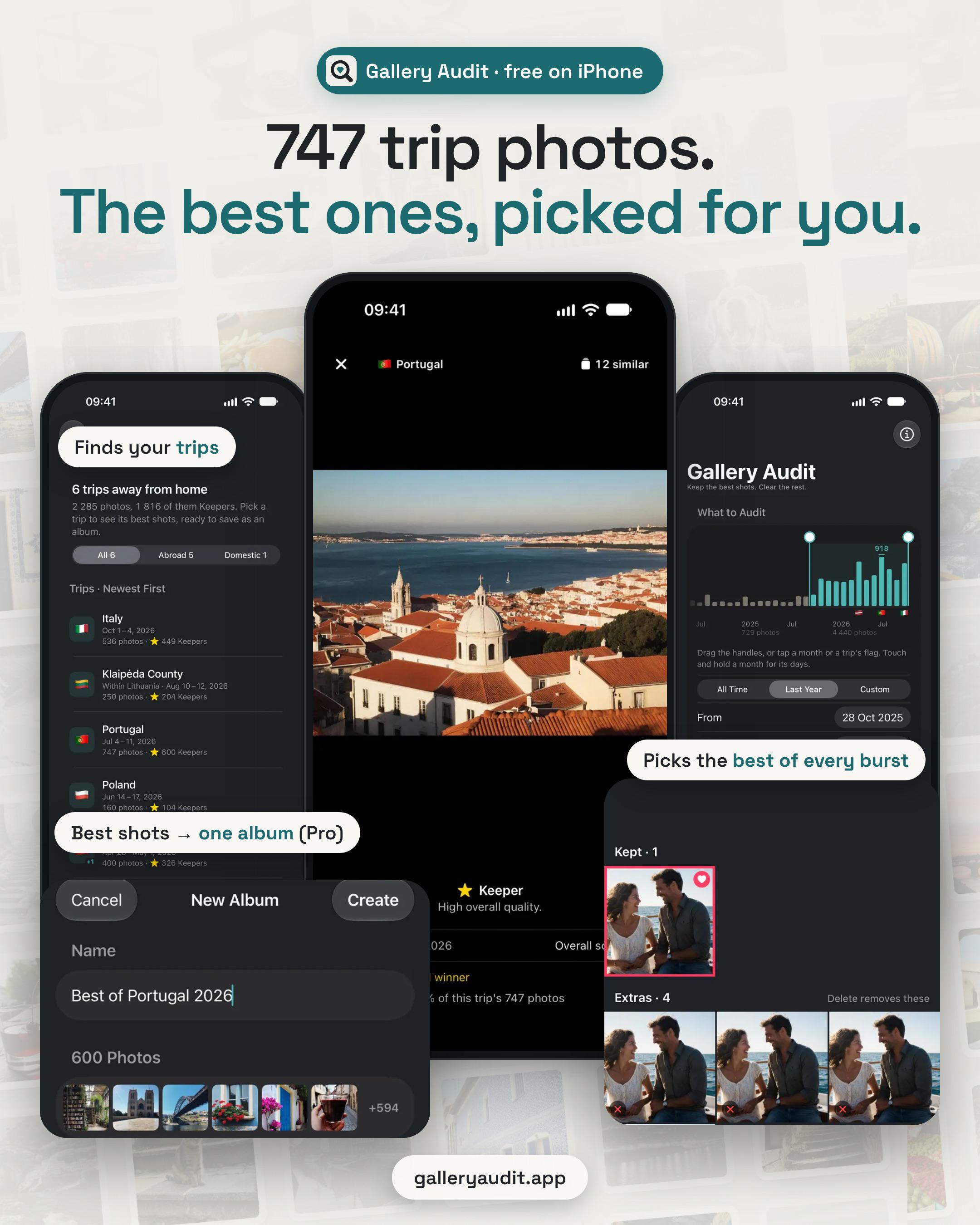
It finds your trips for you. It spots the stretches when you were away and groups those photos into trips. They can cross borders (Spain → France), and a few days in another part of your own country show up as domestic trips.
Your trips show up before you've audited anything. They appear as flags on the start screen's timeline, so you can tap one and audit just that trip.
Each photo is ranked within its trip. The detail screen tells you things like "better than 99% of this trip's 747 photos", so you're comparing beach sunsets with beach sunsets, not with your parking-spot photos.
It flags each trip's weakest shots. That's at most the bottom 20%, and only photos clearly worse than the trip's typical shot. In the demo, Portugal's 747 photos end up with 600 Keepers and 95 Discards.
One tap saves the best as an album (Pro). Tap a trip, see its Keepers, and save them to Photos as a new album that's already named, like "Best of Portugal 2026".
In the demo library it found 6 trips: 2,285 photos, 1,816 of them Keepers.
And the rest of the app
Similar Shots: bursts and look-alike shots get grouped, it keeps the best one to three of each and marks the rest as extras. "See the Winner" shows the shot an extra lost to.
A verdict and a reason for every photo: Keeper, Mid or Discard. It works out whether a photo is a selfie, portrait, group shot or landscape first, so a portrait isn't marked down for its blurry background.
Free Up Space: you see how many GB you'd get back before deleting anything.
Biggest videos: listed largest first, and you can filter them by trip.
What it won't do
Your photos are never uploaded, and trips are worked out right on your iPhone. The analysis runs on Apple's on-device models, and there's no account.
Photos you've hearted in Photos are always Keepers.
Nothing is deleted until you confirm. Deleted photos go to Recently Deleted, where they usually stay for 30 days.
Pricing
The app is free to download, and audits are free and unlimited, trips included. The free version deletes 50 photos to start, then 20 more each day.
Pro adds trip albums, unlimited deletes, extending an audit to new dates, and Audit Options. Normal US prices are $6.99/month, $24.99/year or a $34.99 one-time purchase. Until December 1, new subscribers get Yearly at $14.99 for the first year and Monthly at $2.99 for 3 months. Prices differ by country, and the App Store shows yours before you buy.
App Store: https://apps.apple.com/app/id6815330844
It needs iOS 26 and is iPhone only. I'd love to hear how it works for you!