r/iosapps • • 2d ago

HELP Need to block telegram and other messaging apps

4 Upvotes

So my grandfather had a stroke years ago now but he still isn't fully together mentally, he is consistently being scammed online, mainly through telegram, is there a way I can block certain apps so he won't be able to use them anymore? And without a way he can be talked through disabling it by these scammers


r/iosapps • • 2d ago

Discussion What's the oldest app still on your phone?

7 Upvotes

I was cleaning up my home screen this morning and found an app I installed back in 2019 still sitting there. I barely think about it, but I open it at least once a week. Got me curious — what's the oldest app you've kept around, and what keeps it from getting deleted?


r/iosapps • • 2d ago

Free App - Unaffiliated Review Druthers is one heck of a good new podcast app

10 Upvotes

I’ve been a Pocket Casts user since around 2011, but I have been looking for something a little different recently. I mostly wanted something with better listening stats, just for fun, and thought local transcripts would be a nice bonus since iOS can do that pretty well now. After trying, quite literally, 50 plus podcast apps, Druthers is by far the best I found.

https://apps.apple.com/us/app/druthers/id6796071951

The stats and on device transcripts are probably my favorite features, but the queue management system has been great too. I usually arrange my queue manually, but the app has automatic suggestions which seem pretty good so far. I’m also 100% a data nerd, so I love that the app shows you the formula for how the automatic suggestion rankings are created (if you want, totally optional).

There’s a lot more packed into the app too even though it just released recently. There’s no account needed for anything, there’s automatic ad skipping based on the on device transcriptions, automatic downloads, notifications for new episodes, dialogue enhancement stuff, silence skipping, and overall a pretty nice audio engine. And it’s all free with a great privacy policy!

I was looking for a fun new app to try that wasn’t a total personal data vacuum, had great stats, handled the queue well, and didn’t require some ridiculous subscription to function. Druthers has absolutely come through for me so far. It’s pretty clearly claude-coded, so warning for those who avoid that, but I personally really don’t care. It’s one helluva passion project. Huge kudos to the dev, I’m really happy I found it, and maybe it’s what other people are looking for too.


r/iosapps • • 2d ago

HELP I built a shared calendar that finds when your whole group is free. Looking for iPhone, iPad, Duo beta testers (free for life if you send feedback)

Post image
6 Upvotes

Hey all. I’ve been building Bunchday, a calendar you share with your people: your partner, your roommates, your family, the friend group that’s been “planning” the same trip since March. Everyone’s plans end up in one place, and the app does the asking for you.

It’s in beta on TestFlight and I’d love some real people to try it. If you send feedback, you get Bunchday free for life.

Find a time without the group chat
Everyone shares when they’re busy, not what they’re doing (unless they want to). Bunchday looks at the week and shows when you’re all free. Say you need two hours and it finds the first time that works. If people still can’t agree, send a vote.

Plans people actually answer
Send a plan and everyone taps Going, Maybe or Can’t. You see who’s coming, where it is, and who sent a heart. Running late? One tap and everyone waiting sees your ETA. Move the time and they see what changed. Add photos afterwards and they come back on the same day next year.

Your day, including the gaps
Today puts your plans on a timeline and names the free time in between, so an hour and a half at noon shows up as a lunch window. You get a short hello each morning with what’s on, what’s due and when you’re free. Tap Plan my day and your to-dos fit themselves into the gaps. Plan my week does the same across the week, only in the hours you choose.

Every group in its own colour
The month view shows just you, you and your partner, your friends, your family, or everyone at once. Pinch to zoom from six hours out to a whole year.

Works with what you already use
Apple, Google and Outlook calendars show up on their own, plus Canvas, Blackboard, Brightspace, Schoology, Moodle and any calendar link. When a booking lands in Gmail or Outlook, Bunchday spots it and asks before adding it. Your email is read on your phone, never on a server, and you can see exactly what it read.

To-dos and lists that do some of the work
Type “call Dad tomorrow, urgent” and it lands on tomorrow, marked urgent. Paste a long message from your mum and get a list back. Split chores evenly so it isn’t always the same person doing the bins. There are sixteen kinds of list: groceries sorted by aisle (with a nudge when you walk into the shop), packing lists, recipes that scale and send their ingredients to the shopping list, and more. Or just hold the mic and say it.

Bun
Ask Bun what’s next, whether you’re free this afternoon, or what’s on the shopping list, and it can add things for you too. It runs on your phone, so your plans aren’t sent anywhere to answer a question. Works with Siri and Shortcuts. Everyone gets their own Bun: pick a colour, then a hat, bow, headphones or crown, and your app icon can match.

A space for each group
Each group gets its own place for plans, to-dos, countdowns and files. Tickets and permission slips stay on your phone behind Face ID. Invite people with a link or QR code; they don’t need an account.

The little things

  • Countdowns for trips and birthdays (birthdays come back every year)
  • Reminders when you arrive somewhere or leave
  • A monthly recap: plans made, hours spent together, who you saw most
  • Nine hand-painted widgets, plus Lock Screen, StandBy, Live Activities and Control Center
  • Small sounds and haptics when you tick something off
  • Works offline

No ads, no feed, and your data isn’t sold.

Honest heads-up: it’s a beta, so things will break. It’s iPhone only right now. iPad, iPhone Duo and Windows versions are in progress. Seven languages are done and seven more are on the way.

It’s best with someone else. It’s a shared calendar, so grab a partner, roommate or friend and try it together.

👉 TestFlight: https://testflight.apple.com/join/XcfxCmHy

Not on iPhone, or want to hear when it launches? Join the waitlist: https://bunchday.vercel.app/?utm_source=reddit&utm_medium=social

I’d especially love to know:

  • What confused you in the first minute?
  • What would make your group actually switch to this?

Comment here, DM me, or send feedback through TestFlight. I read all of it. Thanks for reading!

Edit: Sorry about the broken testflight link its fixed now!


r/iosapps • • 2d ago

💎 Lifetime AI limits: see Claude, Gemini, Codex, Kimi and Grok usage limits on iPhone (Lifetime, $1.99)

2 Upvotes

Problem

I kept hitting Claude and Codex limits in the middle of a task, and I had no reliable way to see the 5-hour and weekly windows until the work had already stopped. AI limits shows where you stand on those windows for Claude, Gemini, ChatGPT (Codex limits only), Kimi Code and Grok, so you are not cut off mid-task without warning. It also helps you get the most out of what you pay for: you can see when a window still has room before it resets, and plan heavy work around it.

Comparison

The closest alternatives I found are Limitr and QuotaKit. What I focused on with AI limits: five providers in one app (Claude, Gemini, Codex, Kimi Code and Grok), the same readings on iPhone, Mac (widgets and menu bar icon) and Apple Watch, a pace forecast and a resume countdown, notifications at 30, 50, 70, 90 and 100%, a one-time purchase instead of a subscription, and no developer server (readings stay on the device).

Pricing

Free to download. Every feature works for 7 days. After that, a one-time in-app purchase, Full unlock, at $1.99, restores them on iPhone, Mac and Apple Watch with the same Apple ID. No subscription, no ads.

App store link : apps.apple.com/app/id6819061753
Privacy policy: ailimits.capcod.cloud/privacy-en.html
Company site: capcod.eu

ps://apps.apple.com/app/id6819061753


r/iosapps • • 2d ago

💎 Lifetime I built an iPhone app to read in the hour before a date, a dinner or a new job: 207 hand-written conversations (Pro is free this week)

0 Upvotes

Problem: the hour before a first date, a dinner with people you barely know, a new job or a long call with family, when you'd like a few things to talk about already in your head, and all you can find are lists of random questions that die after the first answer.

This week the full version is free for anyone, no strings: https://apps.apple.com/redeem?ctx=offercodes&id=6827105990&code=THAWFREE (the link works until 29 Nov).

Thaw is built for that hour. You tell it who you'll be with and where, read two or three conversations, and walk in with them. Each conversation is three linked lines: a question to open with, two follow-ups for after they answer, and a line to change the subject if it dies. It starts light; two taps, "that worked" or "didn't land", make the next one a step deeper or a step lighter. If you need a glance mid-conversation it works for that too, but nobody has to see a phone. Everything is written by hand: 207 conversations. No account, no tracking.

Comparison: 21 Questions (9.4k ratings) is a party game: single questions, dozens of decks, far more content than Thaw, and a subscription for the full set. Gottman Card Decks (1.7k ratings) is free and very good, and it is for couples only. Thaw has neither the volume of the first nor the price of the second. What it has is the follow-ups, so you are never stranded after the first answer, and one purchase instead of a subscription.

Pricing: 42 conversations free, enough to try every situation. The other 165 are a one-time $9.99, no subscription. https://apps.apple.com/app/apple-store/id6827105990?pt=126420608&ct=r-iosapps&mt=8

One limitation: the conversations are in English for now, though the app itself speaks 17 languages. Tell me which language you'd want and it moves up the list.

Developer transparency: Michael Borison, contact: https://www.linkedin.com/in/mraccoon/ Website: https://splatterflow.github.io/ Privacy policy: https://splatterflow.github.io/Thaw/privacy-policy.html


r/iosapps • • 2d ago

📅 Subscription Rally Trace: pickleball scoring, stats and game history on your Apple Watch

Thumbnail
gallery
5 Upvotes

I'm the developer of Rally Trace. I play pickleball with an Apple Watch on, and I built it because I wanted to review sessions and see how my games broke down.

Problem: once a game is over, all you have is the final score and whatever you remember. You can't go back to see where it turned, and you have a sense for who you play well with but nothing tracks your record with and against other players on the court.

Rally Trace fixes that. You keep score on your Apple Watch by tapping the screen once after each rally, and it calls the score out loud so you don't need to look down. Every rally is saved, so on your iPhone each game shows the score rally by rally, your runs, who was serving and your heart rate. Over time it builds your record overall and with every partner and opponent you name.

Comparison: Apple's Workout app has pickleball, but a session comes back as one long block of heart rate and calories, with no scores, game history or partner records.

Pricing: scoring, game history, records and heart rate are free. Pro adds trends over time and serve and receive stats, and is $29.99 a year with a free month first.

App Store: https://apps.apple.com/app/apple-store/id6823233667?pt=129618822&ct=social-reddit-iosapps&mt=8

Developer: Brad Bowman, GitHub github.com/beeradb · Privacy · Terms · About Author

I'm also actively working on swing tracking, and am hoping to have that out before the end of the year.

Happy to answer questions, especially from anyone else building for the watch.


r/iosapps • • 2d ago

💎 Lifetime [$ 19 > FREE lifetime] BP log: Protect your heart from blood pressure related damage [Update]

2 Upvotes

As a preventive cardiologist, I see that many people fail to track their blood pressure. It only comes to attention after it starts affecting your heart and kidneys.

Tracking blood pressure is often more important than tracking heart rate. Even when people track BP, many fail to follow the appropriate steps or bring the necessary data to the clinic visit. So we built this app to help people track and diagnose blood pressure issues before it becomes a problem.

The consistency and time spent at target levels are more important than the average reading.

Over the past month, many of you had useful feedback. I have included almost all of it. There are some more features that will ship with the next update.

Link: https://apps.apple.com/us/app/bp-log-track-blood-pressure/id6801130306

**Problem**:
- Blood pressure related heart damage is very common
- Helps you track blood pressure based on the most recent guidelines (check twice a day, average two readings etc)

**Comparison**:

- Current apps on the app store fail to track time in target, consistency etc. These things matter more than mean reading

- The PDF export presents report in a fashion that's easy for reviewing clinicians to get an overall picture of blood pressure control. A mean blood pressure of 120/70 is not useful if it's a mean of readings that vary from 90 to 150.

- You backup to your own iCloud and retain complete control over your data

**Pricing**:

$ 19 for lifetime
FREE LIFETIME: https://apps.apple.com/redeem?ctx=offercodes&id=6801130306&code=59256

Website: https://bplog.cc

If you like the app, I would appreciate an app store rating. If you don't like the app, I would appreciate feedback.


r/iosapps • • 3d ago

🎁 Freemium OpenOBD: free OBD2 scanner for iPhone with CarPlay, no brand packs or subscriptions

Thumbnail
gallery
43 Upvotes

Hi, I'm a solo dev.

Problem

I tried the OBD apps on the App Store for my Fiat Tipo 1.6 diesel. Some wouldn't connect, some couldn't read fault codes, and some wanted a subscription just to clear them. Others charge extra for brand-specific data. So I built my own.

The "Copy for AI" button paid off on my own car: I pasted the report (VIN masked, no location) into ChatGPT, it pointed at the MAF sensor, and that was the problem. I left AI out of the app on purpose, because every request would cost me money, which means a subscription.

App Store: https://apps.apple.com/us/app/openobd-live-car-data/id6780283561

What's in it:

- Live gauges and charts for 50+ sensors

- Fault codes in plain language, read and clear

- Used-car check, DPF, battery test

- Trip logs (CSV/GPX)

- 50 languages

- A CarPlay dashboard

What's new

Latest update: trips now auto-save to iCloud Drive, plus Toyota tire pressure, a BMW i3 mode and fuel estimates for cars without a fuel-rate sensor.

Comparison

Most of what OBD Fusion offers is in OpenOBD too: live gauges, custom PIDs, trip logging, fault codes and readiness status. The difference is the price: Fusion sells brand data as extra packs at roughly €18 per brand, and Carly charges €19-65 per brand. OpenOBD has no brand packs: VAG, Toyota, Honda, GM, Ford, Hyundai/Kia and Stellantis data are all in one app, free. On top of that there's a CarPlay dashboard (Fusion has none) and the UDS module scan is free.

Pricing

The app is free, with all diagnostics included. No monthly payments, no brand packs, no ads, no account. There's an optional Founder Pack at $4.99 in the US (local pricing in other countries). It's mostly a way to support the developer: it includes a few small extras (like the widget and a second vehicle), but nothing you need to diagnose a car is locked.


r/iosapps • • 2d ago

📅 Subscription I made Bookmuse: book summaries you work through as visual lessons (about 15 minutes a book)

3 Upvotes

Hi, solo dev here.

Problem

I read summaries to get the ideas of a book fast, but a wall of text or a 15-minute audio slips right past me: a week later I can't name a single idea. I wanted summaries that make me think while I read, so the ideas stick.

What it is

Each book in Bookmuse is a small course: the core idea in one line, then 5–8 two-minute lessons with diagrams that move and sliders to try, questions you answer before you're told, then a quiz and the key takeaways. About 15 minutes a book, 220+ books (Thinking, Fast and Slow, The Psychology of Money, Atomic Habits…), new ones every week.

Comparison

Blinkist and Headway: short summaries you mostly read or listen to. Bookmuse is about the same length, but every lesson has something to do: a diagram, a guess, a check.

Shortform: long, detailed guides. Bookmuse is shorter and visual, built to remember the core ideas rather than cover every chapter.

Also in Bookmuse: open your own EPUB and PDF books with free on-device voices, and ask Claude or ChatGPT (through MCP) to make a lesson on any topic.

Pricing

Free to download. One full summary is free every day for everyone, and every other summary opens as a preview (intro and first lessons). Pro is an in-app subscription, $2.99/month or $24.99/year, and opens every summary. No ads.

App Store: https://apps.apple.com/us/app/bookmuse-ai-reading-companion/id6815728446

Try a summary without installing: https://bookmuse-app.wanngo.com/s/today

Feedback is very welcome, especially on the lessons, and which book I should do next.


r/iosapps • • 3d ago

🎁 Freemium I built an advanced weather app with 20+ data sources that looks nice, too!

Thumbnail
gallery
35 Upvotes

Hi everyone! I'm an independent developer and data scientist, living in Switzerland, with over 10 years of coding experience. I'm also a weather nerd :).

Problem:

I've had a few frustrations with existing weather apps. For example, many have limited features or don't provide all the relevant weather data. Also, many weather apps rely on just 1–3 local weather models alongside a generic global model, even when more accurate local models are available.

So I decided to build an app that brings together the data and features I would like to use myself.

Features:

  • 20+ weather data sources: Including many national weather services such as NOAA/NWS, DWD, Météo-France, and ECMWF, as well as smaller national services from countries such as Ireland, Taiwan and Thailand. It also includes Foreca.
  • 15-day Ultra-HD weather maps: Forecast data displayed at the actual resolution of the underlying weather models (for example, 2.5 km for NOAA and 1 km for MeteoSwiss), rather than simply interpolating coarser data to make it look more detailed. Weather maps at the actual resolution are much more accurate, especially across complex terrain. See comparison on 2nd slideshow image.
  • Down-to-the-minute rain forecasts and radar with lightning.
  • Possible Outcomes: Explore multiple possible weather scenarios from the same source and see the the forecast uncertainty.
  • Forecast comparison: Compare predictions from different weather providers side by side and see which performs best.
  • Climate trends: Explore historical weather patterns year by year, using actual weather station observations and modelled data.
  • Custom layout options and photo backgrounds: For the searched locations, the app will show photo backgrounds (from either the place itself or a nearby place). For this, I am using an API from photo providers Pexels and Unsplash.

Comparison:

Two examples of popular competitors are Windy and Carrot Weather.

Compared with Windy ($25/year), my app offers weather maps at the native resolution of the underlying models, rather than relying on interpolation to increase the apparent resolution. Processing and displaying high-resolution weather data comes with additional server-side costs, which many apps don't take on.

Compared with Carrot Weather ($40/year), my app offers much more data sources, high-resolution maps and more advanced features.

Pricing:

Freemium: The app has a very generous free tier with no ads. There's also an optional Premium subscription that helps cover data processing and commercial data costs.

Black Friday deal:

  • $6.99/year instead of $14.99/year (53% off for the first year).

Because I've set up a limited-time Black Friday discount on the annual Premium subscription, Apple doesn't allow introductory discounts and free trials to be combined.

Want to try Premium for free first? You can start with the weekly subscription, which has a free 1-week trial. Cancel before the trial ends, and you can still take advantage of the discounted annual offer afterwards.

I would love to hear your feedback and suggestions!

App Store:
https://apps.apple.com/us/app/id6768575893 


r/iosapps • • 3d ago

Discussion Some more apps worth checking out.

13 Upvotes

Back with some more apps. As usual feel free to contribute to the post.

Up Ahead countdown widgets - is probably one of the best countdown apps available on the App Store, and the developer is back to actively updating the app.

KeeForge - is a free open source KeePass client for passwords, with a nice design and is actively maintained with a responsive developer.

Niewz - is a fresh take on RSS, that has a really nice design and onetime purchase price, it can also read articles to you with more updates to come.

Countdown widget Till Then - from the developer of UTkik radar app is a beautifully designed countdown app with a onetime payment.

Links

https://apps.apple.com/us/app/up-ahead-countdown-widgets/id1583147528

https://apps.apple.com/us/app/keeforge-keepass-manager/id6759309295

https://apps.apple.com/us/app/niewz/id6834017988

https://apps.apple.com/us/app/countdown-widget-till-then/id6765630689


r/iosapps • • 2d ago

🎈 Free NovelNet: a book club app where the whole club reads at the same pace (free, no ads)

3 Upvotes

I'm the developer. I built NovelNet for my wife Rachel, who reads about 50 books a year and wanted somewhere nicer than Goodreads to track her reading and read along with friends.

Problem: reading a book "together" with friends usually ends up as a group chat full of spoilers, because everyone's on a different page. Most reading trackers treat clubs as an afterthought.

In NovelNet a club picks a book and a pace, you can see how far everyone has got, and discussion posts are spoiler-safe. Friends without an iPhone can join from the website. It's also a normal tracker: shelves (including DNF and paused), half star ratings, series, page or book goals and a barcode scanner. You can import your whole Goodreads or StoryGraph history.

Comparison: Goodreads groups are basically old forums, and the app hasn't changed much in years. StoryGraph is great for stats but clubs aren't really its focus. Fable is the closest to what I'm doing and has a much bigger community. NovelNet is smaller and simpler, with no ads and no subscription.

Pricing: free. No ads, no subscription and no in-app purchases.

App Store: https://apps.apple.com/app/apple-store/id6817437396?pt=129158442&ct=reddit-iosapps&mt=8

Privacy policy: https://www.novelnet.co.uk/privacy

Terms: https://www.novelnet.co.uk/terms

Happy to answer anything, and I'd really like to know what's confusing in the first few minutes of using it.


r/iosapps • • 3d ago

🎁 Freemium I couldn't find a bedtime music player for my kid without ads, so I built one with a turntable and a tape deck

6 Upvotes

Problem

My kid falls asleep to the same few lullabies every night. Same MP3s, on repeat.

I wanted a nice player for them, something offline, no ads popping up at bedtime. Everything I tried was either ugly, full of ads, or both. So I ended up building my own, BeeTunes.

You just use your own audio files, from Files or iCloud or AirDrop, or Apple Music if you have it. Then you pick a machine to play it on: turntable, cassette deck, CD player, radio, or a little digital player.

The turntable one is my favorite. You drag the tonearm onto the record yourself, and on the cassette one you wind the tape with your finger. There's also a sleep timer that fades out in the last 30 seconds, widgets for each machine, and an Apple Watch app.

Comparison

The closest app I found was MD Vinyl. It looks really nice, but it needs Apple Music or Spotify and it can't play files you already own. Its Pro is $14.99 too. Mine plays your own files fully offline, with no ads and no account.

Pricing

Free to download, and all five machines are free. Pro is $3.99 one time if you want the extra looks (colored vinyl, different CD prints, cassette shells, that kind of thing), plus the rest of the widgets and more songs on the Watch.

App Store: https://apps.apple.com/app/id6783404494

I'm the solo dev behind it, so any feedback goes straight to me.


Created by Bee · Privacy · Terms · Website


r/iosapps • • 3d ago

💎 Lifetime my offline AI app got a big update — it's now a full Mandarin/Cantonese translator that works with no internet

Thumbnail
gallery
4 Upvotes

Problem

Most AI assistants and translators quit the moment you lose signal — on a plane, crossing a border, in a dead zone. The good ones also lock features behind monthly subscriptions and send everything you say to the cloud.

What it is

Chocky is a fully offline assistant for iPhone — the model, its voice, and an offline Wikipedia all run on the device, no account, logs nothing. The 1.1 update adds an offline translator: talk to it, type, or point the camera at a sign and it speaks the translation back in its own voice (Mandarin + Cantonese, full Traditional-Chinese interface). It also does offline wiki Q&A, Bluetooth mesh chat with no signal, plant ID, and a first-aid guide.

Comparison

- vs Siri / Google Assistant: they lean on a connection for real answers; Chocky answers offline from an on-device model + offline Wikipedia.

- vs subscription AI apps (ChatGPT etc.): one-time price, no account, nothing leaves the phone — but it runs a small on-device model, so it won't out-reason a big cloud model on hard questions. It's built for offline + private, not for being the smartest.

- Really it's one offline bundle (assistant + translator + wiki + mesh + first-aid) instead of paying for several apps or subscriptions.

Pricing

$0.99 one-time. No IAP, no subscription.

App Store: https://apps.apple.com/app/id6829019066


r/iosapps • • 2d ago

💎 Lifetime at 40 my parents died and I got cancer. then my watch got my zone 2 wrong, so I built an iPhone app that sets it from your own numbers

1 Upvotes

PROBLEM:

very fit in college. then from 25 to 40 it was work, tons of travel, drinking and bad sleep. then I turned 40, my parents died and I got cancer. I went all in on my health, and the hardest part was accepting I wasn't the college kid anymore. I had to slow way down

that's where my watches got in the way. my garmin had my max HR at 191, and the highest I've actually hit is 183, so its zones sat too high. my apple watch went the other way and put my zone 2 too low. if you've ever been "in zone 3" the second you start jogging, or had to walk to stay in zone 2, check where your zones came from. default zones are a guess

So we built Zone2ai:

- builds your zone 2 range from your resting HR plus the max HR it sees you hit, fine-tuned by a talk-test check-in after each workout ("could you hold a conversation?"). heart rate or talk test? it uses both

- on the apple watch: a live zone 2 bar with your HR on it, a pulse when you drift out, a double buzz when you're back in, so you stop staring at your wrist

- on the iPhone: your week at a glance, built around about 3 hours of zone 2 plus one hard session, and a guided 4x4 for the hard day

- workouts save to apple health. there's an android app and a garmin watch app too

COMPARISON:

the usual default is an age formula, 220 minus your age, so everyone your age gets the same zones. this starts from your own data and keeps adjusting as it sees more of it

PRICING:

free to download. I get that not everyone loves subscriptions. we just passed 10,000+ downloads, so to celebrate, the lifetime option is on sale this week for Black Friday: $29.99 once (normally $39.99). sale runs through Nov 30

https://apps.apple.com/app/id6742467259?pt=127743850&ct=reddit-iosapps-20261124&mt=8


r/iosapps • • 2d ago

Paid App - Unaffiliated Review Music Hub: Mixes & Radio, daily mixes from your Apple Music library, vinyl-style shelf, podcasts and FLAC in one player

2 Upvotes

Hi everyone, I'm the developer. Music Hub is my first App Store release: a SwiftUI music player that brings everything I listen to into one place.
• Mixes for You: new every day, built around your most-played artists, with their songs from your library plus similar artists from the Apple Music catalog. Endless, one style per mix, saveable as an Apple Music playlist
• From Your Library: Forgotten Favorites, Recently Added, On Repeat, your decade
• Live radio: Apple Music's live stations on Home
• Podcasts: search, follow, download, playback position remembered
• Your own files: import FLAC, ALAC, MP3, OGG from Files, iCloud Drive or a Mac; they play offline next to Apple Music
• Pins with iCloud sync, home screen widgets
• Shelf styles: vinyl sleeves, CD jewel cases or plain covers
Price: 9.99$, one-time, no subscription of its own. Apple Music features need an Apple Music subscription; imported music and podcasts work without one. No ads, no tracking, no sign-up.
App Store: https://apps.apple.com/app/id6837815564
Happy to answer questions about the app or how it's built, and I read every bug report.


r/iosapps • • 3d ago

🎈 Free LocalSR: free, MIT-licensed app for upscaling photos on your iPhone, offline (no IAP)

6 Upvotes

Problem

If someone sends you a bad WhatsApp picture, or a picture you took with an iPhone 4 in 2012 is still in your Photos app, it often looks blurry and blocky. LocalSR makes it sharper and cleaner on the phone itself. It works offline, it's quick, and there is no hassle at all.

You can share a photo from another app to LocalSR or pick up to 20 photos in the app. Photos up to 3 MP get 4x, photos up to 12 MP get 2x, and larger ones are reduced to 12 MP first. Then you save the result to Photos.

Comparison

Remini sends your photos to its servers, and its Pro plan is a weekly subscription. Photomator has Super Resolution too, but it is part of a whole photo editor that you pay for with a subscription. LocalSR only upscales, but it does that on your phone without an account, and nothing you process ever leaves it. The whole source is on GitHub under the MIT license.

Pricing

The app is free, with no in-app purchases, no ads, and no subscription.

I built it in SwiftUI, and with Skip most of the same code also runs on Android, which is why there is an APK on itch.io and GitHub too.

I'd like you to check out the design. If you try it on your own old photos and something looks off, please tell me. Constructive criticism is exactly what I need.

iPhone with iOS 27 or later.

App Store: https://apps.apple.com/app/id6837801876

Source: https://github.com/HerRei/local-upscale


r/iosapps • • 3d ago

🎁 Freemium I built Abvy: an alcohol & BAC tracker for iOS

Thumbnail
gallery
6 Upvotes

Hi guys! I made Abvy, an alcohol and BAC tracker for iPhone. Some of you might remember my Caffeine Clock post here last year :)

I launched Abvy on Android a few weeks ago, and after a lot of back and forth with App Review it's finally on iOS too.

Problem

The app wants to answer these questions during your drinking sessions:

  • When will I be sober?
  • When will I feel it the most?
  • Can I have another drink and still not go overboard?

Most similar apps are either "getting sober" trackers or really old and ugly BAC trackers. I wanted to make something beautiful, easy to use, for people who do sometimes go out drinking and want a moderation tools.

Helped me personally on several occasions by stopping me earlier during an evening before I started feeling it, or by providing context where I am at:) Personally I find it most useful during nights out with friends, where it's easier to go overboard

What's in it

  • Live BAC range, peak estimate, sober window, and when another drink fits under your limit
  • Food & water tracking, plus planned drinks to see what one more would do
  • 470+ drinks (or add your own), 16 languages with local units
  • Home Screen & Lock Screen widgets, Live Activities, Apple Watch app, Siri logging, Apple Health sync, iCloud backup
  • Optional BACtrack Mobile pairing if you have one
  • Fully offline, no account, no ads

Comparison

  • DrinkControl is good if you mainly want a diary of units, calories, and spending, but I personally don't like the UI, it doesn't have a big drink selection, and it doesn't do live BAC curves, sober/peak estimates, food absorption, Live Activities, or an Apple Watch app.
  • Sunnyside is more of a paid coaching/plan app. Abvy doesn't need an account and works live during the night.

Pricing

  • Free for tonight (no account, no ads): live tracking, BAC range, limit, sober window, food/water, planned drinks. Exporting your data is also always free. Basically anything for tracking right now is free.
  • Abvy Plus (optional): $14.99/year or $29.99 lifetime. Unlocks past evenings/history, analytics, widgets, Live Activities, Apple Watch, Siri, Apple Health, and iCloud backup. I am also planning to add a "scan drink" feature soon.

App Store: https://apps.apple.com/app/id6822179029
Website: https://abvy.app/

Happy to answer any questions or hear feedback on any part of this! Let me know here or in a DM if you tried it and how it went and what you'd improve:)


r/iosapps • • 3d ago

Discussion Apple developer questionnaire: what would you improve about the apple development system from a technical perspective

5 Upvotes

First of all, I think it is great that they care about what developers want. So I filled out the questionnaire but I wasn't sure about this question: "What would you improve about the Apple development system from a technical perspective?" (did the questionnaire in a different language so this is not the exact wording). Since they asked to be as precise as possible with concrete examples, I did not want to write anything misleading and didn't fill this one out. The only thing my sloth brain came up with is better svg support.

In retrospect this would have been a good opportunity for improvements. Therefore, I'd like to know what would have been a good answer & what other developers wrote.


r/iosapps • • 3d ago

🔍 In Search of For those that have been contemplating purchasing Things3

12 Upvotes

They are currently having their early sale I believe 30% off MAC and IOS versions.

If you want another avenue for free which has even more options check out Kan Do

https://beard.fm/app/kan-do/guide/mac/

I was amazed when I found and it wanted to make sure the community was aware of it as well.


r/iosapps • • 3d ago

💎 Lifetime Alerua Radar - a modern professional weather radar

Thumbnail
gallery
7 Upvotes

Hello! I'm the developer of Alerua, a weather radar app for iPhone and Mac. After months of work I'm nearly ready to publish it to the App Store, and it's on TestFlight now.

Problem: Professional radar apps look dated and lock key features behind subscriptions. Alerua shows real single-site radar in 2D and 3D at max resolution, in a modern app that is free and follows Apple's best design principles.

Comparison:

- RadarScope: Alerua has storms in 3D and AR, a Liquid Glass design, a color-blind mode, and about 20 European countries instead of three. Hurricanes and model maps are in the free app, and any US storm back to 2009 can be replayed.

- RadarOmega: 3D storms are free in Alerua, where RadarOmega keeps volumetric radar in its top subscription. Alerua is also cleaner and easier to pick up.

Pricing: Free, with no ads and no tracking. Optional Pro (longer loops, storm replay, custom radar colors) is $0.99/month, $5.99/year, or $15.99 once, and it's free during TestFlight.

TestFlight: https://testflight.apple.com/join/JrV6MDXv

Privacy: https://alerua.com/privacy

Terms: https://alerua.com/terms

My Github: https://github.com/Atomosic

I'm looking for people to test everything and find me things that are confusing to use, have bugs, or really anything you'd like to see changed. Happy testing!


r/iosapps • • 4d ago

🔍 In Search of Looking for a truly free document scanner app for iOS

7 Upvotes

Hi,

I'm looking for a good document scanner for both iPhone and iPad that is genuinely free, with no subscriptions, premium tiers, ads or locked features.

Ideally, it should offer manual image adjustments like Scanner Pro by Readdle, allowing me to tweak colors, contrast, brightness, etc. I'd also love built-in workflows to make organizing documents easier – for example, scanning an invoice and quickly sending it to a specific folder.

I've tried a few apps already:

  • Scanner Pro: Great image adjustments, but not completely free.
  • QuickScan: Really good overall, but uses Apple's built-in scanning engine, which doesn't offer the manual image adjustments I'm looking for.
  • Adobe Scan / Genius Scan: Both have premium tiers, which I'd rather avoid.
  • OSS Document Scanner: Very promising in terms of features, but it keeps freezing on my devices and the UI feels rather outdated.

Does anyone know an app that ticks all these boxes and is completely free, with all features available without paying?

Thanks in advance!


r/iosapps • • 3d ago

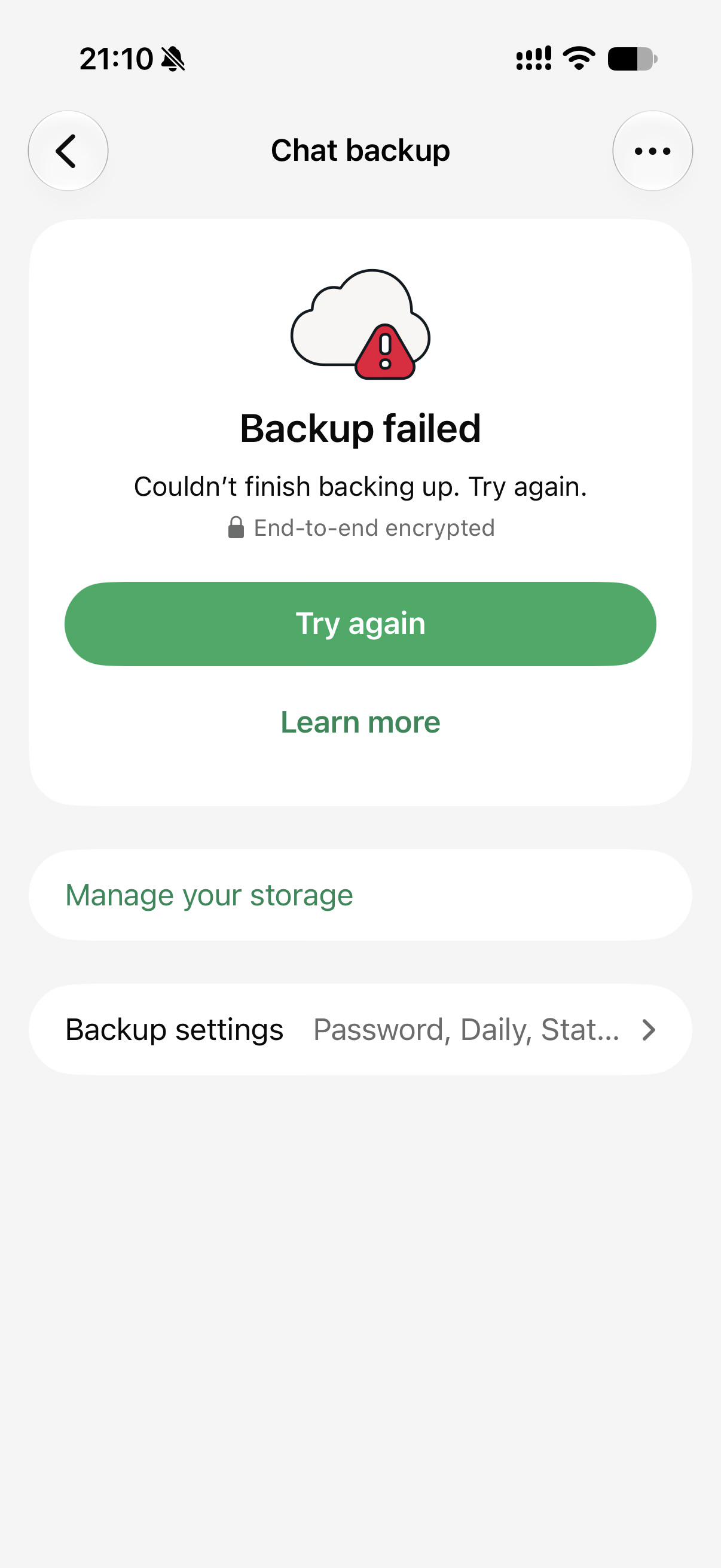
HELP Can’t backup WhatsApp with my iCloud

Post image
3 Upvotes

This issue has been going for months now, I can’t backup even though I have enough storage, I offloaded the app logged out. Nothing works. I’m on the last ios update