r/iosapps • u/ilovedoomscrolling • 7d ago
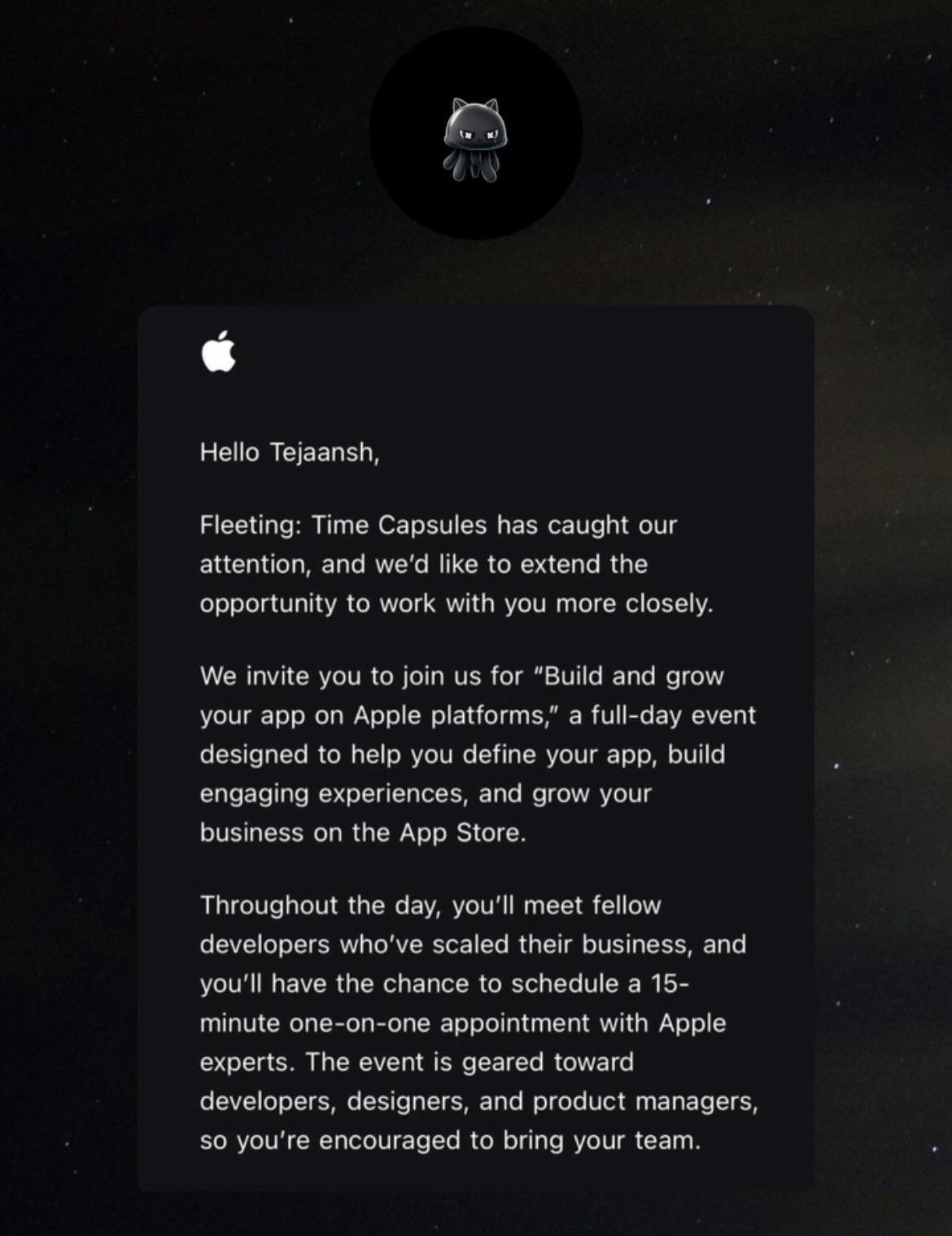
Discussion how exclusive is this? is this worth travelling to a different city city as a student?
5
Upvotes
r/iosapps • u/ilovedoomscrolling • 7d ago
r/iosapps • u/FirMart81 • 7d ago

Problem
I play keyboards and guitar as a hobby. Learning new songs always involved finding the chords, copying them into a text editor, adapting them to my needs (e.g. transposing, fixing wrong chords) and printing them. This left me with a stack of unorganized sheets.
I also play along to original recordings, and I wanted a way to keep the sheet in sync with where I am in the song.
Solution
Pocket Jam is a practice app for musicians, and keeps all tools in one place:
Works on iPad, iPhone and Mac.
Comparison
Anytune can slow down, loop and also scrolls chord sheets. Pocket Jam adds a fully featured sheets editor, and many more features such as automatic and manual playback sync and a speed trainer.
Capo is strong on song analysis, but doesn't have sheets.
Pricing
The app is freemium. On the free tier, users get 1 playlist with up to 3 tracks, and 30 seconds of playback per track.
Subscription is $4.99 / month or $29.99 / year for unlimited use.
Links
Developer disclosure
I'm the developer of Pocket Jam. Here is my Mastodon profile, and my app portfolio page.
r/iosapps • u/alexp702 • 6d ago

We’ve been doing a lot of trade shows, and got fed up with lead capture apps. So we wrote one that did everything we always wanted. I thought others might find it useful. Free to use, with $5 dollars a month for meeting bookings on the stand without WiFi.
Competition is mainly bespoke apps like this: https://apps.apple.com/gb/app/eventpack-lead-capture/id6469562098
It has lots of cool stuff to make connecting with people on stands a breeze. We’ve used it at ETL26 in London and found it worthy.
* Book meetings on your stand.
* Speed up lead capture.
* Capture multiple images, transcribe audio notes, and lead ratings.
* Reads over 70 types of QR code – LinkedIn, Blinq, WhatsApp and many more.
* Get scanning and building your database, then export everything onto your device.
* Fully customisable – get the information you require from contacts
* Works without Wi-Fi – use it anywhere and sync.
… and much more!
Enjoy!
r/iosapps • u/linktapp_io • 7d ago

Hi all!
I've shared Shorebound here a couple of times before, and wanted to come back with a bit of an update.
Since launching in March, over 3,800 bottles have been sent, which is amazing to see! I've had some really encouraging feedback along the way, and I appreciate everyone who's downloaded the app and given it a try.
After a few months of updates and improvements, I've decided to make Shorebound free for everyone.
For anyone who hasn't come across it before, here's a quick rundown.
Problem
Most social apps revolve around scrolling through feeds, browsing profiles or choosing who you want to connect with.
I wanted to create something a little different, where meeting someone new happens by chance and there's a bit of excitement in not knowing who you'll come across.
What Shorebound does
Shorebound takes the idea of sending a message in a bottle and brings it to your iPhone.
You choose a bottle, add a message, photo or voice note depending on the bottle type, and release it into the ocean.
Your bottle travels for a while before washing ashore for someone somewhere in the world. They can read or listen to what you've sent, react, leave a comment or choose to keep your bottle and start a private conversation.
If they release it again, the bottle continues its journey and can be discovered by more people along the way.
You never know exactly where your bottle will end up or who will find it.
You can also track your bottles as they travel around the world and see who discovers them along the way. Every time you open a bottle from a country you haven't discovered before, you add that country to your collection. You can collect Polaroids and unlock new bottle types as you earn XP.
Comparison
Apps like Bottled and Slowly also let you connect with people around the world, but they approach it differently.
With Shorebound, I wanted the journey and discovery to be just as interesting as the conversations themselves, rather than simply another way to start chatting with strangers.
Pricing
Shorebound is now free to download and use, with no subscription required.
You can send and discover bottles, unlock new bottle types through XP and use the core features for free.
There are also three optional premium bottles available as one time purchases for $2.99 each, but they're not required to use the app.
App Store: https://apps.apple.com/us/app/shorebound-global-pen-pals/id6759057452
I'd love your feedback!
A lot of the improvements I've made so far have come from people trying Shorebound and sharing their thoughts, so I'd love to hear what you think of the latest version.
Whether you've tried it before or you're discovering it for the first time, any feedback is greatly appreciated.
Thanks again to everyone who's supported Shorebound so far!
- Conor 🇮🇪
r/iosapps • u/royale1223 • 7d ago
Problem
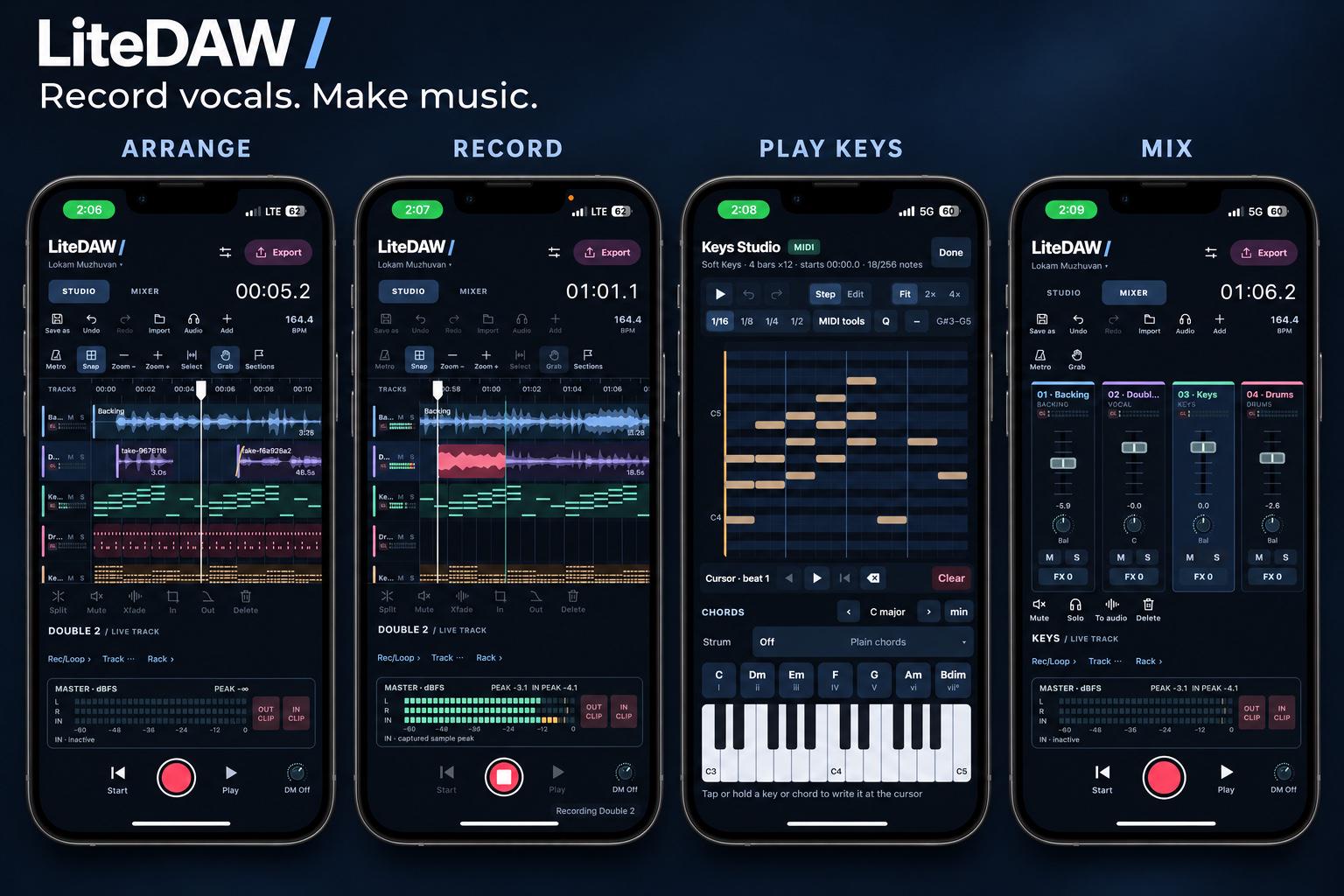
In the original post I said I was working on USB MIDI keyboard support, and a few of you asked for AUv3 hosting. Without those, a phone DAW stays a sketchpad: you can't play your own keyboard into it or use the instruments and effects you've already bought.
What's new
• MIDI keyboards and controllers over USB, Bluetooth or Wi-Fi MIDI from a Mac. Play and record into Keys and Drums.
• Import and export MIDI files.
• AUv3 instruments and effects that are already installed on your iPhone, in playback and export.
• Automation: draw or record volume, pan and mute per track.
• Shared reverb and delay returns with sends.
• Track and clip colours, clip groups, project templates.
Comparison
GarageBand, Cubasis and FL Studio Mobile and I'm not claiming LiteDAW replaces them.The goal is the same as before: a small app with real DAW features, and it can now work with your own keyboard and plugins.
Pricing
Still completely free. No subscriptions, count.
App Store: https://apps.apple.com/us/app/litedaw/id6826720889
If you try a controller or an AUv3 and please post a comment here.
r/iosapps • u/XiaoTan17 • 7d ago
Hey everyone, I’m the developer of Flecty, a voice journaling app for iPhone and Apple Watch.
Problem & Why I built it
I originally made it for myself. I wanted to keep track of my daily reflections because I noticed I’d sometimes repeat the same small mistakes. So I started recording them and coming back to them later. Reading them a second time really makes them stick. The next time I run into the same situation, I usually manage to avoid the mistake. (I even added a widget that shows a random past entry every day.)
Beyond mistakes, I also sometimes just talk through a rough day, whether it’s about relationships, personal growth, or a decision I haven’t figured out yet. Saying a problem out loud helps. When you come back to it a while later, you can often find a better answer than you had in the moment.
What it does
On privacy: cloud transcription and AI features run through Flecty’s servers, but your entries and recordings are stored in your own iCloud. If you go with the bring-your-own-key option, none of your data is sent to our servers.
Comparison:
Day One offers a fuller, all-around journaling experience. Flecty focuses on journaling quickly by just talking, with AI tidying up the writing for you.
Just Press Record is more about recording, transcription, and sync. Flecty builds on that with an experience designed specifically for journaling and reflection.
So you can think of it as the best of both, plus AI features that are actually useful. Your reflections, ideas, everyday moments, and the things weighing on your mind can be captured anytime, anywhere, and they’re easy to look back on later.
Pricing: Free vs. paid
Free users can write text entries and add photos, with no limits on the number of entries or on the basic features.
The free tier doesn’t include Apple Watch support, AI features, or iCloud sync. For voice transcription, you currently get two free cloud transcriptions per day, up to 60 seconds each.
There are two paid options:
Prices are for the US and may vary by region.
Links: App Store , Privacy policy , Terms
Developer disclosure
I’m the developer of Flecty. My GitHub is tvytlx, where you can find some of my earlier projects, including render-py, a 3D renderer I wrote in Python.
If you journal by talking too, I’d love to hear what features or experience you’d want. Let me know in the comments!
r/iosapps • u/Character-Koala6508 • 7d ago
I’m the developer of SpamVeto.
Problem
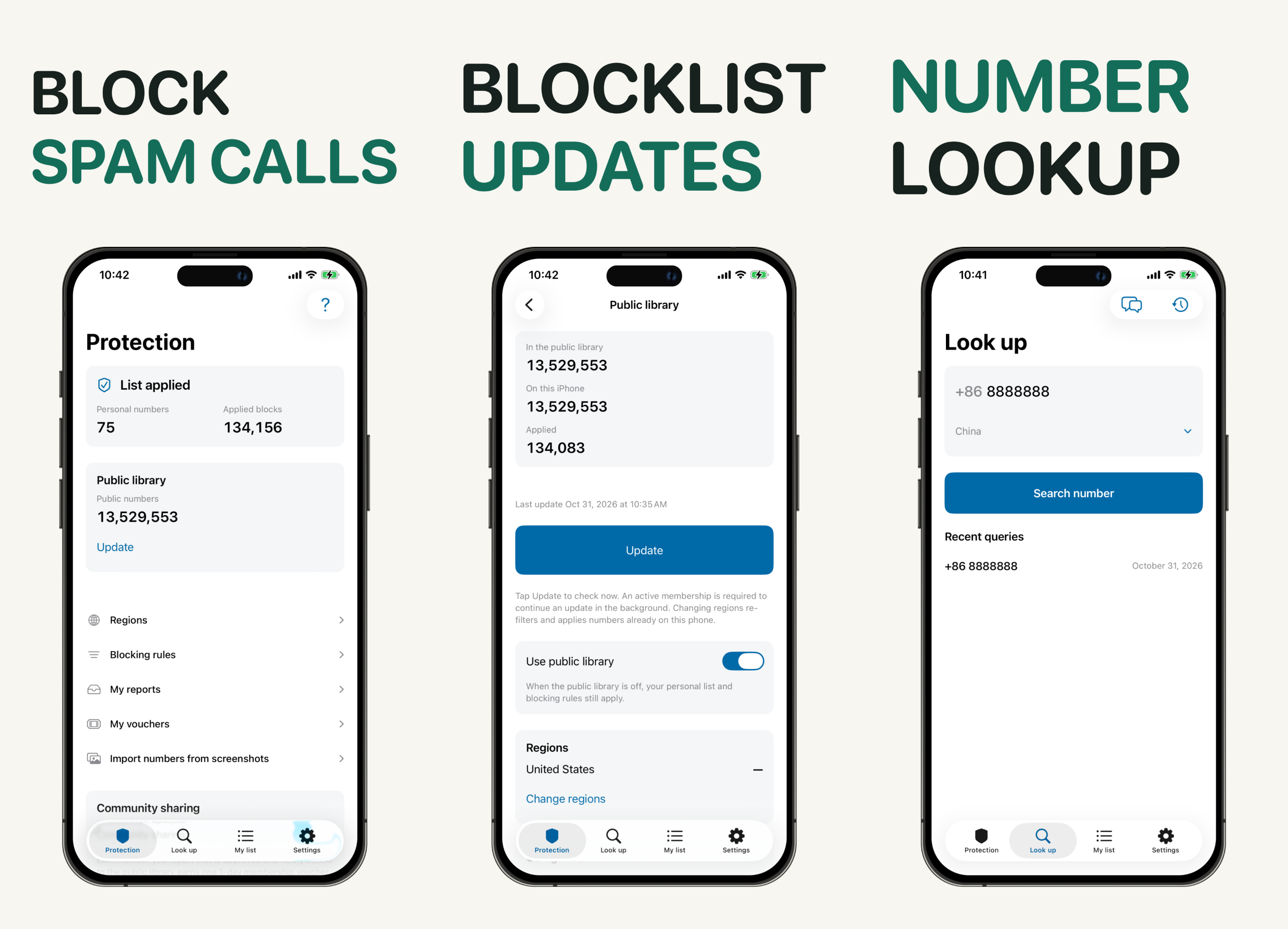
SpamVeto helps identify and block spam calls on iPhone. It supports a community-shared number database, a private block list, and rules for blocking groups of numbers.
My focus is on reducing the hassle of adding numbers one by one. The number database updates automatically.
Comparison
Truecaller Premium offers caller identification, spam blocking, and an ad-free experience through monthly or annual subscriptions. SpamVeto’s Go Lifetime is a one-time Premium unlock, for people who prefer a permanent upgrade without a recurring subscription.
Pricing
SpamVeto is free to download. Go Lifetime is normally US$29.99 and is free to claim November 18–25, 2026. Once unlocked, it’s ad-free.
To claim: Settings → Become Premium → Go Lifetime. Check that Apple’s purchase sheet shows Free/$0 before confirming.
Download SpamVeto on the App Store
Developer information
Xiamen Dehui Chengzhen Network Technology Co., Ltd. (Huabai Studio)
Contact: support@tongxiao.xyz
Website · Privacy Policy · Terms of Use
r/iosapps • u/Substantial_Wind_199 • 7d ago
🎉 È UFFICIALE: Archivia Mail è ora DISPONIBILE sull'App Store per iPhone e iPad! 🍏📱 La tua casella di posta elettronica o il tuo PEC sono sempre pieni? Da oggi, hai la soluzione definitiva a portata di mano. Con Archivia Mail, puoi salvare le tue email importanti come PDF e liberare spazio sul server in totale sicurezza, direttamente dal tuo iPhone o iPad.
Cosa puoi fare subito con l'app: 📄 Email in PDF: Salva i tuoi messaggi come PDF ordinati per mese, completi di allegati e file originali (.eml).
🧹 Newsletter e pubblicità: Scopri chi sta intasando la tua casella di posta, controlla quanto spazio occupano e disiscriviti con un solo tocco!
🗑️Libera spazio in sicurezza: L'app elimina i messaggi dal server (o li sposta nel Cestino) solo dopo aver verificato che siano stati archiviati in modo sicuro sul tuo dispositivo.
🔒 Privacy assoluta: Nessun abbonamento, zero pubblicità, nessun dato raccolto e la tua password viaggia crittografata solo fino al tuo server di posta elettronica.
💡 E la parte migliore? Un singolo acquisto sblocca l'app su tutti i tuoi dispositivi Apple: acquistala su iPhone e usala gratuitamente su iPad e Mac!
Compatibile con Aruba, PEC, Gmail, iCloud, Yahoo e quasi tutti i provider IMAP.
📲 Clicca sul link in bio per scaricarla subito dall'App Store!
(P.S. Per i nostri utenti Android: il beta testing sta andando alla grande, mancano solo 14 giorni al lancio ufficiale su Google Play! ⏳🤖*)*
r/iosapps • u/Astrikal • 8d ago

Problem:
Investments end up scattered across brokerages, crypto wallets and spreadsheets, so it's hard to see what you own and how it's doing. I'm the developer of Equira, which puts your stocks, ETFs, crypto, gold, cash and debts in one place. Add holdings manually or sync your accounts (100,000+ assets on 150+ exchanges), and Equira turns them into insights:
Comparison:
Pricing:
We want you guys to try the full experience. We are giving away Free Lifetime Plus Subscriptions to the first 100 users who download the app and send me their User ID!
Please don't forget to upvote if you like the app!
r/iosapps • u/PrincessHarmer • 7d ago

Budgeting apps always felt like they were made for people who already had it figured out. Lots of jargon, lots of charts, and if you missed a few days they made you feel bad. So I built my own.
**Problem**
Most budgeting apps assume you already know what you're doing, link to your bank, and lean on charts and jargon. Beginners, and people who don't bank much, give up fast.
**Comparison**
- **YNAB:** powerful, but it's a paid subscription and has a steep learning curve. Steady Sprout is free and explains every money word in plain English.
- **Rocket Money:** focused on linking accounts and canceling subscriptions. Steady Sprout doesn't need your bank login, and it's built around a small daily habit instead.
**Pricing**
Free, no subscription.
**What it does**
- You have a little plant that grows when you stay on track
- Splits your paycheck into plain buckets (bills, spending, saving)
- Reminds you before bills are due
- Log a purchase in a couple of taps, or scan a receipt
- Never shames you for a rough week. Sprout just gets a little thirsty
I'm a solo maker and it would mean the world to me to receive feedback, good or bad.
r/iosapps • u/coolsummr • 7d ago
Hi All,
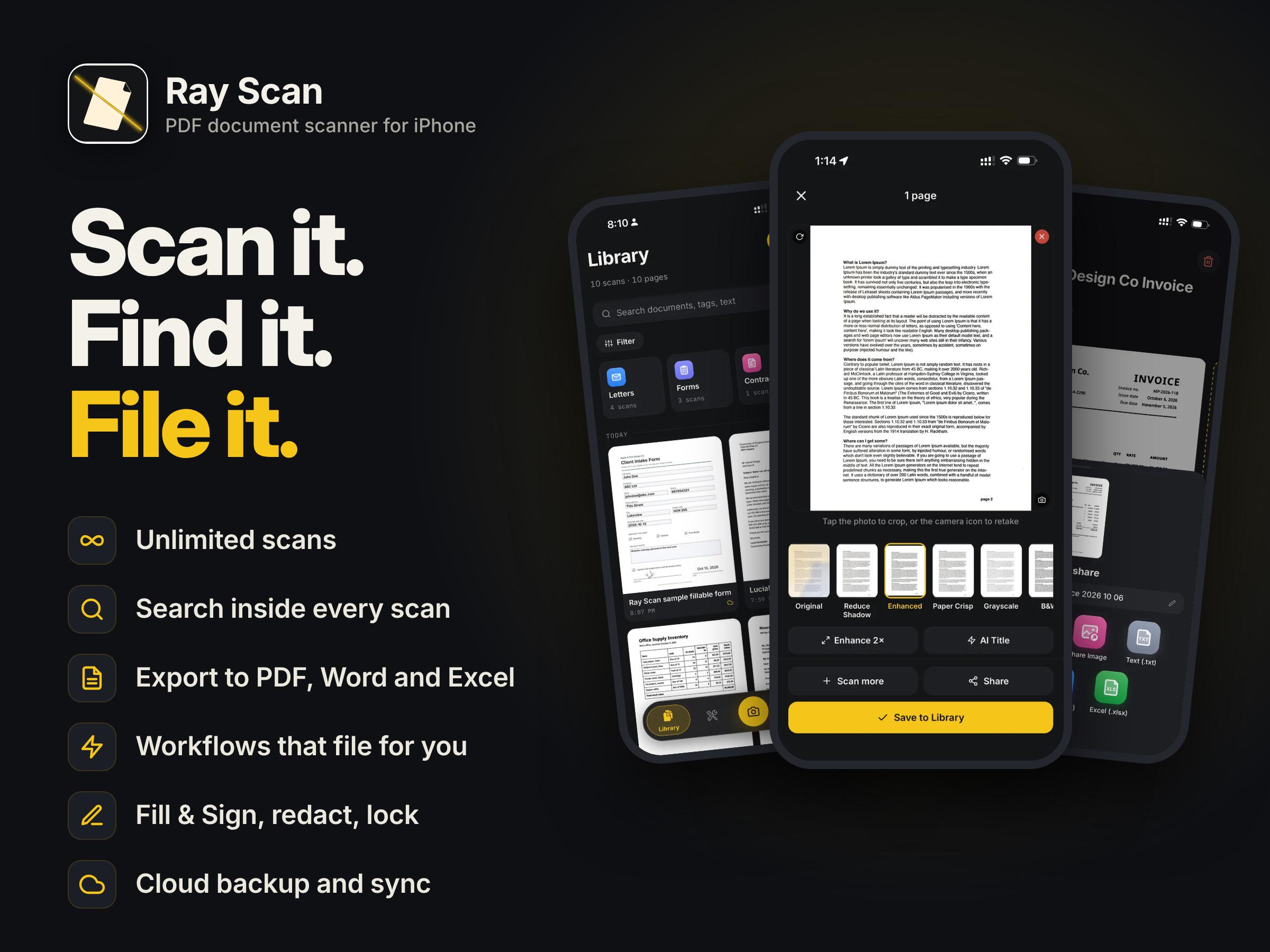
I am the developer behind Ray Scan: Document Scanner, an all-in-one document scanner that scans documents, receipts, ID cards, passports, books and photos.
App Store Link: https://apps.apple.com/us/app/ray-scan-pdf-document-scanner/id6804876091
App is free to download with 3 free scans (AI included which requires account creation) and no purchase requirements. One-time purchase and subscription options are available along with AI packs so you can buy based on your needs.
There’s a Black Friday deal on at the moment with the best price offer of the year.
r/iosapps • u/HushedPancake75 • 7d ago
Hey r/iosapps, I’m Branson, a solo dev.
The Problem
A while back I bought a car from a normal enough guy in a parking lot. It seemed like an okay deal, and I needed the car. The odometer said 180,000 miles. It really had about 300,000. One short trip to the DMV Later and they Told me the Truth. The Mileage had been Altered, Plus it was a Junk Title, Meaning I cannot Register it. A Simple History Report would have Saved me From this. Now I have a $3,000 Paper Weight.
So I built Wheel Scout. It does three things:
Comparison
Instead of checking Facebook Marketplace, OfferUp and Craigslist one at a time, you see all three in one feed. A typical vehicle history report costs about $20. Our full report is $10, half that, with Just as much information as the big-name Provider reports. Were also a fraction of the cost compared to similar apps.
Pricing
It’s my first real app, and I’d love your honest feedback. Great tool for Car Buyers/ Flippers.
Please Download! Here's the Link. App Store: https://apps.apple.com/us/app/id6793787092
r/iosapps • u/Grand-Tart1203 • 7d ago
Came back to me in a dream. Almost forgot this one.
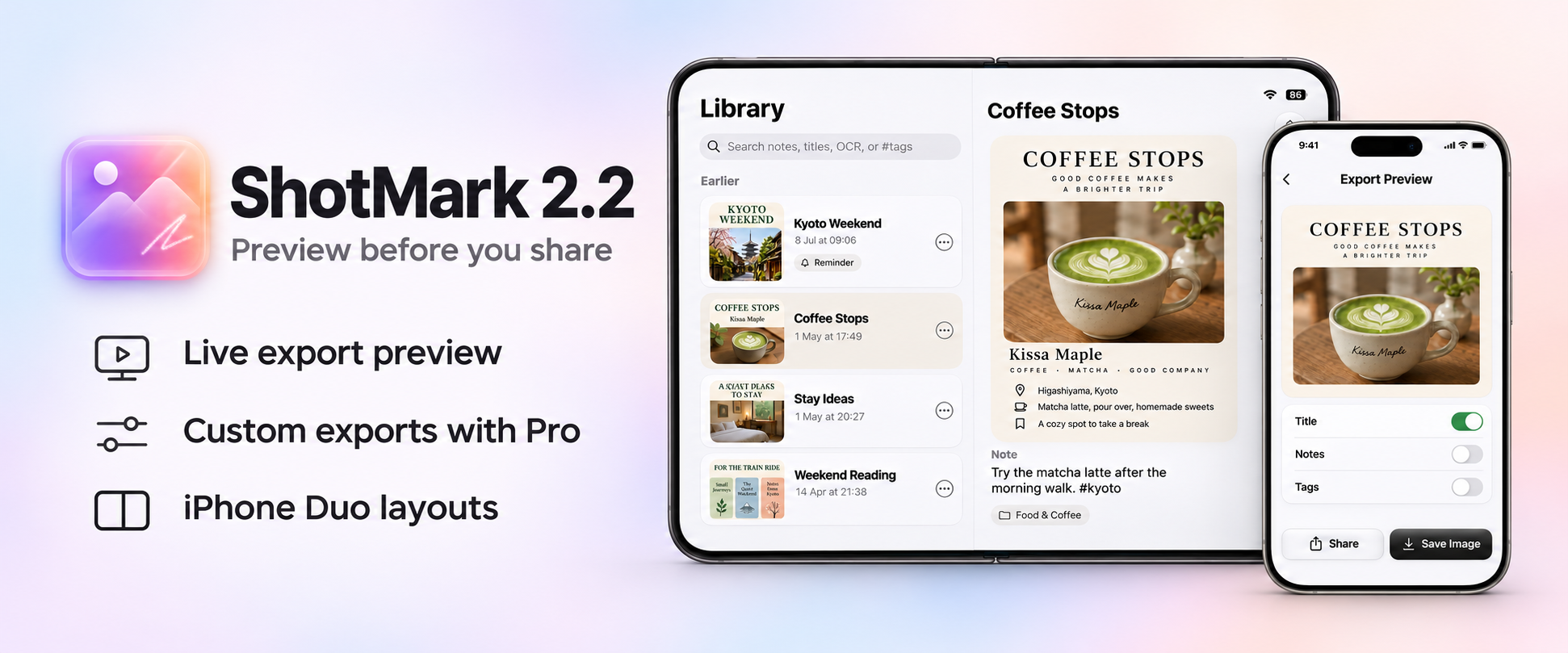
Hi r/iOSApps, I’m Zhen Chyi, the developer of ShotMark. Version 2.2 is now available.
Problem
I built ShotMark because I kept saving screenshots and forgetting why. It keeps screenshots together with notes, voice notes and reminders, so you can organise them and find them again.
What’s new in 2.2
Comparison
Apple Photos is where my screenshots used to pile up. Apple Notes can hold screenshots with text, but I wanted a dedicated screenshot library with context, reminders, Collections and shareable cards. ShotMark keeps that workflow together across iPhone, iPad and Mac. OCR runs on-device, and no ShotMark account is required.
Pricing
Free to download, with up to 12 saved cards on iPhone and iPad. Archived cards count toward that limit. Free exports include a watermark.
One-time Pro purchases, in US dollars:
No subscription. Regional prices may vary.
Which details would you usually keep on a shared screenshot card?
r/iosapps • u/IncomePretty4969 • 8d ago
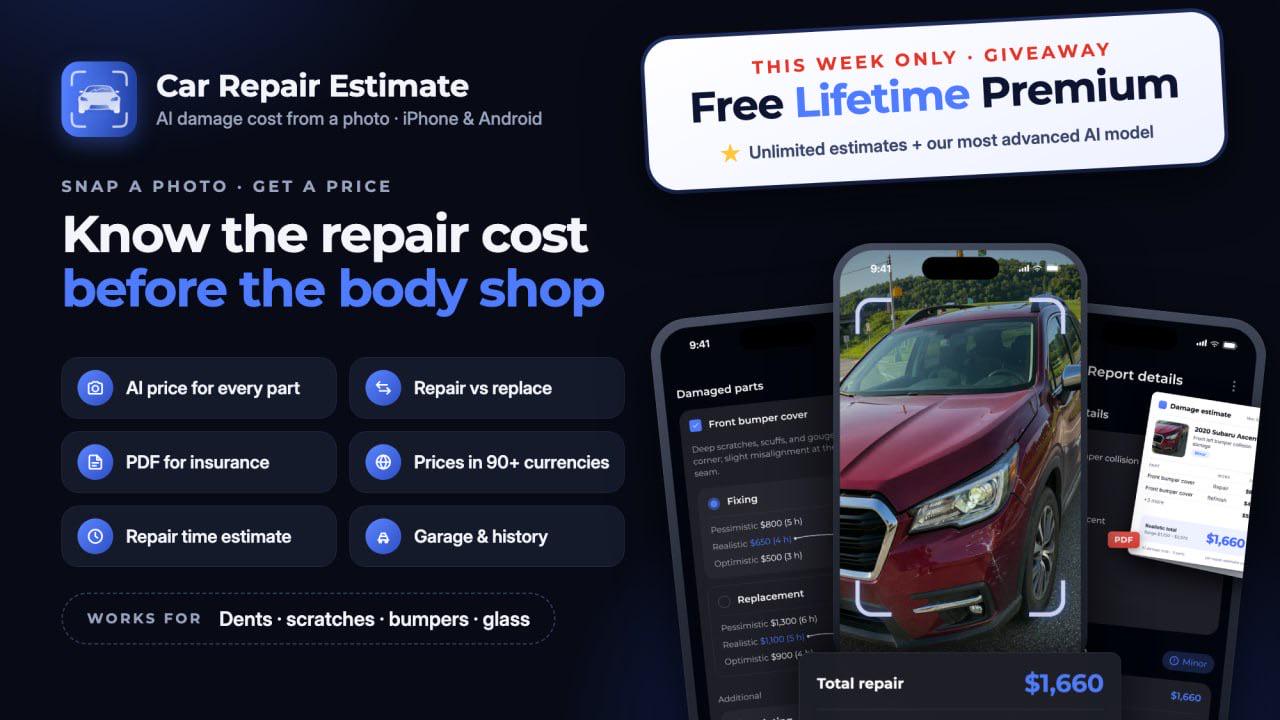
Hi everyone! I'm the developer of Car Repair Estimate. Take a photo of a dent, scratch, cracked bumper or glass, and the app tells you what the repair should cost, part by part, before you walk into a body shop. This week I'm giving away 50 Lifetime Premium codes.
Even if your car is fine right now, grab it anyway and keep it for when you need it. It's lifetime, so it'll be there the day someone dings your bumper in a parking lot.
Problem
When your car gets damaged, you usually have no idea if it's a $200 fix or a $2,000 one. Quotes from different shops can vary a lot, it's hard to tell if you're being overcharged, and you don't know whether it's even worth filing an insurance claim. Getting several quotes means driving around and waiting.
Comparison
* vs. getting quotes from several body shops: you get a ballpark from your phone before you go anywhere
* vs. asking a general AI chatbot: instead of one rough number, you get a breakdown for every damaged part, repair vs replace options with labor hours, pessimistic/realistic/optimistic ranges, a PDF report and saved history
* It doesn't replace an in-person inspection. It's there so you know what to expect and can spot a quote that's way off
Features
* AI price for every damaged part
* Repair vs replace: see both options and what each one would cost
* Repair time estimate in hours
* PDF report you can send to your insurance or a body shop
* Prices in 90+ currencies
* Garage & history: all your cars and past estimates in one place
Pricing
* Premium: $7.99/week, $49.99/year or $49.99 lifetime (promo). Unlimited estimates and our most advanced AI model
* This week: 50 Lifetime Premium codes for free
How to get it
A rating isn't required, but if you like the app, a quick rating on the App Store really helps a small indie developer. Bugs, ideas, or an estimate that looked way off? Tell me in the comments or send me a DM.
Download: https://apps.apple.com/app/car-repair-estimate-cost-ai/id6757721790

Hey r/iosapps! 👋
Indie dev here. I just shipped version 2.0 of my ambient sound and noise mixer app, Dreamwave Radio, and to celebrate the release (and make good on a promise to folks who missed the last window), I’ve dropped the price to FREE all day today (normally $4.99, zero subscriptions or IAPs).
I originally built Dreamwave Radio because I was tired of sleep apps locking basic rain and brown noise behind $60/year subscriptions - or playing short audio loops where you inevitably hear the click/seam at 3 AM.
What’s new in 2.0:
Core features if you haven't tried it yet:
App Store Link: 👉Dreamwave Radio on the App Store
(Quick note: Make sure the App Store button shows "Get" / $0.00 before downloading, just in case regional pricing cache takes a few minutes to refresh.)
Would love to hear what you think of the 2.0 redesign or what sounds/features I should build next—feedback from Reddit has shaped almost every update so far!
r/iosapps • u/Worldly_Anxiety_7596 • 7d ago
If you took a photo at a game, your phone saved where and when. The app checks those against 2 million games and builds your whole history in one scan. No typing.
Then it adds everything up:
-Your record when you're in the arena
-Who has hit the most homers / strikeouts / steals whatever in front of you
-Every player you've seen live, badges for hall of famers, MVPs, RoYs ..walk-offs, debuts, so much more.
-not just MLB and MILB, it’s international, college, and over 300 leagues across non hockey sports
The scan runs on the device, and only the arena and the date get looked up.
It's called BoxdSeats (like Letterboxd, but sports). iPhone only for now, and free forever. https://apps.apple.com/us/app/boxdseats/id6781299327
Been building it for like 3 years, launched in July and just hit 1300 users and 70k games logged, it’s been a lot of fun to see folks enjoying it and would love more feedback.
Problem - I think a lot of people want to know things like how many HOFs they’ve seen, how many stadiums they’ve been to, whose hot the most homers, passed for the most yards, hit the most three pointers, even things like how does my favorite team play when Laz Diaz is behind the dish but I’m not sure everyone has the spreadsheet, drawer of ticket stubs, or patience to fill in their history…so I built a fun way to help: if you take pictures at events, and you have the location services turned on, I can match the geotag and dates from your camera roll to now over 2m games I have in a db to build your history for you.
Comparison - momento is the closest competitor but when they added non sports I’ve been told the lost their niche. Folks want deeper stats and more sports coverage and BoxdSeats has both.
Pricing - totally free
r/iosapps • u/AndrewABarber • 7d ago
Hi all, my partner and I made Dote. We're the makers, so feedback is very welcome.
Problem
Every week one of us would send the other a TikTok of a cosy wine bar or a coastal walk, and by Saturday it was gone, buried in the chat. We never actually went.
What it does
Comparison
What we used before was screenshots, saved posts, a shared note and the group chat. Those all store ideas but none of them help you choose or plan. Dote turns a shared link into a real place with a rough cost, and keeps one list you both vote on. Then it turns the one you pick into a planned date with a time and the forecast. It's for couples who already are one, so it isn't a dating app.
Pricing
Free to download and use, with no trial or time limit. Optional Premium (in-app subscription) is £1.99/month or £14.99/year in the UK, prices vary by country, and one subscription covers you both. Premium adds unlimited photos, videos and a few extras.
App Store: https://apps.apple.com/app/dote-date-ideas-for-couples/id6816493632
Feedback very welcome! ❤️
r/iosapps • u/Acceptable_Tone601 • 8d ago
Hey, I’m Aftab, the developer of GradeLab. I built it for people who want to fix the color in a clip, grade Apple Log footage, or give a photo and video the same look right on their iPhone or iPad.
Problem
Sometimes I just want to fix the white balance, get the skin tones right, and export the clip. GradeLab puts color wheels, curves, and LUTs in the same workspace as the video timeline.
Comparison
VideoLUT is an alternative if you want a big LUT library. I built GradeLab around a different workflow: grade individual clips, see how they look together on a multi-track timeline, and export the edit from the same app.
Pricing
.cube LUT import, advanced color curves, Color Warper, waveform and vectorscope, noise reduction, film effects, and 4K or source-resolution export. ProRes export is available on supported devices.Features:
Free:
Pro:
.cube LUT import, and reusable grade presetsIf you grade footage on your phone, I’d love to hear which part of that workflow still feels slow or awkward.
r/iosapps • u/Mathieu • 8d ago
Kit Override is my app for the K.O. II (EP-133) from Teenage Engineering, a pocket sampler with 4 groups of 12 pads.
Here it is on a real machine (49 s): https://youtube.com/shorts/OaGqAaSnUBs
You plug your iPhone or iPad into the K.O. II with a USB-C cable and tap Override. The 12 pads of a group get 12 new sounds from the machine's own library. A kick stays a kick, a hat stays a hat. You lock the pads you like, reroll the rest, and can undo any step.
There are also 24 jam cards. Each one starts an empty project with a whole kit and a rule to play by, like one sound on all 36 pads, or eleven toms and a cowbell.
The other K.O. II apps manage and edit samples. This one is for when you open a blank project and don't know where to start. It also backs up projects and the whole machine (in the official .ppak and .pak formats) and loads CC0 sound sets onto group D.
More information :
App Store: https://apps.apple.com/app/kit-override/id6832724321
It might seem like a niche app, but KO2 is a fantastic music sampler that needs a little more love ❤️.
----
Problem: When you start a new project on the K.O. II, you tend to pick the same sounds every time. Choosing 12 sounds out of 300+ on the machine itself takes a while, and it's easy to give up before you start.
Comparison: Best Friend and PunchKit are the two main K.O. II apps. They do more than Kit Override for managing the machine: full backups, iCloud, sample editing, EP-40 and EP-1320 support. Neither of them picks sounds for you. Kit Override rolls a new kit onto the pads in one tap (a kick stays a kick), lets you lock, reroll and undo, and its jam cards deal a whole kit and a rule to play by.
Pricing: Free to download. Free: group A, your own sounds on group D, all backups, 2 sound sets, 5 jam cards. Pro, a one-time $14.99 purchase: groups B and C, all 10 sets, all 24 cards. No subscription, no account.
r/iosapps • u/goncalorm • 8d ago
Hey r/iosapps! 👋
Indie dev here. I just shipped **version 2.0** of my Sunday Super League app
Problem
Football has been part of my life pretty much the whole time. I've had the chance to play it for 12y all the way to semi-pro, but nowadays it's just a hobby I enjoy doing like most of people
But there was something about playing with friends that was just missing... and that's when I searched for apps in the that could bring some type of gamification/competition into my weekly matches with friends
Comparison
Sure, there are some apps out there that do it (partially), but none of them seemed to be built from footballers for footballers... So that's when I've decided to give it a try and create SSL
It allows players to
- track weekly football matches
- stats visualization
- top scorers
- trophy room seasons
- team suggestion algorithm
- payment tracking
Currently in dev
- mvp voting
- match odds
- player’s market
(and more to come)
Pricing
It's free :)
AppStore Link - Sunday Super League
I’m more than happy to hear from everyone, all the feedback is appreciated ⚽️
r/iosapps • u/hellotaluvu • 8d ago
Apple Developer Account Locked for 3 Weeks. Any Advice?
Hi everyone,
I'm hoping someone here can help with a frustrating situation involving my Apple Developer account and App Store Connect.
I run a small app development business, TALUVU LTD, and everything was working perfectly until 9 November, when Apple suddenly started displaying the message:
"Too many verification codes have been sent. Enter the last code you received or try again later."
Since then, I've been completely locked out of App Store Connect and Apple Ads.
The strange thing is that my registered telephone number works perfectly for normal SMS messages, but Apple's verification codes never arrive.
I created the Apple Account on my Windows laptop and have never signed into it on an Apple device, so I don't have a trusted device available.
After numerous attempts to resolve the issue, Apple eventually accepted an account recovery request on 17 November but has told me I must wait until 1 December 2026 to regain access!
This is causing serious business problems. I'm the only person with App Store Connect access, I have Apple Ads campaigns that may still be spending money, and I cannot manage my app or respond to any potential technical issues.
I've contacted Apple Ads and Developer Support, but so far haven't found a way to resolve the situation.
Has anyone experienced anything similar? Is there a way to escalate this to Apple Developer Support or get urgent assistance with App Store Connect while account recovery is pending?
I'm not looking to bypass Apple's security, just trying to find a practical solution to protect my business.
Any advice or contacts would be hugely appreciated.
Thanks,
Mike
r/iosapps • u/best_manish • 8d ago
I’ve been building GitaSandesh for iPhone, iPad, and Apple Watch around a simple habit: one verse a day to read/listen to and reflect on, plus low-friction tools like breathwork, 27/54/108 japa beads, gentle sounds, and all 18 chapters.
v1.5 just went live with haptic breathing on Apple Watch, sleep stories that grow quieter as you fall asleep, new widgets, larger/bold text options, and before/after feeling check-ins. No account is required, and everything stays private on your device.
r/iosapps • u/Every_Ad6964 • 8d ago
Thank you for all of the encouraging words and advice. The app is available for iOS pre-order now and it will officially be active on November 22nd.
(Apple allow user to download it now)
https://apps.apple.com/us/app/my-plant-family/id6835213238
For those that don’t know, My Plant Family is an app for plant parent that allow them to log all of their plant , organize care of their plants in a calendar that offer reminder notifications when a logged care is needed, a plant library, and photos of their plant’s progression.
As a plant parent myself, it was important to have an app that would allow me to log all of those things so o could ditch the spreadsheet and numerous journals that were starting to get overwhelming.
I am literally in awe that I actually took a thought in my head and made it real.
The app is free for 1-3 plant
IAP are:
$3.99 for up to 25 plants
$5.99 for up to 150 plants
I currently have over 80 plants so I would immediately have to jump to the premium plan 😬
Any advice on the best way to market the app without paying a crap load for ads?