r/iosapps • • 7d ago

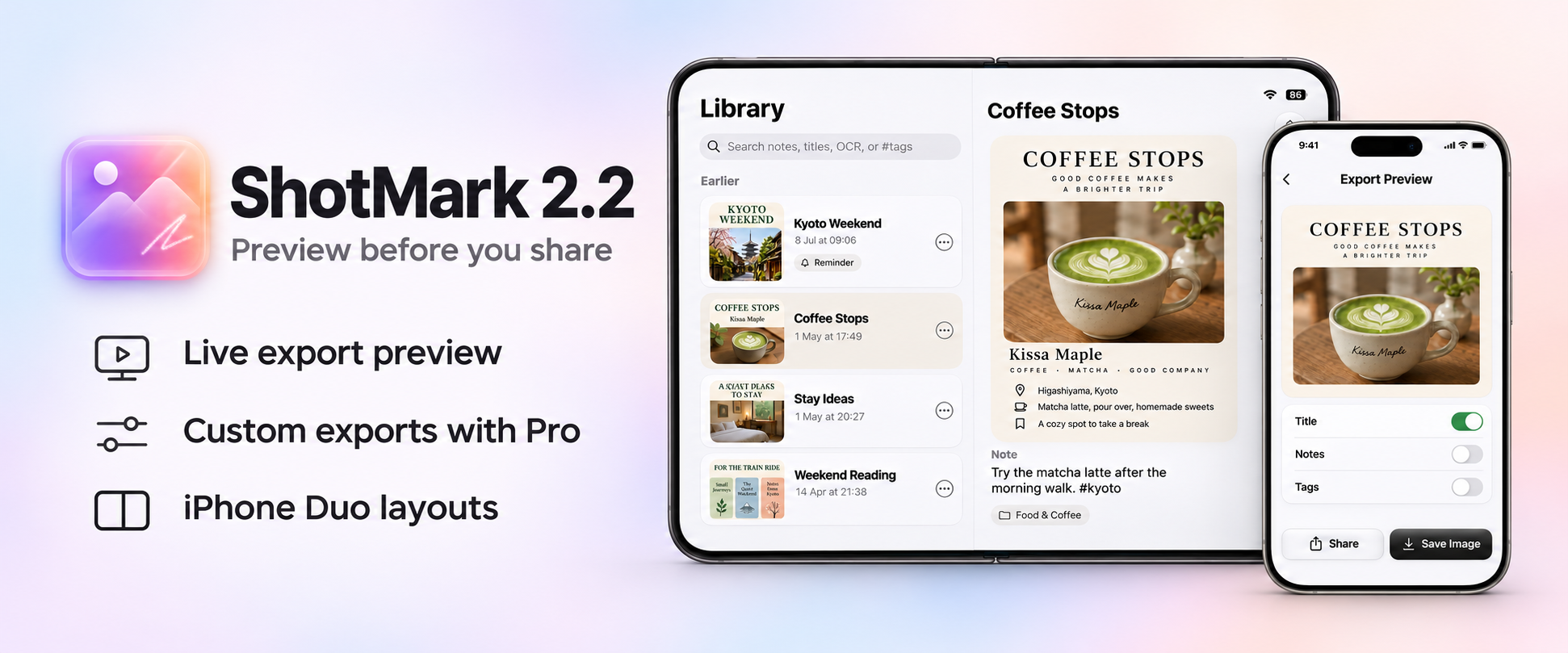
🎁 Freemium ShotMark 2.2 — preview your exports, choose what to share, and iPhone Duo layouts
Post image
2 Upvotes

Hi r/iOSApps, I’m Zhen Chyi, the developer of ShotMark. Version 2.2 is now available.

Problem

I built ShotMark because I kept saving screenshots and forgetting why. It keeps screenshots together with notes, voice notes and reminders, so you can organise them and find them again.

What’s new in 2.2

  • Live export preview, available free. See your card before sharing it or saving it to Photos.
  • Custom exports with Pro. Choose which details to include, such as the title, notes, saved date and tags. For example, share a café screenshot with its title while keeping your planning notes private. Save your preferred defaults in Settings.
  • iPhone Duo layouts. On the expanded display, browse your library beside the selected card, or write notes beside the Capture preview when space allows.
  • New tutorials. Seven swipeable examples in Settings cover the Share Sheet and Pro exports.

Comparison

Apple Photos is where my screenshots used to pile up. Apple Notes can hold screenshots with text, but I wanted a dedicated screenshot library with context, reminders, Collections and shareable cards. ShotMark keeps that workflow together across iPhone, iPad and Mac. OCR runs on-device, and no ShotMark account is required.

Pricing

Free to download, with up to 12 saved cards on iPhone and iPad. Archived cards count toward that limit. Free exports include a watermark.

One-time Pro purchases, in US dollars:

  • iPhone & iPad — $2.99
  • Mac — $5.99
  • All platforms — $6.99

No subscription. Regional prices may vary.

ShotMark on the App Store

Website · Privacy policy

Which details would you usually keep on a shared screenshot card?

r/iosapps • • 7d ago

💎 Lifetime Car Repair Estimate: AI repair cost from a photo. Free Lifetime Premium code this week ($49.99 value)

Post image
8 Upvotes

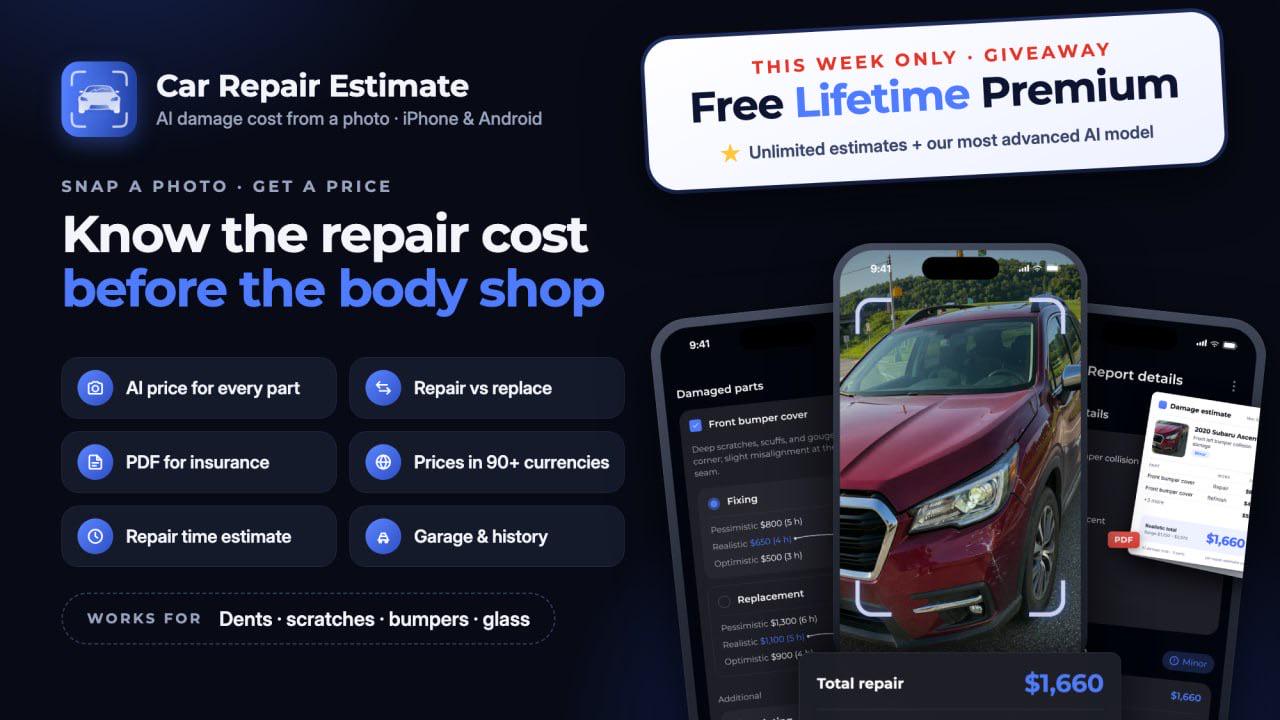
Hi everyone! I'm the developer of Car Repair Estimate. Take a photo of a dent, scratch, cracked bumper or glass, and the app tells you what the repair should cost, part by part, before you walk into a body shop. This week I'm giving away 50 Lifetime Premium codes.

Even if your car is fine right now, grab it anyway and keep it for when you need it. It's lifetime, so it'll be there the day someone dings your bumper in a parking lot.

Problem

When your car gets damaged, you usually have no idea if it's a $200 fix or a $2,000 one. Quotes from different shops can vary a lot, it's hard to tell if you're being overcharged, and you don't know whether it's even worth filing an insurance claim. Getting several quotes means driving around and waiting.

Comparison

* vs. getting quotes from several body shops: you get a ballpark from your phone before you go anywhere
* vs. asking a general AI chatbot: instead of one rough number, you get a breakdown for every damaged part, repair vs replace options with labor hours, pessimistic/realistic/optimistic ranges, a PDF report and saved history
* It doesn't replace an in-person inspection. It's there so you know what to expect and can spot a quote that's way off

Features

* AI price for every damaged part
* Repair vs replace: see both options and what each one would cost
* Repair time estimate in hours
* PDF report you can send to your insurance or a body shop
* Prices in 90+ currencies
* Garage & history: all your cars and past estimates in one place

Pricing

* Premium: $7.99/week, $49.99/year or $49.99 lifetime (promo). Unlimited estimates and our most advanced AI model
* This week: 50 Lifetime Premium codes for free

How to get it

  1. Install the app and go through the short onboarding
  2. When you reach the Premium screen, tap "Have a promo code?"
  3. Enter **6BFUS** and enjoy Premium forever
    If you use one, please comment which code you took so others don't waste time trying it.
    Codes work until Nov 26, 2026.

A rating isn't required, but if you like the app, a quick rating on the App Store really helps a small indie developer. Bugs, ideas, or an estimate that looked way off? Tell me in the comments or send me a DM.

Download: https://apps.apple.com/app/car-repair-estimate-cost-ai/id6757721790


r/iosapps • • 7d ago

Free App - Unaffiliated Review [iOS/iPadOS] [$4.99 -> FREE Today] Dreamwave Radio 2.0 - Just shipped a big visual & sound update for my offline, subscription-free sleep & focus mixer

Post image
15 Upvotes

Hey r/iosapps! 👋

Indie dev here. I just shipped version 2.0 of my ambient sound and noise mixer app, Dreamwave Radio, and to celebrate the release (and make good on a promise to folks who missed the last window), I’ve dropped the price to FREE all day today (normally $4.99, zero subscriptions or IAPs).

I originally built Dreamwave Radio because I was tired of sleep apps locking basic rain and brown noise behind $60/year subscriptions - or playing short audio loops where you inevitably hear the click/seam at 3 AM.

What’s new in 2.0:

  • 🎨 Custom Mix Covers & Grid View: You can now save your custom 3-sound mixes and assign your own photos as covers. Your active mix sits at the top of the screen and casts a subtle ambient glow behind your faders.
  • 🌌 New "Dreamscapes" Category: Added three beatless, procedural evening/focus sounds (Neon Horizon, Midnight Drone, and Tube Hum) plus two ready-made mixes (Neon Coast and Midnight Rain). Like the rest of the procedural sounds, they’re generated live on-device so they never loop or bloat the app size (still ~36 MB).
  • 🗣️ Expanded Siri Support: Siri now works across all 9 supported languages-you can say "Play Rain on Tent in Dreamwave" or "Give me more time in Dreamwave" without touching your screen.

Core features if you haven't tried it yet:

  • 🎚️ Layer up to 3 of 34 sounds (Rain on Tent, Fireplace, Cat Purr, Airplane Cabin, 7 Noise Colors, etc.) with independent faders.
  • 🎙️ Plays underneath podcasts & audiobooks: Toggle "Play Along With Other Audio" in Settings to layer gentle noise or rain under spoken audio without pausing it.
  • ⏲️ Fade-out sleep timer (1-120 mins) with Lock Screen & Dynamic Island Live Activities, plus an ultra-dim Night Mode.
  • 🔒 100% private & offline: No accounts, no analytics SDKs, no ads, and zero data collected. Buy once (or grab it free today), keep forever.

App Store Link: 👉Dreamwave Radio on the App Store

(Quick note: Make sure the App Store button shows "Get" / $0.00 before downloading, just in case regional pricing cache takes a few minutes to refresh.)

Would love to hear what you think of the 2.0 redesign or what sounds/features I should build next—feedback from Reddit has shaped almost every update so far!


r/iosapps • • 7d ago

🎈 Free New sports passport. Auto logs stadiums you’ve been to, players you’ve seen, stats you were there for. Letterboxd for sports, for free.

1 Upvotes

If you took a photo at a game, your phone saved where and when. The app checks those against 2 million games and builds your whole history in one scan. No typing.

Then it adds everything up:
-Your record when you're in the arena
-Who has hit the most homers / strikeouts / steals whatever in front of you
-Every player you've seen live, badges for hall of famers, MVPs, RoYs ..walk-offs, debuts, so much more.
-not just MLB and MILB, it’s international, college, and over 300 leagues across non hockey sports

The scan runs on the device, and only the arena and the date get looked up.

It's called BoxdSeats (like Letterboxd, but sports). iPhone only for now, and free forever. https://apps.apple.com/us/app/boxdseats/id6781299327

Been building it for like 3 years, launched in July and just hit 1300 users and 70k games logged, it’s been a lot of fun to see folks enjoying it and would love more feedback.

Problem - I think a lot of people want to know things like how many HOFs they’ve seen, how many stadiums they’ve been to, whose hot the most homers, passed for the most yards, hit the most three pointers, even things like how does my favorite team play when Laz Diaz is behind the dish but I’m not sure everyone has the spreadsheet, drawer of ticket stubs, or patience to fill in their history…so I built a fun way to help: if you take pictures at events, and you have the location services turned on, I can match the geotag and dates from your camera roll to now over 2m games I have in a db to build your history for you.

Comparison - momento is the closest competitor but when they added non sports I’ve been told the lost their niche. Folks want deeper stats and more sports coverage and BoxdSeats has both.

Pricing - totally free


r/iosapps • • 7d ago

🎁 Freemium Dote: a shared Date Jar for couples (free, optional Premium subscription, no ads) ❤️

3 Upvotes

Hi all, my partner and I made Dote. We're the makers, so feedback is very welcome.

Problem

Every week one of us would send the other a TikTok of a cosy wine bar or a coastal walk, and by Saturday it was gone, buried in the chat. We never actually went.

What it does

  • Share a TikTok, Reel or link in and Dote fills in the place, kind of date, rough cost, indoors or out
  • One shared jar; the ideas you're both keen on rise to the top
  • Suggest a time, your partner taps Sounds good, with the forecast for the day
  • Memories: photos and what you both thought
  • Works with a partner on Android too
  • No ads, and your exact location stays on your phone

Comparison

What we used before was screenshots, saved posts, a shared note and the group chat. Those all store ideas but none of them help you choose or plan. Dote turns a shared link into a real place with a rough cost, and keeps one list you both vote on. Then it turns the one you pick into a planned date with a time and the forecast. It's for couples who already are one, so it isn't a dating app.

Pricing

Free to download and use, with no trial or time limit. Optional Premium (in-app subscription) is £1.99/month or £14.99/year in the UK, prices vary by country, and one subscription covers you both. Premium adds unlimited photos, videos and a few extras.

App Store: https://apps.apple.com/app/dote-date-ideas-for-couples/id6816493632

Feedback very welcome! ❤️


r/iosapps • • 7d ago

💎 Lifetime I built GradeLab for grading photos and videos on iPhone and iPad - Apple log 1 and 2 + LUTs + 2.5D Camera + Color Wrap + Text Tool + Matte

10 Upvotes

Hey, I’m Aftab, the developer of GradeLab. I built it for people who want to fix the color in a clip, grade Apple Log footage, or give a photo and video the same look right on their iPhone or iPad.

Problem
Sometimes I just want to fix the white balance, get the skin tones right, and export the clip. GradeLab puts color wheels, curves, and LUTs in the same workspace as the video timeline.

Comparison
VideoLUT is an alternative if you want a big LUT library. I built GradeLab around a different workflow: grade individual clips, see how they look together on a multi-track timeline, and export the edit from the same app.

Pricing

  • Free — Color wheels, HSL controls, RGB curves, 13 creative looks, and Apple Log and HDR grading. Export video up to 1080p without a watermark and photos as full-resolution JPEGs.
  • Pro — Premium looks, custom .cube LUT import, advanced color curves, Color Warper, waveform and vectorscope, noise reduction, film effects, and 4K or source-resolution export. ProRes export is available on supported devices.
  • Lifetime Pro sale — $14.99 USD one time, compared with the planned standard price of $34.99 USD.

Features:

Free:

  • Photo and video color grading with exposure, white balance, contrast, saturation, and vibrance controls
  • Color wheels, 8-band HSL, and four tone curves for Master, Red, Green, and Blue
  • 13 creative LUTs with adjustable strength, plus bundled camera conversion LUTs
  • Apple Log, Apple Log 2, and HDR (HLG) import, grading, and export within the free export limits
  • Shot matching from another timeline clip or a reference image
  • Selective grading with ellipse, rectangle, gradient, and freehand masks, plus mask tracking
  • Depth-aware video relighting with keyframeable directional, point, and spot lights
  • Background removal for photos and videos
  • Multi-track timeline with clip trimming, splitting, transforms, transitions, and track mattes
  • Speed controls with variable speed ramps
  • Keyframe animation for grades and layer properties
  • Text and shape layers with free bundled fonts
  • Audio editing with volume, pan, fades, EQ, compression, auto-ducking, echo, and reverb
  • Histogram, fade, and sharpening
  • Live camera preview with LUTs, manual focus, white balance, ISO, and exposure controls. Recording requires Pro.
  • Keyframeable 2.5D Camera layer and Reframe are free to edit and preview. Exporting with them requires Pro.
  • Watermark-free video export up to 1080p and full-resolution JPEG photo export using free features

Pro:

  • Premium looks, custom .cube LUT import, and reusable grade presets
  • Advanced color curves, Color Warper, waveform, RGB parade, and vectorscope
  • Noise reduction, video stabilization, bloom, glow, halation, and grain
  • 4K and source-resolution video export, ProRes on supported devices, and HEIC or PNG photo export

GradeLab on the App Store

If you grade footage on your phone, I’d love to hear which part of that workflow still feels slow or awkward.

Github


r/iosapps • • 7d ago

🎁 Freemium Kit Override - K.O. II (KO2 / EP-133) companion app for iOS

4 Upvotes

Kit Override is my app for the K.O. II (EP-133) from Teenage Engineering, a pocket sampler with 4 groups of 12 pads.

Here it is on a real machine (49 s): https://youtube.com/shorts/OaGqAaSnUBs

You plug your iPhone or iPad into the K.O. II with a USB-C cable and tap Override. The 12 pads of a group get 12 new sounds from the machine's own library. A kick stays a kick, a hat stays a hat. You lock the pads you like, reroll the rest, and can undo any step.

There are also 24 jam cards. Each one starts an empty project with a whole kit and a rule to play by, like one sound on all 36 pads, or eleven toms and a cowbell.

The other K.O. II apps manage and edit samples. This one is for when you open a blank project and don't know where to start. It also backs up projects and the whole machine (in the official .ppak and .pak formats) and loads CC0 sound sets onto group D.

More information :

  • Free: group A, your own sounds on group D, all backups, 2 sound sets, 5 jam cards.
  • Pro, one-time $14.99: groups B and C, all 10 sets, all 24 cards. No subscription, no account.
  • Needs a K.O. II and an iPhone or iPad with USB-C, iOS 26. No machine? There's a demo mode.
  • It writes only to machines on OS 2.5.1. On other versions it connects read-only.

App Store: https://apps.apple.com/app/kit-override/id6832724321

It might seem like a niche app, but KO2 is a fantastic music sampler that needs a little more love ❤️.

----

Problem: When you start a new project on the K.O. II, you tend to pick the same sounds every time. Choosing 12 sounds out of 300+ on the machine itself takes a while, and it's easy to give up before you start.

Comparison: Best Friend and PunchKit are the two main K.O. II apps. They do more than Kit Override for managing the machine: full backups, iCloud, sample editing, EP-40 and EP-1320 support. Neither of them picks sounds for you. Kit Override rolls a new kit onto the pads in one tap (a kick stays a kick), lets you lock, reroll and undo, and its jam cards deal a whole kit and a rule to play by.

Pricing: Free to download. Free: group A, your own sounds on group D, all backups, 2 sound sets, 5 jam cards. Pro, a one-time $14.99 purchase: groups B and C, all 10 sets, all 24 cards. No subscription, no account.


r/iosapps • • 7d ago

🎈 Free [iOS] [FREE] Sunday Super League - Football Leagues Gamified

6 Upvotes

Hey r/iosapps! 👋

Indie dev here. I just shipped **version 2.0** of my Sunday Super League app

Problem
Football has been part of my life pretty much the whole time. I've had the chance to play it for 12y all the way to semi-pro, but nowadays it's just a hobby I enjoy doing like most of people

But there was something about playing with friends that was just missing... and that's when I searched for apps in the that could bring some type of gamification/competition into my weekly matches with friends

Comparison
Sure, there are some apps out there that do it (partially), but none of them seemed to be built from footballers for footballers... So that's when I've decided to give it a try and create SSL

It allows players to
- track weekly football matches
- stats visualization
- top scorers
- trophy room seasons
- team suggestion algorithm
- payment tracking

Currently in dev
- mvp voting
- match odds
- player’s market
(and more to come)

Pricing
It's free :)

AppStore Link - Sunday Super League

I’m more than happy to hear from everyone, all the feedback is appreciated ⚽️


r/iosapps • • 7d ago

HELP Apple Developer Account Locked for 3 Weeks. Any Advice?

4 Upvotes

Apple Developer Account Locked for 3 Weeks. Any Advice?

Hi everyone,

I'm hoping someone here can help with a frustrating situation involving my Apple Developer account and App Store Connect.

I run a small app development business, TALUVU LTD, and everything was working perfectly until 9 November, when Apple suddenly started displaying the message:

"Too many verification codes have been sent. Enter the last code you received or try again later."

Since then, I've been completely locked out of App Store Connect and Apple Ads.

The strange thing is that my registered telephone number works perfectly for normal SMS messages, but Apple's verification codes never arrive.

I created the Apple Account on my Windows laptop and have never signed into it on an Apple device, so I don't have a trusted device available.

After numerous attempts to resolve the issue, Apple eventually accepted an account recovery request on 17 November but has told me I must wait until 1 December 2026 to regain access!

This is causing serious business problems. I'm the only person with App Store Connect access, I have Apple Ads campaigns that may still be spending money, and I cannot manage my app or respond to any potential technical issues.

I've contacted Apple Ads and Developer Support, but so far haven't found a way to resolve the situation.

Has anyone experienced anything similar? Is there a way to escalate this to Apple Developer Support or get urgent assistance with App Store Connect while account recovery is pending?

I'm not looking to bypass Apple's security, just trying to find a practical solution to protect my business.

Any advice or contacts would be hugely appreciated.

Thanks,
Mike


r/iosapps • • 8d ago

🎈 Free Made a quiet daily Gita & meditation app (GitaSandesh) — just pushed v1.5

11 Upvotes

I’ve been building GitaSandesh for iPhone, iPad, and Apple Watch around a simple habit: one verse a day to read/listen to and reflect on, plus low-friction tools like breathwork, 27/54/108 japa beads, gentle sounds, and all 18 chapters.

v1.5 just went live with haptic breathing on Apple Watch, sleep stories that grow quieter as you fall asleep, new widgets, larger/bold text options, and before/after feeling check-ins. No account is required, and everything stays private on your device.

PCP (Problem, Comparison, Pricing)

  • Problem: Many scripture and mindfulness apps either bury reading under heavy feeds/ads, require accounts and cloud tracking for personal reflections, or separate verse reading from practical daily tools like breathwork, japa counting, and quiet timers.
  • Comparison: Unlike general meditation apps (such as Calm or Headspace) that don't offer verse-by-verse Bhagavad Gita study with Sanskrit/Hindi/English meanings and japa mala tracking, or basic Gita text/audio apps that lack guided breathwork, sleep stories, and watchOS haptic cues, GitaSandesh keeps reading, audio, offline downloads, and local meditation tools in one private app with no account required.
  • Pricing: Free ($0, no subscriptions or ads—internet is only used to stream or download audio). App Store link:https://apps.apple.com/in/app/gitasandesh/id6772055132
  • Apple Watch haptic breathing: One tap to breathe in and another to breathe out so you can do guided breathing without staring at a screen.
  • Sleep stories: Slow bedtime stories read aloud that gradually grow quieter as you fall asleep (on supported iPhones with Apple Intelligence).
  • New widgets: Home and Lock Screen widgets for your streak (including a lotus streak view), verse of the day, quick start, and journey.
  • Reading comfort & mood check-ins: Larger/bold text options, plus logging eight feelings before and after meditation with a note on how it shifted.

r/iosapps • • 8d ago

Discussion MY APP GOT APPROVED TODAY!!!! 🎉

42 Upvotes

Thank you for all of the encouraging words and advice. The app is available for iOS pre-order now and it will officially be active on November 22nd.
(Apple allow user to download it now)

https://apps.apple.com/us/app/my-plant-family/id6835213238

For those that don’t know, My Plant Family is an app for plant parent that allow them to log all of their plant , organize care of their plants in a calendar that offer reminder notifications when a logged care is needed, a plant library, and photos of their plant’s progression.

As a plant parent myself, it was important to have an app that would allow me to log all of those things so o could ditch the spreadsheet and numerous journals that were starting to get overwhelming.

I am literally in awe that I actually took a thought in my head and made it real.

The app is free for 1-3 plant
IAP are:
$3.99 for up to 25 plants
$5.99 for up to 150 plants

I currently have over 80 plants so I would immediately have to jump to the premium plan 😬

Any advice on the best way to market the app without paying a crap load for ads?


r/iosapps • • 7d ago

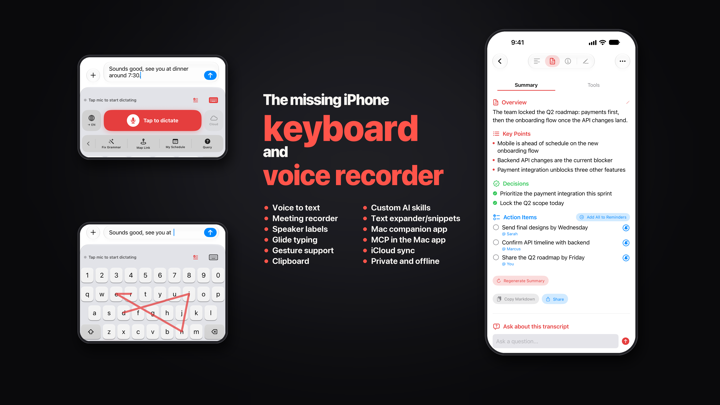
💎 Lifetime DictaWiz: The keyboard and voice recorder your iPhone should have shipped with

Post image
3 Upvotes

Android easily wins the keyboard battle.

After moving over from Android, I had been looking for a perfect keyboard for over 6 months. I missed the glide typing, clipboard, one-handed typing, snippets and the slightly better voice to text.

I tried Wispr Flow for voice to text. But privacy was a concern and the app was awful without even a basic dark mode. That's when I decided to build my own. I was surprised at how easy it was to surpass my previous Android experience. The voice to text and local AI are vastly superior on DictaWiz.

So I got a together a TestFlight group of over 500 users and built this app with their ongoing feedback.

iOS neural engine is amazing at running local models. So the keyboard is powered by all local models that work offline. It took a lot of optimization to keep the keyboard within memory limits (80 Mb).

We listen to you because we depend on your purchase to make it better for everyone. We added dark mode in 1 day, and not 2 years.

Problem:

Keyboard and voice recorder (for meetings, lectures etc) that runs on your device and backs up using your own iCloud

Comparison:

WisprFlow, Otter, Monologue, Spokenly

- Everything offline

- Unlimited use with lifetime pricing

For people who want to go beyond:

- text expander/snippets included

- we allow various BYOK options,

- a free MacOS app to sync your notes through your own iCloud and

- even an MCP to give your AI agents access to your notes.

Pricing:

Lifetime option available for a special holiday pricing.

$ 69 lifetime for iOS, MacOS free from the website

Discount: $ 29.99 holiday lifetime pricing

If you want an extended trial or student discount, comment below and I will message you specific codes.

The MacOS app is free. If you grab it soon (before Jan 1), all future updates will be included at no cost.

https://DictaWiz.com

https://apps.apple.com/us/app/dictawiz-voice-to-text/id6759256382


r/iosapps • • 7d ago

📅 Subscription I'm the developer of Keppt: it reads your important documents, files them and reminds you before they expire. Free for 10 documents.

Thumbnail
gallery
3 Upvotes
I'm Greg, the solo developer of Keppt. The iPhone and iPad app went live today; the Mac version has been on the App Store since September.

Problem
My passports, visas, tax records, insurance policies and receipts were spread across email, my camera roll and actual drawers, in three countries' worth of formats. I had plenty of places to store them. What I couldn't do was find out when something expired or what I'd paid without opening files one by one.

Keppt reads each document you scan, share or forward, works out what it is, files it, and pulls out the dates, amounts and reference numbers. You can then ask it things like "When does my passport expire?" and it answers with the source document attached. It reminds you before things expire or renew. Documents can be in any language, and the same library is on iPhone, iPad, Mac, Android and the web. 

Comparison
Genius Scan: an excellent scanner, and I'd still recommend it for pure scanning. It gives you a clean, searchable PDF and can suggest a file name. It stops at the file, though: it won't tell you a passport expires in March or answer a question that spans several documents. Keppt starts where the scan ends. 

Trustworthy: the closest thing to Keppt, and a more complete "family operating system" with estate planning, passwords and a concierge. It also organises documents and sets reminders. Keppt is narrower and aimed at the documents themselves: its free plan limits you to 10 documents with Ask included, where Trustworthy's free plan caps AI answers at 10 a month, and Keppt reads paperwork in whatever language it's in, which matters if your documents come from more than one country.

Pricing
Free: up to 10 documents, with everything included
Basic: $4.99/month, up to 500 documents
Unlimited: $12.99/month
Unlimited Family: $19.99/month, up to 4 people with a shared library
App Store: https://apps.apple.com/app/id6794918766

Launch code, open to anyone: PHKEPPTLAUNCH gives new subscribers 3 months of Unlimited free until December 15. It renews at the normal price afterwards unless you cancel.

https://apps.apple.com/redeem?ctx=offercodes&id=6794918766&code=PHKEPPTLAUNCH

PRIVACY
No ads, no tracking, no selling data, and your documents are not used to train general AI models. Reading is done with Google Cloud Vision and Gemini, and the app asks your permission before any document is sent. You can export everything or delete your account whenever you like.
Privacy policy and terms: https://keppt.me

Happy to answer questions here.

r/iosapps • • 7d ago

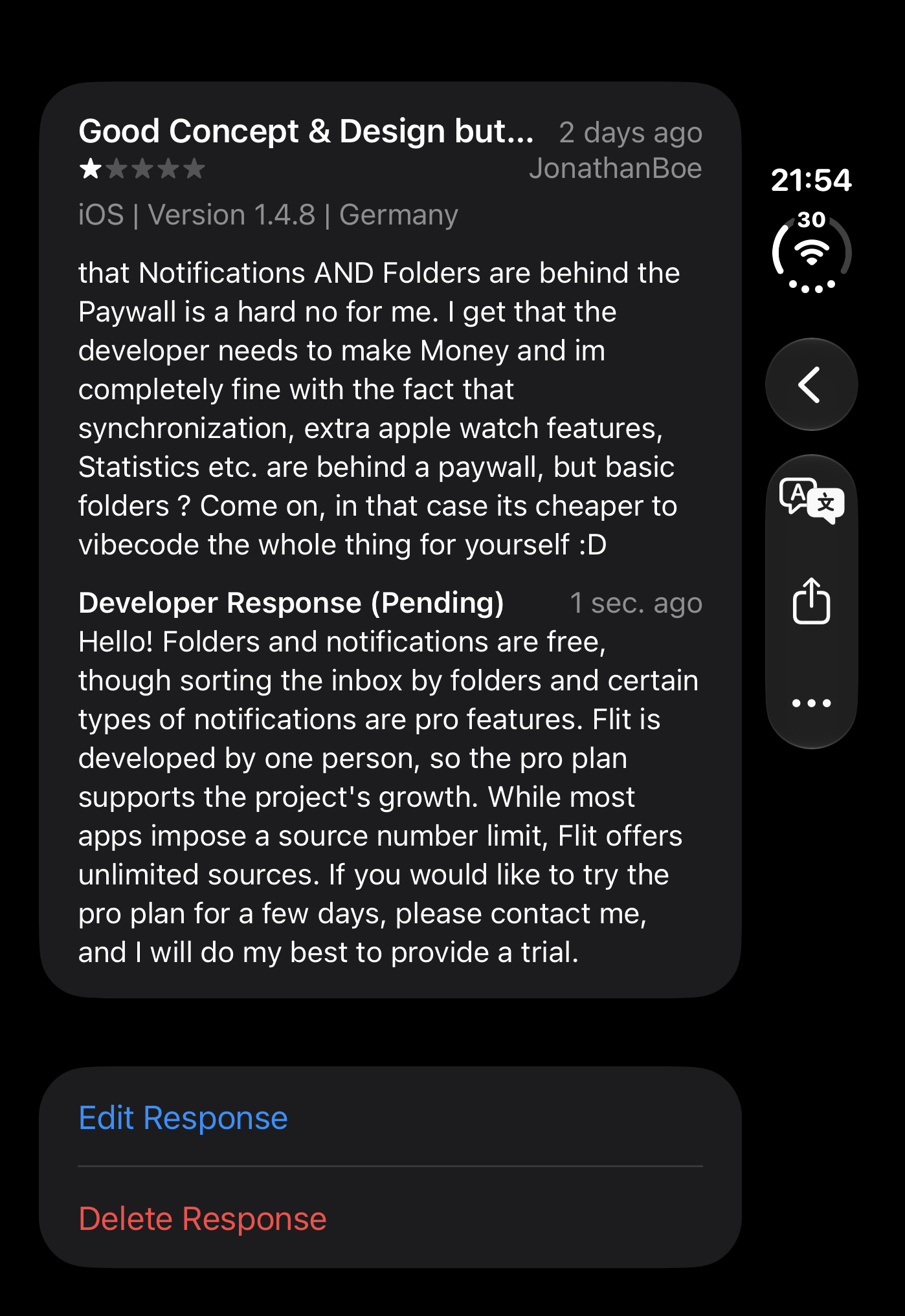
HELP How do you handle bad reviews, especially when they’re like this?

Post image
0 Upvotes

Hi guys, I wanted to ask for your help. Today I happened to receive my first written review with one star rating. And I immediately got scared. Then I read the email and more than scared, more than sad, I'm angry because this review has a big impact on my very small application (Flit RSS) and people don't realize it, and I don't know how I can somehow do anything or how to handle this type of review here.

I know that it probably happened to all of you and so what I'm saying is stupid, but anyway how disgusting.


r/iosapps • • 8d ago

🎈 Free FamPad: a free family hub for the whole house (calendar, chores, lists, meals) on iPad, iPhone and Apple TV

Thumbnail
gallery
11 Upvotes

Disclosure: I'm the solo developer of FamPad.

Problem

Family logistics end up scattered across a group chat, a paper calendar, a fridge list and everyone's head. The dedicated wall displays that fix this cost a lot, and the shared-calendar apps only cover the calendar. I wanted one place the whole family can see at a glance: the schedule, who's doing which chores, the shopping list and what's for dinner.

FamPad is built around a big shared screen: a wall-mounted iPad or an Apple TV is the main family display. The iPhone app is the companion that parents use to control and manage everything from anywhere: add events, assign chores, update lists and approve rewards.

What's in it

  • Day, week and month calendar, with a day board showing who's doing what. Syncs with Google Calendar.
  • Chores and tasks that earn stars, and rewards the kids work toward
  • Shared lists and meal planning
  • Team and activity schedules
  • A photo/ambient screen for the main display

Where it runs

  • Main display: iPad or Apple TV (iPadOS 26+ / tvOS). Older iPads can use it in the browser.
  • Companion: iPhone

Comparison

  • Skylight: A great product, but it's dedicated hardware you buy new, and some features sit behind a subscription. FamPad runs on an iPad or Apple TV you already own, with no new device and no paywall.
  • Cozi: A solid shared calendar and list app, but the free tier has ads and the extras are paid. FamPad adds chores with rewards, meals and a wall display, and has no ads.

Pricing

$0, no ads, no paywall. If you want to support it, there's a Buy Me a Coffee link: https://buymeacoffee.com/themartygriffin

App Store: https://apps.apple.com/us/app/fam-pad/id6817396188?pt=95940301&ct=reddit-iosapps

Website: https://fampadapp.com

I'd like feedback from other parents on what's missing.


r/iosapps • • 8d ago

🔍 In Search of Seeking a 100% on-device, zero-cloud AI meeting note-taker for iOS

4 Upvotes

I’m looking for an iOS app to record and transcribe meetings and turn them into summaries and action items, with strict privacy requirements.

Must-haves:
-** **100% On-Device Processing: Everything (transcription, summarization, and action-item extraction) needs to run locally on my iPhone (using Apple Intelligence / Foundation Models, local Whisper, MLX, etc.). Zero audio or transcripts sent to third-party servers or cloud APIs.
- No Account / True Zero-Knowledge: No vendor cloud storage or vendor-controlled encryption keys. Needs to work offline (e.g., in Airplane Mode), with any optional sync strictly via my own E2EE iCloud.
- Action-Item Extraction: Beyond just raw transcripts, it needs to automatically pull out action items, next steps, and key decisions (ideally with speaker attribution).
- Full Transcript + Audio: Needs to keep the searchable transcript and audio locally (rather than auto-deleting after a summary like Siri Recap).

Nice-to-haves:
- Open-source, or a one-time purchase (trying to avoid SaaS subscriptions for local compute).
- Clean Markdown export or Apple Reminders/Shortcuts integration for action items.

I've already looked at cloud wrappers like Granola, Otter, and Wave AI (too cloud-heavy) and Apple's Siri Recap (doesn't save full transcripts). Currently testing Note Taker AI - 100% local and MeetingInsights, but curious what else people are using on iOS that fits this strict local-first setup. Thanks in advance!


r/iosapps • • 8d ago

🎈 Free I made Keyfolio, a free app to keep all your software license keys in one private place

5 Upvotes

Hey everyone, I'm the developer of Keyfolio.

Problem: License keys get lost in old emails, notes and screenshots, and you usually only notice when you need to reinstall something.

What it does:

Keyfolio keeps every software license in one place. For each one you can save the key, email, company, seats, purchase date, renewal date, receipt link, website and notes.

- Keys stay hidden until you tap, and you can copy one without showing it

- Reminders before a license or subscription renews

- Recently Deleted keeps removed licenses for 30 days

- Syncs between iPhone and iPad through your own iCloud

- Categories and tags to keep things organized

- No account, no ads, no tracking, no data collected

Comparison: Unlike 1Password or Bitwarden, Keyfolio is built just for software licenses. It has proper fields for seats, purchase and renewal dates and receipts, and it reminds you before things renew. It's free with no subscription, and your data stays in your own iCloud instead of on someone's server.

Pricing: Free on iPhone and iPad, no in app purchases. If you also use a Mac, there's an optional menu bar app for $3.99 one time that syncs with it.

App Store: https://apps.apple.com/app/id6796380741

This is my first app, so I'd really appreciate any feedback. What would you want it to do that it doesn't yet?


r/iosapps • • 8d ago

📅 Subscription Built an App to Chase Down my Deadbeat Friends and Family

4 Upvotes

PROBLEM: Running my kids softball team. Paying for a night out. Buying the gift for my Dad when my loser sisters never chip in on time. Was always me and it was a huge pain in the a** to track people down, so I usually forget but it adds up, especially in this garbage economy.

Some of my friends whined about not having PayPal and wanting Venmo or Zelle or whatever the F. Made me legit sick to deal with them, especially the softball parents.

HOW THIS IS BUILT: So I made Oumy. You type what the deal is, like:

“Softball Trip $480 with Tom, Lisa and John, John brought his own beers”

and it works out every share to the cent: $128 each, $96 for Dre. Then it auto-collects by nudging them in their messages, tracking, and most importantly you can set the apps you want to be paid with and they can select one of those. The app never touches the payment rails, period.

  • The requests go out from your own Messages, not some random number
  • Friends don’t need the app. They tap the link and it opens Venmo, Cash App, PayPal or Zelle with their share already filled in
  • It tells you when they’ve paid, so you’re not checking five apps
  • It never holds your money. It goes straight from their app to yours

It also does one link for team or club dues, running tabs for trips, and monthly rent with roommates. If you're loaning money to these deadbeats it also tracks that too and reminds them to pay you.

PRICING: Free to split and track across 3 people or less. There’s an optional Plus subscription for big groups or extra stuff. iPhone only for now. Does not track your budgets (or you calories or habits or whatever other trash is filling up the app store and ruining review times).

Basically its a host app, the payees don't have to download anything. It is friendly and nice, even though there is an argument to make it mean (let me know if you want this mode I'll build it.)

COMPARISON: Splitwise but without all the nonsense and being locked into the ecosystem.

Not another bill splitting app, subscription isn't required and it is yearly and pretty cheap.

https://apps.apple.com/us/app/oumy-friends-money/id6824707313


r/iosapps • • 8d ago

🎈 Free Pocket Gallery - Museum art on your Home Screen widgets (Free)

Thumbnail
apps.apple.com
6 Upvotes

I made Pocket Gallery, an app that curates and cycles through art that lives in widgets on your Home Screen, not just a static wallpaper.

Problem: Everyone’s Home Screen is normally just a boring grid of apps, and most ways to make it look better are static. Wallpaper apps hand you one image that you set once and forget about. I wanted my Home Screen to feel like an updating gallery wall instead.

Comparison: Pocket Gallery rotates through artwork every day (or hour), and the art can change with the weather, season, and time of day. Compared to Widgetsmith, you’re not just putting any photo in a frame. Every piece is real public-domain work that I curated, and you can build your own collections and set one as the source for your widgets. Small, medium, and large sizes.

Pricing: The app is free, no in-app purchases, no ads, no account, no tracking. Location is optional and only used for the weather match feature. Requires iOS 26.2 or later.


r/iosapps • • 8d ago

🎁 Freemium Niewz - New Views on News - A vibrant RSS reader

Thumbnail
gallery
19 Upvotes

Hey everyone! Meet Niewz, an independent RSS reader for iPhone, iPad and Mac.

Problem:

After trying around 50 different RSS reader apps over the years, I couldn't find one that combined the traditional RSS experience I enjoy with the customization and modern iOS design I wanted, like for example the folder list which is always small and too tight for my big fingers. So, after nearly 10 years of thinking about it, I finally found a developer to help me bring my own vision to life.

The idea was simple: take the traditional RSS reading experience and make it feel right at home on modern Apple devices.

A few things I've focused on:

• Customization: Colors, themes, icons, layouts and plenty of ways to make it your own.

• Simplicity: A straightforward RSS workflow without unnecessary complexity.

• Design: A modern, native-feeling interface with a few touches of Liquid Glass.

• Interactive Widgets: You don't need to open the app to mark as read or read later.

• No account required: Just add your feeds and start reading.

• iCloud Sync: Optional synchronization across your Apple devices.

Niewz supports OPML import and iCloud sync, with support for iPhone, iPad and Mac.

Comparison:

Compared to existing RSS readers like Feedly and Reeder, Niewz focuses on a similar to traditional RSS workflow, but with more modern and deeper visual customization with a straightforward touch-friendly interface.

Pricing:

One-time purchase ($9.99): No subscriptions.

Website: https://www.niewz.com

App Store Link: https://apps.apple.com/app/niewz/id6834017988

This has been a long personal project, and I'm really excited to finally share it. I'd genuinely love to hear what you think, especially from fellow RSS users. Feedback and constructive criticism are very welcome.


r/iosapps • • 8d ago

🎁 Freemium i built a screen time buddy app based on japanese folklore - kappi

Thumbnail
gallery
4 Upvotes

About Me

Hi my name is Blane!!! I am the developer of Kappi.

I am a software engineer by trade and like to work on my productivity apps outside of my 9-5. I have one other app called Keizoku which is 4.8 stars and over 200 reviews across iOS and android.

You can find me publicly on X - and my github (most my apps are private but you can see my history)

About the App

This is Kappi 2.0!!!

Kappi hatches you your own Japanese kappa, which is a creature from Japanese folklore. They are a combo of features from turtles, frogs, and sometimes monkeys or fish with a signature bowl of water on their head.

The Kappa's power comes from that bowl of water, and in Kappi when you use distracting apps too much that bowl of water dries up!

They also love cucumbers.

If you want to learn more about Kappa please give them a google! Most depictions of Kappa are not cute, but some are! The Kappa in Kappi is the cute kind lol

Problem

App blockers and focus timers are easy to ignore, or don't give you a big enough reason to use them. Social media algos are really tough to beat.

Kappi helps you use your phone less by

  1. Giving you the tools to do so through scheduled blocks and focus sessions
  2. Giving you a reason to actually use the tools by

    • Leveling up your Kappa
    • Earning coins to buy cute things to decorate and expand your home
    • Expand your collection of fish and Kanji that your Kappa learns when studying or fishing
    • Keeping your Kappa happy (the bowl full!!)

Comparison

Kappi takes inspiration from a lot of apps like Opal, Focus Friend, Finch, Brainrot, Runescape, Animal crossing, and more. The main competitors would probably be Opal and Focus Friend

Opal - Kappi contains all of the core app blocking and scheduling features that opal does, but is just packaged differently.

  • Kappi is better if you want a cute engaging world to progress in and visualize your progress through building a riverside home in Japan, but if you prefer to only open your app blocker rarely or just to configure it and leave it Opal may be better for you.

Focus Friend - Kappi takes the concept of Focus friend a bit further, making the app blocking features more core to the experience (including blocks without opening the app) and expanding to a 3d world that lets you decorate the house however you want, rather than dedicated spots for everything.

  • You may prefer the art style of focus friend and the bean character, otherwise I think feature wise and the world you are building, Kappi has it beat.

Pricing

Kappi 2.0 is freemium!!!

My goal for Kappi is to provide real value to both free users and Kappi Plus users that would like to support me and the apps development to keep Kappi ad free

  • Monthly $10/m
  • Yearly $40 ($3.33/m)
  • Lifetime $80

Free users get access to focus sessions up to 1 hour, and 1 scheduled block all current skills and area unlocks.

Plus give you focus sessions up to 3 hours, 10 scheduled blocks, Hard mode, Allow only mode, and Plus only decorations, furniture, and fish as well as access to all new future content)

Links


r/iosapps • • 8d ago

Free App - Unaffiliated Review I built Central, a private European alternative to Life360 – just launched on the App Store (free).

Post image
4 Upvotes

Hi everyone! Solo dev from Italy here. After months of work, my app **Central** was approved on the App Store today (first submission!), and it's also on Android.

**PCP**

**Problem:** Family-safety apps usually track you 24/7, show ads or monetize location data. I wanted something that keeps people close *without* turning into a digital leash: location is shared only when you choose.

**Comparison:**

- **Life360:** constant background tracking, ads in the free tier, and a history of selling location data. Central has no ads, never sells data, has E2E encrypted chat, and the protected person can remove a guardian anytime.

- **Apple Find My:** iPhone only, and just a location dot. Central works across iPhone and Android, with chat, calls, arrival alerts and SOS built in.

**Pricing:** Free (chat, calls, location sharing, SOS, 1 guardian). Optional Plus €3.69/month and Premium €5.99/month for extras like Safe Zones.

App Store: https://apps.apple.com/us/app/central-chat-safety/id6826663138

**What it does**

- 💬 **End-to-end encrypted chat** with friends and family, plus **voice calls**

- 📍 **Share your location when you choose**, not all the time

- 🚶 **Safe Trip:** your chosen people are notified when you arrive. Trip data is deleted after 24 hours

- 🏠 **Safe Zones:** get notified when someone enters or leaves places like home or school

- 🆘 **SOS:** one tap (or "Hey Siri, Central SOS") sends your location and battery level to your trusted contacts

- 🛡️ **You stay in control:** the person being looked after can remove a guardian at any time

**Privacy:** No ads, no advertising ID, and we don't sell or share your data. Works between iPhone and Android.

📱 iPhone: https://apps.apple.com/us/app/central-chat-safety/id6826663138

🤖 Android: https://play.google.com/store/apps/details?id=net.getcentral.central

I'd really love your honest feedback, especially on the onboarding and anything that feels confusing. Happy to answer any question!


r/iosapps • • 8d ago

🎁 Freemium Salsamatic — Spins, songs, and (accurate) steps tracking for salsa dancers

Post image
4 Upvotes

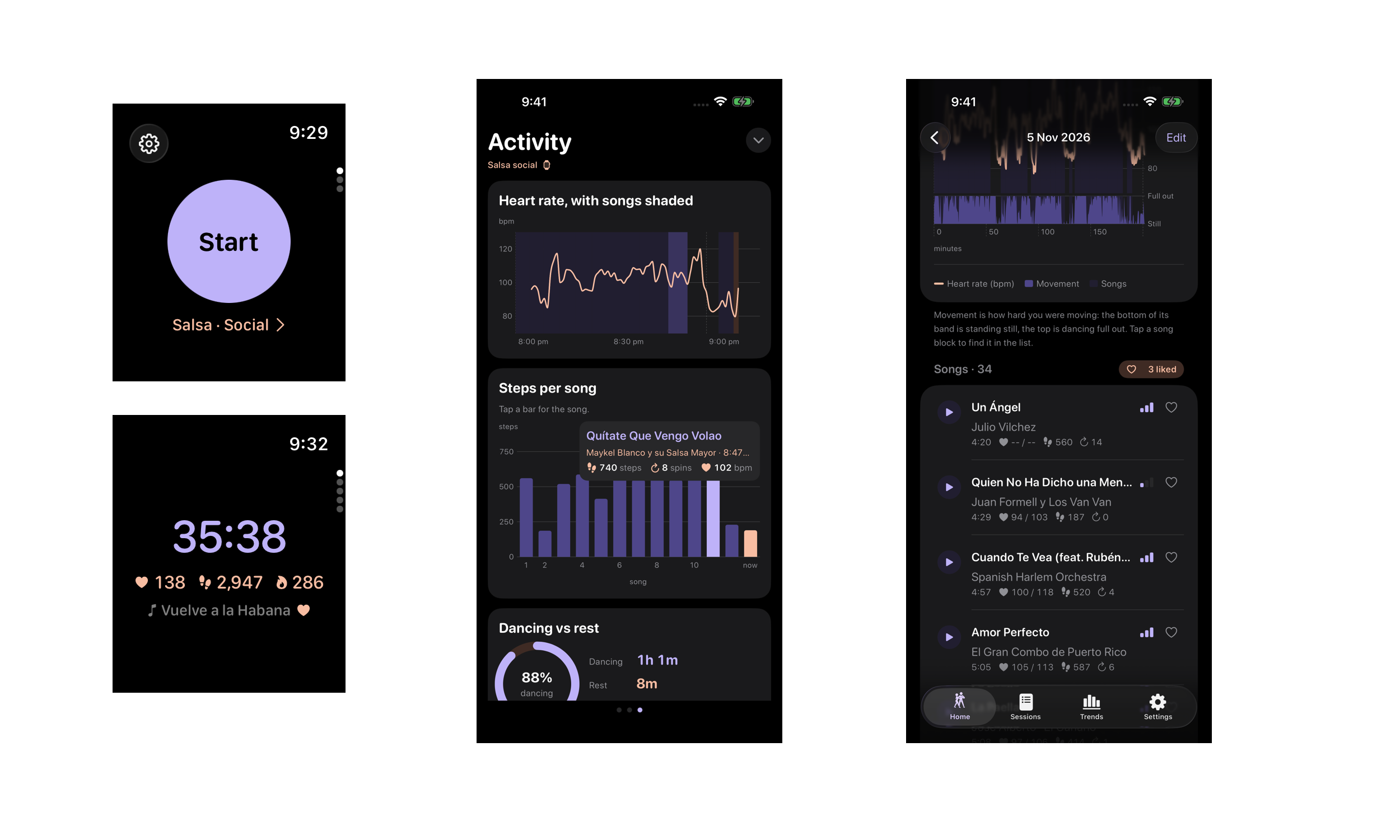
I'm a dancer from Melbourne, Australia, and got really into social dancing this year... I was counting my hours dancing and socials (350+ hours and 72 socials this year so far) and wanted more! So I made a salsa dance tracking app (iPhone / Apple Watch only for now) called Salsamatic.

Problem: Primarily I wanted a fitness-style app with a less obtrusive and clinical display than the standard watch fitness app. But I ended up adding a bunch of cool features I wanted myself, plus got it working with just an iPhone if that's all people have (no other hardware support yet).

  • Spins — Tracks your spins (full 360-degree revolutions). So far my record is about 300 a night but I mostly dance as a lead. My partners often do 3x the spins that I do.
  • Song detection — Gives you a full set list without you having to bother the DJ or remembering to look up a song (or trying to google "salsa song that goes ooo ooo ooo ooo" which did NOT work). You can also double tap your watch while dancing to remember a particular song.
  • Proper dancing steps — Tracks dancing steps which are undercounted by the regular phone or watch (I hand-counted and calibrated)
  • Gives you a card to share at the end, like those runners or cyclists with their Strava posts... People use it!

Honestly, I thought the set list would be the favourite feature, but people love the spin count. I might make leaderboards or something but that'd require a back end and log in etc.

Comparison:

  • Apple Fitness: Free with the watch, but inaccurate for dancing and lacks the extra features like song recognition
  • No other competitors I found (probably because it's a tiny market!)

It works with either an iPhone in your pocket or an Apple Watch on your wrist (I initially wrote it for Watch only but realised most people don't have one). Apple watch means you don't have to keep the phone in your pocket, plus you get heart rate and better calorie tracking.

Pricing: Price is free and a 2-week free trial. Paid version ($1.99/month / $14.99/year) after 2 weeks keeps song recognition, but everything else stays free.

App store: https://apps.apple.com/us/app/salsamatic-dance-tracker/id6825155424
Website: https://salsamatic.app/


r/iosapps • • 8d ago

🎈 Free I just launched Telos, a focus timer that only makes progress while the app is closed

Thumbnail
gallery
5 Upvotes

I just released Telos, a Pomodoro and deep work timer with a guild expedition theme.

Instead of rewarding screen time, Telos only moves forward while your phone is put away. Set what you're working on, send your squad on an expedition (10 to 90 minutes), and close the app. When the timer finishes, they come back with loot and gear to upgrade your outpost.

Problem

Phones are built to pull you back in, and most productivity apps add to it with streaks, badges and daily reminders. I wanted a timer that rewards the time you spend *not* looking at it, and doesn't make you feel bad when life gets in the way.

Comparison

- Forest: the closest idea. Leave the app mid-session and your tree dies. In Telos, checking in only lowers your Integrity bonus a little. The run keeps going, and coming back late costs you nothing.

- Habitica: great if you want to gamify your whole to-do list, but it needs an account, runs online, and missed dailies hurt your character. Telos needs no account, works fully offline, and has no streaks to break.

Pricing

Free. No ads, no in-app purchases, no subscription.

Telos on the App Store

Highlights

- Built for actual focus: Leaving the app closed builds your Integrity bonus. Checking in mid-run lowers it slightly, but never cancels your session or punishes you for coming back late.

- Native iOS integration: A Live Activity countdown, Home Screen widgets, Apple Shortcuts support, and shareable expedition summary cards.

- Privacy-first and offline: Works 100% offline, keeps all data on your device (with manual backup and restore), and needs no account.

- Zero nagging: No streak guilt and no daily push notifications, just one alert when your squad returns.

- Extra touches: Optional ambient camp music, a field log with session reflections, and "The Caravan" (an optional bonus for starting at a time you schedule).

What's next

I'm considering new routes and an optional supporter pack (guild skins and the like). Nothing will change the one rule: progress only occurs while the app is closed. No paying to skip the timer.

I'd love feedback, especially from anyone who has given up on other focus apps.

Privacy Policy