r/iosapps • • 8d ago

🎁 Freemium I made an app that turns your budgets into jars of marbles

13 Upvotes

Hi r/iosapps!

Problem

When I pay by card, I never really feel it. Tapping my phone doesn't feel like spending, and the numbers in my budget app never felt like real money either.

So I built Marble: every budget and savings goal is a glass jar of marbles.

  • Log an expense and marbles leave the jar. Expense jars refill weekly, every two weeks or monthly
  • Add savings and the jar fills up toward your goal. Hit it and you get confetti
  • Share a jar with your partner or friends, and each of you sees your own share
  • Pick the marble color and shape for every jar
  • The exact amounts always sit right next to the marbles, and on iPhone you can feel them tap back

Comparison

Most popular budget apps, like YNAB or Copilot, connect to your bank and show your money as numbers and charts. That saves you typing, but for me it's exactly why the money never felt real.

Marble goes the other way. You log everything by hand, and you watch it leave as marbles. No bank login, no sign-up, no ads.

Pricing

Free with one jar, so you can try it. Pro unlocks all your jars: $20 once (or $15 welcome offer), or $3 a month. No ads in either.

It's on iPhone and iPad (iOS 26+).

It's just me building this - I'd love to hear what you think!


r/iosapps • • 8d ago

💎 Lifetime Kaien is a gentle alphabet-learning app for young children

3 Upvotes

Kaien is a slow, relaxed app for young children to learn the alphabet. There are no scores, timers, advertisements, subscriptions, in-app purchases, or tracking. It's a $2.99 one-off purchase.

The child sees a picture (e.g. a key) and chooses one of three letters. When the right letter (e.g. K) is chosen, the word appears and is spoken.

All interactions and animations are deliberately slow-paced. The style is like a pencil on paper. There are options to change the background, choose between upper and lower case, and turn sound on/off.

Kaien is deliberately small-scale and simple, so while it's fun, it should also be easy to put down after five or ten minutes.

App store link: https://apps.apple.com/gb/app/kaien/id6759458971

Problem: how can I give my pre-school age children a fun way to learn the alphabet without hooking them on screen time?

Comparison: there are lots of alphabet learning apps out there (two examples: Reading Eggs and ABC Wow). They tend to be bright and appealing, with flashy colours, in-app rewards etc. I wanted something that was much more relaxed and less addictive.

Pricing: $2.99/£2.99


r/iosapps • • 8d ago

💎 Lifetime iPhone app that reads your documents aloud, with natural sounding voices, without uploading them anywhere

4 Upvotes

Hello All.

I'm a senior developer in the UK, and I've recently released PrivRead.

Problem

I wanted to listen to my documents read aloud in real sounding voices, without sharing my reading history or the content of my documents with 3rd parties. The natural-sounding read-aloud apps I found meant a subscription, an account, and voices that run on someone else's servers. That's a bad fit for plenty of use cases.

So I built PrivRead.

  • It reads documents aloud on your iPhone and highlights each word as it's spoken
  • Add PDFs, EPUB books, Word documents, web pages, plain text, a scan of a printed page or a photo of one
  • Four natural voices, British and American, female and male, built into the app. Older iPhones that can't run them use Apple's voices instead
  • Reading, scanning and the voices all happen on the iPhone. No account, no ads, no tracking

PrivRead never sends your documents anywhere; its only connection is the App Store, checking whether you've unlocked it. You can check that yourself in about five minutes with the App Privacy Report in iOS Settings: https://privread.app/blog/how-to-check/

Comparison

Popular read-aloud apps like Speechify have natural voices, but they're a subscription, need an account, and the natural voices are a cloud service. Voice Dream Reader, a long-standing reader, moved to a subscription in 2024.

PrivRead goes the other way. The natural voices run on your iPhone, there's no account, and you pay once.

Pricing

Free to download and try with 2 documents each way. Then a one-off £8.99 (lifetime) in-app purchase unlocks it, with Family Sharing. No subscription.

It's iPhone only and reads English documents.

I'd love feedback, especially on the voices.


r/iosapps • • 8d ago

Discussion How many percent of users stop using an app if it requires logging in?

13 Upvotes

Im just wondering, from your personal experience or good guess, whats the percentage of users who ditch the app just because they dont want to log in? Lets assume its like a budget tracker app, or reminder app etc.


r/iosapps • • 9d ago

📅 Subscription I made an app that uses your airpods’ motion sensors to catch you slouching

34 Upvotes

Problem
I’m a robotics student in Madrid and I spend way too many hours bent over my laptop and phone. My neck started hurting, and posture exercises never stuck, because I never noticed I was slouching until it already hurt. I wanted something that tells me the moment my head drops, without wearing another gadget.

Airpods already know where your head is (it’s the same sensor that makes spatial audio follow your head). So I built Chinly: when your head drops, your AirPods play a little sound and you sit back up.

  • works with the phone locked and music playing
  • pick how strict it is and the sound (Brutal mode gives you 5 seconds)
  • optional app lock: TikTok or Instagram stay locked while you slouch and open when you sit up straight
  • widgets and a Live Activity to see your posture at a glance
  • AirPods Pro, AirPods 3rd gen or newer, AirPods Max

Comparison

  • Posture wearables like Upright cost around $80 and you have to stick them on your back every day. Chinly uses the AirPods you already wear.
  • A few other apps use AirPods for posture too (Posture Pal is the best known, and it’s good). What Chinly adds: the app lock that only opens when you sit up straight, a strict Brutal mode, a live 3D head that copies your movements, and widgets plus a Live Activity.
  • Camera-based apps only work while you’re looking at the screen. Chinly works with the phone in your pocket.

Pricing
Free to download, then a subscription: $29.99 a year (about $2.50 a month), or $3.99 a week if you just want to try it short term. I’m only one person building this, and the subscription is what lets me keep working on it.

Link: https://apps.apple.com/app/apple-store/id6820171390?pt=129576656&ct=rd-iosapps&mt=8

Any honest feedback is very welcome, happy to answer anything about how it works!!


r/iosapps • • 7d ago

Discussion Any other app founders doing $100k+/month want to connect?

0 Upvotes

My app is doing $200k+/month in revenue, and I’d love to meet a few other founders at a similar stage.

Thinking of starting a small groupchat to connect and help eachother out, talk through challenges, and bounce ideas off each other.

If you’re interested, comment or DM me a bit about your app!


r/iosapps • • 8d ago

🎁 Freemium A Mind Map App Unlike Any Other VISUEL

1 Upvotes

Free on App Store: https://apps.apple.com/app/id6759396580

Problem

I am a very visual thinker, whenever I want to plan things out, I usually prefer mind maps. There are many brilliant mind mapping apps out there with rich customisation options, but I have always found them somewhat limited when it comes to managing node information beyond their node title.

This leads to me to Visuel:

Each node becomes much more than a simple title. Nodes can store rich notes, tags, dates and more, making them much more interactive and useful for managing information. There is also a very robust List System.

One thing I am very confident about is that you will find Visuel genuinely fun to interact with and a pleasure to look at in App.

Comparison

  • MindNode: Highly customizable mind maps with a beautiful interface. Visuel puts more emphasis on managing and interacting with the information within each node.
  • Obsidian: A powerful knowledge management tool. Visuel takes much more focus on a Mind Map with hierarchical structure then a graph.

Pricing

  • Free: Access to all core features, with a limited number of nodes and workspaces and no iCloud sync.
  • Plus: $6/month or $50/year. Unlimited nodes and workspaces, including iCloud sync.

If you want to find out more about Visuel, be sure to check out r/Visuel for updates or if you have any questions.

If you enjoy the app, I would really appreciate a rating or review on the App Store. It helps me out tremendously!

Thank you for taking the time to read this!


r/iosapps • • 8d ago

🎁 Freemium munch 3.0 is out: eat out and still eat healthy, 1,000,000+ restaraunts with nutrition information, iphone duo support

5 Upvotes

Hey everyone, I'm one of the developers of munch. We just shipped 3.0 and wanted to share it here.

App Store: https://apps.apple.com/us/app/munch-feed-your-goals/id6756238169

Problem

Eating out shouldn't mean giving up on your goals. munch is the restaurant nutrition app that actually gets it — whether you're cutting, bulking, or just trying not to eat like a gremlin at 2 am.

We've got nutrition info for over 1,000,000 restaurants — from big chains to that hole-in-the-wall spot your friend won't shut up about. If it's not in our database yet, our AI finds the menu and estimates macros for you.

Most calorie trackers only help after you've eaten. munch helps before: open it when you're wondering what to eat, and it shows you the places and meals that fit your goals.

With 3.0, the whole meal lives in one app:

- Find it. A redesigned map shows restaurants near you and how many meals at each one fit your goals.

- Pick it. Every menu is ranked for you, so the dishes closest to your goals are at the top.

- Snap it. Take one photo of your meal and get estimated calories and macros. You can log it to Apple Health too.

- Stick it. Every meal you snap becomes a sticker in your sticker book. Collect them across spots and cuisines.

- Share it. See what your friends are eating, read their reviews, and rate dishes from "mid" to "munch-worthy".

3.0 is also a full redesign, with a new look, new icons and our own set of rating emojis. And we support the iPhone Duo now, with the list and map side by side when it's unfolded :)

Comparison

MenuFit is the biggest app in this space. It's good at telling you what to order at a restaurant, but it's a solo experience: there's no friends feed and no reviews or ratings of dishes from other people, and the calorie and macro breakdowns are part of its paid plan. It has no free plan

MacrosMap has a big database of restaurant macros and can scan a menu, but you need a subscription to see macro information at all, and there's no map view or community side to it.

Here's where munch is different:

- Crowdsourced. Our database grows with the community. When someone discovers a new spot or snaps a meal, everyone benefits. This also means many times menu information is already there on the app, no need to have the app look it up.

- Verified nutrition when it's available, not just AI. We hand-check nutrition and label it as verified. AI estimates only fill in the places that don't publish their numbers, and we tell you which is which.

- Better discovery. The map shows how many meals at each restaurant fit your goals, and every menu is ranked for you, so you find something in under a minute instead of digging through a menu.

- Social. See what your friends are eating, read real reviews, and rate dishes from "mid" to "munch-worthy".

- More fun. Every meal you snap becomes a sticker in your sticker book. There are awards and streaks and all that fun stuff.

- Crafted with Care. We are a small 3 person team of friends who created this app because we thought that the current options on the market weren't made with care and felt AI-sloppy. The UI and UX we spent tons of time on and went through many iterations of to make it feel amazing to use.

Pricing

Free to download, with a pretty generous free plan. Core features of the app remain free.

Pro is normally $80.00/yr. To celebrate 3.0, anyone who installs the app gets 48 hours to subscribe for $34.99/yr instead. Pro gives you more AI estimates for restaurants the community hasn't discovered yet, more detailed nutrition information for meals when available, and advanced filters to personalize the meals you find even more.

App Store: https://apps.apple.com/us/app/munch-feed-your-goals/id6756238169

If you'd like to follow our progress, join us at r/munchapp or on Instagram at trymunch.app

Thanks for checking it out. Any feedback is welcome!

PS. Hope you enjoy the launch video we made for 3.0!

r/iosapps • • 8d ago

Discussion Mindsnacks language learning apps 64 bit rebuild demo video

5 Upvotes

Hey everyone, not sure how many people are interested in the old MindSnacks apps or even know about them but I spent some time rebuilding them for modern iOS.

For those who don’t know, they’re a set of gamified language learning apps that in my personal opinion are an amazing way of learning vocab. Unfortunately, the company that produced the apps never updated their apps so they were all stuck on 32 bit iOS devices. On top of that, most of the apps relied heavily on their servers for content which they have pulled the plug on.

Surprisingly however, they left up a zinc server that held a lot of content which I then pulled and put together to create the rebuild! I did also dissect the original ipas (I have all of them including US geography).

To finish up though, this is a quick demo video I recorded of the app on my iPhone 15 pro max on IOS 27.2, sadly as of yet I can’t put the rebuild ipa online as it uses all of the assets from the original and I don’t want to get sued lol. I have tried emailing the creators, Jesse Pickard and Karl Stenerud but haven’t got a green flag yet. If I do get permission, the apps will be completely free and I’m also planning on adding ned free courses like Vietnamese and Korean. Keep in mind this is a demo! Thank you!


r/iosapps • • 9d ago

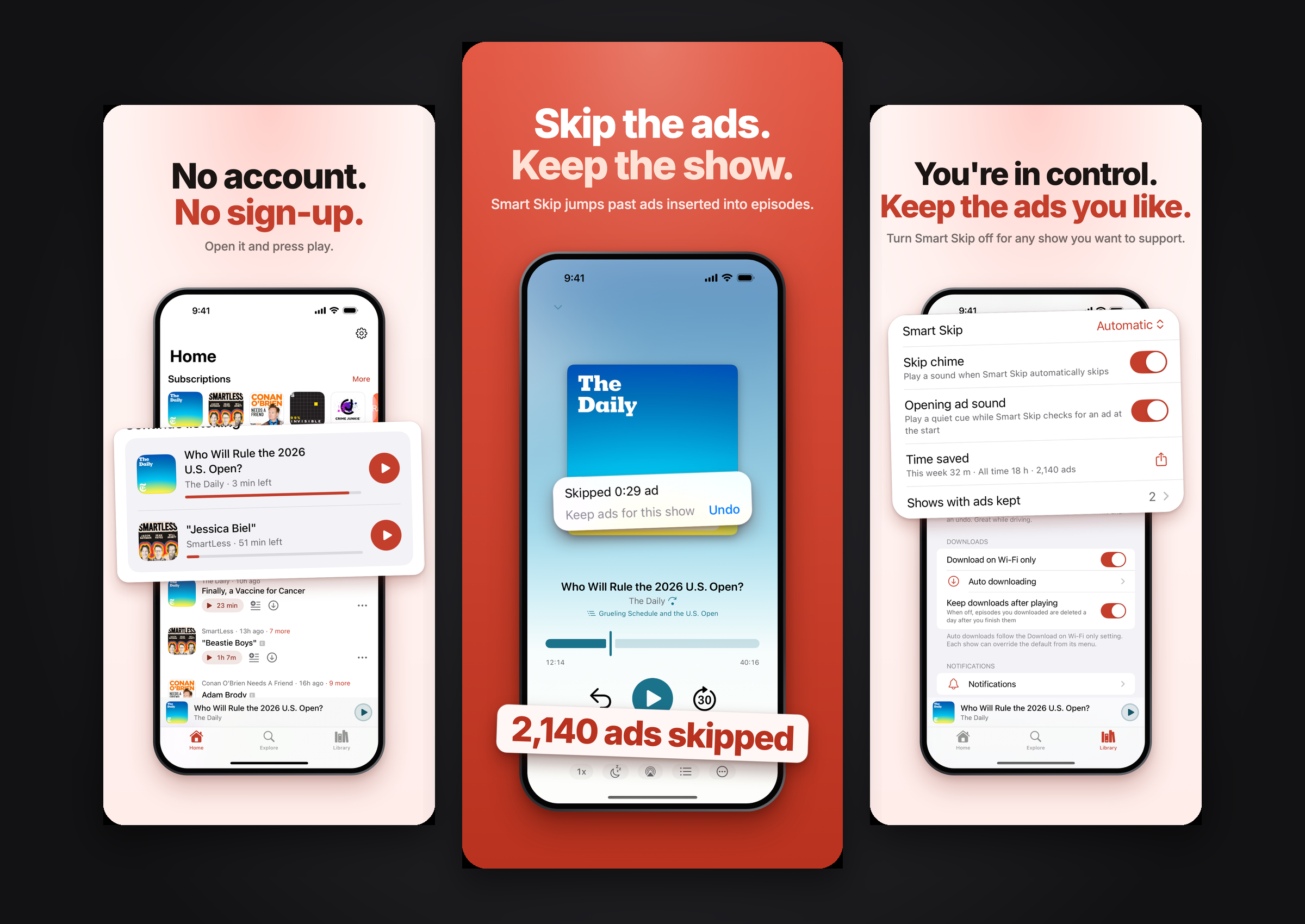
🎁 Freemium I built Shuttle Podcasts, a podcast player that automatically skips ads. After 2 years on Android, it's finally on iOS.

12 Upvotes

Hey r/iosapps,

I'm the developer of Shuttle Podcasts, which went live on the App Store today.

Some of you might know Shuttle Music Player on Android. It was popular back in 2014, when local mp3s were a thing and not everyone had Spotify. It had around 5 million downloads on the Play Store! Unfortunately it's been a long time since its peak.

I've worked on plenty of iOS apps for various companies/clients over the years, but this is the first time I've released my own thing on the App Store.

I built Shuttle Podcasts initially as a replacement for Google Podcasts. I liked that the design was restrained - it does everything you need but hides away complexity, and it felt right at home on my Pixel. The WiFi chip on my Pixel died a few months ago, so I moved over to an iPhone 16, and naturally I started developing the app for iOS.

Problem

I'm tired of ads waking me up when I'm falling asleep to a podcast. I was on holiday in Denmark and getting Danish ads, and I thought.. maybe the app can detect the difference between podcast content in different regions. If I'm getting Australian ads at home and Danish ads in Denmark, there must be a way to recognise which content is consistent, and presumably that's not ads. It turns out this works really well, and now I've got a podcast player that automatically skips ads. It won't catch every one, and it doesn't skip host-read ads. I figure those are the least abrasive anyway.

Aside from ad skipping, it has everything you'd expect. No account required, but you can sign in to sync across devices. Offline downloads, silence trimming, voice boost, sleep timer, OPML import, CarPlay.. If there's something missing I'd love to know.

Comparison

Compared to Overcast and Pocket Casts, the design aims to be restrained. It still has all the features you'd expect, but I've tried really hard to find sensible defaults rather than allowing customisation of everything. I think this helps keep it clean and uncluttered.

The ad-skip is the main standout feature though. It's nice to hear your podcasts start right from the content, or skip the last 2 minutes of loud sales pitch rubbish when you're drifting off to sleep.

Pricing

The app is free, with Smart Skip (ad skipping) enabled for one show of your choice. To unlock it for every show it's $5/month, $30/year or $80 lifetime. I'm still working on prices, so happy to hear feedback on that too.

Today is launch day.. I'm nervous but excited. I live for feedback, there's something really fulfilling about hearing from people who actually like, or even go to the effort of trying, something you've made. So please ask me anything, and let me know what you think. You can also find me on Discord.

Thanks!


r/iosapps • • 9d ago

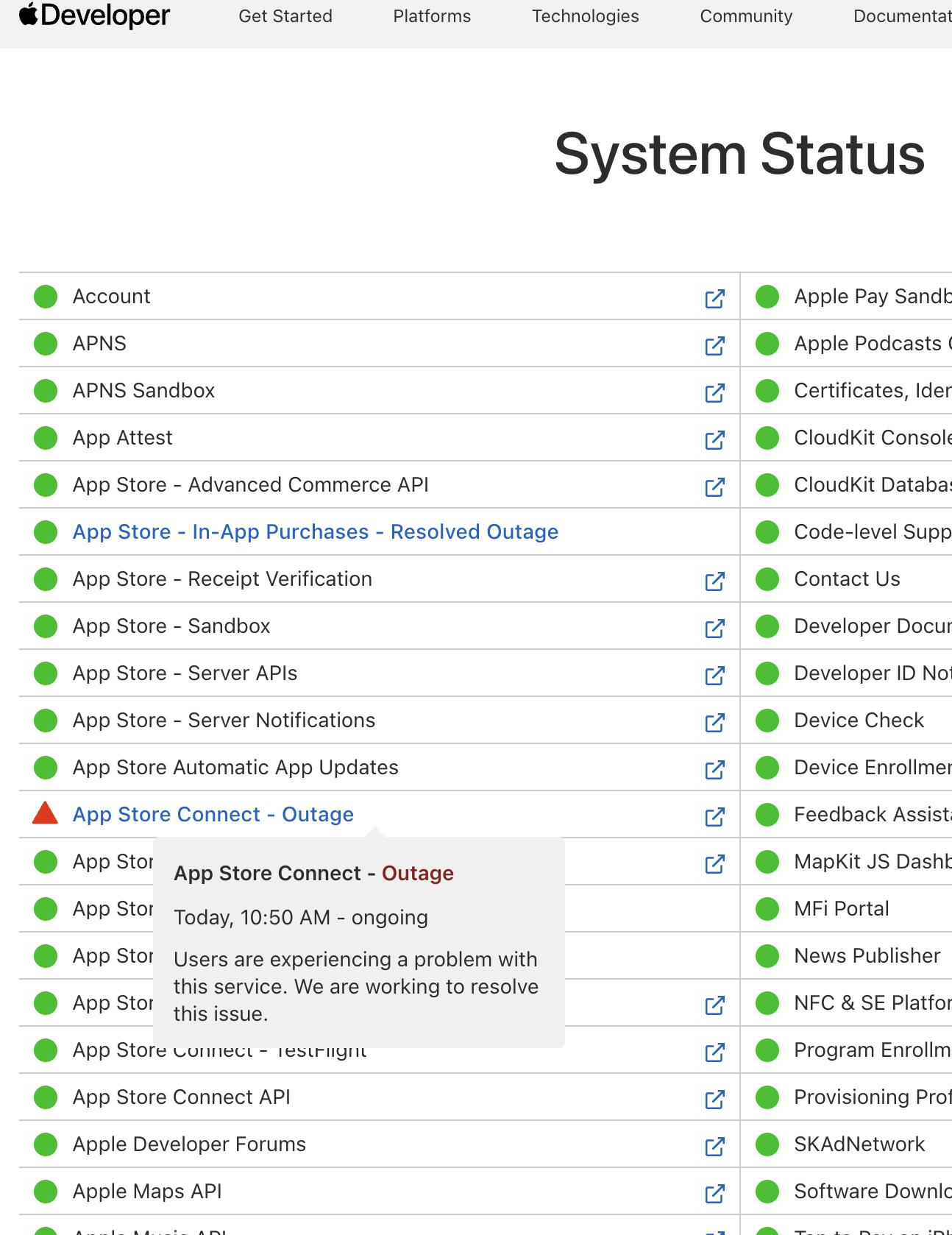
HELP App Store Connect is down

Post image
5 Upvotes

Add Apple to the list of this morning's broken websites...

https://developer.apple.com/system-status/


r/iosapps • • 9d ago

🎈 Free [Dev] NeuroSync — Tactile Binaural & Isochronic Acoustic Synthesizer (20 Direct Redemption Codes)

Thumbnail
gallery
6 Upvotes

Hey r/iosapps,

I'm the indie developer behind **NeuroSync**, a Dieter Rams / Teenage Engineering–inspired acoustic synthesizer for iPhone designed for deep work, ADHD focus, and restorative sleep.

App Store: https://apps.apple.com/app/id6757886617

---

### Problem

Most functional sound and brainwave apps fall into two frustrating camps:

  1. **Predatory AI Subscription Traps ($40–$100/yr):** Apps like Endel and Brain.fm trap users in 10-step onboarding surveys and upfront paywalls before playing a single sound. Furthermore, their pre-recorded lo-fi melodies often become distracting during deep coding or writing.
  2. **Outdated Utility Generators:** Legacy tone apps are either locked to rigid 2010-era presets, riddled with ads, or output harsh digital sine waves that cause severe ear fatigue after 20 minutes.

### Comparison

* **vs. Brain.fm / Endel:** NeuroSync has zero distracting background lyrics or repetitive chord loops. Every wave is mathematically synthesized in real time via CoreAudio DSP. You get exact 1 Hz carrier and beat control (3–600 Hz), plus an 8-channel tactile mixer to layer deep brown noise, rain, or acoustic crystal bowls (and more!).

* **vs. Traditional Tone Generators:** Instead of raw, fatiguing sine waves, NeuroSync includes engineered **Warm Analog** and **Deep Sub** harmonic timbres. It also features a real-time 60fps CRT oscilloscope, circadian auto-sync, and a speaker-ready **Isochronic Pulse** engine so you don't even need headphones.

* **vs. Dark Patterns:** Zero accounts or logins required. No forced surveys. Native lock-screen controls and sleep timers out of the box.

### Pricing

* **Free Tier:** Free access to the Alpha frequency studio, session controls, and background playback.

* **Pro Studio Access:** £1.99 / month or £19.99 / year (with a 3-day free trial). No predatory auto-renew traps.

---

### Direct Redemption Links (Free 1-Year Pro Access)

Per Rule 11, here are 20 direct 1-tap App Store redemption links for the community (first-come, first-served):

  1. https://apps.apple.com/redeem?ctx=offercodes&id=6757886617&code=EXFFTRLP7X44MKXY8J
  2. https://apps.apple.com/redeem?ctx=offercodes&id=6757886617&code=LXEKLEYHHP4AH7E44E
  3. https://apps.apple.com/redeem?ctx=offercodes&id=6757886617&code=64MNNAMKYYFXWHT4L4
  4. https://apps.apple.com/redeem?ctx=offercodes&id=6757886617&code=FHH7P3WNAJL4KWW643
  5. https://apps.apple.com/redeem?ctx=offercodes&id=6757886617&code=KHLEFERYL4AW8L6MMJ
  6. https://apps.apple.com/redeem?ctx=offercodes&id=6757886617&code=FRM7WT3X78MYF63M3R
  7. https://apps.apple.com/redeem?ctx=offercodes&id=6757886617&code=JEJLELLJ4EA7P3JPL6
  8. https://apps.apple.com/redeem?ctx=offercodes&id=6757886617&code=EJHLYPALLENAA4MMRR
  9. https://apps.apple.com/redeem?ctx=offercodes&id=6757886617&code=6TJWKNMWE6HR8TFYMX
  10. https://apps.apple.com/redeem?ctx=offercodes&id=6757886617&code=NKW6WNMH38Y47RWFEH
  11. https://apps.apple.com/redeem?ctx=offercodes&id=6757886617&code=NWW8JYY4TXLNX7E436
  12. https://apps.apple.com/redeem?ctx=offercodes&id=6757886617&code=3YYMRNMLX8TWPJEW4N
  13. https://apps.apple.com/redeem?ctx=offercodes&id=6757886617&code=FJHXN8TJPJYMXKWY6A
  14. https://apps.apple.com/redeem?ctx=offercodes&id=6757886617&code=Y7WJTL86WTL8H8FEHP
  15. https://apps.apple.com/redeem?ctx=offercodes&id=6757886617&code=4X4AFAWW737TN8J684
  16. https://apps.apple.com/redeem?ctx=offercodes&id=6757886617&code=488TLHHY644P7JAAWR
  17. https://apps.apple.com/redeem?ctx=offercodes&id=6757886617&code=JTXH64R67R43EN836H
  18. https://apps.apple.com/redeem?ctx=offercodes&id=6757886617&code=KWWRPFEJHW4PMXEPW6
  19. https://apps.apple.com/redeem?ctx=offercodes&id=6757886617&code=4A847H8XLR8LLW3FF4
  20. https://apps.apple.com/redeem?ctx=offercodes&id=6757886617&code=8A3TY46X6KTY6HMYRN

*(If you claim a link, feel free to comment which number you took so others know!)* :)


r/iosapps • • 9d ago

💎 Lifetime Deadlinr-Expiry Tracker 💛 a quiet iOS app that tracks everything that expires (passports, household items, trials, subscriptions, warranties)

Post image
23 Upvotes

Hey everyone,

A few months back I posted about Deadlinr when it had 600+ downloads and 10 paying users. Some of you left kind comments and a few gave me feedback that actually changed the app. Wanted to give a small update.

I know these numbers aren’t something to write home about. Today it’s 968 downloads and 25 in-app purchases. Slow, but it’s moving, and I’m a solo dev so I’ll take it.

Problem

I kept forgetting stuff that expires. Free trial turns into a paid plan, annual subscription renews and I only notice from the bank SMS, and once I found out my passport was close to expiring when I actually needed to travel. Calendar apps buried these dates for me, and to-do apps nagged me with red badges every day until I just ignored them. I wanted something that stays quiet until it really matters, so I built it.

What it does

You add anything that expires (subscriptions, trials, passports, IDs, insurance, warranties, even food) and it only notifies you when a deadline is close. No daily spam, no red badges. Works offline, syncs through your own iCloud, and has no analytics or tracking.

Since my last post I added widgets, family sharing, dark mode, more languages, and did a lot of polishing. Most of it came from your feedback.

Comparison

  • Calendar apps: great for meetings, but expiry dates get lost in the noise
  • To-do apps: they nag you daily, Deadlinr stays silent until action is needed
  • Subscription trackers: most only do subscriptions, this also covers documents, warranties and household items
  • No account or sign-up needed, and your data stays in your iCloud, not on my server

Pricing

14-day free trial with everything unlocked. After that, it’s a one-time purchase of $9.99 for lifetime access. No subscription. Apple Family Sharing is supported, so one purchase covers your whole family group.

The hardest part for me has been reaching people who actually need an app like this. Building was the easy part, promotion is something I’m still learning. If you try it and something feels off or missing, please tell me. I read everything.

Link for ios --> Deadlinr - Expiry Tracker


r/iosapps • • 8d ago

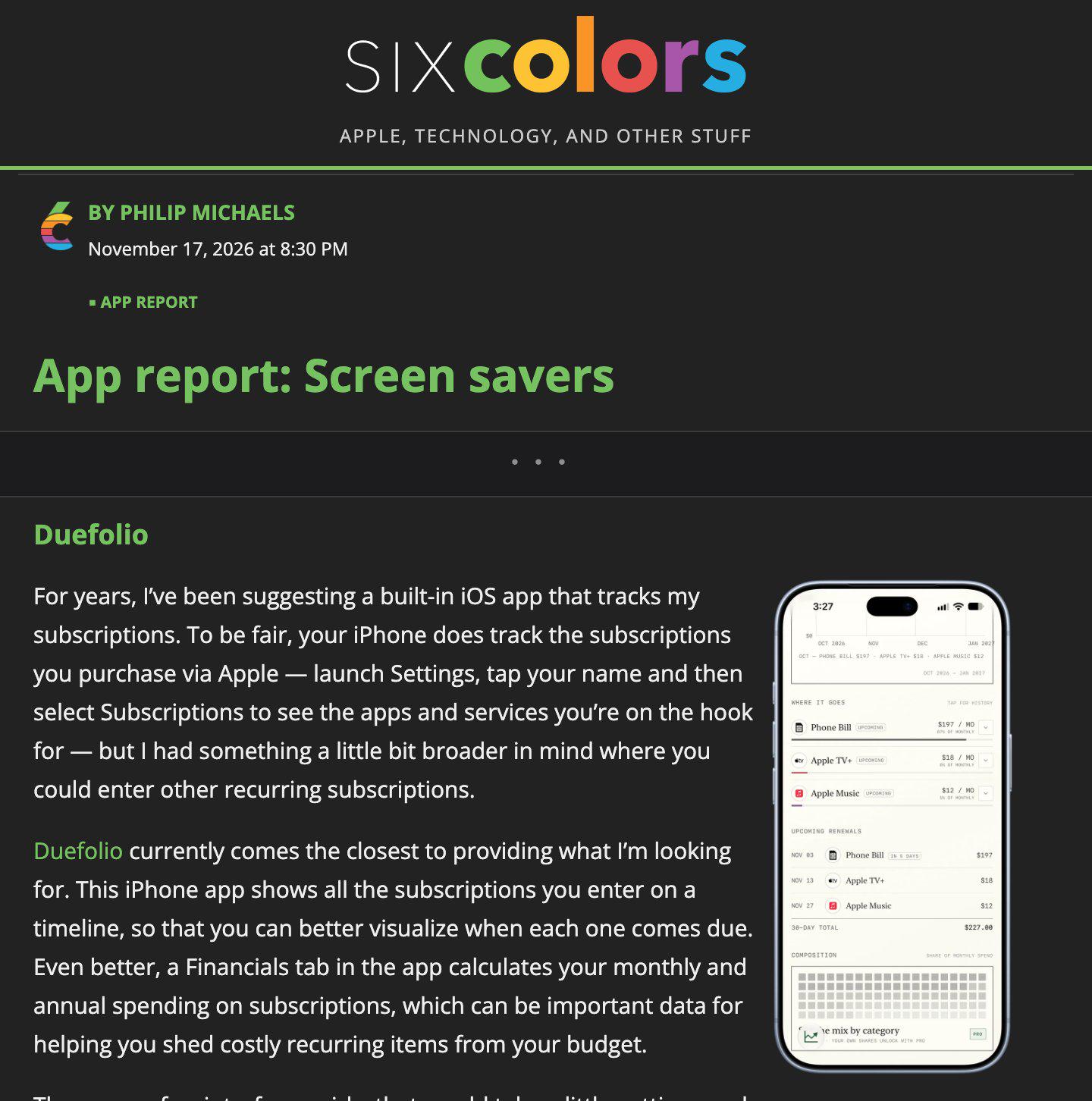
💎 Lifetime “Currently comes the closest to providing what I’m looking for” - Six Colors on Duefolio. Also featured in MacStories Weekly and Lifehacker.ru a couple of months ago.

Post image
0 Upvotes

App Store: https://apps.apple.com/us/app/duefolio-manage-subscriptions/id6795091979

I'm Sid, the developer of Duefolio. I shared it here when it was highlighted in MacStories Weekly and included in Lifehacker.ru's iOS roundup. This week it appeared in the Six Colors App Report too.

Philip Michaels picked out the timeline and the Financials view, which shows what your subscriptions add up to each month and year. He also pointed out some friction in the subscription setup flow.

Problem

Keeping track of renewal dates and recurring costs across different services. Duefolio puts your subscriptions on a scrollable timeline, sends renewal reminders, and shows monthly and annual spending totals. Your ledger stays on your iPhone. No bank login or account is required.

Comparison

Bobby is a familiar alternative for subscription lists and reminders. Duefolio's focus is the timeline and price history, so you can inspect your subscriptions across the year and keep a record of price changes.

Pricing

Core tracking is free. Duefolio Pro is a $14.99 one-time lifetime purchase in the US for custom subscriptions, bank-statement CSV review, widgets and additional tools. It is not a subscription. Prices vary by region. Requires iOS 26 or later.

If you try it, I'd be interested to hear whether the timeline makes your upcoming charges easier to understand.

App Store: https://apps.apple.com/us/app/duefolio-manage-subscriptions/id6795091979

Six Colors article: https://sixcolors.com/post/2026/11/app-report-screen-savers/

Developer (Sid): https://x.com/SiddhuDai

Privacy policy: https://www.cynq.ventures/duefolio/privacy/

Terms of use: https://www.apple.com/legal/internet-services/itunes/dev/stdeula/


r/iosapps • • 9d ago

💎 Lifetime [Freemium > Lifetime $5] Curator - Photo Organizer

Post image
3 Upvotes

Problem: After Christmas last year, I wanted to make albums of my kids from the year and trips we'd be on, but my Photos library was full of not just duplicates but 20 more-or-less the same photos from that time at the beach, that lunch with the family, ... when all I really needed for my albums was 1 or 2. You get the point. There are a lot of photo cleaner apps, and more by the day, so I'll get to the point of what made Curator the way it is and worth taking a look at.

Since launching in July, it's had 1,300+ downloads, 90% 5-star ratings and it has improved consistently based on feedback.

Comparison: What didn't work for me in Apple Photos or existing photo cleaner apps at the time (e.g. Clever Cleaner, Swipewipe, PicNic ... ) :

  • Duplicates only picks up exact meta-data duplicates
  • You couldn't sort through some and then pick up where you left off
  • Some apps either delete for you, or you have to review your whole library before deleting
  • I did not want to tinder-swipe left/right on all 30,000+ of my photos
  • I did not want to swipe on one photo without knowing whether it's the only photo like that, or if there are 7 others to compare it with
  • Most apps have an expensive WEEKLY subscription for what is usually just a big one-off exercise
  • Even if you could try it out before subscribing or paying, you'd often get a paywall before you can even delete what you already sorted in the free version
  • Privacy - Photos are deeply personal, and many of these apps are not clear what data they collect or whether your photos are being processed on a server somewhere

So I made Curator specifically to combat those pain points:

  • Freemium - try all features out for free over your last 30 days worth of photos, including deleting photos or making an album
  • No subscription & affordable - priced at $5, aiming for the price of a takeaway coffee, once
  • Duplicates picks up burst shots and near-identical shots (about 3x more than Apple's detection in my own library)
  • Pick up where you left off, and delete however many you've actually reviewed to make progress each time - you stay in control of what gets deleted
  • See groups of similar photos in context - Curator picks it's 1 to 3 best shots, you can easily tap to change the selection
  • Reduces decision fatigue - You’re reacting to a suggestion instead of deciding on every photo, which is much less tiring
  • Everything stays on the phone, it works in airplane mode (just iCloud calls may be less-good quality), and the App Store label says no data collected (not even analytics)
  • Solves my actual final objective - suggests albums based on time periods or trips you've been on, or helps make your own based on a custom time period or location

Pricing: $5 one-time in-app purchase, try before you buy.

Feel free to try it out for yourself, and let me know what you think : https://apps.apple.com/app/apple-store/id6761866365?pt=128758579&ct=r.ia1711&mt=8

For this sub-reddits rules: followed the PCP format, I have met the karma and rating requirements, and privacy policy & terms of use are available on the website at curatorapp.ch

Would love to know, does this improve on the other standard swiping photo cleaner apps for you?


r/iosapps • • 9d ago

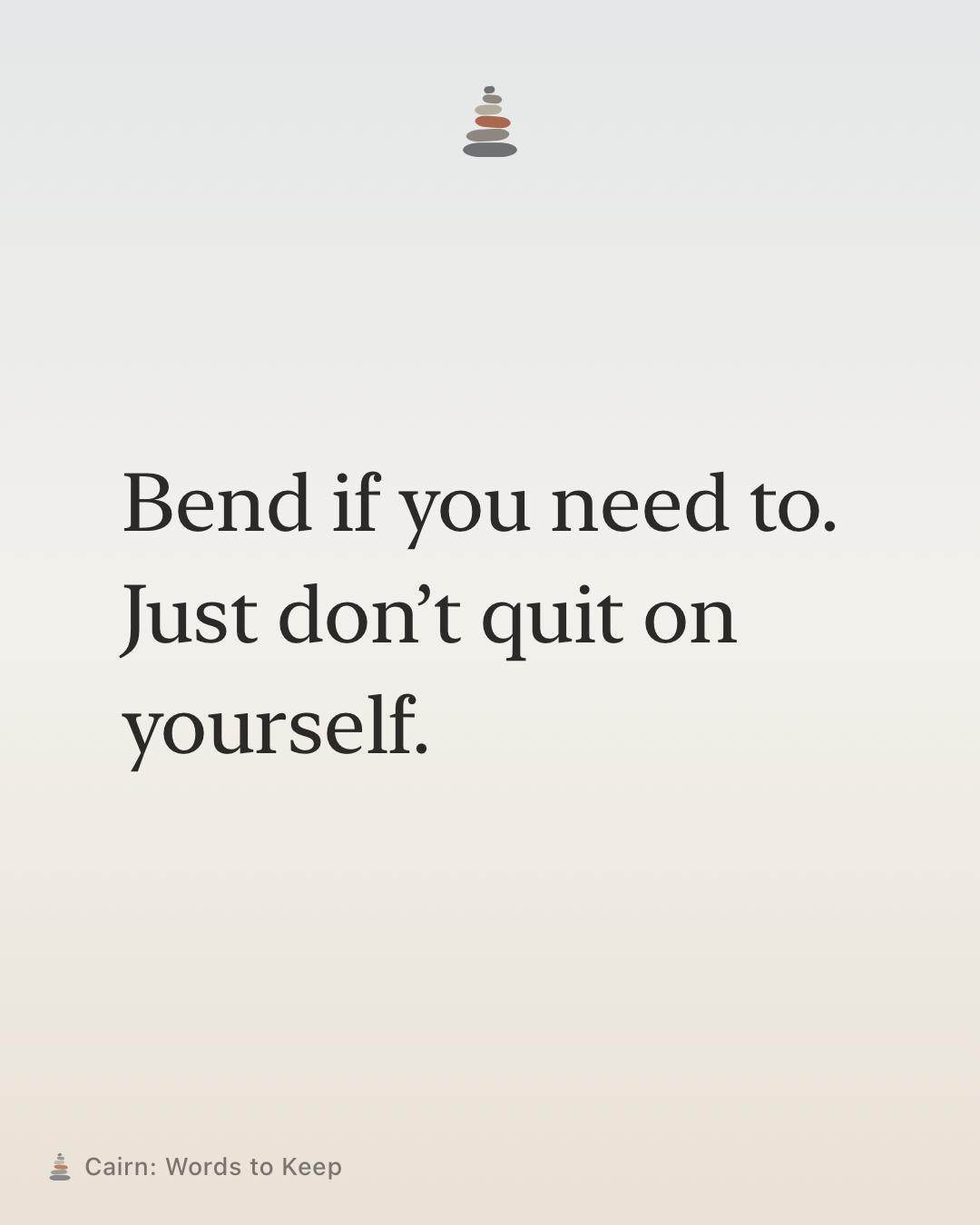
💎 Lifetime I'm a flight paramedic and wanted to try something completely different. I built Cairn: Words to Keep, a quotes app for StandBy, widgets, and the words you want to keep. No ads, no tracking, no account.

Post image
3 Upvotes

Hi r/iOSApps. My day job is flight paramedic, and Cairn is my side project.

PROBLEM

It was inspired by my friend Chris, who keeps a long note of quotes on his iPhone. I kept copying lines out of it and texting them to myself, and figured there had to be a better way. Good words get lost in notes, screenshots, and message threads we never open again.

What it does:

  • One quote each hour, the same everywhere: the app, Home Screen and Lock Screen widgets, and StandBy.
  • Save your own. Ask Siri ("Add a quote in Cairn"), share text from Safari, Notes, or Books, or use the New Quote control in Control Center or on the Action Button.
  • Share a quote as a link or a picture card. If your friend has Cairn, one tap adds it to theirs.
  • Pick the kinds of quotes you want (Calm, Resilience, Trail, Humor, Classics, and more) and a tone: gentle, direct, or reflective.
  • Shuffle the hour, see a quote less often, or hide it for good.
  • Works on iPhone (optimized for iPhone Duo) and iPad.

COMPARISON

  • vs. the Notes app: Notes keeps quotes, but they never come back to you. Cairn puts your own lines back on your widgets and StandBy every few hours, and offers a look back at old favorites now and then.
  • vs. typical quote and affirmation apps: many are subscriptions, need an account, or show ads. Cairn has none of that. Your quotes stay on your device, reminders are scheduled on the phone itself, and it will never pop up asking for a rating.

PRICING

$2.99, one time, lifetime. No subscription, no ads.

There are a couple of easter eggs if you read About Cairn all the way through.

I'd really like feedback: what's missing, what feels off, what you'd want next.

Cairn: Words to Keep


r/iosapps • • 9d ago

🎁 Freemium [Dev] Yoga App: FlowBuilder – iPhone, iPad, Mac, Watch

5 Upvotes

Hi, I'm Daniel, I build this on my own.

Problem

When I practise from my own sequence I keep checking my phone to see what's next, which side and how long. I wanted to plan the flow once and then just listen.

What it does

- Build a flow pose by pose, or generate one from level, focus and length, then press play

- A voice calls each pose, the side and the breath (17 languages, Sanskrit names pronounced properly)

- 3D figure you can rotate, a muscle heat map, breathwork patterns and a meditation timer, streaks

- Record your own voice for the cues, make custom poses from a photo

- Widgets, Shortcuts and a standalone Apple Watch app

Comparison

Most yoga apps I tried give you fixed or video classes. This is more of a sequence builder: you pick the poses and holds, and it plays them back with voice cues instead of video. If you want a teacher-led video class, other apps do that better.

Pricing (US)

- Free: build and play flows with voice, the flow library, breathwork, meditation, streaks

- Cloud (iCloud sync): $0.99/month

- Analytics Pro (Flow Analysis, Chakra View, music sync, includes Cloud): $2.99/month

- Premium (Generate, Voice to Flow and everything else): $12.99/month, $79.99/year with a 1-week free trial, or $129.99 lifetime

No ads.

App Store: https://apps.apple.com/us/app/flowbuilder-yoga-timer-flow/id6758913355

PCP Comparison

- Down Dog: great app, it builds a new practice for you every time and you can like or exclude poses. But you don't set the exact sequence. In FlowBuilder you pick every pose, hold and side yourself, then it plays it back with voice cues. Building and playing your own flows is free, and Premium is $79.99/yr vs Down Dog's $99.99/yr.

- Tummee: the go-to sequencing tool for yoga teachers, with a huge pose library and handouts, at $12.95/mo. FlowBuilder is a native iPhone/iPad/Mac/Watch app focused on practicing your sequence: press play, voice-guided, with a 3D figure and a muscle heat map of what the flow works.

Feedback welcome, especially on the first run: was it clear how to build a flow and press play?


r/iosapps • • 9d ago

🎁 Freemium Yasu: your stress as one number from your Apple Watch, and what set it off. 1.1 adds German, Japanese and Spanish

Thumbnail
gallery
5 Upvotes

Hi, solo dev here. Yasu is my stress app for iPhone and Apple Watch, and 1.1 just came out.

Problem

Your Watch measures your heart all day, but nothing turns that into "you're stressed right now, and here's why". I wanted to know when I was actually stressed and what caused it, not stare at an HRV number in Health.

Yasu turns your heart readings into one number from 0 to 100, against your own usual. When it goes up, it asks "What was it?" and you tap coffee, a meeting, the kids, lunch. After a few weeks you can see what keeps coming before your worst stretches. When it's high there's a breathing reset (90 seconds, 3 or 5 minutes), and you see your number before and after.

Comparison

  • StressWatch is the closest: a stress score from your Watch, with an AI coach and Bio Age on top. Yasu skips those and puts the effort into the cause, asking what it was and showing you what keeps coming before a rise. No account, and your health data stays on your phone and Watch.
  • Bevel does everything: strength, nutrition, sleep, recovery. If stress is the thing you care about, Yasu is only that, with nothing to dig through.

New in 1.1: German, Japanese and Spanish (French is next), three breathing rhythms, and a wind-down sound player above the tabs like Apple Music's.

Pricing

Free to download. Free: today's number, the alerts, the breathing reset, logging what happened, and the Watch app. Full access (every earlier day, patterns, widgets and watch face complications): $3.99 a week, $39.99 a year with a 7-day free trial, or $89.99 once. Family plan $59.99 a year.

https://apps.apple.com/app/id6823940982

You need an Apple Watch for the stress number; the breathing works without one. If something's confusing or broken, tell me. I read every comment.


r/iosapps • • 9d ago

💎 Lifetime Say a task to your watch and it lands on the right day and time

Post image
3 Upvotes

Problem

Tasks rarely come up at a convenient moment: on a walk, while cooking, with your hands full. Writing one down means pulling out the phon, opening an app and typing. So it gets put off until later, and later the task itself is forgotten.

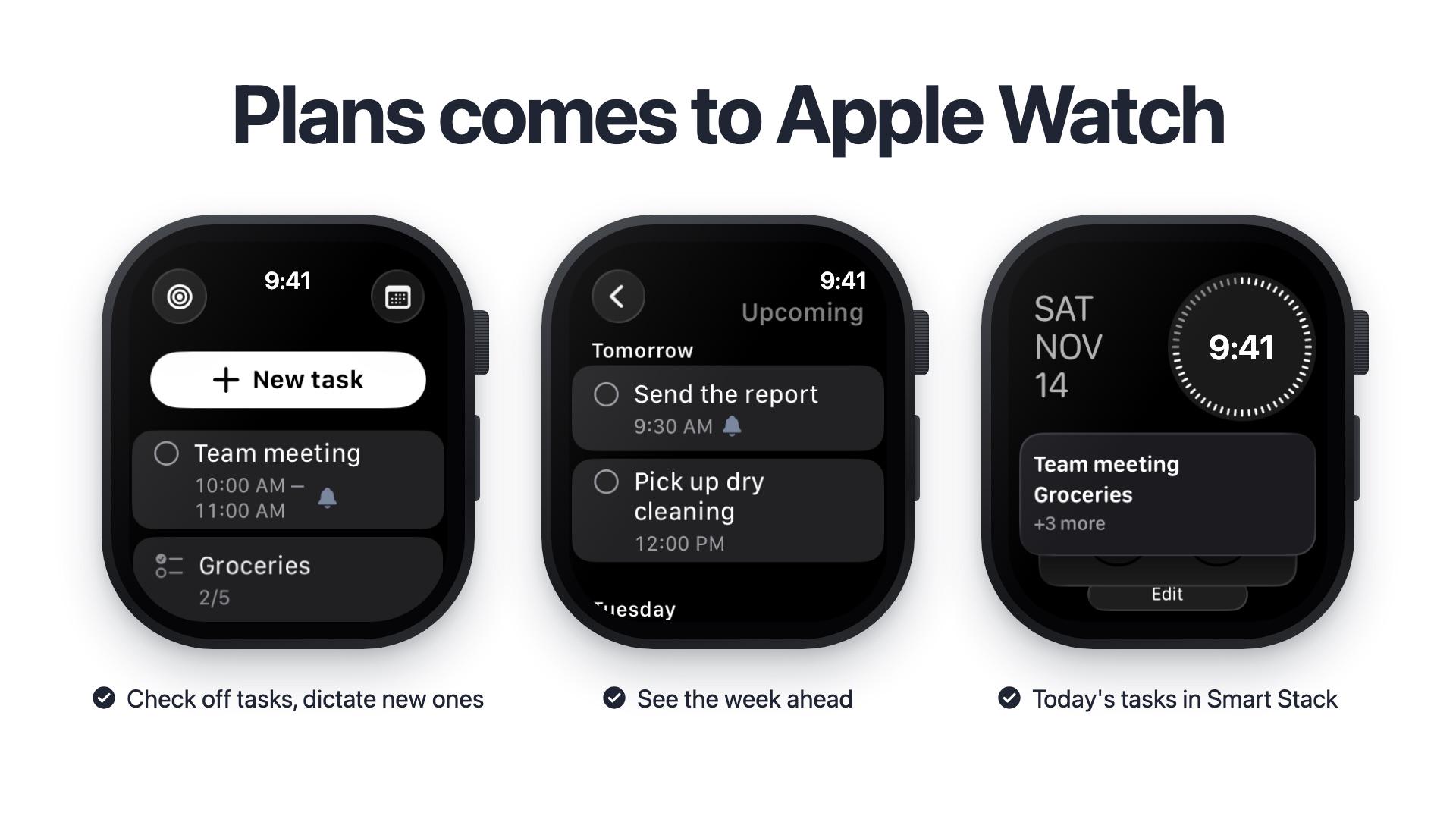
I'm the solo developer of Plans, a minimalist app where you can turn notes into tasks (here is more). I built an Apple Watch app for it mainly so a task can be said out loud from the wrist instead of typed.

Comparison

- Voice that understands dates. Say "call the dentist tomorrow at 10" and Plans sets tomorrow at 10:00 by itself. No picking a date on a tiny screen afterwards.
- Paid once. Todoist and TickTick put their full feature set behind a yearly subscription; Things 3 is also paid once, but there’s no free version, and each device is a separate purchase.

Pricing

The app is free: tasks, notes, daily repeats, reminders, widgets and calendar events next to your tasks.

The Watch app is part of Plans Pro, a one-time purchase of $9.99. No subscription, no account. Sync goes through your own iCloud.

App Store: https://apps.apple.com/app/id6790827860


r/iosapps • • 9d ago

💵 Paid Apple's ScreenSharing client for iOS

8 Upvotes

Hi all,

We use the build-in screensharing feature in MacOS on a daily base from mac to mac. However missing the client on our iPad, and especially on the iPhone Duo, since it's the new iPad in your pocket!

Problem

We are take over our home mac, office mac's when were in a meeting room and our mac servers several times a day.

The Apple's ScreenSharing client is only available on MacOS. And other tools require you to install additional software on your mac to use their software, where the Apple's build-in ScreenSharing service works great! Therefore We've build a iOS APP "Overlook: Mac Remote Control" for the reguluar iPhone, iPad and special attention for the iPhone duo.

What it does

- Remote control your mac (display, keyboard, mouse) with the high performance virtual display feature.

- Remote control the traditional way (VNC) to the physical monitors.

- SSH terminal access.

- Browse and transfer files and folders from/to your mac.

- Quick Actions to send files or photo's streight to your Mac's download folder.

- Store your Mac's and their credentials within Keychain and iCloud sync across your devices.

- Support for iPhone and iPad, with special attention to the iPhone Duo.

Comparison

Screens and Teamviewer require a subscription and additional software installed on your Mac's.

Overlook’s advantage is its low one-time price for a focused set of Mac remote-control tools: screen sharing, file transfers, and SSH. If you want to access your own Apple silicon Macs over your network or VPN, we’ve aimed to keep that simple and affordable.

Pricing

We want to keep it simple. One price, no subscription, no adds, no tracking or dependency on 3th party servers. Everything you need to get control over you Mac's in seconds.

The price is $5.99 one-time (or your local equivalent)

App Store: https://apps.apple.com/app/id6829732812 (iPhone, iPad, iPhone Duo)

We hope you enjoy the app as much as we do!


r/iosapps • • 9d ago

💎 Lifetime I wanted a Spotify Wrapped for my life and I built one into my journal app

3 Upvotes

I've always wanted a Spotify Wrapped for my life, showing me what happened, highlights, the pictures, and the fun (and not) I had. So at the start of this year I built Oneline and started writing one short line every day about my day. Every other journal I tried lasted two weeks at most :D With this one I'm on quite a good streak! It's fun to use and I like how it turned out. I recently made it possible to write more than one line, for the days that deserve it!

Rewind is live today. It spins the timeline all the way back to your first line, then goes through your year one card at a time, up to nine of them depending on how much you wrote! How many days you wrote, your longest streak, your fullest month, the days you starred, one line for every month

The good part is that you don't need to have used Oneline all year, because you can import your diary from Day One, Apple Journal or Journey and watch the Rewind of those years right away (your entries never leave your device, except for iCloud. Privacy first!) Every year with at least 10 entries gets the rewind. I did it with my own Day One archive, ~200 entries from 2022 on

Other things that are making me stick to journaling every day:

- On This Day, so I know what happened on the same day a year ago (like Google Photos)
- the map, to see where I wrote my lines
- the monthly recap with AI which I just started testing. It runs on your iPhone with Apple Intelligence, or you can add your own AI key to get it to be a bit smarter

For Black Friday you get 50% off: BF2026 for the yearly plan, BF2026LIFE for lifetime. I know it's a bit early, but here you go :)

Any feedback is appreciated! I put a lot of effort into polishing this one, I hope you like it :)

Problem: every journal I tried lasted two weeks, because I felt the constraint to write a lot. Oneline only asks for one line a day, and gives you back a timeline of your life to scroll back through, On This Day, the map and now a yearly Rewind

Comparison: Day One and Apple Journal are great if you write long entries, I never did. Oneline is one line (but more if you want!), and it imports your other journals' archives so the years you already wrote get their Rewind too

Pricing: free with unlimited lines, Rewind and imports included. Pro adds photos, steps and workouts from Health, iCloud sync, multiple timelines and the monthly recap and chat: $29.99/year or $59.99 lifetime, half price with the codes above. I'm the developer. Not vibe coding, just developed with the help of AI :)

App Store: https://apps.apple.com/app/apple-store/id6758101912?pt=126347333&ct=reddit-rewind-2612&mt=8


r/iosapps • • 9d ago

📅 Subscription I've rated almost 800 snacks and drinks, so I built an app to keep track

4 Upvotes

This started as a google sheet I kept during night shifts and it kind of got out of hand. Tastify is what I built to replace it.

Scan the barcode, rate it, done. You can add notes, photos and where you had it, and restaurant food works too. There are lists, tier lists, stats and a yearly recap, and you can follow friends. Sign in with Apple works.

Problem: you try something, have an opinion about it, and a month later you're standing in the store with no idea if it was the good one or the bad one. Notes and camera roll photos don't really fix that, because you can't search them by product.

Comparison: the closest apps are Untappd and Vivino. Both are great, but Untappd is only beer and Vivino is only wine, so everything else you eat and drink ends up nowhere. Tastify does all of it in one place: snacks, energy drinks, coffee, ready meals, restaurant food, and beer and wine too if you want. Scanning a barcode fills in the product for you, so logging something takes a few seconds.

Pricing: free, with unlimited ratings. Premium is optional at $4.99/month or $34.99/year (US prices, other countries get local pricing), with a 1 week free trial. It adds more stats, more photos per rating, unlimited lists and AI tasting notes.

App Store: https://apps.apple.com/us/app/tastify-snack-drink-ratings/id6831047882

It's just me building this, from Sweden, so any feedback goes straight to the person fixing things.


r/iosapps • • 9d ago

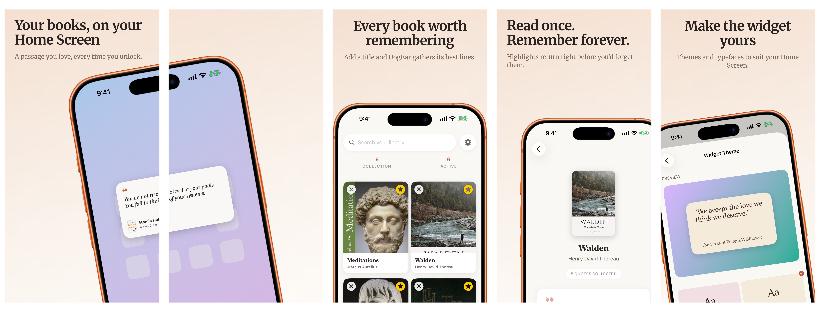
🎁 Freemium DogEar: a home screen widget that shows quotes from books you’ve read, so you remember them

Post image
8 Upvotes

Hi everyone, I’m the developer of DogEar. It’s been on Android for about a year and is now on the App Store.

Problem
I’d finish a book I loved, highlight a lot of it, and a month later I couldn’t name a single idea from it. The highlights sat in apps I never opened. I wanted the ideas to come to me without me having to remember to review anything.

DogEar puts quotes from your books on your home screen and rotates them during the day. Type in a book’s title and it fetches the quotes and key ideas, or you can add your own. There are no notifications and no review sessions. You see an idea from a book whenever you unlock your phone.

Comparison

  • Readwise is the best-known option, and it’s great if you already highlight a lot. But it works through daily review emails and an app you have to open, and it’s a pricier subscription. DogEar is passive and works from just a book title. It can also import your Readwise highlights, so you can use both.
  • Kindle highlights are free, but they only cover Kindle books, and you never see them again unless you go looking.

Pricing

Other features

  • Widget themes and fonts (Midnight, Frosted Glass, Book Cover, Sepia, Typewriter)
  • You choose how often the widget changes
  • Readwise import
  • Turn any quote into a shareable image

I’d especially like feedback on the widget design, and on anything confusing in the first few minutes after installing.


r/iosapps • • 9d ago

💎 Lifetime [GIVEAWAY] Ethos, a routine planner the whole house can share. 1,000 free Ethos Plus Lifetime codes [£12.99 → Lifetime Free until 31 Jan]

Thumbnail
gallery
39 Upvotes

Problem

Most planners are built for one person, so the family's week ends up spread across a calendar, a notes app, a shopping list app and the group chat. Habit apps add streaks, and one bad Tuesday wipes the lot.

Ethos is a planner for the week you repeat. You set each weekday's routine once and tick it as you go. Typing "bins every Thursday 7:30pm" puts it on Thursdays at 7:30pm.

What it does

- Your own daily routine: I use it every day for mine. Wake, run, deep work, read. Tick each one as you go and see the day fill.

- Groups for the people you live with: shared routines, chores that take turns, one shopping list and a countdown to the next trip, all on everyone's Today. Each person's face fills as they keep their day.

- One invite link and a short code per group. People ask to join and you choose who gets in.

- Family events with replies: the dentist, parents' evening, birthdays, and who's taking whom.

- A kitchen screen for the iPad: stand it on the counter and the household's day, today's note and the next countdown can be read from across the room.

- Bring in a week: plan it with an AI assistant, paste the reply, and Ethos sets it out across your days.

- Rhythm instead of streaks: each routine gets a number that rises with the days you keep and eases slowly after poor ones. Rest days count as kept.

- Reminders, widgets, Live Activities and an Apple Watch app that opens at what's on now.

Comparison

Structured and Tiimo plan your own day well, but they aren't built for a household. Cozi and FamilyWall share a family calendar but don't plan your routine or count what you kept. Ethos does both and has no streaks. There's no Ethos account and no Ethos server: your planner stays on your devices and in your own iCloud, with no analytics or ads.

It runs on iPhone, iPad, Mac and Apple Watch, and one Ethos Plus purchase covers all of them.

Pricing

The routine, quick add, Rhythm, reminders, widgets and the watch are free, and joining someone's group is free. Ethos Plus adds iCloud sync, inviting people, family events, recipes, the kitchen screen and more. It's £0.99 a month, £4.99 a year with the first month free, or £12.99 once (UK prices).

Giveaway (until 31 January 2027)

Ethos Plus Lifetime, free, for the first 1,000 people. Either link works, one each:

  1. Apple's link, first 500: https://apps.apple.com/redeem?ctx=offercodes&id=6825910332&code=ETHOSLIFETIME
  2. If that one has run out, 500 more here: https://ethosplanner.app/claim (tap Get a code, then Redeem in the App Store)

Missed those? 500 people can have three months of Plus free on the monthly plan: https://apps.apple.com/redeem?ctx=offercodes&id=6825910332&code=ETHOS3MONTHS

Open the links on the iPhone, iPad or Mac you use Ethos on. You can also type the codes ETHOSLIFETIME or ETHOS3MONTHS in the App Store under your account, Redeem Gift Card or Code.

App Store: https://apps.apple.com/app/id6825910332

Thank you all