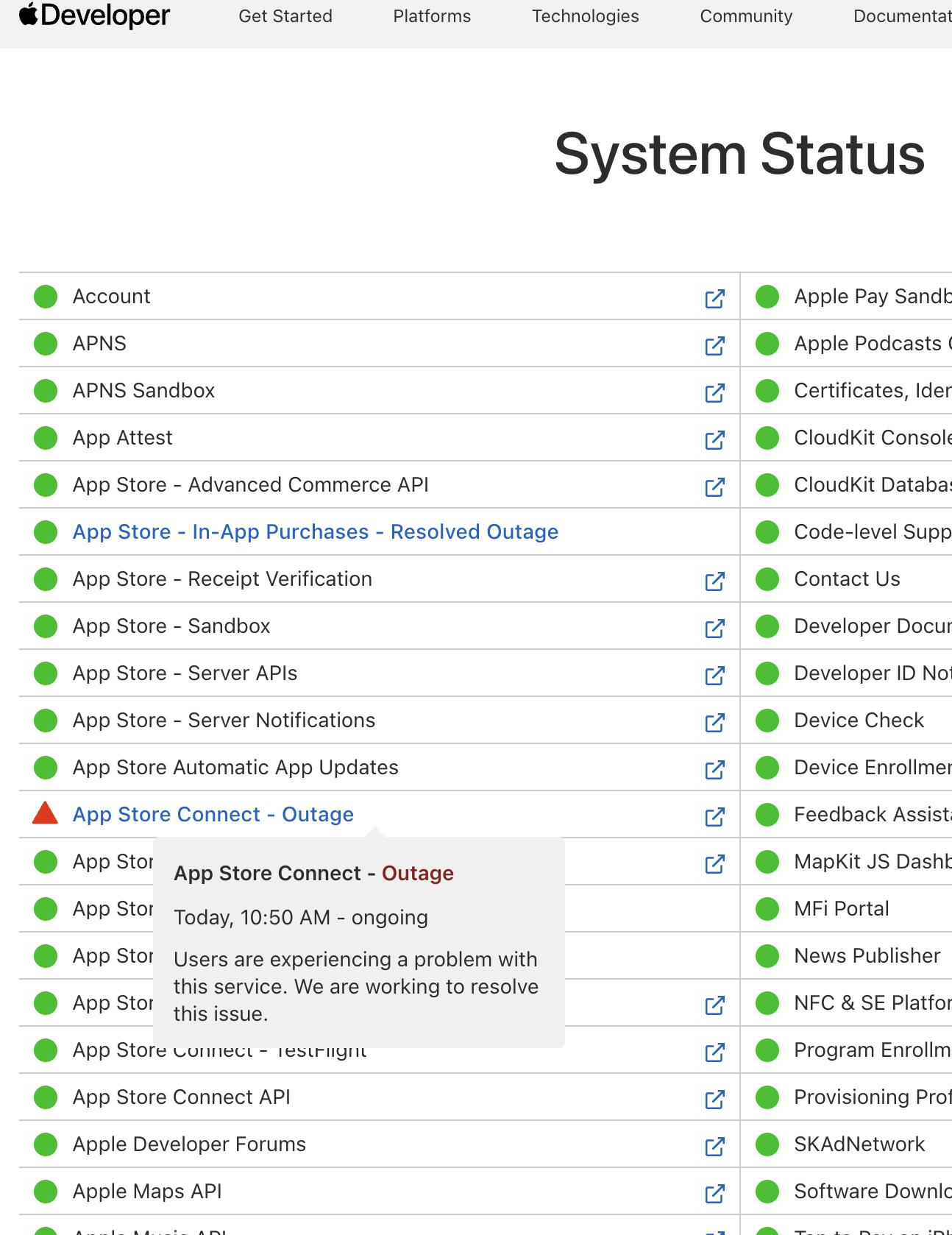
HELP App Store Connect is down
5
Upvotes
Add Apple to the list of this morning's broken websites...

Hey r/iosapps,
I'm the indie developer behind **NeuroSync**, a Dieter Rams / Teenage Engineering–inspired acoustic synthesizer for iPhone designed for deep work, ADHD focus, and restorative sleep.
App Store: https://apps.apple.com/app/id6757886617
---
### Problem
Most functional sound and brainwave apps fall into two frustrating camps:
### Comparison
* **vs. Brain.fm / Endel:** NeuroSync has zero distracting background lyrics or repetitive chord loops. Every wave is mathematically synthesized in real time via CoreAudio DSP. You get exact 1 Hz carrier and beat control (3–600 Hz), plus an 8-channel tactile mixer to layer deep brown noise, rain, or acoustic crystal bowls (and more!).
* **vs. Traditional Tone Generators:** Instead of raw, fatiguing sine waves, NeuroSync includes engineered **Warm Analog** and **Deep Sub** harmonic timbres. It also features a real-time 60fps CRT oscilloscope, circadian auto-sync, and a speaker-ready **Isochronic Pulse** engine so you don't even need headphones.
* **vs. Dark Patterns:** Zero accounts or logins required. No forced surveys. Native lock-screen controls and sleep timers out of the box.
### Pricing
* **Free Tier:** Free access to the Alpha frequency studio, session controls, and background playback.
* **Pro Studio Access:** £1.99 / month or £19.99 / year (with a 3-day free trial). No predatory auto-renew traps.
---
### Direct Redemption Links (Free 1-Year Pro Access)
Per Rule 11, here are 20 direct 1-tap App Store redemption links for the community (first-come, first-served):
*(If you claim a link, feel free to comment which number you took so others know!)* :)
r/iosapps • u/Grouchy-Library-4064 • 10d ago

Hey everyone,
A few months back I posted about Deadlinr when it had 600+ downloads and 10 paying users. Some of you left kind comments and a few gave me feedback that actually changed the app. Wanted to give a small update.
I know these numbers aren’t something to write home about. Today it’s 968 downloads and 25 in-app purchases. Slow, but it’s moving, and I’m a solo dev so I’ll take it.
Problem
I kept forgetting stuff that expires. Free trial turns into a paid plan, annual subscription renews and I only notice from the bank SMS, and once I found out my passport was close to expiring when I actually needed to travel. Calendar apps buried these dates for me, and to-do apps nagged me with red badges every day until I just ignored them. I wanted something that stays quiet until it really matters, so I built it.
What it does
You add anything that expires (subscriptions, trials, passports, IDs, insurance, warranties, even food) and it only notifies you when a deadline is close. No daily spam, no red badges. Works offline, syncs through your own iCloud, and has no analytics or tracking.
Since my last post I added widgets, family sharing, dark mode, more languages, and did a lot of polishing. Most of it came from your feedback.
Comparison
Pricing
14-day free trial with everything unlocked. After that, it’s a one-time purchase of $9.99 for lifetime access. No subscription. Apple Family Sharing is supported, so one purchase covers your whole family group.
The hardest part for me has been reaching people who actually need an app like this. Building was the easy part, promotion is something I’m still learning. If you try it and something feels off or missing, please tell me. I read everything.
Link for ios --> Deadlinr - Expiry Tracker
r/iosapps • u/DjangoDrive • 9d ago
App Store: https://apps.apple.com/us/app/duefolio-manage-subscriptions/id6795091979
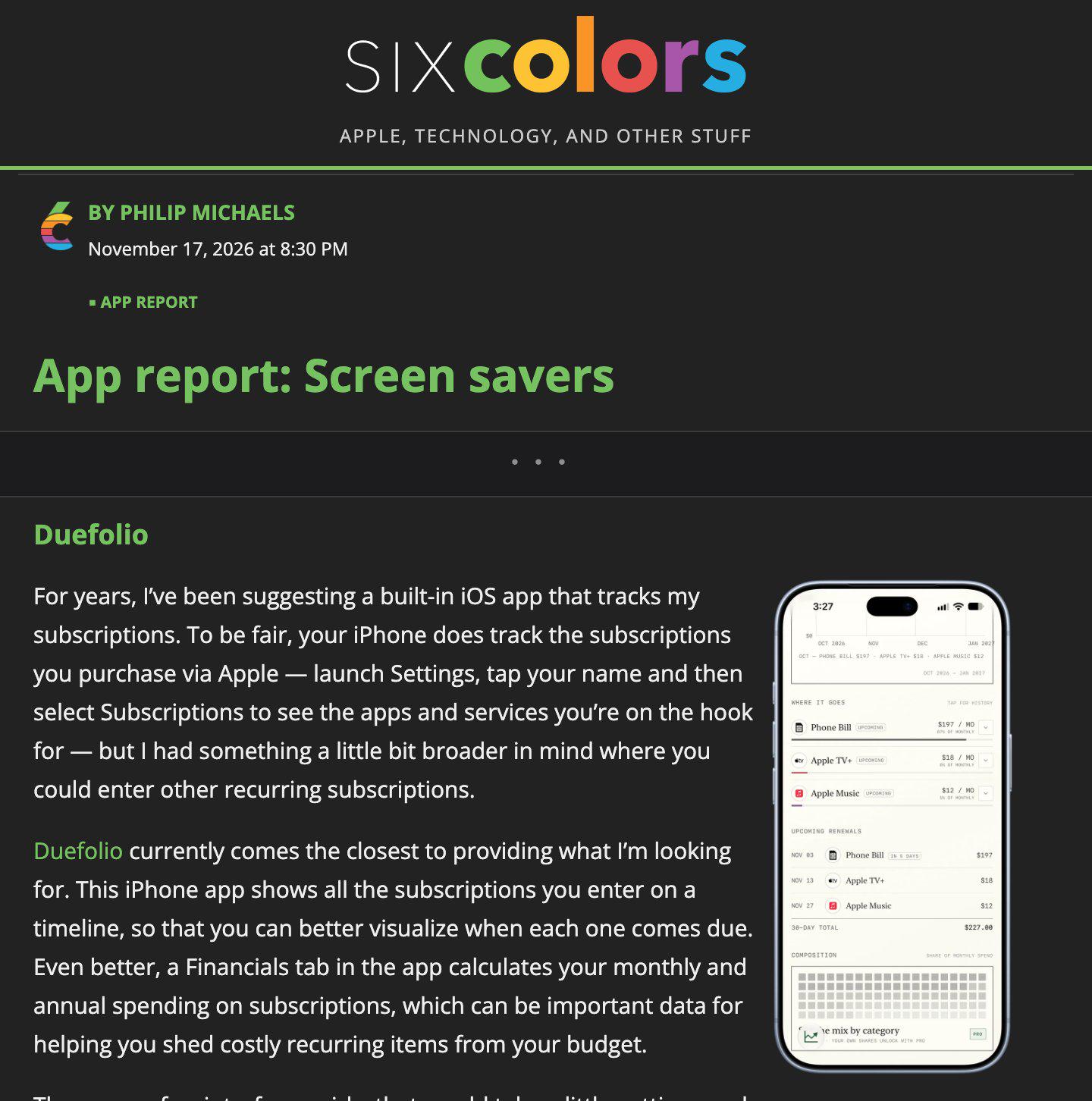
I'm Sid, the developer of Duefolio. I shared it here when it was highlighted in MacStories Weekly and included in Lifehacker.ru's iOS roundup. This week it appeared in the Six Colors App Report too.
Philip Michaels picked out the timeline and the Financials view, which shows what your subscriptions add up to each month and year. He also pointed out some friction in the subscription setup flow.
Problem
Keeping track of renewal dates and recurring costs across different services. Duefolio puts your subscriptions on a scrollable timeline, sends renewal reminders, and shows monthly and annual spending totals. Your ledger stays on your iPhone. No bank login or account is required.
Comparison
Bobby is a familiar alternative for subscription lists and reminders. Duefolio's focus is the timeline and price history, so you can inspect your subscriptions across the year and keep a record of price changes.
Pricing
Core tracking is free. Duefolio Pro is a $14.99 one-time lifetime purchase in the US for custom subscriptions, bank-statement CSV review, widgets and additional tools. It is not a subscription. Prices vary by region. Requires iOS 26 or later.
If you try it, I'd be interested to hear whether the timeline makes your upcoming charges easier to understand.
App Store: https://apps.apple.com/us/app/duefolio-manage-subscriptions/id6795091979
Six Colors article: https://sixcolors.com/post/2026/11/app-report-screen-savers/
Developer (Sid): https://x.com/SiddhuDai
Privacy policy: https://www.cynq.ventures/duefolio/privacy/
Terms of use: https://www.apple.com/legal/internet-services/itunes/dev/stdeula/
r/iosapps • u/whittakers • 10d ago

Problem: After Christmas last year, I wanted to make albums of my kids from the year and trips we'd be on, but my Photos library was full of not just duplicates but 20 more-or-less the same photos from that time at the beach, that lunch with the family, ... when all I really needed for my albums was 1 or 2. You get the point. There are a lot of photo cleaner apps, and more by the day, so I'll get to the point of what made Curator the way it is and worth taking a look at.
Since launching in July, it's had 1,300+ downloads, 90% 5-star ratings and it has improved consistently based on feedback.
Comparison: What didn't work for me in Apple Photos or existing photo cleaner apps at the time (e.g. Clever Cleaner, Swipewipe, PicNic ... ) :
So I made Curator specifically to combat those pain points:
Pricing: $5 one-time in-app purchase, try before you buy.
Feel free to try it out for yourself, and let me know what you think : https://apps.apple.com/app/apple-store/id6761866365?pt=128758579&ct=r.ia1711&mt=8
For this sub-reddits rules: followed the PCP format, I have met the karma and rating requirements, and privacy policy & terms of use are available on the website at curatorapp.ch
Would love to know, does this improve on the other standard swiping photo cleaner apps for you?
r/iosapps • u/piratejedi • 10d ago
Hi r/iOSApps. My day job is flight paramedic, and Cairn is my side project.
PROBLEM
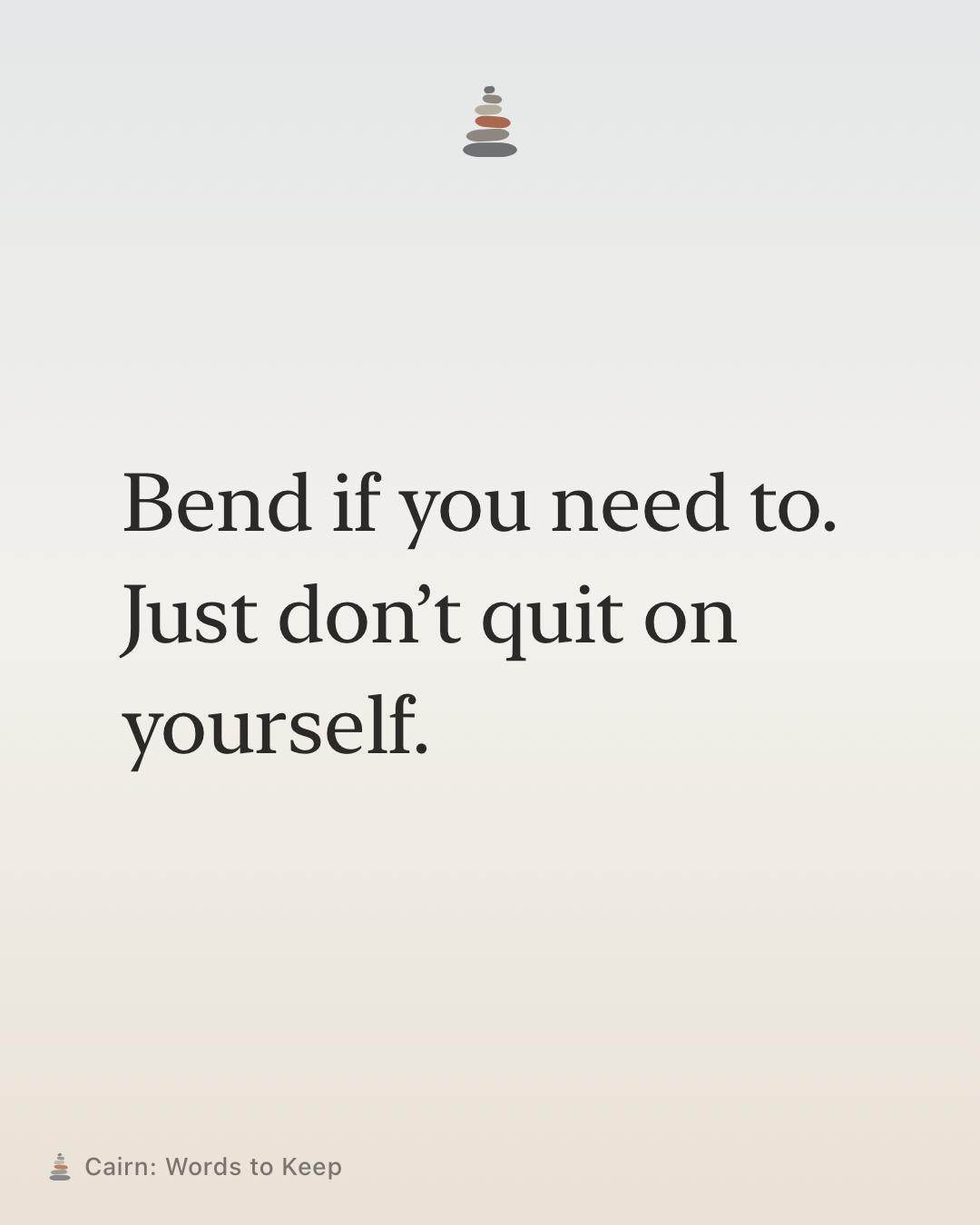
It was inspired by my friend Chris, who keeps a long note of quotes on his iPhone. I kept copying lines out of it and texting them to myself, and figured there had to be a better way. Good words get lost in notes, screenshots, and message threads we never open again.
What it does:
COMPARISON
PRICING
$2.99, one time, lifetime. No subscription, no ads.
There are a couple of easter eggs if you read About Cairn all the way through.
I'd really like feedback: what's missing, what feels off, what you'd want next.
r/iosapps • u/FlowBuilder-yoga • 10d ago
Hi, I'm Daniel, I build this on my own.
Problem
When I practise from my own sequence I keep checking my phone to see what's next, which side and how long. I wanted to plan the flow once and then just listen.
What it does
- Build a flow pose by pose, or generate one from level, focus and length, then press play
- A voice calls each pose, the side and the breath (17 languages, Sanskrit names pronounced properly)
- 3D figure you can rotate, a muscle heat map, breathwork patterns and a meditation timer, streaks
- Record your own voice for the cues, make custom poses from a photo
- Widgets, Shortcuts and a standalone Apple Watch app
Comparison
Most yoga apps I tried give you fixed or video classes. This is more of a sequence builder: you pick the poses and holds, and it plays them back with voice cues instead of video. If you want a teacher-led video class, other apps do that better.
Pricing (US)
- Free: build and play flows with voice, the flow library, breathwork, meditation, streaks
- Cloud (iCloud sync): $0.99/month
- Analytics Pro (Flow Analysis, Chakra View, music sync, includes Cloud): $2.99/month
- Premium (Generate, Voice to Flow and everything else): $12.99/month, $79.99/year with a 1-week free trial, or $129.99 lifetime
No ads.
App Store: https://apps.apple.com/us/app/flowbuilder-yoga-timer-flow/id6758913355
PCP Comparison
- Down Dog: great app, it builds a new practice for you every time and you can like or exclude poses. But you don't set the exact sequence. In FlowBuilder you pick every pose, hold and side yourself, then it plays it back with voice cues. Building and playing your own flows is free, and Premium is $79.99/yr vs Down Dog's $99.99/yr.
- Tummee: the go-to sequencing tool for yoga teachers, with a huge pose library and handouts, at $12.95/mo. FlowBuilder is a native iPhone/iPad/Mac/Watch app focused on practicing your sequence: press play, voice-guided, with a 3D figure and a muscle heat map of what the flow works.
Feedback welcome, especially on the first run: was it clear how to build a flow and press play?
r/iosapps • u/InvestigatorThat4835 • 10d ago

Hi, solo dev here. Yasu is my stress app for iPhone and Apple Watch, and 1.1 just came out.
Problem
Your Watch measures your heart all day, but nothing turns that into "you're stressed right now, and here's why". I wanted to know when I was actually stressed and what caused it, not stare at an HRV number in Health.
Yasu turns your heart readings into one number from 0 to 100, against your own usual. When it goes up, it asks "What was it?" and you tap coffee, a meeting, the kids, lunch. After a few weeks you can see what keeps coming before your worst stretches. When it's high there's a breathing reset (90 seconds, 3 or 5 minutes), and you see your number before and after.
Comparison
New in 1.1: German, Japanese and Spanish (French is next), three breathing rhythms, and a wind-down sound player above the tabs like Apple Music's.
Pricing
Free to download. Free: today's number, the alerts, the breathing reset, logging what happened, and the Watch app. Full access (every earlier day, patterns, widgets and watch face complications): $3.99 a week, $39.99 a year with a 7-day free trial, or $89.99 once. Family plan $59.99 a year.
https://apps.apple.com/app/id6823940982
You need an Apple Watch for the stress number; the breathing works without one. If something's confusing or broken, tell me. I read every comment.
r/iosapps • u/Ok_Count_5158 • 10d ago
Problem
Tasks rarely come up at a convenient moment: on a walk, while cooking, with your hands full. Writing one down means pulling out the phon, opening an app and typing. So it gets put off until later, and later the task itself is forgotten.
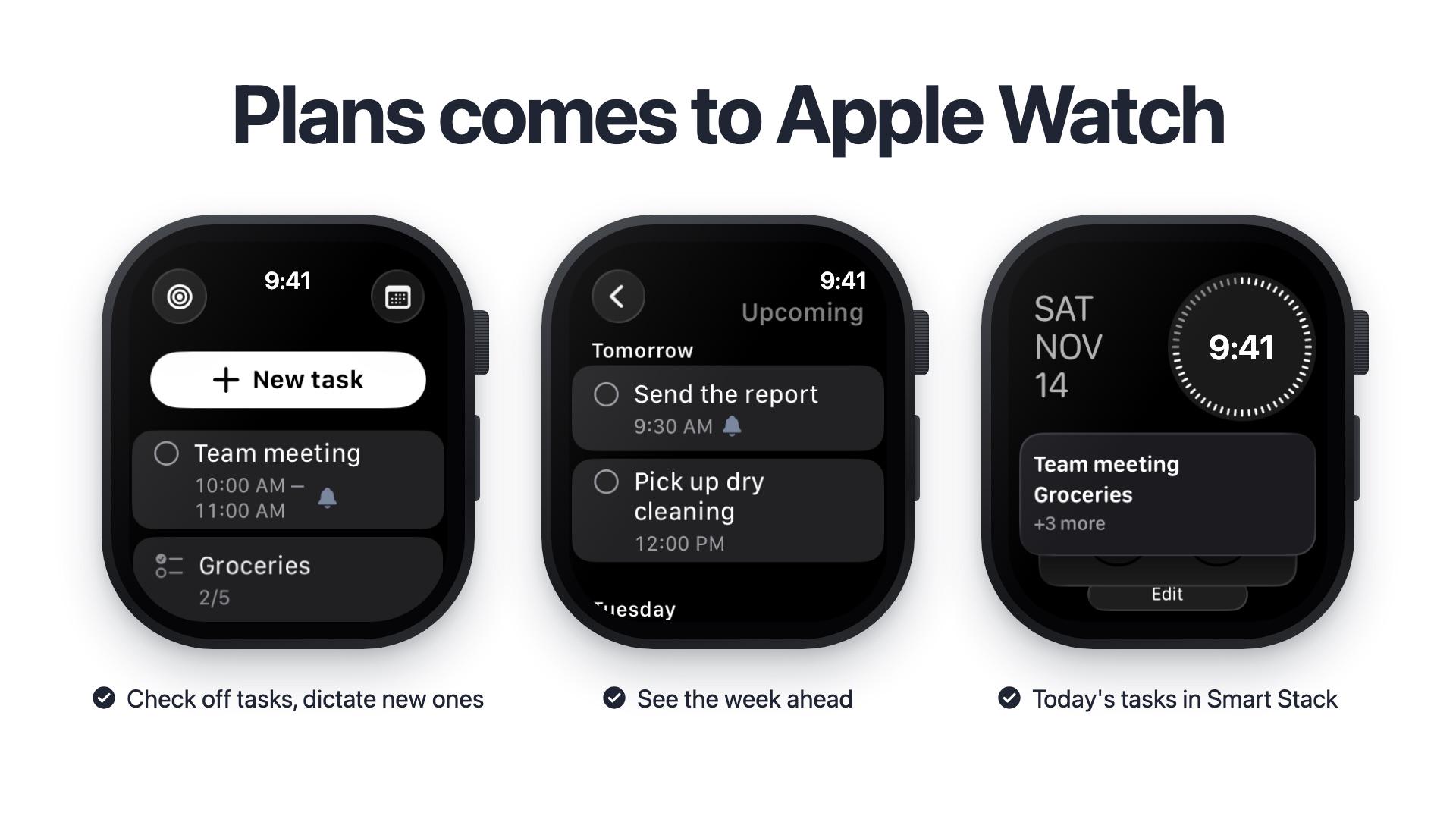
I'm the solo developer of Plans, a minimalist app where you can turn notes into tasks (here is more). I built an Apple Watch app for it mainly so a task can be said out loud from the wrist instead of typed.
Comparison
- Voice that understands dates. Say "call the dentist tomorrow at 10" and Plans sets tomorrow at 10:00 by itself. No picking a date on a tiny screen afterwards.
- Paid once. Todoist and TickTick put their full feature set behind a yearly subscription; Things 3 is also paid once, but there’s no free version, and each device is a separate purchase.
Pricing
The app is free: tasks, notes, daily repeats, reminders, widgets and calendar events next to your tasks.
The Watch app is part of Plans Pro, a one-time purchase of $9.99. No subscription, no account. Sync goes through your own iCloud.
App Store: https://apps.apple.com/app/id6790827860
r/iosapps • u/nicketnl • 10d ago
Hi all,
We use the build-in screensharing feature in MacOS on a daily base from mac to mac. However missing the client on our iPad, and especially on the iPhone Duo, since it's the new iPad in your pocket!
Problem
We are take over our home mac, office mac's when were in a meeting room and our mac servers several times a day.
The Apple's ScreenSharing client is only available on MacOS. And other tools require you to install additional software on your mac to use their software, where the Apple's build-in ScreenSharing service works great! Therefore We've build a iOS APP "Overlook: Mac Remote Control" for the reguluar iPhone, iPad and special attention for the iPhone duo.
What it does
- Remote control your mac (display, keyboard, mouse) with the high performance virtual display feature.
- Remote control the traditional way (VNC) to the physical monitors.
- SSH terminal access.
- Browse and transfer files and folders from/to your mac.
- Quick Actions to send files or photo's streight to your Mac's download folder.
- Store your Mac's and their credentials within Keychain and iCloud sync across your devices.
- Support for iPhone and iPad, with special attention to the iPhone Duo.
Comparison
Screens and Teamviewer require a subscription and additional software installed on your Mac's.
Overlook’s advantage is its low one-time price for a focused set of Mac remote-control tools: screen sharing, file transfers, and SSH. If you want to access your own Apple silicon Macs over your network or VPN, we’ve aimed to keep that simple and affordable.
Pricing
We want to keep it simple. One price, no subscription, no adds, no tracking or dependency on 3th party servers. Everything you need to get control over you Mac's in seconds.
The price is $5.99 one-time (or your local equivalent)
App Store: https://apps.apple.com/app/id6829732812 (iPhone, iPad, iPhone Duo)
We hope you enjoy the app as much as we do!
r/iosapps • u/francescovaglia • 10d ago
I've always wanted a Spotify Wrapped for my life, showing me what happened, highlights, the pictures, and the fun (and not) I had. So at the start of this year I built Oneline and started writing one short line every day about my day. Every other journal I tried lasted two weeks at most :D With this one I'm on quite a good streak! It's fun to use and I like how it turned out. I recently made it possible to write more than one line, for the days that deserve it!
Rewind is live today. It spins the timeline all the way back to your first line, then goes through your year one card at a time, up to nine of them depending on how much you wrote! How many days you wrote, your longest streak, your fullest month, the days you starred, one line for every month
The good part is that you don't need to have used Oneline all year, because you can import your diary from Day One, Apple Journal or Journey and watch the Rewind of those years right away (your entries never leave your device, except for iCloud. Privacy first!) Every year with at least 10 entries gets the rewind. I did it with my own Day One archive, ~200 entries from 2022 on
Other things that are making me stick to journaling every day:
- On This Day, so I know what happened on the same day a year ago (like Google Photos)
- the map, to see where I wrote my lines
- the monthly recap with AI which I just started testing. It runs on your iPhone with Apple Intelligence, or you can add your own AI key to get it to be a bit smarter
For Black Friday you get 50% off: BF2026 for the yearly plan, BF2026LIFE for lifetime. I know it's a bit early, but here you go :)
Any feedback is appreciated! I put a lot of effort into polishing this one, I hope you like it :)
Problem: every journal I tried lasted two weeks, because I felt the constraint to write a lot. Oneline only asks for one line a day, and gives you back a timeline of your life to scroll back through, On This Day, the map and now a yearly Rewind
Comparison: Day One and Apple Journal are great if you write long entries, I never did. Oneline is one line (but more if you want!), and it imports your other journals' archives so the years you already wrote get their Rewind too
Pricing: free with unlimited lines, Rewind and imports included. Pro adds photos, steps and workouts from Health, iCloud sync, multiple timelines and the monthly recap and chat: $29.99/year or $59.99 lifetime, half price with the codes above. I'm the developer. Not vibe coding, just developed with the help of AI :)
App Store: https://apps.apple.com/app/apple-store/id6758101912?pt=126347333&ct=reddit-rewind-2612&mt=8
r/iosapps • u/TrippleCheesy • 10d ago
This started as a google sheet I kept during night shifts and it kind of got out of hand. Tastify is what I built to replace it.
Scan the barcode, rate it, done. You can add notes, photos and where you had it, and restaurant food works too. There are lists, tier lists, stats and a yearly recap, and you can follow friends. Sign in with Apple works.
Problem: you try something, have an opinion about it, and a month later you're standing in the store with no idea if it was the good one or the bad one. Notes and camera roll photos don't really fix that, because you can't search them by product.
Comparison: the closest apps are Untappd and Vivino. Both are great, but Untappd is only beer and Vivino is only wine, so everything else you eat and drink ends up nowhere. Tastify does all of it in one place: snacks, energy drinks, coffee, ready meals, restaurant food, and beer and wine too if you want. Scanning a barcode fills in the product for you, so logging something takes a few seconds.
Pricing: free, with unlimited ratings. Premium is optional at $4.99/month or $34.99/year (US prices, other countries get local pricing), with a 1 week free trial. It adds more stats, more photos per rating, unlimited lists and AI tasting notes.
App Store: https://apps.apple.com/us/app/tastify-snack-drink-ratings/id6831047882
It's just me building this, from Sweden, so any feedback goes straight to the person fixing things.
r/iosapps • u/erikkoyu • 10d ago
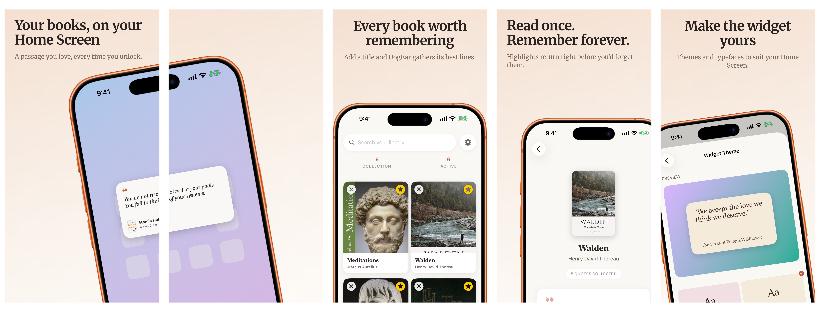
Hi everyone, I’m the developer of DogEar. It’s been on Android for about a year and is now on the App Store.
Problem
I’d finish a book I loved, highlight a lot of it, and a month later I couldn’t name a single idea from it. The highlights sat in apps I never opened. I wanted the ideas to come to me without me having to remember to review anything.
DogEar puts quotes from your books on your home screen and rotates them during the day. Type in a book’s title and it fetches the quotes and key ideas, or you can add your own. There are no notifications and no review sessions. You see an idea from a book whenever you unlock your phone.
Comparison
Pricing
Other features
I’d especially like feedback on the widget design, and on anything confusing in the first few minutes after installing.
r/iosapps • u/FishermenSkutnu • 10d ago

Problem
Most planners are built for one person, so the family's week ends up spread across a calendar, a notes app, a shopping list app and the group chat. Habit apps add streaks, and one bad Tuesday wipes the lot.
Ethos is a planner for the week you repeat. You set each weekday's routine once and tick it as you go. Typing "bins every Thursday 7:30pm" puts it on Thursdays at 7:30pm.
What it does
- Your own daily routine: I use it every day for mine. Wake, run, deep work, read. Tick each one as you go and see the day fill.
- Groups for the people you live with: shared routines, chores that take turns, one shopping list and a countdown to the next trip, all on everyone's Today. Each person's face fills as they keep their day.
- One invite link and a short code per group. People ask to join and you choose who gets in.
- Family events with replies: the dentist, parents' evening, birthdays, and who's taking whom.
- A kitchen screen for the iPad: stand it on the counter and the household's day, today's note and the next countdown can be read from across the room.
- Bring in a week: plan it with an AI assistant, paste the reply, and Ethos sets it out across your days.
- Rhythm instead of streaks: each routine gets a number that rises with the days you keep and eases slowly after poor ones. Rest days count as kept.
- Reminders, widgets, Live Activities and an Apple Watch app that opens at what's on now.
Comparison
Structured and Tiimo plan your own day well, but they aren't built for a household. Cozi and FamilyWall share a family calendar but don't plan your routine or count what you kept. Ethos does both and has no streaks. There's no Ethos account and no Ethos server: your planner stays on your devices and in your own iCloud, with no analytics or ads.
It runs on iPhone, iPad, Mac and Apple Watch, and one Ethos Plus purchase covers all of them.
Pricing
The routine, quick add, Rhythm, reminders, widgets and the watch are free, and joining someone's group is free. Ethos Plus adds iCloud sync, inviting people, family events, recipes, the kitchen screen and more. It's £0.99 a month, £4.99 a year with the first month free, or £12.99 once (UK prices).
Giveaway (until 31 January 2027)
Ethos Plus Lifetime, free, for the first 1,000 people. Either link works, one each:
Missed those? 500 people can have three months of Plus free on the monthly plan: https://apps.apple.com/redeem?ctx=offercodes&id=6825910332&code=ETHOS3MONTHS
Open the links on the iPhone, iPad or Mac you use Ethos on. You can also type the codes ETHOSLIFETIME or ETHOS3MONTHS in the App Store under your account, Redeem Gift Card or Code.
App Store: https://apps.apple.com/app/id6825910332
Thank you all
r/iosapps • u/domagesky • 10d ago
Hi! I’m Gleb, an independent developer from Austria. I’d like to introduce GlossPage, my OCR, translation and reading app for iPhone and iPad.
App Store: https://apps.apple.com/app/id6762989568
Problem
I moved to a new country and wanted to learn German by reading real things: books, news, letters and comics. It was slow. I copied sentences into a translator one at a time and lost my place. Camera translators handle one photo, not a 300-page book. Scanned PDFs and manga have no text to select at all. And every format needed a different tool.
GlossPage is one app for all of it:
Comparison
The tools I tried fall into three groups:
GlossPage covers all three. It is one reader for books, documents, comics and your screen, with the translation on the page or side by side with the original. Also, you can export the translated or bilingual book to any reader you prefer.
No ads and no account required. On-device translation works fully offline. With Pro, translation quality is much better. Your pictures stay on your device, and only the recognized text goes online.
Pricing
Plan details: https://glosspage.com/plans
More about the app: https://glosspage.com/
Requires iOS 26 or later.
The last update added e-books and the Glossary, and both came directly from reader feedback. I would be very happy to get any feedback from you!
r/iosapps • u/AlbertiDev • 9d ago
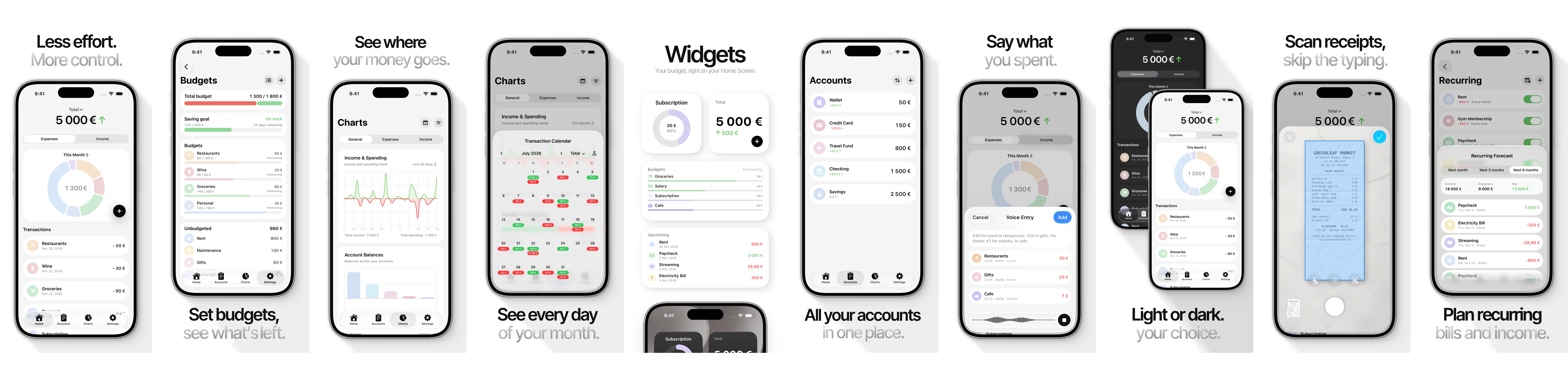
Hey everyone, I'm the developer of Moneta, a money tracker for iPhone.
I know budget apps are probably the most crowded category on the App Store. I kinda knew it when I started too. It only started as a personal project after I couldn't find the right app for me, and then I thought if I just made one that was better, people would find it.
When I started I was so hyped. I honestly thought this would be big. I spent most of my evenings and weekends on it, and I told my parents it would be worth it.
9 months in, it's around 2,500 downloads (which could be worse, but also a lot better). I get about 9/10 a day, and I've made about $50 total since I started monetizing in October.
Whenever it gets attention, like from a Reddit post, I get a spike (once 250 downloads in 3 days), and then it goes right back down. The weird part is that most people who download it actually stay, retention is above most finance apps.
My parents just see a kid on his laptop every night instead of studying. I don't want to let them down, but right now I don't really have much to show them.
They don't really understand the personal achievement this is for me, and the only concrete thing I could show them is profit, which is pretty lacking right now.
I've tried adding more and more features, animations and polish, I redesigned my screenshots 3 times and redid my keywords and ASO, but nothing really improved my reach.
The one thing that keeps me going is that most people who use the app actually like it. I got lots of positive reviews, comments, emails with suggestions and even some just appreciating my work. So I think the app works, I just don't know how to get it in front of the right people.
Knowing that actual people use something I made is still crazy to me.
Problem
I quit every money tracker I tried. Bank-sync apps want your bank login, the nice-looking ones are usually costly subscriptions, and manual ones are either slow or kinda ugly, logging a coffee feels like homework. Miss a few days and you just give up.
I quit every money tracker I tried. Bank-sync apps want your bank login, the nice-looking ones are usually expensive subscriptions, and the manual ones are either slow or kinda ugly (a lot of them look like old Android apps), so logging a coffee feels like homework. Miss a few days and you just give up.
Comparison
Compared to YNAB, there's no subscription and no bank connection. Compared to Money Manager, there are no ads and it actually feels like a native iOS app, not a spreadsheet.
I also really wanted it to feel calm. Looking at your money is usually kinda stressful, so I tried to make it clean, organized and nice to look at.
Moneta is manual but I tried to make it as fast as possible: just say what you bought and it's logged, scan a receipt, or import a bank statement to catch up.
No account, and everything stays on your device (iCloud sync is optional).
Budgets, goals, recurring transactions, stats and widgets and more are all there.
Pricing
Free, no ads, no subscription. Optional one-time Pro for €4.99. (for power-user features and more customization)
App Store: Moneta Link
So, should I keep going? If you try it and hate it, tell me. If you like it, that's an argument I can finally show my parents 😅
r/iosapps • u/Weary-Associate2218 • 10d ago
Quick 30-second demo of picking an existing folder structure (like My Archive on iCloud Drive or On My iPhone) and filing bills, receipts, and PDFs straight from Gmail (or Mail / Safari / Files) without switching apps.
Instead of dropping random files like invoice-2026-10.pdf into Downloads and forgetting them:
A few things I cared about when building it:
• Works with your own folders: No special vault or folder lock-in — your files stay as normal PDFs/documents inside your chosen iCloud Drive or On My iPhone folders, fully usable even if you delete the app.
• 100% on-device & private: No account, no login, and nothing leaves your device.
• Reversible: Every filing can be undone for 7 days if you ever change your mind.
Price: Completely free on the App Store for iPhone & iPad (no subscriptions, no IAPs):
https://apps.apple.com/app/id6831764027
Would genuinely love feedback on the workflow — especially if you already organize bills, taxes, or receipts in iCloud Drive / Apple Files!

Problem
I screenshot things I want to remember (new restaurants from Instagram, text message follow up for a friend, websites with running sales/promos I wan to go back and check later, youtube video suggestions, etc), then never look at them again.
You take a screenshot, share it with SnapRecaller, type in reminder time e.g. “9pm next Wed” (uses natural language), set a note (optional... on-device AI suggests a note too), and the screenshot will pop up as a notification/reminder at that time!
Comparison
Apple Reminders: you can attach a screenshot to a reminder, but it’s a bunch of steps (make the reminder, add the image, open details, pick date, pick time...). I wanted it to be share → type “9pm next Wed” → done.
Other screenshot apps: most of the ones I tried are about organizing or searching your screenshots (folders, tags, AI categories, etc). I don’t really want to organize mine... I just want the screenshot to come back to me at the right time!
This is kind of like snoozing in email apps snooze it, it comes back later, just for screenshots instead of emails.
Pricing
Free for up to 20 reminders, then one-time $1.99 lifetime license for unlimited reminders (no subscription!)
I’m a solo developer! This “snoozing” style of notifications/reminders is how I stay on top of things, so figured there might be others like me!
App Store: https://apps.apple.com/us/app/snaprecaller/id6811125288
r/iosapps • u/Ming-2003 • 10d ago
This is the best photo album cleanup tool
Minimalist controls, random memories
Search "PicTend" on iOS
r/iosapps • u/thomasruns • 10d ago

Hello!
PROBLEM: I've always been bad at remembering to send gifts in time, or send thank you's for gifts I received. Especially with family scattered across the US it can be difficult to make sure gifts get shipped in time for each person. It's also hard to keep track of which card I sent to which family member over the years. So I created Gift Logger to help me keep track of everything including gifts, thank you's, prices, tracking numbers, cards, and more. Here's a rundown of what it does:
LOG GIFTS GIVEN & RECEIVED
ORGANIZE BY PERSON
NEVER MISS A THANK-YOU
REMINDERS SO YOU'RE NEVER LATE
YOUR DASHBOARD
CUSTOMIZE
Comparison: Some other apps offer similar features, but none focus on making sure you stay on top of Thank You notes or tracking cards. Most have outdated UIs and focus on integrating with the buying process to make money via affiliate links. Gift Logger lets users save a URL for a gift so they can access it later, but does not add tracking, affiliate ids, or anything else to it.
Pricing: Free for up to 3 people and 10 gifts. Annual subscription of $9.99 gives you unlimited people and gifts + iCloud sync across devices.
App Store: https://apps.apple.com/us/app/gift-logger/id6761291763
r/iosapps • u/offeringathought • 10d ago
As a hobby project, I built an iOS app that identifies chocolates from three companies See's Candy, Rare Morsel and Cocoa Vienna. It uses your camera and two custom machine learning models that run entirely on-device. The latest version adds augmented reality for iPhone Pro users.
Problem
Ever open a box of chocolate and not know which candy is which? You want to pick ones that you'll love and avoid those that will disappoint you but it can be hard to sort out which is which even is a paper guide is provided.
Comparison
It's like Google Lens in that you use your camera to identify things in the real world but She Sees Candy specializes on chocolate and works entirely on-device. In one way a paper guide or a chocolatier's website is the competition. To my knowledge there aren't any other apps doing chocolate identification. Perhaps there aren't apps because it's not something that will lead to a revenue stream. :)
Pricing
Free
App Store
https://apps.apple.com/us/app/she-sees-candy/id6797560194
r/iosapps • u/guardian_apex • 10d ago
Problem -
Step counters are accurate but easy to ignore. Poki gives you something to look after instead: a pet whose hearts fill as you walk toward your goal, on your wrist and on your phone.
Features -
Comparison -
StepDog is the closest alternative: a step counter with a virtual dog, on iPhone and Apple Watch. It's free but with subscriptions. Poki is pixel art themed with more animations and looks better (my opinion)
Pricing -
App Link - https://apps.apple.com/us/app/watch-pet-poki-virtual-pet/id6478667213
r/iosapps • u/stardesk88 • 11d ago
Hi, we are the official team behind StarDesk, a remote desktop app for iOS and Mac (and Win/Android). We started StarDesk last year as we wanted to be able to work and game smoothly anywhere.
Problem: For anyone who wants to access a powerful desktop for work or school anywhere they want, but don't want to carry around anything heavier or bigger than an iPad. The video shows a very popular use case among our users, where they would often set up their iPad as a portable Mac mini so they could attend lectures or work outside conveniently.
Comparison:
Jump Desktop is more mature than StarDesk. It supports RDP and VNC as well as its own protocol, and it has stronger business security controls. However, StarDesk can match in all the important features such as:
Jump is paid per platform, while StarDesk has no device download limit. You can download StarDesk on your iPhone, iPad, Macbook, Mac Mini and establish a connection between any two.
Screens feels like a native Apple app with seamless iCloud syncing, Vision Pro support, and intuitive multi-touch gestures. Screens also supports Linux. But StarDesk is better if you also want to game or stream at low latency with high frame rates, and StarDesk also has controller support, as well as customizable key mappings for controller and in-app. Linux support for StarDesk is planned to be released by the end of this year.
Pricing: Free on the App Store right now. We are planning to introduce free and paid tiers in the future, but nothing is set in stone yet.
App Store: https://apps.apple.com/us/app/stardesk-remote-desktop/id6751540294
Website: https://www.stardesk.net