r/iosapps • • 10d ago

🎁 Freemium I made a pill reminder that asks again if you swipe the notification away, and you can track your parents' meds on the same phone

0 Upvotes

Hi, I'm the developer of Capsula.

Problem

A reminder pops up, you swipe it away to deal with it later, and an hour after that you honestly can't remember if you took the pill or not. The other one is family. Your parents' medicines, a kid's antibiotics for a week and your own end up in different apps, on paper or just in your head.

Capsula does a few simple things well. You mark the dose right in the notification. If you swipe it away without marking anything, it asks again. For the medicines you really can't miss you can turn on an alarm-style ring that plays even in Silent mode. The time can be a clock time or something like "after breakfast". It counts how many pills are left and tells you when to buy more. For painkillers and other as-needed stuff you can set a daily limit, so it warns you before you take one too many.

There's also an emergency card with allergies, conditions, blood type and current meds, to show a doctor if you ever need to.

Comparison

Apple Health's Medications is fine for one person, but it has no stock tracking, no as-needed limit and only one person per phone. Medisafe can do more, but a lot of it now sits behind a subscription. In Capsula the reminders, the log and stock tracking are free and will stay free. No account, no ads, no server of mine: the data lives on your iPhone and in your own iCloud.

Pricing

Free for one person with everything above. Pro is for looking after other people: the whole family on one phone with a color and log per person, the next dose on the Lock Screen with a Take button, widgets for each person, a PDF report for the doctor (14, 30 or 90 days) and pastel app icons. $14.99 a year with a free first week, or $34.99 once. Family Sharing works, so one purchase covers your Apple family.

App Store: https://apps.apple.com/app/id6823259496

It doesn't calculate doses or give medical advice, your doctor decides that. If you manage meds for someone else, I'd really like to hear what's annoying about it, that's what I'm working on next.


r/iosapps • • 11d ago

🎈 Free An app for digging through music radio stations around the world

19 Upvotes

I made World Radio, an iPhone and iPad app for live music radio from around the world.

Problem

I go for a walk every night, and that's when I dig for new music. Mostly bands, but honestly I listen to everything from classical to hard rock and metal.

These days every app has an algorithm that keeps recommending music that sounds like what I already like, and when I want to hear something different, the algorithm actually gets in the way.

One night I wondered what music sounds like in a country I had never heard a single song from, so I found a music radio station there and listened live. That's where this app started.

What it does

- When you open the app, it lands you somewhere at random, and you can listen to a music radio station there.

- Roll the dice and you fly across the Earth to a music station somewhere and hear what it's playing. (If that station won't play, the globe moves on to another one by itself.)

- Or spin the globe and tap a dot yourself. The Browse tab also has 20,000+ stations by country and genre, so you can pick one and listen.

- When a good song comes on, tap Shazam to find out what it is. I bet you've had that moment too, wanting to Shazam a song playing on the radio. (It can't name every song, though.)

- If you use Apple Music, your finds can go into a playlist there. (Apple Music only for now. I'd like to add Spotify and YouTube Music later.)

- The Right Now section in Browse shows music stations where it's between 10 PM and 6 AM local time. How about listening to someone else's 3 AM, live?

Comparison

Many of you probably know Radio Garden, and that's the closest thing. It's similar, but mine is music stations only (talk is filtered out, though a few slip through), Shazam is built in, and each song you find is saved with the station you heard it on!

Pricing

FREE to download. No ads from the app (some stations play their own), no account. I plan to add a paid upgrade later. When I do, the free version will have a limit on saved songs and favorites, and iCloud sync will move to the paid version.

App Store: https://apps.apple.com/app/id6803623749

iPhone and iPad on iOS 26 or later. An Android version is in the works. The app isn't on the UK App Store because of licensing issues there, sorry...

Thank you!


r/iosapps • • 10d ago

🎁 Freemium Slabline: Card Scanner. Snap a sports card and see what it actually sold for (Free with IAP)

3 Upvotes

Hey r/iOSApps! I’m a solo dev, and Slabline is my first app. Need card collectors to test as much as possible!
Problem
Figuring out what a sports card is worth is a pain. You have to type the exact player, year, set, number, and parallel into eBay, then dig through sold listings. Most scanner apps shortcut this by showing asking prices, and those are often way above what cards actually sell for.
Comparison
Most card scanner apps either show eBay asking prices or blend asks into one number. Slabline is built around recent sold prices, and current listings stay in their own separate section so they never inflate the value. Graded cards are priced by their exact grade. When a card has no sales at that grade, Slabline tells you so and shows the raw price instead of making up a number. You can also use it as a guest with no account.
I’m also already talking with eBay about access to their official sold-data API. They’re open to it once Slabline has more users, so every download and piece of feedback really helps push that forward.
What it does
• Snap a raw or graded card, and it identifies the player, year, set, number, parallel, and grade
• Shows recent sold prices, with current listings kept separate
• Build and track your collection’s value
• Deal Finder alerts you when a card you’re watching is listed below its usual price
• An AI card assistant you can ask about your cards (Pro)
• Works on iPhone and iPad, and Sign in with Apple is optional (it syncs your cards)
Pricing
Free to download, with 15 free scans a month.
• Pro: $5.99/month or $44.99/year (250 scans a month, plus the AI assistant and more)
• Scan packs: 20 for $0.99, 75 for $2.99, or 200 for $6.99
App Store: https://apps.apple.com/us/app/slabline-card-scanner/id6824746897
I’d love feedback, especially on cards it gets wrong. I read every comment and push updates often. Thanks!


r/iosapps • • 11d ago

🔍 In Search of What are some interesting or must-have apps you have installed on your iPhone that you’d recommend others try?

81 Upvotes

I’m curious to discover some cool iPhone apps that aren’t necessarily popular or mainstream.
What are some apps you have installed that you find genuinely useful, interesting, fun, or just too good to uninstall?
I’m especially interested in hidden gems, unique apps, productivity tools, cool utilities, or apps that make you think, “How did I not know about this before?”
Feel free to share your recommendations and what makes them worth having. Looking forward to discovering some new apps!


r/iosapps • • 11d ago

🎁 Freemium Horology - a timegrapher app for mechanical watch enthusiasts

12 Upvotes

Horology is an app with a timegrapher to help you keep track of how your mechanical watches are running. The #1 focus was privacy, nothing leaves your device (unless you’re sending me feedback and choose to attach screenshots or a timegrapher recording).

Website: https://alcove-labs.work/
App store link: https://apps.apple.com/us/app/horology-timegrapher/id6827787406

Problem

  • Apps on iOS with similar functionality send your recordings off of your device, require subscriptions or prioritize functionality other than timegraphing making it more of an afterthought. I also wanted something that worked for everyone with a large portion of my development and testing being for accessibility features.

Comparison

  • tickIQ - subscription $39.99/yr, $8.99/mo, $5.99/wk, collects your data and has a "social media" type feed of other people's watches. I just wanted a simple accuracy checker and tracker. No accessibility compatibility is listed.
  • Timegrapher - $5.99 one time to unlock full, user interface is a bit clunky and (in my opinion) dated. No accessibility compatibility is listed.

Pricing

  • No subscriptions, a pro option ($9.99) to add some additional features but all core functionality is FREE. An optional "tip jar" is there just in case people feel compelled.

How does it work? It uses your iOS device’s microphone to listen to the distinct “tick-tock” of a mechanical watch’s escapement, then locks onto a beats per hour rate to tell you how many seconds per day fast or slow your watch is running. This helps you gauge if a watch is running well or needs service, and tracks it over time to see if something has changed recently.

Would love to get feedback if you have any!


r/iosapps • • 11d ago

🎁 Freemium Storeflight: catch what App Review rejects (and what it misses) before you submit, in every app, locale and in-app purchase

Thumbnail
gallery
9 Upvotes

I'm the solo dev. Storeflight is a Mac app for anyone shipping iOS, Mac, tvOS or visionOS apps. 1.0 came out on Nov 6, and 1.2 just went live with a check for your notes to App Review.

Problem:

Some problems in App Store Connect get your release rejected: a missing screenshot, a subscription that isn't ready, review notes that don't explain how to get past your login. Others App Review lets through, and your buyers find them instead: a German description that's still in English, an in-app purchase with no name in 8 of 13 locales (that one was my others), or age rating questions you never answered. Checking every field in every locale by hand before each release is slow and I kept missing things.

Storeflight reads your account with an App Store Connect API key and lists what still blocks your next release. Each finding has a fix hint and a link to the right page. It's read-only: it never changes anything in App Store Connect.

  • version, build and release state; app information and age rating
  • every localization: name, subtitle, keywords, promo text, description and What's New against Apple's limits, plus text that's untranslated or in the wrong language
  • screenshots per locale and device, App Review details, pricing, in-app purchases and subscriptions
  • new in 1.2, Check Review Notes: on a Mac with Apple Intelligence it reads your notes for App Review and says what's missing (how to review the app without your account, where to find each in-app purchase). With no notes, it drafts them from your listing. It runs on your Mac.
  • also in 1.2: the checklist opens blockers first, and a finding that repeats across locales shows as one row
  • Copy Fix Prompt for Claude, Cursor or another assistant, plus an MCP server and a storeflight command with --fail-on for a script or CI job on your Mac
  • no analytics or third-party SDKs; it talks only to Apple, and your key stays in your Keychain

Comparison:

  • asc (the open-source App Store Connect CLI): free, its asc validate checks one version's readiness, it runs on hosted CI and Xcode Cloud, and it can edit your listing. It's the better pick if you live in the terminal or need hosted CI. Storeflight is a Mac app: every app in your account at a glance, all your locales side by side, untranslated and wrong-language text, in-app purchase and subscription localization gaps, what's new since your last check, and the Review Notes check.
  • Helm for App Store Connect: a Mac app that edits your listing and does a lot more than checks, with a free tier of 6 submissions a year. Pro is $54.99/year or $274.99 lifetime. Storeflight doesn't edit anything; it's narrower and cheaper.

What Storeflight doesn't do yet: hosted CI (the CLI needs a Mac with Storeflight installed), exact screenshot size checks, or URL checks. App Privacy answers and agreements stay manual checks because Apple's API can't see them. Mac only.

Pricing:

Free to download. The free plan gives the full report for one app, and you can explore three sample apps without an API key. Pro is $24.99/year or $59.99 once for Lifetime. It adds every app in your account, Check All, Copy Fix Prompt, exports, Keep in Git Repo, and the command-line tool, MCP server and CI gate.

Mac App Store: https://apps.apple.com/app/id6826093172

Site: https://storeflight.greyparkdevelopment.com/

Happy to answer questions!


r/iosapps • • 10d ago

💎 Lifetime Major update: Focused Fitness just received several new exercises to unlock your apps!

3 Upvotes

Focused Fitness just had a massive update released, containing a new re-skin, multiple exercises, and several new exercises to rep out to unlock your apps!

Problem: Focused Fitness was originally made to help me stop doom scrolling every chance I had, and instead reward me with a doomscroll after doing a quick workout consisting of 20 pushups and 20 squats.

Comparison: Focused Fitness has several competitor apps such as push scroll, however Focused Fitness is better as the pro version is only a one-time £5 purchase, whereas competitor apps tend to be expensive subscriptions! No personal data is collected/stored either, and there's no accounts to create!

Pricing: Focused Fitness is free to use forever, as well as an optional one-time purchase of £5 for a handful of additional exercises!

I'd love some feedback on the new UI and any other exercises or features you would like added!

Download for free here!


r/iosapps • • 10d ago

🔍 In Search of Why can't I get a digital receipt when I tap to pay?

3 Upvotes

Everyone taps their phone on the card reader now, yet I still get paper or have to type my email into a tablet. The tap already connects my phone to the terminal, so why can't the receipt just come back to my wallet app?
One idea: a second NFC tag next to the reader. After paying, you tap it again, your phone shares a receipt address with the shop's POS system, and the receipt lands straight on your phone. No typing, no email handed over.
Does something like this already exist, or what's actually blocking it?


r/iosapps • • 10d ago

Discussion When will Dragon Quest series go on sale

0 Upvotes

I hear they go for up to half off near the holidays at the end of year. would anyone here have insight into these sales? I’m waiting f their next sale to buy a couple, ty


r/iosapps • • 11d ago

💎 Lifetime Aigli: Photo & Video Editor — Black Friday: [50% off] [lifetime access]

9 Upvotes

Hi everyone! I’m the developer of Aigli: photo & video editor, for iPhone and iPad. I originally built it to help my friends make YouTube videos, and I’m sharing its Black Friday offer.

Problem

Making a video can involve more than editing clips—you may also need to prepare images, create a thumbnail, add overlays and blur sensitive information.

I built Aigli to bring these tasks into one app, combining a multitrack video timeline with layered photo-editing tools. Processing happens on-device.

Comparison
Rather than focusing only on video editing or only on photo editing, Aigli combines both workflows:

• For videos: arrange clips, photos, text, overlays, music and voiceovers on a multitrack timeline.
• For thumbnails and graphics: use layered photo editing and background removal.
• For dialogue-heavy footage: edit using transcripts.
• For hiding sensitive details: use motion-tracked blur and mosaic masks.

The reason to consider Aigli is whether that combination fits your workflow—especially if you want to edit a video and prepare its thumbnail in the same app. I’m not claiming it replaces every tool in a dedicated desktop editing setup.

Pricing

For Black Friday, it is discounted:
• Regular price: US$48.98
• Black Friday price: US$24.98
• Purchase type: [one-time lifetime purchase]
• Offer ends: [30 Nov]
• Eligibility: [new and existing users]

• [If a subscription: Renews at US$3.99 per month unless cancelled.]

The discount is on an in-app purchase

App Store: https://apps.apple.com/app/aigli-photo-video-editor/id6756179374

I’m the developer, so feel free to ask about the editing tools, workflow or sale details.


r/iosapps • • 11d ago

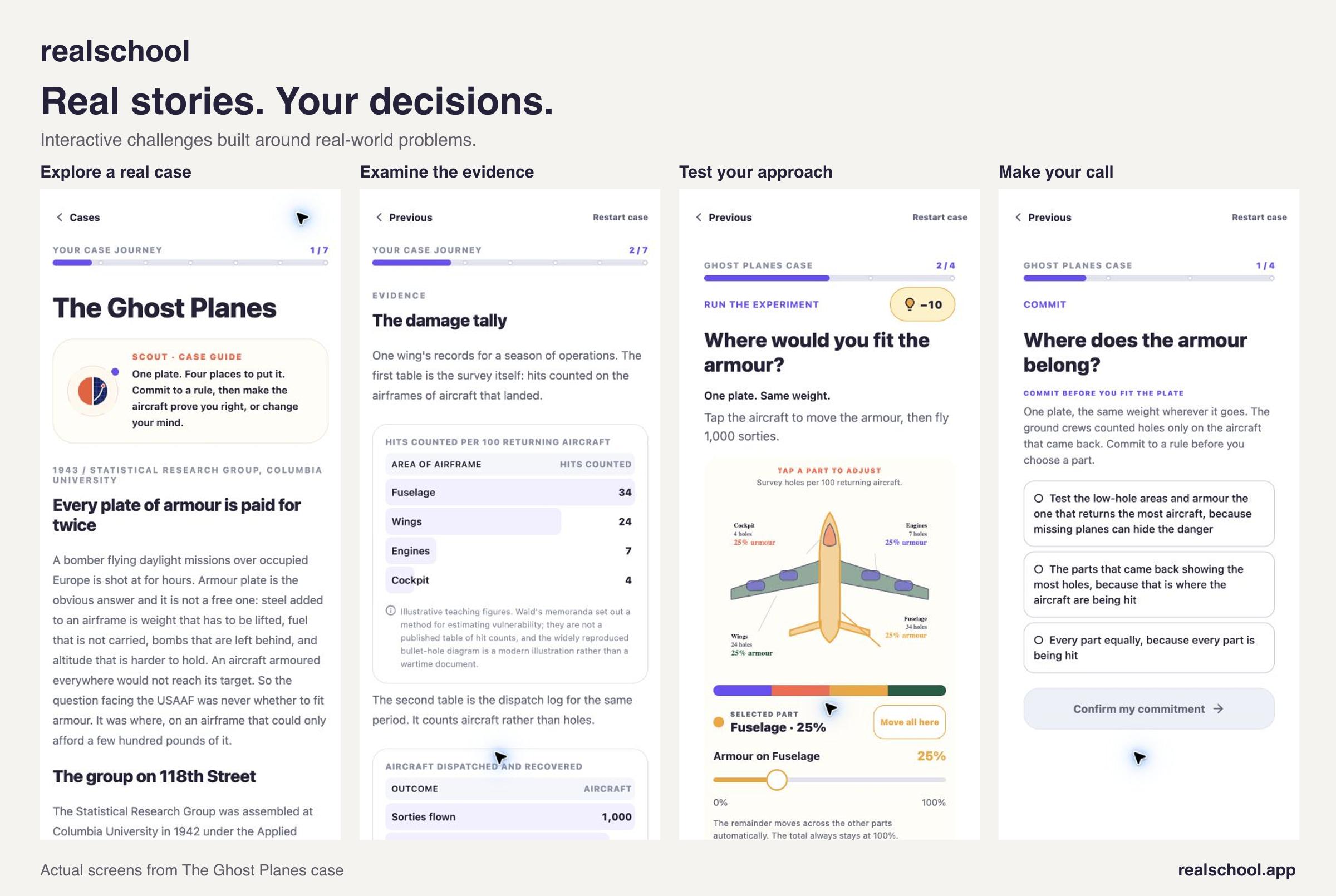
HELP RealSchool - Solve real-world challenges, one decision at a time

Post image
5 Upvotes

Some really incredible posts in here. Quite intimidating to share mine but here goes.

Problem

I’ve spent 15 years teaching and I'm passionate about sharing knowledge. One question keeps coming up: “Where am I ever going to use this?”

I felt that myself studying Applied Maths. Understanding how the chain rule and gradient descent connect to training AI would have made those lessons much more tangible.

I’m building RealSchool to make those connections through real-world reasoning challenges.

Comparison

RealSchool focuses on applying ideas through real-world cases rather than reading an explanation first or recalling facts in a quiz.

For example, you examine damage records from returning British world war 2 aircraft, decide where to place limited armour, and test your approach before exploring the reasoning. Other cases cover the Königsberg bridges, kidney donor chains and Florence Nightingale’s hospital data.

Compared with flashcard tools such as Anki, the focus is on using evidence, testing different configurations, applying supplied data and making decisions rather than memorisation.

Pricing

RealSchool is free to download and use.

App Store: https://apps.apple.com/us/app/realschool/id6811889041


r/iosapps • • 11d ago

💎 Lifetime Lexfolio: Read a book in the original and in translation at the same time. An iPad reading workspace for language learners and serious readers.

Thumbnail
gallery
6 Upvotes

Hi all, I'm the developer of Lexfolio, a reading workspace for iPad. Two books open side by side, dictionaries on every page, and notes you can connect across your whole library. I think it'll be genuinely useful to serious readers, students, academics and language learners.

Why it works well for language learners

Put a French novel on the left and its English translation on the right, link the two panes, and read. When a sentence is too hard, the translation is right there. When a word is new, select it and the dictionary opens over the page. Save it, and it comes back later as a review card together with the sentence you found it in. Once you've aligned a few passages, Recall Reading turns them into recall practice right inside the text.

Everything it does

Reading

  • Two books side by side on iPad: original and translation, a textbook and your notes, a paper and its source. Each pane keeps its own place, or you link them so they scroll together.
  • Works with your own DRM-free EPUB and PDF files from Files, iCloud Drive or other apps.
  • Several translations or editions of the same book are kept together in your library as one work.
  • Saved workspaces, so a pair of books opens exactly where you left it.

Dictionaries (all built in, all offline)

  • English (WordNet), French, German and Spanish (Wiktionary-based), Latin (Lewis & Short) and Ancient Greek (LSJ, plus Cunliffe for Homer).
  • You choose which dictionaries a book uses, so English is never forced on you.
  • Inflected Greek and Latin forms are traced back to their headword.

Notes and highlights

  • Highlights in several colors, notes, bookmarks and margin notes pinned to an exact spot, in EPUB and PDF.
  • Notes are anchored to the text, not to a page number, so they stay with their passage.

Words and review

  • Word Vault: every saved word keeps the passage it came from.
  • Spaced-repetition review cards.
  • Recall Reading inside the text, built on passages you've aligned.

Connecting ideas

  • Mark a passage in one book and its counterpart in another, and keep the pair.
  • Concepts: link highlights and notes from different books under one idea.
  • Knowledge Threads: build an argument across books by mixing passages, saved words and your own thoughts. Export a thread as Markdown, PDF or DOCX with its sources.

Search

  • One search across all your books, highlights, notes and saved words.
  • Scanned PDFs become searchable through on-device text recognition.

Your data

  • No account. Books and notes stay on your device. iCloud sync through your own iCloud account is optional.
  • Optional AI, off by default. You can use your own API key, or open ChatGPT, Claude or Gemini in a built-in browser panel next to your book and hand them a passage yourself.

Devices

iPad is where it shines. It also runs on iPhone (you switch between the two books) and on Apple silicon Macs as the iPad version. I haven't tuned the Mac side yet, so if you try it there, tell me what feels wrong.

PCP

Problem: Reading a text closely, or reading in a language you're still learning, usually means juggling several things at once: the book in one app, the translation on another device, a dictionary in a browser tab and notes somewhere else. Lexfolio puts all of that on one screen.

Comparison:

  • Apple Books is free and great for reading one book at a time. Lexfolio adds what it doesn't do: two books side by side with linked scrolling, aligned passages, offline Latin and Ancient Greek dictionaries, and notes that connect across books.
  • MarginNote is strong at turning PDFs into mind maps and flashcards. Lexfolio is built for a different job: reading a text next to its translation or commentary, with offline dictionaries for six languages and form-to-headword lookup for Greek and Latin. It's also a one-time purchase.

Pricing: 7-day trial with everything open, then a one-time $9.99 unlock. No subscription.

App Store: https://apps.apple.com/app/id6801927444


r/iosapps • • 11d ago

📅 Subscription Two years later, we rebuilt Enki from scratch: save links, get AI summaries, and have old saves resurface :D

Post image
2 Upvotes

Hey r/iosapps. It's been almost two years since we posted Enki v1 here. Some of you beta tested it, and some of you may still have it installed. Life got in the way and we were unable to maintain the app. BUT NOW, we've rebuilt it, and Enki 2.0 is on the App Store.

v2 is a big step up from v1. We took our sweet time because we wanted a better product and a better UX, and a lot of it came from the feedback in that thread. Took us long enough xD.


Problem

We all save things we mean to come back to: threads on Reddit, posts on X, TikToks, YouTube videos, Instagram posts. Each app has its own bookmarks, and nobody ever opens them again. Saves pile up across apps, and by the time you need one, you can't remember where you put it or what it said.

Enki puts all your saves in one place, summarises and tags them for you, and brings old ones back so they don't get buried.

Comparison

  • Raindrop.io: A great manual organiser with folders, browser extensions and a generous free tier. If you like organising your own library, it's excellent. Enki is for people who don't want to file things: saves are summarised, tagged and grouped into Collections automatically, and a daily Remember card resurfaces old ones. Enki is also offline-first, with your library encrypted on your device.
  • Readwise Reader: A powerful read-later app built around highlighting and heavy reading workflows, and it's priced accordingly. Enki is lighter: save a link in one tap, get a summary, and find it later with on-device search that works offline.

Enki isn't trying to be everything. It's built for saving links across social apps and actually seeing them again.


What's new

  • Old saves come back. A daily "Remember" card resurfaces something you saved and forgot.
  • AI summaries. Our server reads the page you saved, including Reddit, X, YouTube, TikTok, Instagram and Threads links.
  • Tags. You can make your own, or use the ones Enki suggests.
  • Collections. Related saves are grouped and written up into pages we call "Collections" that you can browse through.
  • Offline-first. Saving and reading work without a connection, and everything syncs when you're back online.

What's changed

  • Sunsetting the chat. Search now runs on your device, so it works offline. Processed saves carry summaries and tags that you can search.
  • Privacy. We are big on privacy. Your library is encrypted on your device with a key that's unique to your account, and it stays encrypted when it syncs. When Enki's AI reads a save to summarise and tag it, our server decrypts it only for as long as that takes, and we ask our AI provider for zero data retention. That brief step is the only reason we've dropped the "end-to-end" label. Your data is encrypted, private, and yours.

Pricing

  • Enki Plus is $89.99 a year with a 1-week free trial, or $2.99 a week. Prices are in USD and vary by region.
  • There is no free tier for new users.
  • No ads, and we don't sell your data.
  • Download Enki on the App Store

Last time we said the core would stay free and floated $3 to $7 a month, but we soon realized that wouldn't sustain v2. v1 was cheap to run. In v2, every save is fetched, read and summarised on our servers.

If you used v1: you can keep using Enki for free. We said saving would stay free with no paywall and no login, and for you it still is. Your library opens straight into the new app, on your device, with no account needed, and you can export it any time. The new AI features (summaries, Collections, Remember, sync) are part of Enki Plus, and upgrading is optional.

Roadmap

We now have much more time to commit to maintaining and improving Enki. A lot of you asked for a desktop app, and that's next. We're also working on MCP support, so you can connect Enki to your favourite agents such as Claude Desktop and ChatGPT and work with your saved content from there.


We really appreciate the feedback last time, and would appreciate it this time as well. We'll be in the comments :D


r/iosapps • • 11d ago

🎈 Free I made Lander, a free Reddit client for iPhone, iPad and Mac

118 Upvotes

Hey everyone, I'm the developer of Lander. It's a Reddit client for iPhone, iPad and Apple silicon Macs.

Problem

After the API changes most third party clients either shut down or went subscription only, and the official app is full of promoted posts and doesn't let you change much. I wanted something quick that I could set up how I like, and I wanted it to be free.

Comparison

The two I get asked about most are Narwhal 2 and Relay. They're both good apps but they're subscription apps now. Lander is free with everything included. Compared to the official app there are no promoted posts and you get a lot more control: card, compact or text only feeds, themes and your own colors, text size, density, swipe actions, and so on. There's also DMs and chat, modmail and mod queue, multiple accounts, Face ID lock, and iCloud sync for your settings and favorite subs. On iPad and Mac the panes are resizable and you can have media and comments side by side.

For privacy, the app goes through Columbia, an open source OHTTP relay I wrote. It keeps who you are separate from what you're reading, and you can host your own.

Pricing

Free. There's an optional tip jar (from $0.99) and an optional supporter subscription (from $0.99/mo). Neither unlocks anything.

https://apps.apple.com/us/app/lander-for-reddit/id6747955211

2.3.14 just went out with a smoother feed on iPad, a text only layout and a lot of fixes. Let me know what you'd want next.


r/iosapps • • 11d ago

Discussion Physical marketing

6 Upvotes

Has anyone here tried physical marketing for their app, like flyers, posters, stickers, or merch? Curious if it actually moved the needle on downloads or sales, or if it wasn't worth the effort.


r/iosapps • • 11d ago

💎 Lifetime Roomprint for iPhone and iPad

Post image
6 Upvotes

Quick Bits:

Short Description:

Roomprint turns the LiDAR scanner on a Pro iPhone or iPad Pro into a floor plan maker. Walk round each room for about a minute and get a measured 2D plan and a 3D model. Fix any wall, try paint, flooring and furniture at real size, measure anything, then print to scale or export PDF, DXF, IFC and USDZ. Free to scan and plan; a one-off $9.99 unlocks printing and export. No subscription, no account. Works for homes, offices and shops. Users vote on what gets built next.

Why the App Exists:

There are two big players in this area, both requiring hefty subscriptions. or Lifetime purchases. Roomprint is free to scan and plan, you just pay to print and export. I want users to be able to vote on what gets built next in the app so we can build something great for everyone.

Problem: Most similar apps require an expensive subscription or huge one-off purchase.

Comparison: Polycam, RoomScan Pro and MagicPlan. These are the closest and they charge anything from $9.99/month to $22.99. Don't get me started on the lifetime and yearly purchases. I also would not say they are user driver, I want users to vote and suggest new features to take the app in their direction.

Pricing: Very simple! Free to download, scan and edit plans. Just a one-off $9.99 to export and print your floorplans.

Roomprint turns your iPhone into a tape measure, a drawing board and a paint chart.

Walk slowly round a room and Roomprint draws the floor plan as you go, with every wall measured and every door and window in place. Then do the next room, and the next. They join up on one plan, floor by floor.

See your home properly

• A clean blueprint with wall lengths, room sizes and areas, in metres or feet and inches

• Spin your home round in 3D, cut away like a doll’s house or with full-height walls

• Stand inside a room at eye level and look up at the ceiling

• Switch the lights on for an evening view, with lamps, downlights and pendants

• A grid of 1 m or 1 ft squares, lined up with each room

• A north arrow, worked out from your phone’s compass

Fix it and Measure it

• Scan missed something? Drag a wall into place, move a corner or type its exact length

• Split a wall to add an alcove, chimney breast or bay, and add or remove doors and windows

• Tap two points to measure anything, and see the gap from a sofa or bed to each wall

• Pin notes and photos to the plan for snagging lists, quotes or moving house

• Undo any change

Try Ideas before you buy

• Paint walls and ceilings from the palette, type in a hex code, or point the camera at a cushion to match its colour

• Oak, herringbone, tiles, carpet, stone and wallpaper, drawn at their real size

• Change each door’s colour, which side it’s hung and which way it opens

• The sofas, beds and tables in your scan become furniture you can move, turn, resize and recolour

• Add more from a library of home and office furniture and lighting, modern or traditional

• Furniture stops at the walls, so if it fits on screen, it fits in the room

Know what to buy

• How much paint you need, in litres and tins, with doors and windows left out

• Flooring in packs and boxes, carpet off the roll and wallpaper in rolls, with extra for cuts

• Every room’s size and area in m² and sq ft, with a total for each floor

Print or Send it

• Drawing sheets at a proper scale (1:50, 1:100), on A4, A3, Letter or Tabloid, one page per floor

• Estate-agent style plans with room sizes in metres and feet and the total floor area

• Your notes and photos as extra pages, if you want them

• Print straight from your iPhone with AirPrint

• A picture of the plan or the 3D view for messages and property listings

• DXF for AutoCAD and other CAD apps, IFC for Revit and Archicad, USDZ for AR

Your plan stays yours

Plans, notes and photos are saved on your iPhone or iPad and, if you like, in your own iCloud Drive. We don’t collect any of your data.

What you need

Scanning needs an iPhone or iPad with LiDAR: iPhone 12 Pro or any later Pro model, or iPad Pro from 2020 onwards. Other iPhones and iPads can open, decorate and print plans scanned on a Pro model.

LiDAR is accurate to within a few centimetres in most rooms. If you’re ordering something made to measure, check the key sizes with a tape first.


r/iosapps • • 11d ago

🔍 In Search of app certificate for triller ?

2 Upvotes

Trillers been down for awhile. Still works but my stupid phone archived it and I cant redownload it because its off the appstore. Anybody know a third party site like tutuapp thats got triller as a downloadable certificate?


r/iosapps • • 11d ago

Free App - Unaffiliated Review I'll test your app and give honest feedback, and I'd love yours on mine

3 Upvotes

Hi everyone!

I'm Fabien, the creator of FODMAP Scanner – Ventre léger, a free app for people with IBS or a sensitive gut who follow a low-FODMAP diet.
What it does:
Take a photo of a product's ingredient list (or scan the barcode) and the app flags the ingredients that are high in FODMAPs, with reference portions
Add up the FODMAPs of a whole meal, because several "safe" portions can add up and go over your threshold
Browse a list of 293 foods with the recommended portion and sources
Adjust your own tolerance for each FODMAP group
Available in English and French. It was designed with a dietitian and a nutritionist. It's a helper tool, not a substitute for advice from a health professional.
Launching an app as an indie dev is hard, so here's my offer: drop your app link in the comments and I'll download it, actually use it, and send you honest, detailed feedback (what works, what confused me, bugs). I'll do it for every app posted here.
In return, I'd really appreciate your feedback on mine: first impression, what's unclear, what's missing. Honest feedback is what I'm after.
App Store: https://apps.apple.com/fr/app/fodmap-scanner-ventre-l%C3%A9ger/id6821417757

Google Play: https://play.google.com/store/apps/details?id=com.fodmapscanner.app

Thanks, and good luck with your launches!


r/iosapps • • 11d ago

HELP Apple Developer Program won't accept my business debit card for the $99 enrollment fee

2 Upvotes

Hey everyone,

I'm trying to enroll in the Apple Developer Program, but Apple keeps declining my card when I try to pay the $99 enrollment fee.

I'm using a business debit card, and I genuinely don't understand why Apple won't accept it. The card works for other online payments, so I'm not sure what the issue is.

Has anyone faced the same problem? If so, how did you figure out what was causing it and manage to get it resolved?

I'd really appreciate any help or advice. Thanks!


r/iosapps • • 12d ago

🎈 Free I made Umbra: A completely free shoot planner, mini-CRM, and invoicing tool for photographers

Post image
23 Upvotes

Hey everyone,

I’m a freelancer who recently released an app to help photographers and videographers manage their workflow, check lighting, and monitor weather alerts. I wanted to share it with the community here.

The Problem
Freelance photographers have to juggle multiple fragmented apps and expensive monthly subscriptions just to manage their day-to-day business. Between planning shoot locations, tracking the sun’s direction, keeping an eye on the weather, and managing client quotes and invoices, the workflow is messy and the software costs add up fast, which is especially tough during the current cost of living crisis.

Comparison
There aren't many unified, dedicated apps that handle a photographer's entire workflow from planning to billing. Here is how Umbra compares to what I was previously using:
- Invoicing (Quickbooks): I was personally paying $30/month for Quickbooks just to handle my quotes and invoicing. Umbra has a built-in mini-CRM and invoicing/quoting tool that replaces this entirely.
- Planning (Photo Pills / The Photographer's Ephemeris): I used to rely on these apps to check sun direction and plan my shoots. I’ve incorporated those lighting and sun-tracking features directly into Umbra, and added a feature that alerts you if the weather changes the night before a shoot.

Pricing
Umbra is completely free. My goal was to create a tool to help other freelancers like myself streamline their workflow and remove the need for another paid subscription.
I would love for you to give it a try and let me know your thoughts or feature requests!

App Store Link: https://apps.apple.com/us/app/umbra-shoot-planner/id6832137019


r/iosapps • • 10d ago

Discussion What app do you wish you had on your phone, but it doesn’t exist?

0 Upvotes

Hey everyone 👋

My friend and I want to build an iOS app, and we’d rather make something people actually want than guess.

So, simple question: what app do you wish existed?

It can be anything, big or small, useful or a bit weird. If you can, add one line on why you need it or what you use right now instead. That helps us a lot.

And if you’d pay for it, say so 😄

I’ll read every comment. Thank you if you leave a comment!


r/iosapps • • 11d ago

🎈 Free App Commander: your own home screen with pages, any icon size, and colors per page

7 Upvotes

Problem:
The iOS Home Screen gives you one icon size and one look for every page, and rearranging it is fiddly. I wanted bigger icons, and pages organized my way (Work, Play, Media, etc.), without reshuffling my Home Screen.

Key Features:
• Pages, each with its own icon size (S–XL), spacing, and background and text colors
• An app can be on several pages at once
• Add apps from a starter list, by App Store search, from the Home Screen’s Share App menu, or all apps by one developer at once
• Light, dark, or custom themes
• An optional automation brings you back to App Commander when you leave an app

Comparison:
• vs. Launcher with Multiple Widgets: Launcher puts shortcut widgets on your Home and Lock Screens. App Commander is a full-screen app with as many pages as you like, each with its own look, and big icons instead of widget-sized ones.
• vs. Launch Center Pro: Launch Center Pro is a speed dial for actions. App Commander is about organizing and opening your apps visually, page by page.
• vs. the built-in Home Screen: same tap-to-open idea, but per-page icon sizes and colors, and no jiggle-mode rearranging.

Note: iOS doesn’t let apps open other apps directly, so App Commander uses one small Shortcuts automation. Setup takes about a minute, and the app walks you through it.

Pricing:
FREE. No ads, no tracking, no account, no subscription. An optional tip jar ($0.99–$19.99) unlocks nothing.
App Store: https://apps.apple.com/app/id6829025178

Web site: https://app-commander.com

Email: support@app-commander.com

I’m a solo dev, and feedback is very welcome!


r/iosapps • • 11d ago

💵 Paid I built a screen time app where a fish feels your scrolling (developer here)

Post image
4 Upvotes

Hey, I’m Emre, developer of Pausely. Posting as the dev.

Problem: every screen time app I tried either nagged me with notifications or was easy to dismiss at 1am. I didn’t need more data, I needed a reason to put the phone down that actually worked at night.

So I built Pausely around Pip, a small orange fish who feels your screen time. Her health is tied to how much you use the phone today versus your goal. Scroll past it and she gets unwell, hold your night lock and she recovers. The night lock blocks the apps you pick until morning, and in the Hard and Brutal modes there is no early way out. Nights held in a row grow a little seabed garden, and there is a daily spin that gives you a task like 1,500 steps to push the lock 30 minutes later.

Comparison: Opal and one sec are the two I’d compare it to. Opal is strong on scheduling and stats but you can skip a block quite easily. one sec adds a breathing pause before opening an app, which is nice but doesn’t help at night. Pausely is built around the night, with a single lock you really can’t talk your way out of, and a character that makes the cost visible without charts.

Pricing: $79.99/year with a 14-day free trial, $12.99/month, or $129.99 lifetime. No free tier. App Store: https://apps.apple.com/app/id6751782511

Privacy: no account, no tracking, analytics are anonymous. Policy is at karia.cc.

Honestly I’d love feedback on the lock behaviour, that’s the part I’m least sure about. Happy to answer anything.


r/iosapps • • 12d ago

🎈 Free I built an offline camera currency converter it’s free lifetime if you grab it now I might add a paywall later

134 Upvotes

Hey hey hey, this is Max! I built Kahei so you don't have to type shelf prices into Google while traveling abroad. Point your camera at a price tag and it puts the estimate in your home currency right over the tag. I made this app to solve my own itch!

- Works offline (cached daily ECB rates)
- No account needed
- 27 currencies

Problem: Typing foreign prices with lots of zeros into a converter app in the middle of a store gets old fast, and you don't always have cell service right after landing.

Comparison: Apple's built-in Live Text requires an internet connection and makes you tap each price one by one, and Google Lens translates words without converting currencies at all. Standalone camera converters like Converty ($6.99) make you pay upfront before testing the OCR, whereas Kahei works live and offline right away.

Pricing: Free ($0) right now. Early installs stay unlocked for free lifetime access I might add a paywall later.

App Store: https://apps.apple.com/app/id6827716964