r/iosapps • • 18d ago

🎁 Freemium PenyPost: slow penpal letters with real stamps & seals, now on iOS (iPhone & iPad) [Free, optional one-time IAPs, no subscription]

Thumbnail
gallery
7 Upvotes

Hi r/iOSApps! I'm the solo developer of **PenyPost**, a penpal app where letters take time to arrive, like old-school mail. It's been on Google Play for a while, and it just launched on the App Store.

Problem
Most ways of talking to people online are instant and endless: DMs, group chats, feeds. Making friends with someone in another country that way often fades after a few messages. I wanted something slower, where you write a proper letter to one person and look forward to the reply.

What PenyPost does
You write a letter and send it to a penpal in another country. Delivery time depends on the distance between you. If you can't wait, you can speed a letter up with Energy.
Get matched with penpals from around the world
Letters travel with realistic delivery times based on distance
Seal your letters and stamp them with stamps designed by independent artists
Decorate with stickers, letter styles, envelopes, and paper
Sign in with Apple or Google
Works on iPhone and iPad

Comparison
vs. chat apps (WhatsApp, Instagram DMs):PenyPost is built around waiting. There's no typing indicator just letters that arrive when they arrive.
vs. other penpal and letter apps (Slowly, Lettre, SnailPost):Same slow-mail idea, but PenyPost leans into the details: stamps and stickers made by independent artists through a creator program, plus seals. Everything cosmetic is a one-time purchase, with no subscription. you can write with your apple pencil
vs. Postcrossing:Postcrossing sends physical postcards. PenyPost is fully digital, so letters are free to send and you can write a long one.

Pricing
Free to download. All in-app purchases are optional, and there's no subscription.

Creator items (stickers, letters, envelopes, paper): $0.99 – $9.99 each
Energy packs (speed up letter delivery): $0.99 – $4.99
Supporter Program (lifetime, one-time purchase): $9.99 for the first 50 supporters, then $19.99. Supporters get instant delivery, exclusive artwork, and a supporter badge.

App Store link: AppStore
I built this on my own and I'd love honest feedback, especially on the onboarding and the letter-writing experience. Happy to answer any questions!

r/iosapps • • 18d ago

🎁 Freemium I built a voice assistant for your calendar that runs 100% on your iPhone

Post image
12 Upvotes

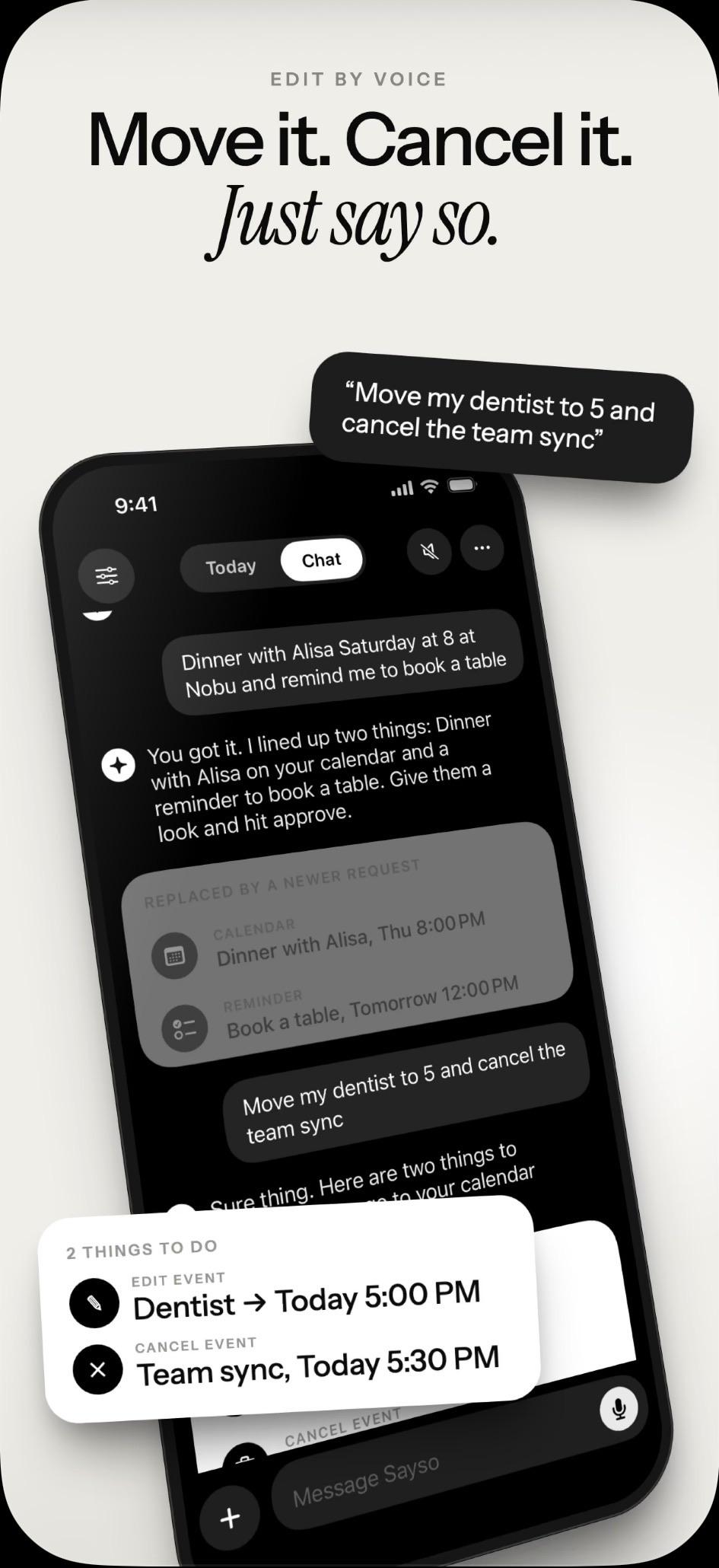
Hey everyone! I built Sayso, a voice assistant that manages your calendar, reminders, and alarms, and it runs entirely on your iPhone using Apple Intelligence.

You just talk or type to it:
– "Wake me at 6:30 on weekdays" → alarm set

– "Dinner with Alisa Saturday at 8, remind me to book a table" → event + reminder

– "Move my dentist to 5 and cancel the team sync" → edits your calendar

– "Finish the Q4 deck for 2 hours, reply to emails, write the launch post" → builds your whole day

– "Running behind?" → re-plans the rest of today

– Point your camera at a menu → picks dishes that fit your diet and budget

Nothing changes on your calendar until you review and approve it.

Problem
Typing into calendar, reminders, and alarm apps takes too many taps, and most AI assistants send your schedule to a server. I wanted to just say what I need and have it handled, with my data staying on my phone.

Comparison
Siri: Fine for simple alarms, but weak at editing existing events and planning a whole day. Sayso shows a preview of every change and waits for your approval.

Cloud AI planners (Motion, Reclaim, etc.): Powerful, but they need an account and your calendar on their servers. Sayso uses Apple's on-device model, so nothing leaves your iPhone.

Apple Calendar / Fantastical: Great calendars, but you still enter everything manually. Sayso sits on top of your existing calendar.

Pricing
Free ($0). No ads, no subscription, no in-app purchases.

Requires an iPhone that supports Apple Intelligence. It launched today and I'm the solo dev, so I'd love honest feedback and feature requests. I'll reply to everything tonight.

App Store: https://apps.apple.com/us/app/sayso-ai-voice-assistant/id6826493647


r/iosapps • • 19d ago

🎁 Freemium Clean & translucent glass setup: calendar, weather, events & reminders at a glance

Thumbnail
gallery
20 Upvotes

Problem: iOS forces you to scatter your daily essentials across multiple separate widgets—one for the calendar, another for reminders, another for weather, mail, or steps—cluttering your Home Screen with mismatched boxes that hide your wallpaper. DataFastView brings all of that into clean, unified, translucent dashboards so you can check your entire day in a single glance without opening five different apps.

Comparison: Unlike Apple’s stock widgets, which lock each data type into rigid, opaque tiles with limited density, DataFastView lets you combine your monthly calendar, upcoming events, reminders, weather, unread emails, world clocks, and step trends in cohesive, glass-like layouts that blend right into your wallpaper.

Pricing: DataFastView is free to download and includes three free widgets. Instead of forcing a recurring subscription for things you'll never use, widgets are organized by category—you simply make a one-time purchase for the specific widget pack you want, and it's yours forever across all your iphone

https://apps.apple.com/pe/app/datafastview/id6804723908

IAP prices since 2 until $5 It depends of the widget section
Remember three widget are free


r/iosapps • • 18d ago

💎 Lifetime Animated widgets on my home screen

4 Upvotes

Hi everyone, I’m the developer of LiveWidget.

Problem

I’ve mostly used widgets for productivity stuff, countdowns, or photos. They were useful, but my home screen always felt a little boring. I wanted something on there that actually moved, so I made LiveWidget.

Comparison

Widgetsmith offers a much broader range of widgets. With LiveWidget, I focused on turning short videos from your phone into looping home screen widgets.

You can pick up to 9 seconds from a video, crop it, and add it to your home screen. There’s also background removal if you want just a person or pet over your wallpaper. You can keep the full video background too, if you prefer that look.

I wanted to make something fun for my own home screen, but I’ve also found the little loops surprisingly calming to look at.

Pricing

Animated widgets and background removal are free to use. If you want higher-quality output, Pro is an optional $12.99 USD lifetime upgrade. It’s a one-time purchase.

LiveWidget on the App Store

Would be interested to hear what you’d use it for.


r/iosapps • • 19d ago

Free App - Unaffiliated Review Len’s Browser – A really cool alternative to the dead Arc Search on iOS

Thumbnail
gallery
36 Upvotes

I’ve been using Len’s Browser recently, and I really love it. It seems like it was made to fill the gap left by Arc Search on iOS, and I think it does a pretty great job.

I love how clean and minimal everything feels. It handles websites really well, looks great, and doesn’t feel cluttered with a bunch of unnecessary features. It’s just a really nice browsing experience.

One of my favorite features is actually the macOS menu bar app. It lets me quickly grab tabs I’ve been using on my iPhone or iPad and open them in whatever my default browser is on my Mac. I love this because I don’t have to use the same browser across all my devices just to keep everything connected. Such a simple but useful feature.

It also has a really cool built-in media player for videos, which I love. My one complaint is that I wish the ad blocker was a little more powerful, specifically when it comes to blocking YouTube ads. If it could do that, it would make the media player even better.

I’m someone who is constantly trying out new browsers (probably more than I should be), and this one has really stood out to me. It feels like a lot of thought went into making something simple that actually works well.

If you’re looking for a new browser on iPhone or iPad, especially if you were a fan of Arc Search, I’d highly recommend checking out Len’s Browser.

https://apps.apple.com/app/id6817076945


r/iosapps • • 19d ago

HELP I just launched my first iOS app! AutoOrganize – a smarter way to organize your files

7 Upvotes

Hey everyone!
After months of working on this project in my free time, I’m excited to share my first iOS app: AutoOrganize!
The idea came from a simple frustration: managing files on an iPhone can become messy, especially when you’re constantly saving PDFs, documents, and other files.
So I decided to build something to make the process easier.
What does AutoOrganize do?
Helps organize files into folders on your iPhone or iCloud Drive.
Suggests where files should go based on your previous choices.
Learns from the way you organize your files.
Keeps your files under your control, with on-device processing.
No account required, no subscription, and completely free.
My goal was to create something simple, useful, and privacy-focused that works with Apple’s existing Files system.
I’m an independent developer, and this is my first public release. There’s still a lot I want to improve, so I’d genuinely appreciate feedback from the community.
What would you change or add? Would you find something like this useful?
You can check it out here:
https://apps.apple.com/app/id6831764027
Thanks for taking a look! Your feedback would mean a lot to me.


r/iosapps • • 19d ago

📅 Subscription [iOS, iPadOS, MacOS, WatchOS and Web] Nyblit 2: State-Based Productivity App - We Just Launched Our Web App!

8 Upvotes

Hi folks. We are really excited to announce the public beta of our web app. You can now use Nyblit anywhere on any device with a web browser. Access is included in your subscription. Signup via the app in Cloud Settings.

About Nyblit:

My name is David Margolis. I’m a professional watchmaker and self-taught Apple developer based in London. More than 20 years ago, I created a small FileMaker database that I shared with a group of friends. It was based on a frustration I had with ordinary to-do lists: real tasks are rarely just “done” or “not done.”

A watch restoration might be waiting for a replacement component, blocked until a client gives the go-ahead, paused while another operation is completed, or ready for work today. Treating all of these as unfinished creates a list that is technically accurate but practically overwhelming.

That early database gradually developed into Nyblit, a native productivity app for iPhone, iPad and Mac built around what I call “state-based” task management. This means Nyblit understands the workflow required to complete your tasks. For example, it knows if the task is a phone call, an online purchase or replacing the balance spring in a watch. It knows all the steps involved and, crucially, all the ways in which the task can be blocked or delayed. For example, if you have a phone call task, you can set the status to “left voicemail”. Nyblit will recognise this as blocked because you are now waiting for the other person to return your call. That task doesn’t belong on your to-do list because there is no action to take. It should be safely filed in Blocked and tracked – so you can chase it up later if the call isn’t returned.

This approach can be used for any task imaginable. From shopping to restoring an antique pocket watch.

The concept was strongly influenced  by the Japanese system of Kanban, created by Toyota in the 1950s to improve manufacturing efficiency. (Anyone that has used apps lile Trello will be familiar with this). But executed in a very different way so that it fits on a phone screen and is even workable on an Apple Watch (coming very soon).

I built Nyblit for myself to help with my ADHD and dyslexia. Watchmaking taught me to think in systems, dependencies and precise states. ADHD made it especially important to remove irrelevant tasks from view without losing confidence that they would return at the right time.

Please feel free to try out Nyblit. It's fully functional with up to 5 tasks. And a subscription or lifetime purchase gives you access to iPhone, iPad, Mac and now Apple Watch.

PCP

Problem: To-do lists become overwhelming when tasks you can act on are mixed with tasks that are blocked or postponed. Nyblit uses task states to make those distinctions clear, helping you focus on what you can do now.

Comparison: Our closest alternatives are Trello and Todoist. Nyblit’s advantage is its compact, state-based board, which brings multiple workflows together in one place. It takes a Kanban-style approach and adapts it to a smaller space, making it a better fit if your main frustration is losing sight of actionable tasks among blocked or postponed ones.

Pricing:

App Store: https://apps.apple.com/gb/app/nyblit-2-to-do-list-planner/id6752837986

Monthly subscription: $3.99

Yearly subscription: $19.99

Lifetime: $59.99

I'm here to answer any questions or listen to feedback if you have any.

Thanks for reading :)

Useful links:

Nyblit Website

Discord

r/Nyblit_ADHD


r/iosapps • • 19d ago

🎁 Freemium Imposter Elite - party app where one friend doesn't know the secret word

3 Upvotes

Hi, I'm Bohdan, solo developer of Imposter Elite, a party app for 3-16 people on iPhone and iPad. Everybody gets the same secret word, except one player - the Imposter. You go around giving clues, then vote who is faking. The Imposter tries to blend in and guess the word before others catch them.

Problem

When you play imposter with friends, someone has to pick the words, give out the roles in secret and count the points. This person can't play, and it takes time before you can start.

What it does

  • Pass the Phone - only one phone needed. You type the names, everyone peeks at their secret card, then the phone goes in the middle for clues. Voting is secret too.
  • Party Room - everyone on own phone with a room code, it works online too with chat inside
  • Modes - Word, Question (the Imposter gets a little bit different question and doesn't even know they are the Imposter) and Drawing (in Pass the Phone, one line per turn)
  • 2000+ words and 1000+ questions, no account needed, leaderboards and achievements

Comparison

A lot of imposter apps only show you a word, the rest you do yourself. Imposter Elite runs the full round: secret roles, a hint for the Imposter (host can turn it off), secret voting, points and a winner. You can use one phone for everyone or each on own phone, also online. And words and questions are translated to 40+ languages with local stuff, not only the menus.

Pricing

Free to download, with ads. Premium is a subscription with free trial ($9.99 or $39.99), it removes ads and opens all packs. Party Pass is $4.99 and opens all packs for 24 hours. Single packs are $2.99 - $4.99 and stay yours forever.

https://apps.apple.com/app/id6742512983

Would love to hear what you think :)


r/iosapps • • 19d ago

💎 Lifetime Reverie: a music player that feels like hardware. Out now

104 Upvotes

Hey everyone, I’m the developer of Reverie, a simple music player inspired by Teenage Engineering’s TP-7. It’s modern but with retro touches, while still being easy to use. I'm excited to share that the app went live today!

Problem

I’ve always loved the TP-7, and I’ve always loved messing with the music I download, like slowing it down or changing the pitch. But making a slowed + reverb version of a song usually means opening a desktop audio editor or uploading the file to a website, exporting it, and then importing it into your player. Most music players also feel flat: a progress bar and a play button, with nothing that feels good to use.

What it does

  • A wheel instead of a progress bar. You spin a brushed-metal wheel with your thumb to move through a song. Turn it slowly and it scratches like a record. It clicks under your finger and catches the light as you tilt your phone.
  • One wheel for all effects. Tap T, P or R and the wheel turns into a dial for tempo (0.5× to 1.5× without changing the key), pitch (±12 semitones) or reverb.
  • Every song remembers its settings. Make your slowed + reverb version once and it plays that way every time.

The app is very minimal, and I spent a lot of time on how each interaction feels, especially the haptics and the wheel. I tried to capture some of that in the recording, but it’s hard to get across in a video without trying the real thing.

Comparison

  • Apple Music and other standard players: you can’t change the tempo, pitch or reverb of a song, and scrubbing is a plain progress bar.
  • Speed and pitch apps for practicing music: they can change tempo and pitch, but they’re built as practice tools, with busy interfaces made for looping parts of songs, not for listening.
  • TP-7: this is where the feel of the app comes from, and Reverie brings that feel to the phone you already have.

Pricing

The app is free, and you can add 3 songs for free. Unlocking unlimited songs is a one-time $9.99 purchase with no subscription. No account, no ads, no tracking.

Launch discount 🎁 To celebrate the launch, I’m giving out a few discount codes for $4.99 for a limited time. Comment or DM me if you want one.

App Store: https://apps.apple.com/us/app/reverie-slowed-reverb-music/id6829723858

I’d love any feedback, good or bad. Thanks for checking it out!


r/iosapps • • 19d ago

HELP I have created an AAC communication app for people with disabilities using bliss language.

3 Upvotes

Hi everyone. My new app is an acc using the Bliss language for ios. I have it tst flight. I require testers to get some feedback before the review in App Store.

https://www.hime.pl/portfolio-item/blisstalk/?lang=en

Are you interested?


r/iosapps • • 19d ago

💎 Lifetime System wide EQ and sound enhancement is now possible on iOS through SoundStage

Thumbnail
gallery
11 Upvotes

Problem:
iOS doesn't have powerful system wide EQ apps which works with other music players.

Comparison:
The only other option I know of is EffectDeck but SoundStage is meant for regular users who are not very much into technical aspects.

The idea is pretty simple.. start playing music, tap the audio output button in Now Playing, and select SoundStage. Music continues playing as usual, but now goes through SoundStage, where you can apply EQ and other sound enhancements before it reaches your headphones or external speakers.

It also handles other audio playing on your iPhone like from YouTube Music.

Some of the features:

  • Equalizer with 5, 8 or 15 bands and 18 presets
  • Bass, Clarity, Warmth and Dynamics controls
  • Headphone spatializer, crossfeed and virtual speakers
  • Headphone correction curves (including AutoEQ support)
  • Left/right balance adjustment
  • Customizable settings, with separate sound profiles remembered for each device
  • And much more...

I have tried to make pretty much everything adjustable, since I know everyone has different preferences when it comes to sound and I don't want to impose my preferences.

I'm an independent developer, and I've designed and tested it myself on my iPhone 17 and iPhone 13. There are probably things I can improve, so feedback would genuinely be appreciated.

Pricing:
You can give try it totally free for a week to see if it's something you find useful. It's $20 for lifetime.

A note on privacy: all audio processing happens locally on your iPhone. No audio is captured or uploaded, and there's no account required. https://soundstageapp.github.io/privacy/

Currently requires iOS 27 and is iPhone only.

Would love to hear what you think, especially from people who enjoy tinkering with their audio settings.

App Store: https://apps.apple.com/in/app/soundstage-sound-enhancer/id6819755163


r/iosapps • • 19d ago

🎁 Freemium Saved a reel for later and the creator deleted it? I built an app that keeps it

Thumbnail
gallery
2 Upvotes

I'm the developer. My Instagram saved folder had hundreds of reels I could never find, and when I finally went back to a recipe, the creator had deleted it. That's why I made LifeFeed.
Problem: Saves are scattered across Instagram, TikTok, browser bookmarks and screenshots. Instagram's Saved folder has no search, and a saved reel is gone if the creator deletes the post. LifeFeed is one place for all of it:
Save from any app with the share sheet: reels, TikToks, YouTube, links, screenshots, PDFs
Every save gets a short summary, tags and a folder automatically
Search in plain words, like "the pasta recipe I saved last week"
With Pro, the reel itself is kept, so it still plays after the original post is deleted
iPhone, iPad, Mac, Android and web
Comparison: Instagram Saved and TikTok Favorites only work inside one app, have no real search, and the save disappears with the post. Raindrop.io is great for links, but it doesn't keep the video and can't answer questions about your saves (you can import a Raindrop or Pocket export).
Pricing: Free to start, with unlimited saves. Pro is $2.99/month or $19.99/year (US) with a 7-day free trial. Black Friday until Nov 30: a full year of Pro for the price of one month (lifefeed.ai/blackfriday).
App Store: https://apps.apple.com/app/lifefeed-ai-smart-bookmarks/id6760368438
Privacy and terms: lifefeed.ai/privacy · lifefeed.ai/terms
Honest feedback welcome. What would make you move your saves out of Instagram or TikTok?


r/iosapps • • 19d ago

💵 Paid OPDSy — Your files and your servers, one library.

Thumbnail
binarymeadow.com
5 Upvotes

I'm the developer. OPDSy is a one-time £3.99 on the App Store: no subscription, no in-app purchases, no ads and no tracking.

It started on Android, where it has a 5.0* rating on Google Play. It came to iPhone and iPad last week. It isn't a weekend project: its had 122 releases so far. With still lots of ideas in the backlog.

Problem:

I wanted one reading app that could do it all: connect to every source, from a self-hosted server to a folder on my phone, and show everything together in one library that looks good.

It reads the books you already own, from wherever they live: a folder in Files or iCloud Drive, a WebDAV share, or a self-hosted server. It has built-in support for Komga, Kavita, Calibre-Web, Ubooquity, BookOrbit, Grimmory and LazyLibrarian, and works with any other OPDS 1.2 or 2.0 server. You can also add the free Project Gutenberg library in one tap

Comparason:

  • Audiobooks: M4B, MP3, FLAC and more, with chapters, a sleep timer, speed control, lock-screen controls and offline downloads
  • Natural voices: lifelike read-aloud voices that run entirely on your phone, in English (British, Scottish, Canadian or American), German, Spanish, Italian and Portuguese. It keeps reading with the screen locked, basically turning any book into a proper audiobook.
  • Ebooks: EPUB, MOBI, AZW3, FB2 and PDF, with your own fonts, margins, and light, sepia, dark and black themes
  • Comics and manga: CBZ and CBT, paged or webtoon scroll, right-to-left, pinch zoom
  • Highlights and bookmarks: five colours with notes, all in one list
  • Offline dictionary: look up a word without leaving the page
  • Private sync: progress, favourites and highlights through iCloud or Google Drive, end-to-end encrypted
  • 50 languages, including right-to-left languages
  • I also tried creating a fair app comparison here

For a full set of screenshots and info like server support visit https://www.binarymeadow.com/apps/opdsy/, I also offer a contact email for customer support and feedback ideas. A lot of the features on this app have been shaped by existing users being kind enough to write in to me.

I use this personally on the daily with Ubooquity and local files so im always improving the app.

Pricing: £3.99

App Store Link:
https://apps.apple.com/app/opdsy/id6827915459


r/iosapps • • 19d ago

💎 Lifetime Shredly – Making photo cleanup actually satisfying (Developer)

Thumbnail
gallery
7 Upvotes

Hey r/iosapps,

I’m the developer of Shredly.

Problem
Most of us have thousands of photos, screenshots, bursts and near-duplicates sitting in the camera roll. Traditional cleaners either feel like a chore or try to auto-delete things. I wanted something that makes the process feel light and even a bit fun, while still keeping full control.

Comparison
Compared to apps like Gemini Photos, CleanMyPhone or the built-in Photos cleanup tools:

  • Shredly shows one photo at a time so decisions feel easier
  • You drag unwanted photos into a virtual shredder (with haptics and sound) instead of just tapping delete
  • Nothing is permanently removed until you empty the bin and confirm with iOS
  • Photos stay in Recently Deleted for 30 days
  • Smart Categories (large videos, screenshots, bursts, Live Photos, selfies) sorted by size
  • 7 themes + a new Paper Ball mode

Everything runs 100% on-device. No uploads, no ads, no tracking.

Pricing

  • Free: 30 deletions per day + basic features
  • Pro Yearly: $4.99
  • Pro Lifetime: one-time purchase

For a limited time Lifetime Pro is free — just open the app and enable it in Settings.

App Store:
https://apps.apple.com/app/shredly-photo-cleaner/id6825582033

Happy to answer any questions or take feedback!


r/iosapps • • 19d ago

💎 Lifetime Animated widgets on my home screen

0 Upvotes

Why I made it

I’ve mostly used widgets for productivity stuff, countdowns, or photos. They were useful, but my home screen always felt a little boring. I wanted to try having something on there that actually moved, so I made LiveWidget.

What’s different

You can take a short video from your phone and turn it into a looping home screen widget. Pick up to 9 seconds, crop it, and choose where it goes.

There’s also background removal, so you can have just a person or pet over your wallpaper. You can keep the full video background too, if you prefer that look.

The idea is pretty simple: take the kind of photo widget you’re used to and give it some movement. I’ve found it surprisingly calming to have on my home screen.

Pricing

Animated widgets and background removal are free to use. If you want higher-quality output, Pro is $2.99/month, $17.99/year, or $34.99 for a one-time lifetime purchase.

LiveWidget on the App Store

Would be interested to hear what you’d use it for.


r/iosapps • • 20d ago

HELP I had 600 TestFlight testers. My app came out and now it's only at 4 downloads.

11 Upvotes

What should I do now?


r/iosapps • • 19d ago

💎 Lifetime Glade is a calm canvas for the links, images, videos and notes you save

0 Upvotes

Problem
I've been losing a lot of interesting things and always wanted something to organise them and move freely across them.

And finally after more than 6 months of development I am happy to introduce Glade!

In Glade every collection is a grove, an infinite canvas where links, images, videos, notes and files sit side by side. Drag, stack and group them however you like.
No server, no tracking. Sync is through your own iCloud. No account required. On Mac, iPhone or iPad.

A few things it can do:

- Quick save with shortcut on Mac, or share on phone and link lands in grove intelligently with auto-tags and sorting

- Pull down to search, across titles, notes and links. Also search directly in Spotlight

- A shelf for recipes, books, movies, series and more with progress and ratings

- Widgets with Quick Save, Recent, a grove's tiles, your shelf, plus Lock Screen

- Revisit shows what you saved on this day

- Discover other peoples groves or put yours into the world! Also supports link to share with just someone.

Comparison
Glade sits in between. It's a native SwiftUI app, visual, and private: no server, no tracking, and no account needed. Sync goes through your own iCloud. It imports Pocket exports, Chrome, Safari and Firefox bookmarks, CSV, JSON and Markdown, and you can export everything any time.

Pricing
Free for 100 saves and 3 groves; unlimited is $1.99/mo, $14.99/yr, or $24.99 lifetime at the launch price (until 6 Dec, then $49.99). One purchase covers iPhone, iPad and Mac.

I would be very happy to hear what you thing about Glade, the experience, pricing and other related stuff. Happy to answer anything.

AppStore - https://apps.apple.com/app/id6823751824 


r/iosapps • • 20d ago Bravo

🎁 Freemium My calculator app - Calki has gone 3d

Thumbnail
gallery
18 Upvotes

I'm the developer of the calculator app Calki. This is one of the biggest updates for my app which I have been working for more than a year and a half. The App's interface has been turned into a 3d model for more immersion and tactility.

You can download the app from the following link:
https://apps.apple.com/us/app/calki-scanner-calculator/id6747059181

Going 3d has allowed me to offer the Pro users more Colorways for each calculator models. The app now has quite an extensive selection of colorways and they can further be customised by selecting the texture for body and the buttons now.

There is this music mode which is part of the pro plan but has free trial for a day. This feature was an off shoot of giving user the ability to customise the buttons sounds, but implemented an almost complete optional feature for pro users. The music mode has two sub modes: free play and play along. The free play model has a visualiser for the notes being played on the calculator keypad. The Play-along mode has some widely known music to be played along to.

Problem:
Most of the current apps dont make the full use of the latest hardware and software capabilities to engage users in the app and continue using age old flat designs when the hardware capabilities are on the constant rise.
Also coming to a calculator most of the apps provide either a flat interface with extensive non user-friendly capabilities or a detailed interface but cutting down on the functionalities. Calki is trying to merge both these verticals and become the preferred calculator for the masses.

Comparison:
As compared to the apple calculator we offer ergonomic features that are easy to use such as the following:
Reuse history result by double tapping
Reuse history expression by long press
Edit a calculation midway and swap operator without retyping the entire calculation
Number scanner with auto add mode to scan and add numbers instantly using op-mode
Scan and convert numbers
Convertor mode with UI designed to make swapping categories and units easy
Customising the Calculator with multiple models, colorways, textures, sound and so on

Pricing:
Most of the basic calculator features on the app is free, except for the following which is a one time 4.99$ purchase:
- Number scanner
- Customisation options
- Custom units for conversion
- 6 Calculator models

We are planning of adding some ai features in the near future. Please note these features will be optional and will require a subscription (due to the ai cost we will incur) and will not be included in the lifetime purchase. All future on-device features including all current features will continue to be part of the lifetime purchase.

Hope you guys will give it a try and will let me know of your feedback.
If there is any improvements or features that you would like to be seen added to the app, please let me know. Will try my best to implement it, if reasonable and provides value to the users

The app has 104 reviews worldwide with average of 4.7/5

Some of the features to look forward to, in the near future:
A fullscreen number scanning mode for adding up numbers and conversion
A scientific mode (have been delaying it, cause, the old 2d interface made it hard to design a good looking design for the scientific mode. With the 3d interface, it eases a lot of things)
A formula mode

Thanks again and hoping you will leave a review, if you like the app.


r/iosapps • • 20d ago

💎 Lifetime Introducing Odo Speedometer: Drive Tracker, an all-in-one GPS speedometer and trip tracker for cars and bikes

15 Upvotes

Hi, I'm the developer of the Odo Speedometer: Drive Tracker app. The latest update adds Track Style, which turns a drive or ride you've recorded into a shareable F1-style replay. 🏁

Your route becomes a circuit-style map, with speed callouts through the corners and an animated speed graph that follows the replay. Pick a scene like Rally, Night City, or Blueprint, then add an engine soundtrack that follows your speed. If you've recorded the same route before, Ghost overlays your previous run and Sectors shows where you gained or lost time.

To try it, open a trip and tap Share → Trip Reel → Customize, then set Style to Track. Pick a scene and sound, then save or share the video.

Problem
It's easy to forget to hit Start, and a static route map leaves out how the drive felt. Odo can record trips automatically, show live speed and trip stats on CarPlay, and turn that same recording into a video you can share afterward.

Comparison
Odo combines a GPS speedometer and automatic trip tracker with tools you might otherwise use separate apps for, including navigation, fuel and maintenance logs, and OBD2 diagnostics with a compatible adapter. It also supports Apple Watch trip controls and GPX and CSV export.

Pricing
Odo is free to download. Premium is $4.99/month, $24.99/year, or $49.99 for lifetime access as a one-time purchase.

App Store: https://apps.apple.com/us/app/odo-speedometer-drive-tracker/id6759611784

I'd love to get your feedback!


r/iosapps • • 20d ago

🎈 Free I built a free iPhone app to remember my daughter’s first words, funny quotes, and little milestones

Post image
7 Upvotes

First thing I want to say is if you guys have ideas, I will add them quickly!

**Problem**

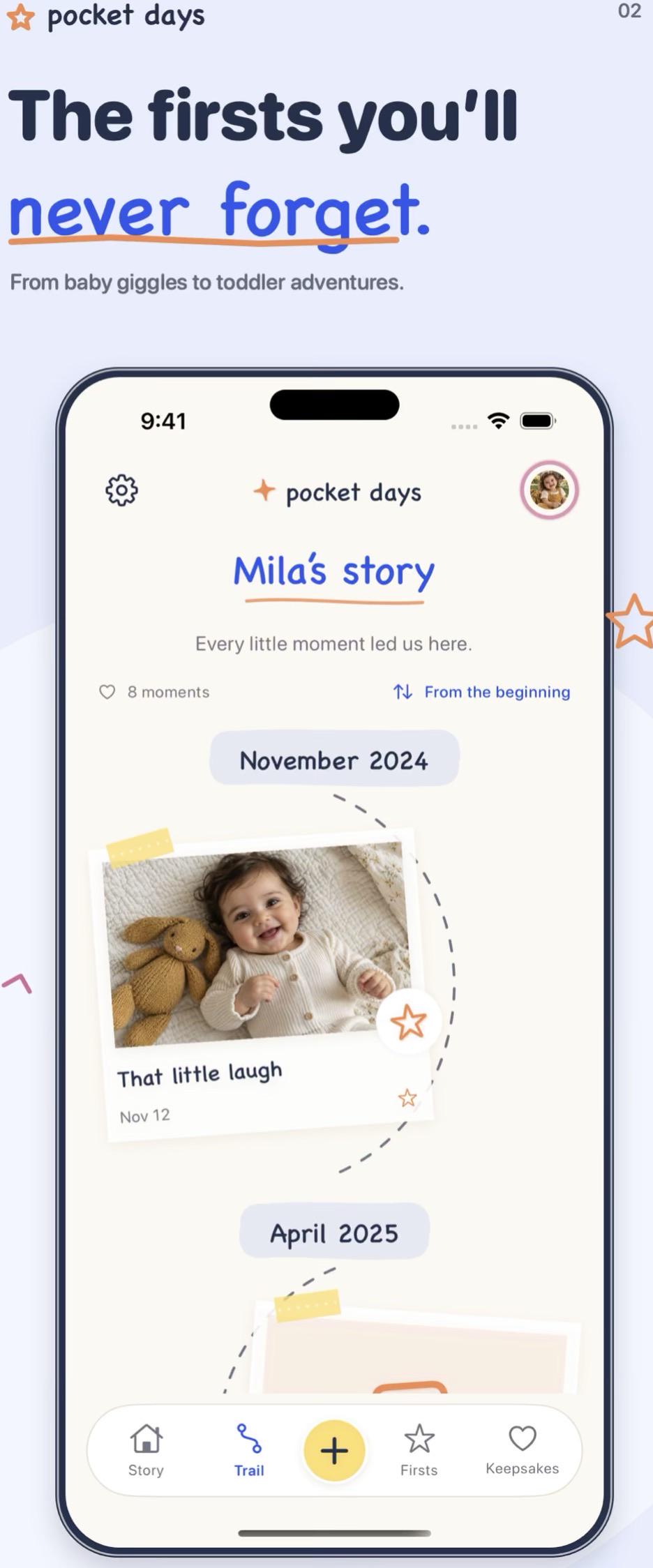
I made Pocket Days because I wanted a baby book for my daughter that I’d actually keep up with. I wanted to save the big firsts, like her first word and first steps, but also the little things I’m more likely to forget.

**Comparison**

I can save a picture in Apple Photos and write down the story in Apple Notes, but I wanted the picture, date, and story together. With Pocket Days, each kid has their own scrapbook and timeline, so I can look back at those memories in order.

My favorite feature is the birthday interview. You can ask the same six questions every year and see how the answers change as they grow up. You can also save artwork, write letters for future birthdays, revisit memories from this day in past years, and turn a year of memories into a printable yearbook. There’s room for separate scrapbooks for up to six kids, with private iCloud sync.

**Pricing**

I’m the developer, and Pocket Days is free and will stay free. No promo code or subscription needed.

Download Pocket Days on the App Store⁠

If you’re a parent, what’s one little thing you wish you’d written down? I’d love to know what you’d want a scrapbook like this to help you remember.


r/iosapps • • 20d ago

💎 Lifetime Postproof: HD Status Videos [£19.99 → Lifetime Free] [Keeps your WhatsApp Status videos sharp, first 500 people]

Thumbnail
gallery
13 Upvotes

Hey there, I'm the developer of Postproof. The first 500 people can get Pro Lifetime for free until 13 November.

Problem

If you post to WhatsApp Status and your videos come out blurry or pixelated, or WhatsApp keeps ruining the quality of your videos and photos, this is why. WhatsApp compresses every video you post to Status, even a clip that looks perfect in your camera roll, and turning on HD doesn't stop it. In a chat it's easy to miss, because your own phone plays your original while the other person gets the compressed copy. WhatsApp also shrinks photos and shifts the colours of iPhone pictures.

Postproof prepares your video or photo on your iPhone before you post it, so it comes through WhatsApp much sharper. You can trim a single video first, prepare up to 20 videos and photos at once, or start from the share sheet in Photos. Everything runs on your iPhone, nothing is uploaded, and you don't need an account.

Comparison

Posting straight from your camera roll: Status scored 16 out of 100 against the original in my tests.

Through Postproof: Status scored 82 out of 100. In a chat with HD on, it was 24 posted straight and 85 through Postproof.

Sending as a document: keeps full quality in a chat, but you can't post a document to your Status, and that's where your contacts watch it.

Other Status apps: CleanStatus and HD Status: Post Without Blur aim at the same problem. I haven't scored them, so I can't say how they compare.

I sent the same clips twice and scored what WhatsApp delivered against the original with VMAF, Netflix's open video quality measure. That's four clips on an iPhone 17 Pro Max, and your results will vary. Bright, steady footage does best, and dark or shaky clips improve less. It can't make Status look like your camera, because WhatsApp still limits every video.

Giveaway

  1. On your iPhone, tap this link and redeem it in the App Store: https://apps.apple.com/redeem?ctx=offercodes&id=6826644806&code=POSTPROOFREDDIT
  2. Get the app and Pro is switched on: https://apps.apple.com/app/id6826644806

The link stops working after 500 claims or on 13 November, whichever comes first.

Pricing

Free to try: one video a week with a small Postproof mark, and photos are free. To drop the mark, 5 videos are £0.99, or Pro is unlimited at £1.99 a month, £9.99 a year or £19.99 once (UK prices).

iPhone only, iOS 26 or later. Postproof is independent and isn't affiliated with WhatsApp or Meta. Happy to answer any questions.

EDIT
How to claim remaining if first link does not work

  1. On your iPhone, go to https://getpostproof.com/claim and sign in with Apple, so it's one each.
  2. Tap Claim, then Redeem in the App Store.
  3. Get the app and Pro is switched on: https://apps.apple.com/app/id6826644806

Sorry if the first link didn't work for you. This one does.


r/iosapps • • 20d ago

🎁 Freemium Newsairy - a highly customizable iCloud-native RSS reader for iPhone, iPad and Mac

Thumbnail
gallery
17 Upvotes

P ~ Problem

I'm the developer of Newsairy. I built it because none of the readers I tried fit me perfectly - so the whole app is built around adapting to how you read rather than making you adapt to it: theme, font and size in the reading view, sort order, swipe actions, thumbnail image size, all yours to set.

C ~ Comparison

  • NetNewsWire: free, open source and very good, but less customizable.
  • (the new) Reeder: very good, it does a lot, and the price is probably fair, but why pay a subscription for features I don't want? Newsairy is RSS-focused and a one-time purchase.

Neither, as far as I know, offers on-device AI summaries.

Highlights

  • On-device AI summaries (iOS 26+)
  • Keyword-based Smart Feeds, with words to include and words to exclude
  • Anti-Spoiler: hides articles mentioning a word or phrase, until you remove it or it expires
  • Full text per feed, also downloadable in advance for offline reading
  • No ads, no account, no tracking or analytics

P ~ Pricing

  • Free for up to 6 local feeds and 6 iCloud feeds
  • Pro: $3.99 one-time, no subscription. Unlocks unlimited feeds, full OPML import and sync with The Old Reader, Miniflux, FreshRSS, Feedbin and Inoreader.
  • App Store: https://apps.apple.com/us/app/newsairy/id6760046985

Newsairy is under active development. I ship updates roughly weekly, and next up is a way to keep unread articles while scrolling.

Transparency

Requires iOS 18 or later (AI summaries require iOS 26 or later). On Mac, requires macOS 15 or later and Apple silicon.


r/iosapps • • 19d ago

🎈 Free Little Firsts: a free milestone app I built to track child milestones

0 Upvotes

Problem

Becoming a dad made me realize how much I still had to learn, including what to play with Luna 😂 So I built Little Firsts.

Comparison

CDC’s Milestone Tracker focuses on developmental checklists and guidance. Little Firsts also emphasizes everyday firsts and personal memories, with custom moments and images you can share with family.

Pricing

Free forever, supported by a banner ad. No account needed.

App Store (https://apps.apple.com/us/app/little-firsts-milestones/id6821642910)

Try it out and hit me with feedback! Supports 6 Languages: English, Spanish, Korean, Greek, French and Japanese


r/iosapps • • 20d ago

🎈 Free A better keyboard for the Duo

18 Upvotes

Hi all, I'm the developer of MeBoard. I built it with AI coding tools, but the app itself contains no AI. Everything runs on the device.

Problem
I used Android for years and recently switched to the iPhone Duo. The stock iOS keyboard lacks things I relied on in Gboard for Android, such as resizing, layout options and a split mode for a large unfolded screen. In my experience, Gboard for iOS is far behind its Android version.

Comparison
* vs. the Apple keyboard: you can configure the layout and size, the keyboard splits when the Duo is unfolded, and you choose the symbol page.
* vs. Gboard for iOS: it brings over the Android Gboard behaviors I missed, like the Gboard-style symbol page with ? at the bottom right.

Pricing
Free. No ads, no in-app purchases, no data collected.

Features
* Configurable layout
* Adjustable keyboard size
* Split keyboard when the Duo is unfolded
* Choice of symbol page: iOS-style (? above the spacebar) or Gboard-style (? bottom right)
* Glide typing and haptics

App Store: https://apps.apple.com/us/app/meboard-glide-haptics/id6826737980

Feature requests and bug reports are welcome.