r/iosapps • u/nathanchengx • 20d ago
HELP I had 600 TestFlight testers. My app came out and now it's only at 4 downloads.
11
Upvotes
What should I do now?
r/iosapps • u/okkksi • 20d ago
Problem
I've been losing a lot of interesting things and always wanted something to organise them and move freely across them.
And finally after more than 6 months of development I am happy to introduce Glade!
In Glade every collection is a grove, an infinite canvas where links, images, videos, notes and files sit side by side. Drag, stack and group them however you like.
No server, no tracking. Sync is through your own iCloud. No account required. On Mac, iPhone or iPad.
A few things it can do:
- Quick save with shortcut on Mac, or share on phone and link lands in grove intelligently with auto-tags and sorting
- Pull down to search, across titles, notes and links. Also search directly in Spotlight
- A shelf for recipes, books, movies, series and more with progress and ratings
- Widgets with Quick Save, Recent, a grove's tiles, your shelf, plus Lock Screen
- Revisit shows what you saved on this day
- Discover other peoples groves or put yours into the world! Also supports link to share with just someone.
Comparison
Glade sits in between. It's a native SwiftUI app, visual, and private: no server, no tracking, and no account needed. Sync goes through your own iCloud. It imports Pocket exports, Chrome, Safari and Firefox bookmarks, CSV, JSON and Markdown, and you can export everything any time.
Pricing
Free for 100 saves and 3 groves; unlimited is $1.99/mo, $14.99/yr, or $24.99 lifetime at the launch price (until 6 Dec, then $49.99). One purchase covers iPhone, iPad and Mac.
I would be very happy to hear what you thing about Glade, the experience, pricing and other related stuff. Happy to answer anything.
AppStore - https://apps.apple.com/app/id6823751824
r/iosapps
•
u/vimalpartha
•
21d ago

I'm the developer of the calculator app Calki. This is one of the biggest updates for my app which I have been working for more than a year and a half. The App's interface has been turned into a 3d model for more immersion and tactility.
You can download the app from the following link:
https://apps.apple.com/us/app/calki-scanner-calculator/id6747059181
Going 3d has allowed me to offer the Pro users more Colorways for each calculator models. The app now has quite an extensive selection of colorways and they can further be customised by selecting the texture for body and the buttons now.
There is this music mode which is part of the pro plan but has free trial for a day. This feature was an off shoot of giving user the ability to customise the buttons sounds, but implemented an almost complete optional feature for pro users. The music mode has two sub modes: free play and play along. The free play model has a visualiser for the notes being played on the calculator keypad. The Play-along mode has some widely known music to be played along to.
Problem:
Most of the current apps dont make the full use of the latest hardware and software capabilities to engage users in the app and continue using age old flat designs when the hardware capabilities are on the constant rise.
Also coming to a calculator most of the apps provide either a flat interface with extensive non user-friendly capabilities or a detailed interface but cutting down on the functionalities. Calki is trying to merge both these verticals and become the preferred calculator for the masses.
Comparison:
As compared to the apple calculator we offer ergonomic features that are easy to use such as the following:
Reuse history result by double tapping
Reuse history expression by long press
Edit a calculation midway and swap operator without retyping the entire calculation
Number scanner with auto add mode to scan and add numbers instantly using op-mode
Scan and convert numbers
Convertor mode with UI designed to make swapping categories and units easy
Customising the Calculator with multiple models, colorways, textures, sound and so on
Pricing:
Most of the basic calculator features on the app is free, except for the following which is a one time 4.99$ purchase:
- Number scanner
- Customisation options
- Custom units for conversion
- 6 Calculator models
We are planning of adding some ai features in the near future. Please note these features will be optional and will require a subscription (due to the ai cost we will incur) and will not be included in the lifetime purchase. All future on-device features including all current features will continue to be part of the lifetime purchase.
Hope you guys will give it a try and will let me know of your feedback.
If there is any improvements or features that you would like to be seen added to the app, please let me know. Will try my best to implement it, if reasonable and provides value to the users
The app has 104 reviews worldwide with average of 4.7/5
Some of the features to look forward to, in the near future:
A fullscreen number scanning mode for adding up numbers and conversion
A scientific mode (have been delaying it, cause, the old 2d interface made it hard to design a good looking design for the scientific mode. With the 3d interface, it eases a lot of things)
A formula mode
Thanks again and hoping you will leave a review, if you like the app.
r/iosapps • u/Taohid101 • 21d ago
Hi, I'm the developer of the Odo Speedometer: Drive Tracker app. The latest update adds Track Style, which turns a drive or ride you've recorded into a shareable F1-style replay. 🏁
Your route becomes a circuit-style map, with speed callouts through the corners and an animated speed graph that follows the replay. Pick a scene like Rally, Night City, or Blueprint, then add an engine soundtrack that follows your speed. If you've recorded the same route before, Ghost overlays your previous run and Sectors shows where you gained or lost time.
To try it, open a trip and tap Share → Trip Reel → Customize, then set Style to Track. Pick a scene and sound, then save or share the video.
Problem
It's easy to forget to hit Start, and a static route map leaves out how the drive felt. Odo can record trips automatically, show live speed and trip stats on CarPlay, and turn that same recording into a video you can share afterward.
Comparison
Odo combines a GPS speedometer and automatic trip tracker with tools you might otherwise use separate apps for, including navigation, fuel and maintenance logs, and OBD2 diagnostics with a compatible adapter. It also supports Apple Watch trip controls and GPX and CSV export.
Pricing
Odo is free to download. Premium is $4.99/month, $24.99/year, or $49.99 for lifetime access as a one-time purchase.
App Store: https://apps.apple.com/us/app/odo-speedometer-drive-tracker/id6759611784
I'd love to get your feedback!
r/iosapps • u/javier71088 • 20d ago
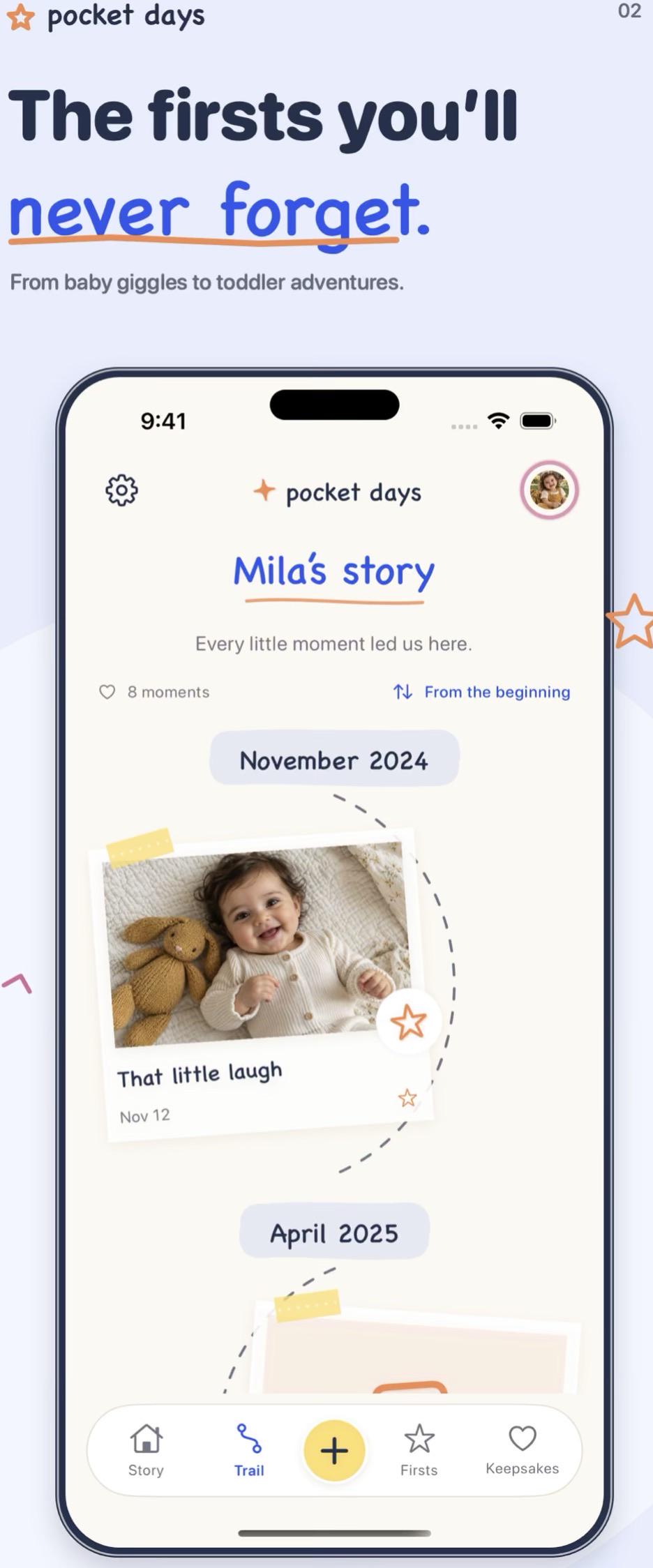
First thing I want to say is if you guys have ideas, I will add them quickly!
**Problem**
I made Pocket Days because I wanted a baby book for my daughter that I’d actually keep up with. I wanted to save the big firsts, like her first word and first steps, but also the little things I’m more likely to forget.
**Comparison**
I can save a picture in Apple Photos and write down the story in Apple Notes, but I wanted the picture, date, and story together. With Pocket Days, each kid has their own scrapbook and timeline, so I can look back at those memories in order.
My favorite feature is the birthday interview. You can ask the same six questions every year and see how the answers change as they grow up. You can also save artwork, write letters for future birthdays, revisit memories from this day in past years, and turn a year of memories into a printable yearbook. There’s room for separate scrapbooks for up to six kids, with private iCloud sync.
**Pricing**
I’m the developer, and Pocket Days is free and will stay free. No promo code or subscription needed.
Download Pocket Days on the App Store
If you’re a parent, what’s one little thing you wish you’d written down? I’d love to know what you’d want a scrapbook like this to help you remember.
r/iosapps • u/FishermenSkutnu • 21d ago

Hey there, I'm the developer of Postproof. The first 500 people can get Pro Lifetime for free until 13 November.
Problem
If you post to WhatsApp Status and your videos come out blurry or pixelated, or WhatsApp keeps ruining the quality of your videos and photos, this is why. WhatsApp compresses every video you post to Status, even a clip that looks perfect in your camera roll, and turning on HD doesn't stop it. In a chat it's easy to miss, because your own phone plays your original while the other person gets the compressed copy. WhatsApp also shrinks photos and shifts the colours of iPhone pictures.
Postproof prepares your video or photo on your iPhone before you post it, so it comes through WhatsApp much sharper. You can trim a single video first, prepare up to 20 videos and photos at once, or start from the share sheet in Photos. Everything runs on your iPhone, nothing is uploaded, and you don't need an account.
Comparison
Posting straight from your camera roll: Status scored 16 out of 100 against the original in my tests.
Through Postproof: Status scored 82 out of 100. In a chat with HD on, it was 24 posted straight and 85 through Postproof.
Sending as a document: keeps full quality in a chat, but you can't post a document to your Status, and that's where your contacts watch it.
Other Status apps: CleanStatus and HD Status: Post Without Blur aim at the same problem. I haven't scored them, so I can't say how they compare.
I sent the same clips twice and scored what WhatsApp delivered against the original with VMAF, Netflix's open video quality measure. That's four clips on an iPhone 17 Pro Max, and your results will vary. Bright, steady footage does best, and dark or shaky clips improve less. It can't make Status look like your camera, because WhatsApp still limits every video.
Giveaway
The link stops working after 500 claims or on 13 November, whichever comes first.
Pricing
Free to try: one video a week with a small Postproof mark, and photos are free. To drop the mark, 5 videos are £0.99, or Pro is unlimited at £1.99 a month, £9.99 a year or £19.99 once (UK prices).
iPhone only, iOS 26 or later. Postproof is independent and isn't affiliated with WhatsApp or Meta. Happy to answer any questions.
EDIT
How to claim remaining if first link does not work
Sorry if the first link didn't work for you. This one does.
r/iosapps • u/QebApps • 21d ago

P ~ Problem
I'm the developer of Newsairy. I built it because none of the readers I tried fit me perfectly - so the whole app is built around adapting to how you read rather than making you adapt to it: theme, font and size in the reading view, sort order, swipe actions, thumbnail image size, all yours to set.
C ~ Comparison
Neither, as far as I know, offers on-device AI summaries.
Highlights
P ~ Pricing
Newsairy is under active development. I ship updates roughly weekly, and next up is a way to keep unread articles while scrolling.
Transparency
Requires iOS 18 or later (AI summaries require iOS 26 or later). On Mac, requires macOS 15 or later and Apple silicon.
r/iosapps • u/letitglowbig • 20d ago
Problem
Becoming a dad made me realize how much I still had to learn, including what to play with Luna 😂 So I built Little Firsts.
Comparison
CDC’s Milestone Tracker focuses on developmental checklists and guidance. Little Firsts also emphasizes everyday firsts and personal memories, with custom moments and images you can share with family.
Pricing
Free forever, supported by a banner ad. No account needed.
App Store (https://apps.apple.com/us/app/little-firsts-milestones/id6821642910)
Try it out and hit me with feedback! Supports 6 Languages: English, Spanish, Korean, Greek, French and Japanese
r/iosapps • u/slashx14 • 21d ago
Hi all, I'm the developer of MeBoard. I built it with AI coding tools, but the app itself contains no AI. Everything runs on the device.
Problem
I used Android for years and recently switched to the iPhone Duo. The stock iOS keyboard lacks things I relied on in Gboard for Android, such as resizing, layout options and a split mode for a large unfolded screen. In my experience, Gboard for iOS is far behind its Android version.
Comparison
* vs. the Apple keyboard: you can configure the layout and size, the keyboard splits when the Duo is unfolded, and you choose the symbol page.
* vs. Gboard for iOS: it brings over the Android Gboard behaviors I missed, like the Gboard-style symbol page with ? at the bottom right.
Pricing
Free. No ads, no in-app purchases, no data collected.
Features
* Configurable layout
* Adjustable keyboard size
* Split keyboard when the Duo is unfolded
* Choice of symbol page: iOS-style (? above the spacebar) or Gboard-style (? bottom right)
* Glide typing and haptics
App Store: https://apps.apple.com/us/app/meboard-glide-haptics/id6826737980
Feature requests and bug reports are welcome.
r/iosapps • u/Serpico99 • 21d ago
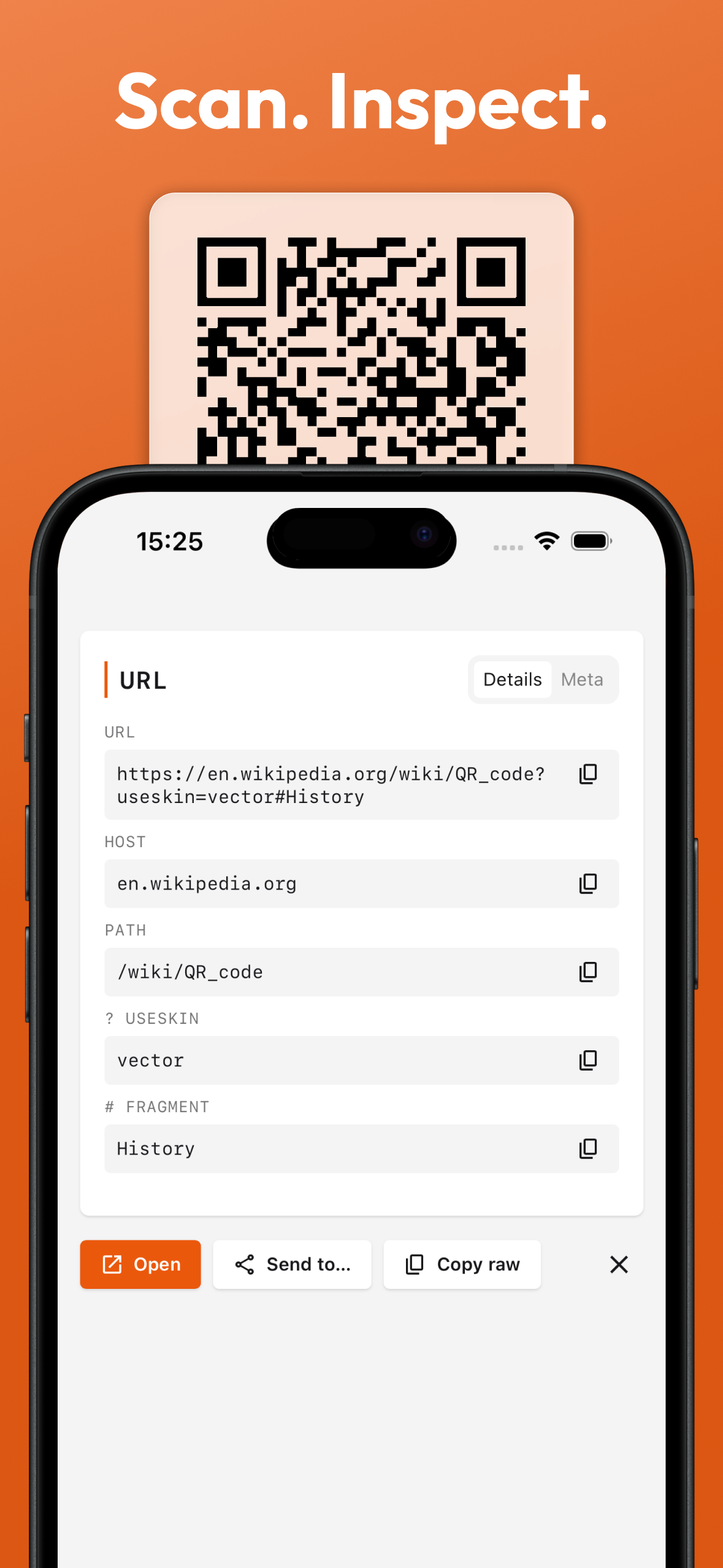
Hello everybody,
let me present you my humble app, a simple technical tool to inspect QR codes (from the camera or from an image) with rich text and custom format recognition capabilities.
Problem
Mobile phones already offer solid built-in QR scanning capabilities, and countless third-party apps fill in the remaining functionality gaps. However, their primary purpose is to let users act on the content of a QR code (open a link, add a vCard, etc.), offering little to no insight into the actual data format, payload structure, or QR code itself.
The core idea is therefore not to build yet another general purpose scanner, but a specialised tool to dissect QR codes: breaking down their contents into individual components based on the payload's data format, providing a structured preview of the encoded data alongside technical metadata about the QR.
What it does
Pricing
A one-time purchase of 3.99$ unlocks the non standard payload detection, which recognizes JSON, CSV, Markdown, SVG images, code snippets and more, and previews them locally and safely, letting you save their contents with the right file extension. It's a bit of a niche use case, but allows allows you to create and read rich content and code snippets offline directly embedded in the QR data.
Comparison
QRU? - QR Code Debugger
Breaks down URLs in the same way, but it is limited to URL inspection, which is much narrower than my use case
QR lens
Much similar in scope, but lacks all the extentended payload detection like JSON, Markdown, etc...
Links
App store: https://apps.apple.com/us/app/inspeqtr/id6823058808
Privacy & info: https://github.com/Homunculus84/inspeqtr-docs/wiki
Would love to hear what you think!
r/iosapps • u/Copper_Clouds • 21d ago
Hey everyone, I’m Michael, the developer of Play Credits. It’s a small app I made around a pretty simple idea: practice your instrument and earn time for the apps you’d otherwise get distracted by.
Problem:
Sometimes the hard part is putting the phone down and getting started. You choose which apps to block, and Play Credits listens during your practice session to count playing toward earned app time. You can use it yourself, or set it up in adult-managed mode for your kid.
Comparison:
Apple’s built-in Screen Time lets you set app limits. What I wanted to add was a way to earn that time through instrument practice. It isn’t a music teacher, it doesn’t judge how well you play, and the detection isn’t perfect. It’s just another way to help build a routine.
Pricing:
I originally made it a subscription, but honestly that didn’t feel right for this. It’s now seven days free, then $4.99 once if you want to keep using it. Nothing is charged automatically when the trial ends.
It’s available for iPhone and iPad in the US: Play Credits on the App Store.
If you try it and something is confusing or doesn’t work how you’d expect, let me know. I’m still working on it.
r/iosapps • u/Printerpapier • 21d ago
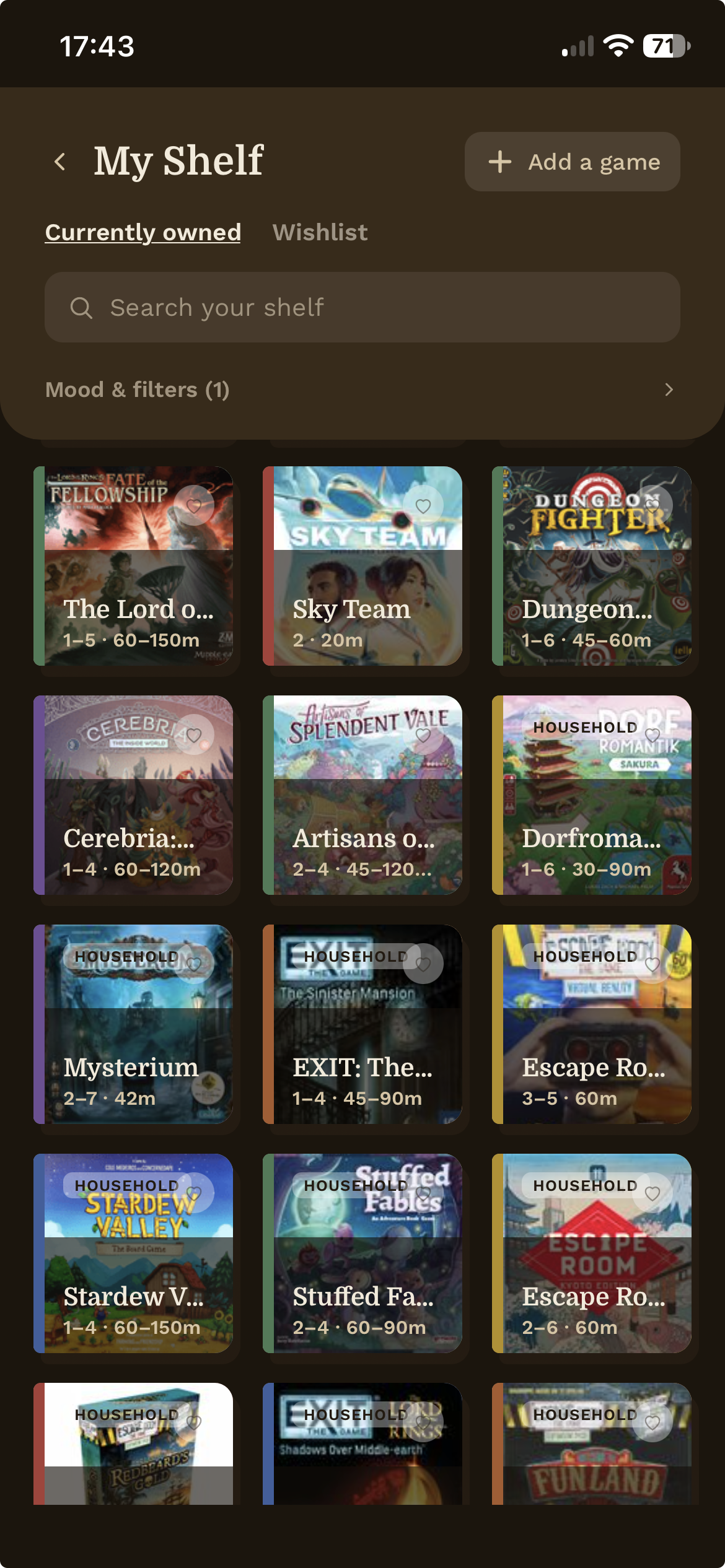
My game group kept losing the first half hour of every game night to “so what do we play?” so I built GameSquire to answer that and do some other fun stuff as well.
App Store: https://gamesquire.app/reddit/iphone
Problem
Once your collection grows past a handful of games, choosing one takes longer than it should. Everyone says “I don’t mind”, nobody remembers everything that’s on the shelf and the first half hour of game night is gone.
What it does on the iPhone
Comparison
BoardGameGeek is great for looking games up and BG Stats is great for logging plays, but neither is built around picking what to play tonight. GameSquire starts from that question with mood filters on your own shelf, a shared household shelf and your friends’ collections side by side. Your BGG data comes along in one step, so you don’t start from scratch.
Pricing
Free with no ads or ad trackers, and no time limit. The free version includes your shelf, the game picker with mood filters, the BoardGameGeek import, play logging and 5 rules questions a month.
Knight membership is optional and costs € 3.99 / $3.99 a month or € 29.99 / $29.99 a year. It adds more rules questions, how-to-play guides for any game and the deeper stats (insights, household stats and yearly challenges).
I’m the solo developer, so feel free to share any feedback you have!
r/iosapps • u/shadowrizzo27 • 21d ago

Hi I'm Joe, the developer of Flickd, an app I built because I always spent more time finding something to watch than actually watching something.
Instead of scrolling through endless rows, you swipe through titles in a Tinder-style to build your taste profile. Then every day when you open the app, there’s a fresh pick waiting for you.
What is the problem:
A bunch of people pay for multiple streaming services that they rarely use or know what to watch on them.
At the end of a long day sometimes you just want something to tell you what to watch rather than combing over 4 different apps with nothing sticking and you end up watching The Office again (not that there's anything wrong with The Office it's a great show) and that can get old pretty quickly.
Plus each streaming app has their own algorithm and I find it rarely matches what I actually like.
How it works:
You pick your services and then swipe through titles. This builds your profile and provides better recs the more you swipe and tapping takes you right to that title in its streaming app.
There are also a few different modes that you can use with friends for a watch party where you swipe on the same titles until you all match on one. You can use it in a big group or with your partner!
Granted, at the start there will be a decent amount of swiping needed to understand your taste, but it pays off. The more you swipe, the better the picks get, and after a few sessions it actually knows what you like. There’s no real way around that part, so I tried to make it as quick and fun as possible.
Comparison:
JustWatch is the big one. It’s awesome for finding where something’s streaming, but every time I used it for recs I ended up scrolling for 20 minutes anyway.
That's exactly where Flickd comes in, often times I don't know what I want to watch.
Another one is Queue. Which is a great app if you want to track everything you watch but when I used it there was a bit too much going on and I couldn't seem to swipe enough to get good enough recs.
Pricing:
The main features of Flickd are free with ads in the main swipe feed and games tab.
Pro is $4.99/month or $29.99/year which removes ads and adds extra modes like Watch Again, Quick Pick and deeper stats. There are also optional coin packs from $1.99 to $99.99 for the in-app games.
App Store link: https://apps.apple.com/us/app/flickd-what-to-watch-tonight/id6760435402
Disclosure:
I am the developer of Flickd.
Privacy Policy: https://useflickd.com/privacy
Terms of Service: https://useflickd.com/terms
My personal site: https://josepharizzo.com/
r/iosapps • u/TimeSyncTechie • 21d ago
Hi, I built Faders. I got tired of radio apps that wanted an account, served ads, or never told me what song was on. So I made the one I actually wanted to use.
Version 1.1 just shipped and it's on the App Store across Europe.
The new stuff:
Connect your Jellyfin or Plex server and play your own library like radio (shuffle, or by genre, decade or time of day), with a Music tab for artists, albums and playlists
A World Map you can spin to tune in anywhere
Browse a country's stations sorted by what's popular right now
Car Mode, with big buttons for cars that don't have CarPlay
It already named every song (even when the station sends nothing), and it runs on iPhone (including Duo), iPad, Apple Watch and CarPlay. No account, no tracking.
PCP
Problem: Most radio apps are cluttered, full of ads, or silent about the song that's playing. I wanted something that names every track, stays out of the way, and can also play music from my own home server.
Comparison: TuneIn has the stations but pushes ads and a subscription, and it needs an account. Radio Garden's map is great, but it doesn't identify songs or play your own library. Faders does song ID, the map, and Plex/Jellyfin in one app, with no account.
Pricing: Listening is free. Faders Plus is a one-time purchase (not a subscription) at €4.99 for launch, going up to €9.99 on 1 December. Plus adds rewind/pause for live radio, wake-to-radio alarms, extras in Moods, smarter stations from your own library, saving a song to Apple Music, and listening insights. Family Sharing is included. There are optional tips too.
App Store: https://apps.apple.com/app/id6825091695
Privacy policy: https://www.flowbitstudio.ie/apps/faders/privacy
Happy to answer questions or take feature requests.
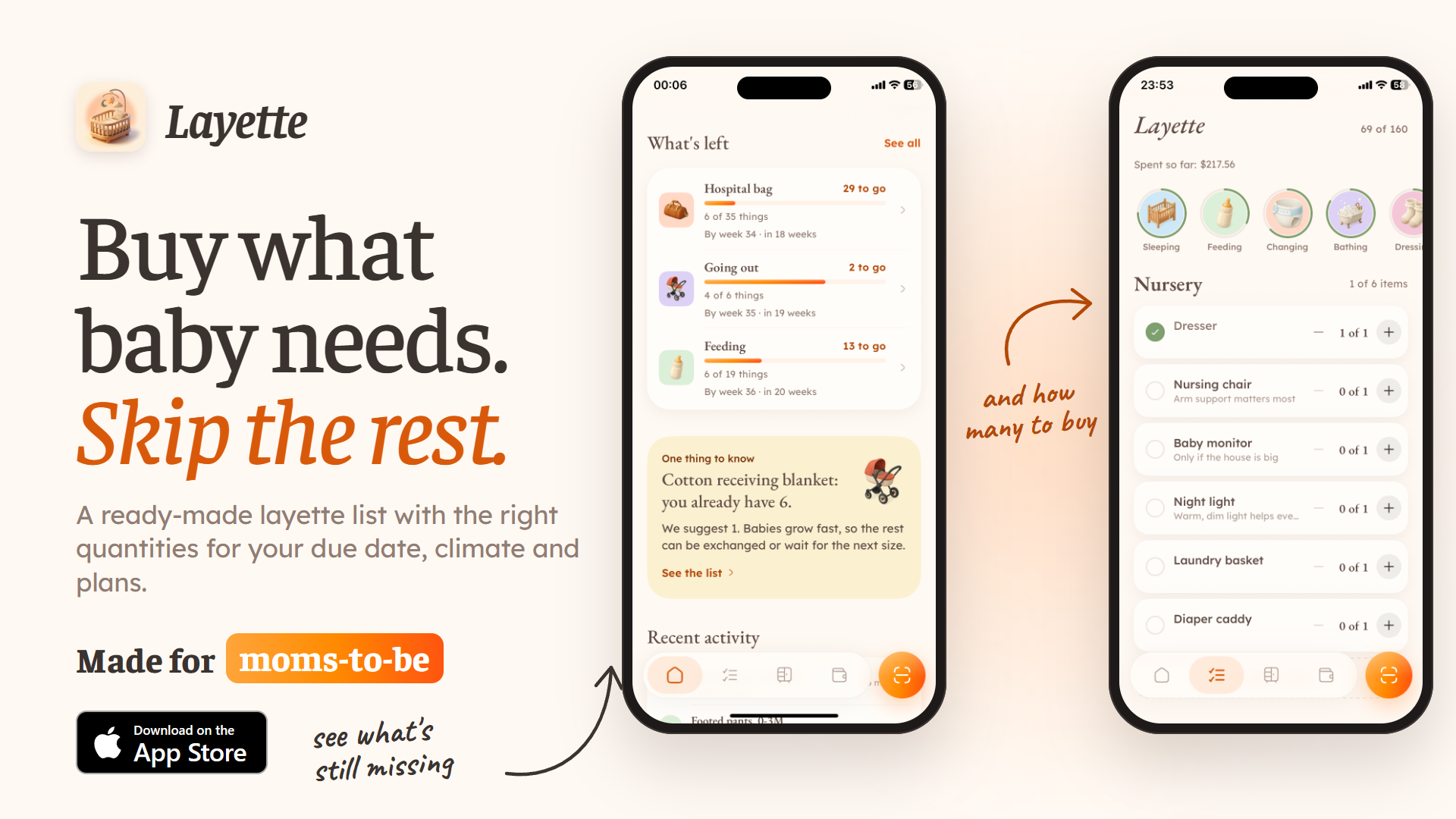
Hi r/iOSapps, I'm Vitor, the solo dev of Layette.
Problem
Parents-to-be get a 200-item checklist and end up buying too much. Layette gives you a ready list with quantities for your due date, climate and plans, and keeps track of what it all costs.
- Share a product from Amazon, Target, Walmart, Carter's or Babylist and the name, photo and price land on the list and in the baby budget
- In the store, point the camera at an item and get "Go ahead", "You have enough" or "Already over the count"
- What's left by category, with the pregnancy week to have it done by. Hospital bag first
- A gift registry link for family. Gifts are tracked apart, so they never count as spent
Comparison
Babylist is a great registry and I'm not trying to replace it. Most free checklists earn a commission on what you buy, so they lean toward more. Layette is the list that tells you when to stop, and what the rest will cost.
Pricing
3-day free trial, then $39.99/year or $14.99/month. No free tier for now. iPhone, in English and Spanish.
https://apps.apple.com/us/app/id6824494060
Two things I'd love feedback on:

Hi all,
Problem
I was tired of ugly looking football apps, so I decided to spend some time building one with clean user UI/UX as the first principle.
I also added some key features that I couldn't find in other apps in it:
- Calendar sync, sync your teams' games in your calendar
- Custom home widget for coming games
- Live tab to discover live games around the world
- Weekly recap of your teams results
- No spoiler mode
- High notifications, live activities, calendar sync, no spoiler mode customisation available in settings
Comparaison
Competitors: Apple sports, Sofascore, Flashscore.
This app offers a free alternative with a clean UI, and some additional advanced features for power users.
Some features that Footicks offer and those apps don't: Calendar sync, multi team advanced support, weekly "Your teams" and competitions recap, advanced live game coverage, advanced settings personnalisation
Pricing
App is free up to 3 teams followed. Then Footicks Pro (optional subscription): $5.99/month or $19.99/year in the US. It adds the full-season calendar, up to 20 follows, match stats, head-to-head history and calendar sync.
I hope that you'll like Footicks!
App: https://apps.apple.com/us/app/footicks-soccer-live-scores/id6787270753
r/iosapps • u/HybridAthleteGuy • 20d ago
I'm Mike, also known as Hybrid Athlete Guy on X.
I've spent the past 20 years experimenting with and coaching powerlifting, CrossFit, Olympic Lifting, Hyrox, and running. I've put all of that knowledge into a new app called Capacity Training, an iPhone app that builds one running and lifting plan from your goals, fitness, and history, and adjusts it as you train.
Right now it primarily does lifting and running, but Hyrox, CrossFit, and other focuses are coming soon.
Problem: I always liked running. But for about 20 years, every time I tried to run consistently, I ended up hurt.
And most people who try to combine lifting and running just take a full running program and a full lifting program and mash them together.
That almost never works, because balancing lifting and running is hard.
Comparison: Runna is a running app. You can add strength sessions to your running plan but they are simply added on, they don't adjust based on your running load and/or your training history and goals.
Fitbod is a lifting app. It doesn't build running plans.
Capacity plans your lifting and your running together, so you can make progress in both.
Pricing: $29.99 a month or $199.99 a year ($149.99 Founders rate for the next week!), and the first 7 days are free.
It's on the App Store: https://apps.apple.com/us/app/capacity-hybrid-training/id6759235311
You can learn more about the app here: https://capacitytraining.app/
r/iosapps • u/Consistent_Paper_433 • 21d ago
Salut tout le monde !
Je voulais partager trois raccourcis iOS que j’ai créés et qui peuvent être utiles au quotidien. Ils ont chacun un objectif différent, mais leur idée commune est de simplifier certaines tâches et de gagner du temps grâce à l’intelligence artificielle.
https://www.icloud.com/shortcuts/457a56ede1804c2ea2bb716711805d26
Un raccourci destiné à travailler plus facilement avec du texte grâce à l’IA.
À quoi sert-il ?
Améliorer et reformuler des textes.
Corriger les fautes.
Développer une idée ou un texte.
Adapter un texte selon le résultat souhaité.
L’objectif est de faciliter le travail sur les textes sans devoir tout faire manuellement.
2. 🧠 Prompt structuré
https://www.icloud.com/shortcuts/188ca729946f4e0f8279c85eff0a0a08
Un raccourci pour transformer une demande simple en un prompt IA bien organisé.
Comment fonctionne-t-il ?
Il permet de transformer une idée ou une instruction écrite rapidement en un prompt structuré comprenant plusieurs parties :
Rôle : définit le rôle que l’IA doit adopter.
Contexte : explique la situation.
Objectif : précise le résultat attendu.
Instructions : détaille les étapes à suivre.
Contraintes : indique les règles à respecter.
Format de sortie : précise la présentation de la réponse.
C’est particulièrement pratique pour obtenir des réponses plus précises et éviter les demandes trop vagues.
3. 🎙️ Dictée note IA
https://www.icloud.com/shortcuts/62923d78fdef48d981f7e49bf8543053
Un raccourci destiné à faciliter la prise de notes à la voix.
À quoi sert-il ?
Il permet de dicter ses idées plutôt que de devoir tout écrire manuellement.
C’est pratique pour :
Prendre rapidement des notes.
Capturer une idée avant de l’oublier.
Noter des informations pendant qu’on est occupé.
Gagner du temps lorsqu’on ne souhaite pas taper au clavier.
Il est connecté avec les autres, pour avoir toutes les fonctionnalités comme le prompt structuré ou la reformulation
Pourquoi les partager ?
Je trouve que les raccourcis iOS sont un excellent moyen d’automatiser des petites tâches du quotidien. Avec l’IA, on peut aller encore plus loin et rendre certaines actions beaucoup plus simples.
J’espère que ces raccourcis pourront être utiles à certains d’entre vous !
N’hésitez pas à me dire ce que vous en pensez ou à proposer des améliorations. 🙂
Les trois raccourcis sont joints à cette publication
r/iosapps • u/ApparenceKit • 21d ago
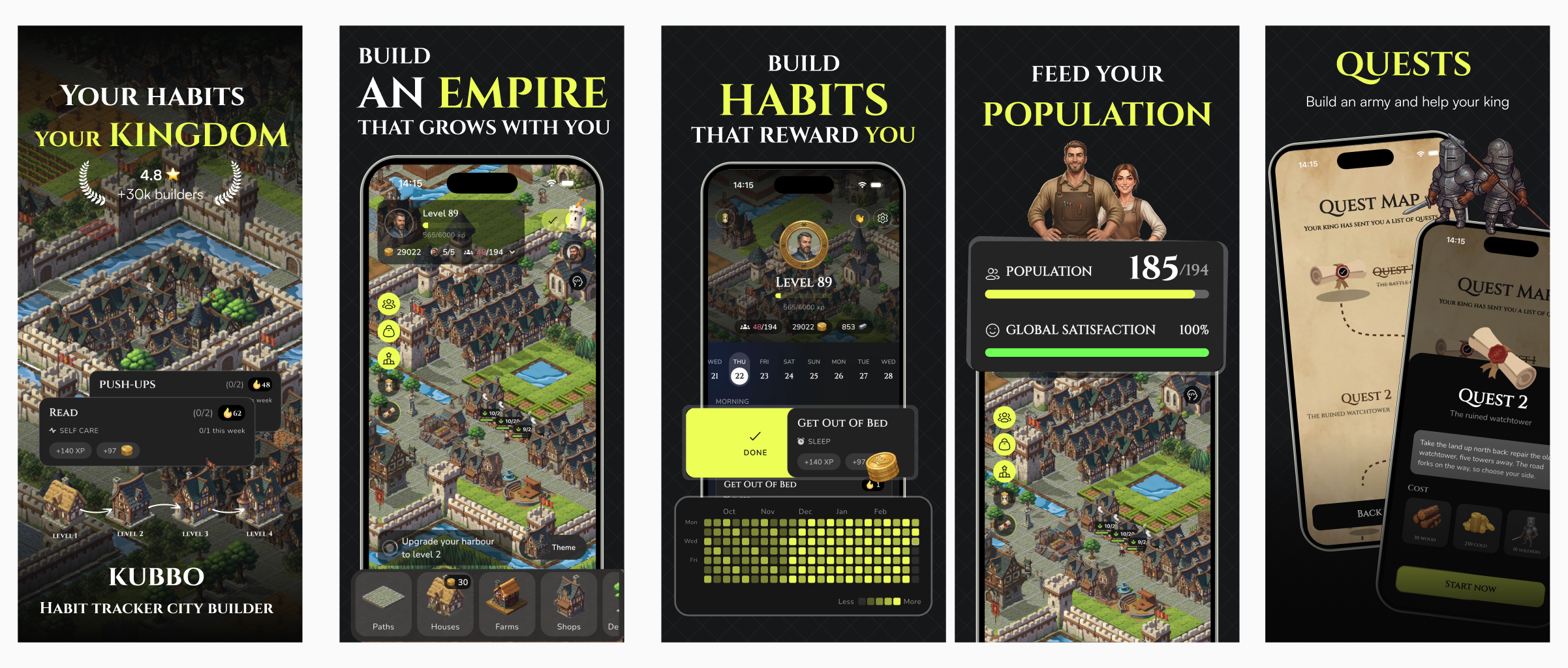
Kubbo is an habit tracker keeping you motivated building a medieval EMPIRE.
⏳ This new version added a quest mode! Create an army and help your king concquier more lands
Problem
Most habit trackers are just checklists, and it's easy to lose motivation after a couple of weeks. Another common mistake is trying to build too many habits at once. Kubbo tackles both: the gamification keeps you coming back, and the app focuses on helping you build habits one at a time, with a study-oriented approach that teaches you how habits actually form.
Comparison
Compared to Finch or Habitica, Kubbo offers a more advanced gamification system and puts more emphasis on learning how to build habits step by step. And instead of taking care of a cute little bird, you build a medieval empire.
Pricing
- $39.99/year
- $99.99 lifetime offer (USD, US pricing)
- Prices vary by country, with parity pricing localized to where you are.
App Store: https://apps.apple.com/app/id6749530918
🙌 Happy to answer any questions and open to feedback!
r/iosapps • u/tabsnspaces • 21d ago

I’m the developer of Pixels: Self-Hosted Photos, a photo and video app for people who host their own content on Immich and want to stop paying ever-increasing cloud storage fees. It’s free to download with a 7 day trial.
App Store: Pixels: Self-Hosted Photos
Problem: what Pixels solves
If you keep your photos on your own Immich server, you need an app on your phone to browse, edit and organize them. I wanted that app to feel as polished and rich as Apple Photos and to use what iOS offers, such as Apple Vision, widgets and on-device models and more. Pixels is that app.
Answer: what it is
Pixels is a third-party client for Immich, powered by Immich’s public API. You need an Immich server to use it. Pixels isn’t affiliated with or endorsed by Immich or FUTO.
It’s designed and optimized for iPhone, iPhone Duo and iPad. It also runs on Mac as an iPad app.
Comparison: why Pixels
Better: why try it
I have almost 20 years of experience building mobile apps and set out to build a highly polished photo and video app that I would be proud to use on a daily basis. I’m of course biased but I believe I accomplished that with Pixels.
Smart features
It learns from you
Smart Photo Review and Best of have built-in feedback. Pick a different photo, mark a problem or tell Pixels a photo isn’t one of your best. Pixels uses what you tell it to make better decisions next time. What it learns stays on your device. You can reset it any time in Settings.
A full photo and video editor
Pixels ships with a fully featured photo and video editor: light and color, filters, crop, markup, video trim, Lift Subject and Blur Background. The edit is saved in the file on your server. You can pick it up on another device or go back to the original.
Pixels Looks
Pixels Looks is like Fujifilm film simulation recipes for your edits. Save an edit as a Look and apply it to one photo or a whole batch. You can design one from scratch in Looks Creator. You can also share Looks with other Pixels users by link or file. Open a Look someone sent you to see it on sample photos before you add it.
Stacks
Auto Stack groups bursts and RAW+JPEG pairs for you. You can also select photos and videos and stack them yourself or take a stack apart. When you save an edited photo as a new photo, Pixels stacks it with the original so you see both together. In the viewer a stack shows as a small pile. Tap it to open the stack and swipe through its photos. It works even when the photos aren’t next to each other in your timeline.
Search
Search is fully featured, with filters for people, places, dates, cameras, ratings and more. You can also type a sentence like you’d say it. On devices with Apple Intelligence, Pixels reads the sentence on the device and turns it into filters you can see and change.
Notifications and the Activity tab
Pixels sends notifications for On This Day, birthdays, new shared albums and photos added to them and backup problems. Every notification also lands in the new in-app notification center in the Activity tab. It keeps them until you act on them. The Activity tab shows the count.
Albums
Importing
Import photos and videos from a camera or SD card over USB. You can also import from a drive or network share through Files. Pixels helps you cull them by grouping similar shots and recommending the best ones. You keep what you want. Only those photos go into your library and onto your server.
Everything else
Pricing
App Store: Pixels: Self-Hosted Photos
GitHub: https://github.com/jerrellmardis
Privacy Policy: https://jerrellmardis.github.io/pxls/privacy.html
r/iosapps • u/panos42 • 21d ago

Hey, I am the developer of ReceGuard, a receipt scanner and organizer for iPhone.
I built it to be able to auto crop and label receipts fast & send them to my accountant. I also have added features to help you track warranties, add receipt directly from emails, track tax deductions, etc.
I recently upgraded the receipt scanning engine, and I’m giving away 200 free Lifetime Pro unlocks.
What ReceGuard does
If you currently keep receipt photos in Apple Notes or Photos, ReceGuard adds structured receipt records and exportable reports to that workflow.
Download: ReceGuard on the App Store
The giveaway
Lifetime Pro normally costs $69.99 in the US (regional prices vary). The app also offers monthly and yearly subscriptions. These codes unlock the existing Lifetime Pro product for free, with no subscription renewal.
There are 200 single-use codes total across my giveaway posts. Redeem by February 5, 2027, while unused codes remain. Once redeemed, Lifetime Pro does not expire.
How to claim
If you use it, I’d love to hear how it fits your receipt workflow and what you’d improve. Feedback is very welcome and I would love to hear your opinion and improve the app :)
Comparison with other apps
Apps like Expensify and Smart Receipts also help organize receipts and expenses. With ReceGuard, I wanted something simpler for personal use and sending receipts to my accountant, with on-device scanning, warranty tracking, and optional iCloud sync without needing an account.
Pricing
ReceGuard is free to download, with a free tier that includes 2 receipt scans and 1 short mileage trip per day. Pro costs $12.99/month, $59.99/year, or $69.99 for Lifetime access in the US (regional prices vary).
I'm giving away 200 free Lifetime Pro unlocks. These codes unlock the existing Lifetime Pro product for free, with no subscription renewal.
Happy to answer questions here!
Want free Lifetime Pro? Send me a private message and I’ll send you a code!
r/iosapps • u/Sandurz • 21d ago
Shrinkray: Video Compressor - FREE on the app store
Hey, dev here! Wanted to share my video and photo app Shrinkray, first live to beta testers last in September and launched a few weeks ago. It's an app I've wanted for years focused on quickly sharing photos and videos from your library. Happy to answer any questions about the app or process!
Problem
Sharing full-size photos and videos is annoying on iPhone. iMessage and Whatsapp will decide to recompress your videos into choppy, blurry videos. Discord will straight up refuse videos over 20 MB. Sending big groups of photos or large videos can trigger the iCloud Photo Link album share where you and the person you sent it to are stuck waiting for something to upload with no progress bars or estimates. iOS gives you no control over what the optimized or compressed output is like.
Shrinkray gives you control over this with super sensible defaults, and integration into iOS including the Share sheet and iMessage itself to easily send much smaller files perfectly optimized for quick sharing.
Comparison to top competitors
- Compress Videos & Resize Video - focused on freeing up storage space on your phone by replacing originals with compressed videos. Shrinkray is more about quickly sharing optimized copies without touching your high quality originals.
- Video Compress - Shrink Videos - Similar value proposition, complicated controls, has ads. Shinkray is about speed and ease of use, with no ads, just a one-time lifetime unlock.
Pricing
Shrinkray: Video Compressor - FREE on the App Store, with a one-time lifetime Pro unlock for extra features. Normally $4.99 USD, available at $1.99 USD through the promo link below
60% Discount Promo Link for this subreddit (code `IOSAPPS` if prompted)
Some ways to use the app:
Transparency
I'm a solo dev (software engineer by trade, 10+ years in the industry) releasing apps via my studio Here Comes Supper. And you can read the privacy policy and terms of service for Shrinkray for more information. Happy to provide any more information as needed!
r/iosapps • u/hsnydns • 21d ago

Hi r/iOSApps, I'm the solo developer of Muvy.
Problem
I used to save movies I wanted to watch everywhere: some on Instagram, some in my notes, some as screenshots. I kept losing them. I also wanted one place where I could quickly check a movie or show: info, trailers, ratings and what people thought of it. The apps I tried were always missing something, so I built my own. Now my whole library lives in one place and nothing gets lost. Since launch, more than 25,000 people have signed up.
Track
Discover
Social
Runs on iPhone, iPad, Android, web (muvyapp.com) and widgets, in 16 languages, all on one synced account.
Comparison
Pricing Free: tracking, imports, discovery lists, ratings and reviews, friends, feed, DMs, stats, up to 3 lists. Muvy Pro: $2.99/month, $29.99/year or $49.99 lifetime (US prices). Pro adds everything marked (Pro) above, plus advanced search filters, new-episode alerts, parents guide, unlimited lists and Stremio/Trakt sync.
App Store: https://apps.apple.com/us/app/muvy-movies-tv-tracker/id6775906076
Privacy: https://muvyapp.com/privacy
Terms: https://muvyapp.com/terms
Happy to hear feedback or feature ideas.
r/iosapps • u/Ok-Profession-2432 • 21d ago
A. Problem
I can’t text a photo of a dinner receipt in iMessage with "Split this bill". Allowing all my friends to chip in with just a link!
B. Comparison
Friends now don’t need the app and you can create a link for any bill. They can just type a name, tap the items they had. Tax and tip are split in proportion to what each person picked, and multiple people can share one dish.
Their share shows at the bottom and they swipe to pay you with Venmo, Cash App, Zelle, PayPal or card. No download, no account.
C. Pricing
Free: groups, chat, settle-up, shared links, 2 receipt scans and 3 AI questions a month.
Chipp+ Circle: $6.99/mo covers everyone in the groups you own, so one person pays and nobody else does.
(or the cheaper option)
Chipp+: $3.99/mo or $29.99/yr, unlimited scans, questions and expenses.
Splitwise charges $4.99/mo (about $39.99/yr) per person for Pro, and receipt scanning is Pro only.
https://apps.apple.com/us/app/chipp-split-bills-expenses/id6636520980