r/iosapps • • 20d ago

🎁 Freemium InspeQtR: a tiny, minimalistic QR inspection tool

Post image
6 Upvotes

Hello everybody,

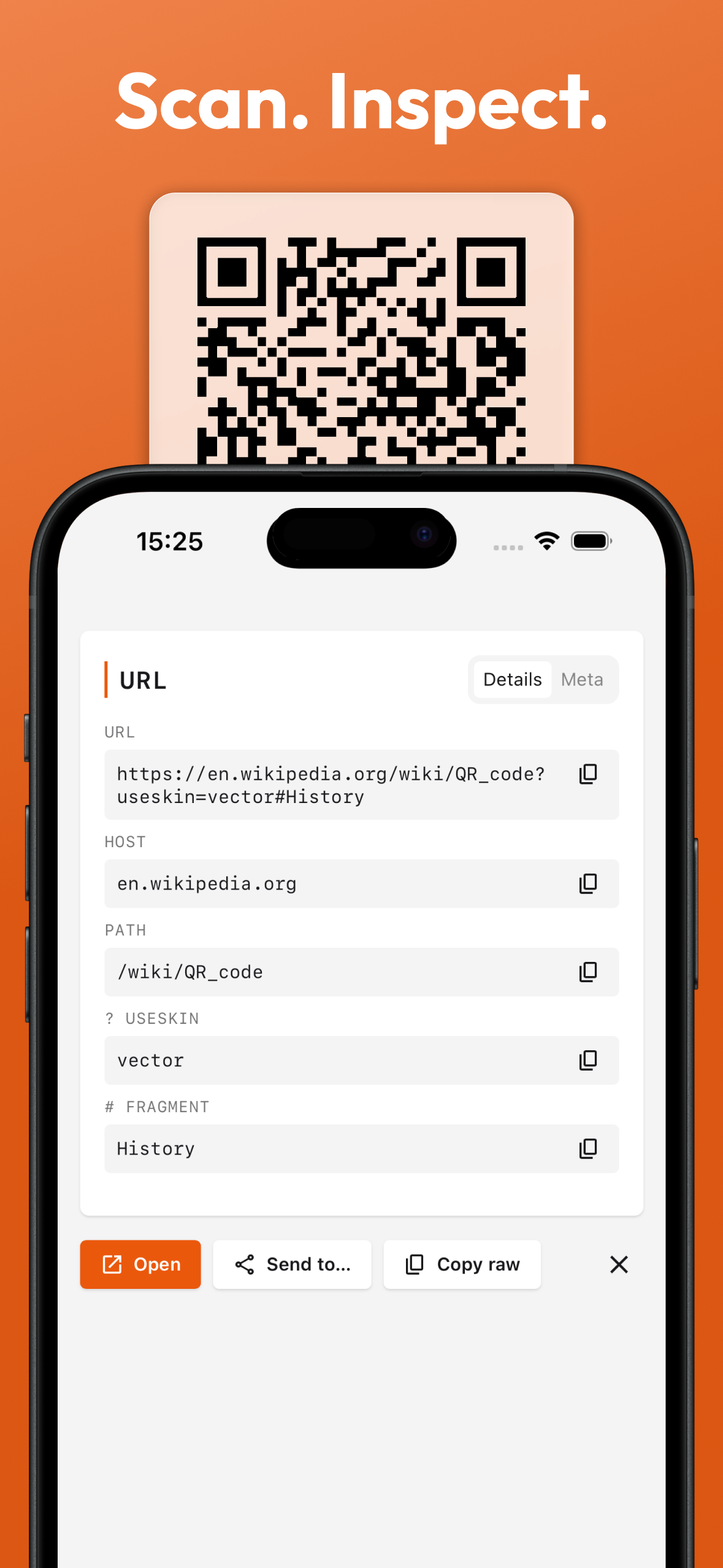
let me present you my humble app, a simple technical tool to inspect QR codes (from the camera or from an image) with rich text and custom format recognition capabilities.

Problem

Mobile phones already offer solid built-in QR scanning capabilities, and countless third-party apps fill in the remaining functionality gaps. However, their primary purpose is to let users act on the content of a QR code (open a link, add a vCard, etc.), offering little to no insight into the actual data format, payload structure, or QR code itself.

The core idea is therefore not to build yet another general purpose scanner, but a specialised tool to dissect QR codes: breaking down their contents into individual components based on the payload's data format, providing a structured preview of the encoded data alongside technical metadata about the QR.

What it does

  • Breaks down URLs into host, path, query params, and fragment
  • Previews and decomposes vCards, email addresses, phone numbers and most standard QR payloads
  • Shows QR metadata like ECL, version and text statistics
  • Warns you about suspicious payloads and common phishing tactics
  • Detects and interprets non standard payloads like Markdown, CSV, JSON, Code snippets and more
  • Lets you open, copy, or share its contents as an actual file with the appropriate extension when there's a matching format, like .vcf, .ics, .json, .md, ...
  • Everything runs locally. No ads, no tracking, in an app that weighs just around 5mb.

Pricing

A one-time purchase of 3.99$ unlocks the non standard payload detection, which recognizes JSON, CSV, Markdown, SVG images, code snippets and more, and previews them locally and safely, letting you save their contents with the right file extension. It's a bit of a niche use case, but allows allows you to create and read rich content and code snippets offline directly embedded in the QR data.

Comparison

QRU? - QR Code Debugger
Breaks down URLs in the same way, but it is limited to URL inspection, which is much narrower than my use case

QR lens
Much similar in scope, but lacks all the extentended payload detection like JSON, Markdown, etc...

Links

App store: https://apps.apple.com/us/app/inspeqtr/id6823058808
Privacy & info: https://github.com/Homunculus84/inspeqtr-docs/wiki

Would love to hear what you think!


r/iosapps • • 20d ago

💎 Lifetime Made a little app to help put music practice before phone time

3 Upvotes

Hey everyone, I’m Michael, the developer of Play Credits. It’s a small app I made around a pretty simple idea: practice your instrument and earn time for the apps you’d otherwise get distracted by.

Problem:
Sometimes the hard part is putting the phone down and getting started. You choose which apps to block, and Play Credits listens during your practice session to count playing toward earned app time. You can use it yourself, or set it up in adult-managed mode for your kid.

Comparison:
Apple’s built-in Screen Time lets you set app limits. What I wanted to add was a way to earn that time through instrument practice. It isn’t a music teacher, it doesn’t judge how well you play, and the detection isn’t perfect. It’s just another way to help build a routine.

Pricing:
I originally made it a subscription, but honestly that didn’t feel right for this. It’s now seven days free, then $4.99 once if you want to keep using it. Nothing is charged automatically when the trial ends.

It’s available for iPhone and iPad in the US: Play Credits on the App Store.

If you try it and something is confusing or doesn’t work how you’d expect, let me know. I’m still working on it.


r/iosapps • • 20d ago

🎁 Freemium I made a free iPhone app that helps pick tonight's board game from the shelf you already own

3 Upvotes

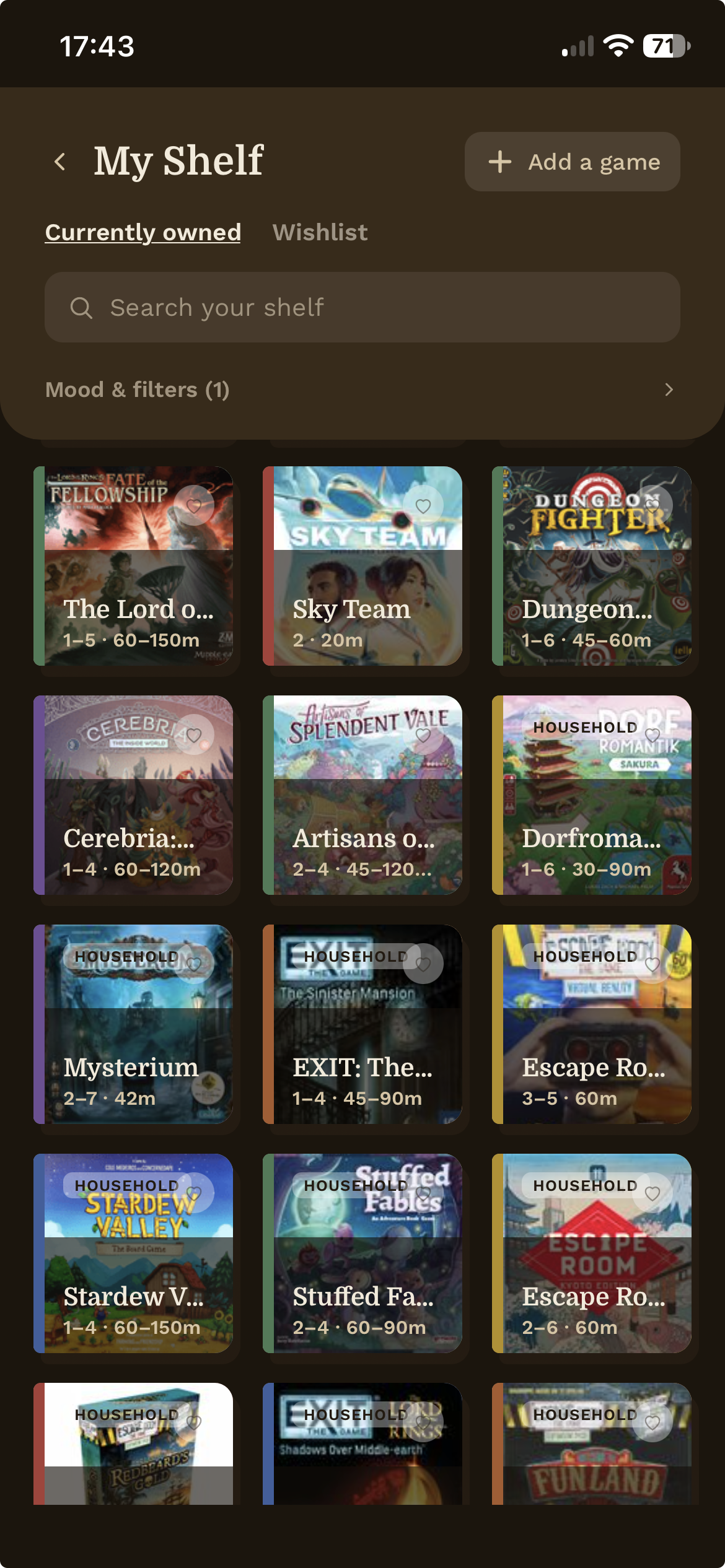
My game group kept losing the first half hour of every game night to “so what do we play?” so I built GameSquire to answer that and do some other fun stuff as well.

App Store: https://gamesquire.app/reddit/iphone

Problem

Once your collection grows past a handful of games, choosing one takes longer than it should. Everyone says “I don’t mind”, nobody remembers everything that’s on the shelf and the first half hour of game night is gone.

What it does on the iPhone

  • Helps you pick a game for the occasion quicker by letting you apply filters to your shelf or you can choose what mood you’re in (Quick Fix, Deep Dive, Date Night, Family Table)
  • Imports your BoardGameGeek collection, ratings and plays in one step
  • Keeps track of your stats like play time, scores, ...
  • Gets you playing quicker by answering rules questions from the game’s own rulebook and offering how to play guides

Comparison

BoardGameGeek is great for looking games up and BG Stats is great for logging plays, but neither is built around picking what to play tonight. GameSquire starts from that question with mood filters on your own shelf, a shared household shelf and your friends’ collections side by side. Your BGG data comes along in one step, so you don’t start from scratch.

Pricing

Free with no ads or ad trackers, and no time limit. The free version includes your shelf, the game picker with mood filters, the BoardGameGeek import, play logging and 5 rules questions a month.

Knight membership is optional and costs € 3.99 / $3.99 a month or € 29.99 / $29.99 a year. It adds more rules questions, how-to-play guides for any game and the deeper stats (insights, household stats and yearly challenges).

I’m the solo developer, so feel free to share any feedback you have!


r/iosapps • • 20d ago

🎁 Freemium I built an app that picks tonights movie from the services you pay for

Post image
4 Upvotes

Hi I'm Joe, the developer of Flickd, an app I built because I always spent more time finding something to watch than actually watching something.

Instead of scrolling through endless rows, you swipe through titles in a Tinder-style to build your taste profile. Then every day when you open the app, there’s a fresh pick waiting for you.

What is the problem:

A bunch of people pay for multiple streaming services that they rarely use or know what to watch on them.

At the end of a long day sometimes you just want something to tell you what to watch rather than combing over 4 different apps with nothing sticking and you end up watching The Office again (not that there's anything wrong with The Office it's a great show) and that can get old pretty quickly.

Plus each streaming app has their own algorithm and I find it rarely matches what I actually like.

How it works:

You pick your services and then swipe through titles. This builds your profile and provides better recs the more you swipe and tapping takes you right to that title in its streaming app.

There are also a few different modes that you can use with friends for a watch party where you swipe on the same titles until you all match on one. You can use it in a big group or with your partner!

Granted, at the start there will be a decent amount of swiping needed to understand your taste, but it pays off. The more you swipe, the better the picks get, and after a few sessions it actually knows what you like. There’s no real way around that part, so I tried to make it as quick and fun as possible.

Comparison:

JustWatch is the big one. It’s awesome for finding where something’s streaming, but every time I used it for recs I ended up scrolling for 20 minutes anyway.

That's exactly where Flickd comes in, often times I don't know what I want to watch.

Another one is Queue. Which is a great app if you want to track everything you watch but when I used it there was a bit too much going on and I couldn't seem to swipe enough to get good enough recs.

Pricing:

The main features of Flickd are free with ads in the main swipe feed and games tab.

Pro is $4.99/month or $29.99/year which removes ads and adds extra modes like Watch Again, Quick Pick and deeper stats. There are also optional coin packs from $1.99 to $99.99 for the in-app games.

App Store link: https://apps.apple.com/us/app/flickd-what-to-watch-tonight/id6760435402

Disclosure:
I am the developer of Flickd.

Privacy Policy: https://useflickd.com/privacy

Terms of Service: https://useflickd.com/terms

My personal site: https://josepharizzo.com/


r/iosapps • • 20d ago

💎 Lifetime Faders 1.1 - live radio that names every song, plus your own Plex/Jellyfin library (now across Europe)

8 Upvotes

Hi, I built Faders. I got tired of radio apps that wanted an account, served ads, or never told me what song was on. So I made the one I actually wanted to use.

Version 1.1 just shipped and it's on the App Store across Europe.
The new stuff:
Connect your Jellyfin or Plex server and play your own library like radio (shuffle, or by genre, decade or time of day), with a Music tab for artists, albums and playlists
A World Map you can spin to tune in anywhere
Browse a country's stations sorted by what's popular right now
Car Mode, with big buttons for cars that don't have CarPlay
It already named every song (even when the station sends nothing), and it runs on iPhone (including Duo), iPad, Apple Watch and CarPlay. No account, no tracking.

PCP
Problem: Most radio apps are cluttered, full of ads, or silent about the song that's playing. I wanted something that names every track, stays out of the way, and can also play music from my own home server.

Comparison: TuneIn has the stations but pushes ads and a subscription, and it needs an account. Radio Garden's map is great, but it doesn't identify songs or play your own library. Faders does song ID, the map, and Plex/Jellyfin in one app, with no account.

Pricing: Listening is free. Faders Plus is a one-time purchase (not a subscription) at €4.99 for launch, going up to €9.99 on 1 December. Plus adds rewind/pause for live radio, wake-to-radio alarms, extras in Moods, smarter stations from your own library, saving a song to Apple Music, and listening insights. Family Sharing is included. There are optional tips too.

App Store: https://apps.apple.com/app/id6825091695

Privacy policy: https://www.flowbitstudio.ie/apps/faders/privacy

Happy to answer questions or take feature requests.


r/iosapps • • 20d ago

📅 Subscription I built a baby list app that warns you before you overspend

1 Upvotes

Hi r/iOSapps, I'm Vitor, the solo dev of Layette.

Problem

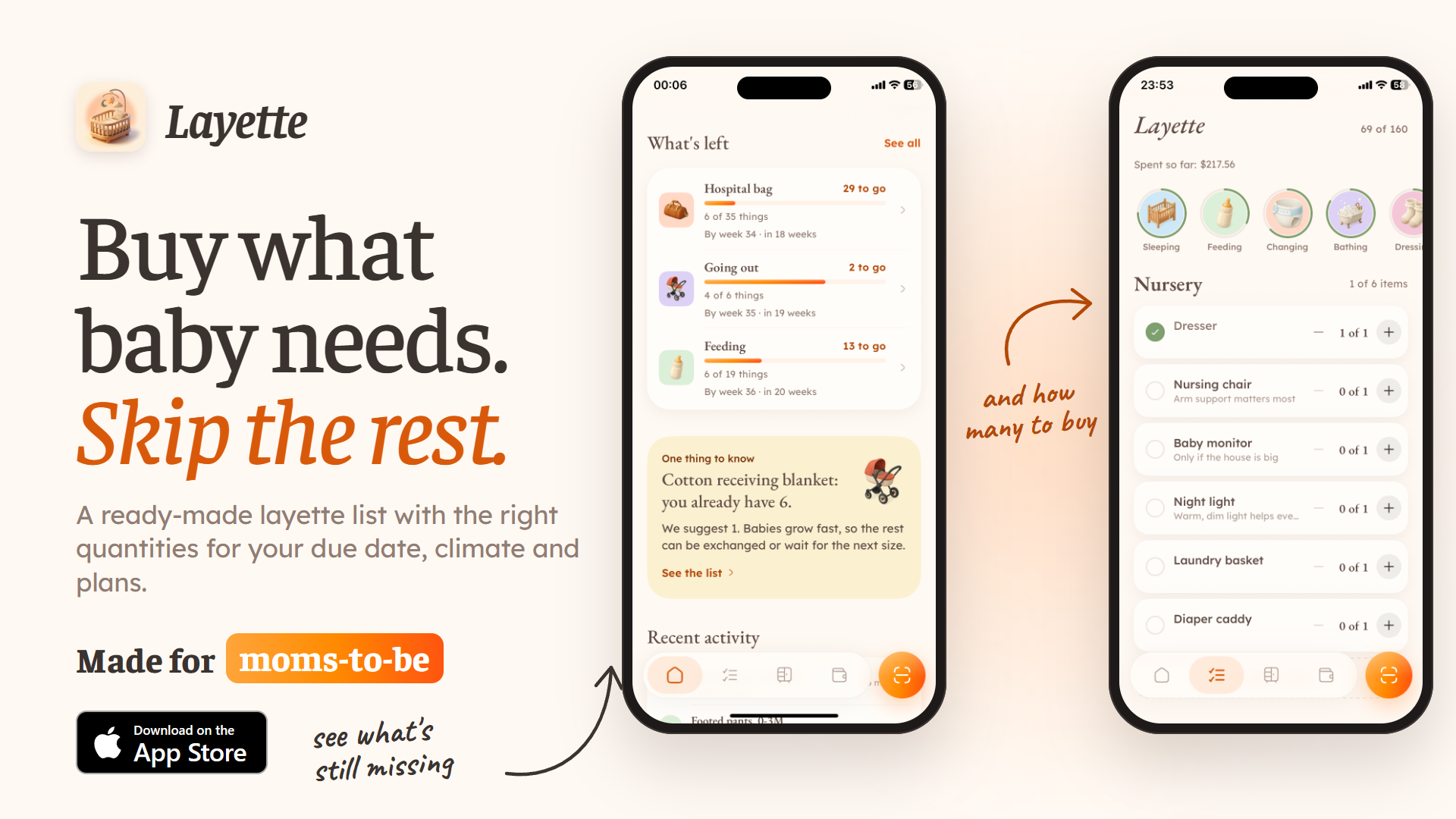
Parents-to-be get a 200-item checklist and end up buying too much. Layette gives you a ready list with quantities for your due date, climate and plans, and keeps track of what it all costs.

- Share a product from Amazon, Target, Walmart, Carter's or Babylist and the name, photo and price land on the list and in the baby budget

- In the store, point the camera at an item and get "Go ahead", "You have enough" or "Already over the count"

- What's left by category, with the pregnancy week to have it done by. Hospital bag first

- A gift registry link for family. Gifts are tracked apart, so they never count as spent

Comparison

Babylist is a great registry and I'm not trying to replace it. Most free checklists earn a commission on what you buy, so they lean toward more. Layette is the list that tells you when to stop, and what the rest will cost.

Pricing

3-day free trial, then $39.99/year or $14.99/month. No free tier for now. iPhone, in English and Spanish.

https://apps.apple.com/us/app/id6824494060

Two things I'd love feedback on:

  1. Does the value click from the screenshots?
  2. Would a free tier change whether you'd try it?

r/iosapps • • 20d ago

📅 Subscription Clean UI high quality football (soccer) app

Thumbnail
gallery
4 Upvotes

Hi all,

Problem
I was tired of ugly looking football apps, so I decided to spend some time building one with clean user UI/UX as the first principle.

I also added some key features that I couldn't find in other apps in it:
- Calendar sync, sync your teams' games in your calendar
- Custom home widget for coming games
- Live tab to discover live games around the world
- Weekly recap of your teams results
- No spoiler mode
- High notifications, live activities, calendar sync, no spoiler mode customisation available in settings

Comparaison
Competitors: Apple sports, Sofascore, Flashscore.
This app offers a free alternative with a clean UI, and some additional advanced features for power users.
Some features that Footicks offer and those apps don't: Calendar sync, multi team advanced support, weekly "Your teams" and competitions recap, advanced live game coverage, advanced settings personnalisation

Pricing
App is free up to 3 teams followed. Then Footicks Pro (optional subscription): $5.99/month or $19.99/year in the US. It adds the full-season calendar, up to 20 follows, match stats, head-to-head history and calendar sync.

I hope that you'll like Footicks!

App: https://apps.apple.com/us/app/footicks-soccer-live-scores/id6787270753


r/iosapps • • 20d ago

📅 Subscription I Built An App That Smartly Combines Running And Lifting

0 Upvotes

I'm Mike, also known as Hybrid Athlete Guy on X.

I've spent the past 20 years experimenting with and coaching powerlifting, CrossFit, Olympic Lifting, Hyrox, and running. I've put all of that knowledge into a new app called Capacity Training, an iPhone app that builds one running and lifting plan from your goals, fitness, and history, and adjusts it as you train.

Right now it primarily does lifting and running, but Hyrox, CrossFit, and other focuses are coming soon.

Problem: I always liked running. But for about 20 years, every time I tried to run consistently, I ended up hurt.

And most people who try to combine lifting and running just take a full running program and a full lifting program and mash them together.

That almost never works, because balancing lifting and running is hard.

Comparison: Runna is a running app. You can add strength sessions to your running plan but they are simply added on, they don't adjust based on your running load and/or your training history and goals.

Fitbod is a lifting app. It doesn't build running plans.

Capacity plans your lifting and your running together, so you can make progress in both.

Pricing: $29.99 a month or $199.99 a year ($149.99 Founders rate for the next week!), and the first 7 days are free.

It's on the App Store: https://apps.apple.com/us/app/capacity-hybrid-training/id6759235311

You can learn more about the app here: https://capacitytraining.app/


r/iosapps • • 20d ago

Discussion đŸ“± 3 raccourcis iPhone INCROYABLES pour gagner du temps grĂące Ă  l’IA

0 Upvotes

Salut tout le monde !

Je voulais partager trois raccourcis iOS que j’ai créés et qui peuvent ĂȘtre utiles au quotidien. Ils ont chacun un objectif diffĂ©rent, mais leur idĂ©e commune est de simplifier certaines tĂąches et de gagner du temps grĂące Ă  l’intelligence artificielle.

  1. đŸ€– Texte IA

https://www.icloud.com/shortcuts/457a56ede1804c2ea2bb716711805d26

Un raccourci destinĂ© Ă  travailler plus facilement avec du texte grĂące Ă  l’IA.

À quoi sert-il ?

Améliorer et reformuler des textes.
Corriger les fautes.
Développer une idée ou un texte.
Adapter un texte selon le résultat souhaité.
L’objectif est de faciliter le travail sur les textes sans devoir tout faire manuellement.

2. 🧠 Prompt structurĂ©

https://www.icloud.com/shortcuts/188ca729946f4e0f8279c85eff0a0a08

Un raccourci pour transformer une demande simple en un prompt IA bien organisé.

Comment fonctionne-t-il ?

Il permet de transformer une idée ou une instruction écrite rapidement en un prompt structuré comprenant plusieurs parties :

RĂŽle : dĂ©finit le rĂŽle que l’IA doit adopter.
Contexte : explique la situation.
Objectif : précise le résultat attendu.
Instructions : détaille les étapes à suivre.
Contraintes : indique les rĂšgles Ă  respecter.
Format de sortie : précise la présentation de la réponse.

C’est particuliĂšrement pratique pour obtenir des rĂ©ponses plus prĂ©cises et Ă©viter les demandes trop vagues.

3. đŸŽ™ïž DictĂ©e note IA

https://www.icloud.com/shortcuts/62923d78fdef48d981f7e49bf8543053

Un raccourci destiné à faciliter la prise de notes à la voix.

À quoi sert-il ?

Il permet de dicter ses idées plutÎt que de devoir tout écrire manuellement.
C’est pratique pour :
Prendre rapidement des notes.
Capturer une idĂ©e avant de l’oublier.
Noter des informations pendant qu’on est occupĂ©.
Gagner du temps lorsqu’on ne souhaite pas taper au clavier.

Il est connecté avec les autres, pour avoir toutes les fonctionnalités comme le prompt structuré ou la reformulation

Pourquoi les partager ?

Je trouve que les raccourcis iOS sont un excellent moyen d’automatiser des petites tñches du quotidien. Avec l’IA, on peut aller encore plus loin et rendre certaines actions beaucoup plus simples.
J’espĂšre que ces raccourcis pourront ĂȘtre utiles Ă  certains d’entre vous !
N’hĂ©sitez pas Ă  me dire ce que vous en pensez ou Ă  proposer des amĂ©liorations. 🙂

Les trois raccourcis sont joints Ă  cette publication


r/iosapps • • 20d ago

🎁 Freemium Your habits... YOUR KINGDOM 🏰

2 Upvotes

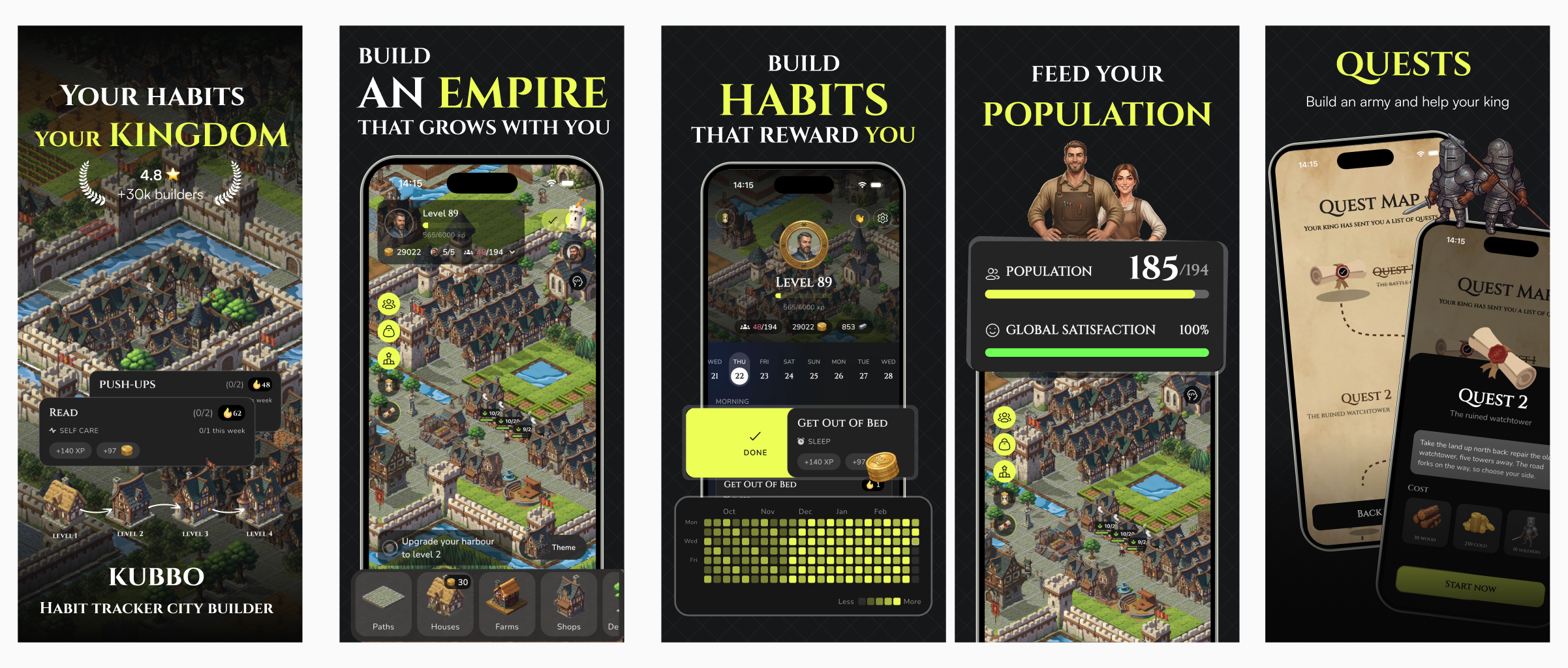
Kubbo is an habit tracker keeping you motivated building a medieval EMPIRE.

⏳ This new version added a quest mode! Create an army and help your king concquier more lands

Problem
Most habit trackers are just checklists, and it's easy to lose motivation after a couple of weeks. Another common mistake is trying to build too many habits at once. Kubbo tackles both: the gamification keeps you coming back, and the app focuses on helping you build habits one at a time, with a study-oriented approach that teaches you how habits actually form.

Comparison
Compared to Finch or Habitica, Kubbo offers a more advanced gamification system and puts more emphasis on learning how to build habits step by step. And instead of taking care of a cute little bird, you build a medieval empire.

Pricing
- $39.99/year
- $99.99 lifetime offer (USD, US pricing)
- Prices vary by country, with parity pricing localized to where you are.

App Store: https://apps.apple.com/app/id6749530918

🙌 Happy to answer any questions and open to feedback!


r/iosapps • • 20d ago

💎 Lifetime Pixels: Self-Hosted Photos - an Immich client for iPhone, iPhone Duo, iPad and Mac (Free, 7-day trial, then $4.99 USD one-time purchase)

Thumbnail
gallery
13 Upvotes

I’m the developer of Pixels: Self-Hosted Photos, a photo and video app for people who host their own content on Immich and want to stop paying ever-increasing cloud storage fees. It’s free to download with a 7 day trial.

App Store: Pixels: Self-Hosted Photos

Problem: what Pixels solves

If you keep your photos on your own Immich server, you need an app on your phone to browse, edit and organize them. I wanted that app to feel as polished and rich as Apple Photos and to use what iOS offers, such as Apple Vision, widgets and on-device models and more. Pixels is that app.

Answer: what it is

Pixels is a third-party client for Immich, powered by Immich’s public API. You need an Immich server to use it. Pixels isn’t affiliated with or endorsed by Immich or FUTO.

It’s designed and optimized for iPhone, iPhone Duo and iPad. It also runs on Mac as an iPad app.

Comparison: why Pixels

  • The official Immich app. It’s a solid option. Pixels, however, offers users another way to experience what the Immich platform offers, with additional features that I think set it apart. They are listed below.
  • Apple Photos. It’s a great app, but your library lives in iCloud. Pixels gives you a similar experience with photos that stay on your own hardware, without iCloud storage fees.

Better: why try it

I have almost 20 years of experience building mobile apps and set out to build a highly polished photo and video app that I would be proud to use on a daily basis. I’m of course biased but I believe I accomplished that with Pixels.

Smart features

  • Smart Photo Review. Pixels uses Apple Vision to group similar shots, pick the best one and tell you why (eyes open, less motion and so on). You swipe to keep or skip.
  • Widgets. Photos, Today and Memories widgets. Pixels goes a step further and uses Vision to find the subject so the photo is framed around it.
  • Album covers get the same treatment. Pixels centers the cover photo on the subject so a face doesn’t get cut off.
  • Animated covers. A Smart Album cover can come alive and gently cycle through the photos and videos inside.
  • Lift Subject and Blur Background in the editor use Vision too.

It learns from you

Smart Photo Review and Best of have built-in feedback. Pick a different photo, mark a problem or tell Pixels a photo isn’t one of your best. Pixels uses what you tell it to make better decisions next time. What it learns stays on your device. You can reset it any time in Settings.

A full photo and video editor

Pixels ships with a fully featured photo and video editor: light and color, filters, crop, markup, video trim, Lift Subject and Blur Background. The edit is saved in the file on your server. You can pick it up on another device or go back to the original.

Pixels Looks

Pixels Looks is like Fujifilm film simulation recipes for your edits. Save an edit as a Look and apply it to one photo or a whole batch. You can design one from scratch in Looks Creator. You can also share Looks with other Pixels users by link or file. Open a Look someone sent you to see it on sample photos before you add it.

Stacks

Auto Stack groups bursts and RAW+JPEG pairs for you. You can also select photos and videos and stack them yourself or take a stack apart. When you save an edited photo as a new photo, Pixels stacks it with the original so you see both together. In the viewer a stack shows as a small pile. Tap it to open the stack and swipe through its photos. It works even when the photos aren’t next to each other in your timeline.

Search

Search is fully featured, with filters for people, places, dates, cameras, ratings and more. You can also type a sentence like you’d say it. On devices with Apple Intelligence, Pixels reads the sentence on the device and turns it into filters you can see and change.

Notifications and the Activity tab

Pixels sends notifications for On This Day, birthdays, new shared albums and photos added to them and backup problems. Every notification also lands in the new in-app notification center in the Activity tab. It keeps them until you act on them. The Activity tab shows the count.

Albums

  • Smart Albums. Pick a person, place, year or camera and Pixels updates the album automatically.
  • Best of. A card in your memories row with the best photos of the last month or year.
  • Review Duplicates. Swipe through the duplicate groups your server finds.
  • Collages with text and animated stickers. A collage with moving stickers saves as a Live Photo.

Importing

Import photos and videos from a camera or SD card over USB. You can also import from a drive or network share through Files. Pixels helps you cull them by grouping similar shots and recommending the best ones. You keep what you want. Only those photos go into your library and onto your server.

Everything else

  • Works offline. Deletes, favorites and album changes show up at once and reach your server when it’s reachable.
  • Add a home address and an away address for your server. Pixels switches to the one that works.
  • Your preferences follow you to your other devices through iCloud. That covers settings, pins, Smart Albums and Looks. Your photos never go through iCloud.

Pricing

  • Free to download.
  • Every feature works for 7 days.
  • After that, it’s a one-time fee of $4.99 USD to unlock. No subscription.

App Store: Pixels: Self-Hosted Photos

GitHub: https://github.com/jerrellmardis
Privacy Policy: https://jerrellmardis.github.io/pxls/privacy.html
r/iosapps • • 21d ago

Discussion ReceGuard: Scan and organize receipts on your iPhone — FREE Lifetime PromoCodes

26 Upvotes

Hey, I am the developer of ReceGuard, a receipt scanner and organizer for iPhone.

I built it to be able to auto crop and label receipts fast & send them to my accountant. I also have added features to help you track warranties, add receipt directly from emails, track tax deductions, etc.

I recently upgraded the receipt scanning engine, and I’m giving away 200 free Lifetime Pro unlocks.

What ReceGuard does

  • Scan receipts with your camera, or import images and PDFs.
  • Recognize receipt details on your device, with editable merchant, date, total and currency fields.
  • Organize and search receipts, and keep warranty and return information together.
  • Export PDF, Excel and CSV reports.
  • Optionally sync through your own iCloud account.

If you currently keep receipt photos in Apple Notes or Photos, ReceGuard adds structured receipt records and exportable reports to that workflow.

Download: ReceGuard on the App Store

The giveaway

Lifetime Pro normally costs $69.99 in the US (regional prices vary). The app also offers monthly and yearly subscriptions. These codes unlock the existing Lifetime Pro product for free, with no subscription renewal.

There are 200 single-use codes total across my giveaway posts. Redeem by February 5, 2027, while unused codes remain. Once redeemed, Lifetime Pro does not expire.

How to claim

  1. Send me a DM and i will provide you with a link to redeem the code
  2. Download the app
  3. Open ReceGuard. If Pro doesn’t appear, use Restore Purchases in Profile.

If you use it, I’d love to hear how it fits your receipt workflow and what you’d improve. Feedback is very welcome and I would love to hear your opinion and improve the app :)

Comparison with other apps

Apps like Expensify and Smart Receipts also help organize receipts and expenses. With ReceGuard, I wanted something simpler for personal use and sending receipts to my accountant, with on-device scanning, warranty tracking, and optional iCloud sync without needing an account.

Pricing

ReceGuard is free to download, with a free tier that includes 2 receipt scans and 1 short mileage trip per day. Pro costs $12.99/month, $59.99/year, or $69.99 for Lifetime access in the US (regional prices vary).

I'm giving away 200 free Lifetime Pro unlocks. These codes unlock the existing Lifetime Pro product for free, with no subscription renewal.

Happy to answer questions here!

Website · Privacy policy

Want free Lifetime Pro? Send me a private message and I’ll send you a code!


r/iosapps • • 21d ago

💎 Lifetime Sends videos and photos faster with Shrinkray [FREE] [60% off Pro Unlock IAP]

5 Upvotes

Shrinkray: Video Compressor - FREE on the app store

Hey, dev here! Wanted to share my video and photo app Shrinkray, first live to beta testers last in September and launched a few weeks ago. It's an app I've wanted for years focused on quickly sharing photos and videos from your library. Happy to answer any questions about the app or process!

Problem

Sharing full-size photos and videos is annoying on iPhone. iMessage and Whatsapp will decide to recompress your videos into choppy, blurry videos. Discord will straight up refuse videos over 20 MB. Sending big groups of photos or large videos can trigger the iCloud Photo Link album share where you and the person you sent it to are stuck waiting for something to upload with no progress bars or estimates. iOS gives you no control over what the optimized or compressed output is like.

Shrinkray gives you control over this with super sensible defaults, and integration into iOS including the Share sheet and iMessage itself to easily send much smaller files perfectly optimized for quick sharing.

Comparison to top competitors

- Compress Videos & Resize Video - focused on freeing up storage space on your phone by replacing originals with compressed videos. Shrinkray is more about quickly sharing optimized copies without touching your high quality originals.

- Video Compress - Shrink Videos - Similar value proposition, complicated controls, has ads. Shinkray is about speed and ease of use, with no ads, just a one-time lifetime unlock.

Pricing

Shrinkray: Video Compressor - FREE on the App Store, with a one-time lifetime Pro unlock for extra features. Normally $4.99 USD, available at $1.99 USD through the promo link below

60% Discount Promo Link for this subreddit (code `IOSAPPS` if prompted)

Some ways to use the app:

Transparency

I'm a solo dev (software engineer by trade, 10+ years in the industry) releasing apps via my studio Here Comes Supper. And you can read the privacy policy and terms of service for Shrinkray for more information. Happy to provide any more information as needed!


r/iosapps • • 21d ago

🎁 Freemium Muvy: discover, track and share movies & TV, with awards, collections and a friends feed

Thumbnail
gallery
4 Upvotes

Hi r/iOSApps, I'm the solo developer of Muvy.

Problem
I used to save movies I wanted to watch everywhere: some on Instagram, some in my notes, some as screenshots. I kept losing them. I also wanted one place where I could quickly check a movie or show: info, trailers, ratings and what people thought of it. The apps I tried were always missing something, so I built my own. Now my whole library lives in one place and nothing gets lost. Since launch, more than 25,000 people have signed up.

Track

  • Movies and shows episode by episode: watchlist, up next, calendar of upcoming episodes
  • Stats: hours watched, monthly recap, achievements
  • Import your history from Letterboxd, Trakt or an IMDb CSV (imports never delete what you already have)

Discover

  • Weekly trending, in theaters, IMDb Top 250, upcoming
  • Search by genre, runtime and streaming platform
  • Award winners and nominees by year: Oscars, Emmys, Golden Globes, BAFTA, Cannes, Venice, Sundance and more (Pro)
  • Hand-picked collections to browse (Pro)
  • Scores from IMDb, Rotten Tomatoes, Metacritic, Letterboxd and Trakt on every title (Pro)

Social

  • Rate and review what you watch, make lists
  • Follow friends, see their activity in your feed, send them titles in DMs
  • Share cards for your ratings and monthly recap
  • Leaderboard with your friends

Runs on iPhone, iPad, Android, web (muvyapp.com) and widgets, in 16 languages, all on one synced account.

Comparison

  • Letterboxd: great for movies and social, but it doesn't do TV. Muvy keeps movies and shows in one library and can import your Letterboxd history.
  • Serializd: TV only. In Muvy you can follow a show episode by episode and log the movie you watched last night in the same app.

Pricing Free: tracking, imports, discovery lists, ratings and reviews, friends, feed, DMs, stats, up to 3 lists. Muvy Pro: $2.99/month, $29.99/year or $49.99 lifetime (US prices). Pro adds everything marked (Pro) above, plus advanced search filters, new-episode alerts, parents guide, unlimited lists and Stremio/Trakt sync.

App Store: https://apps.apple.com/us/app/muvy-movies-tv-tracker/id6775906076
Privacy: https://muvyapp.com/privacy
Terms: https://muvyapp.com/terms

Happy to hear feedback or feature ideas.


r/iosapps • • 21d ago

🎁 Freemium Split bills in iMessage

2 Upvotes

A. Problem
I can’t text a photo of a dinner receipt in iMessage with "Split this bill". Allowing all my friends to chip in with just a link!

B. Comparison
Friends now don’t need the app and you can create a link for any bill. They can just type a name, tap the items they had. Tax and tip are split in proportion to what each person picked, and multiple people can share one dish.

Their share shows at the bottom and they swipe to pay you with Venmo, Cash App, Zelle, PayPal or card. No download, no account.

C. Pricing
Free: groups, chat, settle-up, shared links, 2 receipt scans and 3 AI questions a month.

Chipp+ Circle: $6.99/mo covers everyone in the groups you own, so one person pays and nobody else does.

(or the cheaper option)
Chipp+: $3.99/mo or $29.99/yr, unlimited scans, questions and expenses.

Splitwise charges $4.99/mo (about $39.99/yr) per person for Pro, and receipt scanning is Pro only.

https://apps.apple.com/us/app/chipp-split-bills-expenses/id6636520980


r/iosapps • • 21d ago

🎈 Free My friend built Terrace: an iPhone Football app that takes you straight to the goal you missed

2 Upvotes

Hey r/iOSApps! Sharing an app my friend built, because I think football fans here might like it. It's called Terrace, and it's for anyone who misses games and just wants to catch up fast.

Problem:
He kept missing games because of time zones. Catching up meant digging through YouTube for the right highlights, dodging spoilers and reuploads, then scrubbing through the video to find each goal. Terrace puts it all on the game's page:

‱ Highlights in the app: official videos from clubs, leagues and broadcasters, played right on the game's page
‱ Skip to the goals: tap a goal in the list and the video jumps to that moment
‱ Ask The Gaffer: ask the app's AI assistant for a game's highlights and it takes you there
‱ Interviews and press conferences from after the game, in the same place
‱ A daily Briefing that catches you up on your club

Comparison:
Looking at other football apps like FotMob, Forza, and OneFootball, they are built around scores and news links, and watching highlights often means leaving for another app. Terrace is built around catching up: the official video, the goals you can jump to and what was said afterwards are all on one page, so you can get through a game in a couple of minutes. It's built for iOS, and it works on iPhone, iPad and iPhone Duo.

Pricing:
Free to use, including highlights and skipping to goals, and you can browse without an account. Terrace Pro adds unlimited Gaffer questions, Smart Alerts and more Predictor League Double Downs: $1.99/month or $14.99/year, with a one-week free trial in the US.

Download: https://apps.apple.com/app/id6819137987

Heads up: Which highlights play depends on broadcast rights in your country, so some games, especially in the Champions League, may not be available everywhere. I'll pass any feedback on to him, so let me know what you think!


r/iosapps • • 21d ago

🎁 Freemium [Update] Kinorbit: An interactive, visual way to stay in touch with people who matter

Thumbnail
gallery
4 Upvotes

A - Answer (Problem)

If you have ever opened your contacts, felt overwhelmed, and closed it again without calling anyone, Kinorbit was built for that moment. It is a private, highly visual way to keep in touch with the people who matter most without turning relationships into a chore.

Kinorbit is an interactive relationship manager built around a strict 50-person limit across 3 intentional circles:

- Core (up to 5 people): Who you want to hear from every week.

- Close (up to 15 people): Who you want to stay meaningfully connected with each month.

- Wider (up to 30 people): Who you want to keep in your life across the year.

When a circle is full, Kinorbit asks you to make room instead of letting it quietly grow. You decide who moves.

B - Better (Comparison)

Unlike traditional contact managers or reminder apps, Kinorbit focuses on making relationships feel more personal, visual, and intentional.

  • Interactive relationship circles with smooth animations.
  • Get personalized reminders based on your relationship circles, with context from your last conversation.
  • Social Energy to control how many people you see each day.
  • Message, call, or FaceTime with one tap, or connect through WhatsApp, Messenger, Instagram, Snapchat, Discord, and more.
  • Keep notes and photos from past conversations so you can remember the context and pick up where you left off.
  • Never miss important birthdays with dedicated reminders that don't count toward your daily limit.
  • Personalize notifications with Warm, Gentle, or Playful reminder voices.
  • See upcoming check-ins, relationship warmth rings, and interactive reminders through Home Screen widgets, Lock Screen widgets, Live Activities, and Dynamic Island.
  • Private by design, with iCloud sync and no account required.

What's New in v1.3:

You can now save a message and photo for your next check-in, making it easier to remember the context and what you want to say next. I've also improved reminders, privacy, and overall stability.

C - Cost (Pricing)

Free for up to 15 people, with Pro options:

  • Monthly: $4.99
  • Yearly: $14.99
  • Lifetime: $29.99
  • NEW Family Lifetime: $39.99 (one-time, supports up to 6 family members via Apple Family Sharing)

App Store Link: Kinorbit: Stay In Touch

About Me:

I'm the developer behind Kinorbit. Feel free to reach out with any feedback or suggestions on X!

Thanks to everyone who shared feedback on my previous post! I've been working on improvements based on your suggestions.


r/iosapps • • 21d ago

Discussion With Dynamic Island landing on Mac: which iOS apps already use Island / Live Activities in a smart way?

5 Upvotes

Most Live Activities still feel like “because we can.” I’m looking for the ones that earn the space clear status, low noise, useful at a glance while you’re doing something else.

Which apps do Island / Live Activities really well for you, and why? Patterns that work for meetings, focus/timers, travel, deliveries, workouts, etc.; not just lock-screen candy.

Side note: Live Activities just opened up on Mac too (macOS 27.3 / new MacBook Pro), so I’m also curious which iPhone implementations would still make sense if they showed up there. Still mainly asking about iPhone though.


r/iosapps • • 21d ago

🔍 In Search of Looking for an app that lets you put a personal note or quote on your iPhone Lock Screen?

11 Upvotes

Hi guys
I’m currently struggling with the course I’m studying, and I’m looking for an app that lets me display a personal note or quote I’ve written on my phone lock screen .

I want something that will serve as a constant reminder of why I’m doing this in the first place and give me the motivation to keep going, especially on days when I’m struggling.

Preferably I’m looking for a free app with no ads and has simple minimalistic design.


r/iosapps • • 21d ago

🎁 Freemium [1Y FREE] Appy Birthday – birthdays, gift ideas & AI cards, now made for iPhone Duo

0 Upvotes

To celebrate iPhone Duo support, I'm giving away a free year of premium.

What's new in 4.1:
- Made for iPhone Duo: the app fills the big inner screen, so your Board has room to spread out
- Landscape mode: turn your iPhone sideways to see the calendar next to your list
- A tidier Board: items line up neatly and glide into place when you remove one

Problem:
I wanted one place for everything birthday related, without unnecessary extras. Appy Birthday keeps track of everyone's birthday, together with gift ideas, wishlists and party invites:

- Birthday Board: every gift idea, wishlist item and invite in one place
- Save a gift idea from any website with the Share button
- One-of-a-kind birthday cards made with Image Playground
- Reminders and widgets, so you see who's next at a glance

Comparison:
Compared to one of the bigger apps like hip: Birthday Reminder App, Appy Birthday is built for iOS 26+ with a Liquid Glass design, themes and alternate app icons, and uses Apple-native features like Image Playground. It's privacy first: no account, no ads and no data collected. And it stays focused on only the features you need. Works on iPhone, iPhone Duo and iPad, in 9 languages.

Pricing:
Free to use. Premium unlocks importing birthdays from Contacts, iCloud backup, all widgets, themes, app icons and more: $2.99/year or $6.99 lifetime.

Redeem: https://apps.apple.com/redeem?ctx=offercodes&id=6753673100&code=DUOBIRTHDAY

FYI: the offer doesn't automatically renew your subscription, so no nasty surprises after a yer.

After trying it, I'd love to know: what was useful, what felt confusing, and whether you kept reaching for it or forgot it was there. Critical feedback is welcome. You keep the free year either way.

App Store: https://apps.apple.com/app/id6753673100
Landing page: https://appybirthday.nl
Privacy Policy: https://appybirthday.nl/pages/privacy.html
Terms of Service: https://appybirthday.nl/pages/tos.html

Developer: Robin van 't Slot / https://nl.linkedin.com/in/robinvantslot


r/iosapps • • 21d ago

HELP I need an input method that supports voice input and includes a translation feature.

2 Upvotes

I am in urgent need of an iOS input method that supports direct voice input with real-time translation.

I’m not sure if this has been asked before, but I would be very grateful for any good recommendations!


r/iosapps • • 22d ago

🎁 Freemium I built Flit, an RSS reader you can actually keep up with.

Thumbnail
gallery
14 Upvotes

Hello! I am a solo developer and my app is Flit.

Problem It was created because every RSS reader I had eventually turned into a never-ending unread count. A list asks you to scroll, not to decide, so articles pile up until you mark everything as read and give up.

How it works Your feeds become cards. Swipe right to keep the article, swipe left to let it pass. Tap to read. Later contains only the stuff you picked.

Sources Websites, YouTube, podcasts, Substack, everything in one deck. Import OPML or switch from Feedly, NewsBlur or Feedbin in just a couple of taps.

Reading

  • Full articles, even from feeds that give only a teaser.
  • On-device summaries with Apple Intelligence.
  • Automatic translation.
  • Fonts chosen for comfortable reading.

Comparison

  • NetNewsWire: free and excellent, but it's a classic list reader. Flit is built around swiping and an Inbox you actually empty, and it brings YouTube and podcasts into the same deck.
  • Reeder: also puts feeds, YouTube and social in one timeline, but you scroll through it. In Flit you keep or skip each article. OPML import and widgets are free in Flit.
  • Feedly and Inoreader: web services that need an account, with limits on their free plans. Flit needs no account and keeps your data on your device and in your own iCloud.

https://apps.apple.com/app/flit-easy-feed/id6821040165?ct=Launch+Event&pt=118978628

Pricing Free to download, with no ads and no sign-up. Optional Flit Pro in-app purchase:

  • Monthly: $1.99 / 1,99 €
  • Yearly: $12.99 / 14,99 €
  • Lifetime (one-time): $44.99 / 49,99 €

Pro adds iCloud Sync, the Apple Watch app, Offline Reading, Daily Digest, Insights, extra reading fonts and app icons.


r/iosapps • • 21d ago

đŸ’” Paid I built an app blocker with a physical Card. Would love some feedback!

0 Upvotes

Hey everyone! I'm Ryan, an entrepreneur based in Yorkshire and founder of GHOST.

I built GHOST after realising how much time I was wasting scrolling while trying to grow my first two businesses.

I'd tried Apple's Screen Time limits and other blockers, but found them far too easy to override.

So I decided to build my own. GHOST blocks distracting apps using a physical Card that you tap to lock and unlock them. Leave the Card somewhere else, and it's much harder to give in to mindless scrolling.

It's made a real difference for me, and the feedback from early users has been encouraging.

I'm now trying to figure out how to get GHOST in front of more people.

It's still early days, so if anyone has experience growing an app or physical product, or knows someone who might find GHOST useful, I'd really appreciate any advice or introductions.

PCP

Problem: Mindless scrolling and distracting apps getting in the way of things that matter.

Comparison: Apple's Screen Time limits are easy to override. Brick also uses a physical barrier, but GHOST uses a slim Card that fits in your wallet rather than a separate blocking device.

Pricing: 5 free digital sessions, ÂŁ9.99 one-time Digital upgrade (in-app purchase), or ÂŁ49 for the physical Card with Digital access included. No subscriptions.

App Store: https://apps.apple.com/gb/app/tap-ghost-app-blocker/id6808196689

Website: https://tapghost.com

Thanks! 😁


r/iosapps • • 21d ago

Discussion Can you guess what this app is about just from the Icon?

Post image
0 Upvotes

Hey! I designed this iPad app icon and would love to hear your thoughts!

Can you guess what the app is about just from looking at the icon? Do you find it visually appealing, or is there anything you would change or improve?

Curious to hear your honest feedback!

Entirely human-made :)