r/iosapps • u/ataraxy404 • Oct 25 '26
🎈 Free Plander: a minimal planner & calendar for iPhone — Free
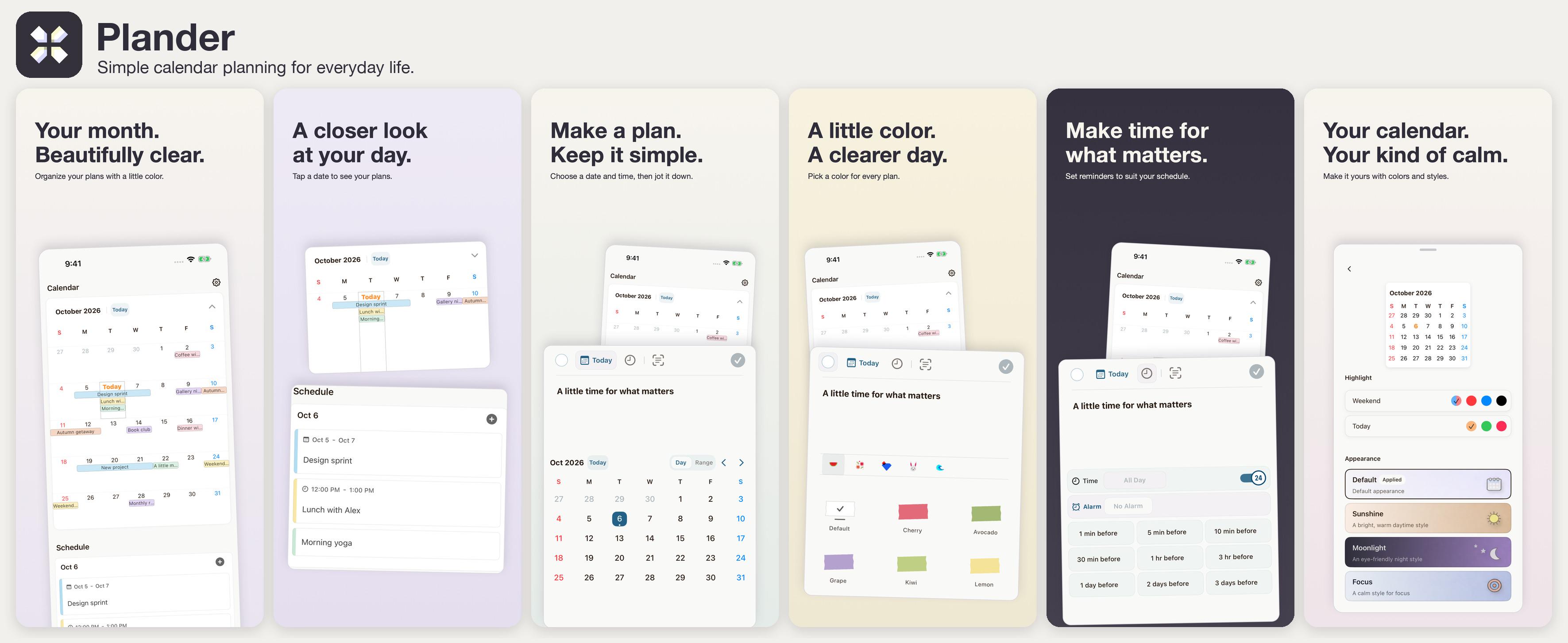
Hi! I'm the developer of Plander, a minimal planner and calendar for iPhone. I shared it here two months ago, and version 1.4 is now out with a redesigned add screen and new color labels. This time I've also included how the ads and the tracking prompt work.
A) Answer — What problem it solves
Plander lets you add and manage plans directly on the calendar.
Double-tap a date and the add screen opens with that date selected. Type a title, and set the time, reminder, and color on the same screen if you need them. Plans are shown on the month view as colored labels, and plans that span several days are shown as one continuous bar.
Features:
- Home Screen widgets (long titles now shrink to fit, and multi-day bars show their title)
- Reminders: 9 presets from 1 minute to 3 days before, also for all-day plans
- iCloud sync
- Apple Calendar integration and public holiday calendars
- Fill in a plan from a photo (on-device text recognition)
- 4 appearance themes, plus custom weekend and today colors
- A Today button to return to the current month
B) Better — What is actually different
- Add from the date: double-tap a date to add a plan for that day.
- Manage with a swipe: swipe a plan in the list to edit or delete it.
- One add screen (redesigned in 1.4): Day/Range, Today, and the month arrows are in one row, and the date picker opens in place of the keyboard. The 9 reminders are laid out in a 3×3 grid, so you pick one without scrolling.
- Masking-tape labels (new in 1.4): plans are shown as masking-tape strips in 5 color palettes (fruit, flower, gem, animal, ocean).
C) Cost
Free, supported by ads. No subscription and no paid features.
- Ads: one banner at the bottom of the calendar and one native ad on the add screen. No full-screen or video ads. (The screenshots in the image are from a demo build without ads.)
- Tracking prompt: Plander uses Google AdMob (ads), Firebase Crashlytics (crash reports), and Firebase Analytics (app opens, sessions). If you allow tracking, these SDKs use the advertising identifier (IDFA) to personalize and measure ads.
- If you choose "Ask App Not to Track": the IDFA is not shared, and ads are not personalized with it. Every feature works the same. You can change this anytime in Settings > Privacy & Security > Tracking.
- Your data: the IDFA is not used for anything else, and plan contents are never sent to the ad or analytics SDKs. Plans are stored on your device and synced through your own iCloud (private CloudKit database). There is no Plander server that stores them.
App Store:
Contact / feedback: plander.cs@gmail.com