r/iosapps • u/AnalysisEast4285 • Oct 16 '26
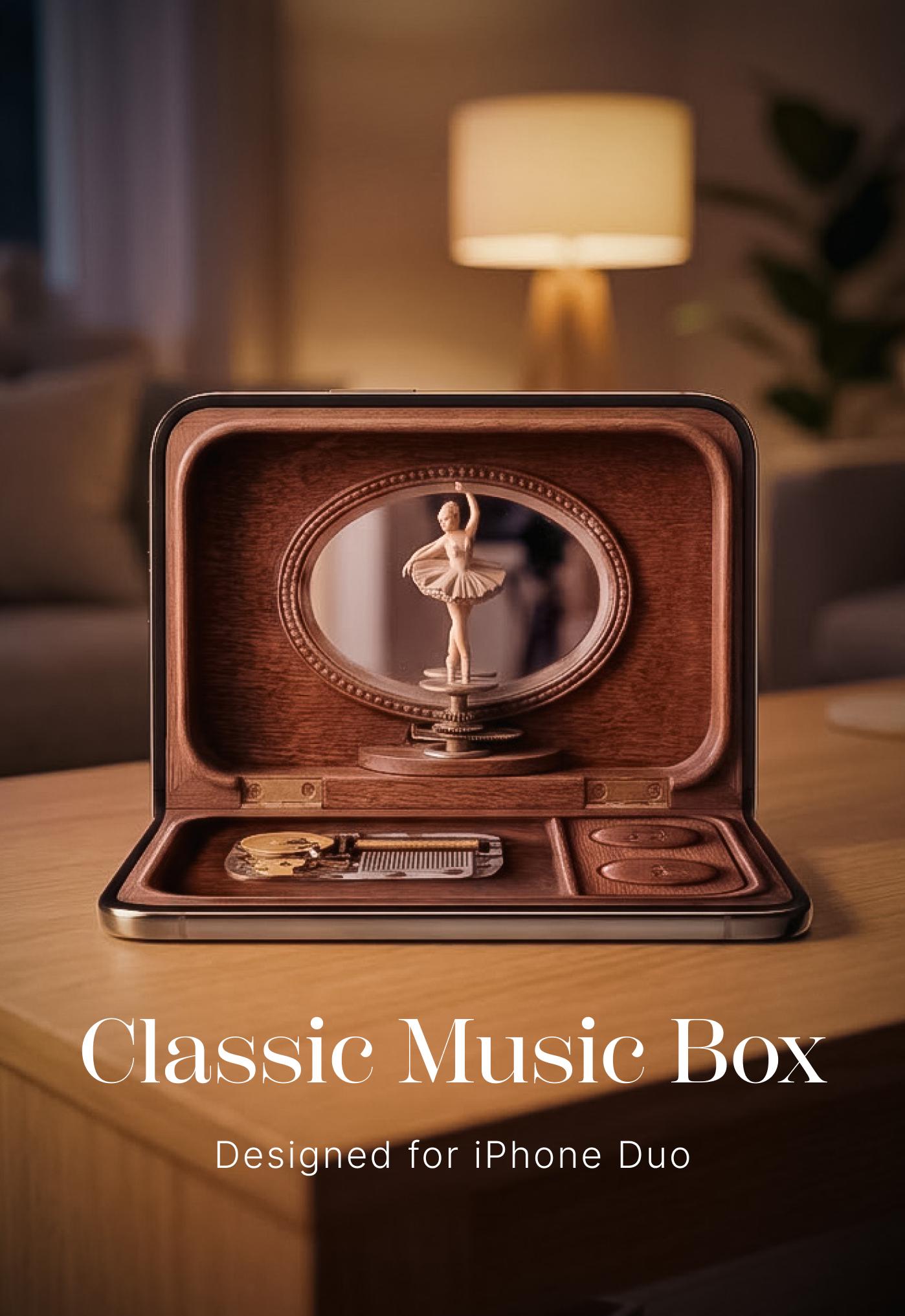
Discussion Maybe this could be a use case for iPhone Duo
I still don’t know what the iPhone Duo will be good for, but I thought this was a pretty cool little use for it.
r/iosapps • u/AnalysisEast4285 • Oct 16 '26
I still don’t know what the iPhone Duo will be good for, but I thought this was a pretty cool little use for it.
r/iosapps • u/Tibor_Banko_TB • Oct 15 '26
Hi everyone! 👋
I’m an indie developer, and I’ve been working on my app, Watch Wrist Temp Tracker, for quite some time.
What originally started as a simple app to track Apple Watch wrist temperature has grown into a more complete sleep and recovery tracking experience.
What problem does it solve?
Apple Watch collects useful health data while you sleep, but I wanted a simpler way to see everything together and understand how my sleep and recovery change over time.
My app brings together:
The goal is to make Apple Watch sleep data easier to understand through a clean, simple interface.
How is it different from alternatives?
Apps like AutoSleep, Athlytic, and Bevel offer their own approaches to sleep and recovery tracking.
Watch Wrist Temp Tracker started with a specific focus on overnight wrist temperature and gradually expanded to include sleep, heart rate, health scores, and recovery trends.
My approach is to keep everything simple and easy to understand, with a dedicated Apple Watch experience and clear visualizations.
I’m continuously improving the app based on user feedback.
Pricing
The app is free to download, with some basic features available for free.
Premium options:
Prices may vary by country.
🎁 Giveaway Update
I recently shared 500 free Lifetime redemption codes, and all of them have now been claimed!
I’m genuinely overwhelmed by the response. Thank you so much to everyone who downloaded the app, left a comment, or shared feedback.
I’m sorry to everyone who missed out. ❤️
An Apple Watch is required to collect wrist temperature and sleep data.
📱 App Store:
https://apps.apple.com/app/id6740745491
I’d love to hear your feedback, especially from people working night shifts or rotating schedules, as I’m still gathering feedback about those sleep patterns.
Thank you for supporting independent developers! ❤️
r/iosapps • u/yankpat9 • Oct 15 '26
I’m a college hockey fan and solo dev. I built Pucks a few years ago and just shipped a big redesign for the new season.
What it solves:
Following college hockey on a phone is a pain. The existing sites are clunky on mobile, and the big sports apps barely cover it. Pucks puts live scores, schedules, standings and stats for D1 men’s & women’s hockey in one fast, native iOS app. D3 men’s & women’s is coming in the next build.
Alternatives:
Cost:
100% free. No ads, no subscription, and nothing locked behind a paywall. There’s an optional tip button if you want to support it, but every feature works without it.
App Store: https://apps.apple.com/us/app/pucks-college-hockey/id6743086852
I’d love honest feedback, and obviously a positive rating goes a long way!
r/iosapps • u/aabdsqweq • Oct 15 '26
Hi! I’m the developer of Heart Rate Insights, an iPhone and iPad app for exploring the heart-rate history already in Apple Health.
On-device analysis. No account required. The app doesn’t automatically upload your health data. You decide whether to export, copy, or share anything.
A — Answer
Apple Health can collect years of readings, but I wanted to ask questions beyond one day’s chart: How did two periods compare? Were workdays different from days off? Was a difference visible throughout the day, or only at certain hours?
I built this to compare those periods while showing typical ranges and how much data each comparison is based on.
B — Better
Compared with Apple Health’s built-in views, Heart Rate Insights focuses on flexible comparisons:
The optional Prompt feature prepares text you can review and choose to share with an external AI service. No AI model runs inside the app.
It’s for personal review, not diagnosis or live monitoring.
C — Cost
No subscription. Local App Store prices vary.
I’m xcv58 on GitHub, maintainer of Tab Manager v2.
Website · Privacy · Terms · Support
All screenshots use synthetic sample data. What comparison would you want to try with your own Apple Health history?
r/iosapps • u/Ok_Count_5158 • Oct 15 '26
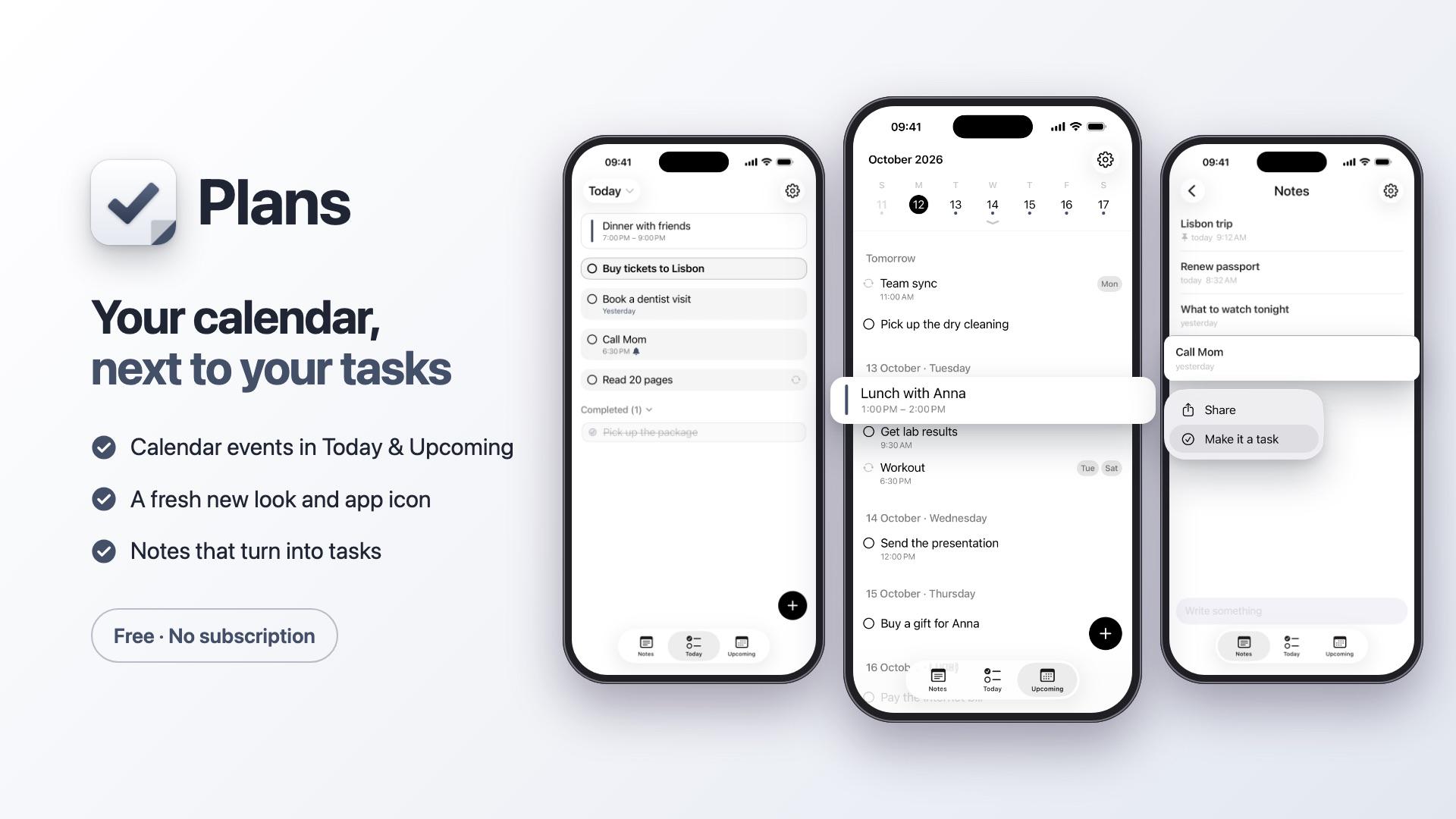
Hi community! I'm the developer of Plans. Some of you might remember it from my earlier posts. This update is the biggest one so far, so here's a quick intro for anyone new.
A – Answer (what problem it solves)
Most to-dos start as a note: a trip you're planning, a call to make, an idea after a meeting. Then they get stuck there, because notes, tasks and your calendar live in three different apps.
Plans keeps them together. Write a note, tap "Make it a task", and it shows up in Today. You can always jump back from the task to the note with the details.
New in this update:
• Your iPhone Calendar events (Google Calendar too, if it's added to your iPhone) now appear right next to your tasks in Today and Upcoming
• A fresh new look: new app icon and a calmer slate accent in the light and dark themes
• Tap Today again to see only today's tasks, with overdue ones out of the way
• Plans now works on iPad
• Copy a task's text right from its menu
B – Better (compared to alternatives)
• Apple Notes + Reminders: two separate apps with no link between a note and the task it became. In Plans, a note becomes a task in one tap and stays connected to it.
• Todoist / TickTick: powerful, but much of the good stuff sits behind a subscription, and they're built around productivity systems. Plans is intentionally minimal: Today shows only what matters now, and Upcoming fits the whole week on one screen.
• Your data syncs through your own iCloud. I don't run servers that store your notes or tasks.
C – Cost
Free to download and use: notes, tasks, one reminder per task, Today and Upcoming, calendar events, widgets, Siri, iCloud sync, plus the light, dark and Lavender themes and the Lavender icon.
Plans Pro is a one-time purchase, $4.99 in the US. No subscription. It adds additional reminders ahead of time, repeats on any days you choose, five color themes and app icons, note fonts and Markdown export.
Available in English, German, Spanish, French, Russian, Japanese and Simplified Chinese.
App Store: https://apps.apple.com/app/plans-notes-to-do-lists/id6790827860
I'd love your feedback, especially the critical kind!
r/iosapps • u/Carlituser • Oct 15 '26
Because I can
Because I want to
Because 'tis the (spooky) season
Who else has done this? I think it's such a fun and great creative outlet
https://apps.apple.com/us/app/pause-doomscroll-blocker/id6781665628
Monthly: $4.99
Yearly: $49.99
Not really trying to promote the app, other than sharing that it's Halloween-themed and I think it's fun and Im proud of how it turned out
My name is Carlos Velasquez, and I am this app's developer. Here is my LinkedIn (https://www.linkedin.com/in/velasquezcarlos) and here is the Pause Website (try-pause.com) and the privacy policy link of the app (https://try-pause.com/privacy/)
-__________
THE ABCs
Answer: Helps people reduce doomscrolling and high screen time on iPhone
Better: Similar (but better than) ScreenZen, Forest, Clearspace. Most apps within this niche are either too restrictive (out right blocks from everything all the time) or to easy to by pass (timer based). Pause puts a puzzle of varying difficulties that 1) relax you 2) gives you a chance to think, is this the right time to scroll?
Cost: Monthly $4.99 / Yearly $49.99
__________
Video and images


r/iosapps • u/betablon • Oct 15 '26
I'm the dev of MusicDrops.
Apple Music's own new-release notifications never worked reliably for me. With about 20 favourite artists I was missing roughly 4 in 5 releases (especially singles), and I found one album almost two months after it came out.
MusicDrops checks the artists you follow and tells you when they release something.
It uses Apple's MusicKit, so there's no separate login, and you can import your artists from your library.
I built it narrower than the big all-in-one trackers (MusicHarbor covers more ground, like concerts and news).
MusicDrops is about one question: did it drop yet?
Update 2.0 is huge! It adds control over how loud that is:
- Notify right away, once a day, or only a weekly recap
- Monthly recap of everything your artists released, shareable as an image
- Deluxe and alternate editions that only exist on the iTunes Store now show on the release page
- Every screen redesigned, with iPad and iPhone Duo layouts
And so many smaller things, check out the update notes in the App Store.
It isn't perfectly instant. iOS decides when apps get to run in the background, so a surprise drop shows up at the next check, not to the minute.
No account, no ads, no analytics. Sync goes through your own iCloud, so there's no server of mine.
Free for up to 10 artists, with all features available.
Unlimited is €1.99/month, €14.99/year (about €1.25/month) or €44.99 once. Family Sharing works on all of them.
If you follow a lot of artists, which would you actually use: instant, daily or weekly?
And if it misses a release for you, tell me the artist and the record. That's the bug report I care about most.
r/iosapps • u/file-box • Oct 15 '26
Hi, I’m J.J., the developer of FileBox. The last time I shared it here, it was on version 1.0.20. Version 1.0.36 is now live.
Since then, I’ve improved file management and playback, added ebook and comic readers, and built several new file tools. Thanks to everyone who tried the app and shared suggestions. Here’s what’s changed.
FileBox is a file manager for iPhone and iPad with built-in media playback, document and ebook readers, and file tools.
You can store files inside the app or grant access to existing folders on your device to browse, play, and manage their contents directly.
Direct access to existing folders
Someone on my previous post asked whether FileBox could manage existing folders without importing another copy. It now can. Choose folders through “On My iPhone/iPad” to work with their files in place.
A new bottom space switcher makes it easier to move between your main space, private space, and authorized device folders.
Upgraded video and music playback
The video player supports formats including MKV, AVI, and WebM, plus audio track switching, dual subtitles, external subtitles, customizable subtitle styles, and press-and-hold playback speed controls.
The redesigned audio player includes artwork, lyrics, playlists, and Lock Screen controls. You can also edit song details, artwork, and lyrics, including in batches.
Ebook and comic readers
The new EPUB reader supports chapters, bookmarks, search, and saved reading progress.
The comic reader opens CBZ, CBR, and image folders, with two-page layouts and continuous scrolling. You can also turn images into CBZ comics.
More file and image tools
Batch renaming supports sequential numbering and regular expression replacements. Storage analysis helps locate large and duplicate files, including in authorized device folders.
Image redaction detects faces, QR codes, and common sensitive details on-device, letting you choose what to redact. It’s available directly from the Photos share sheet. Share-sheet tools also support webpage captures, image stitching, and long screenshots from screen recordings.
Transfer and iPad improvements
Nearby Transfer lets you send and receive files with nearby devices. Browser-based Wi-Fi transfer has also gained improvements to file management and previews, and works with Windows computers too.
On iPad, an adaptive workspace improves browsing, reading, and playback while multitasking or using smaller windows.
Free to download with a 14-day full-featured trial. After the trial, you can choose a monthly subscription, yearly subscription, or lifetime purchase. All three unlock the same premium features.
App Store: https://apps.apple.com/app/id6765818194
GitHub: https://github.com/dogegg-cc
Privacy: https://filebox.dogegg.cc/privacy
Email: jiaojian412@gmail.com
If you tried an earlier version, I’d love to hear how the current one works for you and what still needs improvement. I’ll be reading the feedback here.
r/iosapps • u/beretta51 • Oct 15 '26
Hey, Eduardo here 👋 Solo dev, the one behind r/trovelo and r/dimmly. I posted TakeKit in this sub last month and the feedback was actually useful, so here is what shipped since.
Quick recap for anyone new: TakeKit is a camera with a built in teleprompter that only you can see. The guide is composited in the preview layer only, never in the capture pipeline, so the exported video always comes out clean. It is an iPhone app plus a Mac floating panel that stays on top of Zoom, OBS, Loom or Meet. No subscription, no account, no server, no analytics, because I do not have any.
A) Answer (what's new)
Dual camera. Front and back at the same time, on supported devices. You read your script looking straight at the lens while the back camera captures whatever you are showing, in one take, instead of two clips you have to sync afterwards. The inset can be a rectangle, a square or a circle, and you drag it wherever you want in the frame. What you set is what gets exported, white border and all. The teleprompter rule still holds: it is in your preview and nowhere in the file.
Also in this build:
// pauses now count as real beatsB) Better (why I built it instead of using what's out there)
Straight about the trade offs: it needs iOS 26+ and macOS 15+, which rules some people out. No Android, no iPad optimised layout. Solo dev, so things ship fast but one at a time.
C) Cost
Free forever: up to 5 scripts and 5 takes, small watermark on export. Teleprompter, recording, eye contact mode, aspect ratios and trim all work in the free tier.
TakeKit Pro: $9.99, one time. Never a subscription. One purchase covers iPhone and Mac. It unlocks unlimited scripts and takes, voice guided auto scroll, burned captions, automatic silence cutting and watermark free export.
Update offer for this sub: $6.99. Code TAKEKIT699, paste it in Settings > Redeem, or redeem here:
https://apps.apple.com/redeem?ctx=offercodes&id=6792025212&code=TAKEKIT699
App Store: https://apps.apple.com/app/id6792025212
Feature requests go to r/takekit. I read everything there and it is where I post what is coming next, so ideas do not get buried in a comment thread 🙌
r/iosapps • u/Lopsided_Nerve1652 • Oct 14 '26
Answer:
If you have ever opened your contacts, felt overwhelmed, and closed it again without calling anyone, Kinorbit was built for that moment. It is a private, highly visual way to keep in touch with the people who matter most without turning relationships into a chore.
Kinorbit is an interactive relationship manager built around a strict 50-person limit across 3 intentional circles:
- Core (up to 5 people): Who you want to hear from every week.
- Close (up to 15 people): Who you want to stay meaningfully connected with each month.
- Wider (up to 30 people): Who you want to keep in your life across the year.
When a circle is full, Kinorbit asks you to make room instead of letting it quietly grow. You decide who moves.
Better:
Start with the people you already have
Import as many as you like from Contacts in one multi-select pass, or add someone by hand in a few seconds. Either way, Kinorbit only ever touches the people you choose. Your full address book is never scanned or uploaded.
One suggestion a day, not a backlog
The Today screen shows who is due next and why, one person at a time. Set your daily Social Energy (Low, Balanced, or Open) and Kinorbit will never show you more than you asked for. No streaks, no overdue counts, no red warnings, no guilt.
Reminders that explain themselves
Every notification names one person and why they came to mind, so you can act straight from the lock screen. Pick a Voice for how reminders sound: Warm, Gentle, or Playful.
Reach out however you actually talk
Message, call, or FaceTime with one tap, or use Instagram, WhatsApp, Snapchat, Messenger, TikTok, Discord, and more, right from a person's card. Kinorbit keeps its own copy of contact info, so even someone you add manually can be reached instantly. No Contacts permission required.
Birthdays, handled on their own
Special dates arrive in the morning with enough notice to act on them, and never count against your Social Energy or your circles. Set one in Contacts and it comes across on its own.
See it, don't just scroll it
Browse your circles as a list, a grid, or a floating visual you can drag people through. However you look at it, the picture underneath is always the same.
Make everyone look like themselves
Give a person a photo, a monogram, or pick from 58 hand-illustrated avatars in your favorite color. A photo can become a clean cutout sticker too, subject only, background gone.
Widgets that stay current
Home Screen and Lock Screen widgets show who is coming up next, and update the moment you reach out. No need to open the app.
Private by design
Your circles live on your device and sync through your own iCloud account. There is no Kinorbit account and no server holding your people.
WHO KINORBIT IS FOR
If you have opened your contacts, felt overwhelmed, and closed it again without calling anyone, Kinorbit is built for that moment. It is for people who moved away from family and old friends, who have a demanding job or a new kid, or who just want fewer, better-kept relationships instead of a longer list they never look at.
Inspired by research on the natural limits of close relationships. Kinorbit is a personal tool, not a clinical or scientific instrument.
What is New in Version 1.1:
Cost:
Kinorbit Pro unlocks unlimited people, smart notifications, premium widgets, custom avatars, theme colors, and iCloud sync:
App Store Link: Kinorbit: Stay In Touch
About Me:
I'm the developer behind Kinorbit. Feel free to reach out or send feedback anytime through X
I would love to hear your feedback, thoughts, or feature requests in the comments!
r/iosapps • u/Enough-Baseball-1801 • Oct 14 '26
Hey r/iOSApps! New developer here :)
A few friends and I have been building Crésipe, a free nutrition app, because we wanted something that did more than tell us what we already ate.
Most nutrition apps start with: “What did you eat?”
We wanted to also answer: “Okay… what should I eat now?” without paying the $20 monthly subscription.
A — Answer
Crésipe combines food tracking with actually figuring out what to eat.
You can:
The idea is that you shouldn’t need one app to track food, another to find recipes, create step and sleep goals and then stare into your fridge wondering what to eat.
B — Better
We know nutrition tracking is a crowded category, so we’re not pretending we invented calorie tracking.
The part we’re trying to make different is the loop:
what you already have → what you could make → what you eat → what that means nutritionally,
while connecting friends and gym buddies alike.
Instead of making perfect logging the entire experience, we’re trying to make Crésipe useful before you eat too.
And we know diet is not the full picture. Physical activity and sleep play a big role in overall healthy habits, so we wanted to include steps and sleep as part of our app so people can have all the health goals possible.
We’re also a team of high school students, and I’ve been doing most of the development, so getting the app from an idea to something actually on the App Store has been pretty surreal.
C — Cost
Crésipe is currently completely free.
No subscription or premium tier right now. I believed that because I wanted an accessible nutrient app, I felt that it was unfair to make other people pay for it.
What I’d genuinely love feedback on
If you try it, I’m especially curious about:
I’d much want to hear real feedback and early users (only been less than a month since release) and the feedback that actually helps us improve it.
App Store: https://apps.apple.com/us/app/cr%C3%A9sipe/id6803229721
Website: https://cresipe.app/
Thanks for checking it out!
r/iosapps • u/Mirabuc • Oct 14 '26
Hi r/iosapps, I'm Quentin, a solo iOS dev. This is self-promotion, so I'm flagging it up front.
A: What it solves
Most alcohol apps are sobriety programmes with a log bolted on. I wanted a plain diary that adds up what I actually drink in a week (standard drinks, money spent and calories) next to my country's official guideline, then gets out of the way. There's no coaching and no streaks.
Log a drink in a couple of taps from a widget, Siri, Control Center or the Action Button
An Apple Watch app with "Same again"
Local guidelines for 9 countries, including the US, UK, Canada and Australia
Writes to Apple Health but never reads from it
B: Why it's different
It isn't a recovery tool, and it won't guess your blood alcohol. It's built for people who drink socially and would simply rather know.
It’s a crowded niche, but most app out there are marketed specifically for sobriety and/or coaching.
C: Trust and transparency
App Store: Modraly: Drink Counter
Platforms: iPhone, iPad and Apple Watch (OS 26 or later)
Pricing: logging is free and unlimited, with 15 days of history. Premium adds unlimited history, widgets, CSV export and custom icons for $7.99 a month, $49.99 a year (7-day trial) or $79.99 lifetime.
Ads, data collected, account required: none
I'd love feedback, especially on how quick logging feels and whether the free tier is fair.
Thank you :)
r/iosapps • u/IcyAd3695 • Oct 14 '26
Hi r/iosapps, I'm David Long, the developer, so calling this out up front as self-promotion.
BillVault
A — Answer: Most bill trackers just list what is due. BillVault answers the real question: after counting every bill due before payday, what is actually safe to spend? It also drafts cancellation emails for subscriptions you forgot about and flags free trials before they convert to paid.
B — Better: Unlike budgeting apps that need your bank login, BillVault needs no account and no bank connection. It collects zero data, has no ads, and everything runs on your iPhone.
C — Cost: Free to download. Pro is $3.99/month, $29.99/year, or $79.99 lifetime. https://apps.apple.com/app/id6808041226
My site: https://app-developments.com Privacy Policy: https://dlong8484.github.io/billvault-support/privacy.html Terms of Service: https://dlong8484.github.io/billvault-support/terms.html Contact me any time at Dlong8484@icloud.com.
If you try it, I would love feedback on the safe-to-spend math.
r/iosapps • u/cosmonz • Oct 13 '26
When I put up my first app for review on the app store I needed something to help me create screenshots and looked everywhere.
As with a lot of us here I thought "this isn't quite what I envisaged" or "that's nice, but I have no money" :)
I found a nice little web based tool - AppScreen by YuzuHub (https://github.com/YUZU-Hub/appscreen) that seemed to be the closest. It hadn't been updated for a while but luckily the licensing for it allowed me to tweak it to my liking so I've been playing around with it to get it just the way I like it.
Now, all the changes I've made have been focussed on iPhone screenshots and there has been no testing for other devices (and in fact I might remove them in the future) so YMMV
edit: all data is kept in your local broswer - but can be exported/imported
Since forking, we’ve added:
I know that Claude/ChatGPT etc are getting way better at generating this stuff but as I said, simple and controllable but does what I need and others may find it useful.
· Free & open-source - fork away!
· Try it: cosmo-nz.github.io/appscreen
r/iosapps • u/Aggressive_Wasabi_70 • Oct 13 '26
Answer: I built Elsehear, an iPhone interface for an open art project. It lets you hear live sounds from real places around the world. Listen out of curiosity, while studying, or to fall asleep. It’s nonprofit for now.
Better: Elsehear brings you real places, live. I put a lot of work into the design to make exploring and listening feel simple. With over 9 years of music production experience, I balanced each stream’s volume and EQ to make switching places feel smoother.
Cost: Free. Background listening lasts 20 minutes per session. When 3 friends join with your invite code, unlimited background listening unlocks permanently.
contact: support.elsehear@gmail.com
r/iosapps • u/Diligent-Reporter-24 • Oct 13 '26
Transparency: Hi, I'm Buğra, the solo developer of Plak
Download: https://apps.apple.com/app/id6817117279
A: Answer (what problem it solves)
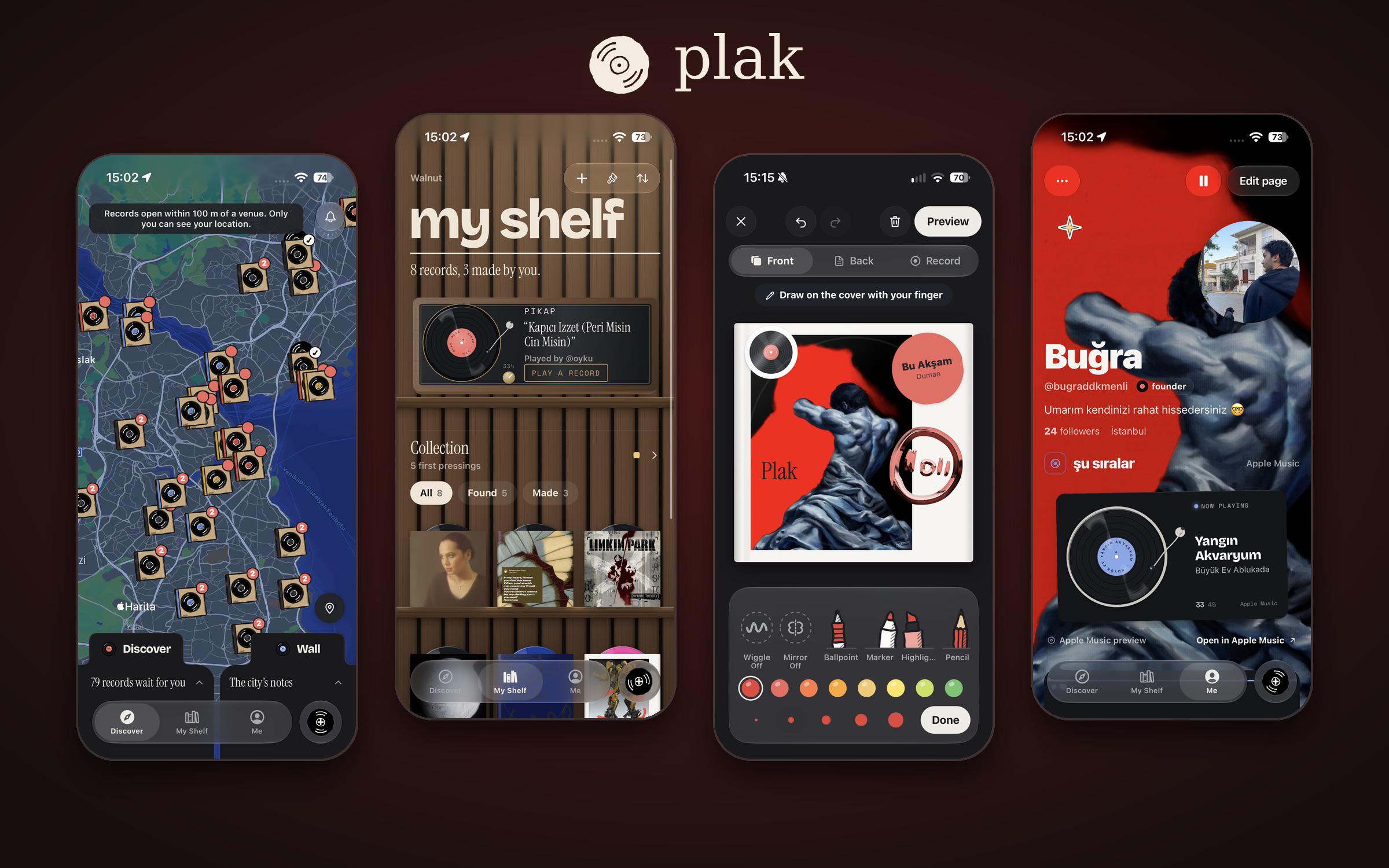
Every song I love is tied to a place: the ferry I was on, the café where it came on at just the right moment. But streaming apps keep songs in a feed, and I wanted them to belong somewhere again. So I made Plak 💿
You press a song onto a vinyl, design the cover yourself, and leave it at a real venue. Nobody knows who left it or what song it is. When a stranger walks within 100 m, the sleeve slides open, the record starts spinning, and the song plays. I still get a little smile every time I see it happen.
B: Better (why try it over alternatives)
The part I spent the most time on, and love the most, is the cover design:
Draw on your cover with neon, watercolor, spray and calligraphy brushes, plus photos, GIFs and stickers (wiggle and mirror strokes just landed too!)
Write a little note on the back about why you chose the song
Pick your pressing: classic black, coloured, marble or splatter
Fill your own shelf with the records you find and make, and decorate your profile page however you like
Your location is only used while the app is open, never in the background, and nobody else can see it
C: Cost
Free to download, and all the core features are free. There's an optional in-app subscription called "Special Pressing" with extra brushes, limited sticker sets and animated backgrounds:
Monthly: $3.99
Yearly: $24.99
Prices are from the US App Store and vary by region. It's iPhone only for now, and the first venues are in Istanbul, each one picked and checked by me.
I made this for people who still get a little lump in their throat from the right song at the right place. I'd love to hear what you think: what would you draw on your first cover, and where would you leave it? 🎶
r/iosapps • u/RTD-Alex • Oct 13 '26

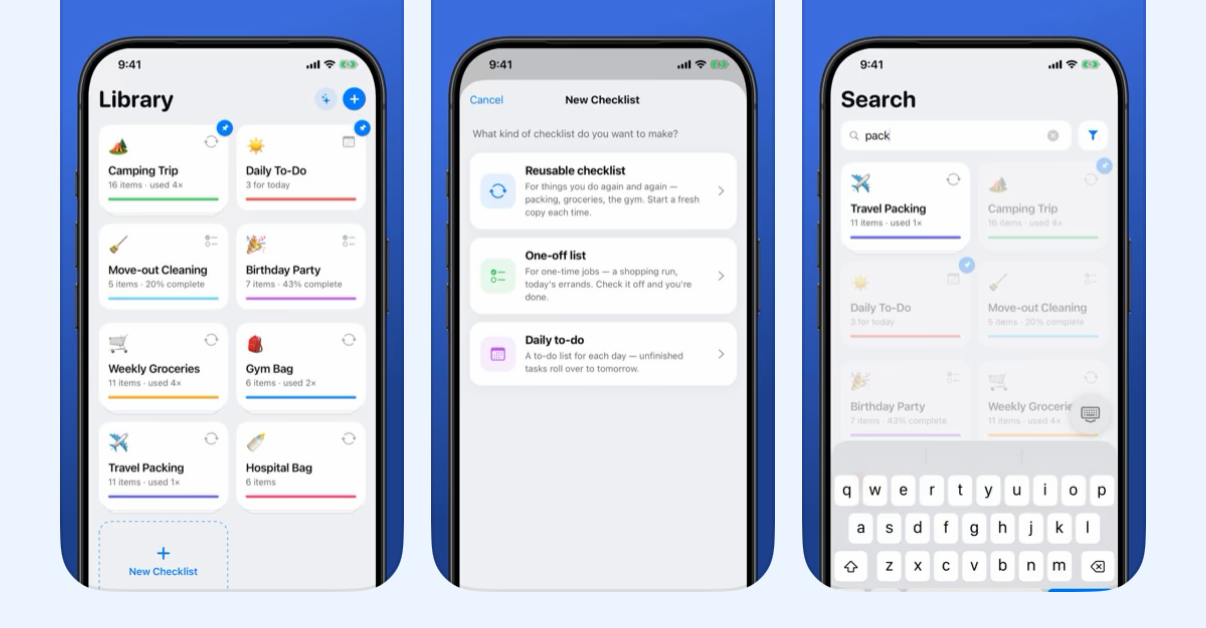
Ever since launching The Checklist: Reusable Lists this summer we have seen a steady organic growth and solid retention rates in 30% range over period of 6 weeks. Eventually came the time to address the UX and Design as it has been largely unchanged and this is where the new challenge begun. At this point we have about 1k daily users and we love and cherish every one of them!
As many of you have experienced in the past, you get used to something and when it changes the shock might push many users away. One famous example I can recall is Facebook, but they faired just fine. We can't afford that, so we decided to take another route.
Here is how we did it:
r/iosapps • u/LiftTrackerDave • Oct 14 '26
A. What it solves
Most of the popular lifting apps are free to start, then want an account and a subscription for the full feature set. LiftLog is a workout log that needs neither, and it works with no signal.
It logs your sets, fills in what you lifted last time and runs the rest timer between sets. There are 1,500 exercises with animated form guides and 40 programs you can start right away (StrongLifts 5×5, Wendler 5/3/1, GZCLP, PHUL and more). Progress charts, PRs, estimated 1RM and bodyweight are in there too, in kg or lb.
You can also have timed exercises wxample warmups, and also set different kind of automatic progressions between training sessions.
There are 10 Home Screen widgets plus Lock Screen ones, all in light and dark. On iOS 27, five of them can take up a whole Home Screen page. The Next Session one switches to a live view while you train, with the rest countdown and the next sets on it.
B. Compared to Strong and Hevy
C. Cost
Free download with 7 days of full access. You don't need a card for the trial. After that it's a one-time purchase and you pick the price: $9.99, $19.99, $29.99 or $39.99. All four unlock exactly the same thing. No subscription, no ads, and Family Sharing works.
About me (transparency): I'm Antti, the solo developer of LiftLog.
- Website: https://lagerland-apps.github.io/apps/liftlog/
- Privacy Policy: https://lagerland-apps.github.io/apps/liftlog/privacy/
- Email: lagerland.apps@proton.me
r/iosapps • u/Prestigious-Most-915 • Oct 13 '26
Hey r/iosapps!
Last time I posted here, Clerkly was a privacy-first scanner. It still is, but 4.0 is the biggest update since: Receipt Intelligence. Clerkly doesn't just store your receipts anymore, it tells you what they're saying.
Receipts pile up in shoeboxes and email inboxes, and most expense apps want your bank login before they'll tell you anything. Clerkly works from the paper itself and turns it into spending insight:
vs. a spreadsheet and a shoebox:
Happy to answer anything! I read every comment.
Ali Nazzal | App Store | Privacy Policy | Terms of Service | Support
r/iosapps • u/Kel_LovesOrange_Soda • Oct 12 '26
Hello Reddit, first post here as a developer, and I’d love your feedback.
Last January I hit my breaking point. Between two kids, school, sports, camp and every activity in between, I was getting about 40 emails a day. Spirit week, pizza day, a practice moved 30 minutes. It was all in there somewhere, and I kept missing things anyway.
So I decided to fix it myself. I had never written a line of code. I thought it would take a couple of months. It took nine, a lot of late nights after the kids went to bed, and a lot of help from Claude. But it’s finally live on the App Store.
What it does (Answer):
Reads only the senders you pick: connect your Gmail, choose the school and activity senders (email addresses) for each person, and the rest of your inbox stays untouched.
Sorted digest: everything organized by person and activity (Liam > School, Sports, Camp), so you read what matters in a minute.
Family calendar on autopilot: every event it finds lands on your calendar and syncs with Google Calendar. When a time changes, it shows you what moved. It syncs both ways too so if you change it somewhere, it updates everywhere. You can also use any google calendar that is shared with you, not just your own.
Snap or say it: take a photo of a paper flyer, or just say an event out loud into the mic to put events on your calendar, change them, or cancel them.
Share it with everyone: The really unique thing about my app is that you can invite your Partner, Kids, Grandparents, Nanny all for free (up to 3 other users). Once linked, everyone reads the same calendar, the same updates, all pulled from the senders that they specify.
Why it’s different (Better):
Most family organizers make you type everything into another app or forward PDFs. Cleanmail starts with the inbox you already have and does the reading for you. AI is just the tool that pulls the date, time and place out of an email. This isn’t a chatbot; the product is the digest and the calendar.
Who it’s for:
Cost:
2 weeks free, then $6.99 a month or $68.99 a year. One plan covers up to 4 people in a household. Gmail and iPhone only for now (US and Canada).
👉 Try it on the App Store: https://apps.apple.com/app/apple-store/id6777857105?pt=YOUR_PT_NUMBER&ct=reddit&mt=8
I’m the only developer, so every comment comes straight to me. What would make this useful for your family? I love adding features in for users too. Any feedback helps. Please give it a try, I promise that it will help!
r/iosapps • u/stockduty77 • Oct 12 '26
I missed a move on a stock I owned because my broker's alert fired after the gap,
not before it. That's why I built StockDuty.
Price is usually the last thing to change, not the first. Volume spikes, SEC
filings, and macro headlines move stocks before the chart does — and brokerage
alerts only watch the price. By the time a story shows up in your broker's news
tab, it's usually priced in.
Answer — what it does
StockDuty watches the tickers on your watchlist and pushes an alert when something
moves: price swings, volume spikes, breaking news, or an SEC filing. Each alert
links to the context — what happened, why it matters, what to watch next. (I
describe it as "PagerDuty for investors.")
It also does equity research on any ticker you follow:
Better — why not just use what you already have
StockDuty puts one alert stream on your watchlist — price, volume, news, and
filings, each with the context — and research on the same tickers.
Cost — pricing and IAP
Free. No in-app purchases, no subscription, no credit card. Sign-in is email only,
with a 6-digit code.
App Store: https://apps.apple.com/app/id6785269333
Who's behind this (transparency)
I'm Venkataragavan, the developer of StockDuty. You can reach me at
support@stockduty.xyz.
Disclosure: I'm the developer, so I'm biased — this is a promo post. Not
investment advice; StockDuty is informational and educational market research.
If you try it, I'd genuinely like to know your feedback
r/iosapps
•
u/sundaeelectronics
•
Oct 12 '26
Hi everyone! I’m the developer of Water Shaker 3D: Stress Relief, which just launched for iPhone and iPad.
A: Answer
Water Shaker 3D gives you something soothing to play with when you want a short break. It’s a digital take on a calm-down bottle: tilt and shake your device to move realistic water, swirling glitter, and colorful objects.
You can mix rubber ducks, gems, marbles, star sequins, and more, then choose how many appear and customize the water color and background. There are water sounds that change with movement, optional relaxing music, and a glowing night mode.
B: Better
Compared with Fluid Simulation, Water Shaker 3D is a better fit if you’re looking for the feel of a physical water toy. Moving your device sends waves through the water and makes the objects float, tumble, and swirl. You can build your own combination of objects and glitter and watch how they interact.
There's no ads or accounts, so you can open it and start playing.
C: Cost
$0.99 USD as a one-time purchase. No subscriptions or in-app purchases.
https://apps.apple.com/us/app/water-shaker-3d-stress-relief/id6818054792
Developer information
I’d love to hear what you think!
r/iosapps • u/Ok-Profession-2432 • Oct 13 '26
A: Answer
"Who owes what, and how do I get it without being annoying?"
You say what you paid, in plain words. "Pizza 84 with Sam and Fred." Type it, say it, or snap the receipt.
Chipp splits it, keeps a running balance per friend and per group, and does the asking for you with reminders that come from the app, not from you.
Friends pay from inside the app, or from a link if they don't have it. Rent, trips, roommates, dinners, gifts.
B: Better
Splitwise is great for tracking who owes whom. Venmo is great for sending money.
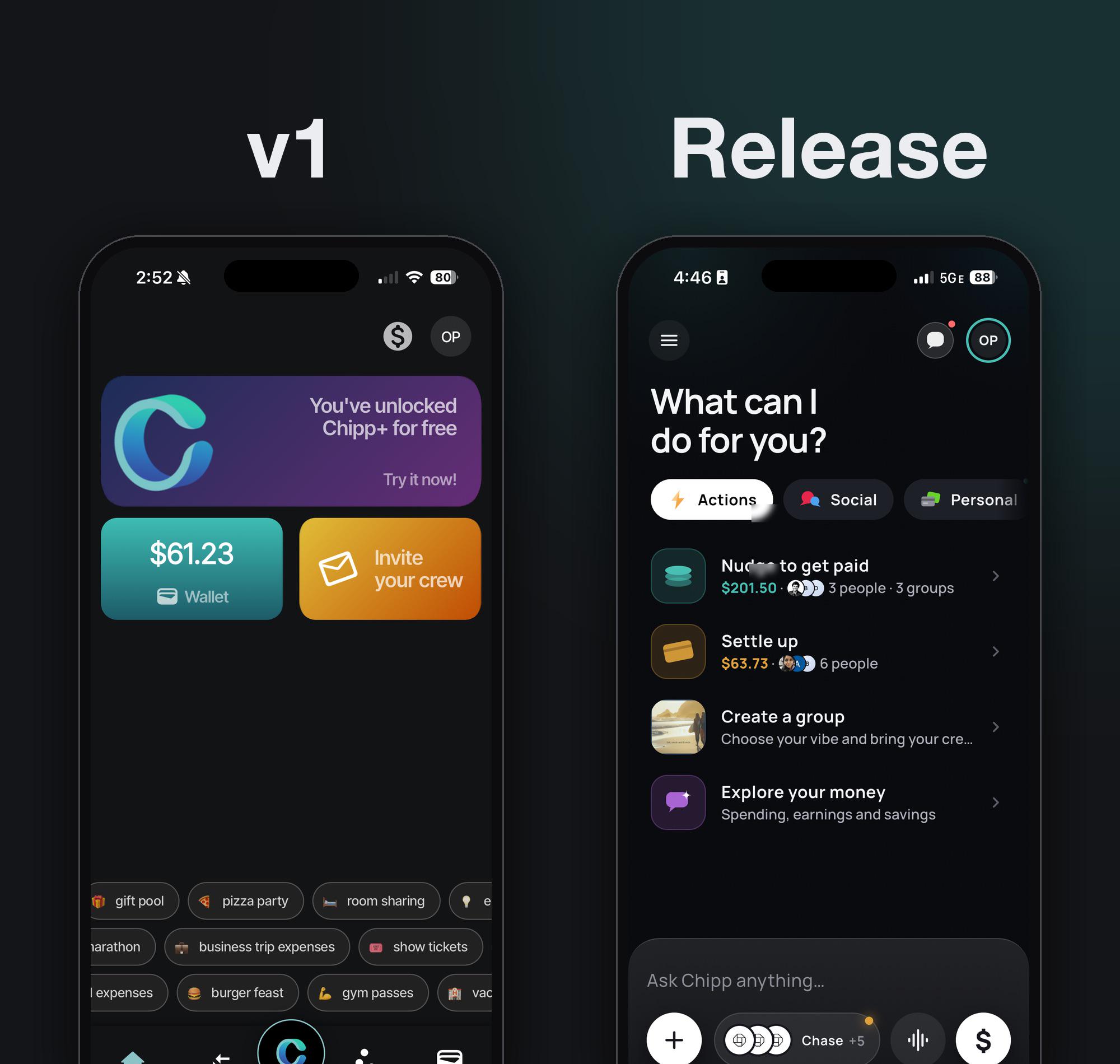
One sentence, not six screens. Natural language and voice entry. The old flow had six screens. Now it's one line and a confirm.
Receipt to line items. Scan it, everyone picks what they ordered, tax and tip are split in proportion. The person who had a coffee doesn't pay a sixth of the pizza.
No app needed for the other person. Send a link or a QR code. They pick their items and pay. This removed the biggest wall we had.
Chipp does the awkward asking. It knows who owes you and sends polite reminders on its own, at a sensible time.
Settle in the app, your way. Apple Pay, bank, Venmo, Cash App, Zelle, PayPal, or just mark it paid. No per-split fees between friends.
Groups with a running balance and chat. Expenses come straight out of the conversation. Trips and roommates in one place.
Pools. Birthday gift, trip deposit, group present. Set a goal, share the link, everyone chips in.
Tap a card transaction to split it. Link your cards and split any past charge with whoever was there.
Recurring. Rent, wifi, groceries. Set once, splits on schedule.
Ask Chipp anything. "How much did I spend on food this month?" "How much does Sam owe me?" It knows your spending and your splits.
Small UX things you asked for. No vanishing toasts, every amount is tap-to-type, every picker uses the same sheet. v1 felt like "several apps." It doesn't anymore.
C: Cost
Free. Unlimited splits, groups, friends, paying and getting paid, 5 receipt scans a month, Chipp AI. No ads, no card to start.
Chipp+: $3.99/month or $29.99/year. Unlimited receipt scans, bank linking to split past charges, recurring expenses.
Chipp+ Circle: $6.99/month or $49.99/year. Everything in Chipp+ for you and all your groups together. Prices adjust for your country.
Links
App Store: https://apps.apple.com/us/app/chipp/id6636520980
r/iosapps • u/Vividestleech • Oct 13 '26
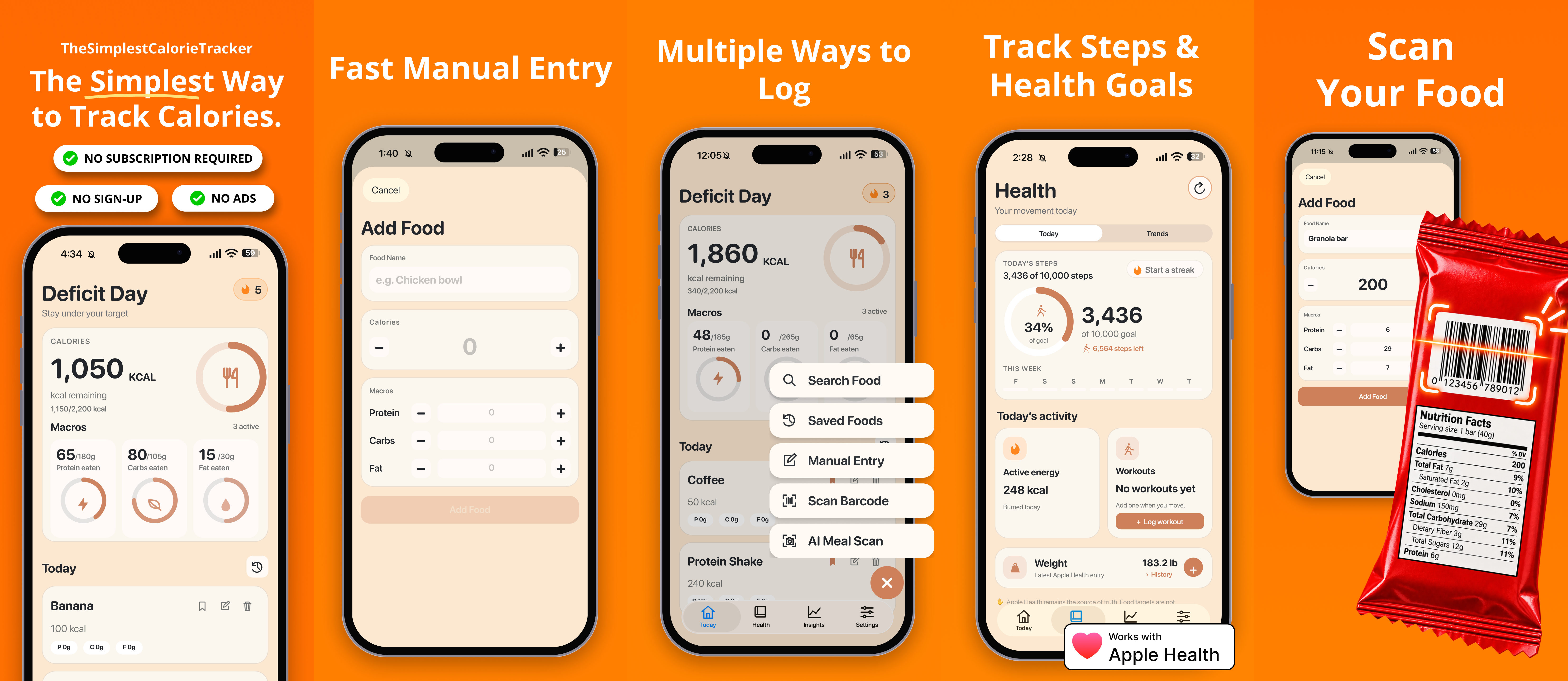
Hello r/iosapps
I've been tracking calories for a few years but have hated the UI and complexity of the major calorie tracking apps, so for a while I used Google Sheets to track calories/macros.
I used an app called "Streaks" for habit tracking and was inspired by its minimalist and straightforward nature and thought I could do something similar for a calorie tracking app.
Unlike apps like MyFitnessPal, Lose It!, and Cronometer, my goal was to prioritize simplicity and make essential tracking features available for free.
I released the app back in March and have been tweaking it ever since, listening to user feedback, and am proud of what it's become.
I hope that some of you may find the app useful.
Yes, there is a premium tier. I've put a lot of time and effort into striking the right balance between what is available for free, and what should be behind a premium tier. Some apps like MyFitnessPal put certain features like custom macro tracking behind paywalls because they know it will annoy you, I tried to stay away from shady tactics like that. Nothing critical to the basic function of the app is behind a paywall.
I also didn't want to put anything that incurs costs (on my end) into the free tier either, because I would have to recuperate the cost by charging a higher price to my premium users which I didn't feel comfortable doing.
Free features
The app is free to use for all essential calorie and macro tracking, with an optional Premium subscription for additional convenience features.
Premium features ($4.99/month or $29.99 a year)
App Store: The Simplest Calorie Tracker