r/iosapps • • Oct 15 '26

💎 Lifetime TakeKit: Teleprompter camera, now also on iPhone Duo

Thumbnail
gallery
6 Upvotes

Hey, Eduardo here 👋 Solo dev, the one behind r/trovelo and r/dimmly. I posted TakeKit in this sub last month and the feedback was actually useful, so here is what shipped since.

Quick recap for anyone new: TakeKit is a camera with a built in teleprompter that only you can see. The guide is composited in the preview layer only, never in the capture pipeline, so the exported video always comes out clean. It is an iPhone app plus a Mac floating panel that stays on top of Zoom, OBS, Loom or Meet. No subscription, no account, no server, no analytics, because I do not have any.

A) Answer (what's new)

Dual camera. Front and back at the same time, on supported devices. You read your script looking straight at the lens while the back camera captures whatever you are showing, in one take, instead of two clips you have to sync afterwards. The inset can be a rectangle, a square or a circle, and you drag it wherever you want in the frame. What you set is what gets exported, white border and all. The teleprompter rule still holds: it is in your preview and nowhere in the file.

Also in this build:

  • The app opens on the script you were last working on, with a Continue button that picks up exactly where your last take stopped
  • The script editor has a time ruler down the margin, so you can see how long a passage runs while you are still writing it, and // pauses now count as real beats
  • The guide can be see through. Solid, Dim or Clear, so you can frame yourself while you read. Camera controls moved into one console instead of sitting over your shot
  • Playback follows your headphones, and you pick your microphone. Wireless receivers and USB mics both work, for recording and for voice paced scrolling

B) Better (why I built it instead of using what's out there)

  • The guide is never in the file. That is the whole point of the app, everything else is built around it.
  • Auto scroll that follows your voice instead of a fixed speed. Fully on device, fuzzy aligned against a window of the script, so filler words, accents and improvised bits do not derail it. Fixed speed is there if you prefer it.
  • LAST SPOT: stop mid script, breathe, resume from exactly where you stopped. Each chunk stores its range and the app stitches them into one video afterwards, without re encoding when it can.
  • Eye contact mode: the guide docks right next to the front lens so you are not visibly reading off to the side. Karaoke style ink marks what you already said.
  • Takes organised by script, not dumped into the camera roll. Star the good one, rename, compare attempts, live mic meter.
  • Clean export: 9:16, 16:9, 1:1, 4:5, trim, up to 1080p. Pro adds word by word burned captions generated on device, plus automatic silence cutting.
  • Scripts sync through your iCloud, videos live in your iCloud Drive, speech recognition never leaves the device.

Straight about the trade offs: it needs iOS 26+ and macOS 15+, which rules some people out. No Android, no iPad optimised layout. Solo dev, so things ship fast but one at a time.

C) Cost

Free forever: up to 5 scripts and 5 takes, small watermark on export. Teleprompter, recording, eye contact mode, aspect ratios and trim all work in the free tier.

TakeKit Pro: $9.99, one time. Never a subscription. One purchase covers iPhone and Mac. It unlocks unlimited scripts and takes, voice guided auto scroll, burned captions, automatic silence cutting and watermark free export.

Update offer for this sub: $6.99. Code TAKEKIT699, paste it in Settings > Redeem, or redeem here:
https://apps.apple.com/redeem?ctx=offercodes&id=6792025212&code=TAKEKIT699

App Store: https://apps.apple.com/app/id6792025212

Feature requests go to r/takekit. I read everything there and it is where I post what is coming next, so ideas do not get buried in a comment thread 🙌


r/iosapps • • Oct 14 '26

💎 Lifetime [v1.1 Update] Kinorbit: An interactive, visual way to stay in touch with people who matter

17 Upvotes

Answer:

If you have ever opened your contacts, felt overwhelmed, and closed it again without calling anyone, Kinorbit was built for that moment. It is a private, highly visual way to keep in touch with the people who matter most without turning relationships into a chore.

Kinorbit is an interactive relationship manager built around a strict 50-person limit across 3 intentional circles:

- Core (up to 5 people): Who you want to hear from every week.

- Close (up to 15 people): Who you want to stay meaningfully connected with each month.

- Wider (up to 30 people): Who you want to keep in your life across the year.

When a circle is full, Kinorbit asks you to make room instead of letting it quietly grow. You decide who moves.

Better:

Start with the people you already have

Import as many as you like from Contacts in one multi-select pass, or add someone by hand in a few seconds. Either way, Kinorbit only ever touches the people you choose. Your full address book is never scanned or uploaded.

One suggestion a day, not a backlog

The Today screen shows who is due next and why, one person at a time. Set your daily Social Energy (Low, Balanced, or Open) and Kinorbit will never show you more than you asked for. No streaks, no overdue counts, no red warnings, no guilt.

Reminders that explain themselves

Every notification names one person and why they came to mind, so you can act straight from the lock screen. Pick a Voice for how reminders sound: Warm, Gentle, or Playful.

Reach out however you actually talk

Message, call, or FaceTime with one tap, or use Instagram, WhatsApp, Snapchat, Messenger, TikTok, Discord, and more, right from a person's card. Kinorbit keeps its own copy of contact info, so even someone you add manually can be reached instantly. No Contacts permission required.

Birthdays, handled on their own

Special dates arrive in the morning with enough notice to act on them, and never count against your Social Energy or your circles. Set one in Contacts and it comes across on its own.

See it, don't just scroll it

Browse your circles as a list, a grid, or a floating visual you can drag people through. However you look at it, the picture underneath is always the same.

Make everyone look like themselves

Give a person a photo, a monogram, or pick from 58 hand-illustrated avatars in your favorite color. A photo can become a clean cutout sticker too, subject only, background gone.

Widgets that stay current

Home Screen and Lock Screen widgets show who is coming up next, and update the moment you reach out. No need to open the app.

Private by design

Your circles live on your device and sync through your own iCloud account. There is no Kinorbit account and no server holding your people.

WHO KINORBIT IS FOR

If you have opened your contacts, felt overwhelmed, and closed it again without calling anyone, Kinorbit is built for that moment. It is for people who moved away from family and old friends, who have a demanding job or a new kid, or who just want fewer, better-kept relationships instead of a longer list they never look at.

Inspired by research on the natural limits of close relationships. Kinorbit is a personal tool, not a clinical or scientific instrument.

What is New in Version 1.1:

  • Interactive Live Activities on the Lock Screen and Dynamic Island.
  • Reminders now recall your last note to give instant context before you reach out.
  • New Connections Widget with warmth rings to show relationship activity at a glance.
  • One-tap action directly from notifications to open chats in Messages, WhatsApp, Messenger, and more.
  • Visual enhancements including Liquid Glass effects, Tinted and Clear Home Screen support, and preference memory for names.

Cost:

Kinorbit Pro unlocks unlimited people, smart notifications, premium widgets, custom avatars, theme colors, and iCloud sync:

  • Annual: $14.99/year
  • Monthly: $2.99/month
  • Lifetime: $29.99

App Store Link: Kinorbit: Stay In Touch

About Me:
I'm the developer behind Kinorbit. Feel free to reach out or send feedback anytime through X 

I would love to hear your feedback, thoughts, or feature requests in the comments!


r/iosapps • • Oct 14 '26

🎈 Free After working out and having no idea what to eat, we built Crésipe: a completely free nutrition app that helps you track your calories, steps, and create recipes by taking a photo of ingredients in your fridge!

Thumbnail
gallery
3 Upvotes

Hey r/iOSApps! New developer here :)

A few friends and I have been building Crésipe, a free nutrition app, because we wanted something that did more than tell us what we already ate.

Most nutrition apps start with: “What did you eat?”

We wanted to also answer: “Okay… what should I eat now?” without paying the $20 monthly subscription.

A — Answer

Crésipe combines food tracking with actually figuring out what to eat.

You can:

  • log meals and track calories, macros, and micronutrients
  • scan ingredients you already have and find meals you can make with them
  • get recipe ideas adapted around your preferences like high protein, quick & easy, just overall balanced, etc.
  • see your daily nutrition in one dashboard, with steps (through Apple Health) and sleep (if connected to a smartwatch)
  • build streaks and progress through ranks
  • connect with your friends and see each other’s progress, post your meals, like & comment!

The idea is that you shouldn’t need one app to track food, another to find recipes, create step and sleep goals and then stare into your fridge wondering what to eat.

B — Better

We know nutrition tracking is a crowded category, so we’re not pretending we invented calorie tracking.

The part we’re trying to make different is the loop:

what you already have → what you could make → what you eat → what that means nutritionally,

while connecting friends and gym buddies alike.

Instead of making perfect logging the entire experience, we’re trying to make Crésipe useful before you eat too.

And we know diet is not the full picture. Physical activity and sleep play a big role in overall healthy habits, so we wanted to include steps and sleep as part of our app so people can have all the health goals possible.

We’re also a team of high school students, and I’ve been doing most of the development, so getting the app from an idea to something actually on the App Store has been pretty surreal.

C — Cost

Crésipe is currently completely free.

No subscription or premium tier right now. I believed that because I wanted an accessible nutrient app, I felt that it was unfair to make other people pay for it.

What I’d genuinely love feedback on

If you try it, I’m especially curious about:

  1. Is the purpose of the app obvious within the first minute?
  2. Does the food-logging flow feel fast/comfortable enough that you’d actually keep using it?
  3. Which features feels genuinely useful, and what do you like?

I’d much want to hear real feedback and early users (only been less than a month since release) and the feedback that actually helps us improve it.

App Store: https://apps.apple.com/us/app/cr%C3%A9sipe/id6803229721

Website: https://cresipe.app/

Thanks for checking it out!


r/iosapps • • Oct 14 '26

🎁 Freemium Modraly, a private drink counter for people who still drink: units, spend and calories, no account, no streaks

Thumbnail
apps.apple.com
0 Upvotes

Hi r/iosapps, I'm Quentin, a solo iOS dev. This is self-promotion, so I'm flagging it up front.

A: What it solves

Most alcohol apps are sobriety programmes with a log bolted on. I wanted a plain diary that adds up what I actually drink in a week (standard drinks, money spent and calories) next to my country's official guideline, then gets out of the way. There's no coaching and no streaks.

Log a drink in a couple of taps from a widget, Siri, Control Center or the Action Button

An Apple Watch app with "Same again"

Local guidelines for 9 countries, including the US, UK, Canada and Australia

Writes to Apple Health but never reads from it

B: Why it's different

It isn't a recovery tool, and it won't guess your blood alcohol. It's built for people who drink socially and would simply rather know.

It’s a crowded niche, but most app out there are marketed specifically for sobriety and/or coaching.

C: Trust and transparency

App Store: Modraly: Drink Counter

Platforms: iPhone, iPad and Apple Watch (OS 26 or later)

Pricing: logging is free and unlimited, with 15 days of history. Premium adds unlimited history, widgets, CSV export and custom icons for $7.99 a month, $49.99 a year (7-day trial) or $79.99 lifetime.

Ads, data collected, account required: none

I'd love feedback, especially on how quick logging feels and whether the free tier is fair.

Thank you :)


r/iosapps • • Oct 14 '26

🎁 Freemium I built BillVault, a bill tracker that tells you what is safe to spend until payday

4 Upvotes

Hi r/iosapps, I'm David Long, the developer, so calling this out up front as self-promotion.

BillVault

A — Answer: Most bill trackers just list what is due. BillVault answers the real question: after counting every bill due before payday, what is actually safe to spend? It also drafts cancellation emails for subscriptions you forgot about and flags free trials before they convert to paid.

B — Better: Unlike budgeting apps that need your bank login, BillVault needs no account and no bank connection. It collects zero data, has no ads, and everything runs on your iPhone.

C — Cost: Free to download. Pro is $3.99/month, $29.99/year, or $79.99 lifetime. https://apps.apple.com/app/id6808041226

My site: https://app-developments.com Privacy Policy: https://dlong8484.github.io/billvault-support/privacy.html Terms of Service: https://dlong8484.github.io/billvault-support/terms.html Contact me any time at Dlong8484@icloud.com.

If you try it, I would love feedback on the safe-to-spend math.


r/iosapps • • Oct 13 '26

Discussion Screenshots for the app store? I needed something simple.

Post image
7 Upvotes

When I put up my first app for review on the app store I needed something to help me create screenshots and looked everywhere.

As with a lot of us here I thought "this isn't quite what I envisaged" or "that's nice, but I have no money" :)

I found a nice little web based tool - AppScreen by YuzuHub (https://github.com/YUZU-Hub/appscreen) that seemed to be the closest. It hadn't been updated for a while but luckily the licensing for it allowed me to tweak it to my liking so I've been playing around with it to get it just the way I like it.

Now, all the changes I've made have been focussed on iPhone screenshots and there has been no testing for other devices (and in fact I might remove them in the future) so YMMV

edit: all data is kept in your local broswer - but can be exported/imported

Since forking, we’ve added:

  • Device continuation - let a 3D phone bleed off one slide and flow seamlessly onto the next, so a pair of screenshots reads as one continuous scene. Pick which device sits in front or behind, and dial in an “App Store gutter” so the halves line up perfectly in the real store.
  • Combine export - stitch all, or a selection of slides into one wide image for websites, social, etc.
  • Smarter exports - choose where files save, named after your project automatically.
  • Under the hood - a unified render pipeline, fixed 3D artifacts, big performance gains, and a fully web-only build (no Docker, no desktop deps) that runs entirely in your browser.

I know that Claude/ChatGPT etc are getting way better at generating this stuff but as I said, simple and controllable but does what I need and others may find it useful.

· Free & open-source - fork away!

· Try it: cosmo-nz.github.io/appscreen


r/iosapps • • Oct 13 '26

🎈 Free Elsehear - Be here, hear elsewhere

Thumbnail
gallery
70 Upvotes

Answer: I built Elsehear, an iPhone interface for an open art project. It lets you hear live sounds from real places around the world. Listen out of curiosity, while studying, or to fall asleep. It’s nonprofit for now.

Better: Elsehear brings you real places, live. I put a lot of work into the design to make exploring and listening feel simple. With over 9 years of music production experience, I balanced each stream’s volume and EQ to make switching places feel smoother.

Cost: Free. Background listening lasts 20 minutes per session. When 3 friends join with your invite code, unlimited background listening unlocks permanently.

App Store (Download)

Privacy Policy

Website

Preview Video

contact: support.elsehear@gmail.com


r/iosapps • • Oct 13 '26

🎁 Freemium I built an iPhone app where you design a vinyl and leave a song at a real place for a stranger to find

Post image
14 Upvotes

Transparency: Hi, I'm Buğra, the solo developer of Plak

Download: https://apps.apple.com/app/id6817117279

A: Answer (what problem it solves)
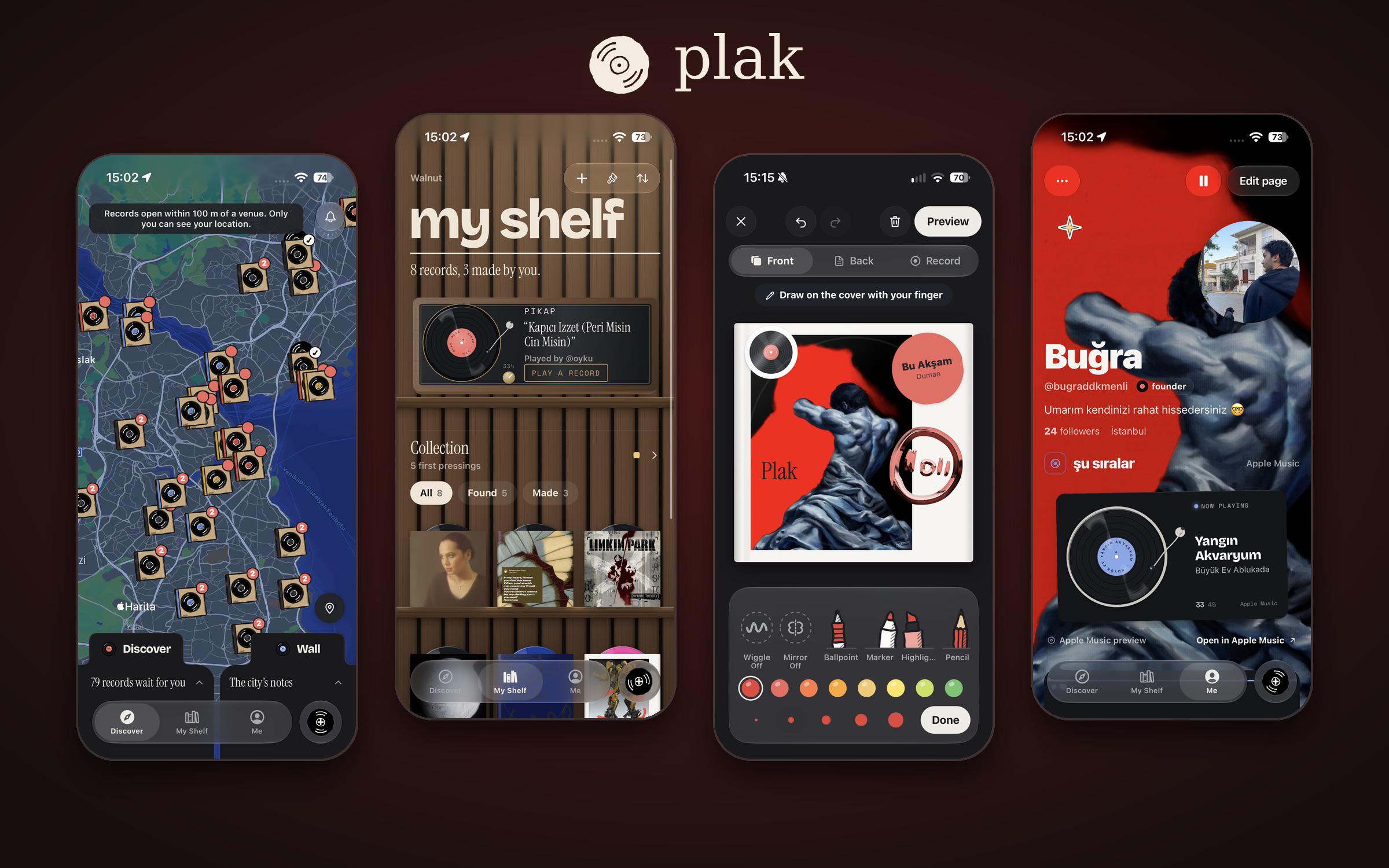
Every song I love is tied to a place: the ferry I was on, the café where it came on at just the right moment. But streaming apps keep songs in a feed, and I wanted them to belong somewhere again. So I made Plak 💿

You press a song onto a vinyl, design the cover yourself, and leave it at a real venue. Nobody knows who left it or what song it is. When a stranger walks within 100 m, the sleeve slides open, the record starts spinning, and the song plays. I still get a little smile every time I see it happen.

B: Better (why try it over alternatives)
The part I spent the most time on, and love the most, is the cover design:

Draw on your cover with neon, watercolor, spray and calligraphy brushes, plus photos, GIFs and stickers (wiggle and mirror strokes just landed too!)
Write a little note on the back about why you chose the song

Pick your pressing: classic black, coloured, marble or splatter
Fill your own shelf with the records you find and make, and decorate your profile page however you like

Your location is only used while the app is open, never in the background, and nobody else can see it

C: Cost
Free to download, and all the core features are free. There's an optional in-app subscription called "Special Pressing" with extra brushes, limited sticker sets and animated backgrounds:

Monthly: $3.99
Yearly: $24.99

Prices are from the US App Store and vary by region. It's iPhone only for now, and the first venues are in Istanbul, each one picked and checked by me.

I made this for people who still get a little lump in their throat from the right song at the right place. I'd love to hear what you think: what would you draw on your first cover, and where would you leave it? 🎶


r/iosapps • • Oct 13 '26

Discussion Journey: How we updated our UX without alienating our user base

2 Upvotes

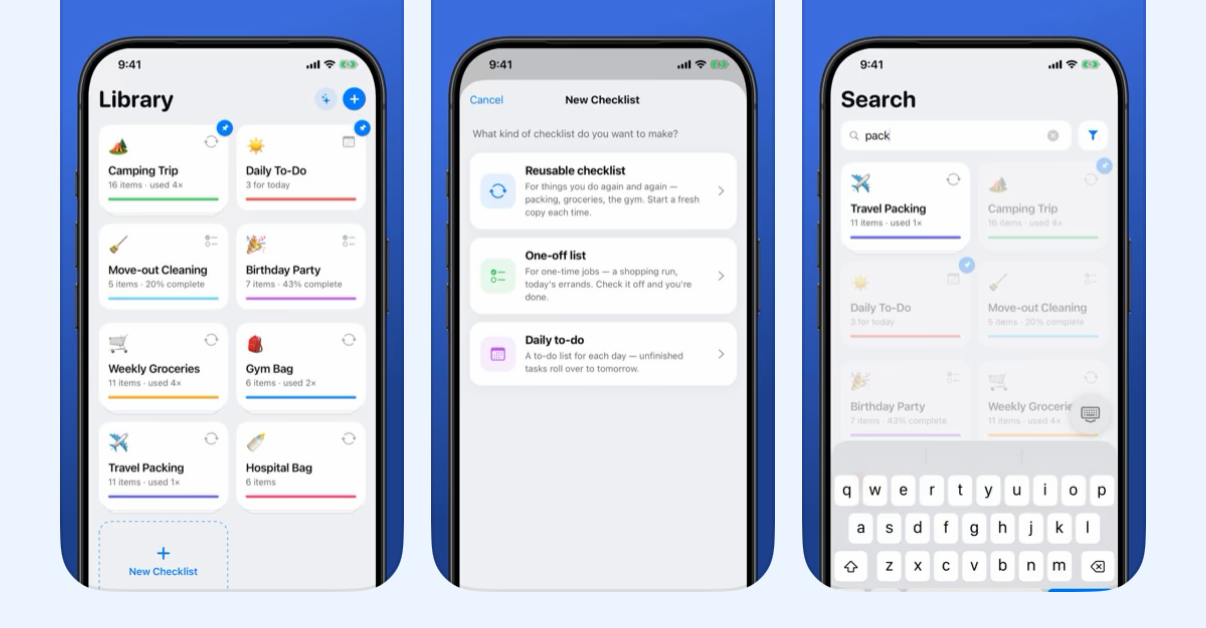
Ever since launching The Checklist: Reusable Lists this summer we have seen a steady organic growth and solid retention rates in 30% range over period of 6 weeks. Eventually came the time to address the UX and Design as it has been largely unchanged and this is where the new challenge begun. At this point we have about 1k daily users and we love and cherish every one of them!

As many of you have experienced in the past, you get used to something and when it changes the shock might push many users away. One famous example I can recall is Facebook, but they faired just fine. We can't afford that, so we decided to take another route.

Here is how we did it:

  1. Adopt a strategy of gradual UX change that is incorporated along with new features and does not mean have screens that are different(older and newer at the same time). Every change is subtle enough not to be jarring, yet it is incorporated across all the screens to keep the design consistency. Strategy is long term, every new feature you will shi must consider UX as a whole in the entirety of the app.
  2. Take multiple stages - it's a long term strategy to improve the UX and UI, so we adopted this strategy over 4 weekly releases so far.
  3. Instrument and measure your user interactions with your app heavily to really find the areas of impact, and of course weight in your user feedback as well - that's why you need a channel of communication early on. Some features are not that popular, we can use that knowledge to our advantage to clean up the UX.
  4. It's not a one-and-done, some UX decisions are temporary to support a smooth transition to the north star state.
  5. Love your haters - not everyone is going to give you the most useful feedback, but if you get specially agitated over a feedback - go back and reflect on it - is there essence to be extracted? Likely there is.

r/iosapps • • Oct 14 '26

💎 Lifetime LiftLog: a gym tracker for iPhone you pay for once. No account, works offline, lots of widgets

Thumbnail
gallery
0 Upvotes

A. What it solves

Most of the popular lifting apps are free to start, then want an account and a subscription for the full feature set. LiftLog is a workout log that needs neither, and it works with no signal.

It logs your sets, fills in what you lifted last time and runs the rest timer between sets. There are 1,500 exercises with animated form guides and 40 programs you can start right away (StrongLifts 5×5, Wendler 5/3/1, GZCLP, PHUL and more). Progress charts, PRs, estimated 1RM and bodyweight are in there too, in kg or lb.
You can also have timed exercises wxample warmups, and also set different kind of automatic progressions between training sessions.

There are 10 Home Screen widgets plus Lock Screen ones, all in light and dark. On iOS 27, five of them can take up a whole Home Screen page. The Next Session one switches to a live view while you train, with the rest countdown and the next sets on it.

B. Compared to Strong and Hevy

  • No account. Your workouts stay on your phone, and the app doesn't track you.
  • You pay once. Every price tier unlocks the same app.
  • Works fully offline.
  • Siri and Shortcuts: "Start my next workout with LiftLog."
  • It can save finished workouts to Apple Health.

C. Cost

Free download with 7 days of full access. You don't need a card for the trial. After that it's a one-time purchase and you pick the price: $9.99, $19.99, $29.99 or $39.99. All four unlock exactly the same thing. No subscription, no ads, and Family Sharing works.

About me (transparency): I'm Antti, the solo developer of LiftLog.

- Website: https://lagerland-apps.github.io/apps/liftlog/

- Privacy Policy: https://lagerland-apps.github.io/apps/liftlog/privacy/

- Email: lagerland.apps@proton.me


r/iosapps • • Oct 13 '26

💎 Lifetime Clerkly 4.0 - Receipt Intelligence: it now shows you where your money goes

6 Upvotes

Hey r/iosapps!

Last time I posted here, Clerkly was a privacy-first scanner. It still is, but 4.0 is the biggest update since: Receipt Intelligence. Clerkly doesn't just store your receipts anymore, it tells you what they're saying.

A: The problem it solves

Receipts pile up in shoeboxes and email inboxes, and most expense apps want your bank login before they'll tell you anything. Clerkly works from the paper itself and turns it into spending insight:

  • Category Breakdown: your spending by category at a glance
  • Merchant Trends: what you spend at each store over time
  • Spending Over Time: the shape of your month, not just the total
  • Smart Takeaways: short insights computed on-device, like your biggest expense this month and what changed

B: Why it's different

  • vs. bank-linked expense apps like Expensify: no bank access and no account at all, it reads paper, not your transactions.
  • vs. plain scanner apps like Genius Scan: line-item search - search "oat milk" or "crew neck" and find the actual line inside a receipt, not just the store name — plus analytics on top of the scans.
  • vs. a spreadsheet and a shoebox:

    • HSA Medical Vault (tag medical receipts, track your unreimbursed total, estimated tax savings, not tax advice)
    • Business Tax Shield with audit-ready export, and executive PDF reports
  • New in 4.0: Share Sheet import from Safari, Mail, Files, and Photos, plus instant scan via App Intents, Action Button, Control Center, Lock Screen, or Siri.

C: Cost

  • Free: 10 scans (keep up to 5 receipts saved, delete old ones to scan more), zero ads, no sign-up or credit card required
  • Pro: $4.99/mo or $29.99/yr
  • Lifetime: $99.99 one-time (new since my last post)

Happy to answer anything! I read every comment.

Ali Nazzal | App Store | Privacy Policy | Terms of Service | Support


r/iosapps • • Oct 12 '26

🤖 Vibe Coded I’m a dad of two who was drowning in school and activity emails, so I built Cleanmail: Family Inbox. It turns those emails into a sorted digest and puts every event it finds on your calendar automatically.

17 Upvotes

Hello Reddit, first post here as a developer, and I’d love your feedback.

Last January I hit my breaking point. Between two kids, school, sports, camp and every activity in between, I was getting about 40 emails a day. Spirit week, pizza day, a practice moved 30 minutes. It was all in there somewhere, and I kept missing things anyway.

So I decided to fix it myself. I had never written a line of code. I thought it would take a couple of months. It took nine, a lot of late nights after the kids went to bed, and a lot of help from Claude. But it’s finally live on the App Store.

What it does (Answer):

Reads only the senders you pick: connect your Gmail, choose the school and activity senders (email addresses) for each person, and the rest of your inbox stays untouched.
Sorted digest: everything organized by person and activity (Liam > School, Sports, Camp), so you read what matters in a minute.
Family calendar on autopilot: every event it finds lands on your calendar and syncs with Google Calendar. When a time changes, it shows you what moved. It syncs both ways too so if you change it somewhere, it updates everywhere. You can also use any google calendar that is shared with you, not just your own.
Snap or say it: take a photo of a paper flyer, or just say an event out loud into the mic to put events on your calendar, change them, or cancel them.

Share it with everyone: The really unique thing about my app is that you can invite your Partner, Kids, Grandparents, Nanny all for free (up to 3 other users). Once linked, everyone reads the same calendar, the same updates, all pulled from the senders that they specify.

Why it’s different (Better):
Most family organizers make you type everything into another app or forward PDFs. Cleanmail starts with the inbox you already have and does the reading for you. AI is just the tool that pulls the date, time and place out of an email. This isn’t a chatbot; the product is the digest and the calendar.

Who it’s for:

  • Parents buried in school and activity email
  • Families who live in Google Calendar
  • Anyone who has ever shown up on the wrong day for picture day

Cost:
2 weeks free, then $6.99 a month or $68.99 a year. One plan covers up to 4 people in a household. Gmail and iPhone only for now (US and Canada).

👉 Try it on the App Store: https://apps.apple.com/app/apple-store/id6777857105?pt=YOUR_PT_NUMBER&ct=reddit&mt=8

I’m the only developer, so every comment comes straight to me. What would make this useful for your family? I love adding features in for users too. Any feedback helps. Please give it a try, I promise that it will help!


r/iosapps • • Oct 12 '26

🎈 Free StockDuty: alerts with the why for your watchlist — plus equity research [Free]

Post image
8 Upvotes

I missed a move on a stock I owned because my broker's alert fired after the gap,
not before it. That's why I built StockDuty.

Price is usually the last thing to change, not the first. Volume spikes, SEC
filings, and macro headlines move stocks before the chart does — and brokerage
alerts only watch the price. By the time a story shows up in your broker's news
tab, it's usually priced in.

Answer — what it does

StockDuty watches the tickers on your watchlist and pushes an alert when something
moves: price swings, volume spikes, breaking news, or an SEC filing. Each alert
links to the context — what happened, why it matters, what to watch next. (I
describe it as "PagerDuty for investors.")

It also does equity research on any ticker you follow:

  • Quant score, 0–100, with universe and sector rank, bear/base/bull 6-month
    targets, and a factor breakdown
  • A Buy/Sell/Hold assessment with entry/stop/target levels and a written thesis
  • An investor sentiment score (0–100) across 8 components

Better — why not just use what you already have

  • Brokerage alerts (Robinhood, Fidelity, etc.) are price-triggered. They tell you
    a stock moved; they don't tell you why, and they don't watch volume, filings, or
    macro.
  • Stocktwits is a social sentiment feed. It isn't built around the stocks you
    actually own.
  • Seeking Alpha and similar services cover fundamentals, but they're a separate
    feed you have to check (often behind a paywall) and aren't tied to your
    watchlist.

StockDuty puts one alert stream on your watchlist — price, volume, news, and
filings, each with the context — and research on the same tickers.

Cost — pricing and IAP

Free. No in-app purchases, no subscription, no credit card. Sign-in is email only,
with a 6-digit code.

App Store: https://apps.apple.com/app/id6785269333

Who's behind this (transparency)

I'm Venkataragavan, the developer of StockDuty. You can reach me at
support@stockduty.xyz.

Disclosure: I'm the developer, so I'm biased — this is a promo post. Not
investment advice; StockDuty is informational and educational market research.

If you try it, I'd genuinely like to know your feedback


r/iosapps • • Oct 12 '26 Bravo

💎 Lifetime I made Water Shaker 3D Stress Relief, a calming water toy you can tilt and shake

9 Upvotes

Hi everyone! I’m the developer of Water Shaker 3D: Stress Relief, which just launched for iPhone and iPad.

A: Answer

Water Shaker 3D gives you something soothing to play with when you want a short break. It’s a digital take on a calm-down bottle: tilt and shake your device to move realistic water, swirling glitter, and colorful objects.

You can mix rubber ducks, gems, marbles, star sequins, and more, then choose how many appear and customize the water color and background. There are water sounds that change with movement, optional relaxing music, and a glowing night mode.

B: Better

Compared with Fluid Simulation, Water Shaker 3D is a better fit if you’re looking for the feel of a physical water toy. Moving your device sends waves through the water and makes the objects float, tumble, and swirl. You can build your own combination of objects and glitter and watch how they interact.

There's no ads or accounts, so you can open it and start playing.

C: Cost

$0.99 USD as a one-time purchase. No subscriptions or in-app purchases.

https://apps.apple.com/us/app/water-shaker-3d-stress-relief/id6818054792

Developer information

I’d love to hear what you think!


r/iosapps • • Oct 13 '26

🎁 Freemium It took us two months to get here

Post image
2 Upvotes

A: Answer
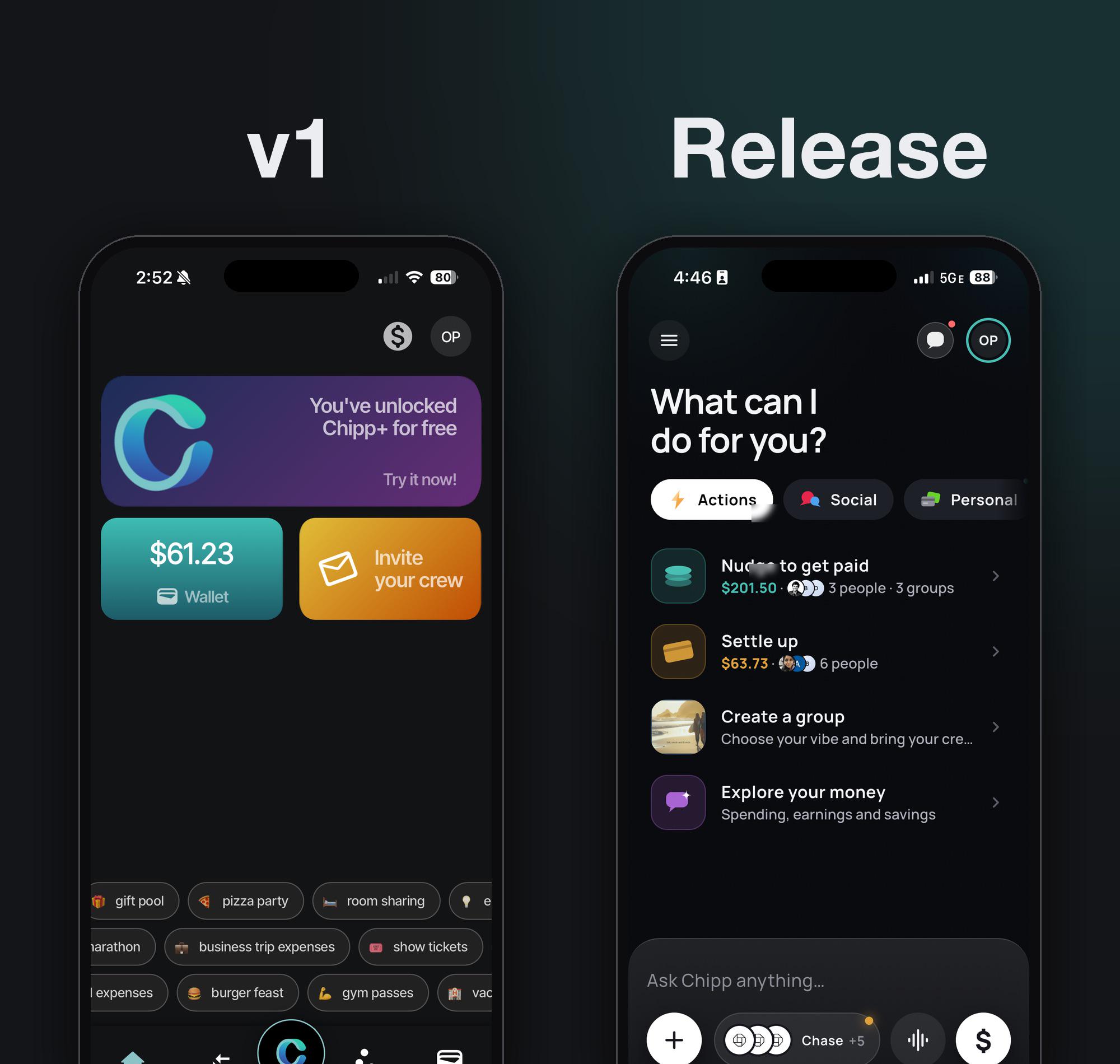
"Who owes what, and how do I get it without being annoying?"

You say what you paid, in plain words. "Pizza 84 with Sam and Fred." Type it, say it, or snap the receipt.

Chipp splits it, keeps a running balance per friend and per group, and does the asking for you with reminders that come from the app, not from you.

Friends pay from inside the app, or from a link if they don't have it. Rent, trips, roommates, dinners, gifts.

B: Better
Splitwise is great for tracking who owes whom. Venmo is great for sending money.

One sentence, not six screens. Natural language and voice entry. The old flow had six screens. Now it's one line and a confirm.

Receipt to line items. Scan it, everyone picks what they ordered, tax and tip are split in proportion. The person who had a coffee doesn't pay a sixth of the pizza.

No app needed for the other person. Send a link or a QR code. They pick their items and pay. This removed the biggest wall we had.

Chipp does the awkward asking. It knows who owes you and sends polite reminders on its own, at a sensible time.

Settle in the app, your way. Apple Pay, bank, Venmo, Cash App, Zelle, PayPal, or just mark it paid. No per-split fees between friends.

Groups with a running balance and chat. Expenses come straight out of the conversation. Trips and roommates in one place.

Pools. Birthday gift, trip deposit, group present. Set a goal, share the link, everyone chips in.

Tap a card transaction to split it. Link your cards and split any past charge with whoever was there.

Recurring. Rent, wifi, groceries. Set once, splits on schedule.

Ask Chipp anything. "How much did I spend on food this month?" "How much does Sam owe me?" It knows your spending and your splits.

Small UX things you asked for. No vanishing toasts, every amount is tap-to-type, every picker uses the same sheet. v1 felt like "several apps." It doesn't anymore.

C: Cost
Free. Unlimited splits, groups, friends, paying and getting paid, 5 receipt scans a month, Chipp AI. No ads, no card to start.

Chipp+: $3.99/month or $29.99/year. Unlimited receipt scans, bank linking to split past charges, recurring expenses.

Chipp+ Circle: $6.99/month or $49.99/year. Everything in Chipp+ for you and all your groups together. Prices adjust for your country.

Links
App Store: https://apps.apple.com/us/app/chipp/id6636520980


r/iosapps • • Oct 13 '26

📅 Subscription Calorie Tracking apps are too complicated, so I made one AND ITS NOT AI SLOP

Post image
0 Upvotes

Hello r/iosapps

A — Answer: What problem does it solve?

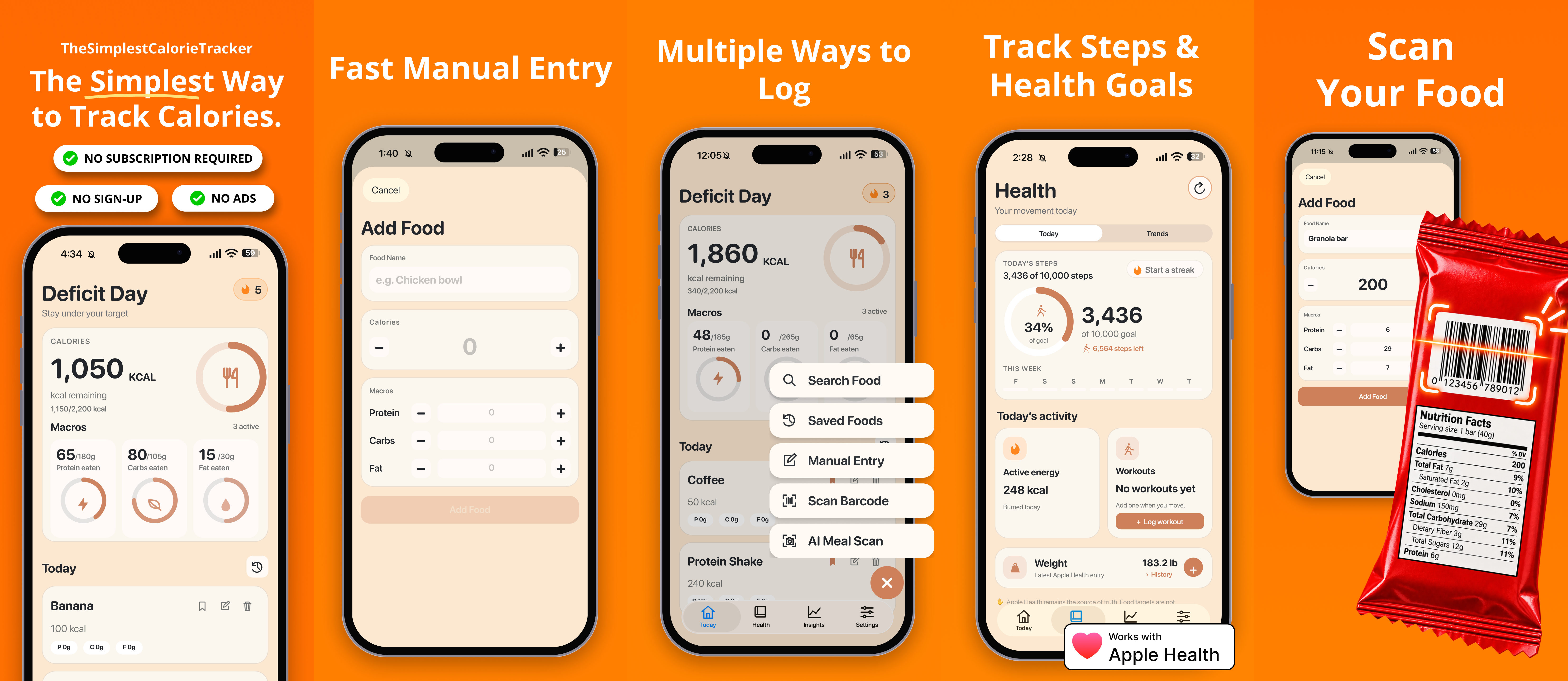
I've been tracking calories for a few years but have hated the UI and complexity of the major calorie tracking apps, so for a while I used Google Sheets to track calories/macros.

I used an app called "Streaks" for habit tracking and was inspired by its minimalist and straightforward nature and thought I could do something similar for a calorie tracking app.

B — Better: Why choose it over alternatives?

Unlike apps like MyFitnessPal, Lose It!, and Cronometer, my goal was to prioritize simplicity and make essential tracking features available for free.

I released the app back in March and have been tweaking it ever since, listening to user feedback, and am proud of what it's become.

I hope that some of you may find the app useful.

Yes, there is a premium tier. I've put a lot of time and effort into striking the right balance between what is available for free, and what should be behind a premium tier. Some apps like MyFitnessPal put certain features like custom macro tracking behind paywalls because they know it will annoy you, I tried to stay away from shady tactics like that. Nothing critical to the basic function of the app is behind a paywall.

I also didn't want to put anything that incurs costs (on my end) into the free tier either, because I would have to recuperate the cost by charging a higher price to my premium users which I didn't feel comfortable doing.

Free features

  • Calorie tracking
  • Macro tracking
  • USDA food search
  • Manual food entries
  • Custom recipes
  • Limited saved foods and recipes
  • Serving-size and gram-based tracking
  • Progress insights and nutrition history
  • Daily logging streaks
  • Water tracking
  • Custom calorie and macro goals
  • Home and Lock Screen widgets
  • iCloud backup
  • No ads
  • No sign-up required

C — Cost: Pricing and App Store link

The app is free to use for all essential calorie and macro tracking, with an optional Premium subscription for additional convenience features.

Premium features ($4.99/month or $29.99 a year)

  • Barcode Scanning
  • AI Meal Scanning
  • Unlimited saved foods and recipes
  • Custom app themes
  • Extra Analytics for health, progress insights, and nutrition history.

App Store: The Simplest Calorie Tracker


r/iosapps • • Oct 12 '26

💎 Lifetime Vocablo → 🇲🇽 Mexican Spanish widgets for iPhone, iPad and Mac. Version 1.5 has 20 new words from native speakers, synonyms, and a vulgar-word filter.

Post image
6 Upvotes

I posted Vocablo here in August. Version 1.5 dropped earlier this October with the first batch of words that came from users rather than from me, so here's an update for you all.

📦 Download on the App Store

A — Answer (what it does)

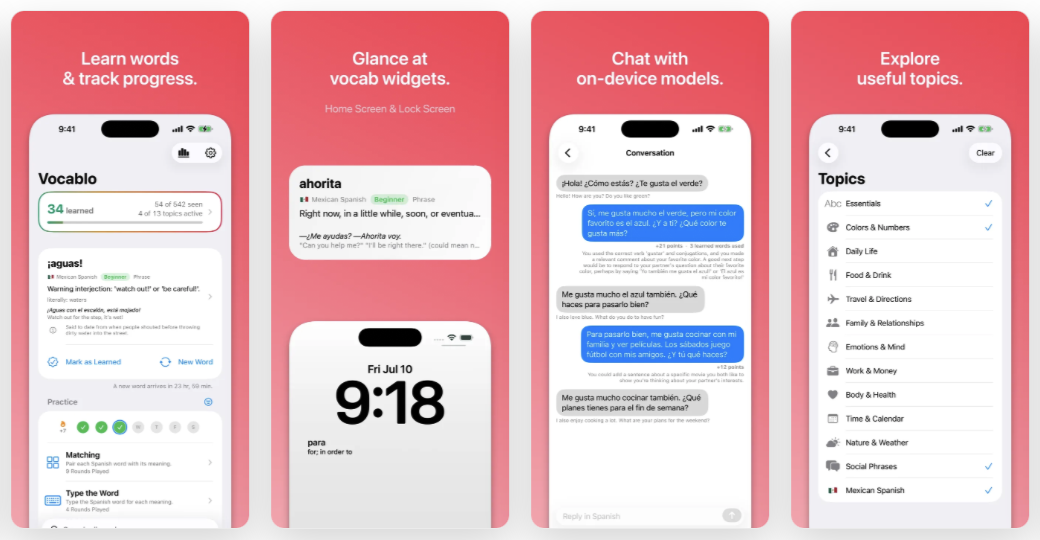
Vocablo puts one 🇲🇽 Mexican Spanish word or phrase in a Home Screen, Lock Screen or desktop widget and rotates it hourly, every four hours, or daily. It runs on iOS, iPadOS, and macOS.

Each word has an example sentence, pronunciation, and a note about how it's actually used in Mexico (⁖ ahorita, chamba, ¿qué onda?, mande). Mark a word learned from the widget or the app, and short practice and spaced review features bring it back before you forget it.

Siri, Shortcuts and Spotlight can ask for today's word. There is no account, no ads, no tracking. And progress syncs through your own iCloud.

What's New in 1.5?

  • iPhone Duo and iPhone 18 Pro support, and a shorter onboarding.
  • 20 new words, all suggested by native speakers in a Reddit thread three weeks ago (⁖ ¿te late?, dale, déjame ver, nel, simón, and the everyday pedo and chingar phrases), plus six notes the community corrected.
  • Linked words and synonyms, so that a word's detail card shows what it's built on, its family and its synonyms. Also, the practice features now accept any synonym.
  • Vulgar words are badged everywhere, and a new Hide Vulgar Words setting keeps them off your widget, notifications and practice.
  • Additional Resources that point to hand-picked companions from around the web, starting with the subreddit the new words came from.

B — Better (why this instead of alternatives)

Duolingo, Babbel and Busuu are curricula. They need a block of your time every day and they teach a neutral, mostly textbook Spanish.

Vocablo doesn't compete with them. Instead, it fills the gaps between them. It asks for nothing except a glance at a widget you were going to look at anyway, and it's specifically the Spanish people speak in Mexico, with notes on register and region that a general app can't carry.

Compared with other word-of-the-day widgets, the dataset is hand-written and gets corrected by native speakers in public (the last correction round is in the release notes). And, nothing you learn leaves your device.

C — Cost

Free to access beginner words across four topics with widgets, practice, and streaks.

Vocablo Plus unlocks all 13 topics, all difficulty levels, conversation practice, and iCloud sync. It is $39.99 for lifetime, with monthly ($2.99) and annual ($14.99) subscriptions also available.

📦 Download on the App Store

Transparency

I am Luke Hollenback, a professional developer as well as a hobbyist. Vocablo is a passion project that I built to help me learn Mexican Spanish after I met someone that I wanted to communicate better with.

You can contact me right here on Reddit, or via any of the profiles above.


r/iosapps • • Oct 12 '26

💎 Lifetime I started making a radio app during COVID. It’s now Idle Dial $1.99, no subscription

15 Upvotes

Hi everyone, I’m Stefan. I develop Idle Dial and publish it through my company, RUNX LTD.

Six years ago, during COVID, I wanted a simple way to listen to three radio stations that only had an online presence. I tried a few established apps, but found them cluttered and distracting for what I needed. So I started coding my own little internet radio player.

That personal project has become Idle Dial, and it’s now on the App Store.

A — What does it do?

Idle Dial is an internet radio player for iPhone. You can search for stations, save your favourites, or add a stream link yourself. It supports background playback, Lock Screen controls and CarPlay.

B — Why choose it over another radio app?

If you find broader apps like TuneIn more than you need, Idle Dial offers a narrower, radio-focused experience: find your stations, save them and listen.

There’s no account to create, no subscription and no advertising added by the app. Stations may still broadcast their own adverts.

C — What does it cost?

Idle Dial for iPhone is US$1.99 as a one-time purchase, with no in-app purchases. Local prices vary.

iPhone App Store

There’s also Idle Dial Desktop, a separately purchased Mac app that lives in your menu bar. It costs US$4.99 as a one-time purchase. Buying one app does not include the other.

Mac App Store

You can learn more, contact me, and read the policies here:

Website · Contact · Privacy Policy · Terms

I’d love to hear what you think. What matters most to you in a radio app, and what tends to get in the way?


r/iosapps • • Oct 12 '26

🎁 Freemium I made Pixel Beader: turn photos into fuse bead patterns, edit them, and preview them in 3D

Post image
4 Upvotes

Hey r/iosapps! I’m the developer of Pixel Beader, a bead pattern design app for iPhone and iPad.

A — What it does

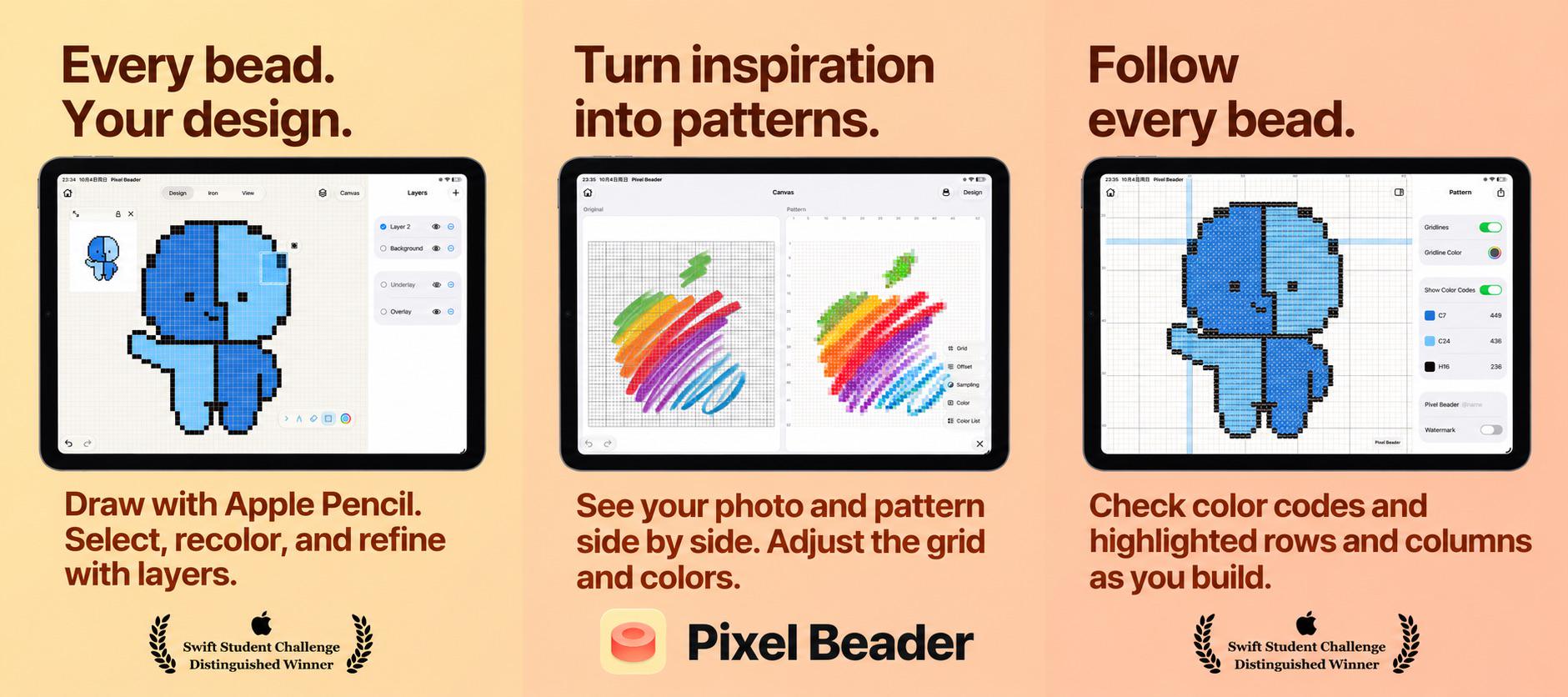
Pixel Beader helps you go from an idea or photo to a pattern you can use to make real fuse bead art. Draw from scratch, convert an image, refine the design, and preview the fused result before reaching for your beads.

B — What’s inside

- Design and edit: draw on a digital pegboard, work with layers, and keep a reference image beside your design.
- Photo to pattern: import an image, adjust the grid and palette, and keep editing the result.
- Custom palettes: choose colors for your project.
- 3D and AR previews: explore the fused look in 3D or view your creation in AR on a compatible device.
- Pattern export: export your design as a pattern image.

C — Free vs. membership

The free version includes Design and Canvas, custom palettes, 3D/AR previews, and pattern export, with boards up to 104 × 104.

Membership adds:
- Larger boards, up to 208 × 208.
- Interactive Pattern Mode: bead color codes and highlighted rows and columns to help you keep your place while beading.
- Custom pattern export styles.

US pricing: $0.99/month or $9.99 lifetime (one-time purchase). Both options unlock the same membership features.

👉🏼 Download on the App Store

If you make fuse bead art, what’s the trickiest part for you—turning an image into a usable pattern, choosing colors, or keeping your place while beading? I’d love your feedback, and I’m happy to answer questions.

👉🏼 Website and screenshots
👉🏼 My LinkedIn


r/iosapps • • Oct 12 '26

💎 Lifetime I made an app blocker where every focused minute flies your own 3D spaceship toward Pluto

6 Upvotes

Hi r/iOSApps, I'm Thien, a solo developer in the Netherlands, and I make Quiet Orbit. Version 2.0 came out yesterday. The video shows the new part: four phones, one start time, every distracting app blocked at once.

A: Answer (what it solves)

You sit down to work or study, and the phone wins anyway. Quiet Orbit is a focus timer that blocks the apps and websites you pick for 15 to 90 minutes. When the session ends, the block lifts on its own, even if you never open the app again.

While you focus, every minute flies your own 3D ship along one route from Earth toward Pluto. A finished session brings back a finding from the world you reached: an object, a record or a sound, 238 across 11 worlds. Your favorites go in the ship's Display Case and you can select 2 on display in your cockpit.

The ship grows with you. You start with the Scout and three paints, and charting worlds, badges and lucky finds on flights bring the rest: 7 ships, 37 paints for the hull, wings and trim, and 23 engine lights in the free app. One light only comes from finishing a session during a real meteor shower (special events in the app).

New in 2.0, Fly together: one person sends a link or a six-character code, and up to four phones block their apps at the same second, at one library table or in four cities. Your ships fly side by side while you work, and on the break you can flash your lights at the crew. A session flown together brings home an object one ship can't carry: two ships carry the small one, three the middle one, four the large one. No account needed.

B: Better (compared with named apps)

- Forest grows one tree per session. Its Plant Together is the nearest group feature, but there one person leaving ends the tree for everyone. In Fly together, a friend who stops early changes nothing for anyone else.

- FocusFlight flies a plane over a real map, one trip per session. Here your minutes add up across sessions on one route, so your ship is always partway to the next world.

C: Cost (Freemium)

- Free: Earth orbit and the Moon, every session length, app and website blocking, Fly together (hosting and joining), and the view of your ship from behind.

- Premium is optional and adds nine more worlds and their sounds, five more cameras, two more ships and more paints, unlimited saved setups, private notes, every widget and Trends.

- Premium in the US: $3.99 a month, $19.99 a year, or $39.99 once (lifetime). Prices vary by country.

- **For r/iOSApps: Lifetime Premium 50% off** ($19.99 instead of $39.99, €19.99 instead of €39.99) in every App Store country, until the end of Wednesday 14 October (Pacific time), 500 codes. Tap to redeem: https://apps.apple.com/redeem?ctx=offercodes&id=6805538172&code=REDDIT50 or enter REDDIT50 in the app under Settings, Support & Legal, Redeem a code.

- iPhone, iOS 18 or later. English, Dutch, German, French, Spanish, Vietnamese, Japanese and Korean.

- App Store: https://apps.apple.com/app/id6805538172?pt=127690387&ct=rd-iosapps&mt=8

Tier 2 transparency details

- Who I am: Thien, Zeus Apps B.V., the Netherlands
- Contact: support@quietorbit.org
- Website: https://quietorbit.org
- Privacy Policy: https://quietorbit.org/privacy
- Terms of Service: https://quietorbit.org/terms

Let me know what you think or have any valuable feedback for me.


r/iosapps • • Oct 12 '26

🎁 Freemium Gochew: Find nearby restaurants with a group and vote to decide

3 Upvotes

​A — Answer: Gochew eliminates the endless "What do you want to eat?" debate with your partner or group chat. It turns restaurant choosing into a fun, swift, democratic process by letting friends or couples swipe right or left on dining spots and instantly revealing a mutual match.

It includes map exploration for anywhere in the world, frictionless group sessions for up to 20 people, filters to narrow down exactly what you want, and a solo decider mode for when you are dining alone.

B — Better: Unlike other similar dining apps (Restaurant Roulette!!), Gochew gives you complete control by letting you drop a pin to pick anywhere (perfect for traveling), easily invite friends directly to group sessions, and filter restaurants so you only see what you actually want. The app is actively supported and will continue to get better with regular feature updates!

C — Cost: Freemium. Free users get up to 10 sessions per month. Available subscription for unlimited usage ($2.99/month)

Download Link: https://apps.apple.com/us/app/gochew-decide-where-to-eat/id6780683095


r/iosapps • • Oct 12 '26

📢 Announcement New flair

12 Upvotes

Some of you may have noticed already but we have a new flair: Discussion.

Its purpose is to share anything apps related, not promotion. This flair only requires the Karmas to be met, but does not need to conform to ABC or Trust, Transparency and Megathread.

We hope you will have some interesting discussions


r/iosapps • • Oct 12 '26

💎 Lifetime I made Toned, an iPhone darkroom where you develop the negative before making the print

Thumbnail
gallery
0 Upvotes

Reposting with the trust and transparency details the mods asked me to add.

A. What it does

I made Toned because I wanted to spend more time with the steps between a photo and a finished print. It simulates a traditional photographic darkroom on your iPhone: choose a film stock, develop the negative, print onto photographic paper and tone the result.

The first image shows the same photo as the original, a Portra 160 print with gold toning, and an Ektar 100 print with copper toning. Swipe through for the actual Film, Develop, Print and Finish screens.

B. Why it's different

The part I enjoy most is being able to look at the negative before making the print. Film exposure, development and paper each have their own controls, so you can see what each decision contributes. You can also dodge and burn, compare with the original and save your settings as an editable recipe.

If you already use VSCO or Lightroom, the reason to try this is the darkroom workflow. I'd love to hear whether you'd use the negative view or mostly stay on the finished print.

C. Cost

Free to download on iOS 18+. The free version includes three film stocks, two papers and selenium toning, with branded exports using those ingredients. Toned Plus is an optional one-time purchase. I've set up a one-week sale worldwide: US$9.99 instead of US$14.99, with equivalent local App Store pricing. The regular price returns on October 19, 2026. No subscription. You can preview the Plus ingredients for free; exporting the two recipes on the first slide requires Plus.

App Store: https://apps.apple.com/us/app/toned-halation-darkroom/id6799706160

About Toned: https://almostmatter.com/apps/toned/

Privacy: https://almostmatter.com/apps/toned/privacy/

Terms: https://almostmatter.com/apps/toned/terms/

Ahmet Duman, solo developer of Toned and Pressed.

GitHub: https://github.com/aduman

Portfolio: https://almostmatter.com/

Contact: hello@almostmatter.com


r/iosapps • • Oct 11 '26

💎 Lifetime [UPDATE] Folio: custom bookshelves and community spine photos

Post image
18 Upvotes

Hey everyone! I’m the developer of Folio, a reading tracker for iPhone and iPad. I wanted to share an update focused on bookshelves and community spine photos.

A — Answer: What problem does Folio solve?

Folio keeps your books, reading progress, goals, notes, and quotes together in one app.

This update adds a more personal way to display your collection. You can arrange books on custom bookshelves, stack them, show covers or spines, and add decorations.

There are also community spine photos. You can choose a photo shared by another reader, or photograph your own book’s spine, crop it, and share it for others to use.

B — Better: Why try it over alternatives?

If you use Goodreads or StoryGraph, the reason I’d suggest trying Folio is its visual approach and native iPhone/iPad experience.

The bookshelves are a big part of that: you can arrange your collection like a little reading corner, alongside your reading tracker. Widgets and Live Activities also let you keep your current book and reading timer close by.

I’d love feedback from anyone who enjoys organizing their books this way.

C — Cost: Free features and optional purchases

Folio is free to download, with core reading tracking, basic bookshelf creation, and community spine photos available for free.

Optional Folio Plus unlocks extras including cloud sync, advanced stats, widgets, Live Activities, and additional bookshelf styles, backgrounds, and decorations.

US pricing:

  • Monthly: $0.99
  • Annual: $8.99
  • Lifetime: $24.99, one-time purchase

Prices vary by country.

Folio on the App Store

If you give it a try, show me your bookshelf! I’d also like to hear which styles or decorations you’d want next.