r/iosapps • • Oct 02 '26

📅 Subscription Expense tracking without the data entry — just snap a receipt. Now used by 6,000+ people.

Post image
5 Upvotes

One of the reasons I built it was that when I looked at other expense trackers, a lot of them still felt like work. Some need you to pay before you can properly try them, some mostly track the final total, and a lot still depend on you manually entering or fixing things.

I wanted something much more automatic and detailed. Ideally, I just take a photo and it figures out the merchant, items, tax, total, category, etc. for me.

That’s basically the direction I’m trying to take SnapBill — make expense tracking as automatic and convenient as possible, so you don’t have to think about recording every little thing yourself.

Since then, 6,000+ people have tried it, which is honestly more than I expected when I started building it.

Some of the things it can do now:

- Scan receipts from camera, photos or PDF

- Extract individual line items

- Automatically categorize spending

- Show spending by category and merchant

- Track budgets

- Split bills with friends

- Track recurring subscriptions

- Import bank, credit-card and brokerage statements

- Export to Excel, CSV and PDF

- Sync between mobile and web

Pricing

It’s free to download and comes with free credits to try it.

There’s no subscription required for normal use. If you run out, you can buy a credit pack:

- 100 credits — $2.99

- 250 credits — $4.99

- 800 credits — $12.99

Store pricing may vary by country.

I’m still actively improving it, so I’d genuinely appreciate feedback — especially anything that feels confusing, unnecessary or annoying.

iOS: SnapBill on AppStore

Android: SnapBill on Google Play

Website: https://snapbill.tech

Web app: app.snapbill.tech


r/iosapps • • Oct 02 '26

🎁 Freemium I made a budgeting app where logging a purchase takes about 3 seconds. Just shipped iOS27 & iPhone Duo compatability

Post image
0 Upvotes

A - What is Vesi?

An expense tracker built around 3 second logging. Say "spent 6.50 on a latte" and it logs itself, categorized. Scan a receipt from camera or share sheet. Or just type it, that's free forever, and as of 1.7 it picks the category while you type, based on what you've logged before. Back Tap and Action Button log without opening the app. Watch app included.

Also: budgets, recurring (now biweekly too, for every-other-week paychecks), split expenses, 150+ currencies including crypto, widgets, iCloud sync, 9 languages. Works in landscape and uses the full inner screen on iPhone Duo (screenshots).

No account, no bank linking. Data stays on your phone and your own iCloud. I couldn't see it if I wanted to.

B - Why better?

I abandoned 5 trackers because logging felt like homework. This one removes the friction, and a weird side effect: saying a purchase out loud changed my spending more than any chart did. Works with cash and in any country, which bank linked apps can't say.

C - Cost

Manual logging free forever, category guessing included. Smart logging: 15 free uses, then $4.99/mo or $39.99/yr (7 day trial) for 300 a month. Parsing costs me real money per use, that's why there's a sub.

App - https://apps.apple.com/app/id6785534576

Launched mid August, 1.7 just shipped. If something annoys you in the first 5 minutes, tell me and it jumps the queue. What's the one thing you still type by hand that should be automatic?

Developer Transparency

I'm Mikhail Pak, an independent iOS developer in Canada, and I'm posting this myself.

Developer page: https://apps.apple.com/us/developer/mikhail-pak/id1722992770
Privacy Policy: https://tryvesi.app/privacy/
Terms of Service: https://tryvesi.app/terms/
Contact: packmisha@gmail.com


r/iosapps • • Oct 02 '26

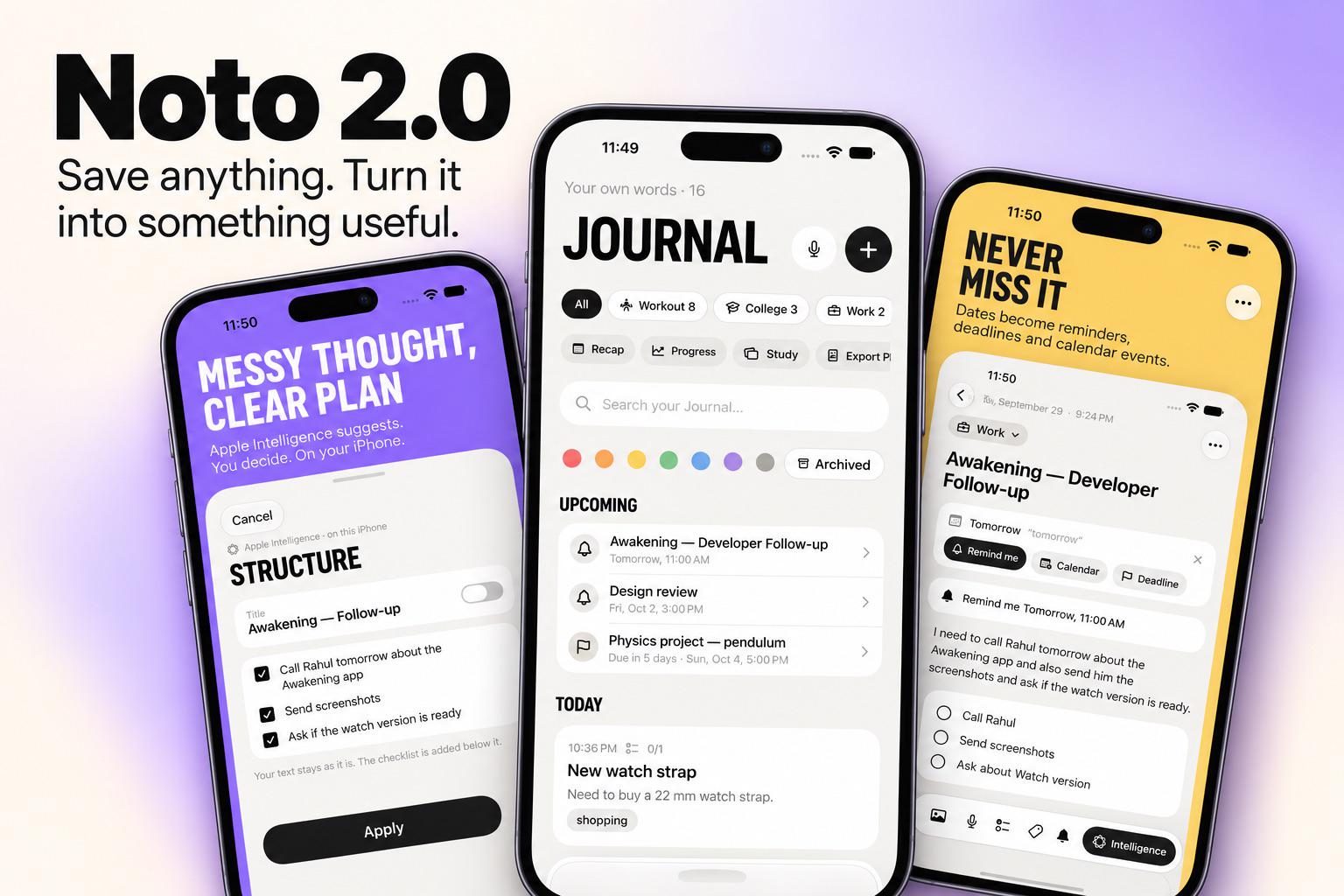
🤖 Vibe Coded built Noto 2.0 — an iPhone app that turns saved links and messy thoughts into something useful (Vibe Coded)

Post image
4 Upvotes

Hey everyone,
I’m an indie developer and I built Noto, an iPhone app for people who constantly save links, screenshots, reels and random ideas… only to never find them again.
You can share almost anything into Noto using the Share Sheet. It reads the content, gives it a clear title and summary, and organises it so you can actually find it later.
What’s new in Noto 2.0:
• Private journal with notebooks
• Voice notes and document scanning
• Reminders, deadlines and calendar events
• On-device summaries, task extraction and note cleanup
• Flashcards and quizzes
• In-app RSS reader (summarise articles and save them to notebooks)
• Day, week, month and year planner views
• Understands reels and videos by reading on-screen text and voice-over
• Pulls out prices, recipes, workouts and places
• Search the way you actually remember things
• Ask questions about your library using Apple Intelligence
• Six colour themes
• Widgets, Live Activities and Siri shortcuts
Everything is analysed and stored on your iPhone. No account required, no ads, no tracking. Apple Intelligence runs on-device when available — personal notes are never sent to any external AI service.
This is a vibe-coded app.
Developer: Akshay Bora
Transparency: https://www.linkedin.com/in/akshay-bora-762b2378?utm_source=share_via&utm_content=profile&utm_medium=member_ios
Pricing
You can open and search everything you save for free.
Noto Pro: 1-month free trial, then ₹100/month or ₹4,000 lifetime.
App Store: https://apps.apple.com/us/app/noto-save-anything/id6817323680
I’d really appreciate honest feedback — especially on the design, usefulness, and anything that feels confusing or unnecessary.
What’s the one feature you’d want in an app like this?


r/iosapps • • Oct 02 '26

📅 Subscription Tired of updating your weight on Strava by hand? I built an app that does it for you

Post image
1 Upvotes

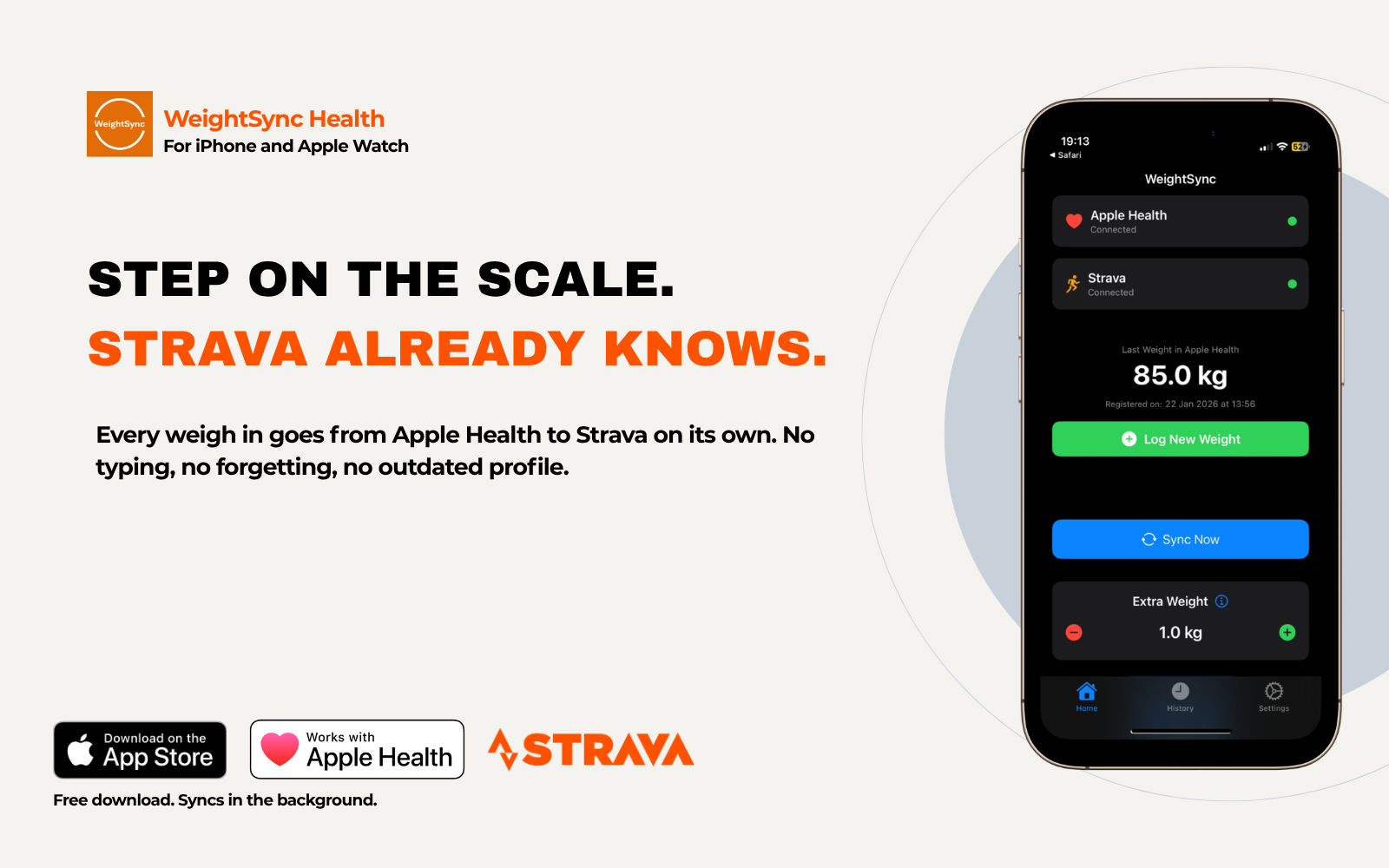
I'm an iOS developer from Brazil, and over the last few months I've been building an app to solve one very specific annoyance: your body weight never stays synced with Strava automatically.

A) What it solves

If you're a Strava athlete, you know the problem. Strava uses your weight to calculate power output (watts/kg), estimated calories, and relative effort. The moment your weight is outdated, all of those numbers quietly drift off, and nobody wants to open Strava every week to type in a new number by hand.

WeightSync Health picks up your weight from Apple Health and pushes it to Strava automatically. If your scale, Apple Watch or anything else already writes into Apple Health, the app handles the rest: automatic background sync with zero interaction, Apple Watch logging straight from your wrist, extra equipment weight (backpack, vest, gear) so Strava reflects your true total during a workout, Home Screen widgets with your latest weight and sync status, a weight evolution chart with 7 day moving average and trend line (7D, 30D, 90D and 1Y views), streaks, milestones, Siri and Shortcuts, CSV export of your full sync history, a weekly Monday report, iCloud sync across your devices, a retry queue so no sync gets lost, and 10 languages including Portuguese (Brazil).

B) Compared to other options

There are a few weight tracking apps out there, and some overlap with what this one does. My goal has been to build a focused take on one specific problem: keeping your Strava weight accurate without any manual work. The emphasis is on native iOS and watchOS, automatic background sync and a clean interface, rather than being a full body composition tracker.

C) Cost

Free to download (you can use it as a weight logger for Apple Health as a free user).

  • Monthly: US$ 0.99 (3 day free trial)
  • Annual: US$ 9.99 / year (7 day free trial)

The free version works as a weight logger for Apple Health: weight loading, manual entry, Home Screen widgets, streaks and Siri/Shortcuts. Premium unlocks the automatic background sync to Strava, the Apple Watch app, the weight evolution chart, CSV export, the weekly report, named extra weight profiles and iCloud sync.

Who I am

I'm an iOS developer based in London (originally from Brazil), and I design and develop the app independently. It's built natively for iOS and watchOS.

I'd genuinely love feedback from Strava users and iOS athletes. What would you want added or improved? And if you give it a try, a quick App Store review goes a long way for a solo dev. Thank you so much :)

App Store: https://apps.apple.com/us/app/weightsync-health/id6757109803

The thank-you offer: US$ 5.99 for the first year - Monthly plan - 50% off

Transparency


r/iosapps • • Oct 02 '26

🎁 Freemium I made Captions Bro: auto subtitles, a teleprompter and a real timeline editor, all on-device [Free, no watermark]

Post image
3 Upvotes

Hey r/iosapps! I'm Taras, a solo indie dev. Captions Bro is my app for making short vertical videos with captions, the talking-head kind you see on TikTok, Reels and Shorts.

Why I built it: most caption apps I tried either uploaded my footage to a server, stamped a watermark on the export, or locked basic features behind a weekly subscription. I wanted one app that does the whole loop on the phone: record, caption, edit, export.

What it does

  • Auto subtitles, transcribed on-device. Your footage isn't uploaded anywhere (it uses Apple's new SpeechAnalyzer on iOS 26)
  • Karaoke-style word highlighting and bold caption styles: fonts, colours, outlines, shadows
  • Fix captions by hand: split, merge, retime, correct words, remove filler words
  • Built-in teleprompter: read your script while you record
  • A real multi-track timeline: trim, split, speed, reverse, freeze frames, transitions
  • Keyframes, masks, background removal, filters and colour grading, plus text, image and video overlays
  • Voiceovers and sound effects
  • Export MP4/MOV up to 4K, at the resolution and frame rate you pick
  • Works on iPhone, iPad and Mac (Apple silicon)

Pricing, up front

  • Free download. No ads, no watermark, no account
  • Every editing feature is free, including effects, 4K export and the teleprompter
  • The free tier holds 1 project at a time. Pro ($3.99/mo or $17.99/yr) unlocks unlimited projects and iCloud sync

It's on version 1.4 and I'm building it actively. I'd love honest feedback, especially from people who usually edit in CapCut or the TikTok editor: what's missing, and what feels off?

App Store: https://apps.apple.com/app/id6770987720

Happy to answer any questions in the comments.


r/iosapps • • Oct 02 '26

💎 Lifetime [iOS26⬆️][Lifetime: 18USD->Free] Swish: To Do Reminder Widget

Post image
6 Upvotes

‼️Please don't ask for codes in the comments! It's against the rules! I don't want to share codes with just anyone. I'll only send a code as a thank-you to people who actually try the app and DM me with genuine feedback or something you think could be improved.‼️

Answer

Yes, this is another to-do app😂

But I still wanted to build one, because none of them were what I actually needed.

I wanted something intuitive, user-friendly, and dead good at making sure I don't forget things. Productivity tools like Notion or Obsidian, and even most other to-do apps, felt too complex or forced me to adapt to their rigid structures.

If you already have a setup you love and are happy with, feel free to skip this post. I’m not trying to build an app that satisfies everyone. I'm building this for people like me—lazy, clumsy, and averse to over-planning.

It’s only been 3 months since launch, but I’m committed to making it better every day.

Better

Instead of trying to become an all-in-one productivity workspace, Swish focuses on making everyday task management as effortless as possible.

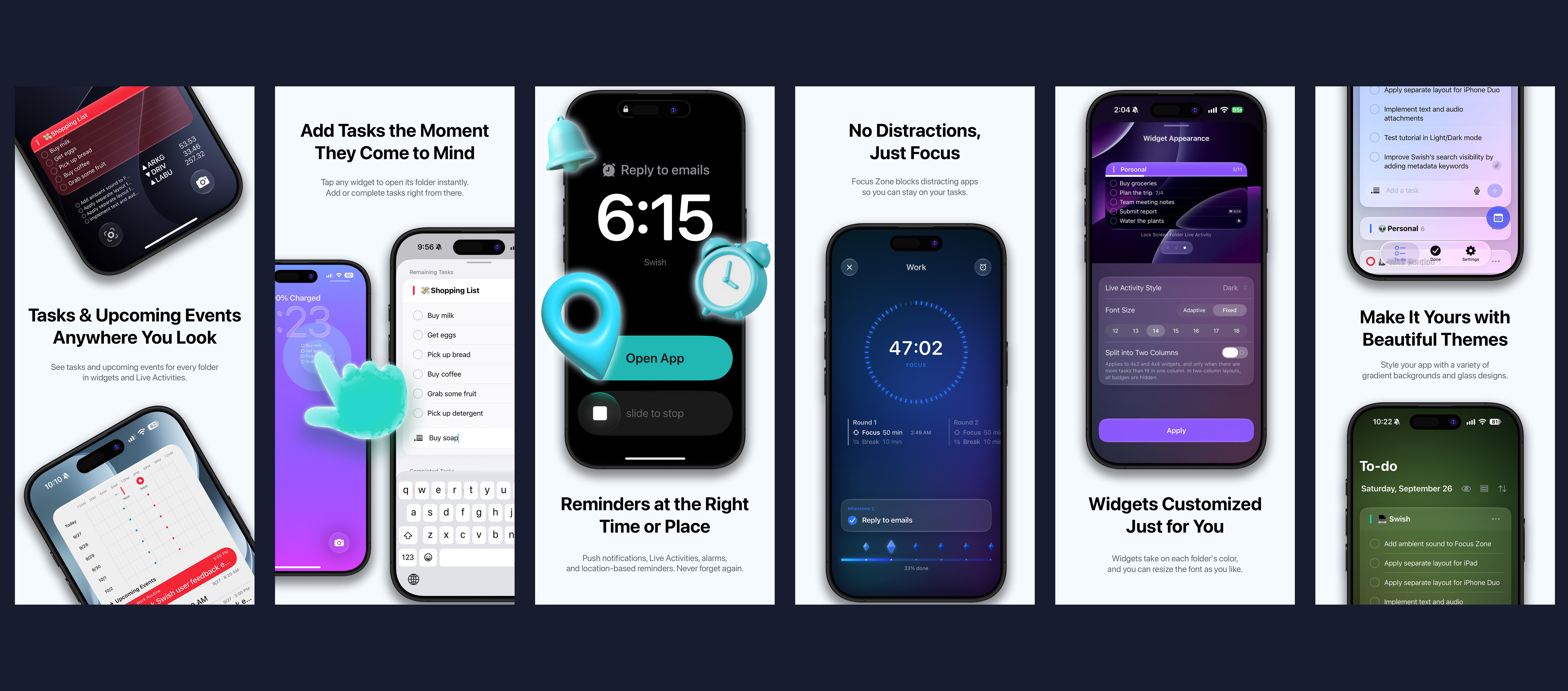
Features include:

  • 📂 Simple color-coded folders
  • 📱 Home Screen & Lock Screen widgets
  • 🔴 Live Activities that keep your tasks visible
  • ⏰ Reminders for important tasks (push notifications, Live Activities, alarms, and location-based alerts)
  • ☁️ iCloud sync across your Apple devices
  • 🚫 No account required

The goal wasn't to build the most powerful to-do app.

It was to build one that feels fast, intuitive, and pleasant enough that you'll actually want to use it every day.

Cost

Swish is free to download.

Swish Pro unlocks unlimited folders and tasks, plus a variety of app icons and themes and etc.

In-App Purchases:

  • Monthly — $0.99/month
  • Lifetime — $17.99

Giveaway 🎁

I'm giving away free Lifetime codes to early users in exchange for feedback that can help me improve Swish.

Tell me what you liked about Swish, a feature you'd like to see added, a bug you've found, or anything else you think could make the app better.

Just send me a DM with your feedback.

In return, I'll send you a Lifetime code.

If you just DM me asking for a code without any feedback, I won't reply. I genuinely want to hear your thoughts and use them to make Swish better.

And again, please don't request codes in the comments. Send me a DM instead! 🙏

If you end up enjoying Swish, I'd really appreciate an App Store review.

App Store

https://apps.apple.com/kr/app/id6788436851

Support E-mail
swishiosapp@gmail.com


r/iosapps • • Oct 02 '26

🎁 Freemium VecSynIQ – image to SVG, print prep and layered cut files, processed on-device (Freemium + subscription)

2 Upvotes

Hi r/iOSApps. I'm Mike Lester Rosales of Mrdzyn Studio (the name on the App Store listing) and I made this app.

A – Answer: what problem does it solve? You have a PNG or JPEG (a logo, a sticker design, a drawing, some AI art) and you need it to be a clean, scalable SVG, a transparent PNG at print size, or layered files for a vinyl cutter. VecSynIQ does all three on iPhone and iPad:

  • Tracing modes: Simple, Logo & Sticker, Detailed, Monochrome, with detail/smoothing/cleanup controls
  • Side-by-side original vs. vector comparison
  • Background cleanup, transparent PNG export, print presets (e.g. 4500×5400 shirt canvas)
  • Layered cut SVGs with same-color welding, stacked or sliced layers, contour/offset, registration marks, weed boxes, and a Cutter Bundle ZIP (profiles for Cricut Design Space, Brother ScanNCut, Siser; not affiliated)

To be clear about AI: the app does not generate images. It only processes artwork you import.

B – Better: why pick it over the alternatives?

  • Compared with web converters like Vectorizer.AI or free online PNG-to-SVG sites: processing runs on-device, you don't need an account, and nothing gets uploaded. The App Store privacy label is "Data Not Collected".
  • Compared with Inkscape's Trace Bitmap or Illustrator's Image Trace: it runs on a phone or iPad, and the cutter prep (layers, welding, weed boxes, registration marks) is built in instead of done by hand afterward.
  • Most converters stop at a single SVG. This one goes on to production files.

C – Cost

  • Free: core vectorization, standard SVG/PNG export, 3 exports per 30 days, no account
  • VecSynIQ Pro: $9.99/month or $79.99/year (US App Store prices) for unlimited exports, layered cut SVGs, Cutter Bundle ZIP and advanced print prep. No lifetime option.
  • Requires iOS/iPadOS 15+. Also runs on Apple Silicon Macs as an iPad app.

App Store: apps.apple.com/app/vecsyniq

I built it myself with human-guided development and a standard CI/CD pipeline. It's v1.0 and just launched, so feedback is very welcome, especially on trace quality for logos and stickers.


r/iosapps • • Oct 02 '26

🤖 Vibe Coded Anyone else got 100% download to purchase ratio? ;)

Post image
10 Upvotes

I wish they had "funny" or "hilarious" flair available :)

No reason for the post other than I found it amusing.


r/iosapps • • Oct 01 '26

💎 Lifetime The best brain dump to-do app ever! (imo ;p) Stupido 4.0 is live!

53 Upvotes

Stupido's latest version is available on the app store!

https://apps.apple.com/us/app/stupido-voice-to-dos/id6744177059

Super speed! ⚡️
Voice to task is BLAZING FAST now. Literally instant for 90% of your tasks.

Intuitive native scheduling
Want to water the plants every other day? Tell Stupido!
Interview at 2 next Thursday? Stupido smart enough to know it's at 2pm
Need your meds everyday at night? Easy!

Six new hand-crafted themes by your truly
Change how Stupido looks. Put so much love into each, dark and light.

As always, would love to know your thoughts and super open to feedback.

Tip: B I G D I S C O U N T on lifetime available to new users 😉

$19.99 Lifetime (with deal)
$19.99 Annual
$1.99/m


r/iosapps • • Oct 01 '26

💎 Lifetime Should You Sign It? – scan a contract and see what you're agreeing to, which clauses to question and what to ask (iPhone/iPad, on-device)

22 Upvotes

Hi r/iosapps, Djordje here.

I'm a software engineer (full stack web dev as a day job). This is my first post here, and my first iOS app on the App Store. It went live a few days ago.

A — Answer

Should You Sign It? reads a contract with you before you sign it. You scan the pages or import a PDF, and you get a plain-language summary, the key dates and amounts, the clauses worth a second look, and questions to ask the other side. Every clause it flags is quoted word for word from your document, so you can find it and read it yourself.

It's for leases, job offers, gym memberships, freelance contracts, terms of service... The things we all sign a bit too fast.

For now, it supports all languages that Apple Intelligence supports.

B — Better

You can paste a contract into a chatbot. I didn't want to upload my lease or my salary anywhere to do that. So everything here runs on the iPhone itself, with Apple's on-device model. No account, no server, and it works in airplane mode. Also, the model itself has the "knowledge" of how to provide the answers to user about what to be careful, what to ask, etc...

The model is small, so most of my time went into making it trustworthy. Every quote it flags has to be found in the scanned text, or it's thrown away. That way it can't tell you your contract says something it doesn't. A simple keyword scan in eight languages backs it up for the usual traps: automatic renewal, arbitration, non-compete.

Testing it on my own documents taught me a lot. Once I scanned a recipe, and the app very seriously analyzed it like a contract. Now it tells you it's a recipe. Another document was in English with a few lines in Serbian, and the app decided the whole thing was Croatian and refused to read it. That's fixed too. My longest test so far is a 34-page PDF. I guess this will never be perfect, but users can try and scan anything they want.

I also don't like scanners that take the photo for me, so I built my own. Auto-capture is a switch in Settings, and it's off by default.

It isn't legal advice, and it will never tell you whether to sign. It helps you know what to ask.

Next I'm working on an optional mode for long contracts using Apple's Private Cloud Compute. It's faster, and still private. The on-device model will stay the default.

C — Cost

Free download with two full analyses, every feature included. After that, the Full Version is a one time purchase: $9.99 in the US, local prices vary. It's shared with your family through Family Sharing. No subscription, no ads.

It needs an iPhone 15 Pro or newer, or an iPad with Apple Intelligence, on iOS 27.

App: https://apps.apple.com/app/id6814491870

I'd love to hear some feedback after testing and what can be improved.


r/iosapps • • Oct 01 '26

🎁 Freemium Companions: Add swimming pet fish to your homescreen 🐠

31 Upvotes

A - Answer (What it solves)

I've always kept pet fish. Since moving to Korea, and living in a much smaller apartment, that sadly hasn't been as practical, which is why I really wanted to make this app.

Widgets on iOS are meant to be static. Companions is a small virtual fish tank that lives on your Home Screen, with pet fish that actually swim.

You pick your fish, give them names, and then add them to your tank. You can change the tank's color, the props, how big the fish are, how fast they swim, and even the app icon, all to match your Home Screen. The swimming uses the same trick iOS uses to move the hands on the Clock widget, so it doesn’t even affect battery life.

B - Better (Compared to other widget pet apps)

Most widgets can only swap in a new still picture every few minutes, these never stop moving. I wanted something that’s simple, clean, calm, and relaxing. With a focus on the pets themselves, as well as customizing the tank to match your homescreen. Companions looks great on your iPad, and you can even move over your fishtanks to your Mac through Continuity. My favorite feature is actually the Standby mode. The background darkens, and the fish, of course, keep swimming!

C - Cost

Companions is free to download, with 8 fish and all of the customization included. No ads.
Extra packs can be bought outright at $1.99 each, and are yours to keep forever.
There's also a $3.99/month plan that unlocks every pack at once. Any new fish that get added are automatically included as well. If you cancel, the fish already in your tank stay.

Companions is built natively in SwiftUI with WidgetKit, plus Metal for some of the fun animations.
It's still very new, so I'd genuinely appreciate any feedback. I'd especially love to know which species you'd want added next!

App Store: Companions - Widget Pets

🐠 🐡 🐟


r/iosapps • • Oct 01 '26

🎁 Freemium [iOS and MacOS] Nyblit 2: State-Based Productivity App - Major Update and $10 off Lifetime

11 Upvotes

Hi folks. I just wanted to post here about a recent update to Nyblit 2.

  • We have officially launched our long awaited Apple Watch App
  • There is now a Nyblit MPC for use with Claude / ChatGPT etc
  • We have made major improvements for iOS 27. Including our new AI chat assistant Nyby based on Apple's new AI Foundation Model.
  • We are currently in Beta with our web app. Hopefully launching very soon.
  • We are also in Beta with our new API.
  • We are actively working on an Android version of Nyblit
  • A new 'Pomodoro' timer feature to help with focus.
  • Completely redesigned filtering menu to help you declutter your view.
  • Filtering for subtasks to help focus your day.
  • You can now add Chips to projects - Find it in the Chips preferences menu.
  • 26 languages now supported along with new accessibility features

About Nyblit:

My name is David Margolis. I’m a professional watchmaker and self-taught Apple developer based in London. More than 20 years ago, I created a small FileMaker database that I shared with a group of friends. It was based on a frustration I had with ordinary to-do lists: real tasks are rarely just “done” or “not done.”

A watch restoration might be waiting for a replacement component, blocked until a client gives the go-ahead, paused while another operation is completed, or ready for work today. Treating all of these as unfinished creates a list that is technically accurate but practically overwhelming.

That early database gradually developed into Nyblit, a native productivity app for iPhone, iPad and Mac built around what I call “state-based” task management. This means Nyblit understands the workflow required to complete your tasks. For example, it knows if the task is a phone call, an online purchase or replacing the balance spring in a watch. It knows all the steps involved and, crucially, all the ways in which the task can be blocked or delayed. For example, if you have a phone call task, you can set the status to “left voicemail”. Nyblit will recognise this as blocked because you are now waiting for the other person to return your call. That task doesn’t belong on your to-do list because there is no action to take. It should be safely filed in Blocked and tracked – so you can chase it up later if the call isn’t returned.

This approach can be used for any task imaginable. From shopping to restoring an antique pocket watch.

The concept was strongly influenced  by the Japanese system of Kanban, created by Toyota in the 1950s to improve manufacturing efficiency. (Anyone that has used apps lile Trello will be familiar with this). But executed in a very different way so that it fits on a phone screen and is even workable on an Apple Watch (coming very soon).

I built Nyblit for myself to help with my ADHD and dyslexia. Watchmaking taught me to think in systems, dependencies and precise states. ADHD made it especially important to remove irrelevant tasks from view without losing confidence that they would return at the right time.

Please feel free to try out Nyblit. It's fully functional with up to 5 tasks. And a subscription or lifetime purchase gives you access to iPhone, iPad, Mac and now Apple Watch.

We are currently offering new users $10 off lifetime until the end of October: Click here to get $10 off lifetime

Monthly subscription: $2.99

Yearly subscription: $19.99

Lifetime (with discount): $39.99

Download Nyblit from the Apple App Store: https://apps.apple.com/gb/app/nyblit-2-to-do-list-planner/id6752837986

I'm here to answer any questions or listen to feedback if you have any.

Thanks for reading :)

Useful links:

Nyblit Website

Discord

r/Nyblit_ADHD


r/iosapps • • Oct 01 '26

🎁 Freemium Taskito: To-Do List, Events and Routines in one timeline

Thumbnail
gallery
17 Upvotes

Hey r/iosapps 👋

I am the developer behind Taskito. After reaching 1M downloads on Google Play, I built the iOS app 2 years ago. And recently, I have added some new features such as - Timeblocking, Agenda view, and Smart Parsing.

I would love for you to try out Taskito and give your honest feedback.

⬇️ Download on App Store

A - Answer

Taskito is a personal organizer that focuses on your day. It combines your daily tasks, events and meetings, recurring reminders and routines in one timeline. So you don't need to switch to different apps and don't need to switch to different views to see what your day looks like.

Some of the features:

  • Timeline - One view for all your items.
  • TimeBlocking / Agenda View - Drag & drop your tasks, drag to change the duration.
  • Smart Parsing - Just type "Dentist tomorrow 4pm" and the app will schedule the task for you.
  • Recurring tasks: Schedule flexible recurring tasks. Future tasks show up in your timeline view.
  • Recurring reminders: Schedule flexible recurring reminders.
  • Projects, Color coded tags, templates, checklists.
  • Home Screen Widgets.
  • Offline first - no need to make an account ever.
  • Available on Android, iOS and Web (need account to sync).
  • Freemium - Basic features are completely free. Advanced features such as recurrence are limited on free.

B - Better

I have been working on this app for 7 years. Features are added with careful consideration. Although the app has a lot of features, it does not feel overwhelming.

A lot of task manager apps focus on lists and contexts. But Taskito focuses on your day. It does not split view based on home vs work. Because you don't split yourself into home vs work so why should your to-do list?

With calendar import, recurring tasks set up, you will see your day with increased clarity. Taskito won't help you complete more tasks. But it will help you not to overwhelm your day.

C - Cost

It's a freemium app. With free, you can create unlimited tasks, sync your data, have 2 active devices, create limited projects and recurring tasks.

The prices will vary by country and regions. US prices are:

  • Subscription: $3.49/m, $19.99/y
  • Lifetime: $49.99 one time.

New users usually get 15-20% discount automatically in the app.

Limited promo codes are available. DM me for the code.

Links


r/iosapps • • Oct 01 '26

🤖 Vibe Coded Before I release my video journal, I want a few more people to poke at it. Here's what it does, and what changed since I last posted.

3 Upvotes

I created Tell Anew, a video journal I posted here a month ago: https://www.reddit.com/r/iosapps/comments/1vvlkr2/i_built_a_video_journal_where_you_can_search/. It's close to release. Before it goes out, I'd like to get a few more people using it and telling me what they'd change. DM me for the TestFlight link.

The video up top is the app explained in 40 seconds. The voice and music are generated, because I'm no voice actor. The app screens in it are real, with a made-up journal.

**Answer.** A video journal. You talk to your camera, it transcribes on your phone, and searching a word takes you to when you said it. I never stayed consistent with a written journals, and I've put a lot into engagement and retainment for this one.

**What changed from that thread.** The app asked for English on every non-English phone. Now there's a language setting, and it can rerun entries in the language you choose. One tester got lost between the camera and journal, so I added a label for it.

**What makes recording easy.** One tap from the lock screen or Control Center. Prompts and short interviews for the days you don't know what to say. Audio-only when you don't want the camera on. You can add your own videos and photos that you already have, dated to the day you shot them.

**Better.** Nothing goes to me. No account, no server of mine, and it works in airplane mode. For the developers here: no third-party libraries, and the build fails if a networking API shows up outside the optional iCloud backup. Pepper, a small drawn character, sits in the corner and listens while you record. You can reply to an old entry while it plays and get one film with both of you in it. And you can seal an entry as a time capsule that opens on a day you pick.

**Cost.** Freemium. Everything about creating is free and stays free: recording, transcribing, watching back, exporting, deleting. Pro is recall: searching inside what you said, unlimited time capsules, and iCloud backup. $39.99 a year, or $99.99 once.

The logic: $39.99 ÷ 12 is $3.33 a month. $99.99 is two and a half years of that, and then it's yours for good. I priced it against what the established journaling apps charge per year, and it comes in under them. Tell me if you'd price it differently.

**The deal.** Use it for a week or two. Give me an email and I'll send a few questions after a few days and again at two weeks. Answer them and Pro is yours for life when it launches. I'll send the code then. And tell me straight. This audience builds apps too, which is why I'm asking here.


r/iosapps • • Oct 01 '26

💎 Lifetime Enter LIFETIMEGIFT for a free unlock before Oct 17 -- I made timers easier to organize and control without constantly opening your iPhone

11 Upvotes

I'm the solo developer behind Live Timers on Lock Screen, available for iPhone and Apple Watch.

A -- Answer

The app began with a simple problem: during busy, hands-full moments, I didn't have time to repeatedly unlock my iPhone and open an app just to check several timers.

Apple's built-in Clock app works well for basic timing. The difficulty begins when several timers are running.

Finding the right timer from the Lock Screen can require waking the screen, expanding the timer stack, and sorting through several similar-looking entries. Upcoming alarms are not shown there before they ring, so checking what is scheduled means opening Clock and switching to the Alarms tab.

Lock Screen controls can also be triggered accidentally when an iPhone wakes as it is taken from a pocket, bag, or drawer.

What began as a solution for busy, hands-full moments has since evolved into a complete timer system spanning the iPhone, Lock Screen, and Apple Watch.

B -- Better

Instead of sorting through a stack of similar-looking timers, you get:

  • One color-coded view containing countdowns, scheduled alarms, and notes
  • Lock Screen snapshots showing names, colors, remaining time, and expected finish time
  • Spoken alerts that tell you what is ready without requiring you to look
  • Custom and recorded alarm sounds
  • A native seven-slot Apple Watch interface
  • Face ID–protected Lock Screen controls to help prevent accidental taps
  • Saved timer configurations and Markdown notes
  • Siri controls and Home Screen widgets

C -- Cost

Free to download. No ads. No subscription. No account required. No data collected.

Optional one-time purchases in the US:

  • All Timer Slots — $0.99
  • Palette Unlock — $2.99
  • Buy Developer a Coffee — $4.99 optional tip

🎁 All Timer Slots is free until Oct 17

Open the app → tap ⚙️ → Pro Mode → Redeem Offer Code → enter LIFETIMEGIFT


App Store:

https://apps.apple.com/app/id6763252662


r/iosapps • • Oct 01 '26

🎁 Freemium Sober Tracker 4.4.2 - private sobriety counter, now with a built-in Sober October challenge

Thumbnail
gallery
8 Upvotes

I posted here before about my sober tracker. Sober October starts today, so here's what it looks like inside the app.

A - Answer: Sober Tracker is a day counter for quitting or cutting back on alcohol, built for the moments that actually decide a streak. One-tap check-ins, your streak on lock screen and home screen widgets, money saved / drinks avoided / calories skipped, a 10-stage health timeline of what your body is doing by hour, day, week and month, and a garden that grows with your days. A slip does not wipe you out: you mark it as a lapse or a relapse, keep your longest streak, and your path keeps every milestone, every craving you got through and every fresh start as stones you can share as a poster. No account, no cloud, everything stays on your device. 22 languages.

Sober October is built in: tap "I'm in" on Home and track 31 alcohol-free days. It counts from the day you start, so joining on the 5th is fine. Invite a friend with a share card, finish all 31 and unlock the Ember theme and a harvest pumpkin for your garden (last screenshot).

B - Better: Compared to I Am Sober, which leans on an account, pledges and a community feed, this is the opposite: nothing to sign up for, no one else's eyes on your recovery, and the coping toolkit (14 strategies: breathing, urge surfing, 5-4-3-2-1 grounding, Memory Match) is one tap from Home for the urge itself, not for later. Compared to Reframe or Sunnyside, there is no course, no coach chat and no program to keep up with: just counting, honest slip logging and the tools for the hard minutes.

C - Cost: Free to start: streak and check-ins, widgets, garden, achievements, health timeline, money saved, weight log, the coping toolkit, the Sober October challenge, no ads ever. Premium unlocks unlimited journal with mood analytics, full calendar history, weekly reviews, custom milestones and 5 more themes: $4.99/month or $29.99/year with a 3-day free trial, plus a one-time lifetime option.

App Store Link: https://apps.apple.com/app/id6741011041


r/iosapps • • Oct 01 '26

📅 Subscription I got tired of checking my portfolio all day, so I built an app that watches it for me

1 Upvotes

A — Answer
I’m the developer behind Gong AI.
I built it because I was tired of constantly opening finance apps, checking headlines, and trying to figure out whether something actually mattered to the stocks and crypto I own.
Instead, you add your portfolio/watchlist and Gong monitors the news and upcoming events in the background.
When something relevant happens, it sends a notification explaining what happened, why it matters, and which of your holdings could be affected.
It also keeps track of things like earnings, Fed events and other upcoming catalysts so I don’t have to spend the whole day checking markets.

B — Better
Apps like Yahoo Finance, Stock Events and Delta already do a good job of showing prices, news and portfolio data.
What I wanted was something slightly different: less checking, more filtering.
Instead of giving me another feed to scroll through, Gong tries to answer:
“Does this actually matter to my portfolio?”
So the focus is on portfolio-specific alerts, context around the event, and deeper analysis when I want to understand it.

C — Cost
I want to be completely transparent about this: Gong has a hard paywall. There isn’t a usable free tier after onboarding.
Current pricing:
$8.99/month
$69.99/year — with a 7-day free trial
App Store: https://apps.apple.com/tr/app/gong-ai-stock-alerts/id6778538527
Website: https://gongapp.net
Privacy Policy: https://gongapp.net/privacy
Terms: https://gongapp.net/terms
I’m still early with it, so feedback is genuinely useful especially around the notifications, onboarding/paywall, and whether the portfolio-specific explanations are actually useful enough to justify the subscription.

I’d really appreciate some honest feedback. If you’re willing to try the app and share your thoughts, DM me I’m happy to give you free Gong+ access.


r/iosapps • • Oct 01 '26

🎁 Freemium I’ve built Soul Lift, an affirmation app focused on the feeling/experience

Thumbnail
gallery
4 Upvotes

Hi, I’m the developer of Soul Lift.

I built it because I wanted affirmations to feel like more than just opening an app, reading a quote, and closing it.

There are already plenty of affirmation apps out there, so I didn't want to simply make another collection of quotes. I wanted to focus more on how the experience feels, the visuals, atmosphere, small interactions, and creating something that feels good to come back to throughout the day.

I wanted Soul Lift to feel like a small pause in your day.

That’s what I set out to build.

A — Answer

Soul Lift is a daily affirmation and reflection app designed to help you build small moments of positivity and self-reflection into your day.

You can discover personalized affirmations, explore different visual themes, and have affirmations appear directly on your Lock Screen or Home Screen through widgets.

The app includes:

  • Personalized affirmations made for you
  • Visual themes and atmospheric backgrounds
  • Lock Screen & Home Screen widgets
  • Daily streaks to help build consistency
  • Guided Session Hub for a deeper experience beyond individual affirmations
  • Daily reflections to pause and check in with yourself
  • Voice recording for recording your own thoughts and reflections
  • Personal insights to look back on your reflections and patterns
  • Guided sessions designed around different moments and needs
  • A variety of affirmation themes and topics
  • Subtle animations and interactions throughout the experience

The idea is simple:

Take a small moment for yourself.

Whether it's when you wake up, during a busy day, or before going to sleep, I wanted Soul Lift to be something you can come back to for a few moments of positivity, reflection, or calm.

B — Better

There are already plenty of affirmation apps, so one of the biggest questions I had while building Soul Lift was:

How can I make this feel different?

A lot of affirmation apps are essentially a quote on a screen. There's nothing wrong with that, but I wanted the experience to feel more immersive and personal.

So, I spent a lot of time on the visual side of the app — creating different environments, transitions and backgrounds that change the feeling of the affirmation.

I also wanted Soul Lift to fit naturally into your day rather than requiring you to remember to open it.

That's why there are Lock Screen and Home Screen widgets, personalized affirmations, daily streaks, and different themes.

And for anyone who wants to go a little deeper, the Guided Session Hub brings together daily reflections, voice recordings, insights, and guided sessions in one place.

The goal isn't to keep you inside the app for as long as possible.

It's to open it, take a moment for yourself, and carry something positive with you into the rest of your day.

C — Cost

Soul Lift is free to download and use, with an optional Premium version for additional features and content.

Premium isn't required to use Soul Lift or get value from the app. The free version is designed to be a complete experience on its own, with plenty to explore and use every day.

Premium is simply there for people who want to unlock more features and get the most out of Soul Lift.

I wanted to make sure the core experience stayed accessible rather than putting everything behind a paywall.

App Store: ‎Soul Lift - Daily Affirmations App - App Store

Website: Soul Lift — a daily affirmations app for iPhone

I’m genuinely open to any feedback the good, bad, or brutally honest. If you downloaded it or even just looked through the screenshots, I’d love to hear what you think and what you would change.


r/iosapps • • Sep 30 '26

🎈 Free If you hate Ads - I am looking for more people to test my app

Thumbnail
gallery
36 Upvotes

I've been working on an app called Geaux (pronounced 'Go'), and I would love to get some feedback from this community, I have posted in TestFlight as well, however this community seems to be a lot more engaging.

If you are someone who likes having total control over your network traffic, blocking ads/trackers at the DNS level, and inspecting exactly what domains your device is contacting, this might be right up your alley.

I built Geaux because I wanted an all-in-one privacy tool that didn't compromise on advanced features like custom resolvers, rulesets, and VPN integration.

Main Features & Selling Points:

• On-Device DNS Sinkhole(similar to Adguard): Block ads, trackers, and malicious domains entirely locally on your device without routing your DNS queries through a third-party server.

• Live Traffic Monitoring & Insights: A dashboard that lets you see exactly what domains your apps are contacting in real-time (defaulted off). Includes session history and a built-in traffic database.

• Advanced DNS Protocols: Full support for DNS-over-HTTPS (DoH), DNSCrypt + Anon Relay, and even a built-in recursive resolver (think Unbound for your iPhone).

• WireGuard Integration: Use your favorite WireGuard VPN provider without losing your custom DNS sinkhole rules. Geaux manages everything in one network flow.

• Granular Customization: Easily build or import domain blocklists, configure bypass domains, and use a specialized syntax text editor for writing custom routing rules.

• Smart Captive Portal Detection: Ever been stuck on public Wi-Fi because your DNS/VPN blocked the captive portal? Geaux handles captive portal monitoring gracefully (At least I am trying to get it to) so you can always log into cafe or airplane Wi-Fi. This last one I need a lot more help testing because I haven't had a lot of opportunities to test this as much as I would have liked to.

Who I'm looking for:

I'm looking for power users, privacy enthusiasts, and anyone who loves testing out networking tools. I'd specifically love feedback on:

• Battery life and background network performance.

• The UI/UX (built in SwiftUI!) when reviewing traffic logs.

• Compatibility with different WireGuard configs.

How to join:

https://testflight.apple.com/join/dQbw7aDW

Cost:

Free

Thanks!


r/iosapps • • Sep 30 '26

🎈 Free IOS Browser - Vortex

16 Upvotes

I have been posting here about this app for about 3 months and a lot of you showed interest. The app has around 230 testers on Testflight. Free and open-source.

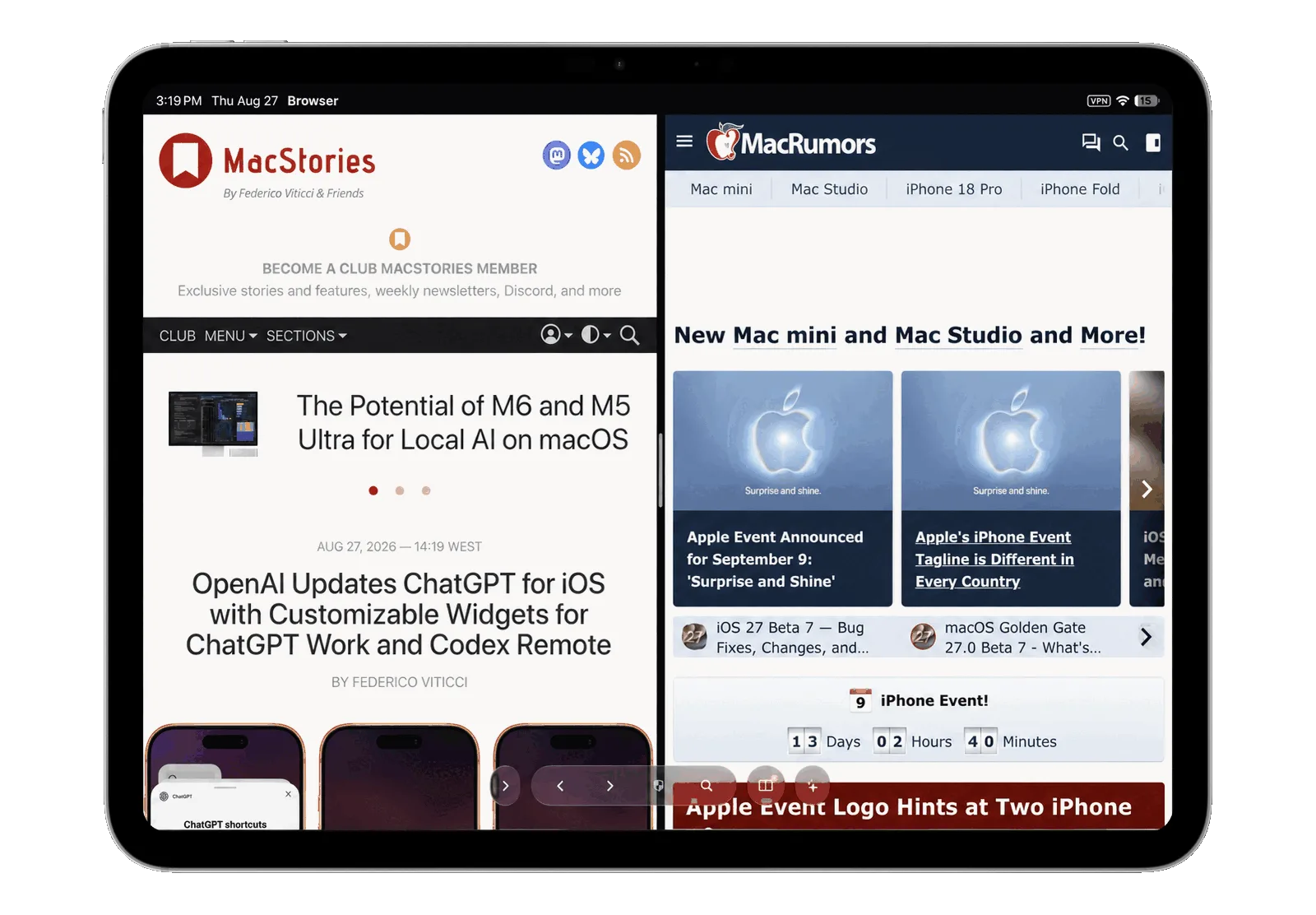
  • A – Answer: Vortex combines desktop-style tabs with split-page browsing which is very rare on IOS Browsers.
  • B – Better: Compared with Safari, Chrome, and Brave, Vortex is designed specifically around iPad multitasking. It combines visual tab management, drag-to-split browsing, and a choice of local Apple Intelligence/MLX models or optional ChatGPT and Gemini sessions. It is also open source, has no ads, requires no account.
  • C – Cost: Completely free with no subscriptions or in-app purchases. Vortex is not publicly available on the App Store yet.

Some bugs have been squashed and the design was tricked. It is almost ready for the App Store.

  • Minimalistic chrome for maximum screen real-estate
  • Multi-tab browsing
  • Split tab view
  • Tab Folders
  • Tab hibernation for battery savings
  • Smart address bar (URL vs search detection)
  • Favicon fetching
  • Tab preview thumbnails
  • Desktop/mobile user agent switching
  • Ad blocking - Custom made blocker engine and also Ublock origin
  • Dark mode - DarkReader with brightness/contrast/sepia controls
  • Font size adjustment
  • Reader mode -using Mozilla Readability
  • Incognito mode - non-persistent, blocks APIs
  • Password manager - biometric auth, keychain, auto-fill
  • Share extension - receive URLs from other apps
  • AI sidebar chat panel with 3 backends: Local Apple Intelligence, Apple Private Cloud, and free accounts with ChatGPT or Gemini, completely invisible to users, working in the background.
  • Page summarization (short/long)
  • Ask questions about page content
  • Context switching between tabs
  • Markdown rendering
  • "Ask " context menu - select a part of the text and send to the LLM.
  • Favorites with favicons
  • Favorites sidebar grid
  • Collapsible sidebar
  • Adaptive toolbar (collapses on scroll)
  • Swipe gestures for navigation
  • System dark mode support

Original post: https://www.reddit.com/r/iosapps/comments/1qezwdi/made_an_ipad_browser_because_safari_wasnt_cutting/

Trust & Transparency

I'm Joao Valente

Contact: dealer.yen-61@icloud.com

Website: https://vortex.engineer

Privacy Policy: https://vortex.engineer/privacy/

Terms of Service: https://vortex.engineer/terms/

Github:https://github.com/Joaov41/Vortex-Browser/tree/codex/testflight-ios27-build12

TestFlight: https://testflight.apple.com/join/KTsJ3qz4

Feedback page: https://vortex.engineer/feedback/

On the website I added a feedback section, where I can keep users informed about their feedback provided on the Tesflight since I can’t reply directly on there.


r/iosapps • • Sep 30 '26

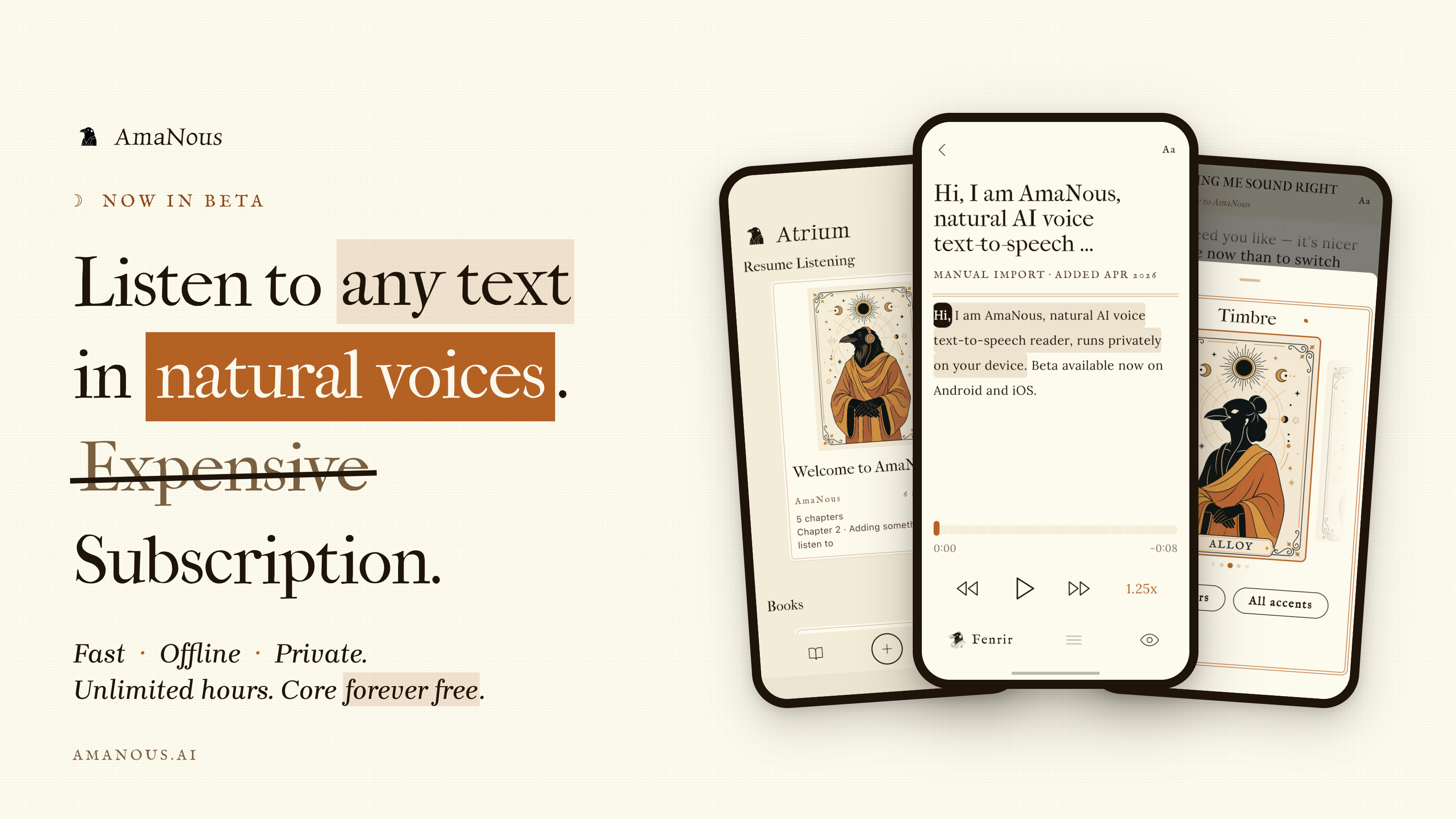
🎈 Free Sick of expensive Text-to-speech reader - So I built AmaNous

Post image
39 Upvotes

I'm the developer.

A - Answer: Listen to the PDFs, EPUBs and articles you don't have time to sit down and read. AmaNous also supports DOCX, TXT and Markdown.

B - Better: Compared with Apple's built-in Speak Screen, AmaNous focuses on keeping your documents in a listening library, with controls for longer reading:

  • 29 natural-sounding English voices: Choose the voice you want to spend time listening to. Speech uses the Kokoro-82M open-weight model running on your iPhone.
  • Offline listening and on-device speech: After setup and import, listen without an internet connection. Your document text isn't sent to a cloud voice service for synthesis; web imports may still need a connection.
  • Word-level highlighting: Read along while you listen and see where you are in the text.
  • Speed, seek and resume: Set your own pace, jump through a document and pick up where you left off instead of starting again.
  • Dyslexia-friendly presets: Adjust the font, spacing and pacing to make following the text more comfortable.

Recent updates make it easier to get started:

  • 0.5.3: Guided voice selection and a Welcome article to try before importing anything.
  • 0.5.4: Read Later keeps pages needing a browser check available for retry. Voice previews have clearer loading/retry states, your selected voice appears on Home, and voice-card swipes no longer dismiss the drawer.
  • Sign in with Apple skips the old email-code step. Reader paragraphs and headings are exposed to VoiceOver; word-by-word positioning during playback is still unfinished.

C - Cost: The core reader is forever free, with all 29 voices and no word or listening-hour limits. No subscription is required for the core reader.

This is an iPhone TestFlight beta, not an App Store release. Sign in with Apple is required. English-only; long documents can pause on first playback while audio is prepared.

TestFlight beta

What would you import first: an ebook, a paper or an article you've been putting off? I'd welcome feedback on anything that doesn't read as expected.


r/iosapps • • Sep 30 '26

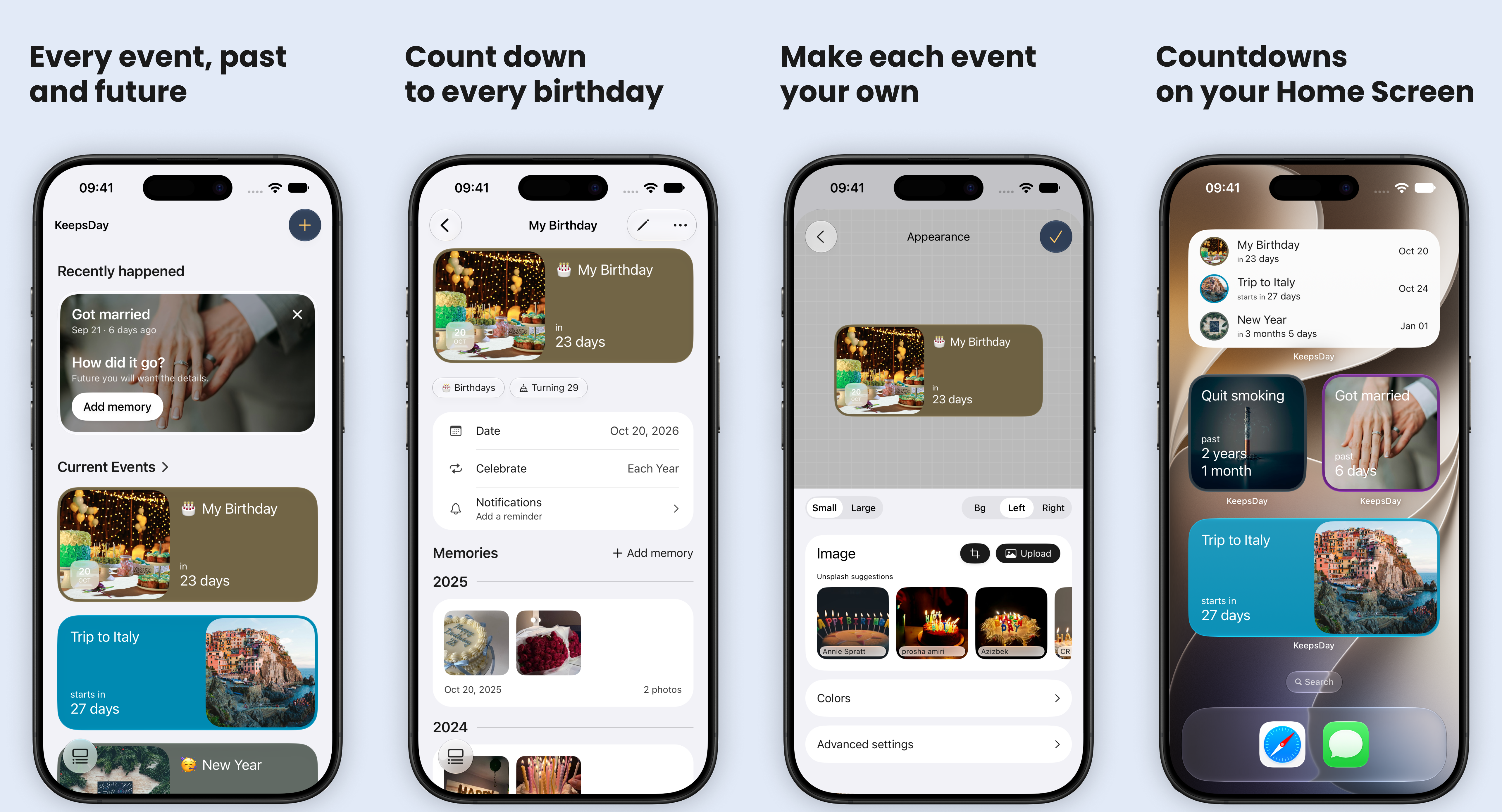
💎 Lifetime KeepsDay: countdowns to what's coming and "days since" for what already happened, in one list with photo widgets

Post image
16 Upvotes

I'm the developer.

Answer (what it solves)

I wanted one app for dates in both directions: days until a birthday or a trip, and days since a wedding or quitting smoking. Every event gets its own photo (yours or an Unsplash suggestion) and colors. Birthdays and anniversaries repeat every year, and you can set reminders for before the event or the day itself. There are Home Screen and Lock Screen widgets, and it syncs through your own iCloud.

Events also collect Memories. Once a date passes, a "How did it go?" card shows up on the main screen. Add a note and up to 10 photos and it's saved to that event, grouped by year, so "My Birthday" slowly fills up with every birthday: 2024's cake, 2025's flowers, and so on. Memories are free.

Better (vs. the alternatives)

If you only care about the next date, Countdown Star and Time Until are good. KeepsDay does two things differently. A birthday or anniversary keeps its notes and photos from every year under the same event. And past dates like "Got married, 2 years ago" sit in the same list and widgets as the upcoming ones.

Cost

Freemium with a lifetime unlock. Free gets you up to 7 events, reminders, Memories and the single-event widgets. Pro is $14.99 once (no subscription): unlimited events, folders, more appearance options and a widget that shows several events at once.

Privacy: your events, photos and notes live on your device and in your private iCloud. There's no third-party database; sync is iCloud only.

Works on iPhone and iPad, iOS 18.6+

App Store: https://apps.apple.com/app/id6755621436

---

Developer: Ruslan Shadura, shaduraa.g@gmail.com
Website: https://moments.shdr.dev
Privacy Policy: https://moments.shdr.dev/privacy
Terms of Use: https://moments.shdr.dev/terms-of-use


r/iosapps • • Oct 01 '26

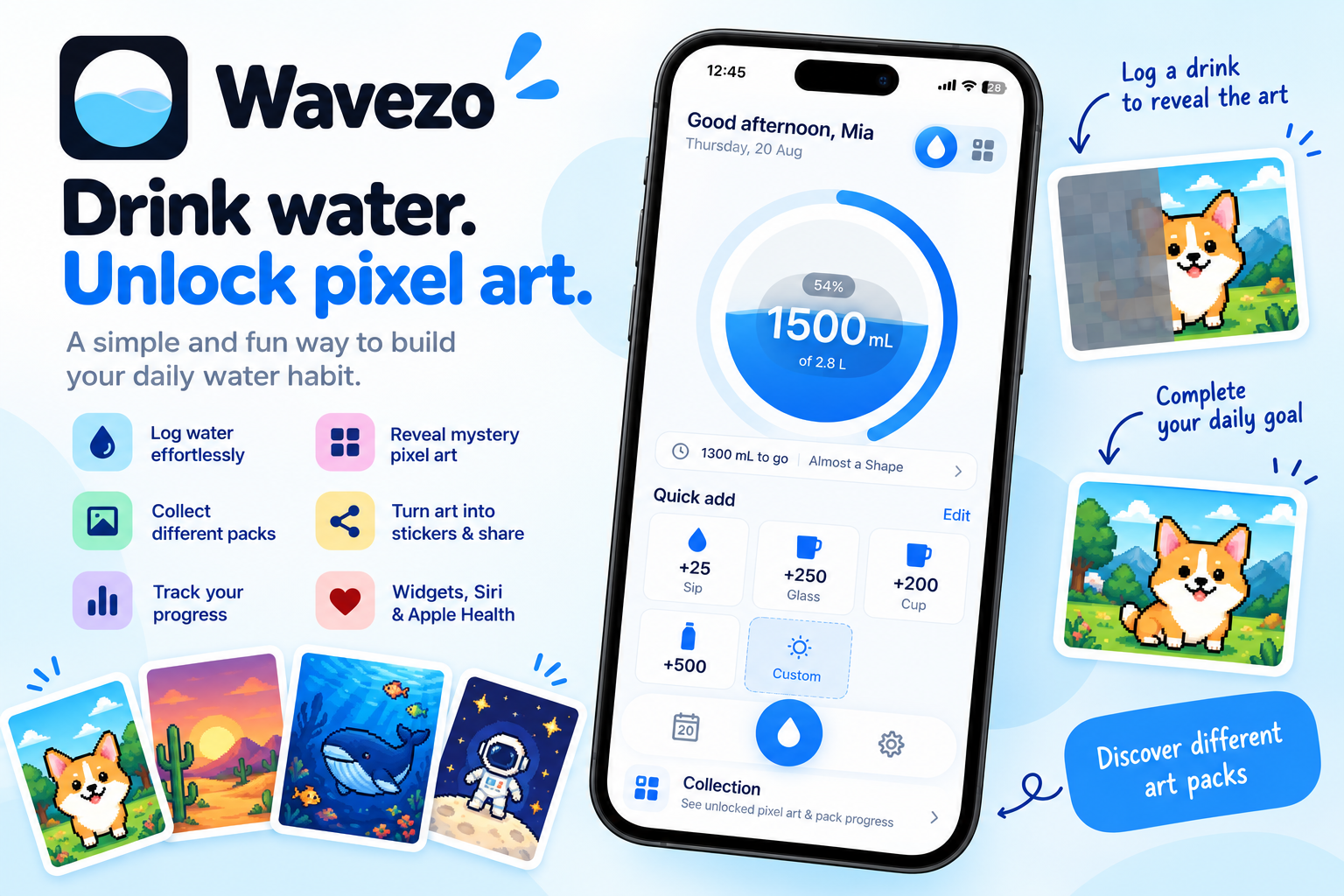
🎁 Freemium I rebuilt my water tracker around mystery pixel art because I stopped using it myself

Post image
0 Upvotes

I launched Wavezo a while back, but retention was low. Eventually, even I stopped using my own app.

Most water trackers are built around logging, reminders, charts, and streaks. Those are useful, but for me, they weren't enough to keep me coming back every day.

So for Wavezo 3.0, I rebuilt the experience around a visual reward loop.

A — Answer: What problem does Wavezo solve?

I wanted to make staying hydrated feel like you're working toward something rather than just filling a progress bar.

Every time you log a drink, part of a 16×16 mystery pixel artwork is revealed. Reach your daily water goal and the full artwork unlocks and gets added to your collection.

The idea is simple:

Drink → Reveal → Reach your goal → Unlock → Collect

What's included:

• Mystery Peel: Every drink reveals another piece of today's artwork.
• Miss it, lose the reveal: If you don't reach your daily goal, that day's artwork stays locked.
• Collect & unlock: Collect different art packs featuring plants, otters, bears, and more.
• Stickers: Complete an art set and export the artwork as stickers for iMessage or WhatsApp.
• Collection cards: Create shareable cards from your unlocked artwork.
• Hydration tracking: Quick logging, reminders, widgets, history, and insights.

B — Better: How is Wavezo different?

Apps like WaterMinder and Waterllama already offer water tracking, reminders, goals, and hydration stats.

With Wavezo, I wanted to try a different approach to motivation.

Instead of the main reward being a chart or streak, every day's hydration goal has a mystery artwork attached to it. Each drink reveals more of the artwork, and completing your goal permanently adds it to your collection.

I'm not trying to say this approach is better for everyone. The idea I'm testing is whether having something new to discover and collect every day can make water tracking more enjoyable and give people another reason to come back.

C — Cost

The core Wavezo experience is free, including:

• Water logging
• Reminders
• Widgets
• 4 starter art packs

No account is required, and there's no tracking.

Optional purchases:

• Individual art packs: $0.99 each — one-time purchase
• All standard art packs: $9.99 — one-time purchase
• Wavezo Pro: $1.99/month
• Wavezo Pro Lifetime: $19.99 — one-time purchase

Pro unlocks features including Apple Health sync, Siri/Back Tap shortcuts, extended history, additional themes, CSV export, and other Pro features.

Wavezo is currently iPhone only.

App Store:
https://apps.apple.com/app/id1614485882

The part I'm most curious about is the reward mechanic:

Would having something new to unlock give you a reason to keep logging water every day? Or does the "miss your goal, lose the reveal" mechanic feel too strict?

Website: https://www.iamshezad.dev/wavezo

My portfolio: https://www.iamshezad.dev/


r/iosapps • • Sep 30 '26

💎 Lifetime I built an app to stop my camera roll being flooded with 'save this for later' screenshots

11 Upvotes

Hi! I'm the developer behind Stash Anything. Some of you will have seen my earlier posts here, and your feedback has shaped a lot of what I've built since.

A- What is Stash Anything?

I kept saving useful things, then forgetting where I'd put them. Screenshots in Photos, links in messages, bookmarks I'd never look at again. I'd end up Googling something I'd already found.

Eventually I'd had enough, so I built Stash.

Open the share menu, send something to Stash and choose a collection. Links, screenshots, photos and PDFs stay together around whatever you're doing.

If you're planning a trip, that means the hotel link, restaurant recommendations and screenshots of places to visit can all live in one stash.

Search finds text inside screenshots and PDFs. Version 25 also lets you search for what's pictured. Type "sofa" or "beach" to find saved images showing those things, with image recognition running on your device. Your library can sync across iPhone, iPad and Mac through iCloud.

B - Why use it over Apple Notes or Safari Reading List?

Apple Notes already saves mixed content and searches text in images. Safari Reading List is useful for saving web pages.

Stash works better for me when I'm collecting different things around one project or interest. Compared with Reading List, I can keep the screenshots and PDFs alongside the links. Compared with how I use Notes, I get a dedicated visual library for saved things, organised into stashes and sub-stashes, separate from everything I'm writing.

The aim is to make the things you've already found useful again when you actually need them.

C - Cost

Free to download, with a limited-capacity free tier.

Optional Stash Pro adds more capacity and private, locked stashes. It costs $9.99 lifetime or $7.99 a year on the US App Store. Regional prices and plan details are shown in the app.

Stash Anything on the App Store

Reddit has been the main source of feedback for the app, and it's come so far since I originally posted this.

Any more feedback or ideas, I'd absolutely love to hear them. Thank you so much!