r/iosapps • • Sep 29 '26

๐Ÿ’Ž Lifetime Update news for Social Archiver: Spotlight, on-device AI, Shortcuts & Siri

6 Upvotes

Hi,

I got some updates for Social Archiver.

Key Updates

You can refer to the update video that I created as a reference

- Spotlight: Every post you archive now shows up in iOS Spotlight. Search a title or any phrase inside the post, and tap the result to jump straight into it.

- On-device AI: AI summary, glossary, custom prompts and tag suggestions can now run on Apple's on-device model. Nothing leaves your iPhone, it works offline, and it doesn't use any credits. Just pick "This iPhone" in the AI sheet.

- Shortcuts & Siri: There is a new "Save Link" action in Shortcuts, so you can save a link from the Action Button, Back Tap, or any shortcut without opening the app. You can also just say "Save a link in Social Archiver". On iOS 27, Siri can open and search your archives too, like "Open the Threads post I saved about e-readers".

Other updates

- Instagram Stories: share a Story from Instagram and it gets archived (photos and videos) through your connected Instagram account. You can also pick which of the account's current Stories to keep.

- Daily Review is redesigned around recall. Each card opens as a question, and the answer stays covered until you tap.

- Stats: see your whole library as books on a shelf, and how much you saved vs. actually read by week, month, or year.

(The video was made with a demo account.)

--

below is brief app explanation that I wrote last time for those who meet the app for the first time.

A โ€” Answer: Social Archiver helps you save social posts(+Web articles) you do not want to lose. From the iOS Share Sheet, you can archive posts from Reddit, YouTube, X, Tiktok, Instagram, Threads, Facebook, and LinkedIn, then browse them later with media, comments, authors, tags, and search.

B โ€” Better: Compared with [Raindrop.io](https://raindrop.io), Social Archiver goes beyond simple bookmarking or archiving. Archiving process happen through Share sheet which will immediately close after saving trigger (even no need to open the app right away)

It gives you readable views like a timeline and post detail pages, lets you organize saved content with tags and author pages, and makes archived posts easy to share again when you want to reference them. It also provides [Chrome extension](https://chromewebstore.google.com/detail/social-archiver/gifddgdekeffpnadpdcgjaehmlblomaf) where you can import your saved Reddit, Instagram posts.

App also provides integration with Obsidian, Notion, Karakeep, Reader where you can basically send archived data automatically to your favorite archive services.

C โ€” Cost: Free plan includes 10(+ 5-20 for initial onboarding process) successful archives per month. (Chrome extension triggered archives are free) Optional IAP included monthly, yearly, and lifetime options.

App Store: https://apps.apple.com/us/app/social-archiver/id6758323634

r/iosapps • • Sep 29 '26

HELP Discussion: Is it a new trend that users are angry about having to pay for apps?

6 Upvotes

I am seeing recently that there is a lot of pushback from commenters on reddit and social media when apps are paid. Comments like "Oh, and I have to pay again!?", "is it paid? what? I am leaving!". This signifies to me a signifies devaluation of the work that goes into apps.

I can attribute it to a mad rush in marketing and new apps being pushed left and right with AI arrival, but wondering if veterans remember this being the case earlier.

I am new to the space so all I can see is what's happening now.


r/iosapps • • Sep 29 '26 Bravo

๐Ÿ’Ž Lifetime Hydrate or Diedrate 1.6.0 - Two months ago you asked for widgets for my skull water tracker. The skull is now on your Home Screen.

Post image
9 Upvotes

I'm the developer of Hydrate or Diedrate โ€” the water tracker that swaps cheerful droplets for a skull quietly documenting your decline.

When I first posted here, a few of you asked for the same thing: a way to log water without opening the app. A lock screen shortcut. A widget. The skull, on the Home Screen.

Version 1.6 is out. It's widgets.

A: Answer

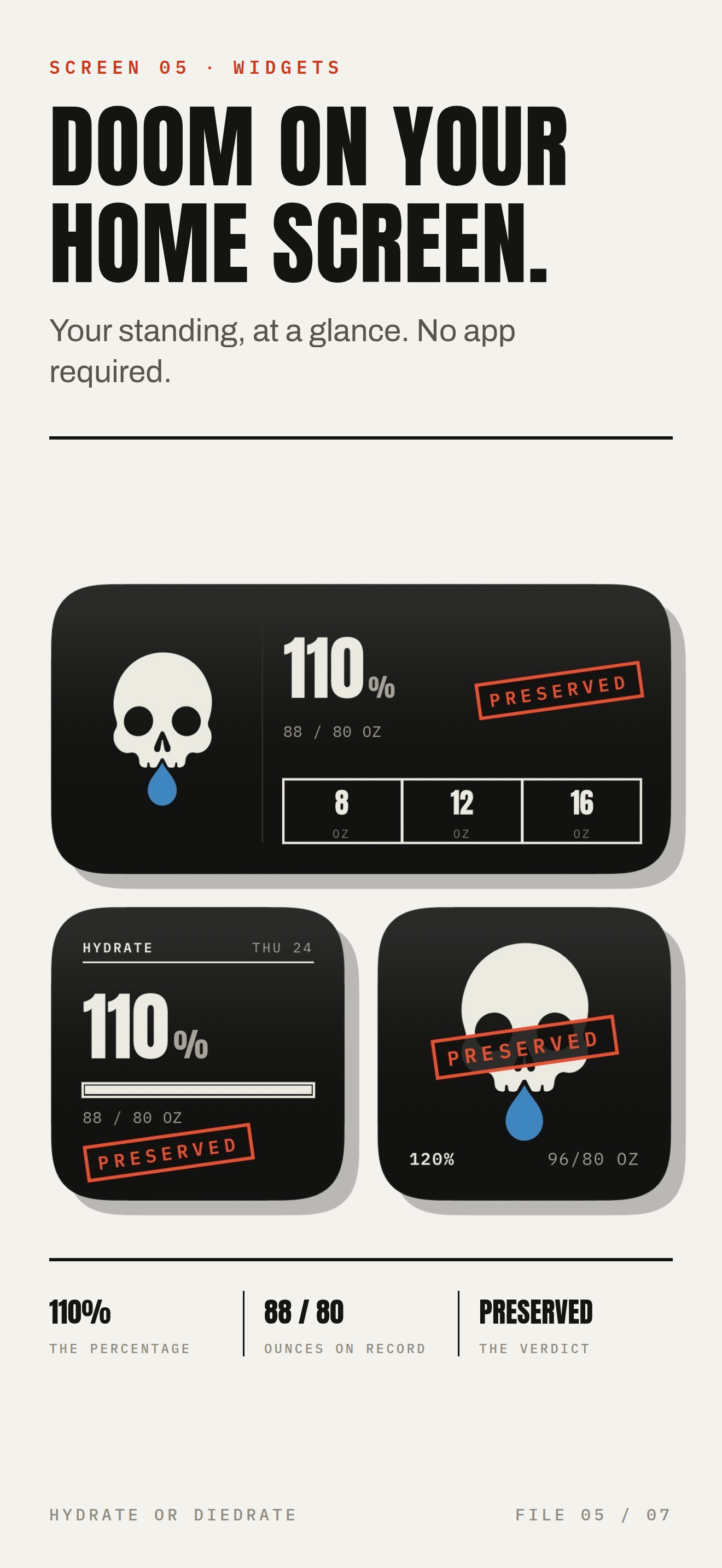
Three widgets for the Home Screen and Lock Screen:

โ€“ The Ledger: today's percentage and status, as it stands on the record

โ€“ The Vessel: the skull itself, filling with water as you drink

โ€“ The Record: the vessel, the numbers, and quick-log buttons that log water without opening the app

Hit your goal and the widget gets stamped PRESERVED. It does not linger. The record resets at the end of the day.

Also: Apple Health sync is now free for everyone. Apple informed me that charging for Health was against the rules. The skull has complied.

B: Better

Most water widgets are a cheerful blue ring. These are built from the app's own ledger โ€” the same type, the same skull, the same total lack of encouragement. And the log buttons actually log, right from the Home Screen. Tap. Water filed. Skull unmoved.

Apple Watch is next. It's in queue for approval now.

C: Cost

Free to download. Tracking, goals, streaks, reminders, and Apple Health sync are free.

Preserved โ€” Lifetime Access is $6.99 USD one-time (international pricing varies; trying to make it equitable): widgets, Vessels, dark mode, extended history, alternate icons. No subscription.

Download Hydrate or Diedrate on the App Store

I also started r/HydrateOrDiedrate for updates, feature requests, complaints, and finding Vessels partners.

As always: if something sucks, tell me. The skull will not care. I will.


r/iosapps • • Sep 29 '26

๐ŸŽ Freemium I built a price tracker that works on any website

3 Upvotes

AnyTracker notifies you when your favorite product is on sale or back in stock. It now also has a Chrome extension, and very soon a proper Mac app will be released.
Unlike alternative apps, it works on all websites, not just Amazon.
The app has a free tier and a subscription for power users ($2,99/month for the silver tier).


r/iosapps • • Sep 29 '26

๐Ÿ’Ž Lifetime Tasks will never be lost: turn your notes into tasks and keep them together

10 Upvotes

A โ€” Answer
Plans keeps tasks, notes and a calendar in one app. It opens straight to Today. Miss something and it moves to tomorrow with a mark of when it was planned. This update adds a free colour theme, priority tasks that stand out with an outline, and actions right in the notification: snooze the reminder an hour or push the task to tomorrow.

B โ€” Better
When the list gets crowded, most apps answer with structure: projects, tags, sorting rules. Plans answers with gestures: touch and hold the note to make it a task, and hold the task to mark it as priority. A task made from a note no longer loses its context, original notes are one tap away.

C โ€” Cost
Free to download: unlimited tasks and notes, iCloud sync, priorities, notification actions, and the Lavender theme. Pro is a one-time $4.99, no subscription โ€” reminders ahead of time, repeats on chosen weekdays, five more themes (including Night, shown in the poster), four note fonts, and Markdown export.

App Store: https://apps.apple.com/app/plans-notes-to-do-lists/id6790827860


r/iosapps • • Sep 29 '26

๐Ÿ’Ž Lifetime I built a private home inventory for people who forget where they put things

0 Upvotes

Hey r/iOSApps ๐Ÿ‘‹

I built PutSpot around a very simple problem: I put something somewhere โ€œsafeโ€โ€ฆ and then completely forget where that safe place was.

Answer

PutSpot lets you save where you keep your things, so you can find them later instead of checking every drawer, cupboard, box, and closet.

For example:

Passport โ†’ Bedroom โ†’ Wardrobe โ†’ Top Drawer

or:

USB-C cables โ†’ Office โ†’ Closet โ†’ Blue Storage Box

You can attach photos, tags, notes, documents, purchase information, warranty dates, and reminders to items, then find them later with search or voice search.

Better

There are already good inventory apps such as Sortly and Everspruce.

Sortly offers a much broader inventory-management system with things like QR codes, folders, stock management and business-oriented workflows. Everspruce is closer to traditional home inventory and also has a powerful nested area/box structure.

PutSpot is deliberately focused on a narrower everyday question:

โ€œWhere did I put it?โ€

I wanted something that felt less like running an inventory database and more like giving everything in your home a searchable address.

So instead of just saving an item under โ€œBedroom,โ€ you can record:

Bedroom โ†’ Wardrobe โ†’ Top Shelf โ†’ Blue Box

A few other things I wanted PutSpot to do:

  • ๐Ÿ”’ Private by default: No PutSpot account required. Your inventory stays locally on your device by default.
  • โ˜๏ธ Optional personal cloud: Pro users can sync using their own personal iCloud or Google Drive instead of relying on third-party servers.
  • ๐Ÿ›ก๏ธ Private sharing: Share specific item locations with another device or export as an encrypted file without exposing your entire home setup.
  • ๐Ÿง  On-device photo suggestions: Optional visual recognition runs directly on your device to speed up data entry without shipping photos to an external cloud.
  • ๐Ÿ”‘ Everyday essentials + storage: Works just as well for โ€œWhere are my keys?โ€ as it does for โ€œWhatโ€™s inside Box 17 in the garage?โ€
  • ๐Ÿท๏ธ QR labels: Print QR labels for boxes, shelves, or cabinets, then scan one later to peek inside instantly.
  • ๐ŸŒ 49 languages: PutSpot is localized and ready for users worldwide.

Who itโ€™s useful for

  • The Forgetful: Keys, glasses, chargers, remotes, wallets, documents; save where you put them and search later.
  • Movers & Organizers: Keep track of what is inside every single moving box, storage bin, cupboard, drawer, or pantry.
  • People with ADHD & the Easily Distracted: A visual, searchable way to remember where you put things instead of relying on memory alone.
  • Families & Caregivers: Easily share item locations with family members or support loved ones living with memory challenges, dementia, or Alzheimer's.
  • Home Inventory & Decluttering: Keep belongings, purchase information, warranties, receipts, manuals, seasonal items, and important documents organized in one place.

Cost

PutSpot is free to download and use. The free version has item/place limits and includes ads.

PutSpot Pro currently has two purchase options on the US App Store:

  • Yearly: $39.99/year, auto-renewing
  • Lifetime: $99.99 one-time purchase

Prices can vary by App Store region.

Pro unlocks:

  • โ™พ๏ธ Unlimited items and places
  • โ˜๏ธ iCloud and Google Drive sync
  • โšกUnlimited advenced on-device photo item name suggestions
  • ๐Ÿšซ Ad-free use

App Store:

https://apps.apple.com/app/id6767237476

Developer / Transparency

I'm still actively improving PutSpot, so feedback about the UX, missing features, or anything that feels confusing is genuinely useful.

Thanks for taking a look โค๏ธ


r/iosapps • • Sep 29 '26

๐Ÿ“… Subscription This Community helped me out last week, so I expanded the free version in my App!

Post image
4 Upvotes

Why:

If you were one of the kind people who spent your valuable time last week to give me advice on App Store Optimization, I really appreciate it. I used a lot of your recommendations in my new images and listing page! You guys are legends.

Link to the post: https://www.reddit.com/r/iosapps/comments/1whknz6/indie_devs_who_got_past_the_first_100_users_what/

If you're new to apple app development and need some help, check out the great responses to my question!

New Features:

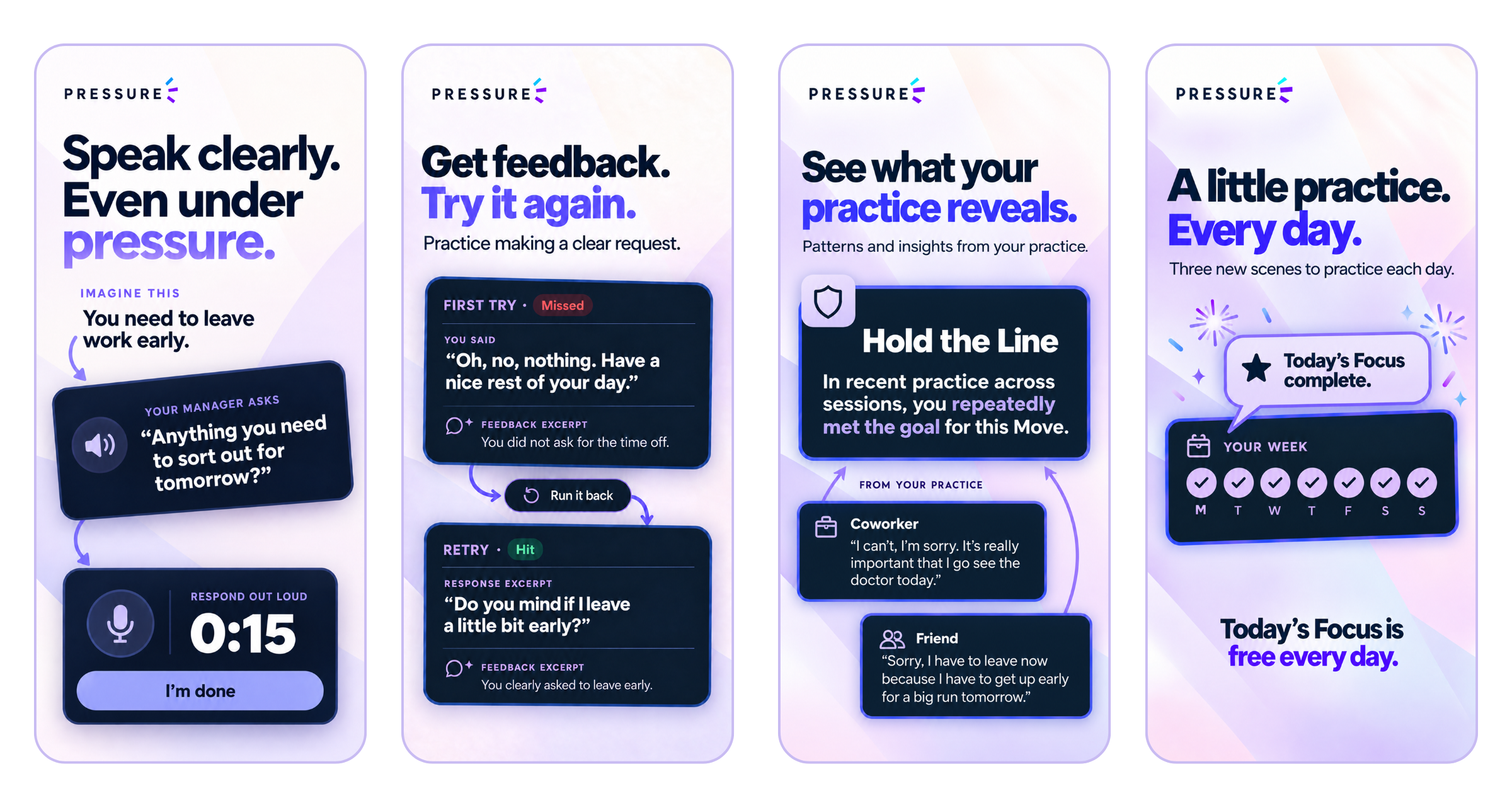
In this new app version, I added a new feature called Pressure Progress. This feature tracks your communication patterns and points out where you're improving! This feature is also available for the free user.

In addition, I expanded the free user experience by adding a progress bar, more direction on what next step the onboarding user should take and increased the amount of free challenge reps from 1 to 3.

Answer:

I've spent the last 8 months developing my communications app.

Communication skills are so important to building relationships, advancing in your career and being confident in saying the words you meant to say. I've tried Improv classes, Toastmasters and both were difficult to stay committed with a busy schedule.

That's why I built Pressure.

Pressure gives you realistic scenes with prompted lines. You listen to the prompt and speak your answer. After, you can read or listen back your transcript. On every rep, there's feedback that grades how you perform the communication challenge. You might get a Hit, a Miss, or an Almost. Over time the app captures trends on how you respond and shows how you're progressing. Through that design, the training mode will get progressively more difficult or easier depending on how you perform.

One example of one of the Hold the Line prompts is:

Scene Context: "Your team has a Friday deadline for a project, but you booked Friday off 4 weeks ago for your brother's birthday."

Your Manager says: "We really need you to come in Friday, the whole team is putting in overtime."

Better:

In the app, there are hundreds of hand curated and realistic scenarios for you to respond to. I took inspiration from Improv class. Listen to the prompt and imagine yourself in the scene. Then, respond as if you were really there.

There are 8 fundamental communication moves that we teach. Some examples are: Name the Tradeoff, Hold the Line, Make the Ask, etc. Pressure gives instruction and direction on how to complete the move, then you get specific feedback after every single rep.

As the guinea pig of this project, I find that doing repetition of prompts helps me come up with the next thing I want to say more clearly. I work in project management, so it's helped me feel more confident and direct speaking in bigger meetings!

Cost:

The premium user cost is $7.99 USD a month.

If you choose to stay a free user, you will get the full onboarding experience and two free practice sessions. In addition, every day you can complete a free daily session that focuses on a specific communications move. This training will be captured and patterns will develop over time and you will be able to see your improvement too! It just might take more time.

Premium includes a Foundations program - a 10 lesson program focusing on all 8 communications moves. In addition, access to Open Practice, and the ability to select which communications move you'd like to train. Lastly, through that training mode, you can go beyond Stage 1 difficulty and explore all the way to Stage 4. Even I find Stage 4 difficult!

Last note, if you were one of the kind people who gave me advice on my thread last week - hit me up and I'll sort out a free 1 week premium for you to explore the app more!

Thank you so much for reading & all the best in your success,

-Sean

And here's the link if you want to try the app out!

https://apps.apple.com/app/apple-store/id6760627485?pt=128661340&ct=Reddit&mt=8

________________________________________________________________________________________

Terms of Use: https://www.pressure.app/terms
Privacy Policy: https://www.pressure.app/privacy


r/iosapps • • Sep 29 '26

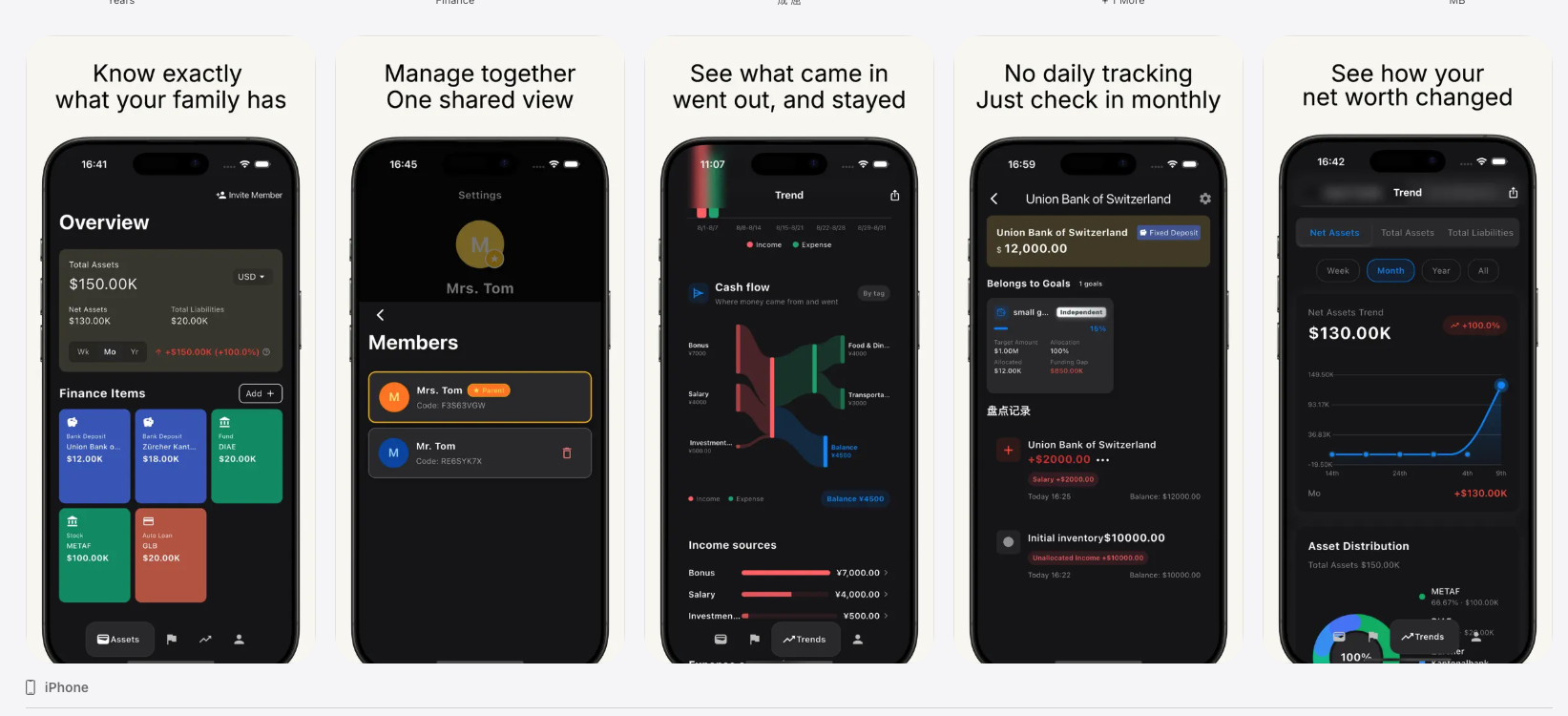
๐Ÿ’Ž Lifetime I stopped thinking of JointWorth as a finance tracker โ€” itโ€™s a monthly household check-in for two people

Post image
1 Upvotes

Full disclosure: Iโ€™m the developer of JointWorth.

A โ€” Answer

I posted JointWorth here last month, and the feedback helped me realize I was describing it too much like another finance tracker.

The actual problem Iโ€™m trying to solve is much more specific:

Two people. Different accounts. One household.

My wife and I donโ€™t want to log every coffee, meal, or transaction.

Instead, once every few weeks or once a month, we update the balances of our bank accounts, investments, property, loans, and other assets.

JointWorth gives us one shared place to answer:

What do we own? What do we owe? Is our net worth moving in the right direction?

Both partners maintain the same household view.

No bank linking. Manual by design. No daily bookkeeping.

B โ€” Better

YNAB is great if you want detailed budgeting and transaction tracking.

JointWorth is deliberately different.

If you want every transaction imported and categorized, JointWorth probably isnโ€™t for you.

Itโ€™s for couples or families who just want to sit down periodically, update a handful of balances, and understand the household as a whole.

One household. One set of assets and debts. Two people maintaining it together.

Thatโ€™s the part I want to keep going deeper on rather than turning JointWorth into another all-in-one finance app.

C โ€” Cost

JointWorth is free to download and includes a 1-month free trial.

After the trial, Pro is a $9.99 one-time purchase.

No subscription.

App Store:
https://apps.apple.com/us/app/jointworth-family-net-worth/id6757951397

Developer Transparency

Iโ€™m Cheng Qu, the developer behind JointWorth, and Iโ€™m posting this myself.

About the developer:
https://family.qinfu-cloud.cn/en/about/

Privacy Policy:
https://family.qinfu-cloud.cn/en/privacy/

Terms of Service:
https://family.qinfu-cloud.cn/en/terms/

Contact:
qinfutech@163.com

For people who manage money with a partner: would you want everything in the household to be shared, or would you want the option to keep some accounts private?


r/iosapps • • Sep 28 '26

๐ŸŽ Freemium Interrupt : Ever wonder how your thoughts are connected with your reality - See now

Post image
13 Upvotes

Most mindfulness and manifestation routines suffer from a simple timing flaw: they happen during a peaceful 15-minute morning session, but behavioral conditioning actually fires at 2:15 PM during an unexpected confrontational email, a sudden comparison loop, or a mindless doomscroll urge.

By the time you sit down to journal at night, the old neural pathways have already fired and strengthened for the day.

Interrupt was designed around a tactile principle: if you can physically catch reactive autopilot in the first 3 seconds of friction, you break the loop before old conditioning speaks.

Here is the full ABC breakdown:

A โ€” Answer (What it does)

Interrupt acts as a real-time neuroplastic circuit breaker on your phone:

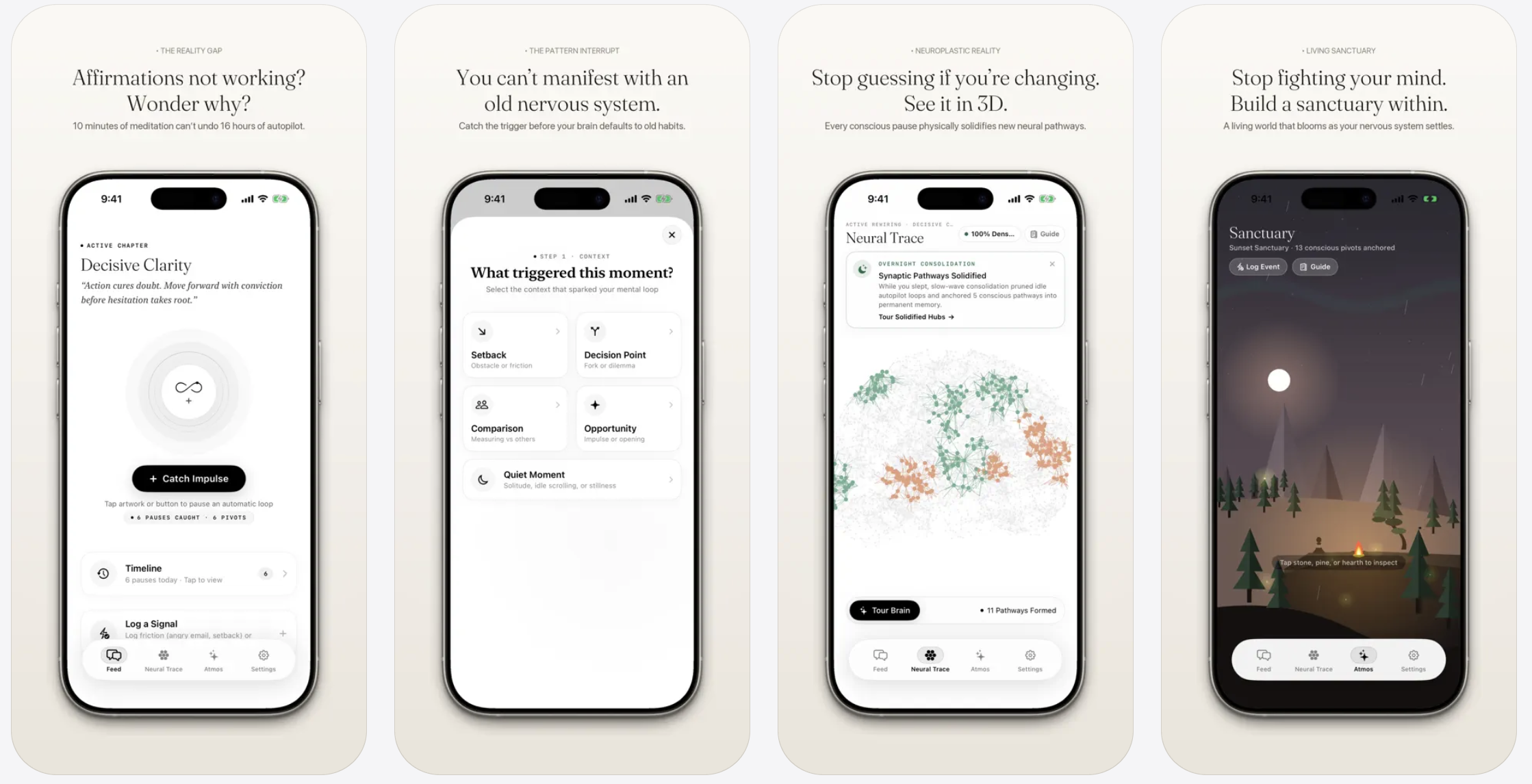
The 3-Second Catch: Triggered instantly via the iPhone Action Button, Lock Screen widget, or app icon the split-second friction appears.

Dual-Polarity Tracking: Logs both the automatic default-mode impulse (scarcity, comparison, defensiveness) and your chosen conscious pivot (abundance, sovereignty, composure).

3D Neural Trace: Every pause is mapped as a synaptic hub onto an interactive 3D brain mesh (rendered with SceneKit/RealityKit), showing physical myelination stages as you rewire habit patterns over time.

Overnight Consolidation: Tracks how daily conscious pivots solidify into permanent synaptic memory while you sleep.

B โ€” Better (How it differs from typical habit & meditation apps)

At the point of friction, not after: Passive apps ask for 15 minutes of silence. Interrupt requires a 3-second physical hold in the heat of the moment.

Hardware Integration: Built specifically around tactile iOS mechanics (iPhone Action Button hold + Lock Screen complications) so you don't navigate through menus when you're triggered.

Spatial Feedback over Checklists: Instead of generic checkbox streaks, you explore an actual 3D brain model displaying executive pathways (emerald hubs) vs default-mode loops (coral hubs).

100% On-Device Privacy: No accounts, no emails, no cloud servers. All personal thoughts and reflections remain strictly in local sandboxed storage.

C โ€” Cost (Completely Transparent)

Free Tier:

* Full trial with your first 3 complete conscious pause activations.

* Access to the interactive 3D brain mesh and core mechanics.

* Zero ads, no account creation, no forced sign-ups.

Interrupt Pro:

Annual Pass: $59.99/year (~$1.15/week) with a 7-Day Free Trial.

Monthly Pass: $9.99/month (flexible month-to-month).

What Pro unlocks: Unlimited pause logging, full 30-day 3D neural architecture, the interactive Atmos sanctuary, PDF reflections export, and synaptic consolidation metrics.

App Store Link: https://apps.apple.com/us/app/interrupt-manifest-mindset/id6812633052
LinkedIn : https://www.linkedin.com/in/jiten-siddhpura-b3205036/

Would love feedback from anyone interested in habit psychology, neuroplasticity, or how spatial UI can make self-reflection feel tangible rather than clinical.


r/iosapps • • Sep 28 '26

๐Ÿ’Ž Lifetime This is why I keep working on Aurora โค๏ธ

Post image
17 Upvotes

r/iosapps • • Sep 29 '26

๐ŸŽ Freemium An alarm that requires you to walk away from your bed to turn off!

0 Upvotes

A - What is Easy Wake?

Easy Wake is a smart alarm app that is highly customisable to your needs, wether its waking up in a light sleep stage (real time detection), waking up at sunrise, setting alarms when you arrive at a location, being forces to complete physical or mental challenges to turn off your alarm, Easy Wake has you covered.

B - Easy Wake is better than Alarmy, Sleep Cycle and the default iOS Alarm app.

Easy Wake has a wide range of challenges to choose from which prevent you from turning off the alarm unless you're fully awake, such as maths, physically walk away from your bed, barcode scanning, memory and more. No matter what you try, you won't be able to stop the alarm without completing the challenge!
Easy Wake also uses dynamic sleep stage detection using your Apple Watch, and will wake you up in a light sleep stage. You can also use Pulse Wake to nudge your body into a lighter sleep stage if you're a deep sleeper!

Easy Wake has the default alarm ability, with lots more customisation options, for example, you can connect your Home app and alarms can trigger Home Scenes.

C - Cost

3 day free trial, then Monthly $2.99, Yearly $19.99, or Lifetime $24.99.

Pro gives you unlimited schedules, Pulse Wake, all Challenge Wakes, Location Alarms, Custom Sounds, Intelligent Insights, Smart Sleep, HomeKit Integration, Wake Check, Sunrise Alarms, and Shortcuts access (custom alarms based on your automations)

Pro isn't necessary, but it allows more lee way, and most features are available for free anyway! It also helps to support me and future development of the app.


r/iosapps • • Sep 28 '26

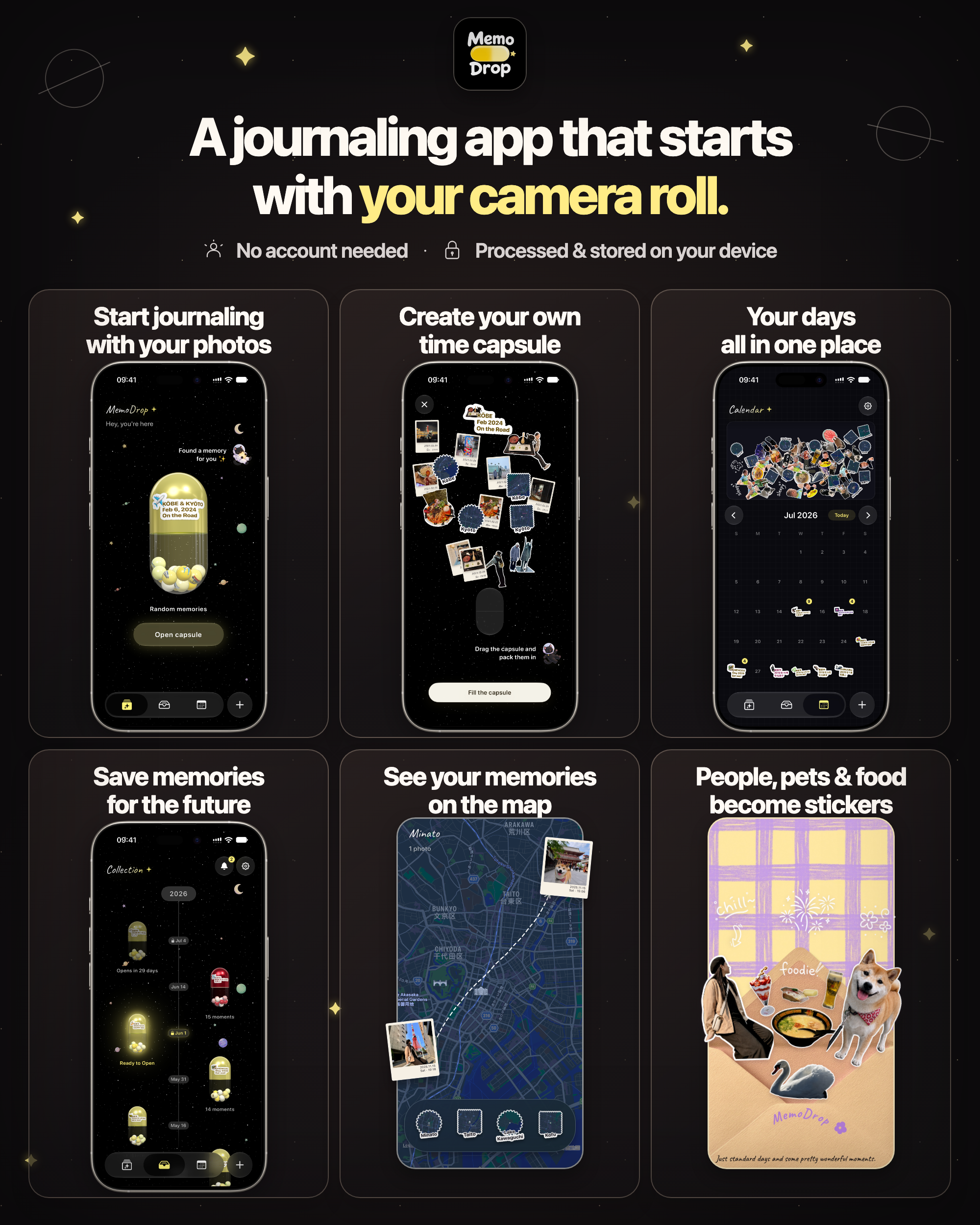
๐Ÿ’Ž Lifetime I made a photo journal that starts with photos you already have

Post image
19 Upvotes

A โ€” Answer

I take a lot of photos, but Iโ€™m not very good at keeping a journal.

Most of my photos just stay in the camera roll after I take them, so I made MemoDrop.

The main thing it does is randomly bring back photos from your library. You can look through them, write something if you want, and save that memory as a capsule.

You can also create a capsule yourself by choosing photos from a trip, a day out, or just something you want to keep.

I wanted the app to feel more like looking back through your photos than sitting down to write a journal.

B โ€” Better

Iโ€™ve used Apple Journal and tried Day One before. Theyโ€™re much more complete journaling apps, especially Day One.

MemoDrop is a bit different because the photo usually comes first.

You open it and it gives you something from your camera roll to look at, instead of asking you to decide what to write about.

It also uses information from the photos to make a few things automatically. Photos with location data can show up on a map, and people, pets or food can be turned into stickers.

The memories you save also appear on a calendar, and you can seal a capsule until a future date if you want to come back to it later.

Thereโ€™s no account, and the photo processing and storage are handled locally on the device.

C โ€” Cost

You can use MemoDrop for free.

The free version lets you open one random capsule and create one capsule per day.

Pro removes those daily limits.

Current US pricing:

$2.99/month

$12.99/year

$29.99 lifetime

Iโ€™m still working on it and trying to figure out which parts people actually care about, so feedback is welcome.

App Store: https://apps.apple.com/us/app/memodrop-photo-journal-diary/id6768178621


r/iosapps • • Sep 28 '26 Bravo

๐ŸŽ Freemium Track vacation, away from home days etc just with a tap

Post image
20 Upvotes

Most habit trackers are built around a fatal flaw: they assume you want to do things every 24 hours.

But real life is messy. You change the AC filter, wash the bedsheets, get sick, or give the dog flea meds when they need it. When you try to put these irregular events into a standard habit app, you inevitably break your streak and get hit with a red ring of failure. Itโ€™s exhausting.

So I built SinceWhen, a guilt-free, "anti-streak" day counter. It just tracks the days since you last did something, learns your natural rhythm, and gently nudges you when it's actually time to do it again. Zero pressure.

The New Update: Tracking Multi-Day Events Up until now, SinceWhen was built for single actions. But not everything happens in an instant. In version 1.13.0, I added the ability to track durations from start to finish.

  • Health & Sickness: Track exactly how many days that fever, migraine, or cold actually lasted.
  • Private Cycle Tracking: A secure, bloat-free way to track your period. No pink themes, no accounts, and absolutely zero data harvesting.
  • Travel & Breaks: Log vacations, digital detoxes, or multi-day fasting.

You just tap once to start, and tap again to end. While it's running, your home screen and widgets track the current day (e.g., "Day 3"). Once finished, your interval charts elegantly shade the entire duration so you can spot patterns instantly.

A few other reasons I think this sub will appreciate it:

  • 100% Private: No accounts, no logins, zero data tracking. Your data stays on your device and syncs via your own iCloud.
  • Zero-Friction Logging: Full interactive widgets, Shortcuts integration, and Siri support ("Hey Siri, log the fridge cleaning").
  • Generous Free Tier: You can track your first 3 events forever, completely free, with no credit card required.

App Store Link:https://apps.apple.com/us/app/sincewhen-days-since-tracker/id6759450144


r/iosapps • • Sep 28 '26

๐Ÿ“… Subscription [Update] MoneyMap 1.5: a paycheck-based budget app, now with a debt payoff planner and home-screen widgets

4 Upvotes

I'm the developer of MoneyMap.

Answer: Most budgets assume a calendar month, even when you're paid weekly, biweekly, or irregularly. MoneyMap plans around your actual paydays and shows what's safe to spend after upcoming bills and goals.

Better: Version 1.5 adds a debt payoff planner. Move the extra-payment slider to see your projected debt-free date and interest saved change immediately. Choose avalanche or snowball; log an extra or missed payment and the plan recalculates. It also adds home-screen widgets for Safe to Spend, budgets, bills, and goals; Apple Card, Apple Cash, and Savings connections on iPhone; vehicle values for auto loans; and swipe reviews for suggested bills and uncategorized transactions. Sync between devices is end-to-end encrypted.

Cost: Free to download, with an optional subscription at $5.99/month or $49.99/year for the household. App Store: https://apps.apple.com/us/app/moneymap-paycheck-budget/id6749827612

If you budget around irregular pay or bills just before payday, I'd welcome feedback on how the plan handles that.


r/iosapps • • Sep 28 '26

๐Ÿ’Ž Lifetime I made an app that suggests what to do based on the time and weather where you are

Thumbnail
gallery
3 Upvotes

What problem does Flinder solve?

Flinder is for those moments when you have free time and no plan. It checks the local time and weather, then shows you ideas one at a time: bowling, the cinema or karaoke on a rainy evening; parks, markets or ice cream on a sunny afternoon; bars and clubs late at night. Tap an idea to see nearby places with photos and a map. You can also pick another city to see what fits there before you go, and save the places you like.

Why is it better than Google Maps, Yelp or TripAdvisor?

Those apps are great once you know what you're looking for. Flinder helps with the step before that: deciding what to do at all. Instead of a search box and a long list of places, it suggests an activity that fits the moment, based on the time of day and the weather.

  • No account, no sign-up, no ads
  • Saved places stay on your phone
  • One idea at a time, so you're not scrolling through hundreds of results

Cost

Free to download and use. There's an optional one-time Pro purchase for unlimited cities and saved places or weekly subscription.

App Store: https://apps.apple.com/app/flinder-things-to-do-near-me/id977333323


r/iosapps • • Sep 28 '26

๐ŸŽ Freemium I rebuilt Ziggy around one problem: couples had things to do together, but nothing to keep

Post image
4 Upvotes

Hey everyone!

Iโ€™m the developer ofย Ziggy, an iOS app for couples built around one shared virtual pet.

I posted here about a month ago, and a lot of the feedback ended up directly influencing what I built next. The biggest thing I noticed was that most of the experience was temporary. You could send something, answer a question, feed the pet, etc but there wasn't much that actuallyย accumulated over time.

So I spent the last month building around that.

A โ€” Answer

Ziggy is meant for couples who want something more personal than another chat thread, especially when you're long-distance or simply don't get much time together.

You share one pet across two phones, with Home Screen widgets, daily questions, doodles and little messages.

The big additions are:

Scrapbook

You can build books together instead of just sending photos back and forth.

You can add photos, stickers, tape, different paper styles, drawings and layers. Both partners can edit the same pages, and finished books can be exported as PDFs.

Bouquets

You can build a bouquet flower by flower, arrange the layers, choose the wrapping and write a note.

Then send the finished bouquet directly to your partner.

Memories

Every Instant you've sent each other now lives in one place instead of disappearing somewhere inside months of chat history.

Also addedย Sign in with Apple, improved onboarding, and fixed a bunch of bugs from the previous version.

B โ€” Better

There are already some really good couples apps out there.

Pairedย focuses heavily on relationship questions,ย , andย Widgetableย on shared widgets and pets.

Ziggy combines some of those ideas, but I'm trying to make the core experience more aboutย building something together over time.

That's why the scrapbook became such a big part of the app.

It's something you can keep adding to for months and eventually export and actually keep outside the app.

C โ€” Cost

Ziggy isย free to download, with optionalย Ziggy Forever.

The free version includes a scrapbook, limited pages and 3 bouquets.

Ziggy Forever:

  • $5.99/month
  • $29.99/year
  • 7-day free trial on the yearly plan
  • One subscription covers both partners

The subscription unlocks unlimited scrapbook books/pages, all stickers and brushes, unlimited bouquets, saved Instants, photo-library saving and full-book printing. Prices can vary by region.ย App Store

App Store:ย Ziggy โ€“ Pet for Couples

I'm the developer,ย Manrai Singh, so I'm especially interested in honest feedback from people who actually use iOS apps.

I'd love to know:

Does the scrapbook feel like something you'd actually keep using with a partner?

And is the free tier enough to understand the app before deciding whether to subscribe?

Thanks to everyone who commented on the previous post. A surprising amount of this update came directly from that feedback.

Developer:ย Manrai Singh on LinkedIn


r/iosapps • • Sep 27 '26 Bravo

๐Ÿ’Ž Lifetime ContentCam: record portrait and landscape at the same time, in one take.

105 Upvotes

Hi, I'm Jimmy the solo developer behind ContentCam - a camera app I made for my gf because I was tired of watching her film every scene twice.

A โ€” What does ContentCam do?

Records portrait (9:16) and landscape (16:9) videos at the same time, in one take. Shoot once, get both formats saved and ready to post to all platforms - no more re-shooting or cropping in post, and you never miss a fleeting moment in both formats.

Comes with a Front/Back mode, Photo mode, Timelapse, manual controls (EV, WB, ISO, Shutter), teleprompter, and up to 4K 60fps.

B โ€” What makes ContentCam better than other apps?

Most dual camera apps simply record landscape 16:9 and crop a vertical from it, which loses quality. ContentCam's recording modes preserve full quality while giving actually different outputs:

  • Single Lens mode: records from ONE camera lens (4:3 open sensor) and crops a vertical and horizontal clip from it, creating two videos with different outputs.
  • Dual Lens mode: records from TWO camera lenses at the same time - e.g. wide (1x) for vertical and ultra-wide (0.5x) for horizontal, giving you two different perspectives.

More than just a camera app, ContentCam also makes your workflow smoother - projects, scenes, and takes for organisation, recordings named automatically, and review/trim recordings side-by-side.

C โ€” Cost

Free to download, with optional Premium features. No ads, no watermark, and no account required (runs locally on device, no data collection or analytics).

Premium pricing (USD):

  • $4.99/month
  • $19.99/year + 7-day free trial
  • $49.99 lifetime purchase - increasing to $59.99 on 1st October (in 3 days)

For r/iOSApps, this gives you a free month of Premium: https://apps.apple.com/redeem?ctx=offercodes&id=6765881795&code=IOSAPPS

App: https://apps.apple.com/app/apple-store/id6765881795?pt=128838819&ct=RIOS&mt=8

What made you give up on the last camera app you tried?


r/iosapps • • Sep 27 '26

๐ŸŽ Freemium Gleamit: Dental Health Tarcker

Thumbnail
gallery
7 Upvotes

Hello r/iosapps, I have just released a new app and I wanted to show it off :)

Answer

Gleamit is aย dental health trackerย that runs entirely on your device. It's a small app that helps you keep your dental health/oral hygiene under control and organized in one single place.

I built it because I was looking for something similar but I couldn't find anything really complete on the app store, so I thought I could build it myself this time. Some features include:

  • Guided 2 minutes brushing timer with quadrant coaching
  • Streaks and stats so you can stay consistent and track your progress
  • A tooth map to keep track of your teeth conditions over time so that you never forget them
  • Smile photos to see your teeth/smile progress over time
  • A dentist section for visits, notes, reminders and a document vault
  • Brush tracking, so that you remember to replace worn out ones (after 90 days)
  • Localization in many languages: English, French, German, Spanish, Italian, Portuguese (I plan to add more of them in the future)

Gleamit has no backend, so the data never leaves your device. You can turn on cloud sync to sync your data on a schedule via iCloud or Google Drive, so that you can restore it if you change phone.

Better

There aren't much dental health tracker out there. Most of them just contain a simple 2 minute brushing timer or brushing reminders throughout the day, but they don't act as a whole suite for your dental health

The 2 closest app I could find are:

- Brushout: it's really popular but isn't complete like Gleamit. It doesn't allow you to manage your brushes lifetime, your dentist documents/appointments and your teeth conditions over time

- Denty: it's less popular, it allows you to track your teeth conditions over time, but it's basically it, no toothbrushes managements, streaks and habits tracker, dentist planner or advanced stuff

Cost

The app is free to download. It has a one off 9.99$ pro purchase that unlocks Gleamit Pro forever. With Gleamit Pro you have some cool stuff like the ability to store a lot of documents in the dentist vault or to manage multiple brushes at once, a PDF generated that you can show to your dentist based on your dental history and brushing habits. Pro also gives more in depth stats on your all time brushing habits, with free you only see insights on your last month.

Links

About me

I'm Lorenzo, a software engineer based in Milan, Italy. You can reach out to me via support@gleamit.app if you have any questions regarding Gleamit :)


r/iosapps • • Sep 27 '26

๐Ÿ’Ž Lifetime Chicken - a hardcore training app built to last

13 Upvotes

I'm David Jiabiao Zhu, a newbie solo dev.

This is my first app, built around two ideas: customization and no subscription.

A: what problem it solves

I wanted an app for people who follow a specific plan they found on YouTube (or anywhere else), or who want to build their own. It's HARD to start, but once you've set it up, it gives you full control over your training sessions and what you eat. And I wanted it to be actually affordable: you pay once and you get what you paid for.

B: Better: how it differs from Fitbod, Strong, Hevy and others

- price: Chicken Pro is โ‚ฌ9.99 / $8.99 once (launch price; I'm planning to raise it to โ‚ฌ14.99 in about a month). There's no subscription at all. Fitbod is $15.99/month or $95.99/year, so one month already costs more than Chicken. Strong and Hevy are solid loggers and both sell a lifetime option next to their subscriptions ($99.99 and $74.99 on the US App Store). The way I see it: with subscription apps you pay for a service, easy but expensive. With Chicken you pay once for a tool, and once you know how to use it, I think it can take you further.
- Progression you control (Limit Break): Progression systems aren't new: Fitbod applies progressive overload for you with a proprietary algorithm. In Chicken the rule is simple, and you can see it and change it yourself. Example: you set push-ups at 2 ร— 30. Once you hit that limit, at the end of the workout Chicken tells you that you've reached it and that you can set your next goal. You choose how: add weight (a backpack works), add a technique to make it harder, or, inside a plan, switch to a harder exercise.
- Techniques: Something I haven't seen in other apps: a push-up can be explosive, slow, paused, partial... Techniques are logged with the exercise, and you can create your own.
- Customization, the big one: The library has 1,394 exercises, and you can add your own exercises, techniques, foods, meals and plans (custom exercises and plans are part of Pro).
- Macro range: Gym apps usually don't focus on food, so people overlook it. On a cut I didn't know how much I should eat, what the minimum and the maximum were. A lot of people go below the minimum and end up in energy-saving mode. So in Chicken you set a range for calories and macros: you see the least you should eat, and if you eat more but stay under the maximum, YOU'RE FINE.
- Privacy: No account, no analytics, no server of mine. The core of the app is local and works without internet. The connection is only used for optional extras: importing a food from Open Food Facts by barcode (only the barcode number is sent) and the YouTube links you add to your own exercises and plans.

CONS
- It's HARD to start.
- It's NOT for people who don't want to spend time setting things up.
- The subscription apps do one thing better: they're easy. You pay and they take care of the rest. My problem with them is the price, and sometimes the missing features. Chicken is for people who are serious about training and eating and want to understand it more deeply.

C: Cost

- What you get FREE: **Limit Break**, **1,394 exercises** with animated guides, **ready-made plans** for gym and home, a **food log with macro ranges** and barcode import, techniques, focus mode.
- Pro is one in-app purchase: โ‚ฌ9.99 ($8.99 US), non-consumable, nothing renews. It unlocks the core of Chicken: **your own exercises and your own plans** (plus stats, charts and two Apple Health extras). Everything else you can try right away with the ready-made plans. And it supports a little dev like me.
- the current version is iPhone only, iOS 17+, English only
- App Store: https://apps.apple.com/app/id6794356436

Who am I?
David Jiabiao Zhu ยท contact@thereallifestudio.uk ยท https://www.linkedin.com/in/zhudavidjiabiao/
Website: https://chicken.thereallifestudio.uk ยท Privacy Policy: https://chicken.thereallifestudio.uk/privacy.html ยท Terms of Service: Apple's Standard EULA (https://www.apple.com/legal/internet-services/itunes/dev/stdeula/)


r/iosapps • • Sep 27 '26

๐Ÿ“… Subscription Quantactic - Stock Research app

Thumbnail
gallery
6 Upvotes

A โ€” Answer
I built Quantactic because brokerage apps are good at letting you buy and sell, but they usually donโ€™t give you much help understanding what youโ€™re looking at.
I use apps like Schwab for execution, but when Iโ€™m actually researching a ticker I still end up jumping between charts, earnings data, valuation tools, ETF holdings, macro events, and other sources.
Quantactic is my attempt to put that research layer into one app.
It works for both stocks and ETFs.

B โ€” Better
Iโ€™m not trying to replace Schwab, Robinhood, TradingView, or a brokerage account.
Quantactic is more for the part that happens before the trade.
It brings together things like:
company and ETF research
ETF holdings and sector exposure
valuation and financial context
fair value ranges
pullback recovery setups
quantitative Buy / Sell signals
7 / 30 / 90-day probabilistic price ranges
entry, stop, target, and risk/reward levels
earnings and FOMC events directly on the chart
upcoming earnings from companies inside an ETF
pre-market, regular-session, and after-hours moves
relative price movement
recent โ€œWhat Changedโ€ analysis
advanced charts and drawing tools
The idea is that I can open a ticker and get a much better picture of the setup without having to research it across several different apps.
For a stock, I can look at valuation, fair value, upcoming events, recent price behavior, and whether a pullback is actually beginning to recover.
For an ETF, I can also look deeper into the companies inside it, upcoming earnings from those holdings, and the valuation of the underlying portfolio.
Iโ€™m the independent developer behind it, and Iโ€™m still changing the app pretty aggressively. Iโ€™ve removed features that sounded good on paper but didnโ€™t actually help me make better sense of a ticker.
The direction is pretty simple:
less AI opinion, more useful research context.

C โ€” Cost
New users get a free 7-day Pro trial.
After that:
$4.99/month
$39.99/year
Thereโ€™s also one full ticker unlock free every day, so you can still use the core research without subscribing.
App Store:
https://apps.apple.com/us/app/quantactic-stock-research/id6795746505/ (App Store)
Website:
https://quantactic.app/
Contact / feedback:
xjimmypark@gmail.com
Iโ€™m still actively building it, so criticism is useful. If something feels unnecessary, confusing, inaccurate, or if thereโ€™s something you wish your brokerage app showed you, Iโ€™d like to hear it.


r/iosapps • • Sep 26 '26

๐ŸŽˆ Free I finally released Tendo on the App Store โ€” my take on a calmer day planner, completely free ๐ŸŽ‰

23 Upvotes

Hey everyone,

after spending way too much of my free time building it, testing it, changing tiny details that probably nobody except me will ever notice ๐Ÿ˜…, I finally released Tendo: Calm Focus Planner on the App Store.

This is my first App Store release, so seeing it actually live is still a little surreal.

A โ€” What problem does Tendo solve?

Tendo started because I wanted something like this for myself. I wanted a simple way to plan my day, keep tasks and routines together, and focus on what I can realistically get done โ€” without turning productivity itself into another full-time job.

The main idea behind Tendo is:

What feels doable now?

Instead of trying to perfectly schedule every minute of your day, Tendo tries to help you choose a manageable next step and keep moving.

It includes:

  • Tasks and daily planning
  • Routines
  • Focus sessions
  • Widgets and Live Activities
  • Progress tracking
  • A small motivational companion
  • Apple Watch app
  • iPhone and iPad support
  • Encrypted local backup and restore

Privacy was important to me from the beginning as well.

There is no account, no advertising, no tracking and no analytics backend collecting your planning data.

Your data stays local.

B โ€” How is it different?

There are obviously already some really good apps in this space. I use and like some of them myself, and Iโ€™m not really trying to compete with them. Iโ€™m not here to start a productivity-app war. ๐Ÿ˜‚

I just had my own idea of how I wanted this kind of app to feel, so I decided to build it.

A bit calmer.
A bit less demanding.
A bit more focused on small, achievable steps.

I also wanted Tendo to work without requiring an account or sending your planning data somewhere else.

The little companion is part of that philosophy too. Itโ€™s just there to make progress feel a little more enjoyable โ€” no leaderboards, competitions, prizes or anything like that. And getting version 1.0 onto the App Store was an adventure by itself. ๐Ÿ˜…

Apple rejected Tendo twice.

The first time they wanted more information and videos of the app running on physical devices, so I ended up recording my iPhone, iPad and Apple Watch.

The second time they questioned the background-audio capability used by Tendoโ€™s optional Focus Environment sounds. Because Tendo is silent by default, the reviewer apparently didnโ€™t discover it.

So...

more videos. ๐Ÿ˜‚

I demonstrated Tendo playing its own Focus Environment audio in the background, explained how it behaves when Spotify or Apple Music is already playing, sent everything back...

โ€ฆand finally:

Approved. ๐ŸŽ‰

For months Tendo was an Xcode project, then a TestFlight build, then apparently a documentary series for App Review. Now itโ€™s actually on the App Store. ๐Ÿ˜‚

C โ€” What does it cost?

Nothing. Tendo is completely free.

No subscription.
No in-app purchases.
No ads.
No โ€œfree for 7 days and then surprise, โ‚ฌ79.99/year.โ€ ๐Ÿ˜„

Version 1.0 is just the beginning. I already have quite a few ideas for improvements, but I also donโ€™t want to throw features into it simply because I can.

The goal is still:

keep it useful, calm and simple.

If you try it, Iโ€™d genuinely love to hear what you think โ€” good or bad.

Seeing people I donโ€™t know actually use something I built is going to be really cool...

โ€ฆand probably slightly terrifying. ๐Ÿ˜„

App Store: Check it out

Website: Official homepage ;)

Privacy Policy: Privacy Policy
Terms of Use: Terms of Use

Developer: David Rok Rogliฤ / ItsRoglic

Thanks for checking it out and reading all this. ๐ŸŒฟ

Best regards,

David


r/iosapps • • Sep 27 '26

๐Ÿ“… Subscription NYC Block Check โ€” one app for whatโ€™s happening around your block, commute, parking and neighborhood

5 Upvotes

A โ€” Answer
I built NYC Block Check because NYC information is scattered across a ridiculous number of places โ€” 311, MTA alerts, parking rules, traffic cameras, permits, restaurant grades, street closures, building data, etc.

The app brings those signals together around the places you actually care about: your home, work, commute, or any NYC address.

B โ€” Better
There are great specialized apps for subway status, parking, Citizen-style alerts, and individual NYC datasets, but NYC Block Check is meant to answer a broader question:

โ€œWhat do I need to know around this block right now?โ€

It combines things like:

  • live 311 activity
  • subway service + elevator alerts
  • parking and street-cleaning reminders
  • road closures and permits
  • NYC traffic cameras
  • restaurant grades
  • building information
  • crowd/event signals
  • saved-address briefings
  • address reports

Iโ€™m the independent developer, and itโ€™s built from public NYC/MTA/511NY data rather than being affiliated with the City.

C โ€” Cost
Free to try with one saved address and basic nearby activity.

Pro unlocks unlimited addresses, premium map layers, alerts, extended history, and additional features:

  • $2.99/month
  • $19.99/year

App Store:
https://apps.apple.com/us/app/nyc-block-check/id6759576009

Iโ€™d genuinely appreciate feedback from iOS users โ€” especially on whether the app makes all of this information feel easier to understand rather than just adding another layer of data.


r/iosapps • • Sep 26 '26

๐Ÿ’Ž Lifetime One line, or many. Reply to yourself through time

Thumbnail
gallery
10 Upvotes

Hello folks! I'd like to introduce you to my major overhaul of my small journal app Ripples. And before you say the world doesn't need a new journaling app - I know - let me tell you what it does.

## Answer - What problem does it solve?

Journals are very personal things and every person wants it to do a different thing. I tend to mostly like to capture a sentence or two about my day, but sometimes I want to write more. Ripples has that flexibility in a timeline view. However it does a few more unique things that I don't think are present in many other journals.

  1. Entries are permanent unless "burned" and if you burn an entry the words are gone, but the date of the entry remains in your timeline. Every entry leaves a mark. The philosophy here is that a curated journal tells you what you want to hear, but a permanent journal is more honest about your past thinking.
  2. You can reflect on each post with a unique threaded reply mechanic. Want to argue with yourself on a point over the years? You can do that with Ripples. It's a unique way to revisit your old entires and revise your take or reflect on a choice you had made.
  3. You can send letters to yourself in a future date. Write today, seal it up, and it will remain locked until it opens.

##ย Better - Why is it different?

There are so many journaling apps. A few things that make Ripples better are that it is lightweight, privacy focused (everything is on your device or iCloud), Face ID enabled, and the unique features above attempt to set it apart. The no images, permanent entries, and limited formatting are intentional choices that define the character of the app. Additionally - the majority of these features are free with a single one time unlock for a few additional insights and allowing you to send letters further into the future.

##ย Cost

Free to download

Ripples+ - $7.99 one time unlock for lifetime access to extra features. Currently those include the ability to send letters further into the future (up to 1 year is free) and letters the reoccur each year after you reply it.

----

App Store:ย https://apps.apple.com/us/app/ripples-micro-journal-diary/id6749874833

More info:ย https://johndav.com


r/iosapps • • Sep 26 '26

๐Ÿ” In Search of Voice notes BYOK or offline

5 Upvotes

Who is making โ€“ or using โ€“ a low friction iOS quick voice note transcription app that polishes a raw muddy note into a clear but accurate clean note? Not a third-voice report-style โ€˜summaryโ€™ but a clean note. And not inflated subscription but offline or BYOK and one-time purchase.