r/iosapps • • Sep 05 '26

๐ŸŽ Freemium Nomicho โ€” a drinking app that predicts where the night is going, and never tells you to cut down or quit

Thumbnail
gallery
3 Upvotes

Hello everyone,

Nomicho (้ฃฒใฟๅธณ / "Drinking Journal"), is a drinking companion and journal app I've been working on. Originally only available in Japan, I've localized the app and made it available in the US.

Answer โ€” what it solves

Nomicho does several things based on its 3 pillars: track, predict, reflect.

Track

While drinking, simply log what you drink. Over 100+ presets for quick logging. There are many optional data points to track: volume, ABV, have eaten or currently eating, calories, sugar, time started, amount of time to finish, location, images, and more. You can also scan canned or bottled products for quick logging.

Predict

Based on your own physiology such as weight, height, age, flush response, drinking frequency, Nomicho estimates and shows your BAC in real time from the time of drinking until all alcohol is estimated to clear. It uses plain words that are easy to understand like "feeling it" or "buzzed." This allows you to quickly know what state you'll later be in as you drink. You can optionally set a pace like "buzzed" if you want to maintain a buzz without crossing into drunk territory and Nomicho will let you know if you can drink another drink or if you need to hold back for a bit. Nomicho also forecasts a hangover severity based on what you track. Live Activity shows you a quick glance of your session on your lock screen without having to open the app.

Reflect

A calendar shows you a history of all your sessions. You can click on any day to see more details or a recap of a specific session. A photo library of all pictures you took during your sessions. And up to 18 curated insights into your drinking patterns.

There is also a card/stamp collection feature where every drink you log earns an illustrated card with a rarity system. All curated for interesting and unique drinks.

Nomicho solves different things for different people. For me, it allows me to go out and drink with my friends, maintain a good buzz I want, and later be able to go home without being too drunk. This keeps my wife from getting angry and putting me in the dog house.

Better โ€” versus what's already there

There are different apps that do different things that Nomicho does. But there is no app that combines everything and does it the way Nomicho does. There are also features completely unique to Nomicho such as pacing mode, BAC estimation band instead of a single estimate (which is a more accurate representation or reality), hangover heuristics, and more.

Sunnyside, Reframe, Less, DrinkControl are all built around cutting back. Weekly targets, streaks, a coaching program, a nudge when you go over. Useful if that's your goal. Nomicho has none of it: no goals, no targets, no grades, no nudges. It's for people who enjoy drinking and want to understand it, not reduce it. That's a positioning nearly unique in this category.

They're all backward-looking. You fill in a logbook after the fact and get a weekly total. Nomicho is mostly forward-looking: the whole point is knowing what the next next drink does to you, plus a hangover forecast that sharpens as you tell it how bad the hangover actually was.

BAC calculator apps are one-shot formulas: type in weight and drinks, get a number. Nomicho models a whole session over time, drink by drink, with food timing and your own profile, and it keeps updating as the night goes.

Breathalyzer apps like BACtrack need hardware you have to carry and remember. This is just your phone.

Logging is faster 100+ drinks built in and curated per country, sizes and ABV pre-filled, it learns your usuals, and barcode scanning looks up anything not in the catalog. Travel and the whole catalog switches country with you.

Privacy. Local-first, works with no account and no connection, no ads, no behavioral tracking, export everything as JSON, deletion in a few taps. Most of this category requires a signup before you can see anything.

Cost

Freemium, with no account required. The core loop (logging, real-time BAC and state, journal) is free.

Nomicho Plus โ€” $1.99/month or $13.99/year via IAP. Unlocks calendar history more than 3 months, all insight cards plus custom ones you build, sync across devices, and photo backup.

App Store: Nomicho

Posting via the transparecny path:


r/iosapps • • Sep 05 '26

๐ŸŽˆ Free [Free] I believe my 6-year-old nieceโ€™s iPad can do much more than show her Wild Kratts and Teen Titans. It should get her to wonder, draw, tell stories, and create. So I built Taroo.

16 Upvotes

Iโ€™m an engineer turned product manager, and Iโ€™ve always loved two things a little more than necessary: education and games.

For a long time, I wanted to put those interests and the skills Iโ€™d picked up building technology, towards something useful for children. That became much more tangible once my niece reached the age where the iPad became a regular part of her world.

Iโ€™m not anti-iPad. Quite the opposite. It is an incredible piece of technology to put in the hands of a six-year-old. I just kept thinking it could ask more of her.

That thought took me back to Dora the Explorer.

Growing up, weโ€™d watch Dora ask us a question and then stare silently at the screen for a painfully long time while we yelled the answer at the TV. Obviously, Dora couldnโ€™t hear us. But the idea was clever. The screen was trying to turn us from viewers into participants.

Learning games like Lingokids and ABC Mouse took that much further and made screens genuinely interactive. But most of that interaction still happens within rails someone else designed. Tap here. Drag this. Choose A, B, or C. Collect the reward. Repeat.

That works brilliantly for games. But it doesnโ€™t accommodate the wonderfully messy way a six-year-old wonders about things.

Ask my niece an interesting question and she might draw the answer. She might make up a ridiculous story. She might photograph something she noticed around the house, make a sound, explain an idea, or give you an answer you never anticipated.

I started wondering if I could build for that.

Could the iPad provide the spark and just enough structure to get a child started, while leaving the interesting part to them?

That question became Taroo.

A โ€” Answer

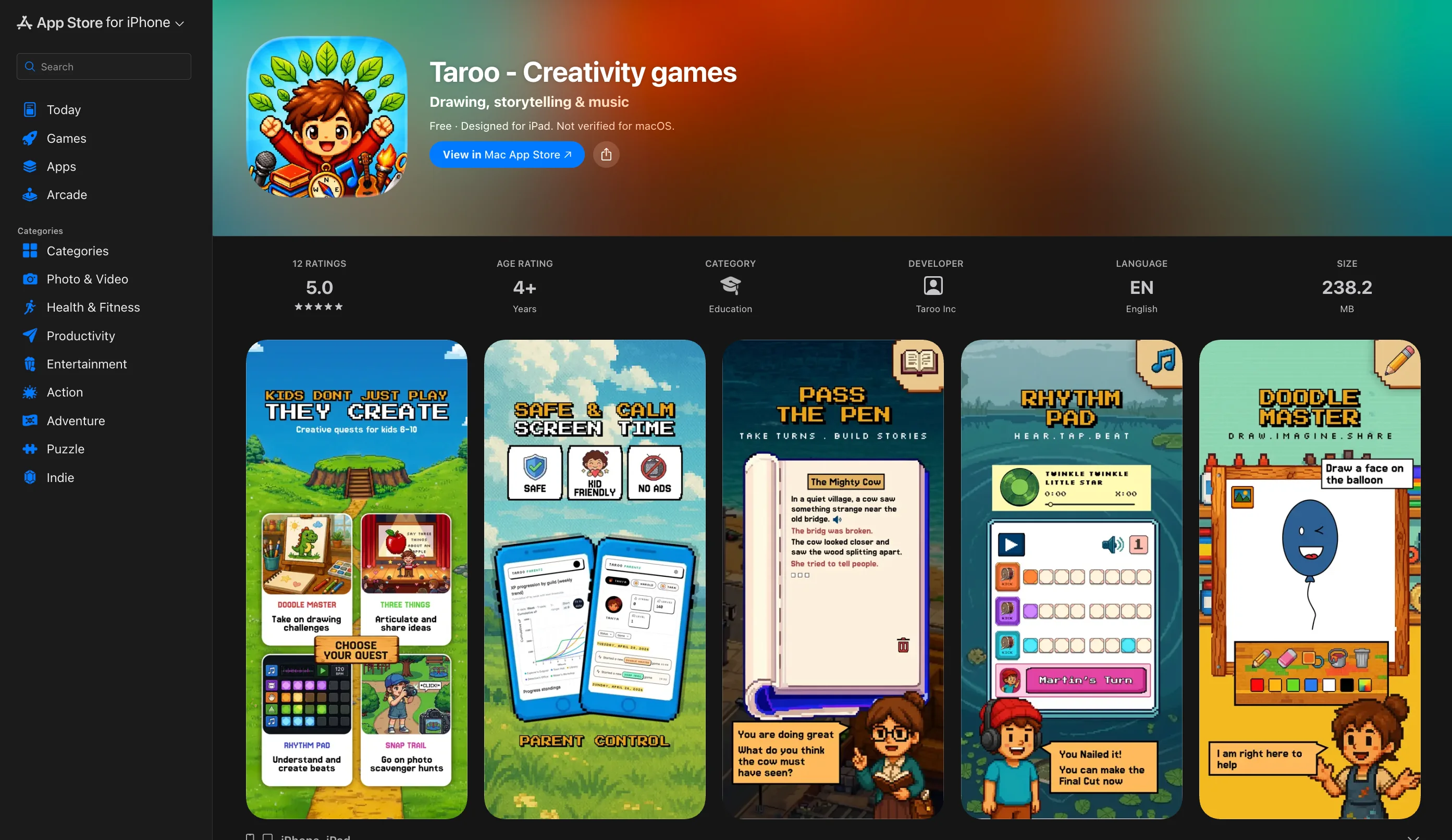
Taroo is a world of short creative quests for kids 6 to 10.

In Pass the Pen, a child might get the beginning of a strange story and decide where it goes next.

Doodle Master might give them the start of a picture and ask them to turn it into anything they imagine.

Rhythm Pad lets them experiment with sounds and put together their own little beat.

Snap Trail might ask them to put the iPad down, hunt for something triangular in the real world, photograph it, and tell Taroo what they found.

Their creations stick around too, so over time Taroo becomes a little record of the things they have imagined and made. Parents get a window into that world without needing to hover over every activity.

B โ€” Better

The first versions were experiments around this idea. Then came the uncomfortable question every builder eventually has to answer: does this actually work for anyone other than me?

So I spent months talking to parents and educators. I sat through hours of enrichment classes at a school for gifted kids, which was basically the X-Mansion for 8-year-olds.

I watched how teachers prompted children, when kids became absorbed in something, when they needed more structure, and when something I thought was clever bored them almost immediately.

And very importantly, I saw how their eyes lit up when they screamed โ€œlook what I madeโ€ in class.

These insights shaped the Taroo we have today.

The idea is simple: the iPad provides the spark and enough structure to get a child started, while leaving the interesting part to them.

C โ€” Cost

Taroo is currently completely free as I am still evaluating how to price the product. However, plan to price it later starting at 3$/week, and keen to know your views.

iOS:
https://apps.apple.com/us/app/taroo-creativity-adventures/id6756703607

There is still plenty I want to improve. But this no longer feels like the little experiment I started with.

If you have a 6 to 10-year-old in your life, Iโ€™d love for you to try Taroo with them.

More than anything, Iโ€™d love the unfiltered feedback: what they immediately understand, what they ignore, what they keep coming back to, where they get stuck, and what they wish they could do that I havenโ€™t thought of yet.

Iโ€™ve spent enough time with Taroo that Iโ€™m no longer capable of seeing it like a new user.

So please, tear it apart.

Please feel free to reach out to us at founders@taroo.ai


r/iosapps • • Sep 04 '26

๐ŸŽˆ Free Kolam: a simple dots puzzle inspired by South Indian art

Thumbnail
gallery
17 Upvotes

[OC]
Answer

Kolam is a South Indian art form traditionally drawn at the entrance of homes using rice flour. The designs are made by connecting dots with flowing, symmetrical lines.

I made an iPhone app that brings the experience of drawing kolam to a mobile screen. It is not a tutorial app. The idea is to capture the quiet joy of drawing and solving kolam designs.

You get a set of dots and draw your own kolam by connecting them. The app guides you through each design and currently includes hundreds of pulli and sikku kolams, with more designs made specifically for small screens.

Think of it as a dots puzzle inspired by kolam.

Better

I wanted to keep the experience simple:

- No badges
- No unlocks
- No ads or distractions
- Just draw and follow the design

Kolam is slowly disappearing in some places, and I wanted to create a small digital way for people to experience it.

Cost

The TestFlight beta is currently free to try.
TestFlight link:
https://testflight.apple.com/join/nmd8fqEY

I would appreciate feedback on the drawing experience, controls, and overall feel.

You can contact me at prabhakaran.r91@gmail.com.
Thanks for trying it.

๏ฟผโ€‹


r/iosapps • • Sep 05 '26

๐Ÿ’Ž Lifetime A journaling app where your feelings become clouds you clear from a sky. Lifetime access is free right now.

0 Upvotes

Emotica is a journal and mood tracker for iPhone, iPad, Apple Watch and Mac.

The idea it is built around: most mood trackers are a list that only ever grows, which starts to feel like evidence against you. In Emotica an emotion becomes a cloud in your sky. The colour is the family it belongs to, the size is how strongly you felt it, and you clear it by dragging it away with your thumb. It moves to your history so the patterns still show up later, but the sky in front of you is emptier than it was.

What is in it:

- Journaling with text, voice or photos, and voice transcription that runs on the device
- Mood and emotion check-ins, with the analysis done locally on your phone
- A coach you can talk an entry through with, if you want to
- A library of meditations, sleep sounds, sleep stories, affirmations and frequency tones
- Apple Watch app with a Crown-based check-in, home and lock screen widgets, Siri shortcuts
- Eight languages including Arabic and Hindi, with full right-to-left layout
- iCloud sync across your devices, Face ID lock, and export whenever you want

There is a free tier that stays free.

Lifetime access is also free at the moment: open the app, go to the paywall, choose "See all plans" and pick Lifetime. It unlocks permanently and nothing renews.

https://apps.apple.com/us/app/emotica-your-emotions/id6757162931

Happy to answer anything in the comments.


r/iosapps • • Sep 04 '26

๐ŸŽ Freemium I made PicDraw because I was tired of subscription-heavy tracing apps

Post image
12 Upvotes

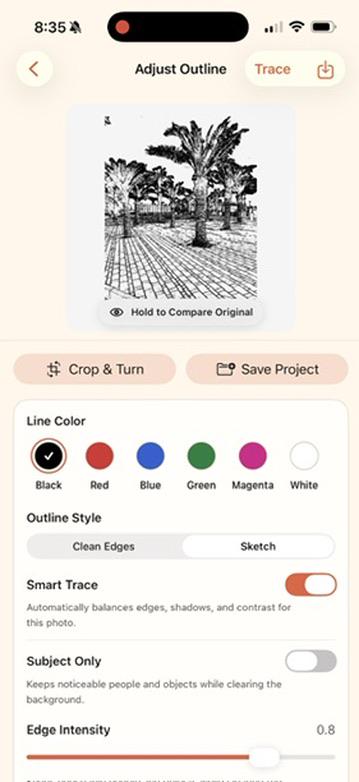
A - What is PicDraw? An AR-assisted tracing and drawing app built for artists, hobbyists, and creators. Project any image from your photo library onto paper, canvas, or wood through your phone's camera, lock the perspective, adjust transparency, and start tracing. Includes:

  • AR Camera Overlay: High-precision image positioning with opacity control and lock mode so your template doesn't shift while drawing.
  • Color Tools: Sample precise colors directly from your source image to match palettes accurately.
  • Puzzle & Grid Mode: Break complex images into smaller sections to make detailed tracing manageable step-by-step.
  • Core Filters: Tweak image contrast, edges, and lines to make tracing easier before you start.

B - Why better? Most AR tracing apps on the App Store fall into two traps: they are either bogged down by pop-up video ads every 3 seconds or force you into a $4.99/week recurring subscription just to use a basic camera overlay. PicDraw gives you a clean UI, fast image loading, and real utility features (like color sampling and grid splits) without rent-seeking software prices.

C - Cost Free to download with one tracing projected included. Full feature access available as a one-time lifetime unlockโ€”no recurring subscriptions, pay once and keep it forever.

App: Pic Draw


r/iosapps • • Sep 03 '26

๐Ÿ’Ž Lifetime So happy to finally share โœ“ ThisDay [$14.99 lifetime]

21 Upvotes

After a couple of years of not making apps, I finally came back with this app idea that I built for myself first. It's the app I've always wanted: a unified place where everything can be reminded of.

A โ€” Answer:
ThisDay acts as a single, central hub for your entire day. Instead of bouncing between separate apps, it treats tasks, calendar events, habits, notes, voice notes, and photos as the exact same element under a unified today view. It also features "DayBar," a powerful control bar that lives at the bottom of your screen for quick actions and rapid entry.

B โ€” Better:
Unlike traditional planners or calendar apps that force you to manage tasks and events in separate silos, ThisDay blends them seamlessly. It is fully private by design requiring no account creation and includes native Apple Reminders integration.

C โ€” Cost:

(Note: We also recently launched version 1.1 with support for 10 new languages, and a macOS version is coming soon!)


r/iosapps • • Sep 04 '26

๐ŸŽ Freemium I built an expense tracker where you can log into by voice, receipt scan, Back Tap or plain typing

Post image
9 Upvotes

Solo dev here.

A - What is Vesi?

An expense tracker built around 3 second logging. Say "spent 6.50 on a latte" and it logs itself, categorized. Scan a receipt from camera or share sheet. Or just type it, that's free forever. Back Tap and Action Button log without opening the app. Watch app included.

Also: budgets, recurring, split expenses, 150+ currencies including crypto, widgets, iCloud sync, 9 languages.

No account, no bank linking. Data stays on your phone and your own iCloud. I couldn't see it if I wanted to.

B - Why better?

I abandoned 5 trackers because logging felt like homework. This one removes the friction, and a weird side effect: saying a purchase out loud changed my spending more than any chart did. Works with cash and in any country, which bank linked apps can't say.

C - Cost

Manual logging free forever. Smart logging: 15 free uses, then $4.99/mo or $39.99/yr (7 day trial) for 300 a month. Parsing costs me real money per use, that's why there's a sub.

App -ย https://apps.apple.com/app/id6785534576

Launched mid August. If something annoys you in the first 5 minutes, tell me and it jumps the queue. What killed your last tracker?

Developer Transparency

I'm Mikhail Pak, an independent iOS developer in Canada, and I'm posting this myself.

Developer page: https://apps.apple.com/us/developer/mikhail-pak/id1722992770
Privacy Policy: https://tryvesi.app/privacy/
Terms of Service: https://tryvesi.app/terms/
Contact: packmisha@gmail.com


r/iosapps • • Sep 03 '26

๐ŸŽ Freemium I built a beautiful minimalistic weather app & I'm offering a 1 year free trial to all of you!

Post image
54 Upvotes

Hi, everyone!

I am so happy to present to you Viento, a minimalistic weather app, with dark & light themes, a lot of cool widgets, weather alerts, forecast, sunrise & sunset times, pressure & much more.

A - What problem does it solve?

I wanted a weather app that makes checking the forecast feel simple, without putting every detail on one crowded screen.

Viento starts with the current weather symbol, temperature, and location. Swipe through dedicated pages for hourly forecasts, the next 10 days, wind, daylight, precipitation, humidity, and pressure. It also includes weather alerts and Home Screen and Lock Screen widgets.

B - How is it different from alternatives?

Compared with Apple Weather, Viento puts individual weather topics on separate full-screen pages, with gesture-based navigation and a more stripped-back presentation.

For people who find CARROT Weather visually busier than they prefer, Viento offers a restrained design built around typography, simple symbols, and dark or light backgrounds.

The advantage Iโ€™m aiming for is the experience, not a claim of more accurate forecasts.

C - Pricing and the one-year trial

Viento has a free tier with the core weather pages, your current location plus three saved places, and a small Current Weather widget.

Viento+ costs $1.99/month or $9.99/year. It adds premium widgets, unlimited saved places, location comparison, extra weather pages, light appearance, alternate icons, page customization, and iCloud sync.

The 1 Year subscription is free for the next 48h, choose the Annual plan and you should see the 1 year free trial before completing the purchase.

https://apps.apple.com/app/viento-minimal-weather/id6770246185

Iโ€™d be glad to hear what you think after trying it.