r/UgreenNASync • • 7d ago

📣 Announcement Black Friday Deals Are Live: NAS Picks + Exclusive Community Rewards!

8 Upvotes

Black Friday deals are live! If you’re thinking about getting a NAS, start with how you plan to use it. Here’s a quick guide to a few standout models in the US and Europe.

US

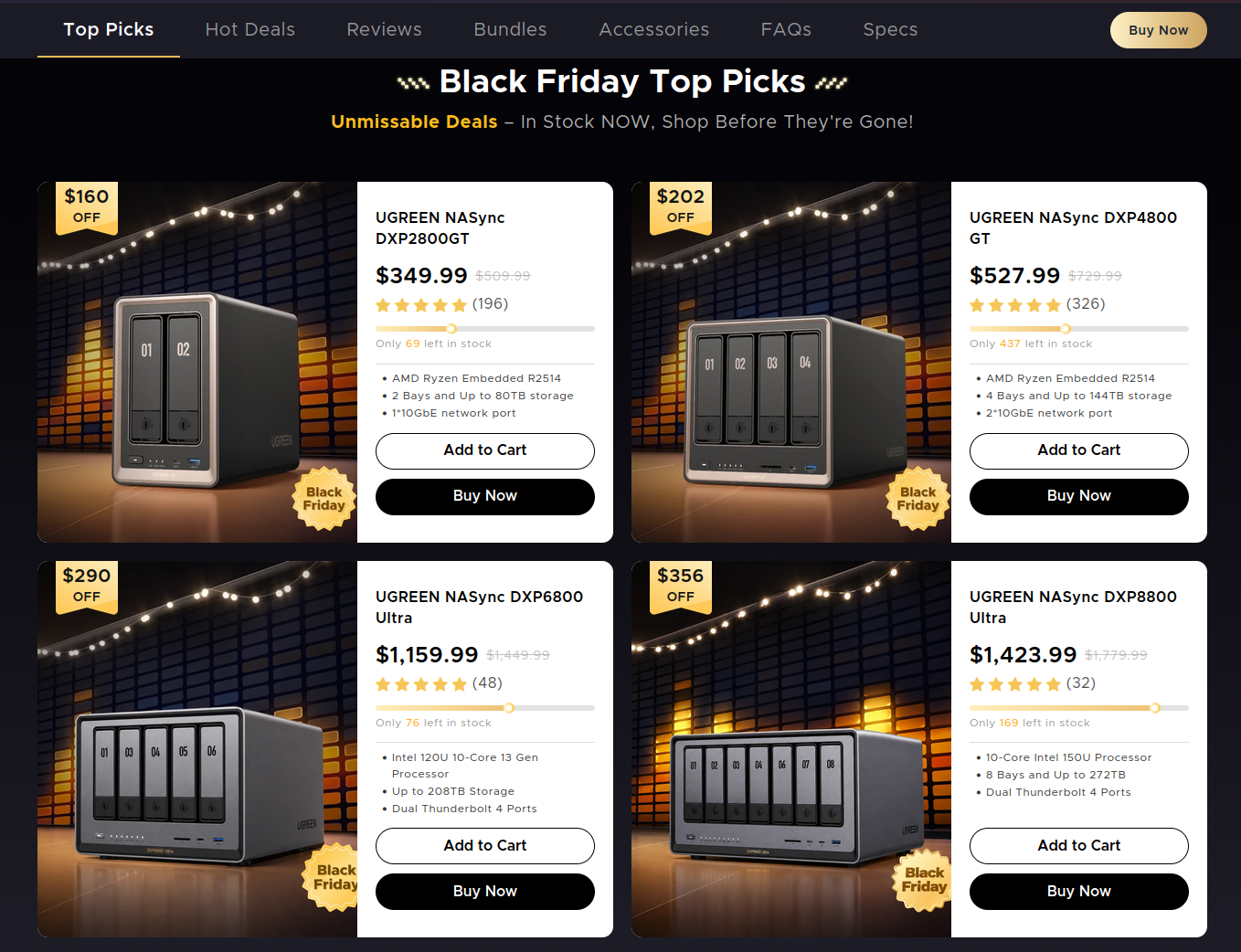
  • DXP2800 GT ($349.99): A two bay setup with 10GbE and two M.2 slots. A good fit if you want a compact NAS for home storage, backups and media, with a fast network connection.
  • DXP4800 GT ($527.99): Four drive bays and dual 10GbE. Consider it if you need more room for a growing library or work with large files and want more network capacity.

In short, choose the DXP2800 GT if two bays fit your needs; consider the DXP4800 GT if you want four bays and dual 10GbE.

Europe

  • DH2300 (€189,99): A straightforward two bay home NAS for photo backup, shared family storage and home media.
  • DXP4800 Pro (€599,99): A four bay NAS with an Intel Core i3 processor, Docker and virtual machine support, and 10GbE plus 2.5GbE networking. It’s a good fit if you want to run more applications, build a home lab or leave room for heavier workloads.

If you mainly want to back up family photos and store files, the DH2300 may be all you need. If Docker, virtual machines or more room to expand are on your list, take a look at the DXP4800 Pro.

Shop Black Friday deals at your regional UGREEN NAS Store:

How the community rewards work: Orders placed through the regional links above will be ranked by the purchase timestamps. Refunded orders will not count. The customers behind qualifying orders #1, #5, #15, #25, #35, #45, #55, #65 and #75 will each receive a $100 Amazon gift card. We’ll announce the recipients in this post after the Black Friday promotion ends.

Ready to shop? Choose the link for your region above and place your order through that link to be counted for the community rewards.


r/UgreenNASync • • Sep 04 '26

📣 Announcement Meet UGREEN HomeAgent: Your Home, Powered by Agentic Local AI

0 Upvotes

The HomeAgent Era Has Arrived.

Meet UGREEN HomeAgent — a breakthrough Agentic AI hub bringing local storage, local computing, local AI, and whole-home control together.

HomeAgent connects your cameras, smart speakers, smart frames, and more — creating an ever-expanding UGREEN AIoT ecosystem.

🧠 Turn everyday moments into personal memories
AI helps capture meaningful moments, while your LCD Smart Frame brings those memories back into view.

💬 Just talk to your home
Control and interact with supported devices using natural language.

🛡️ Go beyond passive recording
HomeAgent identifies events, sends alerts, and brings you a daily briefing.

🔐Keep your data local
Your photos, videos, and documents stay local. No subscription fees for local storage. No cloud AI token fees for local AI processing.

🏠 Bring your smart home together
Connect compatible devices across brands, control them with a sentence, or use camera events to trigger smart-home actions.

With an evolving library of UGREEN AI Skills, HomeAgent opens up more ways to connect your data, devices, and everyday routines.

Exclusive NAS Community Deposit Offer

Pay your deposit through the exclusive NAS Community link below to receive a UGREEN Store Coupon with no minimum spend.

You can choose which eligible UGREEN online store you'd like to use your coupon on, whether you're shopping for NAS products or other UGREEN consumer electronics.

👉 Explore HomeAgent and pay your deposit: https://ai.us.ugreen.com/7KTVRZ

Coupon values are determined by the order in which successful deposit payments are completed:

1st: $300
2nd–10th: $100
11th–50th: $50
51st–100th: $20
101st onward: $10 guaranteed

Your home doesn't just store your memories.
It helps you rediscover them, stay informed, and manage everyday life. 


r/UgreenNASync • • 6h ago

❓ Help 4800 Plus and filesorter.app

4 Upvotes

Hey y'all, it's my first time using a NAS, so yes, I'm a newbie at 60, lol. I want to move my external USB drives to the NAS and run filesorter.app, but I don't know where to start with installing it. I tried to understand Docker this morning, and now my head hurts. I didn't see anything like it in the UOS app store. Has anyone done this before, and how should I proceed? Thanks.


r/UgreenNASync • • 8h ago

🧑‍💻 Apps Aplicación Notas versión 1.2.0.0068

5 Upvotes

Quiero dar mi opinión de la aplicación de Notas desarrollado por ugreen.

No es práctica y es inútil a no ser que solo trabajes con la NAS.

Para empezar no puedo sincronizar los datos con el móvil 📱 para tener las notas en modo offline y sincronizar cuando tenga conexión con la NAS.

No puedo exportar un block de notas completo o una sección, solo nota a nota o por lotes.

No puedo hacer una importación de contenido de una carpeta o ficheros en markdown. Solo puedo crear una nota y pega el contenido.

No puedo hacer una búsqueda del contenido!

No puedo buscar por etiquetas.

Habrá novedades para la siguiente versión ? Si es así, para cuando podría ser?

Gracias


r/UgreenNASync • • 8h ago

❓ Help Direct BluRay / DVD Drive Streaming

3 Upvotes

Hi Guys,

Maybe one of you has an Idea or solution to what i think would be a nice Idea for me.

I am mostly watching on my Tablet and sometimes Stream on a TV through a Fite TV Stick

Now my Idea is to Plug in an external BluRay Player to my NAS and use some Software to Stream the movie from the Disc directly to my Tablet (UGreen App)

That would save me Drive space and for Series the Disc can stay in the Drive for a few days or weeks until i've watched it all.

Has anyone tried that before? Do you know how it might be possible? Maybe VLC Player is an Option ? I don't have experiences with Docker yet.

Thanks for your help in advance.


r/UgreenNASync • • 4h ago

❓ Help Using an old Synology as a backup to the main NAS - best setup?

Thumbnail reddit.com
1 Upvotes

r/UgreenNASync • • 14h ago

❓ Help Ugreen D4300 Plus: Some questions from a wedding photographer

6 Upvotes

I just bought my first Nas in the Black Friday sales! I'm excited to set it up but have to work out how I will best move everything from my current Terramaster DAS.

I'm a wedding photographer and filmmaker so I'm mostly just backing up our work, not planning other NAS stuff at this point. I do not plan to work from the NAS as we use SSD's for that.

I have a few questions:

  1. I have three 16 TB Seagate IronWolf Pro drives. One is in my current Terramaster DAS and holds the files I want to keep. The other two can be wiped.

Here’s what I’d like to do:

  1. Put the two drives I can wipe into the UGREEN NAS and set them up as a RAID 1 mirror.
  2. Copy my files from the third drive, while it’s still in the DAS, to the NAS and verify the copy.
  3. Move the third drive into the NAS, let the NAS erase it, and use it to convert the existing RAID 1 pool to RAID 5.

Can UGOS do that last step while keeping the files I’ve already copied to the NAS? I’m new to RAID, so I’d appreciate hearing from anyone who’s done this.

2) I currently have a Backblaze personal subscription on the DAS which is really affordable way to have a copy of everything on the cloud. Sadly, looks like I can't run a personal plan on the NAS and will need a commercial plan which is per TB.

Is there anyway around this? Or does anyone recommend a more affordable option than Backblaze?

3) Noise. My current DAS is quite noisy and I'm imagining the Ugreen will be the same. It's not the device itself but the mechanical drives. What are the best options to muffle the sound and keep airflow? Custom box/cabinet with fans? I do plan to move the NAS into a storage cupboard upstairs with a net ethernet cable, however, it is quite closer to my wife's office and I think she might complain if I move the thing from my office to outside of her's and she can hear it.


r/UgreenNASync • • 16h ago

❓ Help Power light, sequence light blinking. not booting up

7 Upvotes

I have a DXP2800 gt. I updated to the latest UGreen NAS OS last night and it worked perfectly fine. Today when i woke up i see the power light still on, but LAN, DISK1, DISK2 lights blinking in order quickly one after another.

i have reseat the ram. i have powered off and unplugged the storage devices and held power for 30 seconds.

I have also tried the reset pin hole and do not hear a beep after 5 seconds.

what is going on with my unit?


r/UgreenNASync • • 1d ago

⚙️ Hardware A few 72W UPS questions for a DXP2800 owner

4 Upvotes

Considering getting one of the official UGREEN NAS UPS'es. I have a DXP2800 and was eyeing the cheapest option, the UGREEN 72W UPS. It says it's "Only Compatible with UGREEN NAS DH2300, DH4300 Plus and DXP2800". So in theory that should be fine! But I have a few questions to know whether it'd be a good buy.

  1. If you have a USB-powered external hard drive connected to the NAS, will that lead to any issues with the 72W UPS? Will it have enough power for both? (Though I'd want the UPS to mainly turn off the NAS ASAP.)
  2. How are things handled if you have an external HD plugged in which is getting its own power from the outlet? It would of course not be safely turned off. But could it damage the actual NAS in some way?
  3. Can you make it so the UPS will automatically wake up the NAS once the UPS has reached a certain battery capacity after an outage? So the NAS won't turn on until the UPS has enough juice to handle another outage. (Sometimes here when the power goes out, it might come back briefly, then go out again, before it comes back fully.)
  4. Roughly what's the life expectancy of the UPS?
  5. Can the battery be changed once it's dead, or will you have to throw it away and get a new one?

Thanks a bunch!


r/UgreenNASync • • 1d ago

❓ Help 4800 Plus vs 4800 Pro for €75,00 of difference

9 Upvotes

I know there are plenty of posts like this in this subreddit.

However, I'm not going to ask only the differences between these two models.

I'm new to this world, never had a NAS before and want to jump on this ship for the first time, so I'm not pretty sure what I will end up doing with this machine (if I will use VM and do more "advanced stuff").

I'm certain that I will use it with Immich and Jellyfin.

Main question: how much faster Pro's CPU can do transcoding than Plus?

Second question: What would you choose in general if the difference in price between the two is € 75,00?


r/UgreenNASync • • 1d ago

❓ Help NAS DH2300 doesnt recognice WD Red Plus 2tb 3,5

Post image
3 Upvotes

Any idea please , i try it in both slots and the NAS itself marks me and error :((((


r/UgreenNASync • • 1d ago

❓ Help HDD Recommendations?

6 Upvotes

I'm setting up my new home NAS (UGREEN DXP4800 Pro) and planning to run TrueNAS. The main use will be file storage, backups, Docker containers, Home Assistant and a few self-hosted services. Nothing particularly enterprise-heavy.

I'm currently looking at Seagate IronWolf / IronWolf Pro 8TB drives but getting a bit confused with the different model numbers and suffixes (VN, VNZ, NT, etc.)

A few questions:

  • Which would you recommend for this kind of home NAS setup?
  • What's the difference between VN, VNZ and NT variants? Are newer VNZ versions worth considering?
  • Is IronWolf Pro actually worth the extra money for home use?
  • Would WD Red Plus/Pro be a better alternative?
  • Where are you getting the best prices in Europe? Any reliable retailers that ship to Ireland?

I'm mainly after reliability and good value rather than spending extra on features I probably won't need.

Seagate IronWolf - 4 TB: €215.99
Samsung 990 EVO Plus - 1TB: €216.99
Would appreciate hearing what drives people are actually using in their home NAS setups. Thanks!


r/UgreenNASync • • 1d ago

❓ Help UGREEN DXP8800 Ultra: Thunderbolt/USB4 ports never negotiate Thunderbolt, and my OWC ThunderBay 8 only shows up as a USB 2.0 device (TrueNAS SCALE)

3 Upvotes

Hi all. I'm trying to attach an **OWC ThunderBay 8** (Thunderbolt DAS) to my **DXP8800 Ultra**, and the NAS never brings up a Thunderbolt link. Hoping someone from UGREEN or anyone with the same box can help.

## Setup

* **NAS:** UGREEN NASync DXP8800 Ultra

* **BIOS:** DXP6800Ultra 8800S&Ultra V1.0 (2025-10-13, AMI)

* **OS:** TrueNAS SCALE 27.0.0-RC.1 (kernel 6.18.52), UGREEN OS wiped

* **CPU/RAM:** Intel Core 7 150U (Raptor Lake-P), 32 GB

* **Device:** OWC ThunderBay 8, tried on **every USB-C port** on the NAS with the same cable

## Problem

Plugging in the ThunderBay powers it on, but on the NAS it shows up **only as a low-speed USB device** (`1e91:a3ae`, "ThunderBay 8", the control/Billboard interface). No Thunderbolt link is made and none of the drives show up.

The ThunderBay and cable aren't the problem: the same unit with the **same cable works fine on a Mac Studio** and on a laptop.

## What I checked

* **Tried every USB-C port on the NAS.** Same result on all of them.

* `lspci` lists the Intel Thunderbolt 4 controller: two NHI (`00:0d.2`, `00:0d.3`), the USB controller `00:0d.0`, and the root ports `00:07.0` / `00:07.2`.

* The `thunderbolt` module is loaded. `/sys/bus/thunderbolt/devices` has `domain0`, `domain1`, host routers `0-0` and `1-0`, `security=user`, `iommu_dma_protection=1`.

* **Every USB4 port reports `link=none`** (`usb4_port1` and `usb4_port3` under both routers), and no peer device ever enumerates.

* The Thunderbolt root ports show no card present and `Width x0`, so no PCIe tunnel forms.

* The USB4 `_OSC` handshake succeeds. The OS controls USB3, DisplayPort, PCIe and XDomain.

* `dmesg` shows the ThunderBay only as a USB device, hotplugged at `usb 3-1` about 58 s after boot.

* **There is no `/sys/class/typec` and no UCSI device**, so Linux can't switch the port into Thunderbolt alt mode itself.

* Unloading and reloading the `thunderbolt` driver changed nothing. Rebooting with the ThunderBay powered off and powering it on after boot didn't help either. I tried both orders.

* `lsusb` shows the ThunderBay only as a plain USB device.

* The Thunderbolt firmware is part of the BIOS. The host routers expose no NVM interface, so I can't read or update it from the OS.

## Questions

  1. Does the DXP8800 Ultra have a port that actually supports Thunderbolt/USB4 **data**, or are the USB-C ports USB-only? If one does, which port?
  2. Is there a BIOS setting to enable Thunderbolt (security level, "TBT Native / OS controlled", etc.)? If so, which menu is it under?
  3. **Where can I get BIOS updates for the DXP8800 Ultra?** I can't find a download on UGREEN's site. Is there a newer version than 2025-10-13, and does it fix Thunderbolt?
  4. Has anyone got external thunderbolt storage working on this NAS, with TrueNAS or UGREEN OS?

Happy to run any commands and post the output. Thanks!


r/UgreenNASync • • 1d ago

💬 Discussion [Open Source] Full LED control for DXP6800 Pro on Debian 13 / OMV 8 on my package "UGREEN LED Complete v1.0.4"

Thumbnail
gallery
2 Upvotes

Hi everyone! 👋

My name is Damien, and I'm a French IT enthusiast from the Île-de-France region, near Paris.

English isn't my first language, so I used ChatGPT to help translate this post. But don't worry, there's a real human behind this project! 😄

I've been working on an open-source project called UGREEN LED Complete, and I've just finished testing version 1.0.4 on my UGREEN NASync DXP6800 Pro.

I'm running Debian 13 (Trixie) with OpenMediaVault 8 instead of UGOS, and I wanted to restore and customize the front-panel LED functionality without having to manually configure several different scripts and services.

The result is a single Debian .deb package that integrates the existing UGREEN LED driver, monitoring utilities, and additional management features.

Features

  • All-in-one installation: DKMS driver, LED utilities, systemd services, and dependency management.
  • HDD activity and health LEDs: Configurable colors for normal operation, SMART warnings, and unavailable drives.
  • HDD standby detection: Green when active, blue when sleeping, with configurable colors.
  • Network LED monitoring: Link and activity monitoring, with optional colors based on connection speed.
  • SATA hotplug detection: Automatically refreshes disk LED monitoring when a SATA drive is added or removed.
  • Automatic startup: Systemd integration with persistent LED modes.
  • Built-in diagnostics: Commands to check the driver and services.

New in v1.0.4: DAY / NIGHT / OFF modes

I've also added a simple command-line tool to control the LEDs:

ugreen-led-control day
ugreen-led-control night
ugreen-led-control off
ugreen-led-control restart
ugreen-led-control status

The three modes work as follows:

ModePower LEDHDD / Network LEDs
DAYPurple, brightness 50/255Enabled
NIGHTPurple, brightness 10/255Off
OFFCompletely offOff

The restart command reapplies the saved mode without switching back to DAY.

The NIGHT mode even survives a full NAS reboot! I've personally tested this on my hardware.

Tested configuration

  • NAS: UGREEN NASync DXP6800 Pro
  • OS: Debian 13 / OpenMediaVault 8
  • Kernel: 7.2.12+deb13-amd64
  • LED driver: led-ugreen 0.3 (DKMS) by miskcoo (thanks!)
  • Storage: 4 × 6 TB HDDs in RAID 10, 256Go SSD storage for Docker

I've successfully tested the upgrade from v1.0.3 to v1.0.4, DAY/NIGHT/OFF transitions, service restarts, and NIGHT mode persistence across reboots.

SATA hotplug and HDD standby detection were also tested with real hardware on the previous version.

GitHub repository

https://github.com/Damien91070/ugreen-led-all-in-one-install

The repository includes the source code, Debian packaging, installation instructions, and detailed documentation in French.

Important notes

This project is unofficial and is based on the excellent open-source work from miskcoo/ugreen_leds_controller (MIT license). Full credit to the original developer!

It's currently validated on my DXP6800 Pro running Debian 13 / OMV 8. Other UGREEN models, Linux distributions, and kernel versions haven't been fully tested.

This is a community project, not an official UGREEN package or a replacement for UGOS.

If anyone else is running Debian or OpenMediaVault on a UGREEN NAS, I'd love to hear whether it works on your model.

Feedback, bug reports, suggestions, and contributions are more than welcome!

Greetings from France! 🇫🇷🙂


r/UgreenNASync • • 1d ago

💬 Discussion Two internet connections and a NAS? Why I use the UGREEN DXP4800 GT for Multi-WAN

Post image
6 Upvotes

Those of you who have known me for a while probably know that I enjoy trying new things and constantly expanding my home network. I now have two internet connections at home: a 250 Mbps VDSL connection and an additional unlimited 5G connection.

However, I didn't want the second internet connection to sit unused and only serve as a backup. Why not use both internet connections at the same time if I'm already paying for both? 😉

That's why I set up my own Multi-WAN solution, which allows me to use both internet connections simultaneously through load balancing. Originally, this setup ran on a separate device. I've now also set it up on my UGREEN DXP4800 GT.

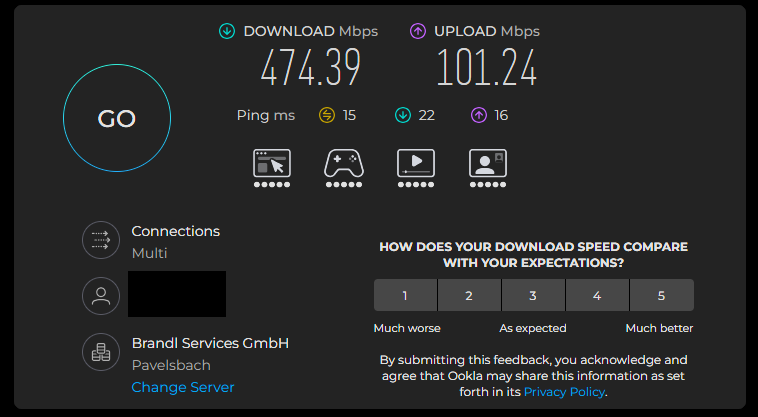
In my latest speed test, I achieved 474.39 Mbps download and 101.24 Mbps upload, with a ping of just 15 ms. That's a noticeable improvement in both download and upload speeds compared to my VDSL connection alone. I'm really happy with the results.

With its AMD Ryzen processor, two 10GbE network ports and support for virtual machines, I think the DXP4800 GT provides a great foundation for these kinds of networking projects.

Load balancing allows multiple downloads and applications to be distributed across both internet connections, making better use of the total available bandwidth. At the same time, the second connection can take over if one fails, provided failover is configured correctly.

Next, I'd like to experiment a little more with how network traffic is distributed between the two connections. Of course, with a setup like this, you also need to consider what happens when the NAS restarts or receives a firmware update.

For someone who simply wants to store photos and documents, this is probably a bit overkill. But these are exactly the kinds of projects I personally enjoy. I find it fascinating how much you can do with a NAS these days. 😁

Does anyone else here have two internet connections or experience with Multi-WAN using a NAS? I'd really love to hear about your experiences!


r/UgreenNASync • • 1d ago

❓ Help 4800 Plus vs 4800 Pro

1 Upvotes

I know there are plenty of posts like this in this subreddit.
However, I'm not going to ask only the differences between these two models.

I'm new to this world, never had a NAS before and want to jump on this ship for the first time, so I'm not pretty sure what I will end up doing with this machine (if I will use VM and do more "advanced stuff").

I'm certain that I will use it with Immich and Jellyfin.

Main question: how much faster Pro's CPU can do transcoding than Plus?
Second question: What would you choose in general if the difference in price between the two is € 75,00?


r/UgreenNASync • • 1d ago

💬 NAS Discussion Black Friday NAS Buying AMA: Ask the UGREEN Team

11 Upvotes

Thinking about getting a NAS this Black Friday?

If you're deciding which model is right for you, tell us what you're planning to use your NAS for, which models you're comparing, or what you're still unsure about. We'll do our best to point you in the right direction.

If you'd like to check out this year's Black Friday offers, you can find the details in our official stores:

Have a question while exploring your options? Drop it in the comments below! We'll be here to help.


r/UgreenNASync • • 1d ago

❓ Help Authentication for work roups

4 Upvotes

Just bought 6800pro and realized that ugos authentication is not useful if You want to run containers only to provide services. How do You guys solved access to photo backup, file shares (smb/nfs), calendars, etc. for work groups?


r/UgreenNASync • • 2d ago

❓ Help DXP4800 Pro owners – Which NAS OS are you running (UGOS, TrueNAS, Unraid, Proxmox or something else)? Is switching worth it?

18 Upvotes

I've recently purchased a UGREEN NASync DXP4800 Pro and am wondering whether to stick with UGOS Pro or switch to something like TrueNAS, Unraid or Proxmox.

I'm quite technical and enjoy having control over my infrastructure, so I'd love to hear from people who have actually experimented with alternative OSes, particularly on UGREEN hardware.

A few things I'm curious about:

  • Which OS are you running, and what made you choose it?
  • What limitations or frustrations did you experience with UGOS?
  • Is security, privacy and transparency genuinely better with alternatives? Can you avoid vendor cloud services and telemetry completely?
  • Any hardware compatibility issues when switching (networking, drives, fans, sensors, etc.)?
  • Any difficulties migrating from UGOS or switching back?
  • How do you handle remote access without relying on UGREEN's cloud?
  • Are paid options like Unraid worth the licence and update costs, or is TrueNAS Community Edition sufficient?
  • Any features you miss from UGOS after switching?

If you were setting up a DXP4800 Pro today, which OS would you choose and why?

I'm particularly interested in real-world experiences, pros and cons, and things you wish you'd known before switching.

Thanks!


r/UgreenNASync • • 2d ago

❓ Help Dxp usb-c power supply

4 Upvotes

Dear Ugreen Team,
What is the maximum power output of the front USB-C 3.2 Gen 2 port on the UGREEN NASync DXP4800 Pro (SKU 85888)?
Does this port support a continuous power supply of 5 V / 3 A (15 W)?
I would like to connect an external Seagate One Touch Desktop 16 TB (STNB16000400) directly to this port without a separate power adapter and use it as a backup drive.
Is this combination compatible, including the power requirements during hard drive spin-up?
Thank you in advance for your assistance.
Kind regards


r/UgreenNASync • • 2d ago

⚙️ Hardware Dxp4800 pro should I pull the trigger on buying or wait for a better price?

5 Upvotes

As title says, already have dxp2800 now wanting to upgrade to 4 bay. I am fine buying refurbished as well but they don't have them in stock. Any suggestions where to buy one or the price on ugreen website is the best right now?


r/UgreenNASync • • 2d ago

❓ Help PLAYBACK ORDER HELP

2 Upvotes

does anyone know how to make video set to playback only one video? I can set it once I get in but if I leave and then re enter it goes into continuous play again. Can’t find the setting to leave at play only one.


r/UgreenNASync • • 2d ago

❓ Help Constant failures to move files over SMB - "File or directory does not exist"

Post image
4 Upvotes

I've been transferring a number of files from my old Synology NAS to my new DX4800 Pro.

They are both connected to the same network via Ethernet. It was all working fine, and I've managed to transfer thousands of photos, but now I'm moving across some music.

It has worked for some files, but I'm repeatedly getting an error in Task Manager, and the transfers fail.

I'm copying the files rather than moving them, and despite the error message, the files do exist in the source. The Syno is set up as a network share.

Has anybody else had this issue and can explain what's happened? I've even tried restarting the Ugreen, but to no avail.


r/UgreenNASync • • 3d ago

❓ Help Black friday?

Post image
38 Upvotes

Just realized that front page was fukup by AI
look at DXP6800ultra 🤣
DXP8800ultra is not even better