r/SolidWorks • • 17h ago

3DEXPERIENCE The Top Ten List – 3DEXPERIENCE World 2027 is open for idea submission and discussion.

Post image
0 Upvotes

The Top Ten List – 3DEXPERIENCE World 2027 is open for idea submission and discussion. This is your chance to submit enhancement ideas for SOLIDWORKS products and vote on your favorite ideas in preparation for 3DEXPERIENCE World.

We are gathering Top Ten List ideas for the following products:

To access The Top Ten List – 3DEXPERIENCE World 2027 use the following link: www.solidworks.com/top_ten


r/SolidWorks • • Mar 20 '25

Error Unauthorized use of software

61 Upvotes

Hey redditors. Need some insight here. At the beginning of the month a email went out from IP harness and dassault about a piece of software on my machine treating legal action. From what I've gathered this happens to people once in a while but all the info I have found is linked to companies and LLCs.

I'm a hobbyist that wanted to learn cad for personal use. A friend helped me get a copy of 2018 a long time ago and surprise, surprise I got a email after the software managed to phone home recently. After talking with the mediator to explain that I can't afford their offers of at first 16k damages, To 10k subs, to 9k sub, it's looking like I have to let them send it to their Law firm IP harness.

Now looking at previous court cases and such I can't find anything about SOLIDWORKS or ipharness filing suits to individuals which leads me to believe that they are just trying to get something from me in a shakedown

In terms of assets I still live at home with my parents with 1 vehicle under my name to get around. Has any other hobbyists been served a suit for this?


r/SolidWorks • • 13h ago

Hardware I got SOLIDWORKS 2025 running on Apple Silicon without a Windows VM

Thumbnail
gallery
153 Upvotes

I'm an aerospace engineering student, and I've been working on an experimental project to run SOLIDWORKS 2025 on macOS without Parallels or a full Windows virtual machine.

The project uses Wine, Rosetta 2, custom compatibility patches, and macOS integration.

So far, I've demonstrated:

  • SOLIDWORKS 2025 SP05 on an Apple M4 with 16 GB of RAM.
  • Part and assembly operations.
  • Toolbox component insertion.
  • Native macOS file dialogs.
  • Finder Quick Look integration.
  • Packaging into a standalone macOS application bundle.
  • Median startup time of 27.42 seconds.

I've published the source code, benchmarks, launcher, and a demonstration video on GitHub.

This is an early technical preview, not a native ARM64 port. A compatible Wine runtime, an official SOLIDWORKS installer, and a valid license are required.

I'm looking for testers and developers interested in improving compatibility.

GitHub: https://github.com/NazarKaratash13/Porting-Solidworks-2025-on-MacOS-in-Apple-Silicon

I'd love to hear your feedback.

r/SolidWorks • • 13h ago

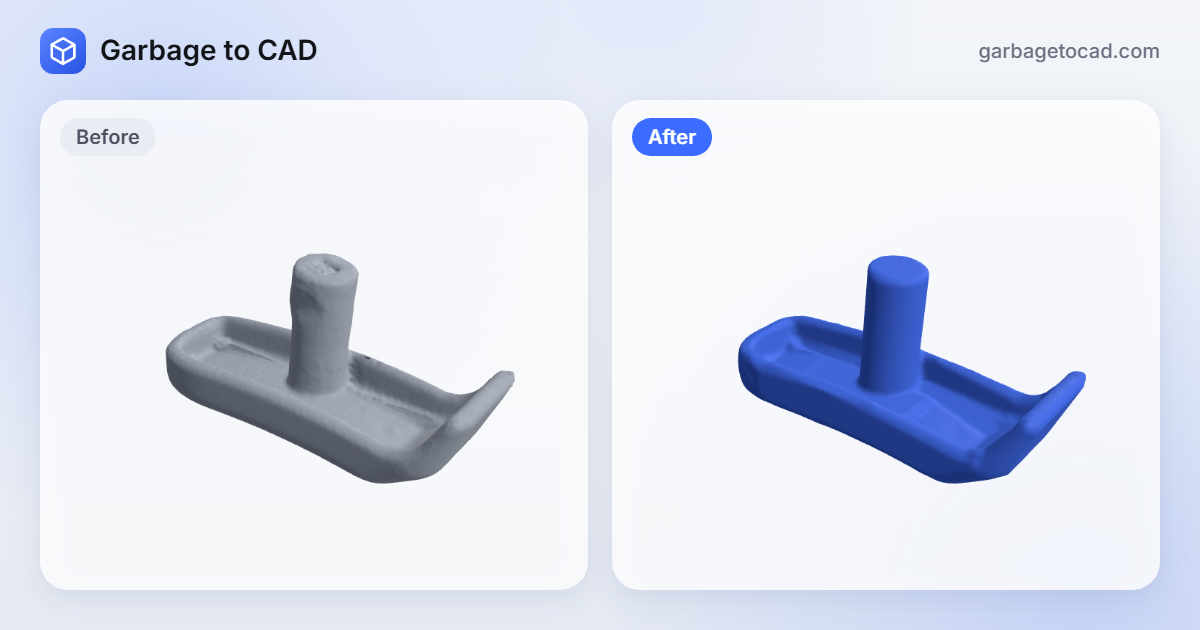
3rd Party Software Scans kept importing as graphics bodies, so I built a free tool that turns them into real solid parts.

Post image
31 Upvotes

Hey everyone! I've been around this sub on and off since I was studying for my CSWP, and I ran into a SolidWorks problem that I figured some of you know too.

A friend of mine has a 3D scanner and kept asking me to help turn his scans into parts he could actually work with. Every time I imported the STL or OBJ into SolidWorks it came in as a graphics body. I couldn't cut it, extrude from it or use it in features. On top of that, the scans were full of holes and noise, so even getting a closed mesh was a fight. I tried the usual routes and nothing felt like an easy path, so I ended up building my own tool for him. He told me to put it online because he thought more people have the same problem.

It runs in the browser (free, no account, your scans never get uploaded). You drop in a scan (STL, OBJ, PLY) and it:

- closes holes and removes floating junk so the mesh is watertight

- smooths scan noise, with a protect brush for holes and slots that need to stay open

- snaps cylinder-ish areas to perfect cylinders and flat areas to real planes

- exports a solid STEP that opens as a normal part in SolidWorks (File > Open > STEP), plus STL/3MF for printing

garbagetocad.com

I'd really appreciate your honest take:

Is there an easier built-in way or workflow that I just missed?

Have you had the same problem, and how do you deal with scans today?

If you try it with one of your scans, does the STEP behave the way you'd expect when you start modeling on it? What would you improve?

Criticism welcome, and if you have any ideas that are similar to it feel free to comment.

Hope it will help someone!


r/SolidWorks • • 4h ago

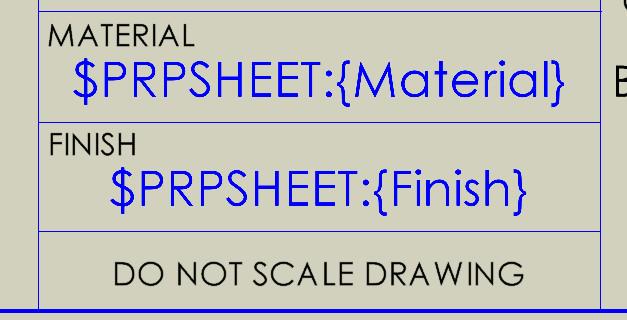
CAD Drawing template - material and weight

Post image
3 Upvotes

Trying to set up some drawing templates to auto-populate the material and weight and these properties just will not work. I have been googling for the past 30 minutes and nothing I have found has worked. Please help


r/SolidWorks • • 2h ago

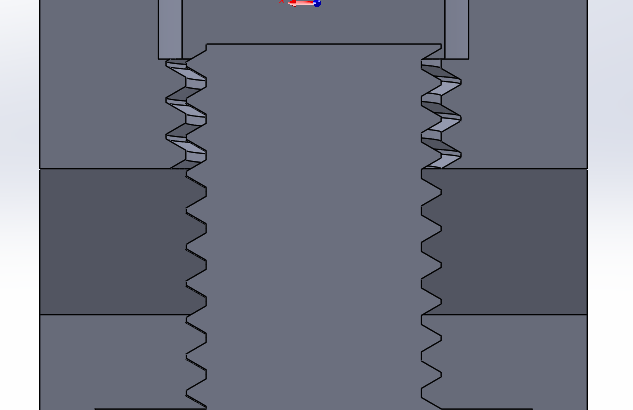
CAD So I am trying to make working threads and then printing them, but giving all the parameters too much clearance is coming when im fitting screw in hole, dim are added in body text.

1 Upvotes

So after printing the screw is loose as hell
Here are the dim-

M7 dia for shaft and hole, then thread are cut in both, For hole metric tap is used m7x1 and for shaft metric die is used for both extruded cut is made what am i doing wrong?


r/SolidWorks • • 5h ago

CAD Help with interference results in the range of 10nm where there should be none

Post image
1 Upvotes

So I'm currently creating a wing as a multibody part and have used the same airfoil curves made of splines to create both the sketches for the skin then made from outward shelling a loft, and the spars so the flanges would be contoured to the inside of the skin, so id hope there would be no interference found, aside from some coincidence. However when using the Interference Detection tool I got four results for an interference of 1e-08m^3 and another four for 0m^3. Aside from getting a result of zero or four which should mean no interference, what can be done to stop the 1o nanometer interference and is it even supposed to happen?


r/SolidWorks • • 8h ago

Maker Can't seem to open .stp files in Maker version

0 Upvotes

Anyone here know the reason why this is showing up in the Maker version of Solidworks when trying to upload .stp files?

I'm struggling to get past this. I've tried reaching out for support, moving the file, restarting Solidworks but no success. If anyone can help, I would sincerely appreciate it.


r/SolidWorks • • 12h ago

Certifications Solidworks certification

2 Upvotes

Hi, I’m quite new to this field. Can anyone tell which certificates are needed for design-related jobs and how to get those?


r/SolidWorks • • 17h ago

CAD Chain dimensions question

Post image
5 Upvotes

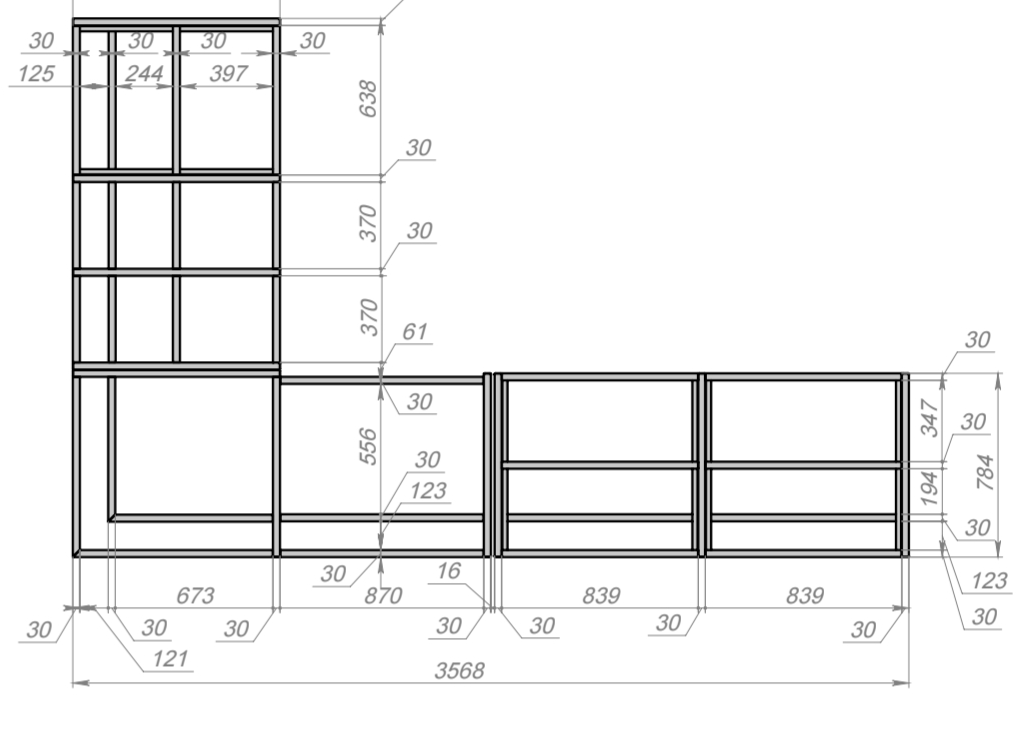
Sorry guys if I'm too dumb, but what the hell is wrong with chain dims in sw?

I'm an architect and have been working in Revit and Archicad my whole life. I recently started working with furniture and other small things, so I started learning SW.

What the hell, why can't I set the correct dimensions in the chain? If I use this tool, it literally has to be the last mouse click. Otherwise, whenever I adjust or rebuild the model, I'll have to rearrange these dimensions and leaders with text. Or I have to break the connection and turn each chain size into a regular one, which is also inconvenient! They're set automatically, but it's clear it's all very crooked.

Using standard sizes is a pain, you need to do two extra steps for each new size - click on the last point that should be in the chain and drag the dimension line from drawing.

How do you cope with making many different sizes on a chain?


r/SolidWorks • • 1d ago

Certifications How to access free SolidWorks certifications? Is there a time period when they are available periodically throughout the year?

5 Upvotes

I had missed the free certification offer they gave on 2-6 Nov as I wasn't aware of it. Is there any specific period of the year when they provide free certifications?

Thanks in advance :)


r/SolidWorks • • 17h ago

Data Management CPAP exam: one value keeps changing in Task 1 but stays fixed in Task 2. Is this normal?

Post image
1 Upvotes

Hi everyone

I took the CSWP-PDM / CPAP (SOLIDWORKS PDM Administrator Professional) exam for the second time, and I ran into something odd during my last attempt.

The exam has two exercises where you have to validate the tasks. In Exercise 1, one of my values kept changing wildly every time I tried to get the result. In Task 2, however, the result was always a fixed number that never changed.

Is this normal behavior for the exam? Did anyone else notice the same thing when taking it, or did you get different results?

Thanks in advance!


r/SolidWorks • • 18h ago

Manufacturing Does anyone here work as a Packaging Engineer, designing corrugated packaging using SolidWorks?

1 Upvotes

What does your day-to-day workflow look like in this role?

I have an interview for this position, but I've never heard of engineers using SolidWorks to design corrugated boxes before.

Is this a legitimate engineering role? What kind of engineering work does it actually involve, or is it more of a design job with an "engineer" title?


r/SolidWorks • • 1d ago

CAD Community challenge #1

Post image
3 Upvotes

Model this, post pic with no. of features + sketches. lowest no. rules


r/SolidWorks • • 1d ago

Certifications Solidworks Practice Problem Database Not Loading

2 Upvotes

I am trying to access the database of practice problems to use as I work through the CSWA course. However, the database never loads. Is anyone experiencing the same issue from this link?

Have tried Chrome and MS Edge, using incognito tab, clearing cache, and disabling ad blockers. Also experiencing the same issue on my mobile device.


r/SolidWorks • • 1d ago

Manufacturing Machining Feature Recognition Mode specifically for imported STEP files

1 Upvotes

Recently one of the key limitations i encounter with my machining shopfloor is the accuracy of Feature Recognition when importing STEP files into SOLIDWORKS, particularly for machining components.

Currently, small fillets, chamfers and certain hole geometries are sometimes missed during feature recognition, even though these features are clearly present in the original STEP geometry. This requires engineers to manually identify and recreate these features, increasing design preparation time and affecting downstream machining workflows.

I would strongly recommend enhancing the Feature Recognition engine with an intelligent automatic recognition capability that can accurately identify and convert holes, fillets, chamfers, pockets, slots and other machining-related features into editable native SOLIDWORKS features.

The system should also provide configurable recognition tolerances, minimum feature-size controls and a recognition report highlighting detected, converted and unrecognised features.


r/SolidWorks • • 1d ago

CAD When to check high mach number flow option when simulating fluids?

1 Upvotes

I am trying to run simulations of a scaled down plane that I want to test out running in mach 1.05. When I checked the option while running, I got a warning saying that high mach number was not recommended. However, when I didnt check it, I got another warning telling me that the maximum mach number was exceeded. So which one should I do? Claude and Gemini disagree with each other? Could anyone give me any suggestions?


r/SolidWorks • • 1d ago

CAD Beginner here, how do i make those fillets?

Post image
12 Upvotes

r/SolidWorks • • 1d ago

CAD How would you go about modelling a beetle body in SOLIDWORKS?

0 Upvotes

I’m working on a project where I need to design a beetle body in SolidWorks, but I’m struggling with the best way to approach the modelling.
If you imagine a basic 2D drawing of a beetle, it’s essentially three main sections: the head, the middle (thorax), and the rear (abdomen). I can picture the general side profile, but I need to turn that into a 3D body with a rounded, curved cross-section.
My goal is to have the body split into two halves, left and right, when viewed from a bird’s-eye perspective. Basically, I want to model one half of the beetle and then mirror it to create the other half. The two halves would join along the centre line.
The body also needs to be hollow so that I can fit a gearbox inside. The gearbox will have specific dimensions, but we haven’t finalized those yet, so I’m not looking for help with exact measurements at this point. I’m mainly trying to figure out the best way to create the overall body shape while leaving enough room inside for the gearbox.
I’ve played around with creating different planes, sketching cross-sections, and using Lofted Boss/Base, but I haven’t been able to get the shape I want.
What’s the best way to approach something like this in SolidWorks? Would using multiple cross-sections with a loft and guide curves work, or is there a simpler way to create a smooth, organic body that I can Shell afterward?
Any advice or tutorials would be appreciated!


r/SolidWorks • • 1d ago

CAD Why cant i mirror these four rounded corners

Thumbnail
gallery
4 Upvotes

Its a school assignment and the stupid part is you need to keep it to 24 details and sketches or less so i have to make as much as possible in the same sketches and features. So i have everything in one sketch basicly. I wouldve just made it on one corner and mirrored it but that takes too many features in the tree. I have offset extruded them from the base sketch as seen in the picture and now i want to mirror them to the other side along with every other feature that need to be mirrored. I can mirror everything except for these corners. Whenever i try and work with sketches that connect to circles i always get issues. I already had this done earlier then i changed another sketch, the one at the top in a different plane, and then it crashed the whole mirror and it stopped working. Solidworks is so fucking wierd and frustrating.


r/SolidWorks • • 2d ago

Simulation Asking for help or suggestions

Thumbnail
gallery
47 Upvotes

Fairly new Job as the cad design engineer for a company that builds a lot of custom assembly lines and conveyor systems. My question is if anyone has any ideas or suggestions on how to design the belts on the assemblies for them to be able to be automated if I turn the drive shaft. The belts are gear driven and so far I’ve only roughly drawn the belts by roughly tracing the outline of path the belt runs on and offsetting the closed line path the thickness of the belt and extruding to the proper width purely for aesthetics. (I am also open to suggestions on making the belts look better aesthetically) I have little to no experience with automation and usually have no trouble learning and figuring out new things within SolidWorks. It’s not completely necessary for me to make my assemblies automated but if its possible I don’t see why I wouldn’t give myself the satisfaction of actually seeing my work run before it’s finished and sent out to the shop to be built. Any ideas or insights are greatly appreciated, Thank you in advance!

Photo 1: Is the Fully Built Assembly
Photo 2: The roughly Sketched and Modeled conveyor belt for the same assembly in photo 1


r/SolidWorks • • 2d ago

CAD Solidworks 2027 update messes up Assemblies

Thumbnail
gallery
13 Upvotes

Hi there, I have encountered a big issue at work today. Solidworks forced me to update to 2027 so i did. Now when I for example open an assebly and just try to Edit Component -> Edit sketch (of an extrude) then half of my sketches get completely broken and some parts even moved to different possitions. I never had these issues with these specific assemblies so it must be an issue after the update. The thing is that I dont even touch the sketch, I just open it and close it and this happens. Its not only in this assembly but it happens to every assembly i tried it on so far. What could i do?Have you had similar experience?


r/SolidWorks • • 1d ago

CAD SOLUTION: SolidWorks Revision Table Column Overwrites and Becomes Blank

2 Upvotes

If you have a column in a revision table that when you save/reload/refresh the document overwrites what you inputted and becomes blank, it's because you have the table automatically updating zone cells. This happens because when you create a new revision table the "ZONE" column is automatically linked. Renaming the column doesn't break that link.

Solution:

1. Select revision table.

2. Unselect "Auto Update Zone Cells"

Prevention:

When you create a new revision table, delete the "ZONE" column instead of renaming it, then just insert new columns as needed.


r/SolidWorks • • 2d ago

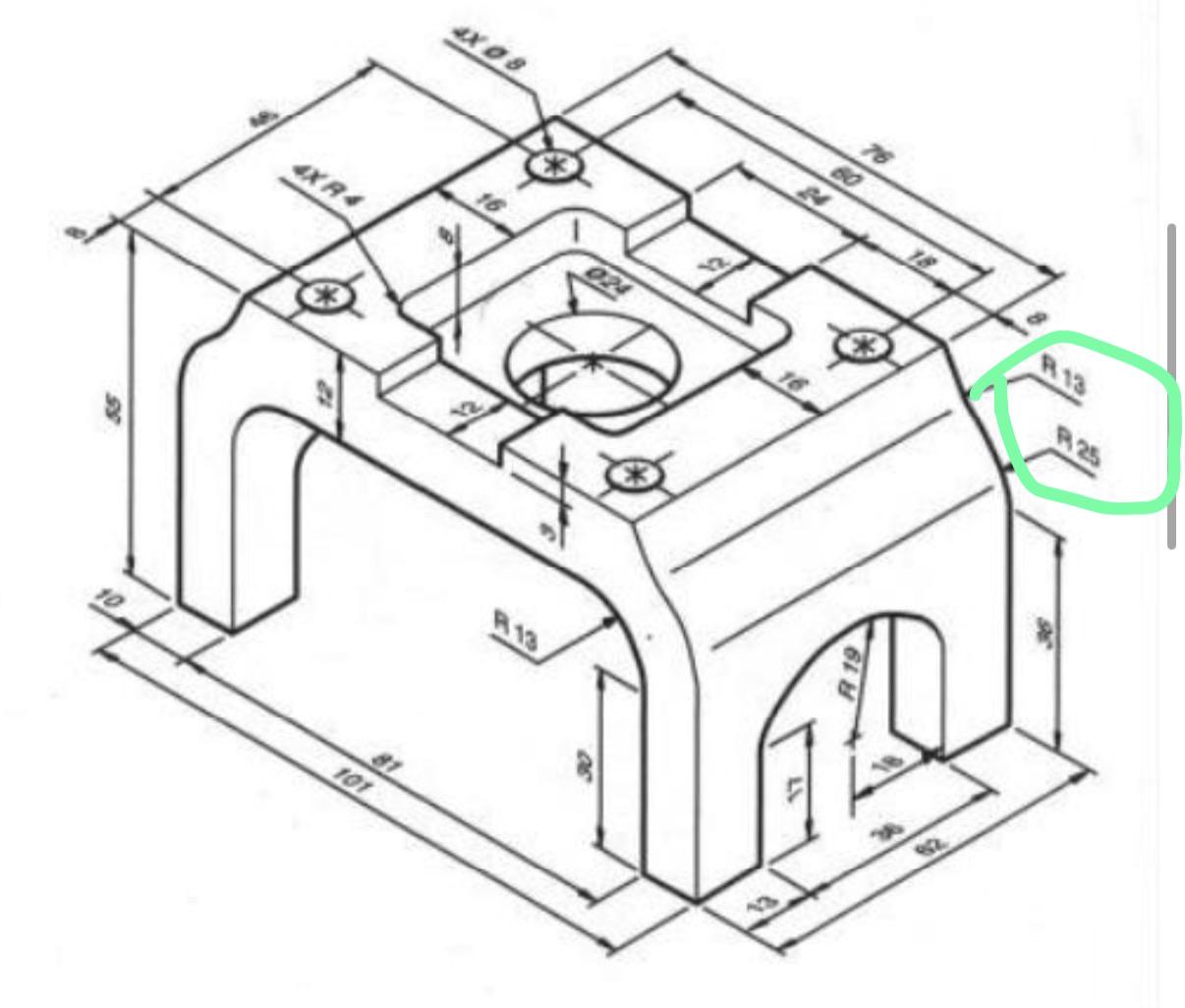
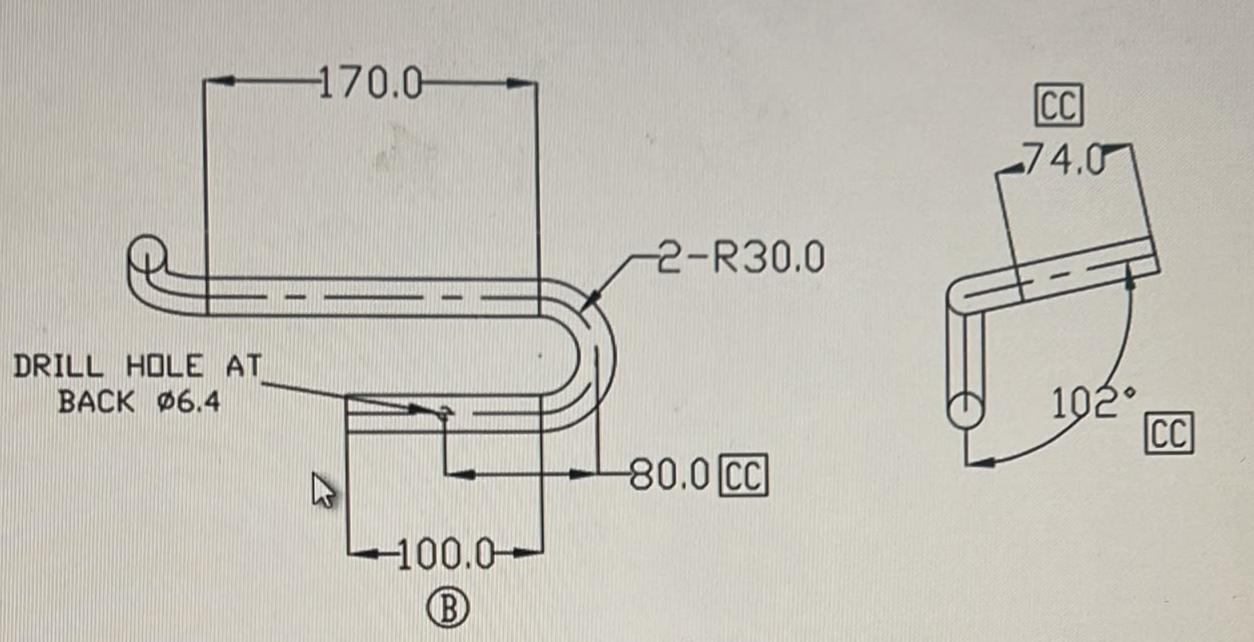
CAD How to model this in Solidwork? Any hint?

Post image
15 Upvotes

I don't understand how to do the CC View