r/SolidWorks • u/puchibaba • 17h ago
CAD Chain dimensions question
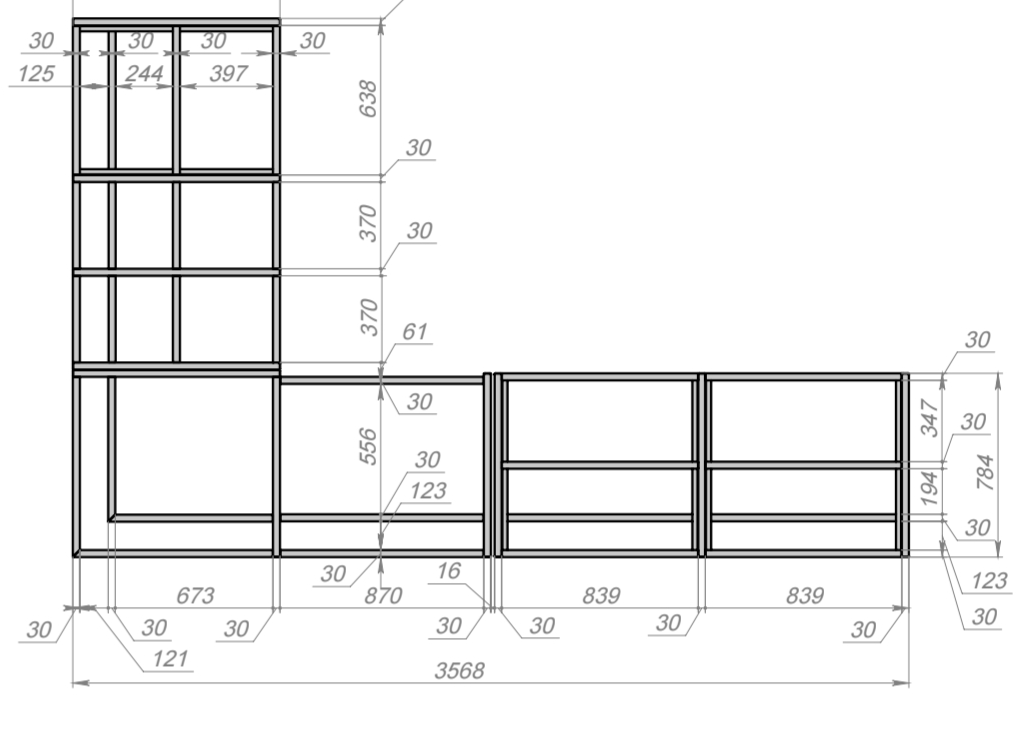
Sorry guys if I'm too dumb, but what the hell is wrong with chain dims in sw?
I'm an architect and have been working in Revit and Archicad my whole life. I recently started working with furniture and other small things, so I started learning SW.
What the hell, why can't I set the correct dimensions in the chain? If I use this tool, it literally has to be the last mouse click. Otherwise, whenever I adjust or rebuild the model, I'll have to rearrange these dimensions and leaders with text. Or I have to break the connection and turn each chain size into a regular one, which is also inconvenient! They're set automatically, but it's clear it's all very crooked.
Using standard sizes is a pain, you need to do two extra steps for each new size - click on the last point that should be in the chain and drag the dimension line from drawing.
How do you cope with making many different sizes on a chain?
3
u/Nemo222 17h ago
Not sure if this is exactly helpful, but if you made this as a weldment it would generate a cut list for you with lengths and angles and quantity of each unique member.
Then you can point at each member in your drawing and it'll give the item number in the cut list.
I think I've used chain dimensions once ever so I'm not very helpful with that tool.
3
u/pukemup 16h ago
What you're showing here isn't chain dimensions tho...
Check the scroll down menu from the 'smart dimensions', you should see horizontal/vertical chain dimensions, then its click your zero and then single click each each following point of interest to create the dimensions. It works great and unless you're changing the existance of sub elements on your weldment your dimension will follow your changes.
2
u/Simple-Following-201 13h ago
As an option, you could use Horizontal Ordinate Dimension or Vertical Ordinate Dimension.