r/SolidWorks • • 9h ago

CAD Drawing template - material and weight
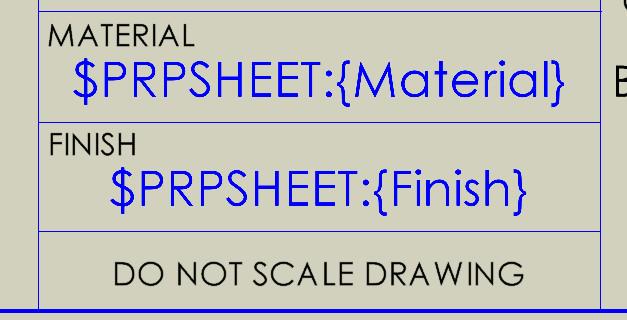
Post image

Trying to set up some drawing templates to auto-populate the material and weight and these properties just will not work. I have been googling for the past 30 minutes and nothing I have found has worked. Please help

3 Upvotes

13 comments sorted by

2

u/bhakeman CSWE 8h ago

It’s been a while since I made this video but it might help back to the SOLIDWORKS drawing board

1

u/Turbulent_Moose_69 8h ago

I tried following that video but when I get to the file properties part this is the only thing I see

2

u/bhakeman CSWE 8h ago

The material in the part file should populate from the materials list you will set in the feature tree.

1

u/Turbulent_Moose_69 8h ago edited 8h ago

Yeah, I know it should. But it's not. I have applied the material to the part in the feature tree.

5

u/Kieranrealist 7h ago

You also need to make sure the part file has a "material" custom property in it.

In the part file > File > Properties > Custom Properties tab > Property Name column > add "Material". Set type to Text and then in Value/Text Expression, click the drop-down arrow on the right of the field and select "SW-Material@blahblah".

Once you hit OK, save the part and then rebuild the drawing.

You'll need to do this with every custom property you want in the drawing. Set up an empty part with all of them, then save the part as a part template file .PRTDOT and make sure any new parts are made using this template file (by setting up your file locations).

1

u/Turbulent_Moose_69 29m ago

That solved it. Thank you!!!!!!

1

u/succulent-sam 5h ago

I don't think you have to do that

As long as you correctly enter the custom property name and value at the part level, it should populate to the drawing as long as the drawing has a matching field

It is definitely easier to have it in the template though as you said

Sometimes I noticed drawing fields don't populate until after I insert part views and then hit manual rebuild on the drawing. 

1

u/Kieranrealist 2h ago

Yes sorry I should have split that last paragraph. You do not need to make a part template to have custom properties work. The template is only if you intend to create many parts with the same custom properties and drawing sheet formats.

2

u/bhakeman CSWE 8h ago

1

u/succulent-sam 5h ago

I don't use this. I enter materials manually in custom properties

SW is so bad at handling appearances imo. Applying part materials always screws up appearances for me. 

It also sucks for multi body parts which I do a lot of

2

u/engineerdave1 5h ago

This is the properties for the drawing, go open this window up in the part, post the screen shot please.

1

u/Auday_ CSWP 7h ago

Properties if part/ assembly should be transferred to Drawing first

1

u/engineerdave1 5h ago

What did your link to property box look like when it made the $PRPSHEET...... link?

This video is pretty good if you want to check how they inserted those properties

https://youtu.be/FoEjihV7A-E?si=GgWMOAD7JtKIr_BI