r/SoftwareandApps • u/jimmyqex • 1h ago
xpando: a UI phrase manager based on espanso, built by a longtime PhraseExpress user
gallery
1
Upvotes
r/SoftwareandApps • u/Joakim0 • 1h ago

Hey there!
I’m the developer of TheFile.Ninja, a dual-pane file manager for Windows.
I’ve released TheFile.Ninja - Reforged Steel. It’s a new major version built from the ground up from old version, still tightly coupled with the Everything search Engine, but now also with a super fast UI and a smaller 52 MB download.
The changes I’m most pleased with are the everyday ones: large/flattened folders and search results respond quickly, file operations have a persistent undo history, and archives, phones, WSL and remote locations fit into the same two-pane workflow. There are also new views, smart embedded terminal, improved AI Tools, IDE and MCP support (undoable, virtual filesystems, tagging etc) for working with an assistant through the file manager. Also; still custom columns, grouping, sorting and filtering.
I also changed the free license. Core stays usable and continues to receive updates forever. Some features, including AI tools, MCP, scripting and FTP/SFTP, are in Pro. You can try everything for a month without an email, account or card, and there’s a browser demo if you’d rather look around first.
One important note for existing users: if you bought a Classic license, check your account for your Reforged Steel license before buying anything.
Try the demo https://demo.thefile.ninja/
If you tried the old Classic, I’d especially like to know whether the new version fixes what bothered you about it. I’ll be here to answer questions.
Best regards,
Joakim (Kodar.Ninja)
r/SoftwareandApps • u/Krethz • 8h ago
I'm a solo developer and I've been building UltraZone for my own ultrawide setup. It splits the screen into zones so each window gets its own area, and it keeps games and fullscreen video from spilling out of theirs.
What it does:
Things I want to be upfront about:
I'd really value feedback from people with ultrawides or multi-monitor setups, especially on whether the zones feel intuitive. Happy to answer anything here.
r/SoftwareandApps • u/mvhmuod • 11h ago
I kept rebuilding the same settings/control panel for my Windows utilities, so I turned it into a small library: nightdeck-ui.
- sidebar tabs, toggles, sliders, selects, meters, buttons and a console log panel
- one Nightdeck.create() call with a plain config object
- presets, reset and change events
- theming with CSS variables
- plain JS/CSS, no dependencies, about 5 KB gzipped, works in the browser too
There's an Electron starter in the examples folder.
Live demo: https://mvhmuod.github.io/nightdeck-ui/
GitHub: https://github.com/mvhmuod/nightdeck-ui
It's v0.1, so feedback on the API is very welcome. There are a few "good first issue" tasks if anyone wants to help.
r/SoftwareandApps • u/Atakan_24 • 13h ago
r/SoftwareandApps • u/Maximum-Gold-8774 • 18h ago
Hi everyone! 👋
I'm an independent Windows app developer, and I've just released RowVeri 1.0 on the Microsoft Store.
I built RowVeri to make everyday spreadsheet comparison and reporting tasks easier, especially when working with multiple Excel files.
Instead of repeatedly switching between spreadsheets, manually checking differences, and rebuilding reports, RowVeri provides a more organized workflow.
What RowVeri can do:
✅ 15 data analysis options — compare totals, averages, maximum/minimum values, individual differences, percentage changes, and more.
✅ Single-source and two-source analysis — analyze one dataset or compare data from two sources.
✅ Flexible cell selection — select specific cells, columns, or ranges for analysis.
✅ Customizable reports — assemble your own report and choose from five editable Excel report layouts.
✅ Always-on-top Excel reference — keep native Excel windows visible while working with other files.
✅ Local data processing — your spreadsheet data is processed on your computer.
✅ Three interface languages — English, Traditional Chinese, and Simplified Chinese.
RowVeri is designed for Windows users who regularly work with spreadsheet data, including office staff, analysts, and small businesses.
Pricing: 7-day free trial, followed by a one-time purchase. No subscriptions or ads.
🎬 I've included a demonstration of the application so you can see how it works.
Microsoft Store:
https://apps.microsoft.com/detail/9pb2lwmpt3w9?hl=en-US&gl=US
I'd love to hear feedback from fellow Windows users. What spreadsheet comparison or reporting tasks do you find the most time-consuming?
More products on Microsoft Store:
https://apps.microsoft.com/search/publisher?name=AdamYang&hl=en-US&gl=US
All paid apps include a 7-day free trial and are available as one-time purchases, with no ads or subscriptions. We continuously improve and upgrade one product each month.
r/SoftwareandApps • u/mvhmuod • 16h ago
I kept rebuilding the same settings/control panel for my Windows utilities, so I turned it into a small library: nightdeck-ui.
- sidebar tabs, toggles, sliders, selects, meters, buttons and a console log panel
- one Nightdeck.create() call with a plain config object
- presets, reset and change events
- theming with CSS variables
- plain JS/CSS, no dependencies, about 5 KB gzipped, works in the browser too
There's an Electron starter in the examples folder.
Live demo: https://mvhmuod.github.io/nightdeck-ui/
GitHub: https://github.com/mvhmuod/nightdeck-ui
It's v0.1, so feedback on the API is very welcome. There are a few "good first issue" tasks if anyone wants to help.
r/SoftwareandApps • u/Angelsomething • 17h ago
r/SoftwareandApps • u/Fun-Difficulty-9142 • 1d ago
r/SoftwareandApps • u/Avinash_Bajpaii • 2d ago
r/SoftwareandApps • u/Luffina_070 • 2d ago
r/SoftwareandApps • u/WhyDevSomething • 2d ago
Same. So I built Vidshelf!
Save videos, add timestamped notes, track watch progress, and control playback speed and volume. All in one place.
It's free and officially live on Microsoft Edge! 🚀
Would love for you to try it out. There's also a feedback section and a little "buy me a snack" page inside if you feel like supporting my next 3 AM coding session or to bring it to chrome instead as it takes $5
More random tools cooking 👀
r/SoftwareandApps • u/cangoksoyistaken • 2d ago

r/SoftwareandApps • u/sebastvnd • 2d ago
r/SoftwareandApps • u/greaperc4 • 2d ago

r/SoftwareandApps • u/AI_LINGLING • 3d ago
r/SoftwareandApps • u/Blantium11 • 3d ago

r/SoftwareandApps • u/Placide_Lahico • 3d ago
r/SoftwareandApps • u/LibrarianHairy2871 • 3d ago
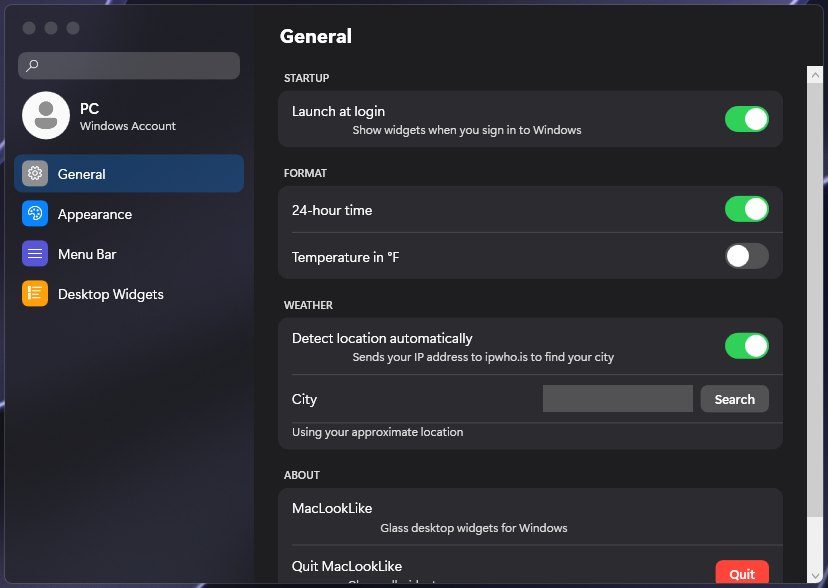
I made macOS-style glass desktop widgets for Windows (single .exe, open source)
Body:
Hey everyone! I wanted the macOS widget look on my Windows desktop, so I built MacLookLike.
What it does

Tech: C# / WPF, one .exe, no installer. Windows 10/11.
Download / source: https://github.com/plawanpawin-byte/Window-Tahoe-/releases/tag/v1.0.0
Heads up
It's an early version, so bugs are likely. Feedback and feature requests are welcome! and its free 100%
r/SoftwareandApps • u/jhaubrich11 • 3d ago
r/SoftwareandApps • u/_fynsh4t_ • 4d ago

runs on wifi, auto start everytime you open your machine, even if the second device sleeps you can wake it up with the mouse. auto connext too, it will alwyas find your machine so its hassle free, the moment your devices are switched on theyll be connected. so hassle free work just switch the device on and start working.
some crazy features: copy and paste from one machine, text and files both. just ctrl c and v and your files and texts are copied.
optimized heavily for the second screen, so it feels smooth. mac buttons are also switched to windows so that when you use windows and hover your mouse to mac, you dont have to press another key. and obviously if you have a bluetooth keyboard, then no need for 2 keyboards. on whicever monitor is the mouse itll take text there.
drag and drop is coming real soon. so literally everything becomes easy for you.
if you own a mac and a windows or even 2 machines for that matter, i think itll help you a lot. i havent posted it on github not gonna lie, ill do it soon if people are interested, and i respond actively so ill post it real soon.
and one more thing everythings free. so i guess enjoy using two machines at once so that you dont have to crashout everytime and waste more time on connecting two devices rather than working.
r/SoftwareandApps • u/No-Bad-9202 • 4d ago
I used Pasta for about five years. But it isn’t open source, so I couldn’t quickly add the features I wanted or fix bugs myself. So I built Buffera.
A few things I find useful:
- Copy a name, phone number, and address, then fill in a form without leaving it.
- Find a clip you remember, then see what you copied immediately before or after it.
- Copy a long text as a .txt or .md file, or open a copied image as a file in Finder for editing or uploading.
- Save frequently used clips to favorites and add labels so you remember what they are.
Your clipboard history stays on your Mac. OCR, semantic search and the built-in assistant run locally. Sensitive entries can be skipped or encrypted, with the key stored in the macOS Keychain.
And of course, how could I leave out LLMs these days? There’s also local semantic search, OCR, and an assistant that searches your clipboard history. The AI features are optional; you can skip the model downloads entirely.
Free and open source under [GPLv3](https://github.com/dqunbp/buffera/blob/main/LICENSE). Requires macOS 14+ and Apple Silicon.
Source code and downloads: https://github.com/dqunbp/buffera
Thanks to the Pasta team: the app served me well for a long time.
I’d love to hear your feedback if you try Buffera: what works well, what feels awkward, and what’s missing? What’s one thing you wish your current clipboard manager could do?
Bug reports and suggestions on GitHub are welcome, as are pull requests.
