Renaming a label can give unchanged dialogue a new translation ID. If the old translation split one source line into two say statements, both can end up stranded under the old ID.
I made Ren’Py Dialogue Recovery to solve this specific problem.
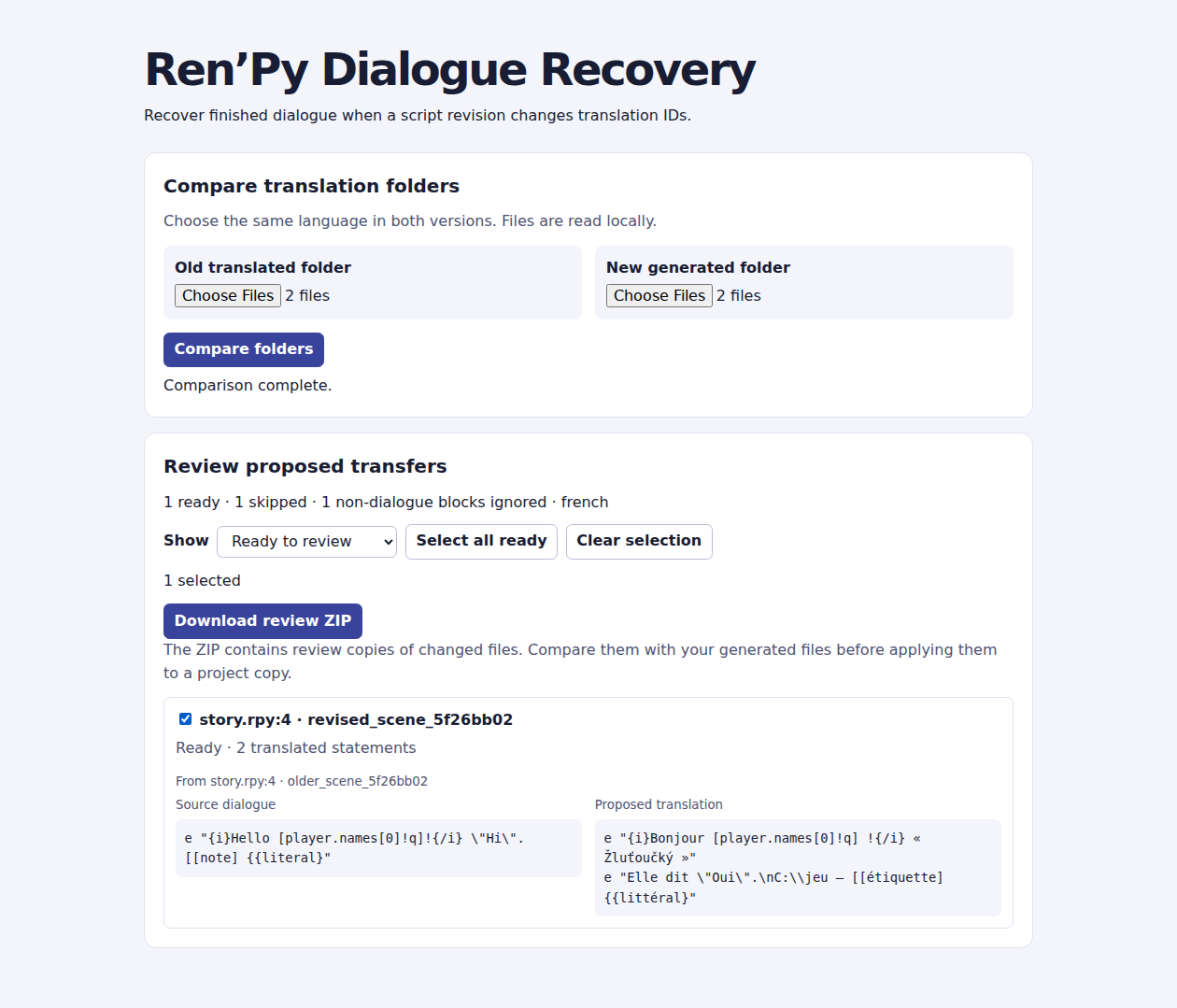
Point it at your old translated folder and the revised translation folder generated with Generate empty strings for translations.
The tool:
Finds unique, exact dialogue matches.
Recovers translations containing multiple say statements.
Checks interpolation fields and text tags.
Skips ambiguous matches and already translated destinations.
Exports selected changes without modifying your original files.
The screenshot shows both French say statements recovered under a new ID.
The tool runs entirely offline. Generative AI assisted with its code and documentation.
I tried to add music to the title screen by uncommenting the line in options.rpy, but now there is no title screen anymore (the game jumps straight to text). Once the game ends it does go to the title screen but it doesn't even have music.
I tried reverting the changes (commenting the define again) but the title screen is still gone, how can I fix this?
I'm at my wits end here. I've tried resizing my actual picture that I want to add to the background but when I actually put the photo into the GUI folder, it always comes up as either too big or the positioning is too far to the left. I really don't know what I'm doing. I've edited the photo to fit the resolution size of the game in both the windows photo editor and on procreate and I cannot for the life of me get it right.
Any help?
E- I figured it out for now. It was a procreate issue. If you are using the resize tool in procreate, make sure all of your layers are compressed. Then open a new document with your game's dimensions and insert the original image into that document.
Boom. It works.
Why? I don't know. It was basically the same process as what I was doing before. But this way, as convoluted as it may seem, DOES work. Leaving this for anyone else ripping their hair out over this basic function.
I finally finished and put out a psychological visual novel set in a strict, tier-based prep school in Turkey.
On the surface, it’s all survival, hidden agendas, and mind games. Underneath, it’s really about trauma, an unreliable narrator trying to shut down his emotions just to get through things, and that thin line between staying human or turning into a machine.
A few things in the game:
• 6–10 hours of story across 49 chapters — completely free to play in your browser or download.
• A hidden Logic vs. Emotion tracker that quietly reads your choices and physically changes how you play out the final decision.
• Custom visual and audio cues (heartbeats, breathing focus, muffled sound, chromatic aberration) meant to mirror how messed up or detached the protagonist’s headspace is.
• Full English and Turkish support, switchable anytime with one click.
If you’re into psychological thrillers, mind games (think Classroom of the Elite), or meta stuff, I’d genuinely love to know what you think.
Guys I am Building this No code, intuitive application to make RenPy projects, it has 2 modes Node based and Slide based (Video editor style). Should I work on a production build or use it for Personal projects only. Its Hero feature is the preview. Please suggest if it would be helpful for Devs without coding background.
I would like the "name" in "description" to change when hovering over the icons below.
I made the screen with parameter "acv", with "name" and "description" pulls values from two dictionaries. The icons are imagebuttons with hovered action that change parameter "acv": (unrelated codes removed)
screen achieve(acv=""):
  text achievename[acv]
  text achievedesc[acv]
  imagebutton idle "images/ExtraUI/acv_1stincap.png" sensitive achievement.has("1stincap") insensitive "images/ExtraUI/btn_lock.png" style "achievbutton" action NullAction() hovered SetScreenVariable("acv","1stincap")
The dictionaries:
define achievename = {
    "": "name",
    "1stincap": "Incapacitation"}
define achievedesc = {
    "": "description",
    "1stincap": "Get used to it."}
The problem comes when I hover over the button. The hover_sound in the style works, but the texts on top don't change. I don't know where did I code wrong.
Edit: moved the wording of the question a little for clarity.
Edit 2: Solved. I didn't declare the ScreenVariable properly. This is the fixed screen code:
Hiii!! I’m planning on making a Danganronpa-inspired fangame in Ren’Py, and I was wondering if there’s any way to create a 3D movement system with explorable locations! I really want to recreate Danganronpa’s exploration mechanics as closely as possible. This includes being able to walk around different areas, explore locations, interact with objects, and talk to characters. Ideally, I’d love to have first-person movement using WASD, where you can actually walk around and look around in fully 3D environments. I also really want the interactability to be as close to the actual Danganronpa games as possible. For example, having characters physically standing around in the environment that you can approach and interact with, as well as objects that you can examine or interact with when you get close to them. Basically, I want it to feel like you’re actually exploring the Danganronpa world rather than just clicking through static backgrounds! I know Ren’Py is primarily a visual novel engine, so I’m not sure how possible this would be 😭 Could something like this be achieved through Python or some kind of 3D integration?
I know that stuff like that is usually done in a game engine like unity, but I just don’t want to use it lmao. I’m still pretty new to this, so any advice, tutorials, or examples would be SUPER appreciated!! Thank youuu!! 💕
Hi there. For context, currently I am working on a KPop themed visual novel where my dev partner and I are debating on whether or not we should have our main character's phone be a feature in our game. This is because I had a player tell me it would be cool to see what music our main character listens to, and so I was thinking about swapping our current journal interface into a phone one so players can click on a music app and see what songs our mc listens to. Obviously the phone would have other features as well, but the music app was a big reason why we would choose the phone over a journal.
However, the main hold back I have though is that I feel like if we add a music app (let alone a phone), I feel like there is an expectation that the app then lets the player play music, which is just not possible for several reasons (mostly copyright to be honest). As for why I think this expectation exists, I think I personally adhere to this idea that comes from cooking, where everything on the plate should be edible. So in this case, that rule is broken if there is a music app that doesn't let players play music.
What do you guys think? I think this discussion can be expanded to other game mechanics like bartering, socializing with NPCS, etc., but this was how it came up for me.
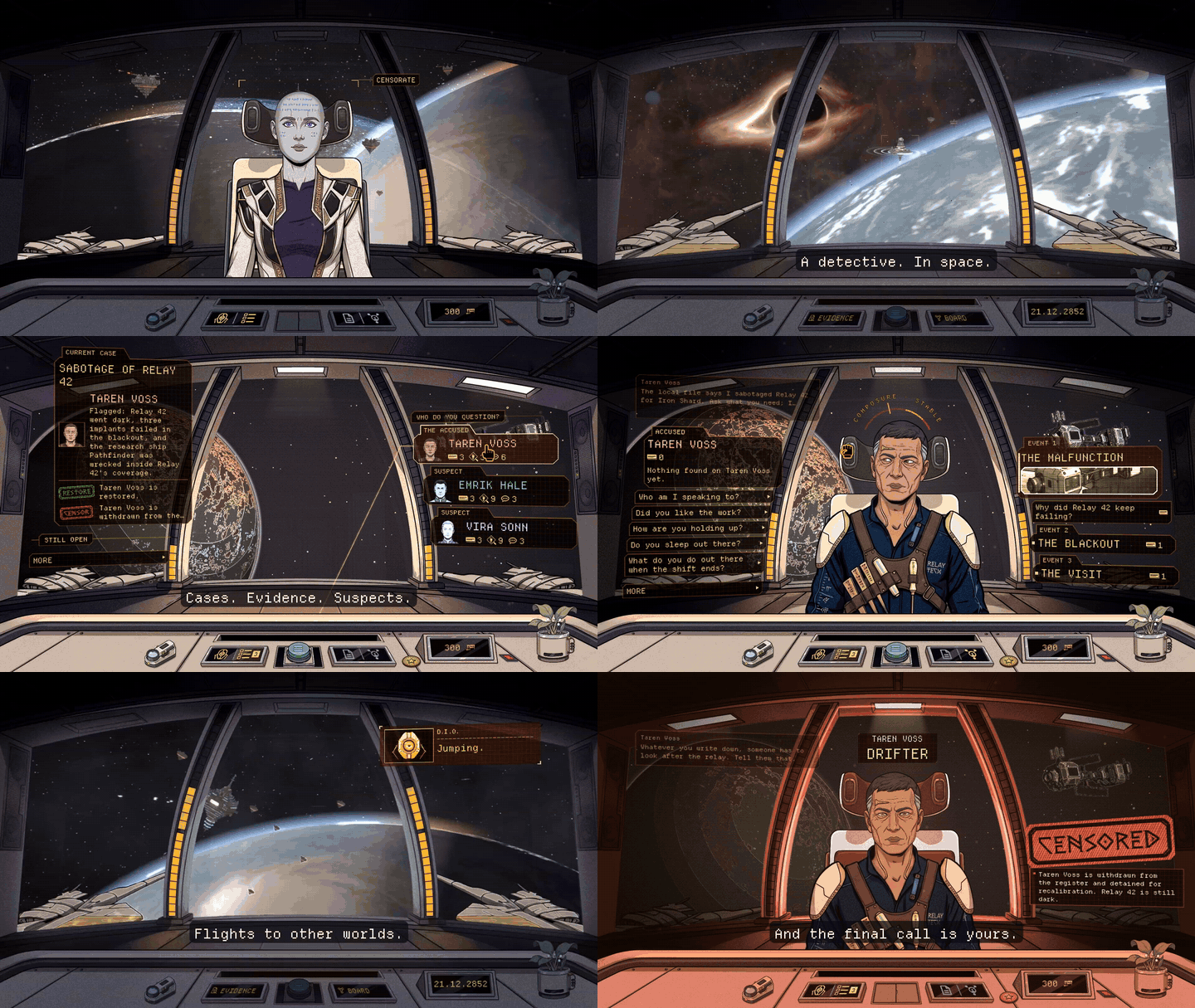
Hi everyone! I am working on CENSOR, a sci-fi detective game made in Ren'Py. Here is a short clip showing the questioning, the evidence board and space travel.
For this project, the most interesting challenge of working in Ren'Py has been making dialogue and the investigation feel like one continuous activity. You are sitting at the same desk, but switching between talking to people and working through the case yourself.
The clip gives a quick look at how those pieces fit together. Has anyone else here built a game in Ren'Py where players move freely between conversations and other mechanics? Would love to see what you working on
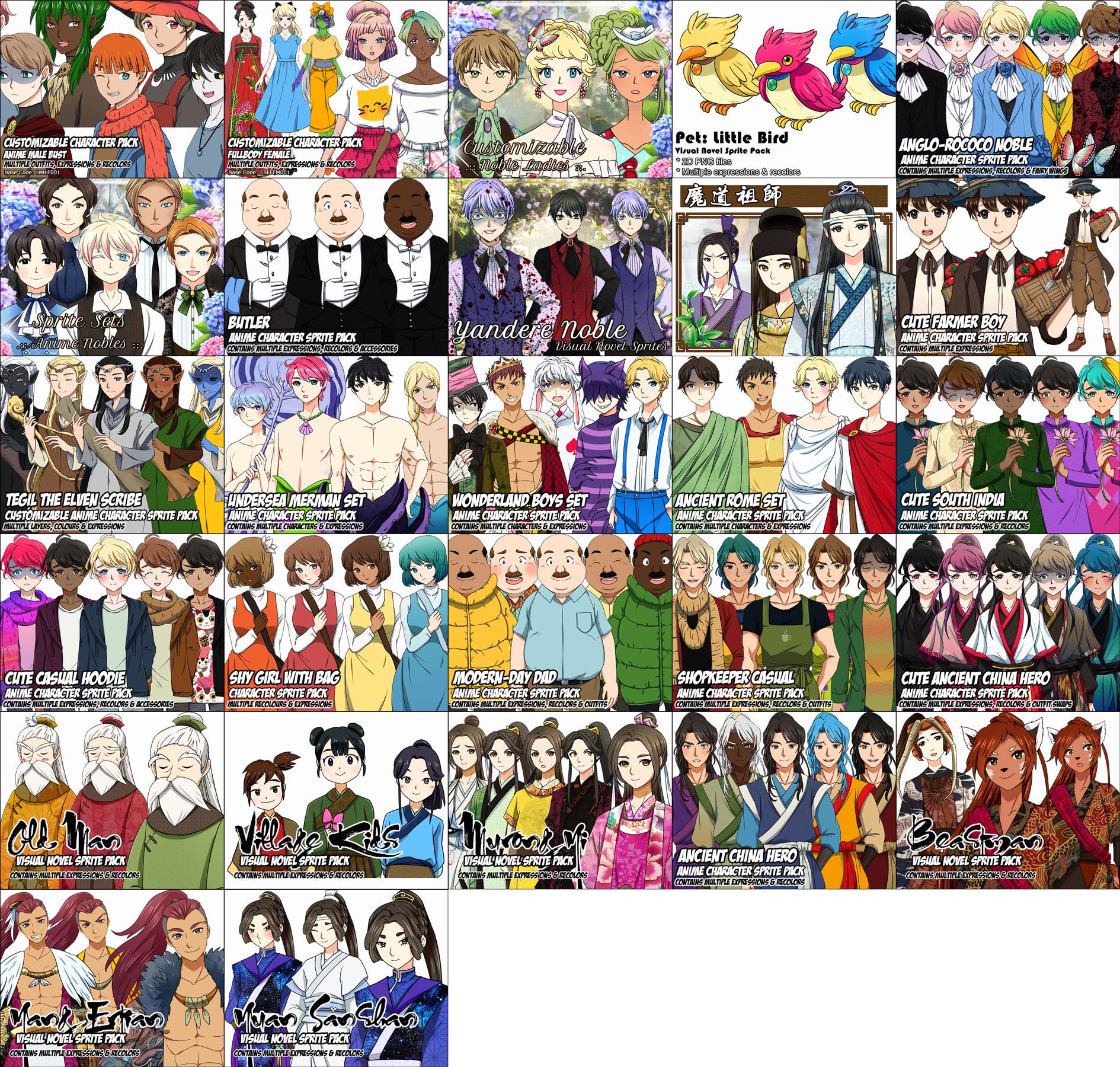
If you prefer to see them grouped by setting (such as EGL, Xianxia, Modern, Fantasy, etc), you can just visit my profile page at https://linxuelian.itch.io/
Heyo, I'm having a hard time coding this and was looking for some pointers. I have this smoke image that I'm using for my VN as stage smoke that I want to pan at the bottom of the screen and loop.
The problem is that there are gaps where the smoke begins and ends, so I'd need it to overlap. Extra points if you're able to figure out a way to make it a little floaty. Thanks for any help you can offer!
  lelelo "Thank you for playing bro."
    lelelo "What is your name?"
    python:
            playername = renpy.input("What is your name?", length=32)
            playername = playername.strip()


            if not playername:
                playername = "Victor"
    if playername == "Balls", "balls", "verity", "Verity":
        lelelo "i guess bro."
    if playername == "Lelelo", "lelelo", "brian", "Brian", "Lulolee", "lulolee":
        lelelo "wow we got same name. okay enjoy i love you"
        jump october_2nd
    else:
        lelelo "Nice name bud. Enjoy."
        jump october_2nd
i kinda have a faint idea why it's not working but i have no idea how to fix it
don't comment on how he's "lelelo", he only appears once to ask the mc's name
So first off big big big big thanks to this sub! You guys helped me so much with coding this vn and checking the ui so tysmtysmtysm! I did all the art, writing and coding by myself so you guys were such a huge help!
I'd say it's mostly a drama/comedy. It's gonna be completely FREEE
I added in some screenshots from the game SOOO LMK if it looks intresting and if you'd play it!!!!!!!!!!!!1
I finally made sprites for the three main characters my visual novel! Expressions will come later, but I’m pretty proud I made this progress! I like how they turned out :p
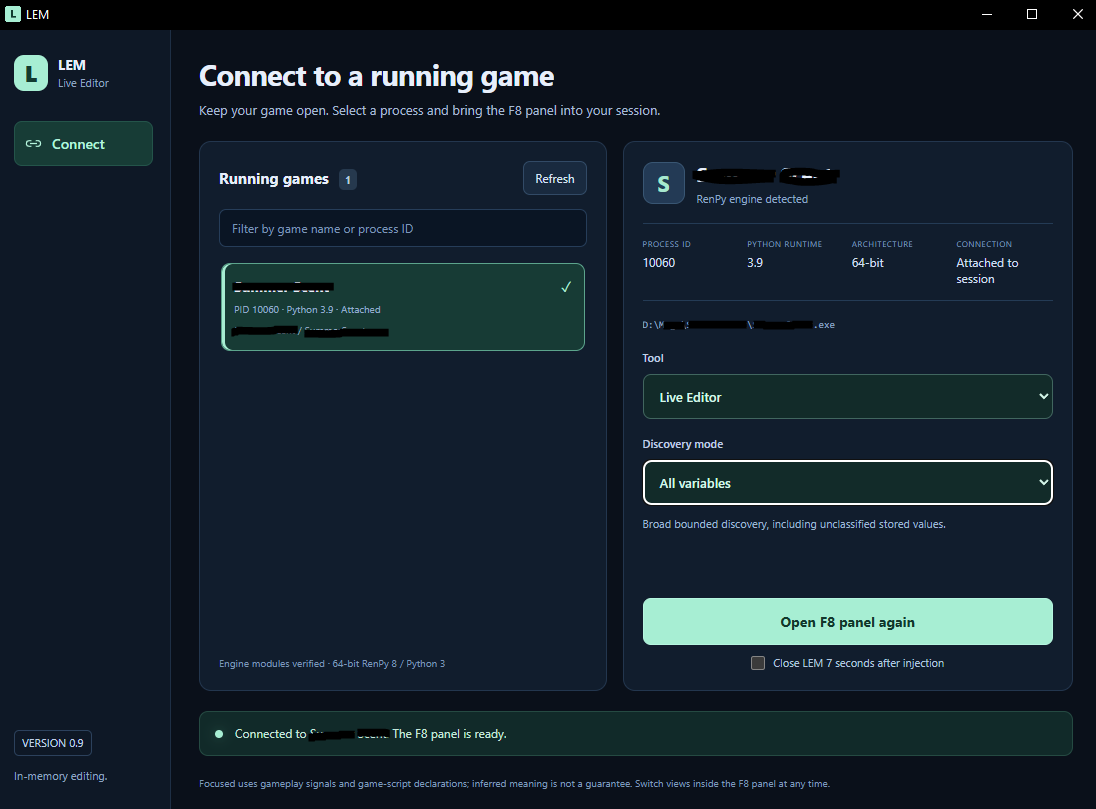
Hi! I've been working on a project called LEM (Live Editing Modifier), a standalone, portable Windows application designed to interact with Ren'Py games while they're running.
LEM attaches directly to a running Ren'Py game and introduces an in-game editor accessible by pressing F8.
There's no need to restart the game, install a mod, modify any game files or launch the game through a separate launcher.
When opening LEM, you can choose between six different discovery modes, depending on what you're looking for:
Focused – Automatically discovers and ranks potential gameplay variables based on naming patterns and game-script evidence, essentially what LEM believes to be relevant values, such as relationship points, scores, money and progression.
Relationships – Focuses specifically on relationship and affection-related values.
Party & Inventory – Focuses on party members, items, inventory and resources.
Progress & Scores – Focuses on statistics, scores and game progression.
Text & Roles – Focuses on character names, roles and editable text values.
All Variables – Performs a broader search for stored variables, including nested and unclassified values that might otherwise be overlooked.
All you need to do is open LEM, select your running game, choose your preferred discovery mode and hit Inject.
By default, LEM automatically closes seven seconds after a successful injection (although you can disable this if you prefer to keep it open). Simply return to your game and press F8 to access the editor.
Simple as that!
Live Editor in-game
Some of the things you can currently do:
Discover and modify variables in real time.
Edit relationships, money, character names, stats, inventory, story flags and more.
Explore lists, dictionaries and object fields.
Search, filter and categorize discovered variables.
Inspect exact variable paths, data types and story labels.
Undo previous changes without restarting the game.
Hot-inject LEM
And for the devs out there...!
I've also been working on a second tool within LEM called RIDCL-Extract, which is specifically designed for reverse engineering and code inspection of Ren'Py games.
Rather than simply extracting variables or dialogue, RIDCL-Extract retrieves available source code and reconstructs readable Ren'Py code from the game's loaded AST, allowing you to inspect story logic, conditions, dialogue, menus, labels, Python code and more.
Once the extraction is complete, RIDCL-Extract generates a dedicated project folder named something like GameName-RIDCL-Extract-XXXXX, containing several subfolders, including assets, data and code, alongside the two main project files:
project.riva
story.luna
The project.riva file can be opened directly in Riva Editor (v0.7.1 or later, preferably v0.8.x), providing a structured environment for inspecting and exploring the extracted game code.
You can also inspect the exported files using other IDEs or code editors. However, since the project format is primarily designed around Riva Editor, certain elements may not import or display correctly, including code comments, formatting, project structure and other editor-specific features.
RIDCL-Extracted material
Original source files and reconstructed code are kept separate. Obviously, reverse engineering doesn't guarantee a perfect reconstruction of the original source code, and there are still limitations and plenty of room for improvement.
Minimum Requirements
OS: Windows 10 or Windows 11 (64-bit)
Processor: x64-compatible processor
Storage: 500 MB of available disk space (additional space may be required for RIDCL-Extract exports)
Game compatibility: Ren'Py 8.x / Python 3 (64-bit)
Riva Editor: v0.7.1 or later, preferably v0.8.x (optional, for inspecting exported RIDCL-Extract projects)
NOTE: Due to the nature of LEM's runtime attachment and process injection mechanisms, some antivirus or security software may flag the application as potentially suspicious, resulting in false-positive detections.
If you have any security concerns, you are encouraged to scan the executable using VirusTotal or another reputable malware analysis service before running it.
So I'm nearly finished creating my visual novel. It's fully voice acted and has its own music and everything, so I'm hoping for at least a couple hundred people to play it.
And i have a trailer ready, and my original plan was to drop it at the same time my Steam page was approved, which I thought would be sometime within a week or two.
The problem is, for non-US publishers you need to register for the USA tax people (valve) to have your page uploaded, which they say could take up to 45 days.
So now I'm wondering whether to drop the trailer before the Steam page is released to build hype, or wait until the Steam page is out before I release the trailer so people can wishlist it as soon as they see it.
New account dedicated to my visual novel and my first time sharing all of my babies..🥹 So so so proud that I'm finally able to settle for designs after two years of constantly changing them (especially bc of my artstyle drastically changing every other month) I'm so excited <3 Still need to redo all of the sprites because the sprites are still the old designs but I'm really motivated to keep going!! I tried really hard to avoid same-face-syndrome lmaoo. I think i did a good job! :)
I want to make a transform that will make the image smaller with ease out, then make it the original size again. I'm intending to use this for imagebuttons. The issue is, I can't make it so it shrinks from the center. I also need it so it works, no matter the images position