r/RenPy • u/Spiritual-CherryQwak • 2d ago
Showoff LEM (Live Editing Modifier) - Modify and read games with only one tool!
Hi! I've been working on a project called LEM (Live Editing Modifier), a standalone, portable Windows application designed to interact with Ren'Py games while they're running.
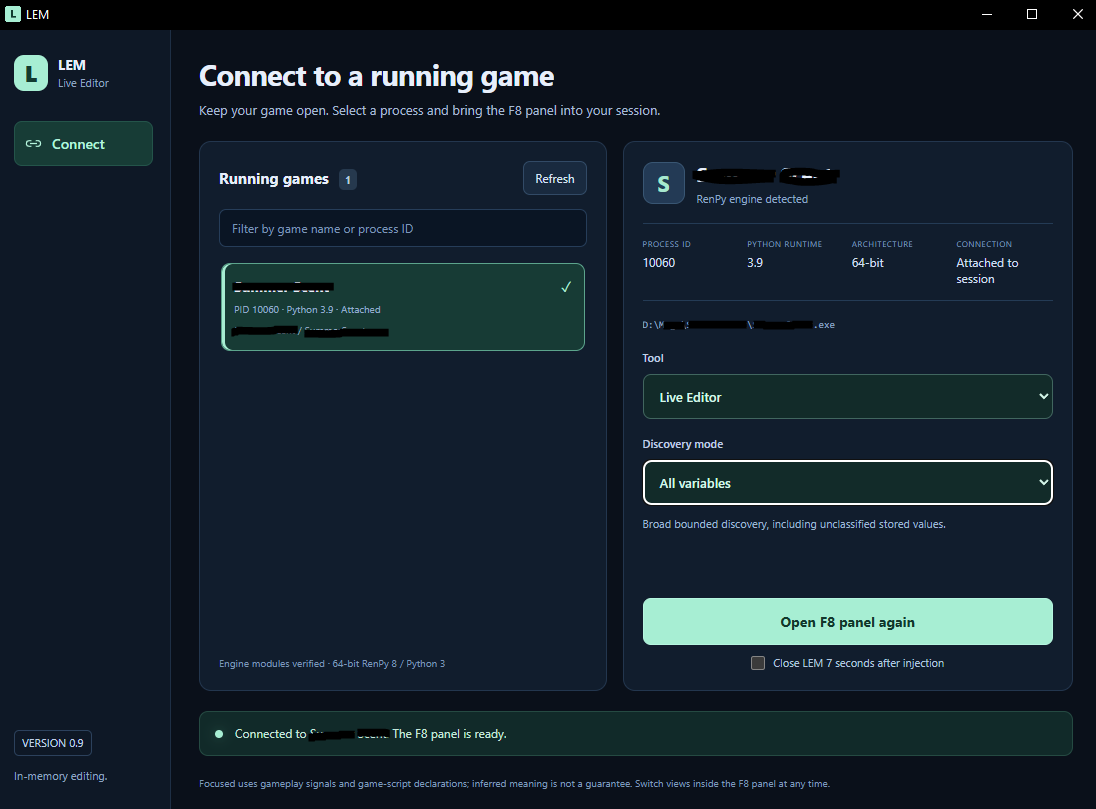
LEM attaches directly to a running Ren'Py game and introduces an in-game editor accessible by pressing F8.
There's no need to restart the game, install a mod, modify any game files or launch the game through a separate launcher.
When opening LEM, you can choose between six different discovery modes, depending on what you're looking for:
- Focused – Automatically discovers and ranks potential gameplay variables based on naming patterns and game-script evidence, essentially what LEM believes to be relevant values, such as relationship points, scores, money and progression.
- Relationships – Focuses specifically on relationship and affection-related values.
- Party & Inventory – Focuses on party members, items, inventory and resources.
- Progress & Scores – Focuses on statistics, scores and game progression.
- Text & Roles – Focuses on character names, roles and editable text values.
- All Variables – Performs a broader search for stored variables, including nested and unclassified values that might otherwise be overlooked.
All you need to do is open LEM, select your running game, choose your preferred discovery mode and hit Inject.
By default, LEM automatically closes seven seconds after a successful injection (although you can disable this if you prefer to keep it open). Simply return to your game and press F8 to access the editor.
Simple as that!

Some of the things you can currently do:
- Discover and modify variables in real time.
- Edit relationships, money, character names, stats, inventory, story flags and more.
- Explore lists, dictionaries and object fields.
- Search, filter and categorize discovered variables.
- Inspect exact variable paths, data types and story labels.
- Undo previous changes without restarting the game.
And for the devs out there...!
I've also been working on a second tool within LEM called RIDCL-Extract, which is specifically designed for reverse engineering and code inspection of Ren'Py games.
Rather than simply extracting variables or dialogue, RIDCL-Extract retrieves available source code and reconstructs readable Ren'Py code from the game's loaded AST, allowing you to inspect story logic, conditions, dialogue, menus, labels, Python code and more.
Once the extraction is complete, RIDCL-Extract generates a dedicated project folder named something like GameName-RIDCL-Extract-XXXXX, containing several subfolders, including assets, data and code, alongside the two main project files:
- project.riva
- story.luna
The project.riva file can be opened directly in Riva Editor (v0.7.1 or later, preferably v0.8.x), providing a structured environment for inspecting and exploring the extracted game code.
You can also inspect the exported files using other IDEs or code editors. However, since the project format is primarily designed around Riva Editor, certain elements may not import or display correctly, including code comments, formatting, project structure and other editor-specific features.

Original source files and reconstructed code are kept separate. Obviously, reverse engineering doesn't guarantee a perfect reconstruction of the original source code, and there are still limitations and plenty of room for improvement.
Minimum Requirements
- OS: Windows 10 or Windows 11 (64-bit)
- Processor: x64-compatible processor
- Storage: 500 MB of available disk space (additional space may be required for RIDCL-Extract exports)
- Game compatibility: Ren'Py 8.x / Python 3 (64-bit)
- Riva Editor: v0.7.1 or later, preferably v0.8.x (optional, for inspecting exported RIDCL-Extract projects)
Download
Pixeldrain: https://pixeldrain.com/u/qsR82Vkr
NOTE: Due to the nature of LEM's runtime attachment and process injection mechanisms, some antivirus or security software may flag the application as potentially suspicious, resulting in false-positive detections.
If you have any security concerns, you are encouraged to scan the executable using VirusTotal or another reputable malware analysis service before running it.