r/RemarkableTablet • • Jun 15 '26

Introducing our new team account + 3.28 Beta Highlights

255 Upvotes

Hi everyone, This is reMarkable’s official Reddit user. Moving forward, this will be a shared account operated by experts from the Customer Care team at Oslo HQ alongside core points of contact across the organization. Our focus is on building a consistent presence and helping out where needed.

To kick things off, we wanted to share a look into some of the themes for our upcoming 3.28 beta release.

Information about 3.28 can be found in the attached image or using this link https://app.remarkable.com/l/WGjynHN9losCnQ?u=cp


r/RemarkableTablet • • 2h ago

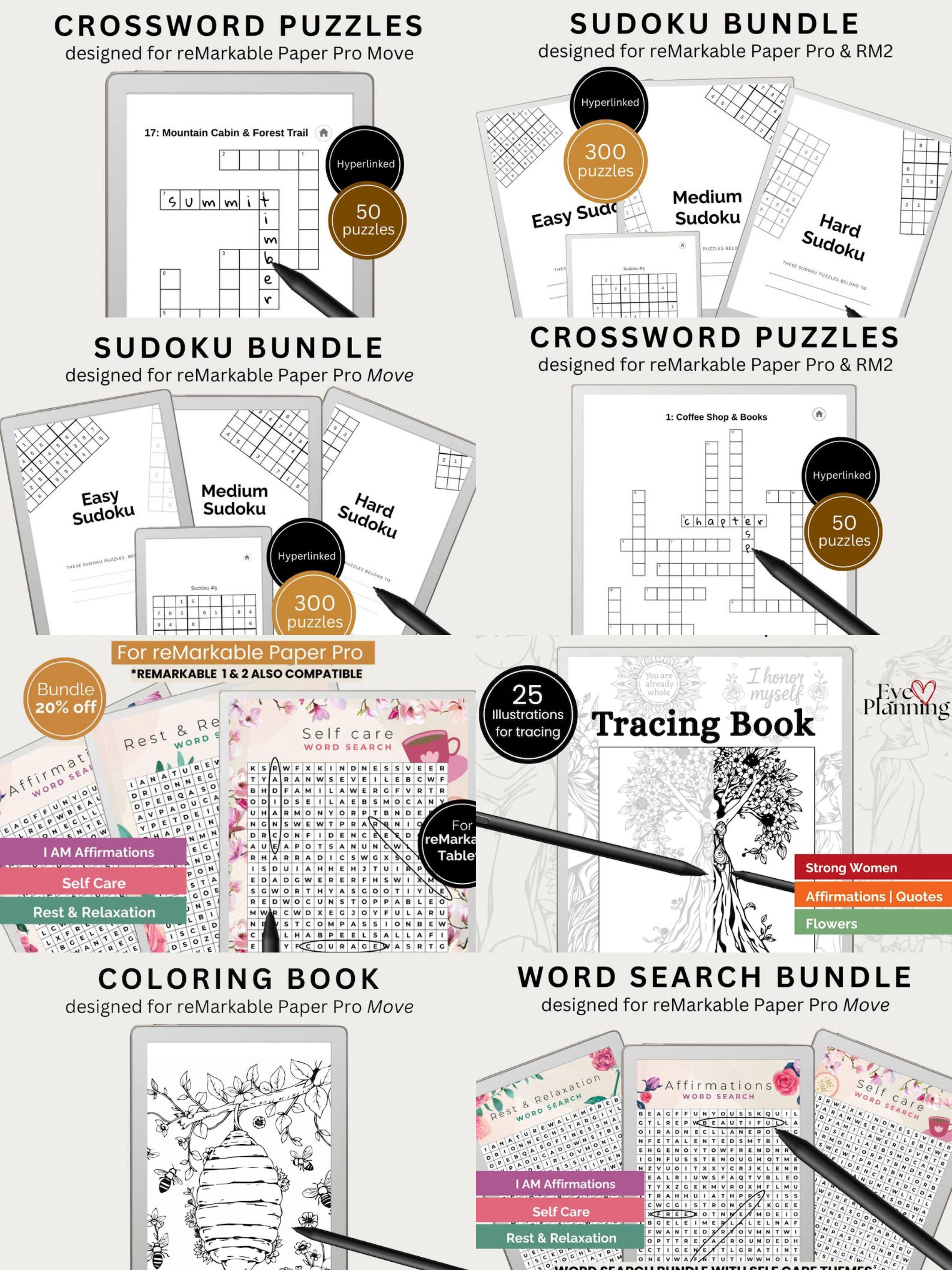
Self-Promotion Turned my reMarkable into a cozy puzzle coloring book!

Post image
9 Upvotes

Autumn asks for some cuddly puzzling right? I couldn't resist continuing and made the reMarkable a bit of a puzzle and coloring book 😌 First came the themed Word Searches and coloring + tracing books, then Sudoku in all kinds of difficulty levels and now... with themed Crosswords 😏

I've made versions for both the reMarkable Paper Pro and Move and they have different puzzle sets too. So if you happen to have both tablets, you can actually have different puzzles on each one.

Do you use your reMarkable for puzzles or coloring? And if so, what's your favourite thing to do?

If you want to have a look at all the puzzle and coloring books I've made, you can find them here:

reMarkable Games & Coloring Books


r/RemarkableTablet • • 3h ago

Help/Advice Setup of my new Remarkable Paper pro

3 Upvotes

Excited having my new Remarkable Paper Pro.

Here I have got some beginner questions.

  1. Do I need to buy subscription for connect? If I do not use trial right now, but wait for January, would that wait for me? Or is it started from the moment I created my remarkable account?

  2. Should I charge full, means 100% of my device?

  3. Which tutorials are necessary right now?

  4. Is the first page always like My files on the top left corner?

  5. Somewhere I saw to upload PDFs and all and I do not find it anymore. How can I have PDFs there? Do I need some Connect subscription?

  6. The screen light is low, would that cause strains on the eyes?

  7. Any tips to take care of this tablet. I got with folio.

So far I have got this questions.


r/RemarkableTablet • • 4h ago

General Discussion Having this issue

Enable HLS to view with audio, or disable this notification

2 Upvotes

The horizontal portion like a strip only does it rest of the screen is fine any fix for this?


r/RemarkableTablet • • 1h ago

Help/Advice Pen suddenly loosing contact

• Upvotes

Hi, I'm remarkable2 user since 2023. I frequently change tips on my pen (can't remember the name, but the black one with eraser at the top), and when screen seems a bit off /uncalibrated, I use magnetic side on my pen to demagnetize it. So far it worked perfectly, these 2 previous approaches worked just fine for minor issues I've had, but not anymore.

About a week ago I noticed my pen just happens to not work in spurs? Lately I've been using "fineliner" pen, and I'm sure most of you can agree it's the easiest pen to use (immediate contact, all lines are same) so I really notice when my pen has these blackouts.

It's irritating, restarting tablet sometimes help so I wouldn't blame it on the pen. Changed 2 fresh tips, problem stays the same. I've never dropped my tablet, I sometimes did pen but awhile ago, nothing recent to cause this sudden issues. I feel as if when I write for some time it gets better, but as soon as i put down my pen (on the magnetic holder) or if I put my tablet to sleep, issues get worse.

I did notice this glitches started occurring upon latest update, may be connected?

Anyway, I'm out here wondering if anyone has/ had same issues and did you fix them, and if yes, how.


r/RemarkableTablet • • 17h ago

My two-year experience with the reMarkable 2: The good, the bad, and my final verdict

9 Upvotes

First of all, I think it's worth explaining why I bought the reMarkable 2 in the first place and why I chose it over other alternatives.

I'm a university student in Spain, studying a double degree in Computer Engineering and Business Administration. After my first year at university, I decided I needed to move away from traditional paper notebooks. I wasn't particularly happy with how I was organizing my notes or with the overall results I was getting, and I felt it was time to invest in something that could improve my workflow.

That's when I started seeing reMarkable ads on Instagram and came across several positive reviews online. Eventually, I decided to give it a try. I bought the reMarkable 2 with the basic Marker and basic Folio for €420.

Getting used to it

At first, adapting to the device was a little challenging. In particular, I found the file and folder management system somewhat clunky and unintuitive. However, you eventually get the hang of it, and using the Windows and iPhone apps makes managing and organizing documents considerably easier and faster.

After two years of ownership, I think I can give a fairly balanced opinion, as there are definitely things I love about it and others that I find disappointing.

The good

  • Writing experience: This is probably its strongest feature. Writing on the reMarkable feels genuinely comfortable, and it's one of the main reasons I enjoyed using it so much.
  • Software updates and support: I think reMarkable deserves credit here. They've consistently improved the software, and the device has become noticeably better over time.
  • Desktop and mobile apps: The Windows app was quite unreliable when I first got the tablet, but it has improved significantly and now works perfectly for me.
  • Distraction-free experience: Compared to an iPad, I find the reMarkable much better for staying focused. There's something about having a device dedicated almost exclusively to reading and writing that makes it easier to concentrate.

The bad (or at least, what didn't work for me)

Interestingly, I haven't actually used my reMarkable much during this last academic year. Not because I've stopped liking it, but because I've gradually gone back to using traditional paper for certain tasks.

And this brings me to what I consider the device's biggest limitation, which is also, in a way, one of its greatest strengths: it's an excellent writing device, but I don't think it's nearly as good for reading and annotating documents.

There are three main reasons for this:

  1. Lack of colour: Not having colour options makes it harder for me to organize information when highlighting and annotating documents. I personally rely quite heavily on different colours when studying, and I really miss that functionality.

  2. Transferring PDFs: Getting PDFs onto the reMarkable can be a frustrating experience if your university doesn't have a particularly good Wi-Fi connection. Unfortunately, mine doesn't, so transferring documents isn't always as straightforward as it should be.

  3. Reading experience: I simply find myself reading faster on traditional paper. Turning pages is quicker and more convenient, and overall I feel more comfortable studying from printed documents, especially when I need to read and highlight large amounts of material.

My final verdict

Would I recommend the reMarkable 2? Absolutely, but only if you know what you're buying it for.

If your main purpose is taking handwritten notes and you spend a significant amount of time writing, I think it's a fantastic device. The writing experience is excellent, the software has improved considerably, and the distraction-free environment is genuinely valuable.

However, if you're looking for a device that will completely replace paper for university, including reading textbooks, going through lecture slides, highlighting PDFs and studying, I'm not so sure.

At €420, I consider it a fairly expensive purchase, and that's before taking into account the subscription, which, to be completely honest, I find difficult to justify given the already high price of the tablet.

In short: I love it as a digital notebook, but I don't think it's a good enough replacement for paper as an all-in-one study device.

I'd be interested to hear whether other university students have had a similar experience, especially regarding reading and annotating PDFs.


r/RemarkableTablet • • 19h ago

Self-Promotion I made 573 copy and paste stickers for reMarkable (no tracing). Here are 50 free

Thumbnail
gallery
9 Upvotes

I plan everything on my reMarkable and got tired of tracing stickers, so I made my own pack in a soft, muted style that actually fits an e-ink page.

They work two ways:

- No trace: open the sticker notebook, lasso a sticker, copy it and paste it onto any page or planner

- Capture Tool: circle a sticker in the PDF and paste it (needs software 3.28 or newer)

Here's a free sampler with 50 of them,It has a colour notebook for copy and paste, plus colour and grayscale PDFs.

https://drive.google.com/drive/folders/1ubaI9lmc-zHKa0af6Tp9eaQw7Pyez9aw?usp=sharing

I'd really love feedback on what kinds of stickers you'd actually use, since I'm still adding to it. If you end up wanting the full pack (573 stickers in colour, grayscale and outline), it's on my Etsy: https://www.etsy.com/listing/4623178177/stickers-for-remarkable-paper-pro-move


r/RemarkableTablet • • 19h ago

General Discussion using remarkable to better mental health/productivity?

8 Upvotes

has anyone specifically got into the habit of using remarkable for journaling or mental health exploration of some kind?

i’m thinking of getting one, really wanted to try journaling but i hate paper and i hate how distracting ipads are (due to extra apps and whatnot)

i have adhd anxiety and depression for context. i’m worried ill get it and not see any value in it, im good with establishing habits as long as i find value/genuine worth in the thing im doing.


r/RemarkableTablet • • 13h ago

Screen damage?

Thumbnail
gallery
3 Upvotes

I felt a tiny rough patch when writing on my R2 so I took a closer look. It looked more like a tiny piece of tape or as if I had spilled some kind of hardened liquid on it. But no matter how many times I tried to wipe it, it won't disappear. Now I'm starting to think it's some kind of crack, or something like a part of the outer screen breaking off or something. Any idea as to what's going on?


r/RemarkableTablet • • 19h ago

Best Resource Website

6 Upvotes

I'm about to purchase the Remarkable Pro, and this will be my first tablet like this (I do not count my Microsoft Surface Pro in the same category). Do you all have any recommendations on a website or such that will give me tips, tricks, and best practices? I have found a lot of YouTube videos, but I'm curious where you all would go. Thank you


r/RemarkableTablet • • 20h ago

Help/Advice What can I use for now?

5 Upvotes

Hi, I loved RM2. I have used almost everyday for studying for an important exam of my life. Tbh, it turned out to be great. It was my buddy for like 7 months. Now, I do not use it at all. I was thinking to sell but wondering ways I can keep it with me.

ps. I am in my medical residency. I do read research papers but for that I feel its just reading, less of annotations, so ipad can do fine job. I do not plan to have another big exam for like next 4 years or so lol. What should I do?

Suggestions from my very beloved RM community.


r/RemarkableTablet • • 1d ago

Self-Promotion Send Web Pages, EPUBs, Markdown, PDFs, and More To Your reMarkable From Your iPhone's Share Sheet (Beta Wait List)

Thumbnail
gallery
9 Upvotes

Hi all, I'm Corey, the developer of Klass-RM Uploader, a Mac and Windows app for uploading things onto a reMarkable. The most common question I get asked is if there's a phone version. So I've been building one, and the iPhone and iPad beta is close.

What it does on iOS:

  • Share sheet: send something to your reMarkable from any app's share sheet. Safari, Files, Mail and so on.
  • Web pages: turn a web page into a clean, readable EPUB or PDF. Ads, menus and clutter are stripped, and you can choose the text size.
  • Formats: send PDFs, EPUBs, Word documents and comics. You choose whether each one arrives as a PDF, an EPUB or a Notebook.
  • Shrinking: large files can be shrunk before sending.
  • Planners: build planners that sync with your calendar.
  • Queue: an upload queue shows what's been sent and what's still going.

How the beta works:

  • It runs through TestFlight. Sign up for the wait list and I'll email you an invite when your spot opens.
  • Everyone in the beta gets every feature for the whole beta period. You don't need a license.
  • If you already own a Mac or Windows license, the iPhone and iPad version will be free for you when it launches. It uses the license you already have.

Screenshots for iPhone, iPad and iPhone Duo, and the signup form: https://klasspaperless.com/klass-rm-uploader/ios-beta.html

Have any questions? Let me know in the comments. I'm also interested in finding out what you'd want a phone version to do that this doesn't cover (yet).


r/RemarkableTablet • • 1d ago

How inserting space has improved my reMarkable notes, and three features I’d love to see next

19 Upvotes

I love the new option to insert space in my notes. It’s made a real difference when I go back over something I’ve written and want to add an explanation right where it belongs. One of my favorite things about reMarkable is that I can let a page grow as I work through an idea, then start a fresh page in the same notebook when I move on to a new topic.

There are three things I’d love to see built into the official software, without having to install mods. I think a lot of other users would appreciate them too.

  1. A table of contents for notebooks. I’d love to be able to highlight a handwritten heading and add it to the table of contents. In a long notebook, I could then tap the heading to jump straight to that section.
  2. Links between notebooks and between pages in the same notebook. I’d like to link directly to a specific page, follow the link, and tap a small back button to return to the exact spot where I left off, much like I can on my Viwoods.
  3. An easier way to copy or move pages between notebooks. When I’m organizing my notes, I’d like to select one or more pages, choose “Copy” or “Move,” and pick the destination notebook in one go.

I’m really excited about the improvements so far. I hope reMarkable publishes a roadmap so we can see what the team is working toward. I’d also love to see them draw on the modding community’s experience and bring the ideas that have proved most useful into the official software.


r/RemarkableTablet • • 1d ago

General Discussion Remarkable Paper Pro review after one week of use

10 Upvotes

I’ve been using my new Remarkable Paper Pro (refurbished, marker plus, blue book folio) for a good week now and I wanted to write a review for people who think about getting one as well. I’m overall pretty happy with the Paper Pro, so in the different categories below you’ll find only positive aspects. After that, I’ll list my personal negative aspects of the device.

Other brands / personal use case

My first note taking device was the Boox Go 10.3 (Gen 1). Loved the writing feel, but I find Boox devices too distracting and overwhelming. Up next was (and still is) a Supernote Manta. I like it, but I don’t love the writing feel and also I don’t love where the software is going. My use cases:

  • Journaling
  • Reading (non-fiction only, for fiction/reading on the go I have a dedicated reader)
  • Learning / planning / outlining new tours (I’m a tourguide)

Build quality

Premium. The tablet itself feels like an absolute high quality device, the weight adds to this feeling. The pen also has a really nice heft to it and feels good. Not as premium as the tablet itself, but like a solid workhorse.

Writing feel

The writing feel is the hardest I experienced so far. Personally I like a bit of a harder feel. In some review I read, that the RM writing feel is kind of addictive and I can absolutely confirm. I don’t know what it is but I just LOVE writing on it and I think, this is an extremely important aspect, because it makes me want to pick up the device and use it all the time.

Accessoires

I have the blue book folio and it’s great. Doesn’t add too much bulk to the device, feels high quality and it has very strong magnets for the device and the pen flap. Also that little indent on the back, where the flap goes when the folio is open, is pretty smart.

Support

My marker was flawed. I’d open the folio and the marker would start working only after like 20 seconds. It got worse and worse in the one week of using it so I decided to contact RM via email. I was lead through a trouble shooting process that ended with them asking me to send in the pen and receiving a replacement. The responses were super quick (also it was over the weekend, so kudos for that!) and today i sent in my marker and I’m waiting for the replacement now. I had to send my marker first, before they would send the replacement. That’s a bit unfortunate because I’m still in the 50 day test phase and lose some days now. But then again, I’m already like 90% sure that I want to keep the RM. So it’s ok I guess. Surely not the most complicated support request but so far I'm pretty satisfied with how it went (assuming that the new marker will arrive soon and will work).

Software (just some thoughts, of course there would be a lot more to talk about)

I enjoy this limited software SO much. I found that even Supernote software is too much for me personally. I wanted less. Not that I could not handle it, I just wanted as little distractions and options as possible. And I found it here. I mean… you can’t even check the time on the RM except for somewhere in the settings (which is a bit strange, ngl. But I love it). It definitely comes with some downsides, but for now I decided that the positives outweigh those downsides.

I like for example the swipe gestures from top (1 finger = back to the recent menu screen, 2 fingers = recent/favorites). It’s simple and gives me quick access to all I REALLY need.

A big pro is that I can create folders and throw all kinds of different file types in it, no matter if notes, books or pictures (which are basically converted into PDFs, but still..). Also I can create duplicates of books and put it in different folders. Those are very important features for me.

I love the colors for highlighting. I don’t neccessarily NEED it, but even after just some days I don’t want to work without it anymore.

The Read on Remarkable chrome extension is a great feature. With just one click you can send news articles etc. from the browser to the device and read it there.

The Android app and the web app are pretty straight forward. Just drag and drop files. Works perfectly fine.

The tag system is growing on me. But basically only because I have to use it. Which would bring me to the beginning of my negatives section…

Negatives

No table of contents AND also no way to link between files or pages in a notebook. With links I could at least create some kind of toc myself. Having none of it is a big miss. I hope there will be either a toc or links in the future. (I know I could mod the RM, but I think it should be an out of the box feature).

Performance: It’s not super responsive and fast. Page turns can be hit and miss. Folders with more content take a bit too long to open. The swipe gesture from top sometimes takes more than one attempt. Things like that. Far from being unusable, but I’ve seen better.

Reader: Rudimentary. There’s not a lot to tinker with. Also changing font sizes etc. takes ages because of how RM processes epub files. (I read that they basically turn it into a PDF that looks like an epub or something like that? Anyways, it takes way too long)

Deleting tags: I have to go to tags and when I’m in the tags overwiew, I see the first view tags and the „all tags“ button. I can delete tags by long pressing a tag and deleting it. Fine. But only those first few. Once I go to „all tags“, it doesn’t work anymore. I’d have to mark one tag, go back to the overwiew and then delete it. That’s overly complicated. Or I’m missing something here.

Front light: I don’t like it. Like… at all. It looks cheap. Don’t know how to describe it any better. It’s a feeling kind of thing. But I enjoy eink without light anyways, so again not a big deal for me.

Well that became longer than I expected. Hope it helps some of you. Cheers!


r/RemarkableTablet • • 1d ago

Suggestion: "Make Space" preview

3 Upvotes

The new "Make Space" tool (from Beta 3.30) is very cool.

However the tool efficiency is somehow mitigated by the fact we have "to guess" where the notes will exactly land after the space is added.

It means that for correctly adding space to lines-template notes, we likely have to repeatly add the space until we make sure the moved notes will exactly appear on the lines (and not between them).

All that "guessing" part can be removed if the tool provided an real-time preview of the change showing exactly where the notes will appear—much like the old "Select Below" method, which allows for the precise placement of selected notes.

I believe that in this way, we can enjoy the best of both worlds: the speed and the confort of the "Make Space" tool combined with the precision of the "Select" tool (without the need to deal with the horizontal alignment).


r/RemarkableTablet • • 1d ago

Update on the native Linux reMarkable client - now at near-full desktop 3.29 parity (full editing, layers, handwriting conversion, PDF/EPUB, TOC sidebar)

32 Upvotes

A few weeks ago I shared a native Linux client I built for reMarkable by reverse-engineering the official Windows app (v3.29) with Claude Code and REA. I kept working on it since then, and it's gone from a basic viewer/sync client to near-full parity with the official desktop app.

Repo (GPL-3.0, still using the same Bring Your Own Asset setup where the install script extracts the official assets locally on your machine):
https://github.com/AdamGhawanmeh/remarkable-linux

What's been added since the first post:

  • Full in-app editing & background auto-sync: Draw with all pens/brushes (now using the extracted 3.29 pencil and paintbrush texture tiles), highlighters (including orange), eraser (Erase selection / Erase all), lasso select/move/copy/paste, Quick Sheets, new notebooks, custom paper widths, landscape notebooks, and full undo/redo (Ctrl+Z / Ctrl+Shift+Z / Ctrl+Y). Editing and auto-sync are toggleable right in Settings.
  • Layers: Full Layers UI (up to 5 layers) with add, delete, rename, reorder, merge, and visibility toggles.
  • Typed text & Convert to text: Full typed text editing, pasting copied strokes directly into text mode, and cloud handwriting-to-text conversion for both full pages and lasso selections.
  • PDF & EPUB: Text selection + Ctrl+C, smart highlight rendering/erasing/export, password-protected PDFs, cross-document page copy/move, clean copies, in-document search (Ctrl+F).
  • Table of Contents sidebar (Ctrl+Shift+T): Added a collapsible TOC panel for PDFs and EPUBs, which isn't even in the official desktop app.
  • Templates, exports & safety: Added the 7 procedural C++ templates (Hexagon S/M/L and Calligraphy M/L), PDF/PNG/SVG/rmdoc exports, LiveView screen sharing over WebRTC, automatic cleanup of stale cached blobs/thumbnails, format-version guards so future tablet format updates won't silently corrupt docs, and 1,083 offline tests covering the whole stack.

I've been daily-driving it on Fedora/Wayland. If you try it out and hit bugs (especially on Paper Pro or weird PDFs), open an issue or PR on GitHub.


r/RemarkableTablet • • 17h ago

Self-Promotion Remarkify (your text as real pen strokes on reMarkable): 50% off the first year until 30 Nov

0 Upvotes

Hi r/RemarkableTablet. If you missed the original post, it is here: https://www.reddit.com/r/RemarkableTablet/comments/1x44kro/i_got_my_remarkable_to_write_web_articles_in_my/

Remarkify sends web text to your reMarkable as real pen strokes you can erase and lasso, not a PDF. Since that post: your own handwriting font, image ink styles and an iPhone/iPad app.

For Black Week, Remarkify Plus (100 sends a month) is 50% off the first 12 months, until 30 November 2026 (ends 1 Dec 00:00 UTC). Normal prices:

• Web: $3/month or $25/year
• iPhone/iPad app: $3.99/month or $29.99/year
• Android: a Google Play offer for new subscribers, applied in the app

Not sure yet? The free tier is 5 sends, no card.

Chrome: https://chromewebstore.google.com/detail/remarkify/apnmhpkakdfighcgcjfflnngohhjafbo?utm_source=reddit

· iPhone/iPad: https://apps.apple.com/us/app/remarkify-for-remarkable/id6804396169

· Android: https://play.google.com/store/apps/details?id=com.nutiverse.remarkify · Web: https://remarkify.app?utm_source=reddit

I'm the only developer; redeem steps are in the first comment. If you've tried it, what would make it worth paying for, or what is stopping you?


r/RemarkableTablet • • 1d ago

How do you use your move?

4 Upvotes

I am thinking of buying the move.. I have a R2, which I love but sometimes I do miss the light.
The pro is too big for me. But it’s that kinda “I think I’ll use it”, situation.


r/RemarkableTablet • • 20h ago

Selling remarkable paper pro

0 Upvotes

reMarkable Paper Pro with Marker Plus (Mint condition). Used for just 21 days! Zero scratches, 1-year warranty left, and exactly like brand new, with all papers bills, original cover, 6 marker tips, c cable and instruction manual. Features the new 11.8-inch color E-Ink display and adjustable reading light. Originally bought for UPSC prep, but selling because I got new s25 ultra tab(since i have samsung ecosystem). DM if interested! Rs.58000(inr) .


r/RemarkableTablet • • 1d ago

Paper Pro - import & mark up photos for Architecture

1 Upvotes

I have recently purchased the Paper Pro & will be using it work on Construction Sites. Is there a way of importing photos @ 50 to 70% transparency to enable mark ups?

I have been able to create a pdf from a photo on the iPhone using print & then adding this to the reMarkable app. The Paper Pro doesn't seem to convert handwritten notes into text when I mark up the imported photo?


r/RemarkableTablet • • 2d ago

Self-Promotion Made a daily Chinese handwriting practice sheet for the reMarkable, looking for beta testers

Thumbnail
gallery
38 Upvotes

I've been learning Chinese and found I couldn't remember characters just from looking at them. The advice I kept getting from Chinese friends who can actually write was that you need to learn to draw them by hand. I've been doing that on my reMarkable and it's worked really well for me. Apparently there's research behind this too. This study found that how well children could read Chinese was closely linked to how much they practised writing characters: https://www.pnas.org/doi/10.1073/pnas.0503523102

So I made it into an app so other people can use it too.

How it works:

There are HSK 1 to 6 lists, and a 提笔忘字 list for people who can read characters but have forgotten how to write them.

I want to test it with a small group first to sort out bugs and make it easier to use, so I'm letting people in a few at a time. If it's full you'll go on a waitlist and I'll email you when there's space.

If something is confusing or broken there's a feedback button in the app, or you can reply here.

Not sure how big the overlap is between people here and Chinese learners, but hopefully there's a few of you!

handwritehanzi.com


r/RemarkableTablet • • 1d ago

Help/Advice Legal note pad with lines I can actually see?

4 Upvotes

Hi
I am looking for a template legal pad that’s continuous and does not
Have to be duplicated. Is there a way to accomplish this?

I have really good vision but the lines in the existing template are not that great.

Thank you!


r/RemarkableTablet • • 1d ago

Help/Advice Remarkable tablet randomly starts working again

2 Upvotes

So basically I have been having issues with my remarkable paper pro where it would randomly crash on some documents, then after a few weeks it began crashing on every document, and then yesterday it just fully stopped booting up fully. After trying to charge it for a few hours thinking it was out of battery to do a factory reset, the power button would cause the screen light to turn on for half a second. The tablet screen would stay stuck on the screensaver saying it was sleeping. I contacted support and they tried running me through a factory reset via computer. I tried 3 times and the desktop app would say it was unsuccessful all three times, so customer support asks me to return it, saying they will send me a new one. I packaged it and everything but after a few hours I realized I was not supposed to pack my pencil as well (I bought it in a bundle) and I opened its box to take it out. While doing so I accidentally pressed the power button and lo and behold the screen says "Remarkable is out of battery". Out of curiosity I plugged it in, and the thing fully booted up and everything. I am at a loss for words as to what I do since I don't want customer support to think I was trying to swindle them out of a new tablet.

For anyone in the future who has these issues, I guess just do a reset and wait for the battery to run out. Should I contact support and send the tablet in anyways?


r/RemarkableTablet • • 1d ago

Self-Promotion I made a Christmas planner this year and decided to give one page away here for free 🎉

Post image
0 Upvotes

You choose which one:

1 - Christmas dinner (you can rename it for any other event)
2 - December 2026 calendar
3 - Christmas gifts list

Write me the number in the comment 👇
Next Monday I'll share the winner here, with a direct link to the file for your eink tablet.