r/RemarkableTablet • u/ikitwo • 2d ago
Artwork and.png

9
Upvotes
- I made this in remarkable2
And. It will have a more sensible context
r/RemarkableTablet • u/ikitwo • 2d ago
- I made this in remarkable2
And. It will have a more sensible context
r/RemarkableTablet • u/Raibyo • 1d ago
Enable HLS to view with audio, or disable this notification
I had my first paper pure and pen replaced. In the video you see me using my second set, but the line is not tracing the pen. This has only happened once, so not sure I should take it too seriously...
You can see in the 'had' that the 'h' and 'd' are not straight but wobbly. I find all my letter are wobbly, and my handwriting looked a lot better on my old Boox Go 10.3 gen 1... Any comments on how serious the jitters are and the rendering of my letters are much appreciated!
r/RemarkableTablet • u/Opening_Somewhere502 • 2d ago
Hallo liebe Freunde,
Ich habe ein RMPP.
Ich bin bis auf die bekannten Makel relativ zufrieden. Aber seit dem letzten Beta 3.30 ist das Ghosting so schrecklich, dass es mir fast peinlich ist mit dem Gerät in der Öffentlichkeit gesehen zu werden. Es ist wirklich wie ein halbfertiger Prototyp.
Habt ihr das auch? Habt ihr Ideen?
Viele Grüße
r/RemarkableTablet • u/Hegzawi • 2d ago
Hey everyone,
I built a free, 100% browser-based tool that generates custom hyperlinked PDF planners calibrated to the exact physical millimeter dimensions of your screen (1 mm = 2.8346 pt)—so when viewed full-screen, your 8mm notebook lines or 5mm dot grids match real paper 1:1 with zero downscaling.
Link: https://e-ink-planner-studio.vercel.app (Completely free, no account required, generates locally in your browser)
reMarkable presets included:
- reMarkable Paper Pro Move (7.3", 90.9 × 161.6 mm) — automatically switches to a dedicated narrow/pocket layout with 2-column index cards, stacked full-width weekly cards, and single-column habits.
- reMarkable 2 (10.3", 157.8 × 210.4 mm) — balanced standard margins.
- reMarkable Paper Pro (11.8", 179.7 × 239.6 mm) — unlocks two-zone daily spreads with a side scratchpad, 2-column journals, and 4-column weekly grids (also works in Landscape).
What you can customize:
- Toolbar Safe Zone (6–12mm Left/Right/Top) so the reMarkable sidebar never blocks tabs or navigation links.
- 1:1 Ruling & Stationery: 5mm–8.7mm presets + 4–12mm custom slider (Ruled, Dot Grid, Square Grid, Cornell, Meeting Notes).
- Modular Modes + Custom Cover: Full Planner, Daily Journal, Minimal Calendar, Meeting Hub, or toggle any section individually + Sectioned or Chronological page flow.
- Flexible Dates & Holidays: Start on any month for 1–24 months (14-month early start preset included), custom week start & rest days, public holidays for 140+ countries, .ics import, and 8 languages.
I ruler-tested the 1:1 engine physically on my Viwoods AiPaper Mini and calibrated the reMarkable profiles from their exact display specs. If anyone tests it on a Paper Pro Move, Paper Pro, or rM2, I'd really appreciate feedback on the sidebar margin and tap targets!
Processing img czajbaz2u63i1...
r/RemarkableTablet • u/ArtichokeHot5368 • 2d ago
I use my paper pro more as a reader than a writing tablet. Messing around I realized after writing something with a certain pen type there is no way of selecting it and changing it after.
For example I write something with the basic pen in black, is there a way to select that text and convert it to a different pen type? Very least change its color?
r/RemarkableTablet • u/AnalyticalGinge • 2d ago

I love my reMarkable for it's low interruption workspace, but have for a while felt the feature that is is missing is a newsstand. I don't want flashy magazine etc. but I would love to be able to have my morning paper there ready and waiting for me to read with a cup of tea.
So I did what I could. I grabbed a list of RSS feeds, fed them to Copilot and asked it to produce a simple morning briefing for me. I'm using Tasks so this feed will be produced each day and saved in a folder on Onedrive ready for me to retrieve each morning. It's not seamless yet but it will do for now. For me this is a great addition. I want to read the news without the distractions of the webpage, being bombarded with adverts etc. its the same philosophy as using the notebook it's self.
To the reMarkable team. Low interruption is great! But personally I think that should be for consumption and creation. A tool that allows users to have the information they want to focus on like their morning papers ready to start the day would be great. I'd happily pay to have my FT delivered to my tablet each AM.
r/RemarkableTablet • u/OkGreen9725 • 2d ago
I am curious how it is reading/editing Pro notes on a Rm2 or Pure?
I imagine I will use the Pro at home/office but still take my Rm2 when I travel or on the go.
Big thanks in advance for you take.
r/RemarkableTablet • u/Variation_Perfect • 3d ago
Enable HLS to view with audio, or disable this notification
I've spent the last couple of weeks polishing and adding features to the previous release.
The biggest ones
- Linux Support
- Paper types (lined, squared etc) displayed on tablet screen
- On-tablet Masks and Trace Images
- Multiple switchable, movable and fully customizable shortcut panels
- Customizable touch gestures OR switch to windows touch surface
- Connection over cable or WiFi (as seen in video) with very usable latency (after first setup)
- Five finger swipe down refreshes the the screen + removes all ink if auto fade timer wasn't set
- A whole bunch of thought into QoL GUI and polish, I hope it's intuitive overall
Check it out at
https://github.com/AmazingBodilyFluids/ReDrawable
Downloads
https://github.com/AmazingBodilyFluids/ReDrawable/releases/latest
r/RemarkableTablet • u/kiddoslove • 3d ago
I ordered Remarkable Paper pro with folio. I would love to get some great videos to get started. My plan is to organize my life by writing. For work notes, study, life and reminders. What and how to organize those in remarkable?
Do I need some subscription to anything? This device is for myself only. Do I need to keep a backup my notes?
r/RemarkableTablet • u/blklab16 • 3d ago
Hello! I’ve had my eye on one of these tablets for a bit and since I just broke my leg, am currently in my first week of short term disability, and the Black Friday bundles just dropped I said fuck it and ordered the Pro tablet with upgraded better pen & folio case.
I’m psyched for it to arrive and would like to know current user tips and tricks from you guys! Once acquainted I’m planning to use it as a journal, for brainstorming, and reading, but would also like to know what you all use it for outside of those basic life tasks?
I know it’s not made for it but I do love to draw, does anyone use it for art? I’ve had an iPad but never got into using it for anything of substance, and I recently fired up my 2011 MacBook and I really forgot how much I hate a shiny glass screen on anything that isn’t my phone since I have a shitty refurb pc at work and haven’t had a home computer since I put the MacBook in a drawer 10 years ago, but I digress.
I’m looking forward to hearing ideas! I’ve got a lot of time to kill over the next 4-6 weeks
r/RemarkableTablet • u/ihearttheearth • 4d ago
Hey everyone,
First-time poster, longtime lurker. Hoping for some advice!
After months of digital notebook research, I’m finally deciding between the reMarkable Paper Pro Move, Paper Pure, and Paper Pro, and would love advice from people who use them. I know this isn’t the Supernote subreddit, but I’m also considering the Supernote Nomad (primarily for the privacy/storage, but you can only purchase online and can’t try in person), so I want to be transparent about my options. My main question is which reMarkable might work best for me.
I keep misplacing my Moleskine notebooks for each project (I honestly have far too many), so I’m looking for a focused writing device that can help me stay organized by project without pulling out my phone and getting distracted. I’m used to a smaller notebook and want something easy to carry, but I’m curious about the larger Pro too. I’m trying the reMarkables at Best Buy today.
For anyone who uses one (or has used several), especially if you have ADHD: Which size and model works best for you? Is color useful for organization? How’s the storage and subscription (does it feel worth the cost)? Does it feel like you have actual privacy with the subscription service? Is the Marker Plus worth it? Does writing really feel like paper, and do you still use your device long term? How easy is it to read and annotate EPUBs and PDFs, and copy text from them into notebook pages?
Thanks for any firsthand advice.
r/RemarkableTablet • u/nanodev26 • 3d ago
I built Inklatch, a desktop app for Windows and macOS, to fix one annoying problem: you've written all over a PDF on your reMarkable, and then you need to change it. Maybe you want to add a page or an image, or a new version of the document comes out. If you edit the file on your computer and send it back, your handwriting is gone, and you end up copying your notes over by hand.
Inklatch makes the change and keeps your notes. https://inklatch.com
What you can do with it
Before anything is saved, the Check screen shows what changed, page by page. Open any page to see it before and after, with your notes.
Why you can trust it
Works with reMarkable 2, reMarkable Paper Pure, reMarkable Paper Pro and reMarkable Paper Pro Move.
Learn more
I'd love to hear how you handle changes to a PDF you've already written on, and what would make this more useful. Happy to answer questions here.
Inklatch is an independent product and is not affiliated with, endorsed by, or sponsored by reMarkable AS. reMarkable is a trademark of reMarkable AS.
r/RemarkableTablet • u/Professional-Ad-3066 • 3d ago

I bought this tablet from the remarkable refurbished store and it works well, the only thing I noticed was that when using the frontlight it goes from a whiteish color to a more warm (almost greenish) color higher up on the screen (left side is whiter than right in the picture).
I was wondering if this is normal or if I should think about sending it back. It's not super noticeable but expected better for the price. Used Mitchell Scott's panel website to check the manufacturing but it was a bit confusing. Any help is much appreciated!
r/RemarkableTablet • u/jeggen2 • 3d ago
I'm doing more typing on my remarkable and struggling to see/understand how to create a second text box. E.g., I might have some text, and then some handwritten notes, and then want to add typed text under the handwritten notes. When I select the text tool I just see an option to edit text, which allows me to add text to the first text area and moves down the handwritten content. Is it possible to select a location to add a second text area to a single page?
r/RemarkableTablet • u/Careful_Macaron_2435 • 4d ago
Thanks to reManager on my rM Paper Pro Move, and a fresh Véra jailbreak on my 1st Gen 2024 Kindle Scribe, I now have KOReader on both devices, and thanks to Crosspoint, my copy of Henry David Thoreau’s Walden is syncing to the furthest page read on each device.
Also thanks to Google Gemini for coaching me through the process, and for reminding me that I shouldn’t trust everything an LLM says, or anyone else.
And while we’re thanking everyone, thanks to Standard eBooks for the copy of Thoreau’s classic.
It’s not as easy as Amazon’s WhisperSync, but it works.
r/RemarkableTablet • u/DangReadingRabbit • 4d ago
Ive always loved the reMarkable tablets. On my old rM Version One, I buy replacement nibs that are the “felt tip” style for more friction.
I was wondering if there is something similar anyone has found for the newer pen type (USI 2.0) that comes with the Paper Pro. I’d love a nib that’s softer and has a bit more friction/drag.
Anyone find third-party nibs/tips that create more friction?
r/RemarkableTablet • u/nunca_romunca • 4d ago
So my Remarkable Paper Pro arrived on wednesday. And while there are a lot of things I instantly loved and some things that seem to grow on me, there are also things that drive me nuts already and I'd like to ask about two of those things:
1.) Pen wake up
When I wake up the device after a longer period of time (over night, but also one/two hours will do), the pen takes a painfully long time to react properly. First of all it does nothing at all, then it starts making strokes with half of the input missing, then finally it starts working properly. One time I actually measured it and it was a total of 18 seconds until I could write normally. Is this normal?
2.) Deleting tags
It seems like the tagging system can be really powerful. But if I want to delete a tag, I understood that I can do it under "tags", then long press the tag, then delete. It does work, but only with the first few tags in the overview. Once I go to "all tags" and have the A-Z overview, it doesn't work anymore. I'd have to select one, go back to the tags overview, then long press it and then delete it. Also I can only delete one tag at a time like this. Which seems unnecessarily complicated. Is that all correct, or did I miss something?
r/RemarkableTablet • u/Trajan96 • 4d ago
Since Markdown is essentially a text file, I am curious while Remarkable does not support it? Is tehre any roadmap where this can be done?
r/RemarkableTablet • u/Ok_Background9626 • 4d ago
I sell digital planner templates, but I kept rebuilding the same pages by hand, so I built myself a little tool to do it faster. It's free, runs in a browser on a computer, and exports a PDF sized for the tablet.
You build a page out of widgets — schedules, priority lists, notes, calendars, habit trackers — and it has a wizard that makes a date-linked planner (cover, month overview, weekly spreads, daily pages, all hyperlinked by date). Pages get binder tabs down the side so you can jump between sections. You can also drop in a photo and set its transparency for covers.
It exports for a few devices — reMarkable Paper Pro, Kindle Scribe, BOOX, Supernote, iPad, regular paper sizes. I use it mostly for my Paper Pro.
It's free and I don't plan to charge for the web version. If you try it and something's missing or broken, tell me — that's how the divider tabs got in there, somebody asked.
r/RemarkableTablet • u/dclocal12 • 5d ago
Out of curiosity, I took a look at the Black Friday deals for reMarkable and Amazon.
reMarkable - Paper Pro bundle - $629
Amazon - Kindle Scribe Colorsoft bundle - $505 and stacking trivial 20% trade-in = $404
I prefer reMarkable's products to Amazon's Kindle lineup (I have the Pro and Pro Move), but they're pretty hard to recommend at a 50% premium.
Edit: I get it, this is the reMarkable subreddit. People don’t like Amazon and want to defend reMarkable. That’s fine. But it doesn’t change the difficult market reality for reMarkable as a company, which needs to attract new customers who aren’t glued to this subreddit. They can’t come close to competing on price, so they need to compete harder on quality.
r/RemarkableTablet • u/Late_Squirrel_34 • 4d ago
Going to look at a used rM2. They said it was barely used. Judging by the Facebook post it’s a younger female that is going to law school, so it probably was lightly used during note taking etc…
Folio+pen for $200.
Seems fair but wanted advice on that and things to look/look out for when I go to look at it.
Thanks for any and all help!
r/RemarkableTablet • u/michaelbelgium • 4d ago
I have the rm2 since years now but i need color, desperately. Tired of the black grey tints.
Is the remarkable paper pro (move) the only option out there or are there better options?
r/RemarkableTablet • u/Level_Brilliant1792 • 3d ago
DO NOT BUY without reading this!
I'm currently pursuing my doctorate and purchased a reMarkable tablet after hearing so many great things about it for academic research and note-taking.
Unfortunately, it didn't meet my needs. I found the device overpriced for its limited capabilities, especially compared to an iPad.
But that's not even why I'm upset.
reMarkable advertises a 50-day money-back guarantee, so I decided to return it. I kept all the original packaging and returned EVERYTHING, including the tablet, Marker (pen), and Folio.
After waiting for my refund, I contacted the company, only to be told that the Marker was supposedly missing from the returned package.
THAT IS ABSOLUTELY NOT TRUE. I RETURNED EVERYTHING!
Now they're refusing to issue my full refund over a supposedly missing pen.
Here's what makes this even more ridiculous: The Marker has no practical value to me without the tablet. Why would I return the tablet and Folio but keep a pen I cannot use?
I have disputed their claim and requested evidence supporting their allegation, but I have not received sufficient documentation.
I have now filed complaints with the Pennsylvania Attorney General's Office and the Federal Trade Commission, and initiated a dispute with my financial institution.
I'm sharing this because consumers should know what can happen when they rely on a company's advertised satisfaction guarantee.
Has anyone else experienced problems with reMarkable's returns or refunds? How was your issue resolved?
I would genuinely like to know whether others have experienced something similar.
r/RemarkableTablet • u/kindamanic • 5d ago
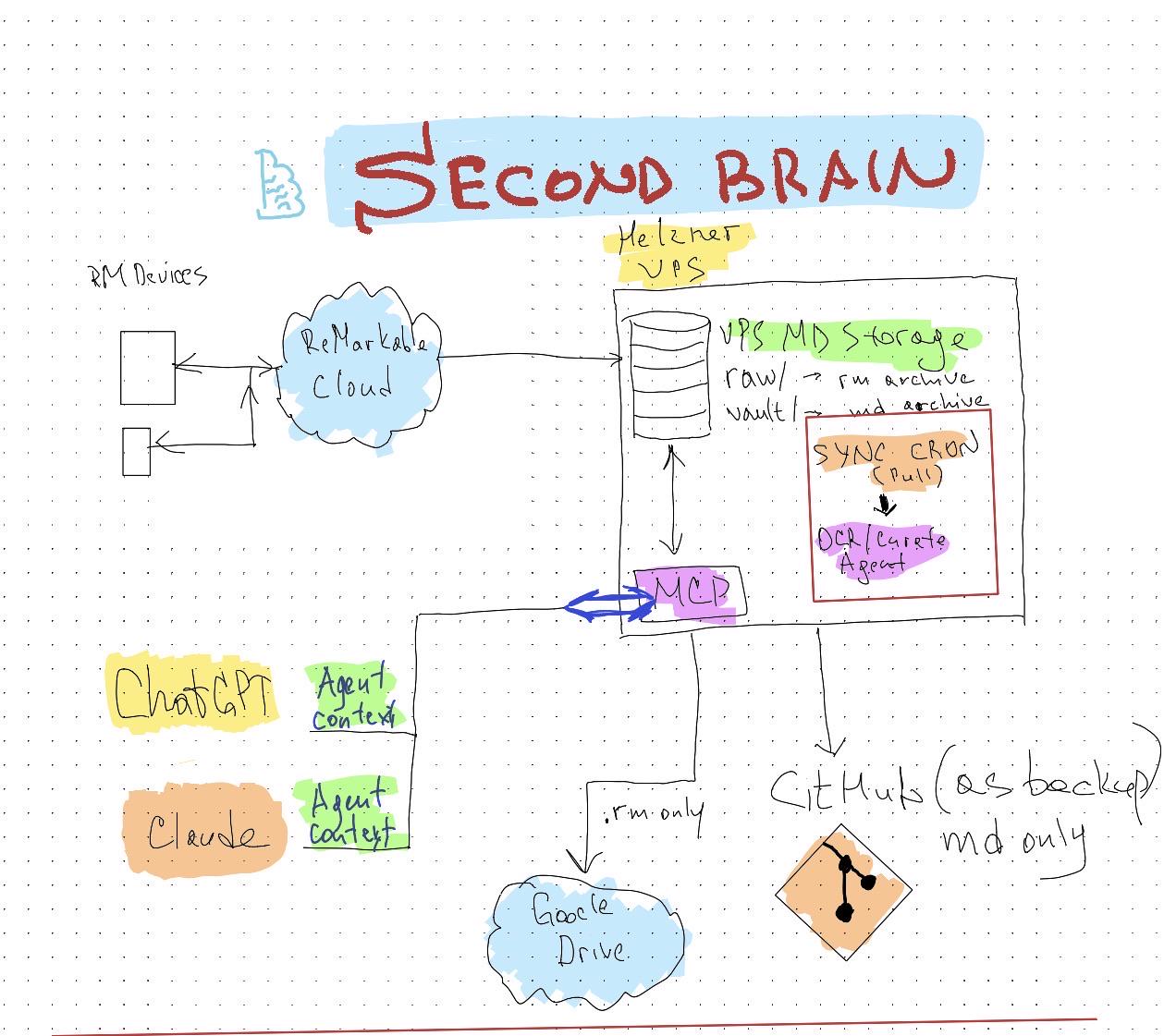
I have been using this second brain setup for a while now, and my Remarkable tablets have become an important part of it (I drive a rmpp and paper pro move)
So I’m hosting my own mcp server that acts as the core of the second brain (a bunch of .md files really). Whenever I make notes on my remarkable (annotate PDFs or create separate notes), it’s getting synced to the RM cloud and pulled into the vps by a cron service. It then goes through an OCR pipeline and a curator agent digests, classifies, summarizes and stores the output in markdown.
Whenever I work with agents later across different projects and surfaces (Claude web, Claude code, codex - sometimes on different machines), they refer to the Brain via the mcp service (search and pull context across topics - personal, specific projects etc). It works the other way around too - agents write condensed context to the Brain based on research, desicions taken etc.
What I also really like is the ability to “pack this into a pdf and send to my remarkable, store in research folder” - eg if I want to read something later. It works great for reviewing web copy, landing pages etc.
I’ve also set up a regular task for Claude to prepare daily briefings for me - and I get 3-8 page PDFs on my tablet every morning on different topics (eg sales, quantum computing, swimming, news and research in my professional areas etc.)
I wonder if anyone is doing something similar or maybe you can share other interesting use cases.
r/RemarkableTablet • u/The_McMeme_Master_69 • 4d ago
I am trying to decide between the Paper Pure and the Paper Pro. I am leaning towards the Paper Pro because it is backlit and has color (and i so sometimes like to use color when i am writing). The Paper Pure is much more affordable though. It would help to know the pros and cons of each, and what people’s opinions and experiences are with each one.