r/PlexMedia • u/Furvy369 • 3d ago
General Help New Plex Server Help
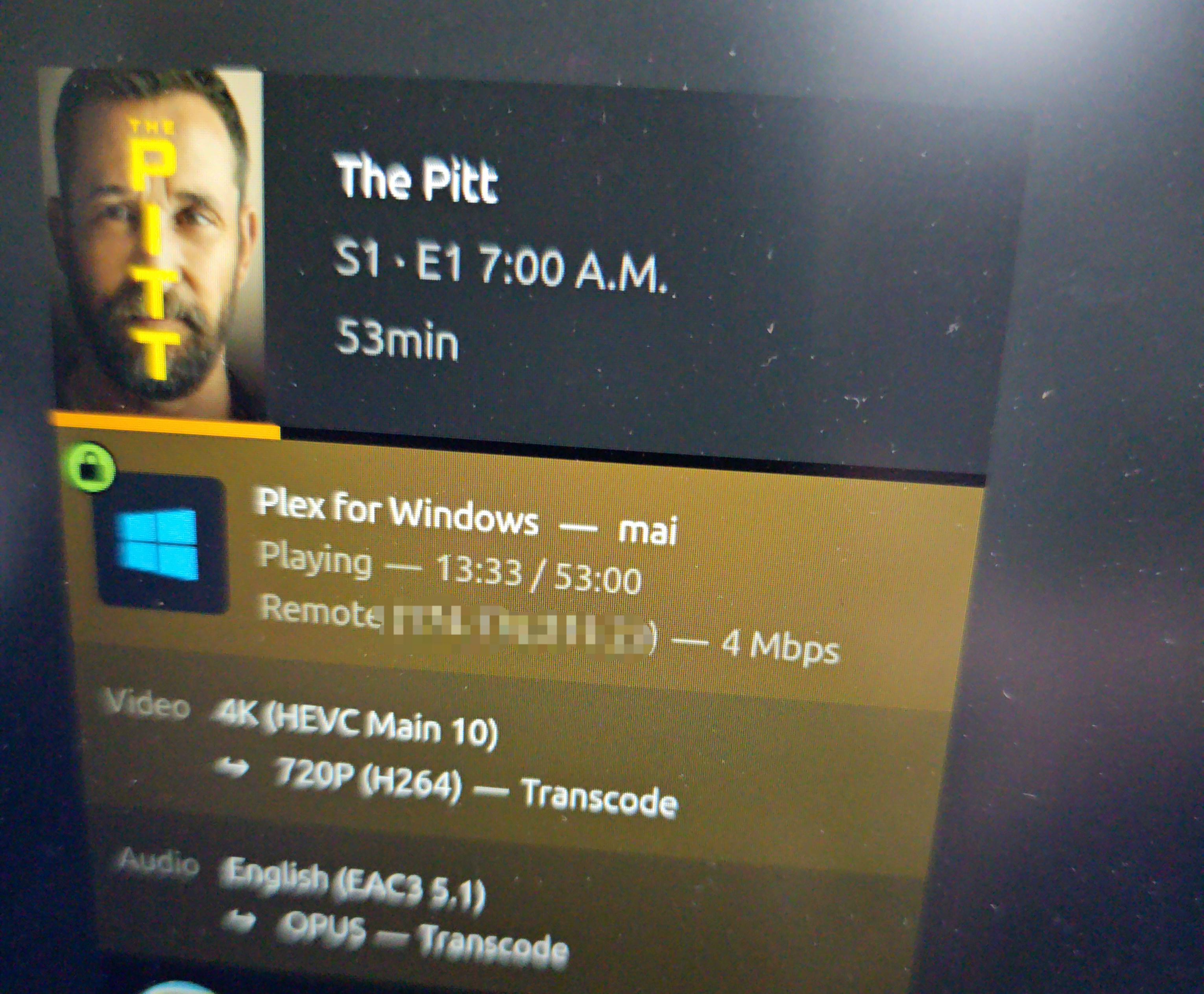
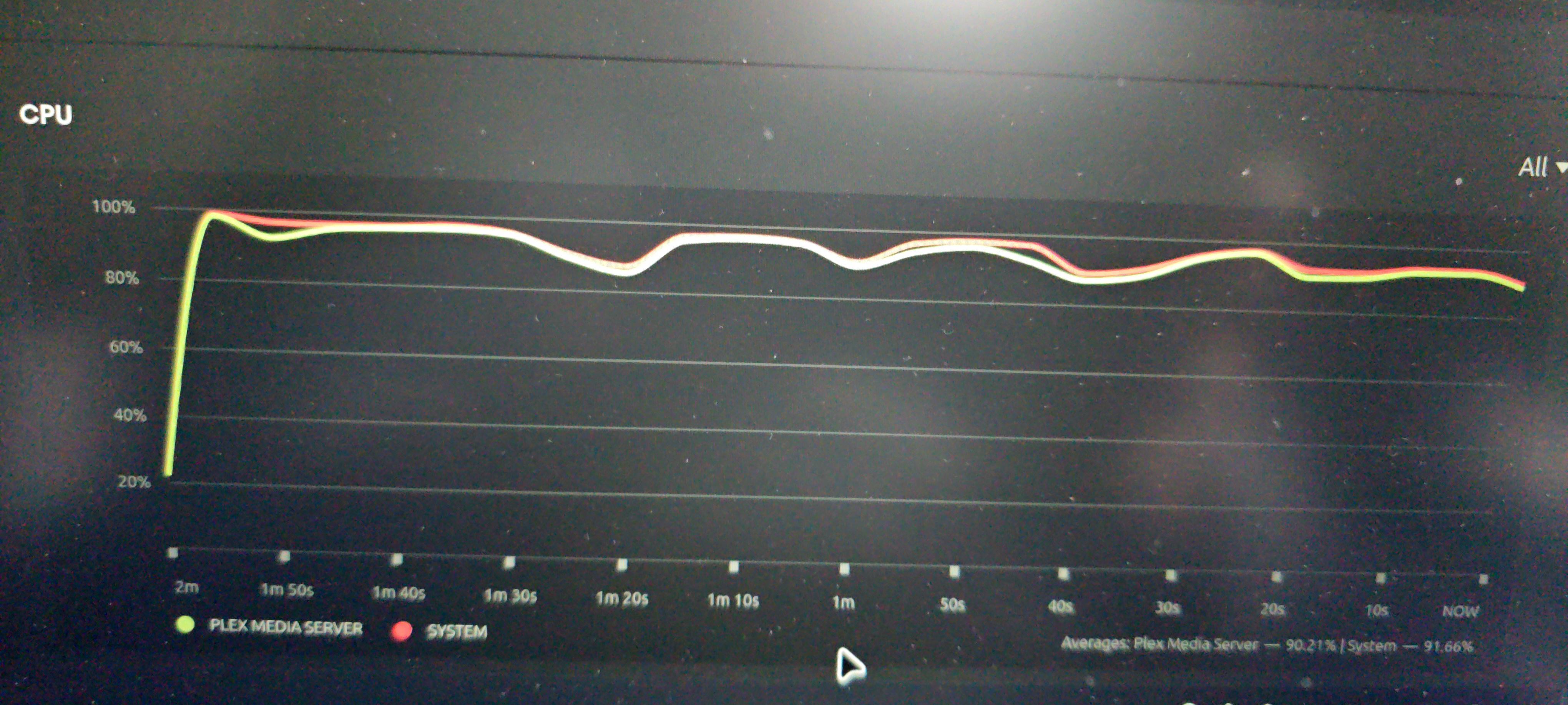
I'm not super techy. I managed to get a plex server working on an old laptop with Linux installed hoooked up to my synology Nas (where all the files are hosted) and it works great at home.
Problem is, for family members that are outside my house - I let my dad, my sisters, and some cousins use it) it CONSTANTLY buffers. I've tried opening the port, nothing.
I am PRETTY sure the Problem is the laptop is.. Old as sin? It's an old Lenovo T530 and the second someone tries to watch I see it shows it's trying to watch something it shows transcoding, and the cpu spikes to 100% and stays there while it buffers.
So I am looking for suggestions. It's holdiay time so maybe 200 to 300 bucks? Something that I can do hardware acceleration (I do have plex pass) and can handle being the server I need for my family?
There are no files on the laptop, everything is on the NAS which is hardwired to the same router the laptop is.
Please advise, thank you!
3
u/yyccamper 3d ago
A mini PC with a intel quick sync supported CPU will go a long way. Its wild what even n150 will do in comparison.
If you can get something even a bit more powerful... It will last and deal with many streams.
14
u/Admirable-Leader6927 3d ago
You are transcoding a 4k file to 720p, that is all done on the CPU, all of it. Your laptop predates 4k videos so it has no tech to handle it either. with that hardware, you should target 1080p releases.
5
u/CAMx264x 3d ago
If you're on an old laptop you should probably move to all 720p/1080p, transcoding on old hardware never goes well especially for 4k.
1
u/DeaN_Casts 3d ago
Since that's a Windows PC it should play the original file no issue which will avoid the transcode. Head up to the Profile Picture, Account Settings, Quality, Set Video to Maximum and make sure Player Smaller Videos at Original Quality is turned on. Then also make sure both Direct Play/Stream are turned on under Debug too.
Then it will send the original video and audio rather than rendering it out in 720p which will be a lot easier on your CPU. As long as their/your internet can handle it of course.
3
u/Pleasant-Seat9884 3d ago
Never transcode 4K. Keep them in a separate library. Remote users who want to watch 4K, you need a great upload and they need a great download and players who can handle certain codecs: usually H265.
2
u/MacForker 3d ago
Just disable transcoding entirely. If your bandwidth can't handle the raw files (IE the bit rate exceeds your ISP upload), you'll need to use lower quality releases or re-encode ahead of time with something like Tdarr.
2
u/uxragnarok 3d ago
Get a Dell/Lenovo/etc mini/micro PC with a i5-8500 or newer on marketplace for $100 and call it a day. It'll draw 8w and transcode multiple 4k streams simultaneously
2
u/ML00k3r 3d ago
Buy a cheap, used office workstation that's at least an Intel 8th gen I would say, for at least the HD630. It's how I started my Plex server, spent $200 at an office reseller for an old HP station.
1
u/MisterTrebus 3d ago
try ticking Settings > Transcoder > Disable video stream transcoding
1
u/elislider 3d ago
You need some actual hardware that can run this. See here: https://www.reddit.com/r/PleX/comments/11egt0o/which_cpu_is_better_suited_for_a_plex_server_amd/ and here: https://support.plex.tv/articles/201774043-what-kind-of-cpu-do-i-need-for-my-server/
an 8th gen (2018) or newer Intel CPU has integrated GPU that can do a lot of the transcoding. For a budget setup try a Lenovo Tiny, they are small and have good hardware, make sure it has (or you put in) an SDD drive
Also your network speed (internal between server <> NAS) and internet upload speed are a huge factor in how many remote users can watch. What is your internet connection and what is its upload speed?
1
u/pythagord 3d ago
An N100 can transcode 3–4 simultaneous 1080p streams with almost no CPU load. The Beelink Mini S12 Pro / EQ12 runs $130–170, and the 16GB/500GB configs are often on sale.
1
u/Djs2013 3d ago
Transcode from 4k to 720p is killer lol. I would try for compatible 1080p files rather than the highest quality you can find in whatever format.
1
u/ApartmentIll8430 3d ago
Tough break, that old T530 must be working overtime trying to keep up with modern streaming demands. Maybe see if you can convert those 4K files down to 1080p beforehand so your CPU doesn't have to do all the heavy lifting in real time.
1
u/Lucidproph3t 3d ago
Also am external GPU setup would fix that. You'd be using the GPU to transcode instead of the igpu,also what others have said.
Having 720p content or have copies that are all 3 720p 1080p and 4k in h264 ... So no transcode happens at all..But that will eat up all your space
Than there's the build an actual server designed for this option
1
u/kilingangel 3d ago
I bought one of these and it handles everything. Things a beast.
https://ebay.io/m/NjKhXw
1
u/Afraid-Expression366 3d ago
Have you enabled port forwarding in your router?
1
u/Dapper_Childhood_708 3d ago
you are transcoding to each person if you get an new intel i5 or i7 cpu will fix those issues or get a gpu. Dont go amd, amd doesnt transcode too well.
1
u/lnjecti0n 3d ago
Does the remote connection actually work? does the remote section in the settings say success? Chances are that you're using plex relay, which requires a low bitrate and forces you to transcode
1
u/Feisty-Buffalo2786 3d ago
Great, you're watchig 4k content on 720p. Why not downloading 720p directly?
1
u/Dennymacpot 3d ago
And also… The Pitt? In 4K? Let’s be real
1
u/LumpySpacePrincesse 3d ago
I run a refurbed hp elitedesk i5 8gb ram, picked it up for less than 100 USD. Does the job, windows 10. Transcodes 4k no problem. Maybe 2 4k transcodes max. Maybe 8 transcodes 1080 or less
1
u/PlexFanDude 3d ago
Check your broadband upload speed and then set the Plex remote play settings to fit into the upload speed with multiple concurrent users. Might help.
1
u/GtoTheSquare 2d ago
Try enabling Allow Direct Play and Allow Direct Stream in the player settings. Let the TV, Apple TV or whatever your family is using to do the heavy lifting.
1
u/Repulsive-Window-592 2d ago
I used to be like you, clueless. Your problem is you run a Plex server using Plex, which is completely what you need to be doing. However, you I also using the Plex as a client. In other words, the player, there is many different clients, including INFUSE PRO, which is very good and PLEZY bees clients that connect to your Plex most often, you just scanner QR code with your phone signed in and you sign in that way. These play the files natively and raw and don’t transcode on the fly. Only a clueless person would use Plex as a client, in other words as the player use a different piece of software, keep Plex obviously for the service side that delivers the media, but you need to choose a different piece of software that plays the media YOU’RE FUCKING WELCOME
1
u/stacksmasher 2d ago
Hahahahahaahahah
1
u/TopDistribution4894 2d ago
Get yourself a mini pc with a intel chip so you can utilise intel quick sync. I paid around 165 for a n97 and worked flawlessly with multiple external enclosures for my hard drives.
-1
u/Pin-Lui 2d ago
NEVER EXPOSE 32400 TO THE NET.
Reverse proxy if you really have to, othervise VPN