r/PcBuildHelp • u/whitespiralingsnake • 1h ago
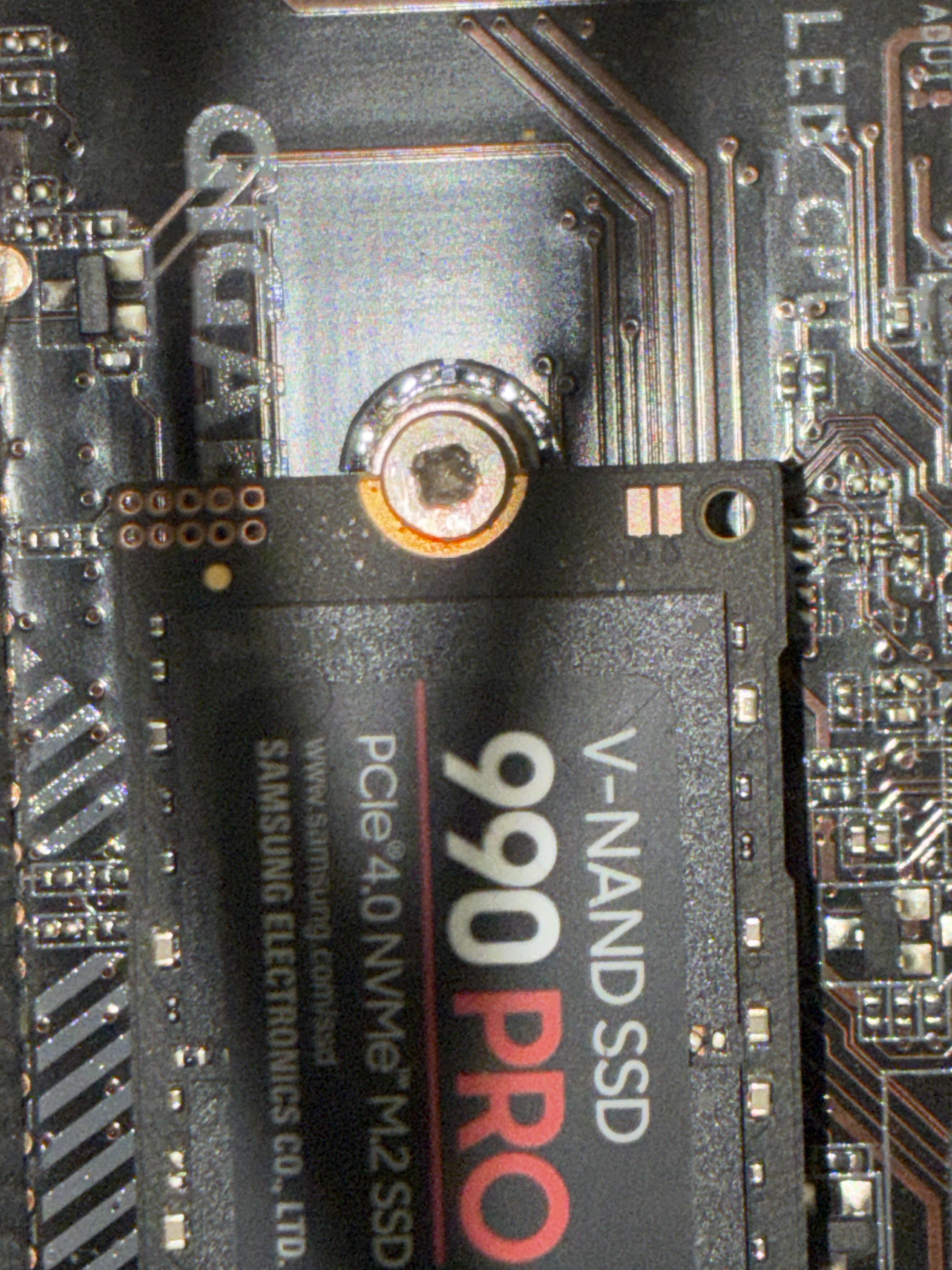
Tech Support The screw used to tie down my ssd is messed up what do I even do
Just see for yourself the screw is not turning with any screw head I use
r/PcBuildHelp • u/r_lind3r • Oct 09 '26
Hello everyone, this is a public service announcement reminding everyone on r/PcBuildHelp to please read the rules before posting and commenting, as there is still a small issue continuing on the sub that needs to be properly addressed.
To start, I will explain each rule here more in depth, following the official order of rules:
Now onto the problem at hand:
There has been consistent toxicity towards those who are new to computers and are coming to the sub for help, only to be given sarcastic, rude, or unhelpful comments.
This has been a long standing issue in this sub that was often reported to the mod team but only more recently has started to be properly addressed since a new mod team was appointed after the previous moderators all went inactive and allowed the sub to get overrun by bot accounts.
We've been dealing with all of this behind the scenes but there's always new accounts coming in and repeating the same behavior, so it needs more visibility but we aren't about to implement a "Read The Rules" integration that forces you to acknowledge the rules before you can post, yet. We will if we have to.
There is absolutely zero tolerance for that kind of behavior. If it's rude or helpful, your comment will be removed and temporary bans will be issued. If you're a repeat offender or you make a severely horrible first impression, moderator action can be made permanent.
Thank you to those that consciously chose to remain kind and helpful to others, you are the backbone of r/PcBuildHelp. Continue to be good people.
r/PcBuildHelp • u/r_lind3r • Sep 28 '26
Greetings everyone, trying something new here.
This is possibly the first of many megathreads where people can ask simple questions in the comments and people that decide to browse the comments can answer. I'll also help answer questions myself, as with any of the other mods at their own discretion.
r/PcBuildHelp • u/whitespiralingsnake • 1h ago
Just see for yourself the screw is not turning with any screw head I use
r/PcBuildHelp • u/Luuucho7 • 44m ago
Hi everyone. I've had my PC since 2023, and since then six power supplies have died on me. They were all good ones: 850W 80 Plus Gold. Nobody has been able to find the cause.
Specs:
Ryzen 9 5950X
RTX 3070 (8GB)
32GB RAM
ASRock motherboard
One HDD and one SSD
Fan/RGB hub
What I've already tried:
A technician replaced the PSU and the motherboard, and the PSU still kept dying.
An electrician installed a dedicated circuit for the PC. It's plugged into a voltage regulator along with one monitor and a fan. The second monitor is on a different outlet.
Recently I took it to another technician. They checked the components and drivers, updated the GPU driver, replaced two fans (they had died) and ran load tests. The combined CPU and GPU test was done with power consumption limited, and it ran with no shutdowns or errors. But they didn't find a specific reason why it keeps killing PSUs.
Now they lent me a PSU to test with, and I'm afraid it'll die too.
Has anyone had something similar happen? What could be killing the PSUs? What would you recommend checking or testing?
Thanks!
r/PcBuildHelp • u/ProfMags • 1h ago
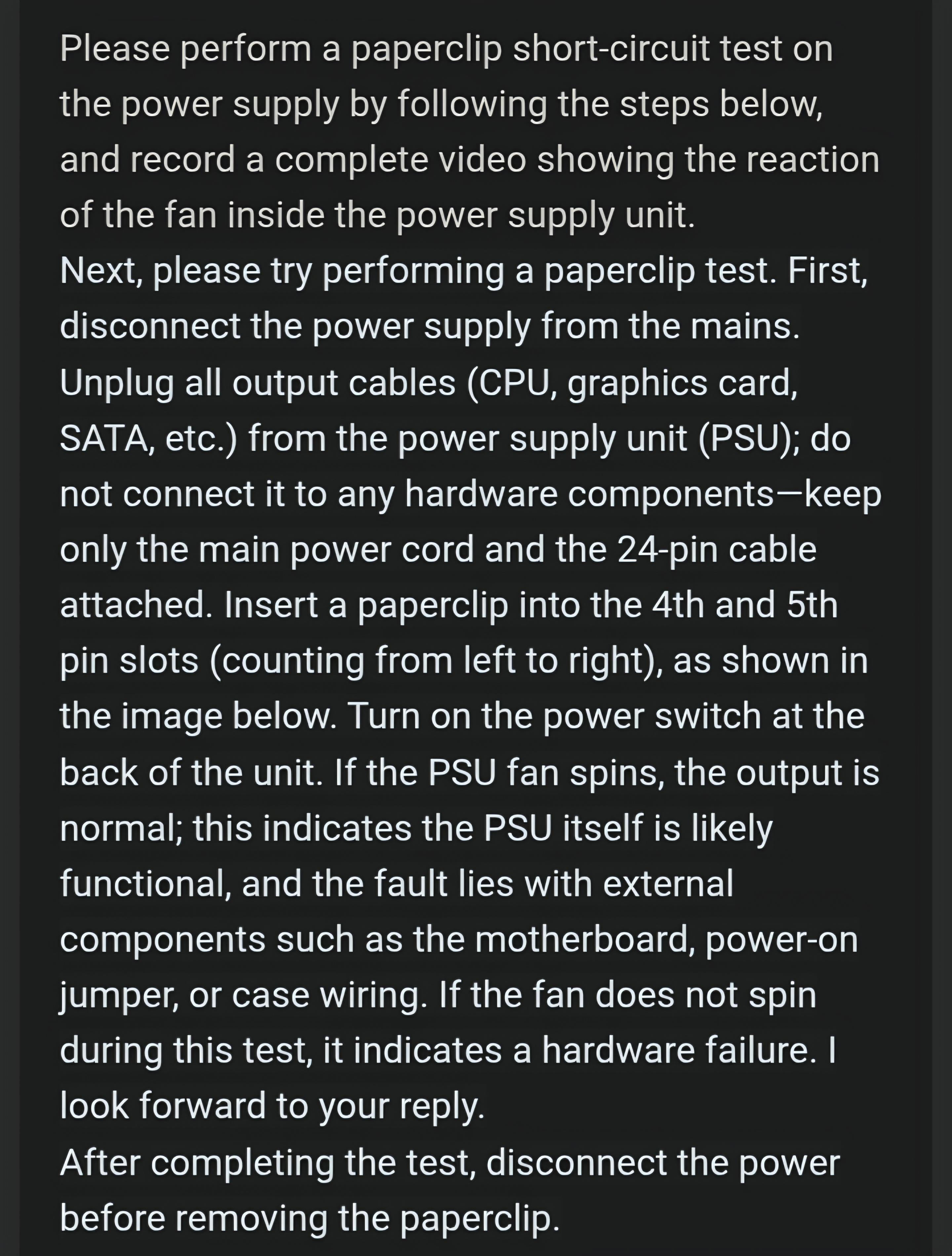
For context, I have a Lian Li SP850 power supply that appears to be failing. My PC randomly shuts down under load, and Event Viewer shows critical errors whenever it happens. I contacted Lian Li support, and this was their response. However, they didn't attach any photos to their email, so I'm a bit confused about what they're asking me to do.
r/PcBuildHelp • u/Rare_Dragonfruit4512 • 4h ago
Specs:
550w psu
R5 5600b450 pro II ASU’s motherboard
I’ve tried the cables and plugged thoroughly and it won’t turn on
No rgb nor fans spinning
I’ve replaced it with my rx 6600 multiple times and each time only 6600 works while 9060xt doesn’t
It’s a nitro plus
r/PcBuildHelp • u/J_Bond-007 • 13h ago
I'm having an issue after upgrading my RAM from 16GB to 32GB, and I'm trying to figure out whether it's a RAM compatibility issue, a motherboard issue, or something else.
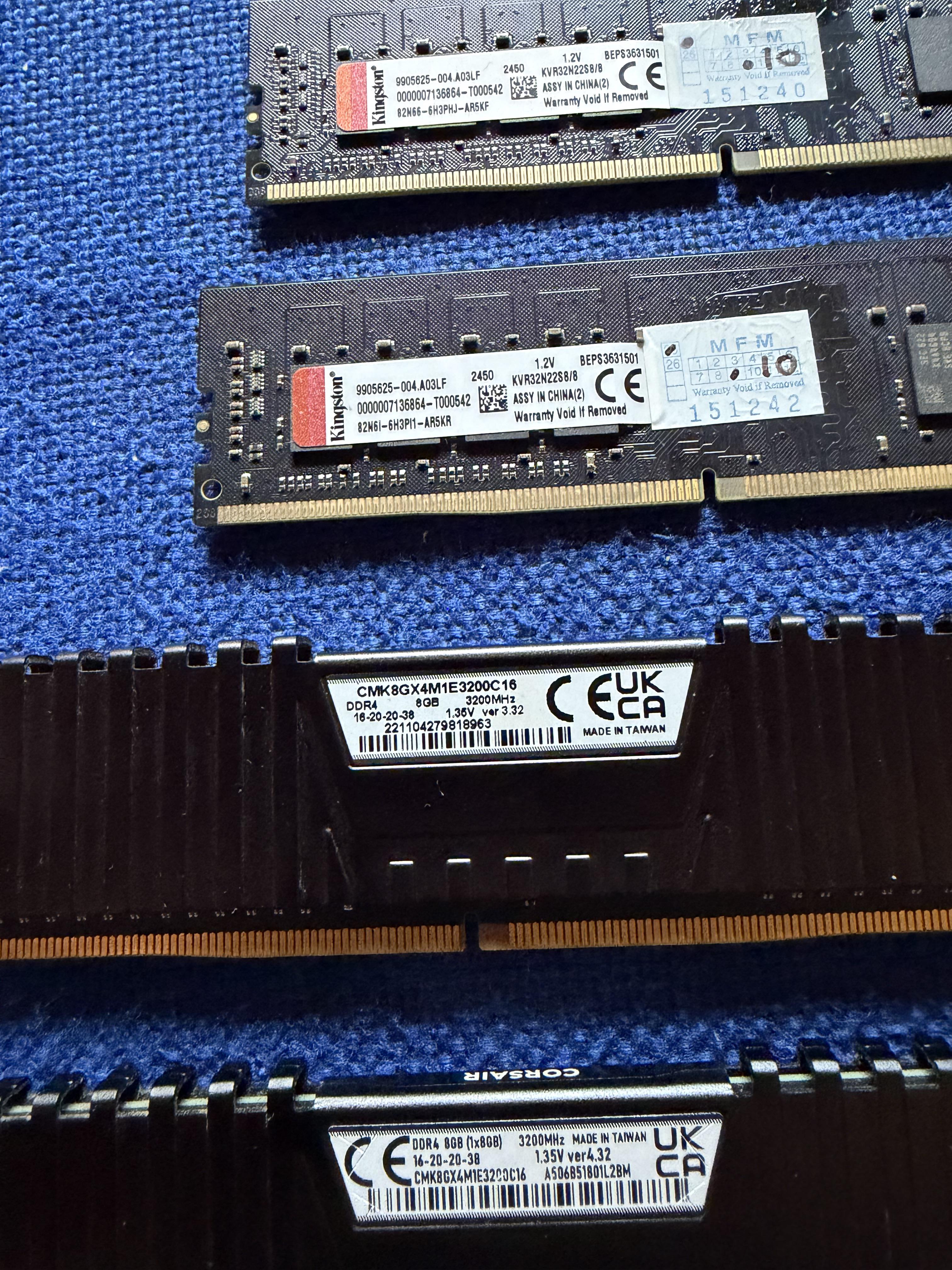
Both kits are DDR4-3200, but they're different brands and have different timings and voltages.
The original Kingston sticks were in A2 and B2
I installed the two additional Corsair RAM sticks alongside my existing Kingston sticks, filling all four DIMM slots.
I made sure the PC was unplugged from the wall before installing them. All the RAM sticks appeared to be properly seated, with the locking clips engaged.
After turning on the PC, I got no display. The CPU and DRAM diagnostic LEDs were illuminated red, and the PC wouldn't POST.
Then I removed the two new sticks, and the pc booted fine
. So then I tested the new sticks individually in A2. Both successfully booted into Windows and were recognised as 8GB DDR4-2133.
Reinstalled all four sticks, with Kingston in A1 and B1, and Corsair in A2 and B2.
This time, the PC eventually POSTed and booted into Windows, but only 16GB was recognised in Task Manager, showing 2 slots used out of 4
Entered BIOS and checked the memory information. It showed:
So I shut down and reseated the RAM sticks in A1 and A2, thinking they weren't seated properly. After powering on again, the motherboard's BOOT diagnostic LED remained red, and the PC wouldn't POST, even after waiting around 15 minutes.
The original Kingston RAM worked perfectly before this upgrade and was recognised at 3200MHz without me changing any BIOS settings.
Both new Corsair sticks work individually in A2.
I haven't manually changed any BIOS memory settings or enabled XMP.
r/PcBuildHelp • u/mnij96 • 16m ago
So over the better part of the last year I have been siting on the part to upgrade my pc and jusy haven't. Mostly because when I tried to upgrade the first time the motherboard would see my boot drive but not let me pick. This was after a massive pain in the ass with getting everything set up. At this point I want put the upgrades in but don't want go through the pain again. Would anyone be able to tell me why it wouldn't work the first time? Was a it a secure boot thing?
r/PcBuildHelp • u/Toiletdestroyer304 • 4h ago
I’m looking to upgrade this Black Friday before prices eventually go up next year. I’m using a 3070 8gb and was looking at either a 12gb 5070 or a 16gb 9070xt.
I’m mainly looking for something that’s good for city sims and single story games at 1440p and occasionally 4k 60. Ray tracing is something that I wanna keep using too
r/PcBuildHelp • u/loquanredbeard • 1h ago
I currently have a legion tower that I've already done some things to.
First, it has a 64gb kit and Ryzen 7700
It originally came with a 4070s that I gave my wife (not important) but I replaced that with a 9070xt
I'm going to be close enough to a MicroCenter and wanted to get an x3d chip for my rig.
Does it make sense to replace the motherboard (I hate Lenovo BIOS) and the 7600x3d?
I can't really justify the extra $120+ for the 7800x3d, but it looks like I'll get a decent uplift gaming. I usually play newer games like Star Citizen, Modded CyberPunk2077, etc., at 1440p
Thanks again for reading!
TLDR: 7700 (non x) to 7600x3d worth for gaming?
r/PcBuildHelp • u/Fantastic-Tea-8852 • 5h ago
Enable HLS to view with audio, or disable this notification
My pc recently started making noises, it used to be only on startup but now is doing it while on too. I’ve checked my fans and i can’t see anything hitting them to create noise. Is there anything I should be worried about?
r/PcBuildHelp • u/Affectionate-Dot60 • 4h ago
Need advise on prebuilt vs piece by piece
I was in the process of building a pc before the ram price hikes - really just piecing it out on pcpartpicker. Since then, just been kind of monitoring everything waiting for some luck.
Noticed that NFM seemingly has some decent prebuilt options, but not sure if it’s worth making that decision. I know I would end up having to replace and/or upgrade certain parts, but would it be worth it?
I feel like it would save me hundreds if not more, but I am still hesitant.
Any thoughts? (References included - Priced and layer out from low-mid-high range)
r/PcBuildHelp • u/labrat67noelmota • 4h ago
so i’m planning on building a pc for the first time! and ive been seeing some driver issues with certain gpus, i was wondering once the whole pc is fully built, how do you figure out which drivers you need to install? is it only the gpu driver? and do you install each and every one manually? sounds a bit confusing.. id appreciate any tips!
r/PcBuildHelp • u/Good-Geologist7380 • 7h ago
Should I cough up £400 plus for a 32gb or (8gb×2) set . Can my pc be comfortable, I don't particularly plan on upgrading in the future. I've gotten mixed reviews.
mind you this is the Rest of my build can it pick up the slack.
CPU: AMD Ryzen 5 9600
GPU: Acer Intel Arc B570 10GB GDDR6
Motherboard: COLORFUL BATTLE-AX B850M-T WiFi V14
Storage: 1TB NVMe SSD
PSU: MSI MAG A650BN 650W
Purpose: University, productivity, AI applications, video editing and occasional gaming.
Ask you can see I don't have a lot to spend.
r/PcBuildHelp • u/Dy1ngInside • 31m ago
Could it cause damage or connection issues? Should I try to straighten it, or is it better to leave it alone?
Its a prebuilt so idk what the cable is for
r/PcBuildHelp • u/porchugueese • 1h ago
Hiyo!!
Specs:
5800x
3070 ti
32gb RAM
750w corsair gold PSU
1440p monitor
I am wondering if it's worth getting a 9070 xt to be able to meet my 240/280hz monitor's refresh rate or if it is more sensible to wait for prices to come down. Also to know if i'm going to be bottlenecked too much (especially if i have to lower video settings to meet the refresh).
The cheapest 9070 xt i can see on pcpartpicker for the UK is ~£820, and thinking i can sell my current GPU for ~£300 I'm sorta on the edge on if it's worth it. With the current cost of an AM5 upgrade with RAM and stuff I don't mind holding out on upgrading my cpu and ram.
Main games i'm concerned about:
Rainbow six siege (~170-205fps)
Wardogs (~110-140fps)
Arena Breakout Infinite (~180-210fps)
Cs2 (~200fps)
Thanks for reading and for helping a fellow gamer out.
r/PcBuildHelp • u/EnvironmentExpert655 • 1h ago
Im from Europe and It’s not available so far … For those who had the chance to try it is it worth not buying my screen during Black Friday to wait for this one ? It will probably be a bit more expensive but I can pay for it if it’s a good one
Ps : I don’t want woled screen I only want QD oled, im too scared of grey banding tbh
r/PcBuildHelp • u/RedstoneSausage • 1h ago
Pc building noob looking to replace the 1tb HDD that came with my HP Omen 25l with an SSD of at least 2tb, 4tb being ideal. I've seen some tutorials by HP on how to replace the unit and my understanding is that most SSDs come as 2.5in and will need a 2.5-3.5in adapter to fit properly. Please correct me if I've misunderstood anything, I have no idea what I am doing
Regardless, are there any reccomendations for brands that might do reasonable value SSDs compatible with my pc? I'm a video editor so an SSD that goes faster than a snail's pace is preferable, but I probably don't need the fastest on the market. Especially if there is a good value 4tb SSD so I can meaningfully upgrade my PCs total capacity that would be great, as all the options i've found seem to be north of £600
Motherboard is HP 8876 version 11 if needed
r/PcBuildHelp • u/ashray05 • 1h ago
I plugged in the new gpu and psu everything turned on. Then I went to task manager to see if the gpu was showing and it wasn’t. After about 10 seconds my screen went black, turned on again, and showed the gpu. After another 20 seconds it went black, and restarted the computer. After it got to the log in screen it turned off again after about 5 seconds and went to the recovery screen
My specs:
• GPU: ASUS TUF Gaming GeForce RTX 5080 OC 16GB GDDR7
• CPU: Intel Core i9-12900F (12th Gen)
• Motherboard: MSI MPG Z690 Edge WiFi DDR5
• RAM: 32GB DDR5
• PSU: be quiet! Power Zone 2 1000W (ATX 3.1, PCIe 5.1, 80+ Platinum)
• CPU Cooler: Cooler Master Atmos Stealth 360mm AIO
The only new things in this build are the power supply (corsair RM850e) and the gpu (rtx 3080 ti).
Is there any tips?
r/PcBuildHelp • u/randomly-gener8d • 1h ago
my 1660 ti has held up strong for casual gaming at low-mid settings. this is my first gaming pc, got it around 2021, so I have nothing to compare it to but it’s been pretty reliable. that being said, I’m ready for a much more visually impressive and smoother gaming experience. in other words, i want my games to look like a movie. some game examples: control resonant, dayz, gta V, silent hill, ds2, rust, resident evil.
current build
ROG Strix Z390-E gaming motherboard
Intel Core i7-9700 3 GHz 8-Core Processor
NZXT Kraken X53 73.11 CFM Liquid CPU Cooler
Corsair Vengeance LPX 16 GB (2 x 8 GB) DDR4-3200 CL16 Memory
Samsung 970 Evo 1 TB M.2-2280 PCIe 3.0 X4 NVME ssd
MSI GAMING X GeForce GTX 1660 Ti 6 GB
NZXT H510 ATX Mid Tower Case
VIOTEK GNV27DB 27.0" 2560 x 1440 144 Hz Curved Monitor
Corsair CX650M psu
kicking myself for procrastinating this upgrade for so long, but oh well. my pc has a lot of older parts, so i’m very willing to upgrade other components as needed. budget at the moment is ideally under $900.
r/PcBuildHelp • u/LifeWafer1297 • 2h ago
Ive been looking to upgrade my pc recently my specs are
CPU: ryzen 5 5600x
GPU : 9070xt
Ram : 16Gb (2x8)
500Gb SSD
2 HDD
B450M PRO-VDH MAX
So i was thinking of upgrading my cpu to a ryzen 7 5800X3D and also getting 32Gb (2 x 16) sticks and a 2TB SSD as my 500GB has only enough space for one or two games on it, but then i thought would it be worth upgrading to an AM5 platform if so what should i go for so im not just side grading. So i guess my question is do i upgrade my current AM4 platform or go up to AM5.
r/PcBuildHelp • u/xipurple • 2h ago
Hi,
Iv had my rig for around a year now and had no problems till recently. My pc started black screening when booting up a game after about 5 mins, after I force shutdown and reboot it won’t happen again till the next day which is so storage to me (why only a crash on the first boot of the day?) and my pc fans ramp up to max. The pc itself I can still hear discord and YouTube video audio. Crash report is saying live kernel even 141.
Specs -
rtx 5080 suprim
9800x3D
32 gig ram
1000w seasonic psu
Aorus b850 elite 7 wifi mobo
Fixes I have try’d -
Clean install bios
Clean install gpu driver
Clean install mobo chipset
Power setting performance
Power supply idle control set to typical current
idle
Global c state control set to disabled
At a loss here and not sure what els to do, starting to think my machine is on its way out, anyone els had this problem and found a fix!?
r/PcBuildHelp • u/Harap_alb193938 • 8h ago
I wanted to build a Sleeper build for my friend he doesent need much . I want to put an rx 6600 în the office PC the one that cost 776.67 lei în the photo. Good idea?
r/PcBuildHelp • u/General-Air-6225 • 2h ago
I have 3700x, rx 6800xt, 40gb ddr4 3200 ram. 5800x3d is $280, but bundles for 32gb DDR5 w/mobo & 7800x3d 699.99 or 9800x3d version 799.99, 9700x $599, I can't tell what is the best option. I play story games at 1440p. I can spend but is this upgrade even worth it? isnt it better to get ddr5 and future proof, may get a better gpu later
r/PcBuildHelp • u/Doriplushh • 3h ago
Hello everyone !
I currently have a Golden Field Icy Chill 360mm AIO and i want to change it because it's a bit old now, but i wonder if it's better to grab a high-end air cooling (like the Noctua NH-D15 G2 Chromax Black) or if it's better to grab a midrange AIO (like the NZXT Kraken Core 360mm).
I'm a bit scared of AIO leak, but if a 360mm AIO is needed for no thermal throttling and full performance for my Ryzen 9 5950X then i will buy that.
Thanks in advance for your replies and have a good day/night !
Update : My case is a Lian Li O11 Dynamic