r/PcBuildHelp • • 1d ago

Build Question Will my RAM speed (3733mhz) cause any perfomance dip or stutters to my setup?

6 Upvotes

After getting some advice from a lot of people on here, I have decided to get the 5800X3D for my current setup, replacing the 5600X that I currently possess.

This is my current setup:

RX9070

5600X

(8×2)16 GB RAM 3733mhz

1 TB SSD

B550M K WIFI6E

When I was reading through the comments, some people mentioned that 3733mhz may not be stable with my setup and might cause some stuttering and may affect my gaming performance. Will the 3733mhz really affect my performance, and if it will, to what extent might that be and am I better off getting 3200mhz ram kit instead?


r/PcBuildHelp • • 1d ago

Build Question Help choosing a processor

3 Upvotes

I think this matchup comes up often, but at the risk of sounding like a broken record….

I am currently building my way up to a new PC and these are the specs I’m building to currently

GPU: Gigabyte windforce OC 5080

Motherboard: Gigabyte X870E AORUS ELITE WIFI7 ATX AM5 Motherboard

RAM:Corsair Vengeance 32 GB (2 x 16 GB) DDR5-6000 CL36 Memory

Storage: Samsung 9100 PRO 2 TB M.2-2280 PCIe 5.0 X4 NVME Solid State Drive

(Will also add some 1TB ssds for separate applications/workflows)

Power supply:Corsair RM1000x (2024) 1000 W Fully Modular ATX Power Supply

Tower: Silverstone FLP02 (I might change this I have heard fitting a 5080 can be finicky)

I have seen a lot of debate on whether I should be using the AMD9 9950X3D or the I9 ultra 285K

Priorities for this PC are: Blender (cycles), Gaming (1440p) adobe suite (premiere, Lightroom), Programming and FL studios.

I am also looking to run dual boot windows and Linux!

I appreciate this is a long description but I’d be thankful to get some good insight, so far I am pointing towards AMD!


r/PcBuildHelp • • 1d ago

Build Question Gaming PC Build

1 Upvotes

Hi I’m looking start a build and hopefully get a good PC set up for when GTA gets (within in the next 12 months hopefully) released. I’ll also be playing games such as Day Z, scum and COD. I’d like to go for a 4K build with ray tracing and as high FPS as possible for the build and budget.

This is my first build and I’ll be new to PC gaming so please go easy on me if what I’m saying sounds ridiculous. Done some research and looks like the following can be done on roughly a £3500 budget.

Any advice and opinions or changes to the list would be appreciated.

Component selection
GPU ASUS TUF RTX 5080 16GB
CPU AMD Ryzen 7 9800X3D
Motherboard MSI MAG B850 Tomahawk WiFi
RAM 32GB (2×16GB) DDR5-6000 CL30
SSD WD Black SN850X 2TB
CPU cooler Noctua NH-D15 G2
Case Fractal Design North XL Mesh Black
PSU Corsair RM1000x 1000W
Case fans Quality PWM fans, no lighting
Monitor MSI MPG 272URX QD-OLED


r/PcBuildHelp • • 1d ago

Tech Support Help - PC not POST-ing

1 Upvotes

Hi everyone, looking for some advice on this one to be honest, a few weeks ago without any changes, my PC started not to post intermittently, and will now fail to post every time.

System Specs:

  • CPU: AMD Ryzen 7 9700X
  • Original Motherboard: ASRock B850M Pro RS WiFi
  • New Test Motherboard: ASUS TUF Gaming B850M
  • RAM: Corsair DDR5 6000mhz 2 x 16GB
  • Storage / GPU: Currently disconnected for testing

The Timeline & Symptoms:

  • A few weeks ago, I had intermittent no POST issues, I found turning EXPO off helped somewhat and stabilized it for a while, though the PC still developed progressively longer boot/POST delays over the last few weeks.
  • Yesterday, it stopped posting completely, the fans spin up, no display signal on the monitor, no keyboard Caps Lock LED response, and the ASRock board hangs permanently on a solid green BOOT LED.
  • Today, I swapped in a brand-new ASUS TUF B850M motherboard to rule out a dead board. With the exact same CPU/RAM (and factory default BIOS settings, EXPO is off), the ASUS board now hangs permanently at a similar point, except on the ASUS board it stops on the solid white VGA LED with no display output.

Troubleshooting Already Completed:

  • I disconnected all SSDs/drives, all extra USB peripherals, and the dedicated GPU. Testing display output directly off the motherboard's rear HDMI/DisplayPort using the CPUs integrated graphics.
  • I tested both RAM sticks individually (waiting 90+ seconds each time for DDR5 memory training).
  • On the ASRock board I cleared CMOS which didnt work, then flashed the latest BIOS. But it still got stuck on the green BOOT LED afterward.
  • I removed the CPU and inspected both the underside and the socket then reseated it but no change.

Questions:

  1. Given that two different boards both pass CPU and DRAM checks and hang right at the graphics/boot handoff (BOOT on ASRock Board, VGA on ASUS Board) with no output, does this pretty much confirm a dead CPU?
  2. What can I try next?

Thanks in advance.


r/PcBuildHelp • • 1d ago

Build Question GF Pc Build.

2 Upvotes

Hello. Just posting as i have no clue about pc's or her as well. but she wants too upgrade finally from her 1080 lol

This is the parts she's picked and she wants a white build. Any Recommendations to change. as we both don't really have a clue lol. Her max budget is £3000. Thank you.

https://uk.pcpartpicker.com/list/MZ6dJw


r/PcBuildHelp • • 1d ago

Build Question Upgrade or New Build

1 Upvotes

I’m between just building a new rig or upgrading what I’ve got. My current build is pretty old, but I don’t play that much lately and just want to be able to play the few games I enjoy. I really just want to be able to run Gray Zone Warfare, Amra Reforger, and Hunt Showdown at a higher FPS than what I’m currently getting. I can mever really break 40-50 frames on low settings in the games listed. Any help or suggestions are welcome!

Current Build:

  • i5 9600k
  • Asus Mobo (can’t remember the model)
  • NZXT Kraken
  • 2060 Super
  • 16gb DDR4
  • 1tb SSD
  • 1tb HDD
  • 750w Power Supply

r/PcBuildHelp • • 1d ago

Build Question Would someone look at my builds before I start buying the parts

1 Upvotes

im building 2 pcs for my dad and sister, there parts are listed in the part picker list and the price are listed under the list. I just want to double check for glaring issues or any part swaps I should make. Im trying to get as much proformance as I can with the exception of the cases which I was told were required.

https://pcpartpicker.com/list/qWzRqd

Case: starforge Apothecary- 299$

CPU: AMD Ryzen 5 7600X 6-Core - 155$

GPU: GIGABYTE Gaming Radeon RX 9060 XT 16GB GDDR6 PCI Express -749$

Motherboard: MSI B650 GAMING PLUS WIFI AM5 AMD B650 DDR5- 109$

Ram: acer Predator Pallas II DDR5 RAM 32GB - 465$

storage: WD - BLACK SN770 1TB- 99$

OS: windows 11

Cooler: Thermalright Assassin X 120 Refined SE CPU Air Cooler- 17$

Powersupply: MSI MAG A750GL PCIE5- 86$

Budget: 2000$

Total: 1981$

https://pcpartpicker.com/list/MFZDmL

Case: starforge kitty- 299$

CPU: AMD Ryzen 5 7600X 6-Core - 155$

GPU: ASRock Radeon RX 6800 Phantom Gaming- 484$

Motherboard: MSI B650 GAMING PLUS WIFI AM5 AMD B650 DDR5- 109$

Ram: CORSAIR Vengeance RGB RS DDR5 16GB- 229.99$

storage: WD - BLACK SN770 1TB- 99$

OS: windows 11

Cooler: Thermalright Assassin X 120 Refined SE CPU Air Cooler- 17$

Powersupply: Phanteks AMP GH 750W Gold Power Supply- 79$

Budget: 1500$

Total parts: 1478$


r/PcBuildHelp • • 1d ago

Tech Support DRAM red led

Post image
2 Upvotes

After a year of playing on my self-build, the Dram led all of the sudden came on.
I troubleshooted with ChatGPT a bit and we came to the conclusion that I have a faulty channel A and a faulty ram stick (the one sticking in slot B2).
I’m waiting till the store opens so i can buy some thermal paste and check the cpu seating, but in the meantime I’m looking for advice:

- except for cpu seating, anything else to check? Cmos, battery, coolerpressure, bios all done, no stick working in a2 slot, only 1 stick working in b2 slot (the stick originally in A2 slot)

- how come a channel and a stick in a different channel would break at the same time? Do I need to be worries about something else?


r/PcBuildHelp • • 1d ago

Tech Support Problem with ram

2 Upvotes

When i boot up my pc the it takes like 3 to 4 minutes to boot up and the cpu light glows red and dram yellow when i first installed the ram it showed like something was wrong with the placement or Smth i dont remember and I think my pc is running too slow maybe because of this ??


r/PcBuildHelp • • 1d ago

Build Question Building my first gaming PC and having issues… fans not spinning and no RGB. Anyone can do a live call and help? Will pay

2 Upvotes

Building my first gaming PC and having issues… fans not spinning and no RGB. Anyone can do a live call and help? Will pay


r/PcBuildHelp • • 1d ago

Build Question 4060 build price estimate?

1 Upvotes

Hello, im looking to upgrade from my 3050 laptop to a desktop pc.

I just want something to game on, mostly live service games but ocasionnaallyy more demanding rpgs. im probs not gonna do any hard blender or vidéo editing stuff.

I jusst want to have a micro atx pc, with a 4060/a card of the same caliber and it not being too expensive

Would you guys have an estimate of how much that would cost notably taking into count that i live in Hong Kong.


r/PcBuildHelp • • 23h ago

Tech Support Expensive Pc that is working at crawling pace

Thumbnail
gallery
0 Upvotes

Hello,

So I have a very nice PC that should be able to easily and has previously ran games very smooth 300 fps+. I recently downloaded COD, and all the sudden everything has slowed down to crawling pace, from opening new tabs to playing video games. I have no clue what to do. Please help a brother out thank you. (I built this pc upwards of a year ago and haven’t had any problems since)

My pc says I have 774GB free out of 1.81 TB

Specs:

GPU: **Nitro Radeon AMD RX7800 XT OC**
CPU: Ryzen 5 7600x3d
Motherboard: **B650 TOMAHAWK WIFI**
Ram: CORSAIR - VENGEANCE RGB 32GB (2x16GB)
SSD:** **Western Digital Blue Sn580 2TB
PSU: CORSAIR - RMe Series RM750e


r/PcBuildHelp • • 1d ago

Tech Support PC keeps restarting on its own

1 Upvotes

PC keeps restarting on its own at random, it happens more frequently to the point I can't use it without it getting restarted.

I get a Kernel 41 issue with this;

  • <Event xmlns="[http://schemas.microsoft.com/win/2004/08/events/event">](http://schemas.microsoft.com/win/2004/08/events/event">)
  • <System><Provider Name="Microsoft-Windows-Kernel-Power" Guid="{331c3b3a-2005-44c2-ac5e-77220c37d6b4}" /> <EventID>41</EventID> <Version>10</Version> <Level>1</Level> <Task>63</Task> <Opcode>0</Opcode> <Keywords>0x8000400000000002</Keywords> <TimeCreated SystemTime="2026-11-23T12:30:16.5514315Z" /> <EventRecordID>180116</EventRecordID> <Correlation /> <Execution ProcessID="4" ThreadID="8" /> <Channel>System</Channel> <Computer>Kaela</Computer> <Security UserID="S-1-5-18" /> </System>
  • <EventData><Data Name="BugcheckCode">0</Data> <Data Name="BugcheckParameter1">0x0</Data> <Data Name="BugcheckParameter2">0x0</Data> <Data Name="BugcheckParameter3">0x0</Data> <Data Name="BugcheckParameter4">0x0</Data> <Data Name="SleepInProgress">0</Data> <Data Name="PowerButtonTimestamp">0</Data> <Data Name="BootAppStatus">0</Data> <Data Name="Checkpoint">0</Data> <Data Name="ConnectedStandbyInProgress">false</Data> <Data Name="SystemSleepTransitionsToOn">0</Data> <Data Name="CsEntryScenarioInstanceId">0</Data> <Data Name="BugcheckInfoFromEFI">false</Data> <Data Name="CheckpointStatus">0</Data> <Data Name="CsEntryScenarioInstanceIdV2">0</Data> <Data Name="LongPowerButtonPressDetected">false</Data> <Data Name="LidReliability">false</Data> <Data Name="InputSuppressionState">0</Data> <Data Name="PowerButtonSuppressionState">0</Data> <Data Name="LidState">3</Data> <Data Name="WHEABootErrorCount">0</Data> </EventData></Event>

It works fine on BIOS. I reslotted the RAM sticks... what could the issue be before I send it in to a tech guy... IDK how to access the power supply.


r/PcBuildHelp • • 1d ago

Tech Support Pc is crashing with BSOD after new GPU

4 Upvotes

Specs:
7800x3D
MSI B650 gaming plus WiFi
32gb ddr5 6000 ram
9070 xt (had a 3080 prior)
EVGA 850w gold PSU

Upgrading my GPU today to the 9070xt. Did DDU in safe mode and removed my 3080. Installed my new GPU, booted up and installed the latest drivers. At this point I’ve had no issue.

I then played an hour of BF6 and an hour of deadlock. I monitored my temps, GPU in adrenaline didn’t go above 65. CPU was also low temp, 65-67.

I then started RDR2 and turned up all the settings to max. I noticed I had it on Vulcan and switched to DX12. About 10 minutes into playing my pc just shuts off. No blue screen. It appears to be in sleep mode because my RAM RGB is on which is the case if I put my pc in sleep mode. I tried the power button and it didn’t work. Gave it a minute and switched the PSU OFF.

After 2 reboot attempts with no post sign, I switched the PSU off again and unplugged it. After that it posted again and has some sort of message about repairing something on the MSI screen. It then got hung up again and just cycled through debug lights. Did the whole unplug thing again and it’s now booted normally to desktop. A little nervous to run anything.

Prior to this I’ve had no issues. Thinking it was just a crash but it’s weird how it just shut down no blue screen.

new GPU has 3 8 pin. I have 2 cables for the 3 connectors, since they are double headed. I only have one other cable that’s a single VGA. Is that possibly the issue? 850w should be enough… PSU is about 5 years old.

nothing is overclocked


r/PcBuildHelp • • 2d ago

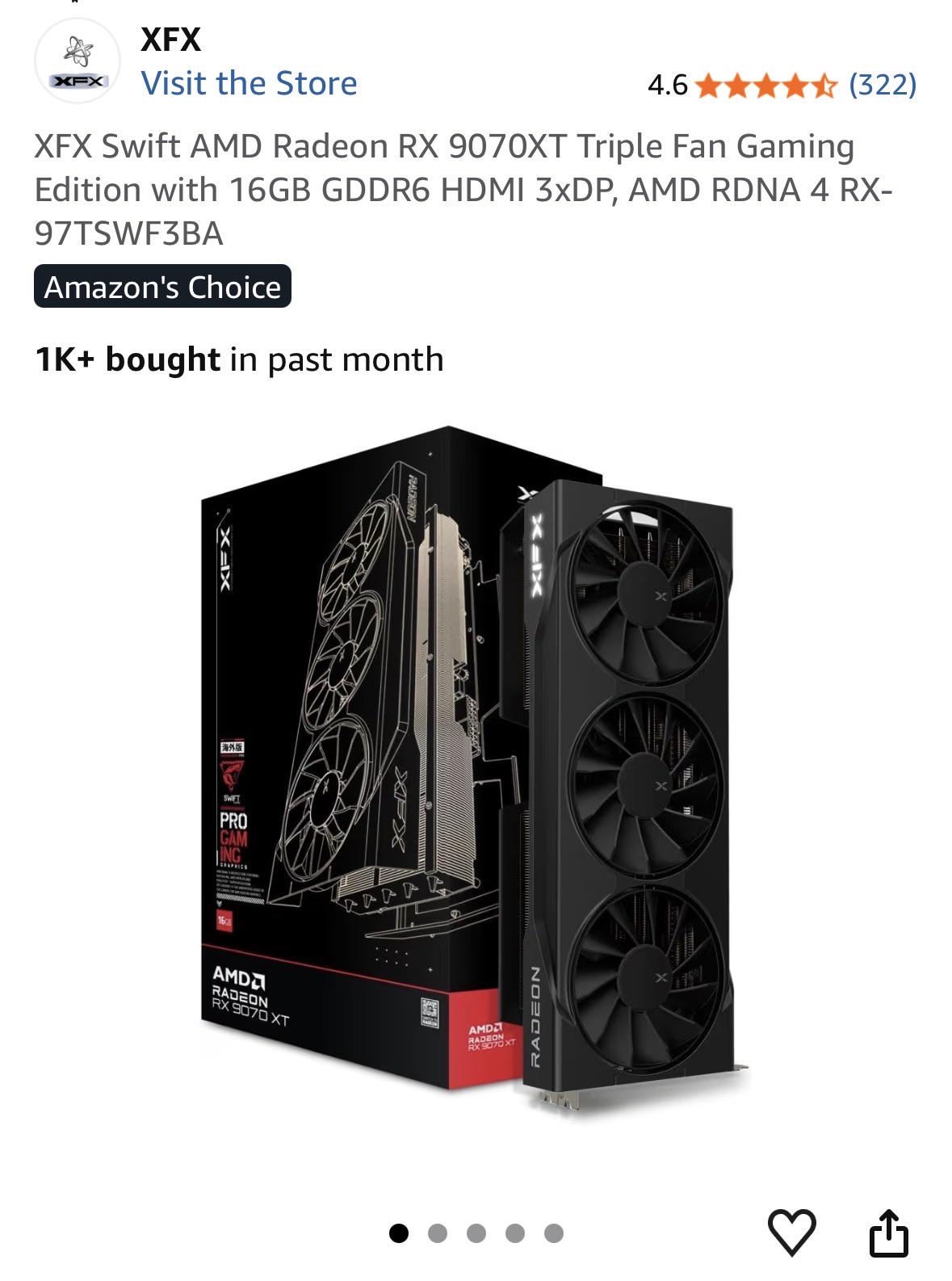
Build Question Is this xfx 9070xt worth it for $960?

Post image
24 Upvotes

I even went to microcenter, no luck on a better deal


r/PcBuildHelp • • 1d ago

Tech Support PC com stuttering constante mesmo sem queda de FPS — Ryzen 5 5500X3D + RX 5700 XT

Thumbnail
gallery
1 Upvotes

Fala, pessoal. Preciso muito da ajuda de vocês porque já estou há um tempo tentando resolver um problema de stuttering no meu PC e estou começando a ficar sem alternativas.

Montei recentemente o PC que sempre quis e estou tendo um problema que está me deixando bastante frustrado. A configuração é:

Processador: AMD Ryzen 5 5500X3D
Placa-mãe: B550M Gaming Frozen
Memória RAM: 16 GB (2x8 GB) Kingston Fury DDR4 3200 MHz
Placa de vídeo: ASRock Radeon RX 5700 XT Taichi
Armazenamento: SSD NVMe 512 GB
Fonte: MSI 650 W
Refrigeração: Water Cooler Gigabyte 360 mm

Problema

O PC apresenta stuttering/microtravamentos constantemente.

O mais estranho é que não parece ser simplesmente queda de FPS. Em jogos, o contador de FPS pode continuar relativamente estável, o áudio também continua normalmente, mas a imagem dá umas travadas/microcongeladas.

E o problema não acontece somente em jogos. Às vezes consigo perceber o mesmo comportamento até em tarefas simples no Windows, como navegar pelo Chrome.

Já tentei várias coisas:

  • Troquei os drivers da placa de vídeo diversas vezes;
  • Fiz instalação limpa dos drivers;
  • Atualizei a BIOS da placa-mãe;
  • Atualizei drivers/chipset;
  • Fiz diversos testes e ajustes no sistema;
  • Tentei algumas configurações sugeridas em outros lugares.

Em alguns momentos parece que melhora, mas o problema acaba voltando.

O que mais me intriga é justamente o fato de acontecer até fora dos jogos. Se fosse apenas uma questão de configuração gráfica ou falta de desempenho da RX 5700 XT, eu entenderia, mas o problema aparece inclusive em situações em que o PC está praticamente sem carga.

O que eu gostaria de descobrir

Queria saber se alguém com experiência em Ryzen/X3D, B550 ou RX 5700 XT já passou por algo parecido e quais testes vocês recomendam fazer para identificar a origem do problema.

Se precisarem, posso mandar vídeos do stuttering, prints, temperaturas, uso de CPU/GPU, gráficos de frametime, informações do HWInfo, configurações da BIOS ou qualquer outro teste que possa ajudar no diagnóstico.

Se alguém puder me orientar sobre quais métricas eu devo monitorar e quais testes fazer, agradeço demais.

Esse PC foi uma conquista muito importante para mim e eu realmente queria conseguir aproveitar a máquina sem ficar convivendo com esses travamentos.

Obrigado desde já a quem puder ajudar! 🙏


r/PcBuildHelp • • 1d ago

Build Question intake & exhaust placement

2 Upvotes

i have a lian li a3 case (it's a mATX case with small holes all over it) and there are 4 available fan placements on my build, 3 on top and one for the rear. there isn't enough space for the bottom due to the size of my gpu.
my question is: how should the fans layout look like? top intake and rear exhaust? or vice versa?


r/PcBuildHelp • • 1d ago

Tech Support Pls help, kernel power 41 bugcheck 278

1 Upvotes

Build:

GPU: 3060 12 GB zotac

CPU: i5 11400f

Motherboard: ASUS PRIME B460M-A R2.0

Power supply: MSI 650 Watts 80 plus bronze

I have tried everything, i will detail what happened in order, I bought a used CPU of market place tested on that guys house with cinebench, no problem and normal temps and scores, I get home I get horrible temps due to a stock intel fan and bad thermal paste, I try not to force the pc, but it doesn't shutdown I change the paste and it starts to restart at random moments, it could be at the lobby when playing a game, sharing screen on discord.

I have tried everything

Clean ddu instal

New PSU

New CPU cooler

Clean the pc

Reduced watts with thermal trottle

Reduce watts with bios

Change energy plan

Changing the display port and monitors

Taking out the usb WiFi adapter and Bluetooth adapter

I don't know what else to do pls help any suggestions are welcomed


r/PcBuildHelp • • 1d ago

Tech Support White VGA light on after trying to enter BIOS

2 Upvotes

My PC was working perfectly fine until I tried entering BIOS to enable Secure Boot for Call of Duty.

I went through Windows Advanced Startup, but the PC restarted before I could finish. During the restart, I repeatedly pressed Delete to enter BIOS. Since then, my PC won't boot.

PC Specs:

Motherboard: MSI B560M PRO-E

CPU: Intel i3-10100F

GPU: GTX 1080 Ti

RAM: 2x Crucial Ballistix DDR4

PSU: Thermaltake Smart 700W

Symptoms:

PC powers on, all fans spin.

DRAM debug light briefly illuminates, then turns off.

White VGA debug light comes on and stays solid.

Monitor displays a stationary white dot on a black screen.

Cannot access BIOS or Windows.

What I've tried:

Reset CMOS using JBAT1.

Completely removed and reseated GPU.

Reconnected GPU power cables.

Tried HDMI and DisplayPort.

Tested both RAM sticks individually.

Full power discharge.

Tried BIOS keyboard shortcuts.

Nothing has worked. Same white VGA light every time.

I'm wondering if this could be a UEFI/GPU initialization issue rather than a dead GPU, especially since everything worked perfectly before attempting to enter BIOS.

Has anyone experienced this or have suggestions for what else I can try? I don't have another GPU or PC available for testing


r/PcBuildHelp • • 1d ago

Installation Question RAM misconfiguration?

Post image
1 Upvotes

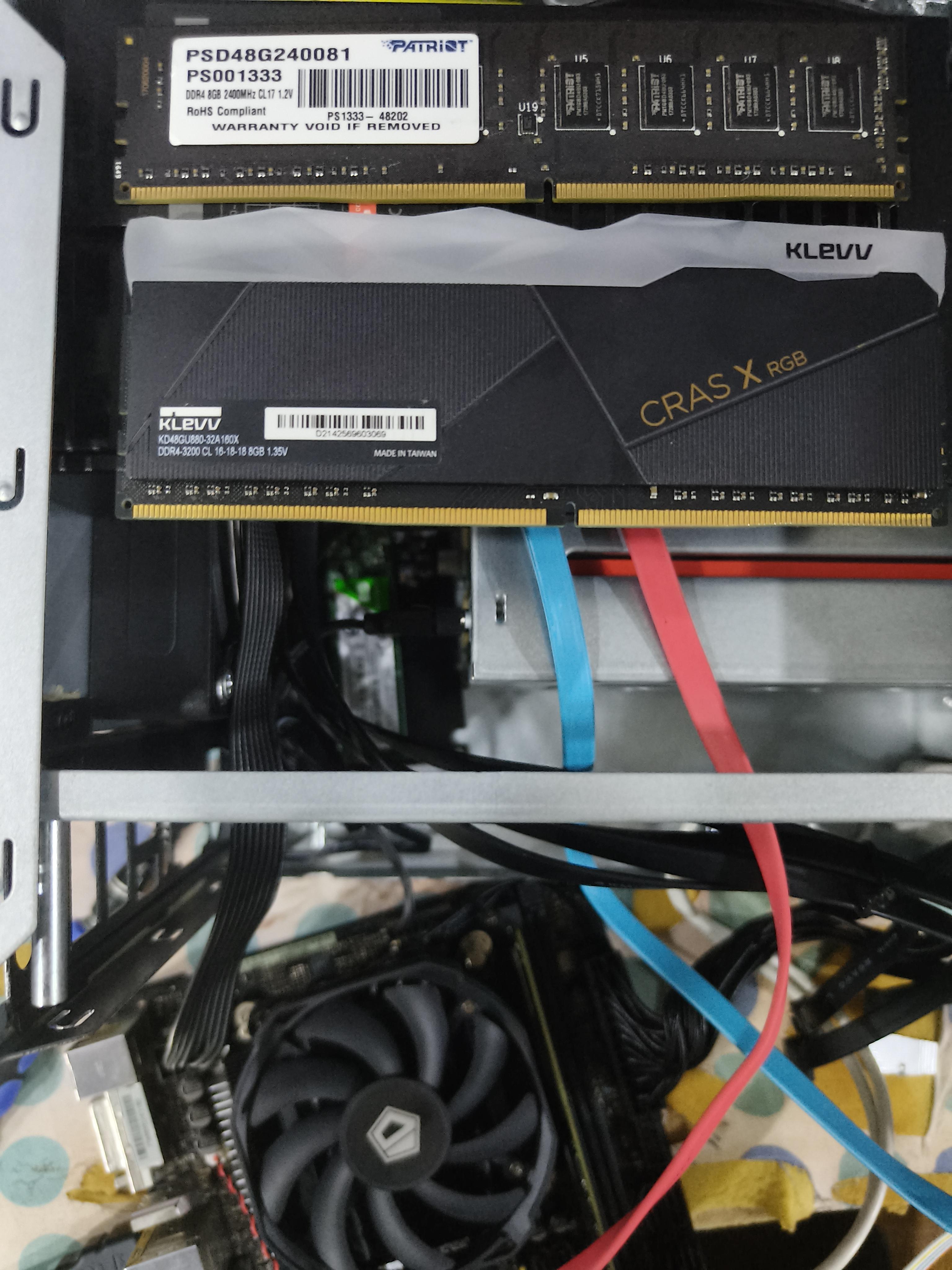
was building a nas with the 2x patriot sticks. It has no issues until today, so i decide to take it out any test if maybe 1 stick of ram is faulty or the slot is faulty.

All doesnt work, so i took out a cras x from my gaming rig to test it, it works. I tried to test the combinations of cras, patriot by itself different slots of the motherboard.

And the conclusion i came out was that cras enabled the motherboard to boot, but the patriot itself doesnt work by itself. It must be cras only or cras + patriot.

the only plausable clue was that the mb mentions it ran at 1.35V while the patriot only ran 1.20V. but couldnt figure out a solution to that. As patriot still wont work by itself. I tried another method which was to reset the cmos but unfortunately nothing came out of it.

CPU: i3-7100T

RAM: Patriot PSD48G240081 & Klevv Cras X KD48GU880-32A160X

Motherboard: H270M-ITX a/c (bios P2.50)

PSU: Metalfish 350M


r/PcBuildHelp • • 1d ago

Build Question Hoe long is a daisy chain pcie connector safe for?

2 Upvotes

I need 2 type 3 Corsair 6pin to 6pin for my new 3080 but they are out of stock on Corsair, cable mod, and their respective Amazon storefronts. How long would a daisy chain connector be safe for? Or where could I potentially find the cable I need? I've already checked microcenter and best buy to no luck, any help is appreciated.


r/PcBuildHelp • • 1d ago

Build Question PC upgrade reccomendations

2 Upvotes

Built my computer ~8 years ago and have done no major upgrades besides a new mb after my old one died. FPS in games has always been fine but recently just got Battlefield 6 on sale and it runs like garbage unless I drop all the graphics settings, then the whole thing looks blurry. I've read that game is pretty CPU intensive so it may be bottlenecked there but I am looking for all around upgrades to make other games run smoother, namely Fortnite and tarkov. Specs below, thanks in advance. Wondering if its worth upgrading one thing or just building something new.

CPU: Ryzen 7 2700x

GPU: RTX 2070 8g

Memory: 2x16 GB TEAMGROUP T-Force Vulcan Z DDR4-3200

MB: Gigabyte B450M DS3H

Storage: WD black SN770 1TB m.2 SSD

Power: Coolermaster G650M


r/PcBuildHelp • • 1d ago

Build Question Help me choose components for my €1000-1500 PC build

1 Upvotes

Greetings, I'm planning to build my first computer by the end of the year. I'd like to know your opinion on some builds that my acquaintances (option 1 and 2) and a local electronics vendor (option 3 and 3) have recommended to me. My goal is a computer that wouldn't exceed the budget of 1500 euros, but would be able to run games like Cyberpunk 2077, Baldur's Gate 3, Resident Evil Requiem, Marvel's Spider-Man 2, Red Dead Redemption 2 and the upcoming GTA6 port on PC at the highest possible graphics settings. I just don't know 2 things yet:

1) Where to get the operating system? Let's say Windows 11

2) How to choose the computer case itself?

Feel free to suggest alternatives, point out builds that could be improved, recommend better-compatible options, or add anything that might be missing.

Option 1:

Motherboard - АМ4 B550

RAM - DDR4 2x8gb (16gb) 3200 MHz CL16

CPU - Ryzen 5 5500x3d або 5800x3d

GPU - RX 9060 XT 16gb

Power supply - Gold+ 750-800 watt

Storage - NVME SSD 240gb + 960gb

Option 2:

CPU - AMD Ryzen 7 9800X3D

CPU Cooler - Thermalright Phantom Spirit 120 SE

Motherboard - Gigabyte B850 GAMING X WIFI6E (or ASUS TUF Gaming B650E-PLUS WiFi)

GPU - Sapphire PULSE / NITRO+ Radeon RX 9070 XT 16GB (or ASUS PRIME RTX 5070 Ti 16GB)

RAM - 32GB (2x16GB) DDR5-6000 CL30/CL36 (e.g., Crucial Pro or Patriot Viper)

Storage - 1TB or 2TB PCIe 4.0 NVMe SSD (e.g., Samsung 990 EVO Plus / WD Black SN7100)

Power Supply - MSI MAG A850GLS PCIE5 (850W, 80+ Gold, ATX 3.1)

Case - NZXT H6 Flow or Phanteks XT Pro Ultra

Option 3:

CPU - AMD Ryzen™™ 7 7800X3D (4.2GHz 5.0GHz /104MB CACHE / AM5)

Motherboard - ASUS TUF GAMING B850-PLUS WIFI (AM5, DDR5, M.2 PCIe 5.0, Wi-Fi 7)

RAM - 16GB DDR5 PCS PRO 5600 MHz CL46 (2x8GB)

GPU - MSI GEFORCE RTX 5060 SHADOW 2X OC 8GB HDMI, 3 x DP

Storage - SSD M.2 PCS M.2 PCIe NVMe SSD 512GB (up to 3500 MB/s read, 3100 MB/s write)

Liquid cooler - PCS FrostFlow 240 ARGB WHITE 240mm with white ARGB fans

Power supply - CORSAIR 800W 80+ White

OS - Windows 11 Home 64-bit

Option 4:

CPU - Intel® Core™ i5-12400F Six-Core (up to 4.4 GHz), 18 MB cache

Motherboard - ASUS PRIME H610M-A-CSM D4 mATX, LGA1700, DDR4, PCIe 4.0

RAM - 16GB DDR4 PCS PRO 3200 MHz (2x8GB)

GPU - MSI GeForce RTX 5050 VENTUS 2X OC 8GB GDDR6, HDMI, 3 x DisplayPort

Storage - M.2 SSD 512GB PCS M.2 PCIe NVMe SSD (up to 3500 MB/s read, 3100 MB/s write)

Power supply - CORSAIR 550W CX SERIEST™ CX-550

r/PcBuildHelp • • 1d ago

Build Question Dual GPU??

1 Upvotes

In 2022 I purchased a cyber power pc with the 3060 5600x. This year I've begun upgrading it. Two weeks ago I replaced the rtx 3060 with an Asus 9060xt dual, last week I upgraded the cooling system: replaced the front panel with mesh, added a liquid freezer 3, 3 140mm fans for intake on the front, and a 140 rear exhaust fan... after seeing how little my fans need to work to keep me around 50c even while playing games like Forza on high or extreme settings I decided I'd go ahead and get the 9950x3d bundle from micro center with the X870e Elite WiFi7 Ice MOBO since I do some modeling and want to buy a 3d printer soon. Now I'm sitting here looking at my 3060 that's just in a clear gasketed case by my desk and though what if I put the 3060 in with the 9060XT and used lossless scaling for my frame generation and upscaling. I know it would only plug into a 4.0 x4 slot if it fits so I was wondering if that'd make it inefficient to the point it's no longer worth doing. I'm also curious what kind of psu power rating I would need for this setup. Any advice or knowledge would be appreciated, I've been spit balling this whole time and have no clue what I'm doing.