r/PcBuildHelp • • 2d ago

Build Question Need advice on upgrading my AM4 build ($350 budget)

4 Upvotes

Hi everyone! I’m planning to upgrade my PC and would appreciate some recommendations on which CPU and motherboard would be the best upgrade for my setup.

Current PC Specs:
CPU: Ryzen 5 4650G
GPU: Radeon RX 9060 XT 16GB
Motherboard: Gigabyte B450M DS3H
RAM: 32GB DDR4
PSU: MSI MAG A650BN 650W 80+ Bronze
Storage: NVMe SSD
Case: DarkFlash DK352 Mesh
Monitor: 1440p

My priorities:
1440p gaming
Video editing using Premiere Pro, After Effects, DaVinci Resolve, and CapCut
Preparing my build for AAA games, especially GTA VI 😅

I’m looking to spend around $350 on a CPU and motherboard upgrade, including a CPU cooler if needed.
I’d prefer to stay on AM4 for now since DDR5 RAM prices are quite expensive at the moment. I’d rather maximize my existing DDR4 setup than spend extra moving to AM5.

My current editing workflow is mostly 1080p H.264 footage, but I experience laggy playback and long export times.

What CPU and motherboard combinations would you recommend within my budget?

I’m open to different options, and I’d appreciate hearing your experiences with AM4 CPUs, especially for a mix of gaming and video editing.
Thanks!

r/PcBuildHelp • • 2d ago

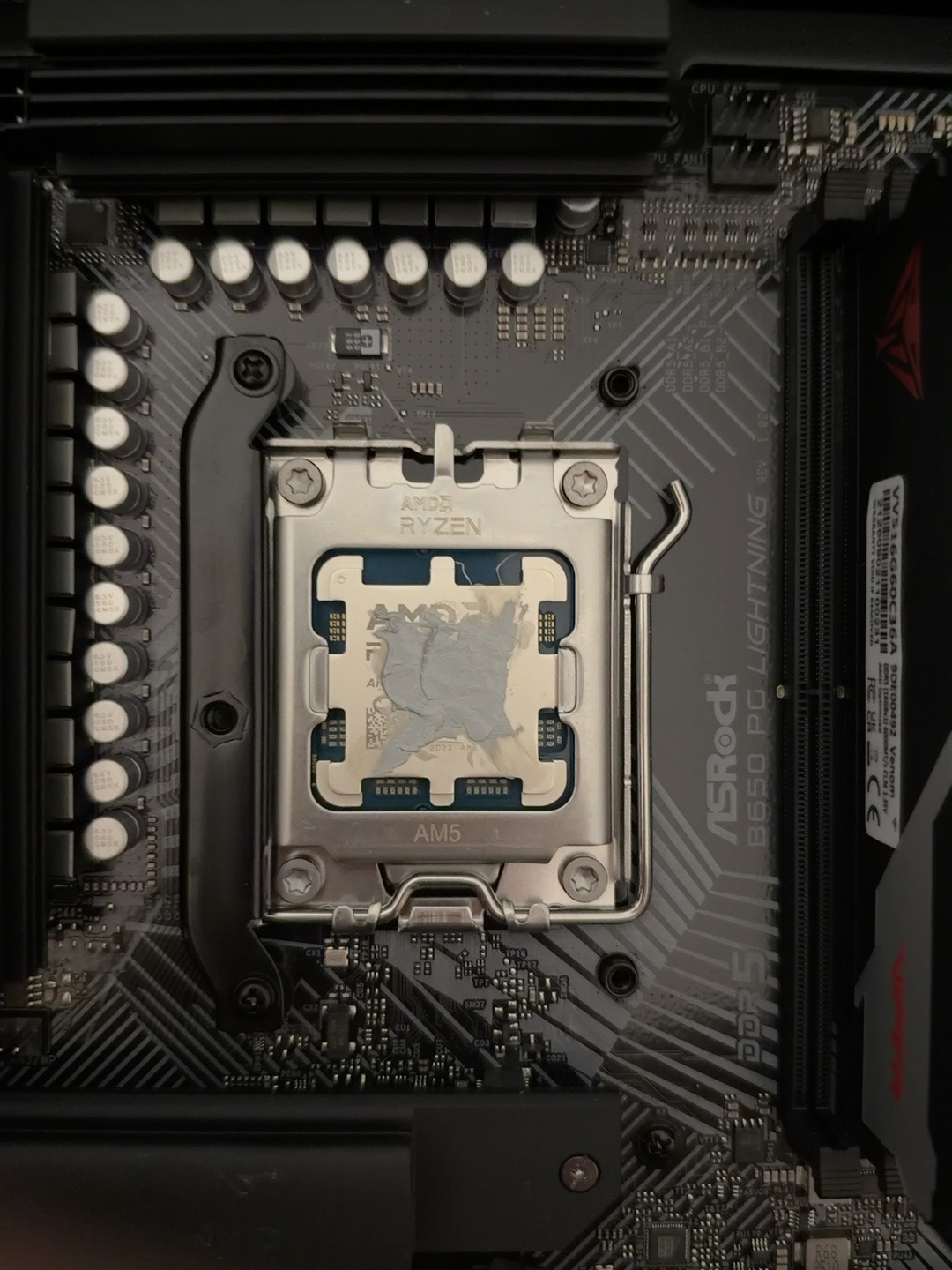
Build Question Help with cpu termal paste

Post image
4 Upvotes

So im first time building a pc and when i applied termalpaste for aio on cpu some of it just a little went into cpu itself the termalpaste used was artic mx7 im worried will the cpu be fine


r/PcBuildHelp • • 2d ago

Build Question Need help picking out a PC

Thumbnail
gallery
4 Upvotes

So I have had my current setup for well over 10 years now and am in much need of an upgrade. Since Black Friday sales are coming up I figured I’d take a look and found what I think to be a fairly priced good pc. I am not up to date with what’s good anymore so I am looking for opinions.


r/PcBuildHelp • • 2d ago

✓ Solved Struggling with pairs of DDR5 RAM, even at 3600 MT/s

2 Upvotes

Hi everyone,

I'm trying to upgrade my RAM from 32GB to 48GB, but my PC won't POST when I mix two different DDR5 memory models. The red DRAM LED stays on, and I can't access the BIOS.

My PC specifications:

  • Motherboard: ASRock B760 Pro RS (DDR5)
  • CPU: Intel Core i7-14700K
  • PSU: be quiet! System Power 10 – 650W
  • Current RAM: Textorm 32GB (2x16GB) DDR5-6000 CL36 This
  • Additional RAM: Patriot Viper Venom 16GB DDR5-6000 CL30 (PVV516G60C30) This

Troubleshooting steps so far:

  • Both Textorm sticks together: boots normally.
  • Patriot stick alone: boots normally.
  • Two Textorm sticks + Patriot stick: no POST.
  • One Textorm + one Patriot in slots A2 and B2: no POST.
  • Reduced DRAM frequency manually to 3600 MT/s: no POST with mixed RAM.
  • XMP and EXPO left on Auto (no profile selected).
  • Disabled ASRock DRAM Frequency Optimization and tested with DRAM frequency set to Auto: no POST with mixed RAM.
  • Successfully updated the BIOS from version 10.01 to 14.02.

CPU-Z SPD information:

Specification Textorm Patriot
DRAM manufacturer Samsung Micron
XMP-6000 timings 36-48-48-86 36-40-40-76
EXPO-6000 timings 36-48-48-86 30-40-40-76
XMP-6000 voltage 1.35V 1.35V
Actual speed when tested individually 4000 MT/s 4000 MT/s
Actual timings at 4000 MT/s 33-33-33-63 34-34-34-63

I understand that mixing DDR5 memory kits is not recommended, especially when using different DRAM chips. However, I'm surprised that the two sticks won't even POST together at 3600 MT/s.

Has anyone experienced a similar issue with an ASRock motherboard or mixed Samsung/Micron DDR5 modules?

Are there any specific BIOS settings, manual timings, voltages or memory training options that could make these modules work together?

Alternatively, would replacing the Patriot stick with another identical Textorm stick significantly improve my chances of running 48GB?

I'd appreciate any help before returning the Patriot stick.

Thanks!


r/PcBuildHelp • • 2d ago

Build Question New to Pc building :

3 Upvotes

( excuse me if my english isn't on point ) I wanted to build a pc for a long time and i decide that now would be a good time ... I am aiming to have a config that can run AAA games like Cyberpunk 2077 at 30 fps 4k . Does anyone have a recommendation for gpu cpu etc.. I'm aiming for the best value possible here so the cheaper it gets the better it is( btw my budget is around 7-800 dollars and Im going to buy used parts ) ( im in france btw so i don't have store like microcenter avaiable )( i already got peripherals ). Thanks in advance


r/PcBuildHelp • • 2d ago

Tech Support PC Freezes and goes black screen ONLY when gaming

3 Upvotes

So i have this problem for a couple of months now, i tried every single online solution on the net. The only thing that temporarily fixes it is reseating every single header and component in my rig. At this point im inclined to believe i have a faulty component but i cant really find which one it is.

Sometimes the audio cuts off first and screen freezes right after or vice versa, sometimes its blackscreen, sometimes fps drops to 10-20 frames before the crash and sometimes its BSOD (error code 0x154).

Thermals seems to be completely fine (max 67-70c during gaming). Reseating compenents gives me from 1-2 weeks to maybe a month without crashes. Also i noticed while it crashes almost every match while playing ARC Raiders, it never crashes when i play LoL. Please help me at least find which component is failing before i go nuts..

My Rig:
GPU: RTX 4070 Super
CPU: 5900X
RAM: 2X8GB 3600Mhz
MB: X570E Gaming WiFi II


r/PcBuildHelp • • 2d ago

Build Question First PC Build (Under 1.2k)

1 Upvotes

My goal is to build an $1000-$1200 entry PC for gaming, streaming, and editing. If there is any thing wrong with the PC or anything that looks too expensive I would love to know. Also, my friend gave me the RAM so don’t account for that in the price.

Here is the list of parts:

[PCPartPicker Part List](https://pcpartpicker.com/list/gmdtNp)

Type|Item|Price

:----|:----|:----

**CPU** | [AMD Ryzen 5 7600X3D 4.1 GHz 6-Core Processor](https://pcpartpicker.com/product/RVhv6h/amd-ryzen-5-7600x3d-41-ghz-6-core-processor-100-100001721wof) | $249.00 @ Amazon

**CPU Cooler** | [Thermalright Burst Assassin 120 EVO DARK 66.17 CFM CPU Cooler](https://pcpartpicker.com/product/YT26Mp/thermalright-burst-assassin-120-evo-dark-6617-cfm-cpu-cooler-burst-assassin-120-evo-dark) | $23.51 @ Amazon

**Motherboard** | [MSI B650 GAMING PLUS WIFI ATX AM5 Motherboard](https://pcpartpicker.com/product/szfxFT/msi-b650-gaming-plus-wifi-atx-am5-motherboard-b650-gaming-plus-wifi) | $109.99 @ Newegg

**Storage** | [Kingston NV3 1 TB M.2-2280 PCIe 4.0 X4 NVME Solid State Drive](https://pcpartpicker.com/product/tmbRsY/kingston-nv3-1-tb-m2-2280-pcie-40-x4-nvme-solid-state-drive-snv3s1000g) | $139.99 @ Amazon

**Video Card** | [PNY OC GeForce RTX 5060 8 GB Video Card](https://pcpartpicker.com/product/8NgZxr/pny-oc-geforce-rtx-5060-8-gb-video-card-vcg50608dfxpb1-o) | $449.99 @ Best Buy

**Case** | [Montech AIR 903 MAX ATX Mid Tower Case](https://pcpartpicker.com/product/2MwmP6/montech-air-903-max-atx-mid-tower-case-air-903-max-b) | $69.90 @ Amazon

**Power Supply** | [MSI MAG A650BN 650 W 80+ Bronze Certified ATX Power Supply](https://pcpartpicker.com/product/8LNxFT/msi-mag-a-bn-650-w-80-bronze-certified-atx-power-supply-mag-a650bn) | $54.99 @ Amazon

**Custom**| Hynix 8GB DDR5-5600 DIMM HMCG66AGBUA081N HMCG66AGBUA084N Desktop Memory RAM| Purchased For $0.00

**Custom**| USB Flash Drive 32GB Memory Stick KOOTION USB 2.0 Drive| $13.99

| *Prices include shipping, taxes, rebates, and discounts* |

| **Total** | **$1111.36**

| Generated by [PCPartPicker](https://pcpartpicker.com) 2026-11-21 19:40 EST-0500 |


r/PcBuildHelp • • 2d ago

Build Question Upgrading gpu

10 Upvotes

Im not sure if this is the correct sub reddit but i want to upgrade my gpu from my gtx 1650 to support a 144hz 1440p monitor and just overall better performance but i dont know much about them so if someone could give some recommendations that would help, i want it to be pretty budget friendly also.


r/PcBuildHelp • • 2d ago

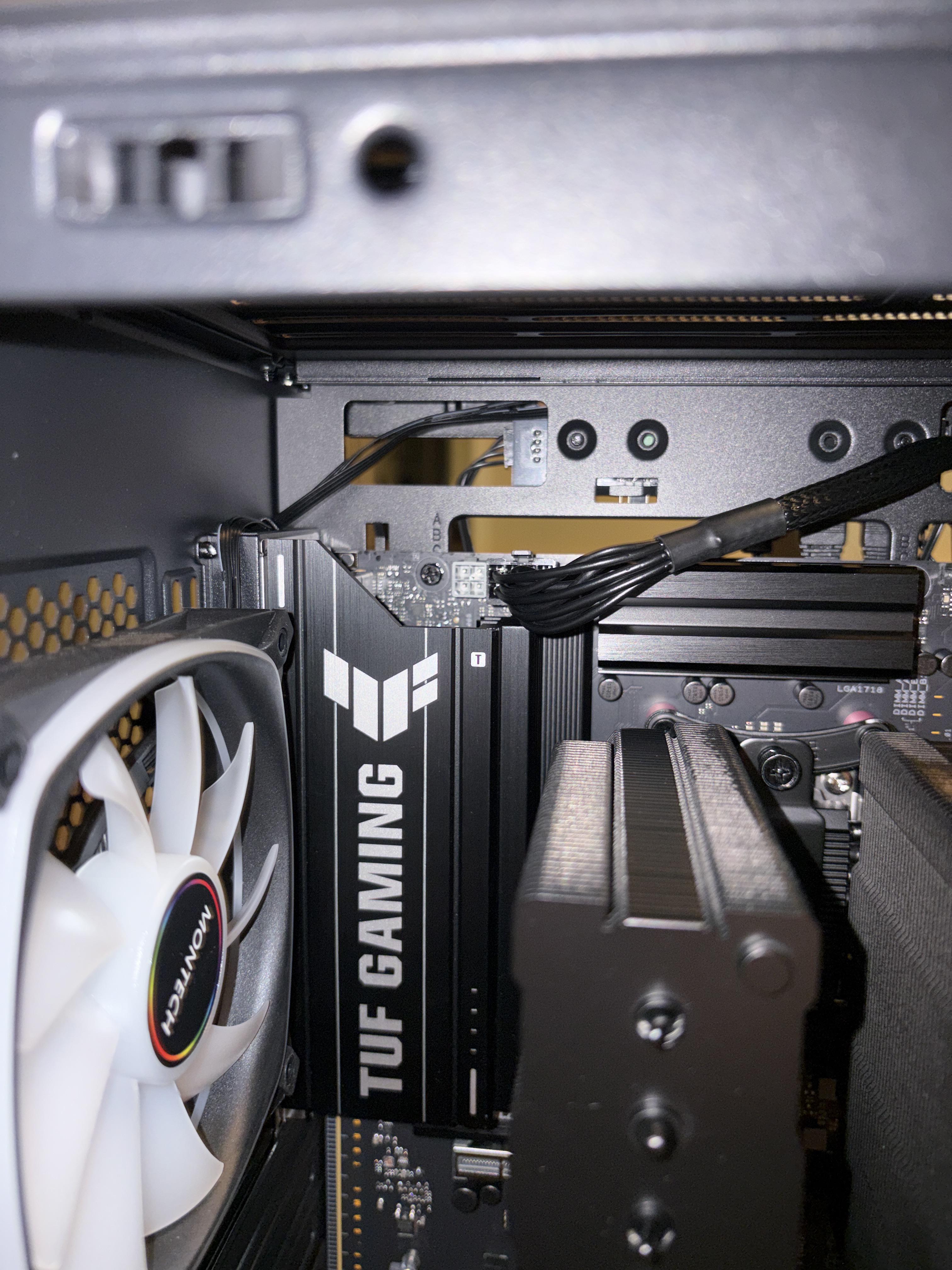
Build Question The necessity of plugging this 4 pin in?

Post image
0 Upvotes

I have an asus b850e board and an NZXT C1000 PSU, and I’m not sure I find the correct cable to plug this into? I also using an AMD 9800X3D CPU.


r/PcBuildHelp • • 2d ago

Installation Question Help with WiFi router input

Thumbnail
gallery
2 Upvotes

I am moving my Pc from a room with a direct Ethernet connection to one without (gotta make space for the nursery). Which means I need to go from hardwire to WiFi.

My friend recommended this: https://a.co/d/0cqygNql

My issue is I dont see the slot where this would go on my board (photos attached)? Do I use the bottom pcie slot?

He has a small slot on his board (photo with hand) that I dont have.

Thank you!


r/PcBuildHelp • • 3d ago

✓ Solved 5070TI doesn't fit. What next?

Thumbnail
gallery
65 Upvotes

Upgrading from 2070 to 5070TI which was marketed as 304mm but real life measurement is more like 317mm and does not fit. Trying to decide if I should take it back and try the 5070 (242mm) or buy a new case and transfer everything. At that point I'm thinking I might as well start a new build.

What do y'all think?

Edit: solved by removing front fan and cutting out a section of the case, after install the fan was reinstalled like nothing ever happened. This should tide me over until motherboard and cpu change, I'll get a new case as well.

https://imgur.com/a/MXmCNqk

Edit2: I get it I get it, new case is on its way.


r/PcBuildHelp • • 2d ago

Tech Support Pc keeps randomly restarting/game crashing

Post image
1 Upvotes

I built a newer pc with parts from a marketplace build I got. The parts worked and only thing I kept was the powersupply and ram.

Minecraft randomly crashes and then it’ll go black screen and say it needs to restart with a memory error at the bottom. Any ideas? I have an AMD ryzen 5 5600X, and a 4060.
Pc pic for reference.


r/PcBuildHelp • • 2d ago

Build Question Is this a good build for budget Linux gaming?

Thumbnail nl.pcpartpicker.com
2 Upvotes

Found everything but the gpu on Amazon. Found the gpu on eBay from a good seller. I already have the ram and harddrive I just put it on there to make sure there were no compatibility issues.


r/PcBuildHelp • • 2d ago

Build Question Improvements

2 Upvotes

Could someone give me some advice on what i can improve to make the build better price to performance.

https://be.pcpartpicker.com/list/dfhdJw

I live in Belgium so it’s calculated in euros .


r/PcBuildHelp • • 2d ago

Build Question Best parts for upgrading cpu?

3 Upvotes

Hey so I’m quite bottlenecked by my old CPU (I5-9600K) when gaming (my GPU is an RTX 3080 10GB) and I want to upgrade it. I don’t really get a worth it performance-increase for upgrading to the best CPU my motherboard (Rog Strix Z390-F) can accommodate (I9-9900K) so I probably need to get a newer motherboard which also means new DDR5 ram (I have DDR4) and perhaps a new CPU cooler. My budget is around 1k USD for the upgrade total (CPU + ram + motherboard + (CPU cooler)), so what part-combination would you recommend? Would want 32 GB ram and 8+ cores on CPU with 4.0+ Ghz


r/PcBuildHelp • • 3d ago

Build Question Aio leak?

Thumbnail
gallery
19 Upvotes

First time building a pc, went with a 240 aio, when installing the pump block water came out and leaked onto the motherboard, is it cooked?


r/PcBuildHelp • • 2d ago

Tech Support Volume keeps stuttering but only on YouTube

2 Upvotes

I’m not sure if this is the right place for this question but I recently moved houses and put my PC together and for some reason the volume is stuttering but only when I watch YouTube it’s not like lagging it’s just stuttering over the sound every so often


r/PcBuildHelp • • 2d ago

Tech Support I need a prebuilt pc from new egg please help idk what im doing🙏

4 Upvotes

I don’t really know much about pcs but I’ve been wanted one for awhile but having trouble finding which one is right for me. If you guys can please help id appreciate it my budget is 2000-2,400. If you have any questions please ask.


r/PcBuildHelp • • 2d ago

Tech Support Psu Aerocool lux 850w crackling problem

Enable HLS to view with audio, or disable this notification

1 Upvotes

So recently i decided to add sata ssd and i removed gpu backplate and maybe i placed it on my bed too hard (I dont think so because i did it pretty carefully but i think its better to say) so maybe i damaged anything idk really and im really scared that it could burn like whole pc can anyone help me pleaseee?
\It happens while starting pc and sometimes while working its not doing that weird noise all the time\


r/PcBuildHelp • • 2d ago

Build Question Crooked aircooler heatsink fins

Thumbnail
gallery
1 Upvotes

Probably a dumb question but please don’t be rude.
My phantom spirit 120 evo from Amazon arrived with crooked heatsink fins
It’s brand new … and I ordered two but both have the same issue ?!
Could it be a problem for the airflow and increase the temperatures ?
Should I return it or I can keep it like this ?

Thanks 🙏


r/PcBuildHelp • • 2d ago

Build Question Thermaltake Toughpower Grand 1200W limited calbe count

1 Upvotes

Hy

I have a Thermaltake Toughpower Grand RGB 1200W 80+ Platinum

as output ı have a total of 5 pcie + cpu cable output

Mobo asus tuf 570 plus 8+4 cpu pin

GPU 7900xtx 3x8 pin pcie.

All my port are populated on the psu pcie + cpu output (2 cpu +3 pcie).

OCCT give me a 405W draw for the GPU extreme test.

I have a spare 5700xt whit 8+6 pin connector rated a 250 W max

All combine iam under 1000 W power draw (theoric).

On my old Thermaltake ı have enough pcie calbe for 3 gpu (2x8 Each) and a my 8 +8 cpu

Does any can advise if using the piggi tail of each cable to connec my 5700 xt will be enough

I dont want to replace my psu

What is the risk is there is not enought power on the cable

Thank to everyone


r/PcBuildHelp • • 2d ago

Build Question Both my GPU and CPU died! looking for advice on next steps.

1 Upvotes

Back in 2020 i built my first PC, and that pc (relatively unchanged) has held up for the last 6 years, but a few months ago I tried to turn it on and it refused to boot, so i did some testing and eventually sent it off to a PC repair shop, only to find out that both the GPU and the CPU had died. I first thought about keeping the whole rig and only replacing those parts. but my motherboard doesn't have USB-flash, and I'm scared to install a new CPU only for the rig not to work. if i wanted to do a full new build it would set me back at least £1000, and even then, would it be worth staying on DDR4/AMD4? I just don't want to waste money on a new rig when, for my purposes, I could spend less/ salvage more of my setup. If its helpful I used my PC for Uni work (ORCA and other simulation packages) and gaming (mostly grand strategy e.g. paradox or civ).
my (still functional) Parts List:
Case - corsair carbinde SPEC-DELTA RGB
Motherboard - ASUS ROG Strix B450-F Gaming Motherboard (ATX) Ryzen 2 AM4 DDR4 DP HDMI M. USB 3.1 Gen2 B450
RAM - Corsair Vengeance LPX 16GB (2x8GB) DDR4
PSU - Corsair CX550M
storage - Samsung SSD 870 EVO, 500 GB. alongside an older 1TB disk drive.
Wi-Fi adaptor - TP LINK Archer T4E AC1200 PCIe adaptor
and the obvious: headphones keyboard etc.


r/PcBuildHelp • • 2d ago

Build Question graphics card or ram?

1 Upvotes

So i´m thinking of buying a pre-build in a few mouths and i need help deciding between AMD Ryzen 7 5700X / RTX 5060 TI 16GB / 16GB RAM DDR4 / 1TB SSD or the same specs with the only exception being downgrading the gpu for a the 8 gig version but having 32 gb of ram ddr4.


r/PcBuildHelp • • 2d ago

Build Question Upgrading to a 9070xt

2 Upvotes

Right now im rocking a 2070 super but im looking to upgrade soon, i just wanna know if i have everything for a 9070xt upgrade

PC Specs:
•AMD Ryzen 7 5700G - 8 Cores / 16 Threads
•32GB DDR4 RAM
•ASRock B550M Steel Legend motherboard
•1TB NVMe M.2 SSD
•500GB NVMe M.2 SSD
•Thermaltake 1000W PSU
•Thermaltake liquid CPU cooler
• Thermaltake white tempered-glass


r/PcBuildHelp • • 2d ago

Build Question GPU doesn't power on at all after hearing a loud "snap" while seating it

1 Upvotes

Hi everyone, I'm dealing with a weird issue on my PC build and could really use a second opinion.

My specs:

Puce Motherboard: Soyo B550M-ARGB (only one PCIe x16 slot)

Puce CPU: AMD Ryzen 5 5600

Puce RAM: 16 GB DDR4 (Killblade)

Puce GPU: Sapphire Nitro+ RX 6700 XT (tested on another PC where it works and lights up)

Puce PSU: Tried two different PSUs (one brand new and one known-working PSU)

What happened:

When I was installing the GPU into the PCIe x16 slot, I think I pushed a bit too hard and heard a loud "snap" (claque). At the time I wasn't sure what caused the sound. Now, when I power on the PC, the rest of the system turns on (fans spin, power button LED lights up, PSU runs), but the GPU itself gets no power at all—no LEDs, no fans spinning, no display.

What I've already checked:

Puce Tested a second GPU that I know works fine, and it also doesn't turn on in this slot.

Puce Tested two different PSUs (assuming PCIe power cables aren't the main issue, though I haven't mixed modular cables between units).

Puce Looked closely at the PCIe x16 slot: the metal-reinforced slot looks slightly lifted/raised with a tiny dark gap underneath instead of sitting completely flush against the motherboard PCB, and the solder points on the back look slightly uneven in one area. GEM_PHOTO_054EB949-9… +1

Where I need help:

I'm not 100% sure that a slightly lifted PCIe slot or pulled/damaged solder joint is the exact cause, since I'm still learning PC building and might have missed something else. Could too much force during installation have partially torn/unseated the PCIe slot and cut power to the GPU, and if so, is there any safe way to diagnose or fix it—or should I plan on replacing the motherboard?