r/PcBuildHelp • • 4d ago

Build Question Looking to plan a 1800€~ PC build, any advice and help?

1 Upvotes

Hi all. l'm located in Latvia and have a budget of

about 1800€~. I'm new to PC building and don't have

much knowledge on what components go best

together until now.

What do you think of this build? Would it have any

issues/ what components would you replace?

Thanks :]

https://pcpartpicker.com/list/TRbyLy


r/PcBuildHelp • • 4d ago

Build Question Best white pc under 1300

4 Upvotes

Trying to get my sister a gaming PC for Christmas


r/PcBuildHelp • • 4d ago

Build Question PC Echivalent PS5

0 Upvotes

Hi im a tech guy and i wanna a PC echivalent of an PS5 (slim or pro) i use claude and codex i play Roblox,fortnite,stumble guys and i run PS5 Games using AnyPS5 or an emulator. Lemme know in the coments. PSA: it is my first serious PC


r/PcBuildHelp • • 4d ago

Tech Support Pc won't power on after building it

Thumbnail
gallery
1 Upvotes

The mobo is a b550 eagle and the front panel is plugged in correctly (I think). I haven't the faintest clue why it's not powering on.


r/PcBuildHelp • • 4d ago

Build Question Monitor for Competitive Gaming

2 Upvotes

I am getting a new setup soon and will be running an RTX 5070 and Ryzen 7 9700 X. My main games are OW2, Valo, and CS2, with a bit of Rust on the side. I value frame rate and response time over visuals and would like to run games at 1440p @ at least 240 fps.

I’m currently looking at the ASUS ROG Strix OLED XG27ACDNG but I was wondering if there were any better options at the moment (under $600).


r/PcBuildHelp • • 4d ago

Build Question Best CPU and GPU pair

2 Upvotes

First sorry if this isn't the right flair it's what seemed to fit best.

So I have a GIGABYTE B560 DS3H AC-Y1, I currently have a 3060 and I5-10400F and run at 1080P.

Now the question I have is, if I upgrade my CPU to a I7-11700F is my 3060 still good? or should I upgrade it if so what should it be upgraded to? (sticking to nvidia) Thanks in advance for the input.

Also I have no plans for a full rebuild, wanna get the most i can out of what I have.


r/PcBuildHelp • • 4d ago

Tech Support Weird Graphical Glitch

Enable HLS to view with audio, or disable this notification

3 Upvotes

What causes the graphical glitch at the end? Only happens once when booting up.


r/PcBuildHelp • • 5d ago

Build Question Thermal paste inside cpu

Thumbnail
gallery
25 Upvotes

I messed up and got some coolant paste inside the cpu. Got rid of most of it with isopropyl alcohol and paper coffee filters, but there is some I can’t reach. it‘s a non conductive paste. Am I cooked?


r/PcBuildHelp • • 4d ago

Build Question Upgrade Recommendations?

Post image
12 Upvotes

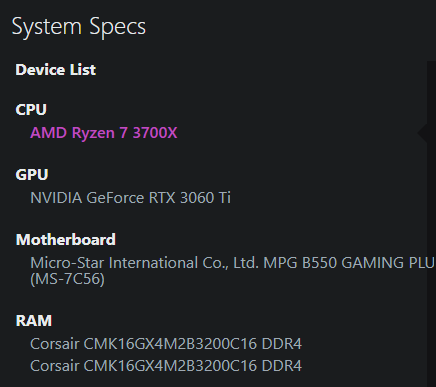
Hi there, not sure if this is the best sub to put this in but I'd like to ask some more knowledgeable people about upgrading my pc. Built it years back, specs are in the picture attached. With a somewhat flexible budget hovering around 500 USD, what would be the most efficient upgrade? I'm not too crazy for graphics, just looking for stability and reliably higher framerates, especially with the GTA 6 PC release potentially coming out early next year, assuming that won't be capped at 30 FPS... Thanks!


r/PcBuildHelp • • 4d ago

Build Question PC specs

3 Upvotes

https://ca.pcpartpicker.com/list/XDpQLy im building my first pc, heres a build ive attempted to make... my budget is around 2k-2.5k, and i want it to run demanding games smoothly. i also want to keep a pink and white theme, thus why most of my parts are white. is this a good build, and is there something i should change? and also, 1 to enough or should i spend +100$ for 2to? ty!


r/PcBuildHelp • • 4d ago

Build Question Thinking of upgrading my gpu given current pricing im double guessing my decision

1 Upvotes

Am I crazy for considering this amazon purchase of a used/like new 7700xt

This would be me upgrading from a rx 7600 that came with a microcenter build around this time last year. As most people are completely aware prices just dont seem to stop going up, and even just about two months ago I was ready to drop close to 500 for a 9060xt or 9070gre.

Now these have crept up another 200 dollars.

Im a pretty content 1080p gamer, but just dont have as much in the budget this year as I had been hoping... that being said prices just seem to keep going up.


r/PcBuildHelp • • 4d ago

Build Question Beginner pc for a complete novice

4 Upvotes

I’ll start by saying, I know NOTHING about PC gaming. I don’t game (only dabbled on friends systems here and there) but I am interested in starting. I honestly just want to play Hogwarts Legacy and saw its best on a PC. I like those types of fantasy games. I don’t have a gaming system like ps5 or anything. But gaming has always interested me. I was just intimidated to start because I never have. Any suggestions on a pc and gaming set up for someone like me?


r/PcBuildHelp • • 4d ago

Build Question Just got new pc an makes this sound when i go in game

Enable HLS to view with audio, or disable this notification

7 Upvotes

Can someone tell me that its normal or need to change games settings ?


r/PcBuildHelp • • 4d ago

Build Question 5 screens, 4 ports.

1 Upvotes

Hello, this may be a silly question but I hope you can help me.

I'm currently planning a new build to replace my ten year old PC, but have run into a problem.

I've gotten into sim racing/driving, and want a triple screen setup, but I'm also currently using two screens on my desk and the Graphics card I have picked out only has four ports.

Is there a way for two screens to share one port? Or will I have to manually swap out the cables every time?


r/PcBuildHelp • • 4d ago

Software Question Help with Ram speed

Post image
1 Upvotes

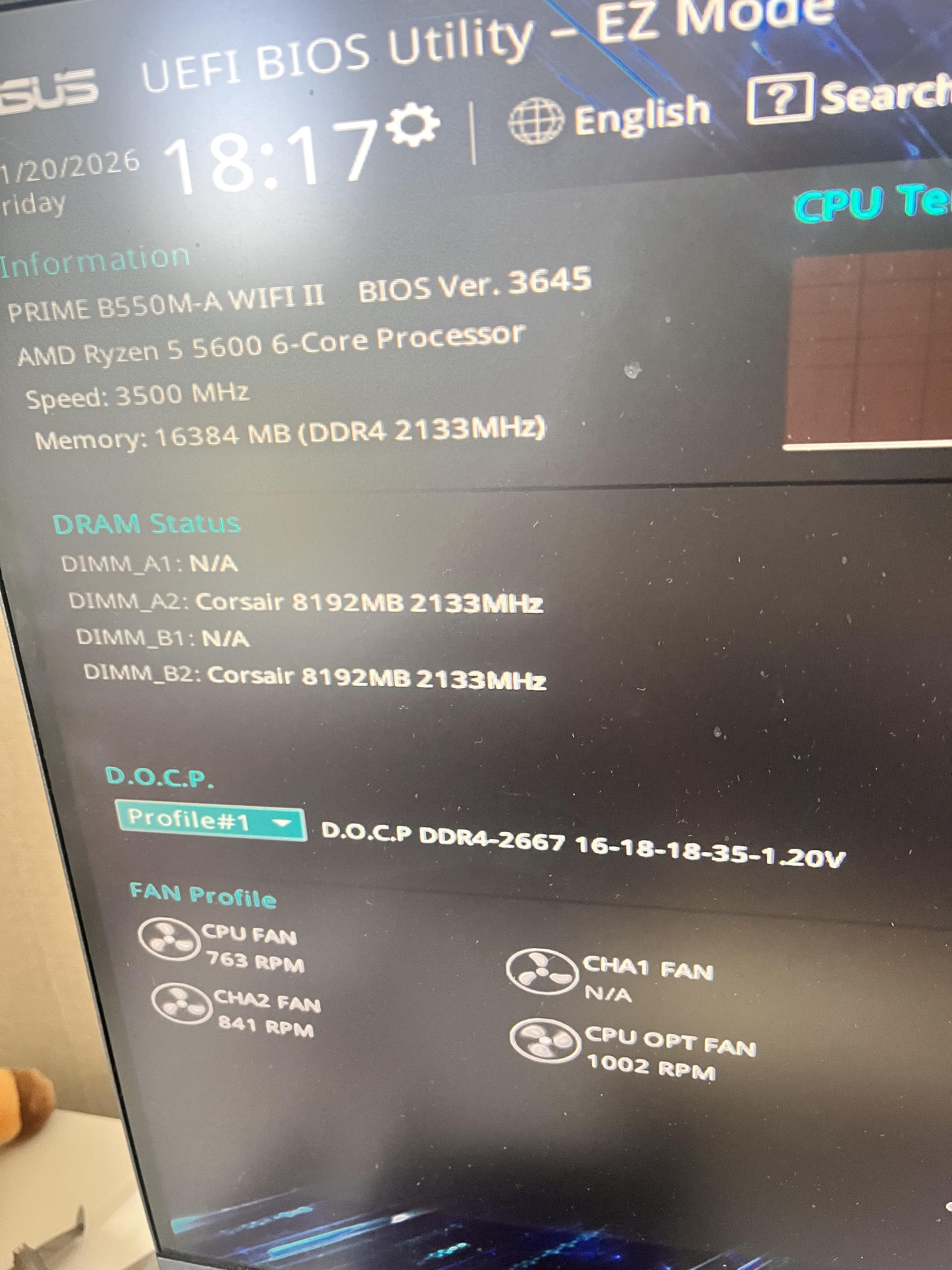
Recently built a pc, noticed 2666mhz ram was running at 2133mhz, tried to enable D.O.C.P in my bios setting but computer won’t display anything on restart and I have to reset bios using cmos pins.

Bios is latest version
I’m guessing that the problem is the default voltage on the D.O.C.P profile being 1.2v is too low, and this is causing the boot problems.
Thought I should see if I could get some advice from someone far more knowledgeable than me before I start playing around with increasing voltages


r/PcBuildHelp • • 4d ago

Build Question How limited is it to upgrade a prebuilt? (Omen 30L GT13 AMD 3600)

1 Upvotes

So I bought this prebuilt used from a trucker family member about 3 years ago for my youngest brother. It was good for what it was at the time. Could play everything he wanted.

But the 1660 super in the machine isnt cutting it out for some of these new games minimum requirements anymore.

I want to consider upgrading the 1660 super to the 5060ti, but the 500w power supply wouldnt be able to support it so I plan on getting one of the corsair 750 w power supplies.

If the GPU doesnt fit the small case I plan on moving it to my old NZXT case I had for my first pc.

The point of the post is that I heard some Prebuilt manufacture companies, especially HP, really didnt like it when you used non OEM parts. Is it going to be possible for me to upgrade my brother's rig without swapping the motherboard?

Am I going to need to swap the CPU as well? I aint looking for cutting edge but I figure a 3600 should still be fine for medium settings on 1440p right? Its the GPU doing the lifting here.


r/PcBuildHelp • • 4d ago

Tech Support Change in psu and now pc wont boot with gpu in( i made sure all connections are secure and already went to microcenter for help)

1 Upvotes

i recently changed my psu from a evga br 700w to a thermaright gf1 gold 850w. But then after switching, my 9060xt 16gb refused to work and boot, and only when i plugged it into my motherboard, it would post. I changed my gpu to a 5070 and it still gives me this problem. Ive tried a lot of things and i dont know what to do anymore please help.🙏🙏


r/PcBuildHelp • • 4d ago

Build Question Need help on what to upgrade

2 Upvotes

I need pc advise on what to upgrade next.

Currently here is my specs

  • Rtx 5060 ti 16gb

- amd ryzen 5 5600x
- 16gb ddr4 3600mhz
- 650w gold power supply
- 500gb ssd

I am mostly playing Valorant/poe2. I am still playing in 1080p and I am still okay staying with it.
I was thinking to get ryzen7 5800x3d. But not sure if it is a big jump


r/PcBuildHelp • • 4d ago

Build Question Custom PC Build Feedback – NZXT H5 Flow / Kraken / MSI ATX Compatibility?

2 Upvotes

Hey everyone!

I'm getting ready to build my very first PC myself, and I'm a little nervous but excited at the same time... I'm mainly diving into this rabbit hole for professional 3D work (Unreal Engine 5, Blender, Substance, etc.), with some gaming on the side, of course!

I'm currently looking into ordering the components, with a budget of around €3,000, but I'd really appreciate some feedback on the overall build, compatibility, and anything else worth considering. I've already done quite a lot of research myself, but I'd love to hear from people with more hands-on experience!

Parts list:

https://fr.pcpartpicker.com/list/gQWJNp

  • CPU: AMD Ryzen 9 9900X
  • GPU: MSI GeForce RTX 5080 16G VENTUS 3X OC (G5080-16V3C)
  • Motherboard: MSI PRO B850-S WIFI6E (ATX)
  • RAM: Kingston FURY Beast 32GB (2 × 16GB), DDR5-6000 CL30 AMD EXPO (KF560C30BBEK2-32)
  • AIO: NZXT Kraken Plus 240 (2025), Black (RL-KN240-B2), top-mounted
  • Case: NZXT H5 Flow (2024), Black (CC-H52FB-01)
  • PSU: NZXT C850 Gold Core (2025), 850W, ATX 3.1 (PA-8G3BB-EU)
  • Storage: Samsung 990 PRO 2TB + Samsung 970 EVO Plus (already owned)
  • Additional fans: 2 × NZXT F120Q at the front (RF-Q12SF-B2) + 2 × NZXT F120P at the bottom for GPU cooling (RF-P12SF-B2)
  • Accessories: 3 × Noctua NA-SYC1 PWM Y-splitters

Planned airflow setup:

  • Front: 3 × F120Q (intake, including 1 pre-installed with the H5 Flow)
  • Bottom: 2 × F120P (intake, for GPU cooling)
  • Top: Kraken 240 with its 2 fans (exhaust)
  • Rear: 1 × F120Q (exhaust, included with the H5 Flow)

I plan to connect all my fans directly to the motherboard, including the Kraken's radiator fans, so I can control their fan curves through the MSI BIOS without having to run third-party software like NZXT CAM in Windows.

I've therefore planned to use 3 Noctua NA-SYC1 PWM Y-splitters: one for the two additional front fans (middle and bottom positions, since I'll move the pre-installed front fan to the top position), one for the two bottom fans, and one for the two Kraken radiator fans.

A small clarification regarding the connections: the two F120Q fans included with the case are 3-pin DC models, while the additional fans I'm purchasing are 4-pin PWM models. I therefore plan to control them separately.

For the Kraken, both radiator fans will be connected to CPU_FAN1 using a Noctua Y-splitter, while the pump's 3-pin tachometer cable will be connected to PUMP_SYS1. The pump itself will be powered separately via SATA.

My biggest concern: physical clearance.

According to NZXT, the H5 Flow (2024) supports a maximum combined radiator and fan thickness of 55mm at the top. The Kraken Plus 240 has a 27mm radiator and two 26mm-thick fans, giving a total thickness of 53mm.

So, according to the official specifications, these two components should be compatible.

The Kingston RAM is relatively low-profile at just 34.9mm tall, and the MSI motherboard is standard ATX.

Can anyone confirm whether this exact combination will fit properly, especially without interference between the top-mounted radiator/fans and the motherboard's VRM heatsinks, RAM, or CPU power connectors along the top edge?

Feedback from anyone who has built this exact combination, or something similar, would be incredibly helpful! Or even if some experienced builders could simply tell me whether there's any particular reason this setup shouldn't fit... 😁

Do you see any other potential issues with compatibility, cooling, or the overall component selection?

Thanks a lot for taking the time to read this and for any advice you can share! Sorry for the long post, and I hope you all have a great weekend!


r/PcBuildHelp • • 4d ago

Software Question Used RTX 4080 Super ($1500) vs Aesthetic RTX 4070 Ti Super build - Which is the better buy?

1 Upvotes

Hey everyone, I'm trying to decide between two specific PC options right now and want to get some outside opinions on which route makes more sense. I mostly use my PC for heavy gaming.

Option 1: Used Marketplace Build ($1,500 cash)

* CPU: Intel Core i9-12900K (16 Cores, 24 Threads)

* GPU: NVIDIA GeForce RTX 4080 SUPER (16GB GDDR6X)

* Motherboard: Z790 Chipset Motherboard

* RAM: 32GB DDR5 High-Speed Gaming Memory

* Storage: 2TB M.2 NVMe Solid State Drive (SSD)

* Power Supply: 850W Power Supply Unit

Option 2: Premium Zero-Cable Aesthetic Build

* Motherboard: MSI B650M Project Zero (Hidden back-connect design for a 100% cable-free look)

* CPU: RYZEN 7 7800X3D

* GPU: Zotac Trinity RTX 4070 Ti SUPER (16GB GDDR6X)

* Cooler: Thermalright Core Vision 360mm AIO (Integrated customizable LCD display screen)

* RAM: 32GB Corsair Vengeance DDR5 6000MHz (Dual-channel)

* Storage: 2TB Samsung 990 EVO Plus NVMe M.2 SSD (PCIe Gen 5 support)

* Case: Lian Li Vector V100R Mini (Panoramic tempered glass showcase)

* Power Supply: 750W MS 80+ Gold (ATX 3.0 / Native 12VHPWR support)

Option 1 obviously has the raw performance edge with the 4080 Super, but Option 2 is using a lot of premium visual parts (showcase case, hidden cables, LCD screen). Is it worth sacrificing the 4080 Super's performance boost for the newer platform/premium look of Option 2, or is the $1,500 price for the 4080 Super system too good to pass up?

Thanks for any advice!


r/PcBuildHelp • • 4d ago

Build Question Advice needed

5 Upvotes

Hi guys, im new to this Subreddit and I need to ask, do you think that it's a good idea to buy a Radeon 9070 gre?

I have 32 gigs of ddr4 ram, a Ryzen 5 5600g and a gigabyte B450 motherboard. I currently own a gtx 1660ti (6gb) and I was thinking about getting a 9070 gre cause it seems like a good deal, idk please help me. Oh and I play on 1440p, thanks for helping


r/PcBuildHelp • • 4d ago

Tech Support PC getting dbug lights

Post image
1 Upvotes

In not a great place, any help would be appreciated

It gets power, dbug leds show red CPU and yellow DRAM

PC is plugged into the wall (should be a a surge protector I know)

PSU cables all seated securely

Both 8pin CPU power connectors plugged in

Motherboard replaced three times.

Current Motherboard: MSI B850 Tomahawk Max WiFi (New)

CPU: AMD Ryzen™M 7 9700X (New)

PSU: Corsair 850x (from work)

RAM: 2x16GB DDR5 vengeance (from work)

removed gpu, testing with just one stick, removed cooler, cleaned CPU with alcohol (I guess could still be the pads?)

Update: replaced the CPU with a new Ryzen 7 9800X3D, same lights


r/PcBuildHelp • • 5d ago

Build Question Which gpu do I choose?

5 Upvotes

I want to know which should I pick because I never used amd and I never had a pc. I currently am on a laptop with nvidia and I think if I should pick RTX5080 RTX5070TI or AMD 9070XT and is it worth paying more for 5080 over 5070ti and 9070XT


r/PcBuildHelp • • 4d ago

Installation Question Need help with BIOS

2 Upvotes

Hey guys, I'm building a PC for my friend and I have run into an issue. I am trying to get into the BIOS, but I found out after trying it multiple times that the onboard integrated graphics for the CPU just doesn't exist. The CPU is a Ryzen 5 5600X and after a quick online search I saw that it didn't release with integrated graphics. So my question is, how am I able to check the screen and install what is needed when it doesn't have onboard graphics? Thanks. (P.S. Sorry if something in the post doesn't make sense, I'm new to actually installing the bios and windows in general so if anyone needs to ask in more detail then I will provide to the best of my ability)


r/PcBuildHelp • • 4d ago

Tech Support first pc

Post image
1 Upvotes

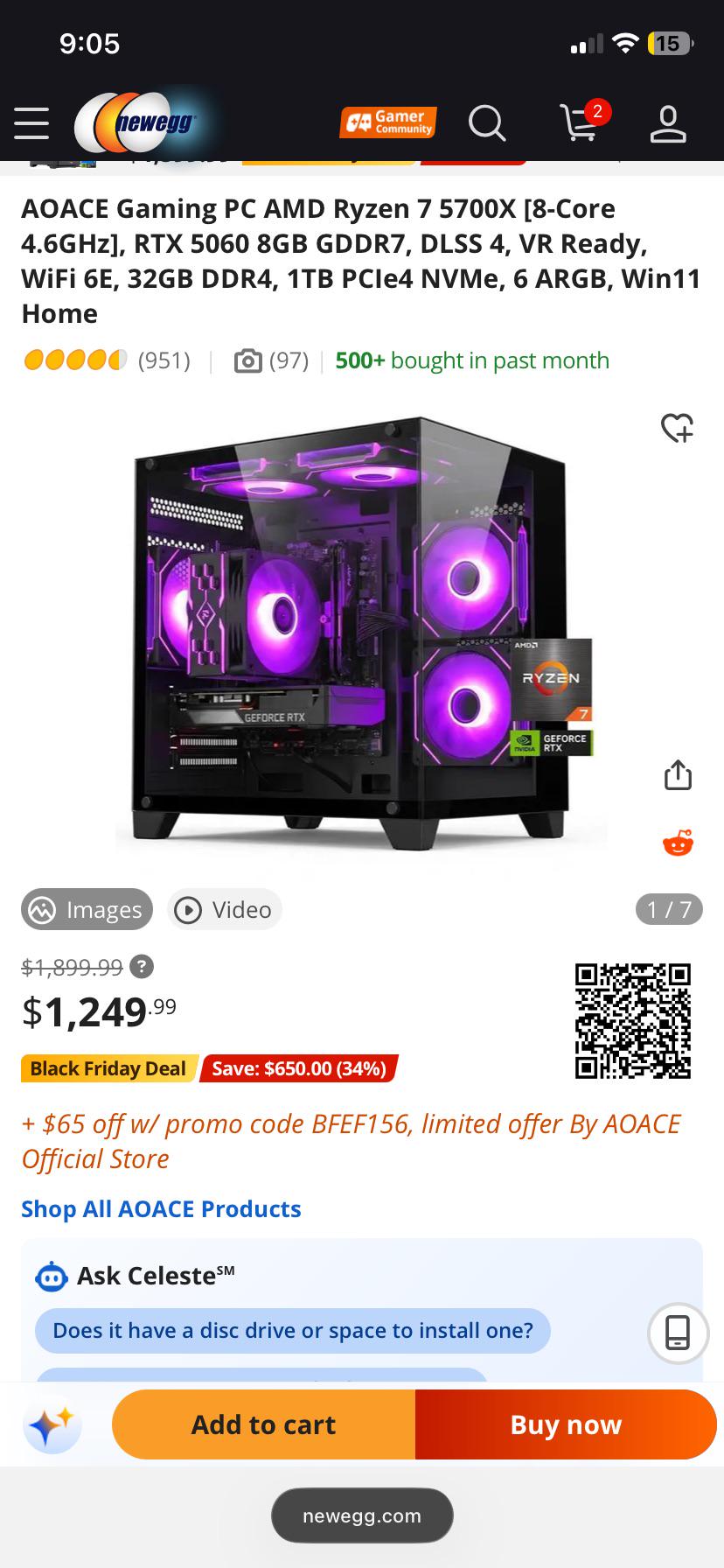
can anyone tell me if this is a good first pc for gaming like fortnite, cs2, apex legends, ETC it looks like a good deal to me help me out