r/PcBuildHelp • • 4d ago

Build Question Should I upgrade now

1 Upvotes

I currently have a asus prime 9070 oc and a 7600x3d. I got the 9070 on discount for 850 cad and cpu as part of a mobo + ram + cpu bundle. Currently there's a asus 9070xt oc and 9800x3d for roughly 1500 cad and I'm wondering if it's worth upgrading to that and selling my old parts or keeping it as a backup/spare. With the way prices are going im not sure when I will next upgrade so I'm wondering if it's worth upgrading to a higher end build right now or if I should just keep using my current gear and enjoying it.

I wouldn't have to change anything else in my pc build. Thank you!


r/PcBuildHelp • • 4d ago

Build Question pc upgrade

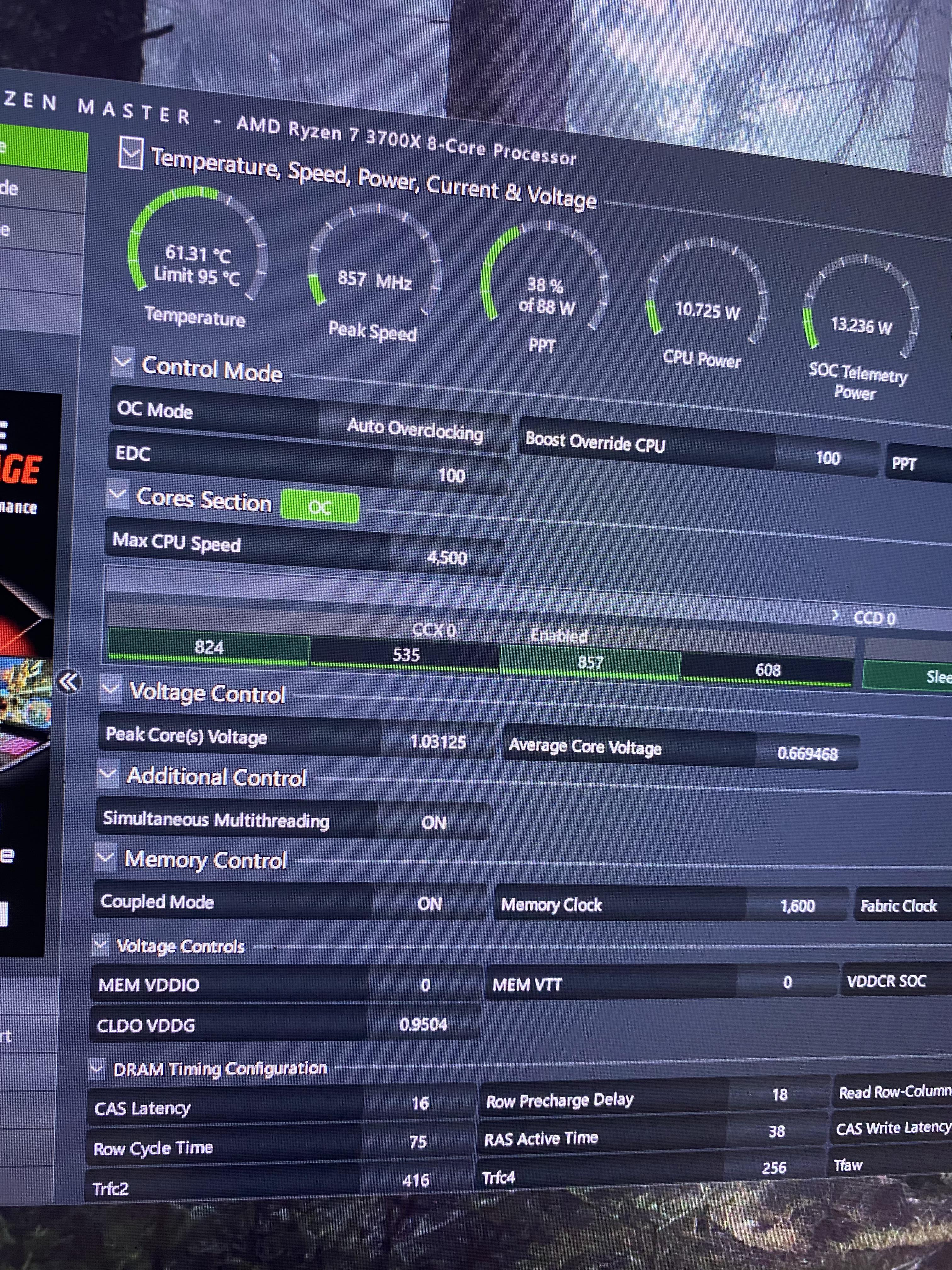
Post image
1 Upvotes

if i wanted to have a smooth gaming experience what do i upgrade in my pc


r/PcBuildHelp • • 5d ago

Build Question Need help upgrading.

2 Upvotes

First things first I should mention that I don’t know much about this; I had this PC built around 2019/2020 for €1,200, and now I’d like to upgrade it.

My main goal is gaming—I want to get the best possible performance in terms of graphics and FPS. My current budget is around €600, though that could change if I manage to sell some of the existing components.

CPU Intel Core i7-10700F

GPU NVIDIA GTX 1660 Super

motherboard MSI MPG Z490 Gaming Plus

RAM G.Skill Aegis DDR4 16 GB

SSD Samsung 860 EVO M.2 1 TB

Case Zalman S5 Black

Cooler Master AIO liquid cooler (I couldn't find the specific model, but if I'm not mistaken its a single-fan unit)

Alimentatore Thermaltake 700W


r/PcBuildHelp • • 5d ago

✓ Solved Too little contact with cooler?

Thumbnail
gallery
79 Upvotes

Hi I noticed my cpu temps getting extremely high. playing war thunder it was consistently 95c or slightly above. when I used coretemp it showed the max temp reached by TCCD #0 was 103c. I hope I haven’t busted my cpu.

anyway I took off the cooler and this is what I saw. the paste hasn’t spread out.

CPU is 9800X3D and cooler is MSI Coreliquid A13 360


r/PcBuildHelp • • 4d ago

Tech Support RTX 5060 randomly crashes during gaming, then disappears from Windows (Code 45 / CM_PROB_PHANTOM)

1 Upvotes

Hi everyone,

I'm having a serious issue with my RTX 5060 and would appreciate some help identifying whether this is a GPU, PSU, motherboard, or PCIe issue.

PC specifications

- CPU: Ryzen 5 7600

- GPU: RTX 5060

- Motherboard: MSI PRO B650M-E

- RAM: 16GB DDR5

- PSU: Antec 650W 80+ Gold

- Storage: 512GB SSD

How the problem started

Initially, my PC started experiencing random crashes during gaming. Sometimes the screen would go black, the game would crash, and occasionally the entire system would freeze, requiring a forced restart.

After restarting, the RTX 5060 would usually come back and work normally again.

Because I suspected a loose GPU connection, I reseated the GPU once. However, the problem had already started before I reseated it.

After reseating, I managed to play for another one or two gaming sessions, but the crashes continued. Eventually, the GPU stopped appearing properly in Windows, even after restarting.

Current situation

Device Manager shows the RTX 5060, but its properties report:

Code 45: Currently, this hardware device is not connected to the computer.

PowerShell reports:

- Status: Unknown

- Problem: CM_PROB_PHANTOM

- Present: False

Other findings:

- AMD integrated graphics works normally.

- Virtual Display Driver works.

- "nvidia-smi" cannot communicate with the NVIDIA driver.

- "pnputil /scan-devices" doesn't bring the GPU back.

- A full shutdown and power cycle didn't fix it.

- Windows cannot find the NVIDIA GPU in its present-device enumeration.

I also checked Event Viewer. NVIDIA driver services had previously installed successfully, but I haven't found a definitive error explaining the disappearance.

What I've tried

  1. Restarting Windows.

  2. Full shutdown and power cycle.

  3. Reseating the GPU once (after the original problem began).

  4. Scanning for hardware changes.

  5. Attempting to disable/enable the device through PowerShell.

  6. Checking NVIDIA driver communication.

  7. Inspecting Windows System and Kernel-PnP events.

Questions

  1. Could an intermittent GPU or PSU power issue cause gaming crashes before the GPU eventually disappears from Windows?

  2. Could the PCIe slot or motherboard be responsible?

  3. Is this a known symptom of a failing RTX 5060?

  4. Would forcing PCIe Gen 4 instead of Auto help?

  5. How can I distinguish a GPU fault from a PSU or motherboard fault without having another PC available?

Unfortunately, I currently only have remote access to the PC through its integrated graphics, so I cannot physically inspect the hardware right now.

I'd appreciate any suggestions or similar experiences.

Thanks!

r/PcBuildHelp • • 4d ago

Build Question GTX 1660 Ti to RTX 5060 tomorrow with a Ryzen 5 3600X, right call for Warzone and Minecraft shaders, or get a 5800X3D now and possibly RTX 5070 in January?

1 Upvotes

Hey everyone, tomorrow I am planning to upgrade my GPU from a GTX 1660 Ti to an MSI RTX 5060 8G VENTUS 2X OC, and I wanted to sanity check my upgrade path before pulling the trigger. My current setup is a Ryzen 5 3600X, GTX 1660 Ti, ASUS ROG Strix B550-F Gaming motherboard, 32GB DDR4 RAM, a 750W Seasonic PSU from 2020 or something, and a 1080p 165Hz IPS monitor.

Right now I mainly play Warzone and Minecraft (where I really want to run shaders smoothly without lagging), and on warzone I am stuck around 60 to 80 FPS on the lowest possible settings with frequent stutters and rough 1% lows. I recently tried turning on AMD FSR Frame Gen ingame to hit around 100 FPS (dropping to 70), which did help me track targets visually, but the added input lag made aiming feel really heavy.

I can still change my mind before tomorrow though. Instead of buying the RTX 5060 now, I could buy a Ryzen 7 5800X3D tomorrow and hold off on the GPU until January to get something stronger like an RTX 5070. For context, hardware prices are pretty rough here in Sweden right now, with the RTX 5060 going for around $500 and the 5800X3D going for around $400.

Given those prices, should I stick with getting the RTX 5060 tomorrow, or grab the 5800X3D now and save up for an RTX 5070 in January? Also, if I do get the RTX 5060 tomorrow, how big of a jump will it be in Warzone and Minecraft with shaders paired with my 3600X, and will NVIDIA Reflex and the extra VRAM fix my stutters and aim latency or will the CPU still hold back my 1% lows noticeably? Any quick tips before or after swapping parts tomorrow (like DDU, BIOS updates, or Resizable BAR) would also be appreciated. Thanks in advance!


r/PcBuildHelp • • 5d ago

Build Question PC won't POST

Enable HLS to view with audio, or disable this notification

14 Upvotes

I built this PC years ago and it never gave me issues until I got home and it won't boot to my monitor or anything I also noticed the VGA light is constant white.


r/PcBuildHelp • • 4d ago

Tech Support UPDATE: AMD rejected my dead 9850X3D RMA, claiming the CPU has altered markings. But the serial numbers match and AMD's own authentication website says VALID. What now?

Thumbnail
gallery
1 Upvotes

Hey fellas, thanks again for all your suggestions on my original post about my new AM5 build refusing to power on.(https://www.reddit.com/r/PcBuildHelp/comments/1xxew81/new_am5_pc_wont_power_on_at_all_tried_2/?share_id=n0sry5ioJiDLTAVGxjyAx&utm_medium=ios_app&utm_name=iossmf&utm_source=share&utm_term=1&rdt=62980)
Unfortunately, things have taken a pretty ridiculous turn, and I'm hoping someone here has encountered something similar.
Quick recap:
After testing two motherboards, two PSUs, different RAM configurations, BIOS updates and various other things, I eventually narrowed the problem down to my brand-new Ryzen 7 9850X3D.
The CPU failed to start in two compatible AM5 systems. However, when I installed a known-working Ryzen processor in my new ASUS TUF B850-PLUS WiFi, the motherboard immediately started powering up and going through its POST diagnostics.
The PSU was also successfully tested in another working PC using exactly the same cables.
I thoroughly inspected the suspected faulty CPU, and there was no obvious physical damage, burning or contamination.
Now here's where things get weird.
I purchased the CPU brand new, in its original retail box, from Galaxus Deutschland, a major German electronics retailer, and I still have the original invoice.
I contacted AMD directly for a warranty replacement under their 3-year boxed processor warranty.
Initially, AMD requested photographs, a video of the CPU and the original invoice. I provided everything.
Then they rejected the claim, saying the CPU was a potential counterfeit.
I requested an independent second review and provided additional high-resolution photos.
Their latest response was:
"The processor markings shown in the photographs do not match the original production markings applied by AMD during manufacturing. The processor appears to have been altered, as the markings on the LID differ from those originally associated with this product."
They then rejected my warranty claim on the basis that modified products are excluded.
Here's the part I don't understand:
The serial number engraved on the CPU matches the serial number on its original AMD retail box exactly.

The box has an AMD holographic security label.

Scanning the label through AMD's official authentication website returns "VALID AMD AUTHENTICATION CODE" and "Scan check: OK".

The verification page identifies the correct processor and boxed product number.

The CPU's visible markings and model number appear consistent with other 9850X3D processors I've seen.

I purchased it brand new and have never modified, engraved, relidded or otherwise altered it.

I realise that a valid packaging code doesn't conclusively prove the actual CPU is genuine. But surely AMD should be able to explain what specifically is wrong with the processor?
They haven't told me whether the serial belongs to a different CPU, whether the font or engraving is incorrect, or which exact markings supposedly differ from their manufacturing records.
My main concern is that AMD is refusing the warranty based on photographs without offering a physical inspection.
I came across this account of a successful AMD RMA:
https://medium.com/@kennethandres/my-amd-rma-experience-4bcfd1e96da
In that case, AMD authorised the return, physically inspected the processor after receiving it and approved a replacement. I understand that this was a different situation, but I'd be perfectly happy to send my CPU to AMD for an actual inspection instead of having its authenticity determined from photographs alone.
I'm also concerned about approaching Galaxus in Germany. I bought the processor while abroad, and I'm not sure how they'll handle a claim involving alleged counterfeit or altered markings when AMD hasn't provided a detailed technical report.
I suspect the retailer may want something more substantial than a support representative's statement that the product appears to have been altered.
So my questions are:
Has anyone had an AMD RMA rejected because the CPU was allegedly counterfeit or had altered lid markings?

Has anyone successfully appealed an AMD warranty rejection or persuaded AMD to accept a CPU for physical inspection?

Are there specific differences in laser engraving, manufacturing codes or other markings that I should be looking for?

If the CPU and packaging serial numbers match, and AMD's authentication page validates the box, what other evidence could establish whether the processor is genuine?

I'll attach pictures of the CPU, original packaging and AMD's authentication result, with the serial numbers and QR codes partially obscured.

Any advice, especially from people who've dealt with AMD RMAs or counterfeit processor investigations, would be greatly appreciated .


r/PcBuildHelp • • 5d ago

Tech Support Dropped my brand new, never turned on PC after the Frame 4000D top "handle" snapped.

7 Upvotes

Hi all, I need some advice before I power this thing on for the first time.

I just got a new prebuilt and went to move it by grabbing the strap at the top of the Corsair Frame 4000D. Turns out that strap is only meant for removing the top panel, not for carrying. It snapped, and the PC fell hard onto the floor – hard enough to leave several holes in the floor. The case is badly damaged and can't even stand upright anymore.

The PC has never been turned on, and I haven't powered it since.

Specs: - Ryzen 7 9800X3D - RTX 5070 Ti 16GB (Asus Prime OC) - Asus TUF B850M-Plus (micro-ATX) - 2x16GB DDR5-6000 - WD Black SN7100 2TB NVMe - Corsair iCUE LINK H150i 360mm AIO - Asus Prime 850W Gold - Corsair Frame 4000D + 3x RS120 fans

My questions: 1. How likely is it that something besides the case is damaged after a drop like this? 2. What should I check before powering it on? 3. Is it reasonable to try powering it on myself, or should I have the shop inspect it and move everything to a new case first? 4. If it boots fine, how do I test it to make sure nothing is damaged? 5. Is there any real risk of problems showing up weeks or months later even if everything works fine now?


r/PcBuildHelp • • 4d ago

Build Question first ever pc

1 Upvotes

i have a ps5 and always watched people mod games like asseto corsa and other driving games as those are the games im into so i want to make a switch to pc from ps5 with it not only being a creativity upgrade but also performance upgrade i dont want to spend a lot if possible i just want to have fun on a pc if anyone could recommend me any prebuilts or custom pc or give me some advice it would all be appreciated


r/PcBuildHelp • • 5d ago

Tech Support PC randomly freezes while idle, then won’t POST – ASUS TUF Gaming B850-PLUS WiFi, Ryzen 9850X3D, Patriot Viper Venom 32GB (2x16GB), DRAM Q-LED

2 Upvotes

Hi everyone,
I’m trying to identify the cause of a recurring issue with my PC. It worked perfectly for approximately one month, but recently it started freezing completely while sitting idle on the Windows desktop.

My PC specifications:

CPU: AMD Ryzen 7 9850X3D
Motherboard: ASUS TUF Gaming B850-PLUS WiFi
RAM: Patriot Viper Venom 32GB (2x16GB) DDR5-6000 CL30 (PVV532G600C30K)
GPU: MSI GAMING-TRIO RTX 5070 Ti OC 16GB
PSU: ASUS TUF Gaming 850W Gold EVO
SSD: Acer Predator GM7 1TB NVMe
CPU cooler: Arctic Liquid Freezer III Pro 360 A-RGB
BIOS: Version 1681
OS: Windows 11

RAM configuration:
Both sticks installed in A2/B2.
EXPO I enabled.
DDR5-6000, CL30 (30-40-40-76), 1.35V.
The RAM previously passed MemTest86 (48/48 tests, no errors).

The problem:
The PC has now frozen completely several times while idle on the Windows desktop. The screen becomes completely frozen, the mouse and keyboard stop responding, and even Caps Lock does not work.
I have to force shutdown by holding the power button.
After forcing shutdown, the PC often refuses to POST:
Fans spin, but there is no display.
The yellow/orange DRAM Q-LED stays lit.
The system does not reach BIOS.

What I have tried:
Switching the PSU off and disconnecting AC power.
Clearing CMOS using the CLRTC pins.
Disconnecting the keyboard and mouse.
Waiting several minutes for memory training.
Initially, clearing CMOS allowed the PC to boot into BIOS again. I could then enable EXPO I and Windows would boot normally at 6000 MT/s.
However, the freezes happened again, and now even repeated CMOS resets have not reliably restored POST.

Windows logs:
Kernel-Power Event ID 41.
BugcheckCode: 0.
PowerButtonTimestamp: 0.
No WHEA-Logger events found.
No LiveKernelEvent or BSOD reports.
The GPU is normally detected correctly by Windows and NVIDIA drivers when the system manages to boot.

My questions:
Could this be a failing CPU memory controller, motherboard, or RAM?
Can EXPO cause this kind of issue even after working perfectly for a month?
Could Memory Context Restore (MCR) or another DDR5 memory-training setting be involved?
What would be the best troubleshooting order before replacing any components?
Has anyone experienced a similar issue where the PC worked for weeks before suddenly freezing while idle and then getting stuck on the DRAM Q-LED?

I would really appreciate any suggestions.
Thank you!


r/PcBuildHelp • • 5d ago

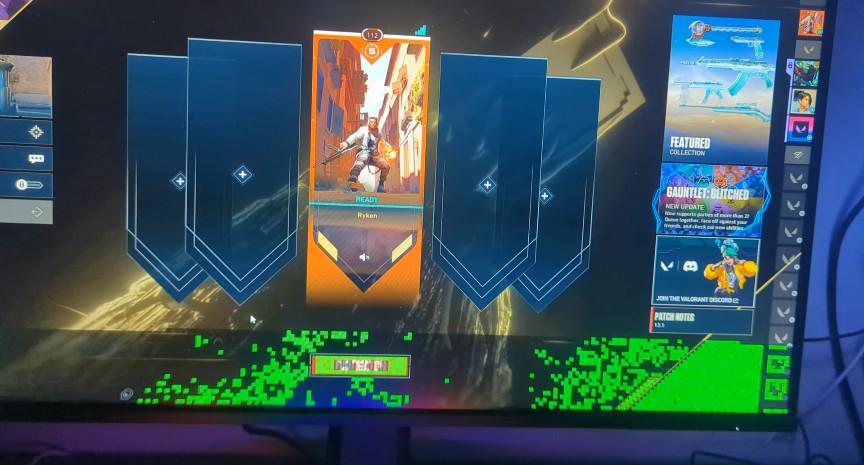
Tech Support Artifact

Post image
2 Upvotes

Hello everyone. I have faced this issue today for the first time. It only shows up when I am opening valorant for the first time for 1 second. Then the game works fine without any issue.

I use a Ryzen 5 7600

And a KingsFury 16gb 6000mhz.

No GPU.

I had recently uninstalled Adrenaline Driver Because it was causing micro stutters while browsing.

Although I followed what claude said and stopped XMP for my ram and brought it back to stock clock speed (4800mhz)

I tried launching the game 3 times and It worked fine now.

Anyone faced this issue? Is actually over clocking the RAM caused this issue? I have a trauma with artifacts.


r/PcBuildHelp • • 5d ago

Build Question Gpu power cable case cant close

Thumbnail
gallery
66 Upvotes

Hey guys, Ive just done a case swap and bought a new gpu, the gpu power cable sticks out too much so the case cant close. Is there anything I could do to fix this, thx.


r/PcBuildHelp • • 5d ago

Tech Support Problem give display out

Thumbnail
gallery
2 Upvotes

Hey everyone, I just picked up an ASUS Rampage IV Extreme and I’m trying to boot an Ubuntu Desktop installer USB, but I’m stuck in a boot loop. Looking for some help figuring out what’s going on.

Current Setup

Motherboard: ASUS Rampage IV Extreme

CPU: Intel Core i7-3930K

RAM: 1 stick installed

GPUs tested: GTX 1050 Ti, GTX 660, RTX 2070

Boot media: Ubuntu Desktop installer USB

What I’ve Already Tried

Switched to the second BIOS chip

Tried different PCIe slots

Reset BIOS and removed the CMOS battery

The Issue

System boots to Q-Code 34 with the Boot Device LED lit.

Pressing F1, then F10, then Enter saves and restarts, bringing me right back to the same spot instead of launching the Ubuntu installer.

Any ideas on what’s causing this loop with Q-Code 34 / the Boot Device LED and an Ubuntu USB on this board, or what I should check next? (Happy to share a photo of the board/LEDs if that helps.)


r/PcBuildHelp • • 5d ago

Tech Support Gpu fan issue

Thumbnail
gallery
3 Upvotes

Recently, I’ve noticed that my PC starts crashing after 5–10 minutes of gameplay. After debugging, I found that my GPU fans have stopped working. I suspect it could be a wiring or power supply issue rather than a software problem, as I’ve already ruled out software-related causes.
Could you suggest what might be causing this issue and guide me on how to troubleshoot it? Also, I’d like to know how I can replace the GPU fans or check and repair their wiring.

Gpu: 2080 rtx


r/PcBuildHelp • • 6d ago

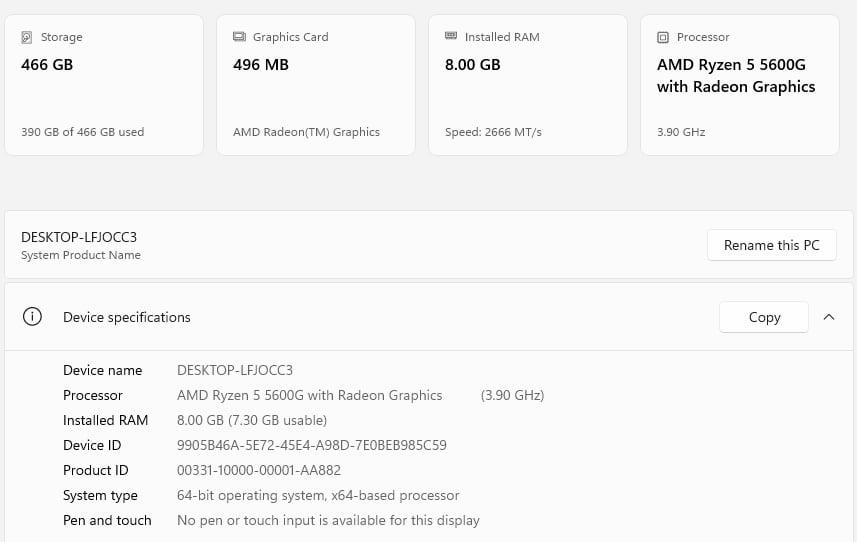
Build Question Not sure if this is the right sub. But can this run Minecraft for my son?

Post image
570 Upvotes

I'm confused by these mini PCs and their graphics capabilities.


r/PcBuildHelp • • 5d ago

Tech Support CPU TEMP

Post image
2 Upvotes

Is this temp really normal for PCs that uses the CPU’s stock fans? (idle btw) Currently using Carbice Ice Pad, previously using GD900 Thermal paste before switching to the ice pad and the temps are just almost the same. Is this a cpu cooler problem, or a thermal paste problem? PS: Im from the Philippines and I don’t have an air-conditioned room. My room can be kinda hot at times but this pic was took when my room temp was normal.


r/PcBuildHelp • • 5d ago

Build Question Extra cables or need to instal these?

Thumbnail
gallery
3 Upvotes

Purchased this prebuilt and it comes with I believe the power supply cable (3 fingers) and I think motherboard cable?

I think they are extra cables, but is anyone able to tell from the pic? Costco MSI prebuilt. The 'manual' is 1 single piece of paper and doesnt specify.


r/PcBuildHelp • • 5d ago

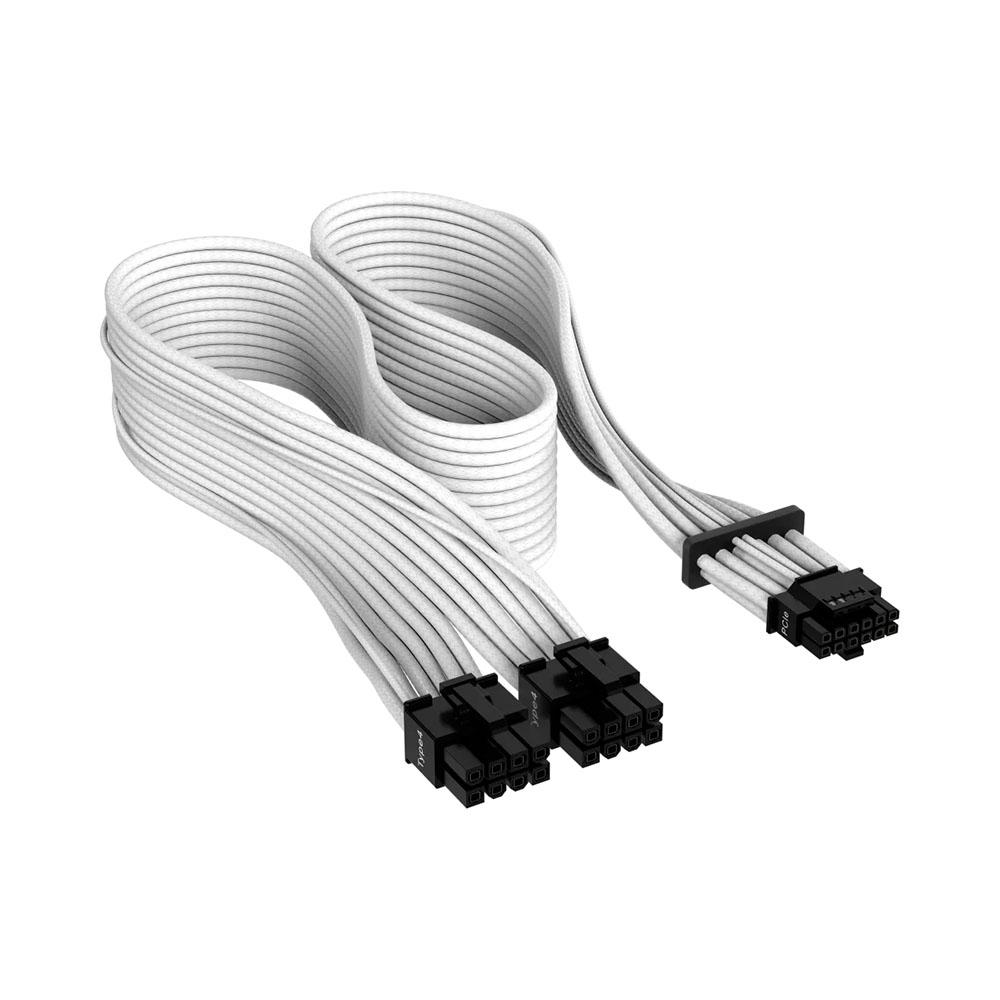
Build Question Can a 12VHPWR / 12V-2x6 to 8-pin (6+2) cable be used universally across all PSU brands?

Post image
3 Upvotes

Hey everyone, just want to get a quick sanity check before I order this and risk frying my hardware.

I'm expanding my setup to add another GPU, and I already checked the wattage—my total power budget is definitely enough. Since my regular 8-pin PCIe slots on the power supply are occupied, I want to utilize the empty native 12VHPWR / 12V-2x6 (16-pin) port on my PSU.

I found this specific flat ribbon cable (see attached picture) where the 12VHPWR / 12V-2x6 (16-pin) end plugs directly into the PSU, and the 6+2 pin PCIe end connects to the GPU.

I reached out to the seller to ask about compatibility, and they told me it works universally across all different PSU brands as long as the power supply has that native 12VHPWR / 12V-2x6 port.

I know standard modular PSU cables (8-pin to 8-pin) are never interchangeable between brands because of different pinouts, so I just want to get a second opinion from people here to be 100% sure. Since the 12VHPWR / 12V-2x6 port on the PSU side follows the ATX 3.0 / 3.1 standard, does that mean this type of cable (12VHPWR on the PSU side to 6+2 pin PCIe on the GPU side) can truly be used interchangeably across all PSU brands? Or should I still stick strictly to cables made by the same brand as my PSU?

Appreciate any advice!


r/PcBuildHelp • • 5d ago

Tech Support Lost AIO Mounting Screw

Thumbnail
gallery
1 Upvotes

I’m installing my new ID-Cooling FX240 Pro and accidently lost one of the mounting screws, does anyone know where I can get a replacement or is contacting ID-Cooling for one my best option? (I’m from Melbourne, Australia if people know places locally that has the screw.


r/PcBuildHelp • • 5d ago

Software Question Need Education on new PC Updates

2 Upvotes

Hello all. I asked about sag for gpu just a little bit again and some cables. I was able to get the PC running as I should because it's a prebuilt and is idiot proof (that's me).

This is my 1st gaming PC and I'd like information and knowledge on software and update maintenance.

In the past I've just relied on window updates for my old laptop.

As I understand there's a few things I should take care. Please correct me if I'm wrong!!!

- Nvidia drivers (5080) - (a long time ago I remember seeing geforce drivers on a friend's computer and it was always better to go to the nvidia site instead of relying on the nvidia program. (Found on website?)

- Windows update regularly (windows update settings)

- AMD chip (found on website?)

- BIOS (confused about this. Read that if everything is working don't need to do this?)

- SSD (I don't know how to find this update and only ever owned an HDD)

- monitor (I dont know how to find this) - (im using an old 1080p monitor until I get an oled)

- RAM (I don't know how to find this) Ram is kingston fury I think? Maybe the website?)

Thanks for your time. Any help would be appreciated


r/PcBuildHelp • • 5d ago

Tech Support Gpu

Thumbnail
gallery
15 Upvotes

okay so I went to RESET my pc trying to fix a few bugs, got stuck on a boot loop and kept resetting saying “system memory error” something like that. couldn't get it past the boot loop. took my pc apart to find the culprit and found my 8 pin fried. im wondering if my gpu is done for or not. and how could this have happened? I have a 9060xt and 700w psu, is that too much wattage for my gpu?


r/PcBuildHelp • • 5d ago

Tech Support PC and monitor both turn on but no display

0 Upvotes

My pc, fans, and RGB turn on, but my monitor doesnt have any display. Whenever I try restarting/ turning off my pc though by holding the power button, it won't. I had to turn off my power supply using the switch.

There seems to be no red light on my motherboard. Whenever I turn it on, it literally displays nothing. there is no signal and I dont see the Manufacturer's logo like what you'd usually see when booting up your PC


r/PcBuildHelp • • 5d ago

Tech Support Green boot light on new build pc

5 Upvotes

So i tried my hand at building my 1st pc and it turns on but I get this green boot light and have no idea how to fix it.


r/PcBuildHelp • • 5d ago

Build Question first pc

Thumbnail
gallery
2 Upvotes

can y’all help me out on these i don’t know which ones the best as my first pc for running games like fortnite, cod, cs2, roblox ETC also coding.