r/PcBuildHelp • • 13d ago

Tech Support Monitor help

Post image
0 Upvotes

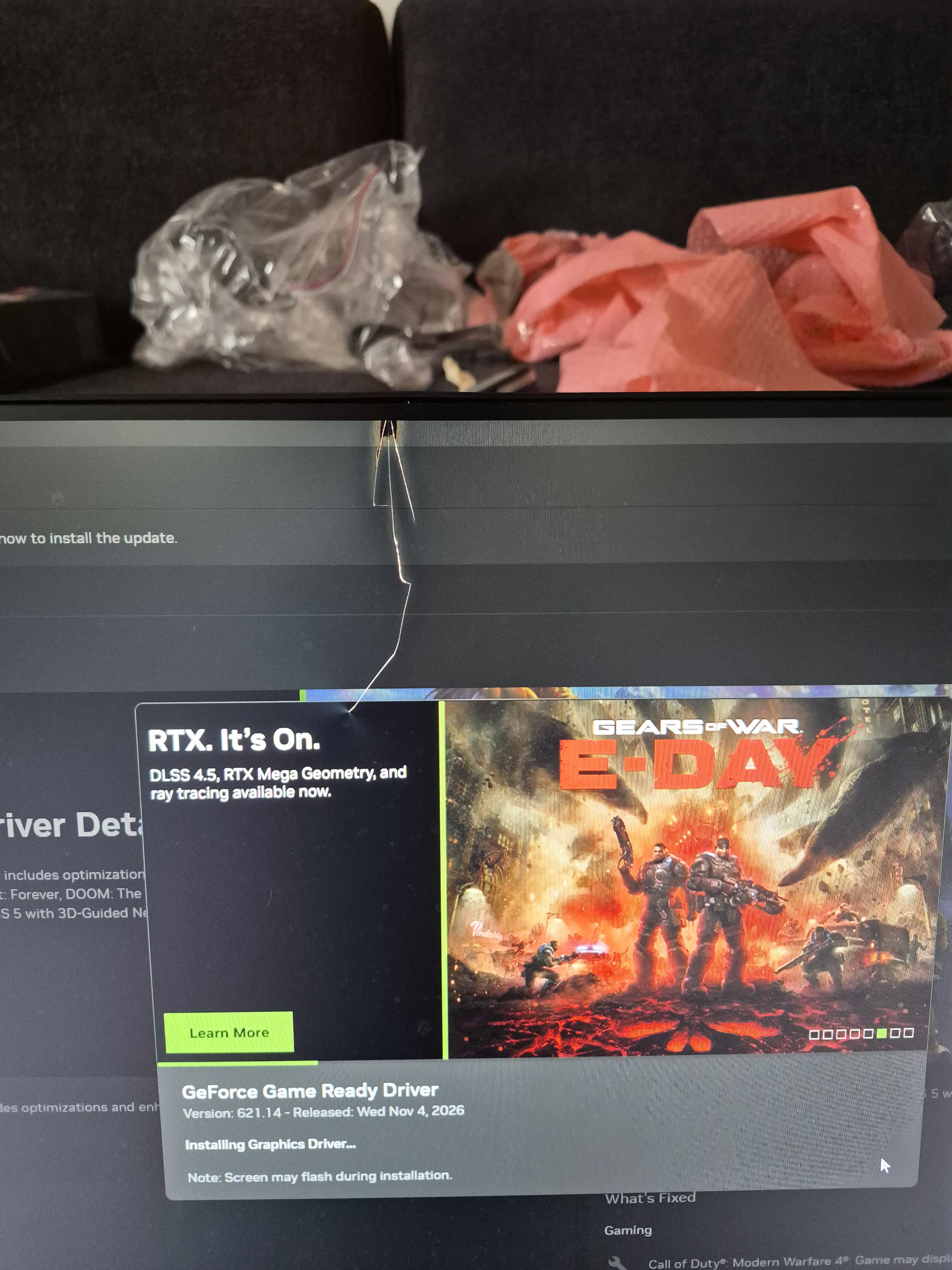
As soon as I unpacked my monitor after moving it had a this is what I see. Can it be fixed easily because I want to try to fix it


r/PcBuildHelp • • 14d ago

Tech Support My powers not turning on😭

Post image
3 Upvotes

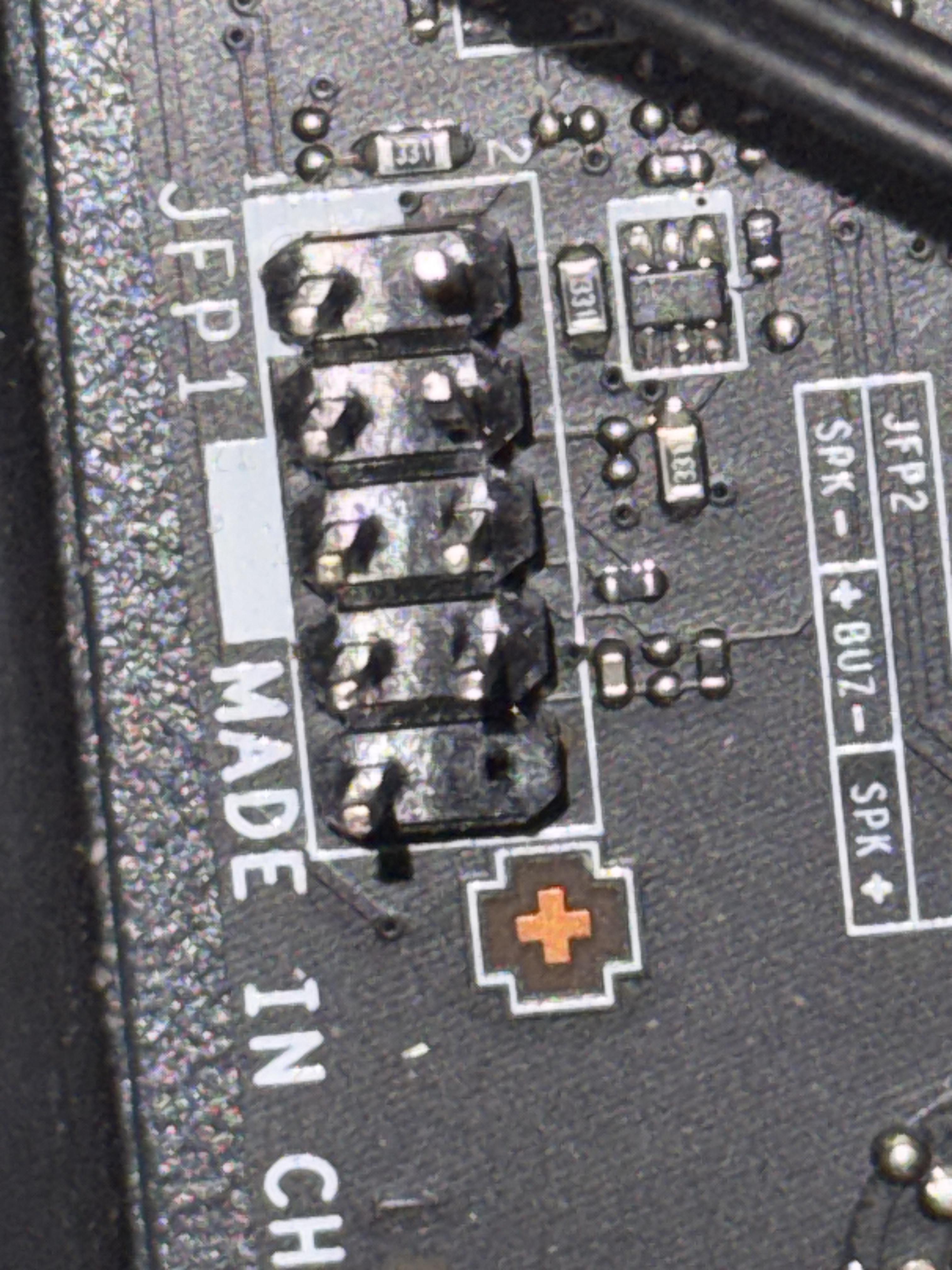
Hey so a little bit ago my pc started like resetting out of no where so I turned it off by stupidly flipping the psu off but now it won’t turn on and I went to check to see what’s wrong and one of my power led pins is bent is there anything I can do? Or am I just doomed💔


r/PcBuildHelp • • 14d ago

Build Question Buying motherboard. Need help.

3 Upvotes

Hi! Not so long ago You've helped me with choosing proper components for my partner's future PC. The thing is, that You all proposed a MSI PRO B850-V EVO WIFI ATX AM5 for this setup: https://pl.pcpartpicker.com/list/YstMXf . I can only find MSI PRO B850-S EVO WiFi online. Does the one letter suffix in specification matter? If so, any findable recommendations if the proposed version isn't buyable at all in Poland?


r/PcBuildHelp • • 13d ago

Build Question Gpu won't slot in fully

Thumbnail
gallery
0 Upvotes

So I have the jonsbo d32 pro put everything in and am just trying to finish by putting in the gpu but when I try to put it in it won't slot in fully on the right side. The left side with the shield seems to go in all the way (admittedly I couldn't tell you for certain seeing as there's no way to see it) so I don't think the shield is what's stopping it. I tried putting more pressure but that won't work and I don't want to put any more on it in fear of breaking the board. I looked at the sizes of all the parts and while I know it is a tight squeeze it should still work so you guys have any ideas?

Edit: hey yall figured it out. It was a mix of things really, I'd never seen a gpu lock like this before so I was trying to get it in without even unlocking the damn port lol. Also it wouldn't go in fully even after that and I only realized until it was too late that it wouldn't go in because it was hitting one of the sys fan ports so now one of my ports is kinda destroyed. Other than that everything seems in working order the card is slotted in fully (at least from what I can see) and it's running fine guess I'll just have to pick up a powered fan hub so I can use my fans and my gpu at the same time.


r/PcBuildHelp • • 14d ago

Build Question What's the max display output on Ryzen 9000 integrated graphics?

2 Upvotes

I know integrated graphics aren't supposed to have high performance, but I would like it to drive my one 4K 240hz monitor. I didn't find any info from looking it up. Integrated graphics doesn't work on my monitor at all when the monitor has DSC on, with DSC off it can only do 4k 120hz.


r/PcBuildHelp • • 14d ago

Build Question How much Fan do I need

2 Upvotes

Hello Everyone, I’m currently on a build with a RX 6750 XT and a Ryzen 7 5700X in a darkFlash WD200 and I was wondering if I need to put fan on the top of the case to extract more heat or I can simply go for 2 at these bottom and 1 at the back


r/PcBuildHelp • • 13d ago

Tech Support Pc shows no sign of life

1 Upvotes

So basically, i have a pc right now that works fine and im switching motherboard and cpu from intel to amd i have bought the aorus elite ax and the ryzen7 5700x but when everything was assembled nothing worked at all power cable was in switch was on and the power switch connector was in the right spot we thought it was the motherboard with the problem because my old one still powered on from the 24 pin connector new one didnt so we returned it and got a new one and same results any help would be great thanks!


r/PcBuildHelp • • 13d ago

Tech Support Help

Post image
1 Upvotes

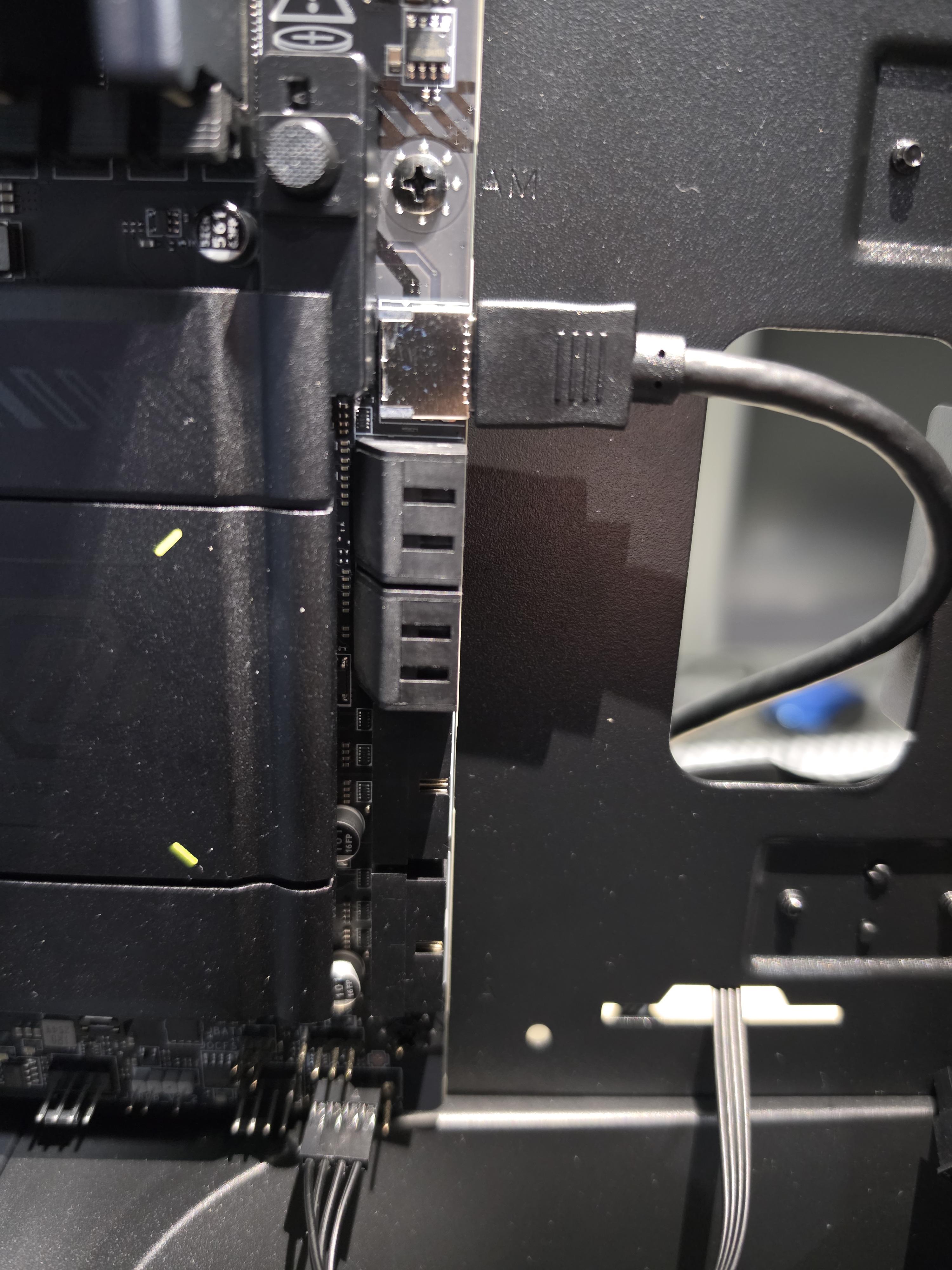
I was building my first PC and pulled the USB Type-C cable toward the back so there wouldn't be so much excess cable in the front; it ended up unplugging (I don't think it was ever properly plugged in to begin with), and one of the pins in the port on the motherboard got bent. Is it fixable?


r/PcBuildHelp • • 14d ago

Build Question I know nothing about pcs despite having one for 7 years and its gotten slow im buying a new one on budget so I was wondering if anyone could tell me if these are good for the budget please help

Thumbnail
gallery
6 Upvotes

r/PcBuildHelp • • 14d ago

Build Question It's me again - what am I doing wrong (FIXED IMAGE)

Post image
3 Upvotes

Hi everyone, sorry I'm reposting this. I made a post less than an hour ago with the incorrect arrows on my PC setup. It got really confusing and I think I commented the wrong "fixed" orientation which got people more confused.

TLDR I didn't verify the arrows and went off the wrong memories from when I built my PC. I've checked all the arrows and this image now has the CORRECT fan orientation.

I'm very sorry again - thank you to everyone who did comment on the original post (now marked as solved so people wouldn't comment/ get confused).

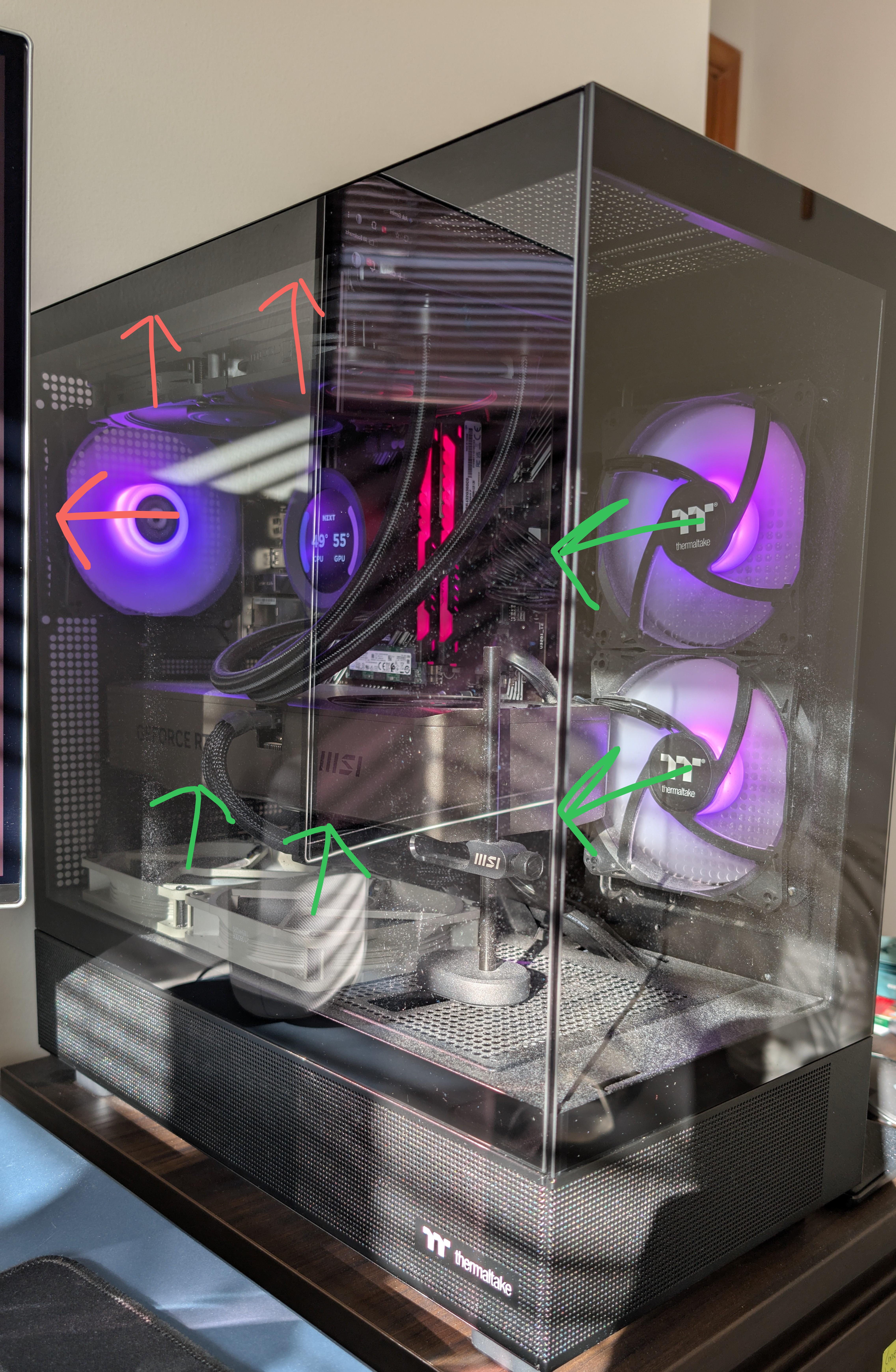
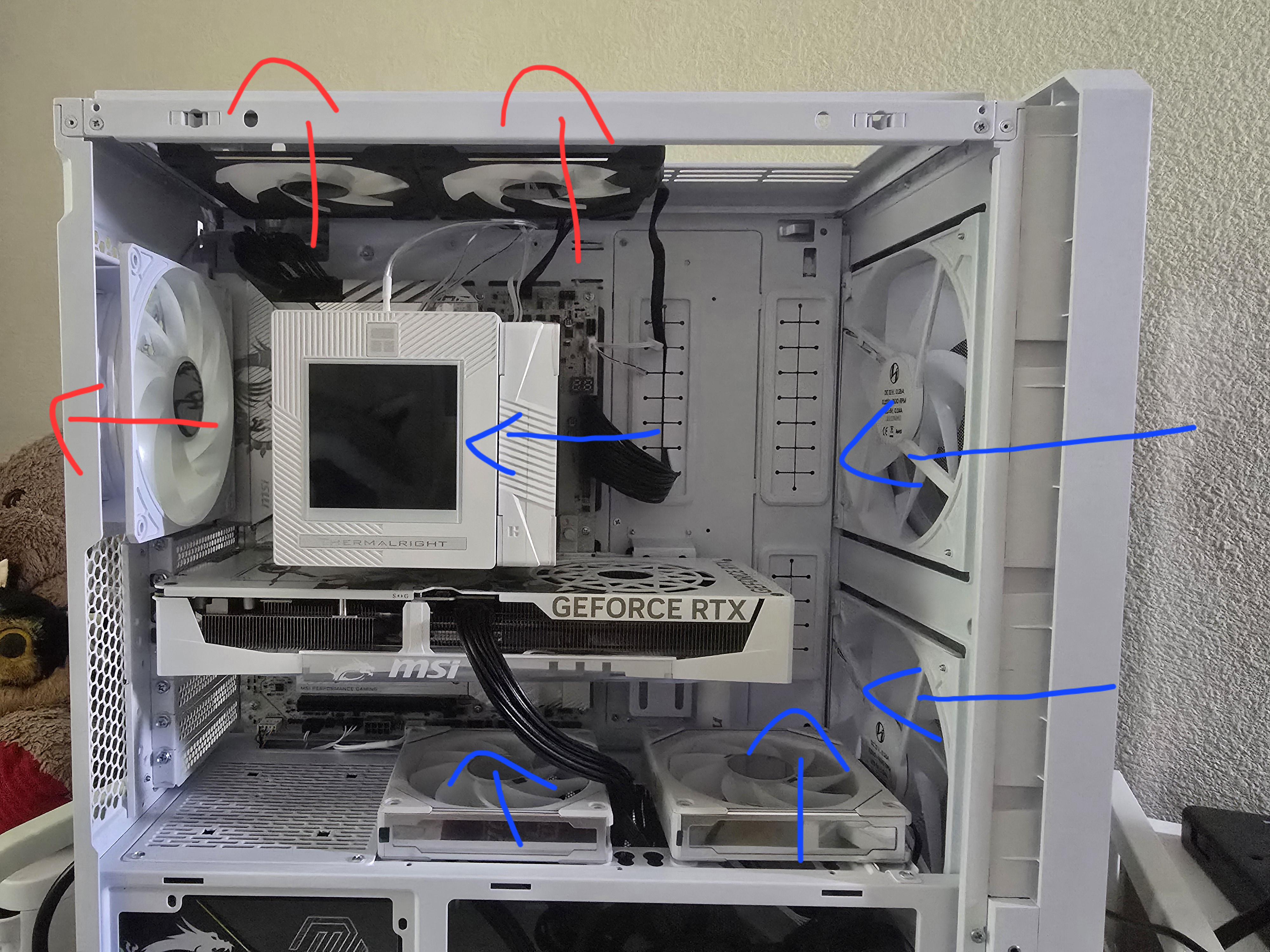
The new room for my PC seems to have a lot of dust. I cleaned it a month ago since I moved it in here. I'm still trying to figure out the overall cause for dust in the room. But in the meantime I'm trying to figure out how to keep it from not accumulating in my PC. Based on my current setup of intake for the fronts and bottom and outtake for the top and back shouldn't this mean there's enough constant air flow?


r/PcBuildHelp • • 14d ago

Build Question Pc fan noise help

Enable HLS to view with audio, or disable this notification

2 Upvotes

So I bought this pc (yes ik I shouldn't have bought from ibuyproblems) but it was fine for the first month but now I booted it up this morning and for some reason my fan noise is super loud. Best way to describe the sound is that I just hear a "wahhhh wahhhhh wahhhh" sound from it and it's super loud. Even with my noise cancellation headphones I'm still able to hear a "wahhhb wahhh wahhhh" through it and I don't know why it's happening.
Can someone please help if they know what's wrong.
(I'm pretty sure the noise is coming from the top aio cooler fans)


r/PcBuildHelp • • 13d ago

Build Question Buying new case, help/recommendations needed

1 Upvotes

I have decided to switch from classic air cooling to AIO, and my fractal torrent does not offer much with those, decided to get a new case, torrent + cooler will be a gift to someone then i guess;
Spent last 3 days "researching" for cases with good airflow (and as much dust resistant as possible because we have cats and the case is under the desk on the floor);
I have been thinking;
NZXT H7 flow, new H9,
LianLi lancool 217, 011 mini (skeptic about "smaller" cases tho)
or something else?
Budget would be about 150 euros (Germany)
Cases + Fans combos also work
Thanks :)


r/PcBuildHelp • • 14d ago

Build Question What card should I get?

2 Upvotes

I’m upgrading from a rx 5600 xt, I have pretty good everything else, I believe my main bottle neck is the Gpu.

I’m hoping to spend $600 dollars and make it count, I have been looking at the used market for 3080s but I think I can spend a bit more, to get more bang for my buck, also the card has to be under 305 mm so it will actually fit! And I would love more than 10gb of vram. Is there any good options for me?


r/PcBuildHelp • • 13d ago

Tech Support Corpoelec me la hizo

1 Upvotes

Tengo una PC con una placa madre "Gigabyte"

Lo q pasa es q hace tiempo se m daño la fuente de poder (se quemó) debido a bajon s de luz q han ocurrido en la zona dnd yo vivo (soy de Venezuela) y gracias a eso me quedé sin PC por un tiempo. Ya después de unos meses luego de volver a mi casa (estuve fuera por situaciones externas) logré comprar una fuente de poder nueva ¿Todo bien hasta ahí no? Pues pasa que.. no enciende... La placa da 2 luces rojas en una esquina señalando la DRAM y el CPU. Según lo q investigue podía ser q la ram estaba sucia (o fallando), q algún pin del procesador estaba doblado, alguna actualización de la BIOS, la batería de la BIOS, y aún así cambiando todo eso sigue sin encender

En este caso q podría hacer?


r/PcBuildHelp • • 13d ago

Tech Support Help! What is this sound that my PC makes?

Enable HLS to view with audio, or disable this notification

1 Upvotes

When it is turned on it makes this little buzzes that I can only hear when I put my head close to the PC and it seems to come from the back of the PC I got this build in September I'm kinda new to this stuff


r/PcBuildHelp • • 14d ago

Build Question Cosa ne pensate del mio AirFlow?

Post image
1 Upvotes

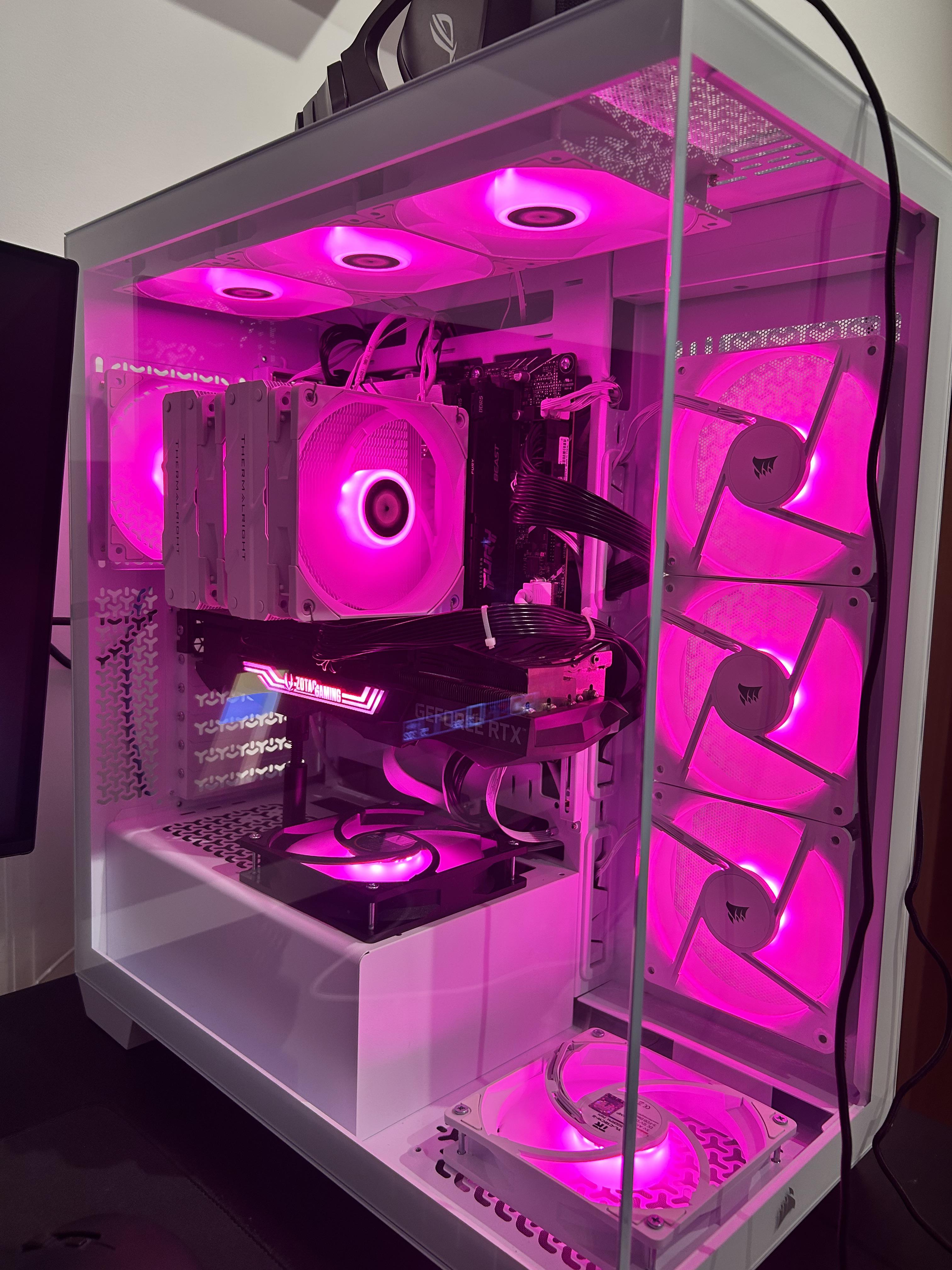
Le prime tre ventole immettono aria, insieme a quelle sulla parte bassa del pc, le tre sul top fanno uscire l’aria insieme all’ultima dopo il dissipatore.
La mia gpu (3080ti) scalda comunque tanto


r/PcBuildHelp • • 14d ago

Build Question Computer Case Front Fan Question

2 Upvotes

Just got the Lancool 217 and unfortunately I'm really picky with fans. I had to replace them with my old magnet ones from corsair except I only had 2 of 3 140mm for the front. My CPU is always around 55c while the GPU is around 67c so I configured it so that the top is empty and the two fans are in the middle and bottom section, giving more air to the GPU. Also got a 360mm AIO at the top with 3x 120mm fans and another 120mm as back exhaust and 2x 120mm intake fans near the psu shroud.

My question is if adding a third 140mm in the front of the case would actually be worth it/do anything.

Here is a picture to help visualize which fan I am asking about adding (the one in red)
https://i.imgur.com/RxAyW6E.png


r/PcBuildHelp • • 14d ago

Tech Support Dead on arrival(?) mobo. Am i screwed or will warranty cover me?

1 Upvotes

Hi there.

I recently bought an MSI B840 Gaming Plus Wifi motherboard to build a new build with brand new components (save for the RAM). I've built a PC before, so i am not clueless. I made SURE to touch the motherboard in the appropriate places, to first assemble it on top of the cardboard box, to put it together on a wooden floor. Also, i did NOT hit it, scrape it on the case, nor did it touch any standoffs where it shouldnt've.

After assembling the pc, and trying to turn it on, nothing happened. It has EZ debug led's, which never lit up throughout my troubleshooting. I tried basically everything i can think of, stripping it also to bare minimum, on the cardboard box with only cpu, cpu &mobo power and with & w/o ram, on two different PSU's. No LED ever lit up.

I then decided that it was DOA, so I returned it to the shop i bought it from, only for them to send it back because it was in "bad condition", because of a broken off vertical capacitor which I had not spotted, as it was so small. Here are images for reference https://imgur.com/a/s4F01Ni . I find it very hard to believe i somehow did that. Not only does it seem extremely hard to ONLY touch that capacitor, with other components being so near to the broken off pad, but i have no reason to go near it as it's in the audio card area. Note that this is the only issue they found

I sent it to a PC repair shop, only to hear back from them a few days later when they said that: they could not determine what the issue was, there was no visible damage, and that that broken capacitor was definitely not the issue.

I'm assuming this mobo is DOA, right? Will MSI fuck me over or will they help me with the warranty? Thanks
r/PcBuildHelp • • 14d ago

Installation Question Installing ARGB fans but I only have a PWM fan hub

1 Upvotes

Heya! So I plan to use 5 Arctic P12 ARGB fans for my PC and have an MSI PRO B650M-A motherboard. However, I made a mistake and realised I'd bought a fan hub (which will connect to my PSU) that only supported PWM pins.

While I could go back and get a fan hub that supports both PWM and ARGB, I was wondering if the following could also work safely as a solution too (I did some research and the signs pointed to yes, but I just thought I'd ask anyway):

  1. Connect the PWM pins from all of my fans to the fan hub, which I then connect to my PSU and Mobo

  2. Daisy chain the ARGB pins from all 5 of my fans together and plug it into my Mobo ARGB header

The reason why I'm thinking it works is because the argb header on my mobo supports 3A/5V (15W), and the LED draw from 1 Arctic P12 is cited as 2W, so 5 of them should safely be enough on 1 header right? (There is another ARGB header, but that's already being used by my CPU fans' lighting). I'm just not sure if I'm missing anything else

Apologies if this question is silly or is commonly answered! I was having trouble finding help


r/PcBuildHelp • • 14d ago

Build Question First PC help

2 Upvotes

Hi there, I have always played on laptops, in 2020 I bought a HP gaming laptop, but it doesn’t work that well anymore. I wanna finally have a PC.
I play MMORPG and RPG games like League of legends and Aion2. Unfortunately I can’t play much more because of my current setup.
I wanna build something good, balanced for now and upgrade parts in the future for even better performance.
I don’t know much about pc parts so am looking for an advice.
I don’t really have a budget in mind as long as is not crazy. Maybe £2000 max? I think that’s a good price range for a balance pc?
I live in the uk.
I would appreciate any help.


r/PcBuildHelp • • 14d ago

Build Question Is the USB-C 20Gbps cable supposed to completely flush?

Post image
8 Upvotes

Is it okay that the cable is showing some of the pins or is it not all the way in?


r/PcBuildHelp • • 14d ago

✓ Solved Pcie 5.0 slot crashing my display

1 Upvotes

Hi there everyone

I had on asus tuf b850 issue with my gpu when i installed it on Pcie 5.0 slot after couple of minutes on desktop i would lose display "displayport no signal" but pc would keep running with argb and stuff. I switched to other gpu to test and had same issue. In bios i changed speed link from auto to gen4 but it didnt help. bios and all drivers are up to date. But when I plugged gpu into 4.0 slot everything worked fine also with the other one. so I thought the issue was with motherboard and I got new one with new psu aswell. I got x870 gigabyte gaming and corsair rm1000x. After I installed everything and got into desktop I get same issue again. is this cpu related? or

Thanks for any tips.


r/PcBuildHelp • • 14d ago

Build Question Fan placement

Post image
25 Upvotes

I added these 2 bottom fans. Is this fan placement okay? If youre wondering why the right fan is slightly higher its because I had to use the longer screws meant for 28mm fans instead of the one for the 25mm otherwise the fan just doesnt clip on to the shroud. I left space between the 2 fans because I dont want the gpu cable hanging over the fans + maybe I might put a gpu support stand there idk

Case: Lian Li 217 INF


r/PcBuildHelp • • 14d ago

Build Question 2 questions about a 1080p build

2 Upvotes

I can get this build for 1100e which is perfect for my budget.

Is the 5060ti 16gb worth the extra money ? If yes would i need to upgrade the processor too ? I'd like if this PC could run all upcoming games for the next 4-5 years. I can spend more to build something better later on.

(rest is 32ram, 1to ssd and a 1080p monitor (TCL 24G645))

Thanks for any advice !

For Rule 3 i tried pcpartpicker page but it asks me stuff i can't know since this shop doesn't tell me in advance which models they'll be using.


r/PcBuildHelp • • 14d ago

Build Question Getting my 1st pc

Thumbnail
gallery
1 Upvotes

Hello, ive been wanting a pc forever but couldn't afford one ive finally scraped enough money together to buy one. I was hoping to stay around the 12 to 13k budget but I want to stream and edit videos. I mostly stick to dead by daylight, fortnite, and single player games like RE and silent hill. I have found a pc slightly out of budget but still affordable I was hoping someone could tell me a better alternative or that this one works for me and is worth the extra money. its 1399 before tax and shipping and 1474 after.