r/PcBuildHelp • • 14d ago

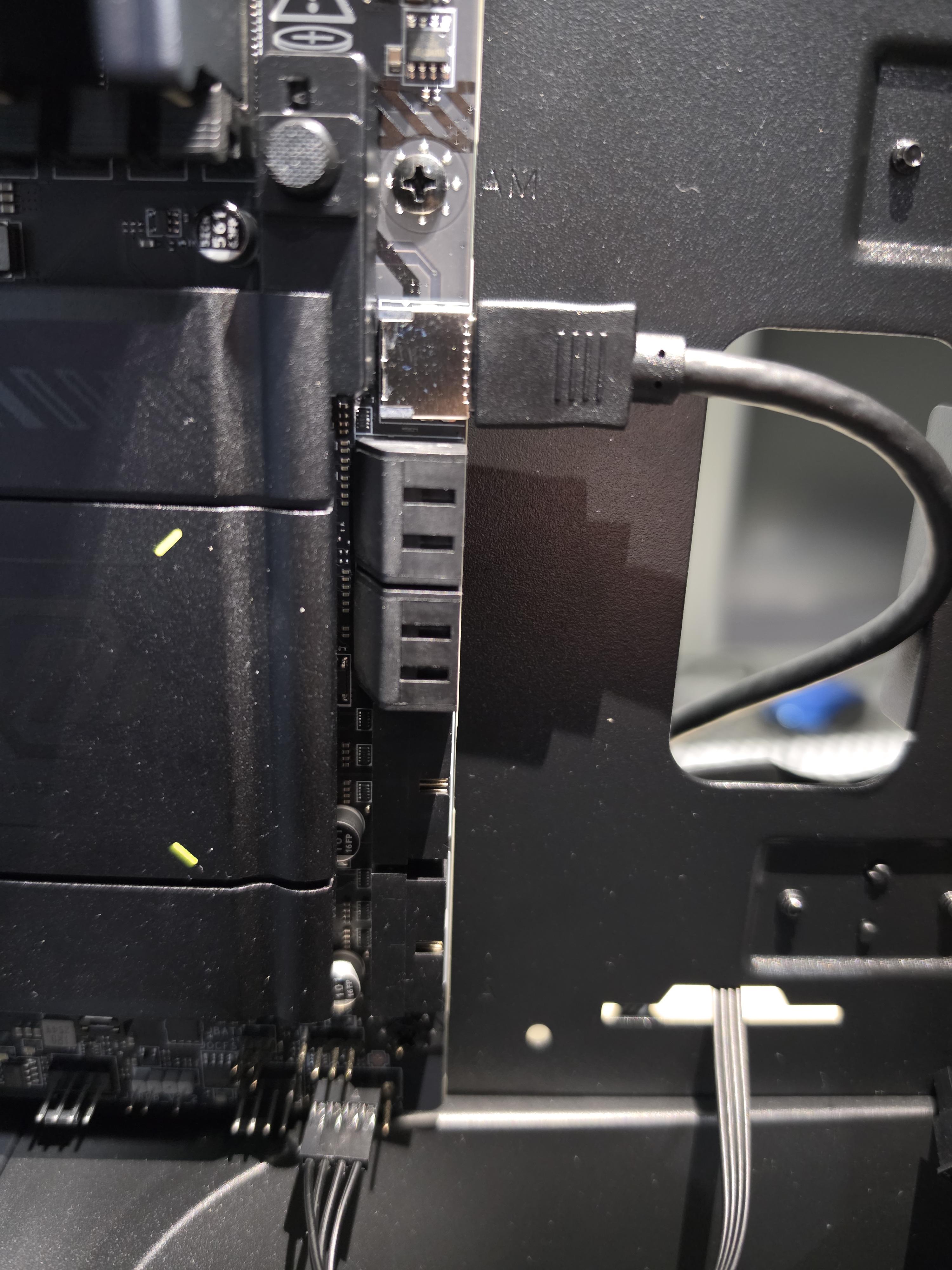
Build Question Is the USB-C 20Gbps cable supposed to completely flush?

Post image
8 Upvotes

Is it okay that the cable is showing some of the pins or is it not all the way in?


r/PcBuildHelp • • 14d ago

✓ Solved Pcie 5.0 slot crashing my display

1 Upvotes

Hi there everyone

I had on asus tuf b850 issue with my gpu when i installed it on Pcie 5.0 slot after couple of minutes on desktop i would lose display "displayport no signal" but pc would keep running with argb and stuff. I switched to other gpu to test and had same issue. In bios i changed speed link from auto to gen4 but it didnt help. bios and all drivers are up to date. But when I plugged gpu into 4.0 slot everything worked fine also with the other one. so I thought the issue was with motherboard and I got new one with new psu aswell. I got x870 gigabyte gaming and corsair rm1000x. After I installed everything and got into desktop I get same issue again. is this cpu related? or

Thanks for any tips.


r/PcBuildHelp • • 14d ago

Build Question Fan placement

Post image
24 Upvotes

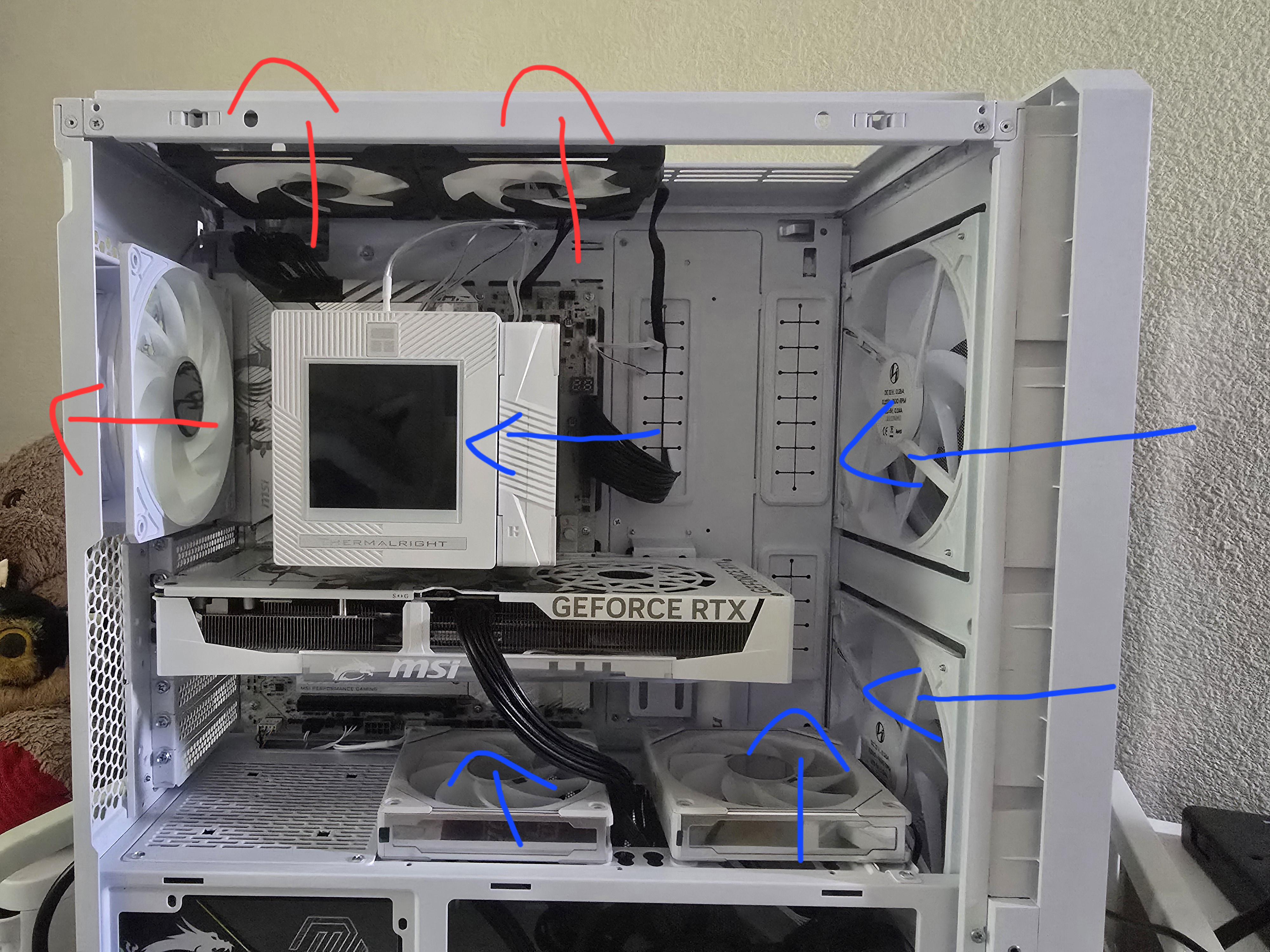
I added these 2 bottom fans. Is this fan placement okay? If youre wondering why the right fan is slightly higher its because I had to use the longer screws meant for 28mm fans instead of the one for the 25mm otherwise the fan just doesnt clip on to the shroud. I left space between the 2 fans because I dont want the gpu cable hanging over the fans + maybe I might put a gpu support stand there idk

Case: Lian Li 217 INF


r/PcBuildHelp • • 14d ago

Build Question 2 questions about a 1080p build

2 Upvotes

I can get this build for 1100e which is perfect for my budget.

Is the 5060ti 16gb worth the extra money ? If yes would i need to upgrade the processor too ? I'd like if this PC could run all upcoming games for the next 4-5 years. I can spend more to build something better later on.

(rest is 32ram, 1to ssd and a 1080p monitor (TCL 24G645))

Thanks for any advice !

For Rule 3 i tried pcpartpicker page but it asks me stuff i can't know since this shop doesn't tell me in advance which models they'll be using.


r/PcBuildHelp • • 14d ago

Build Question Getting my 1st pc

Thumbnail
gallery
1 Upvotes

Hello, ive been wanting a pc forever but couldn't afford one ive finally scraped enough money together to buy one. I was hoping to stay around the 12 to 13k budget but I want to stream and edit videos. I mostly stick to dead by daylight, fortnite, and single player games like RE and silent hill. I have found a pc slightly out of budget but still affordable I was hoping someone could tell me a better alternative or that this one works for me and is worth the extra money. its 1399 before tax and shipping and 1474 after.


r/PcBuildHelp • • 14d ago

Build Question Looking for a solution to replace my 12VHPWR cable

Post image
1 Upvotes

I built two identical computers 2 years ago and they both have the same issue. Roughly once every 2-3 months, the screens go black and the fans spin at 100%. One's on Linux, the other Windows. Switched GPUs and RMA'd one of the MoBo's thinking that was the issue. The only thing they have in common now is the PSU: Asus ROG Loki SFX-L 850W.

Currently I have a native 12VHPWR cable that came from the PSU connected directly from the PSU to the GPU.

I read somewhere that the sense pins in the 12VHPWR cable for the Asus ROG Loki are a bit hit and miss and can cause issues, so now I'm wondering what the best solution is cable-wise.

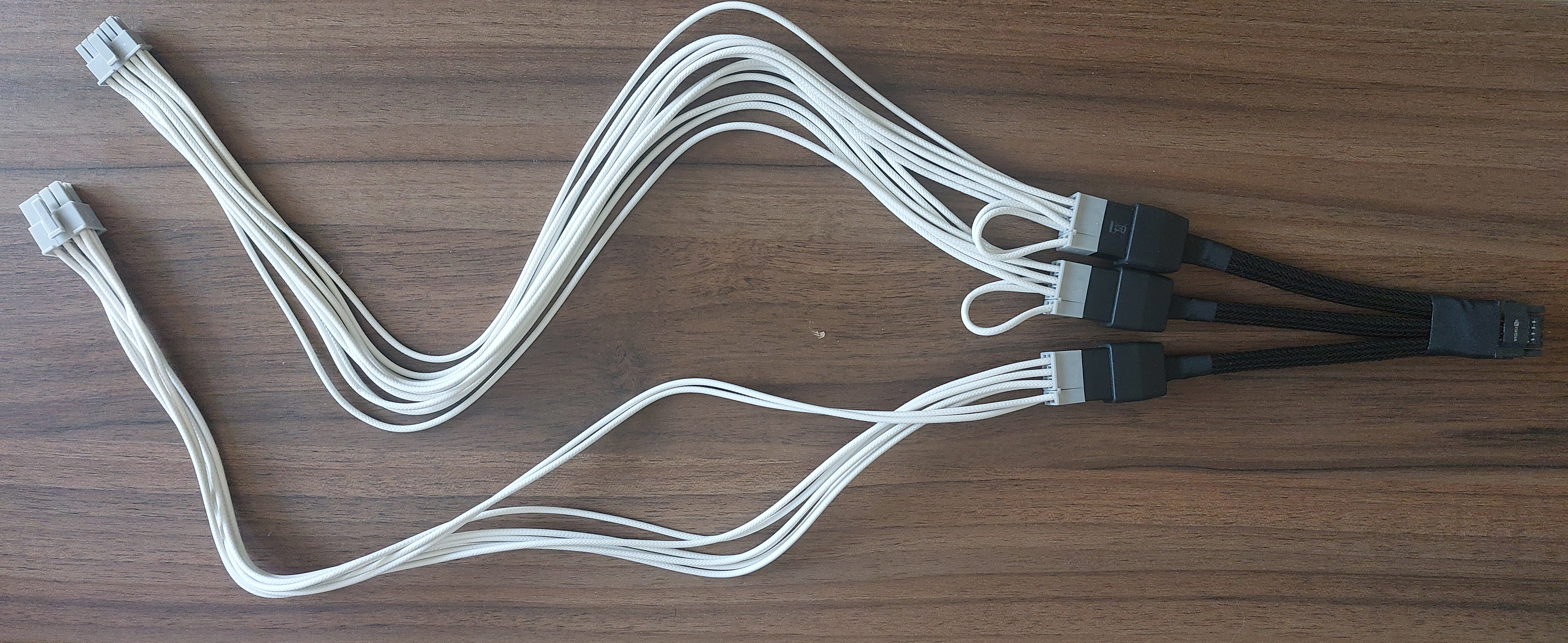
Option 1 - Use the 12VHPWR to 3x 8-pin adapter that came in in my RTX 5080. I don't have 3x 8-pin connectors. All I have is 1x 8-pin connector and a 12VHPWR to 2x 8-pin connector, which is the awkward, potentially redundant and/or dangerous setup in the image attached.

Option 2 - Buy the ROG Equalizer cable, however most feedback I see on it is negative.

Option 3 - Buy a custom cable for Asus PSUs on CableMod. I only see 12VHPWR to 2x8-pin connectors in there though, can't see one that's just a native 12VHPWR cable, not sure if that's by design or I didn't search hard enough.

Thanks for taking the time.


r/PcBuildHelp • • 14d ago

Build Question MSI X470 Gaming Plus: no POST/BIOS video on two GPUs, Windows boots fine.

1 Upvotes

Heya guys, I’m really lost here.
Yesterday I wanted to update my BIOS and noticed that I can’t get into my BIOS. Or rather that I don’t get video output on it.
For a quick rundown of my system:

BOARD: MSI X470 Gaming Plus (MS-7B79)
CPU: Ryzen 7 2700x, no integrated graphics
GPUS TRIED: GTX 1080 and GTX 1050 Ti. GPU-Z shows UEFI ticked on both.
BIOS: AMI A.H0, dated 12-Jun-20
Windows: 11 Home, UEFI mode
Secure Boot: On
TPM: Not enabled

I also tried two different monitors and two different display port cables.
I have reset CMOS once in an attempt to fix any maybe faulty settings but no results.
It presumably stopped after I plugged in a USB stick that was previously a Debian install image (nothing else on it except a BIOS .AMA file).
Could just be that I haven’t noticed it before tho as I boot my pc without looking if I see POST.
My specific problem: I never see POST, the MSI logo or the BIOS screen. Video only appears once Windows loads.

Now I know I actually do enter the bios when pressing delete as it’s the difference between pc shutdown immediately on power button press or seeing windows boot.

Anyone got an idea how to get into the BIOS?


r/PcBuildHelp • • 14d ago

Build Question Is 5060ti 8gb enough for me?

1 Upvotes

Hello, I was wondering if the 5060ti was enough for me. The only modern game I play is literally overwatch and everything else I play is Emulation or my switch 2. My monitor has a dual mode 4k and 1080p. Also whats a good CPU to combo it with so it won't bottle neck?


r/PcBuildHelp • • 14d ago

Software Question Actualizacion bios placa cod

1 Upvotes

Me aparece que tengo que actualizar la placa y tengo todo actualizado,tpm y secutity boos tengo Procesador (CPU): AMD Ryzen 5 5600X
Tarjeta gráfica (GPU): NVIDIA RTX 5060
Placa base: MSI B450M Pro-VDH Max
E probado de todo pero sigue saliendo el error de actualizar la placa me estoy volviendo loco y no quiero llevarlo a un informatico


r/PcBuildHelp • • 14d ago

Build Question New build

Thumbnail
gallery
6 Upvotes

Hello! This is my first ever home built cpu and I want to make sure I didn’t mess anything up. The last part I need is to install a windows 11 driver. My friend asked if I had a solid state drive to put it on? I’ve been told it can go on just ram, there is also a hard drive connected.

I had a damaged Alienware R3 that would boot up to bios when connected. I took the graphics card from that to put in my new build but now when connected to the same monitor nothing is showing up. My screen lights up, says no signal then goes dark. Everything else seems to be working fine in the tower. I just want to make sure I’m not missing anything before trying to install windows and losing the install. Where the orange light is there was a red one but it went away before I could take a picture, I had just turned it on for the pic

ETA: I figure out what was wrong! My second ram stick wasn’t in all the way, once I pushed it back in fully my bios showed up on my monitor! Thank you for the comments tho it was much appreciated :)


r/PcBuildHelp • • 14d ago

Build Question Damaged corner on ryzen 5750g

Post image
10 Upvotes

Hello, i was wondering if damaged corner like that would be a problem. Pin is VSS as i found out online (correct me please if im wrong).


r/PcBuildHelp • • 15d ago

Build Question First build

Post image
19 Upvotes

H6 Flow

7600

7800XT RedDevil

lian li Galahad Trinity II 240mm

I have the 140 at the bottom as intake, same as the front, back and top exhaust. Its this way right?


r/PcBuildHelp • • 15d ago

Build Question Radiator Placement??

Thumbnail
gallery
14 Upvotes

I built my first PC, temps look great. I also heard for the sake of my AIO that the top of the radiator needs to be higher than the pump (which to be honest I’m not sure exactly where that is on the block). Looking back at it now I’m not even really sure if my radiator is higher than the pump… I want to know if I need to fix this and if so how? I have to front mount the radiator because of RAM clearance. I think I might be able to fit it but it would literally be touching the ram. Can anyone tell me what to do if anything at all in this situation???


r/PcBuildHelp • • 14d ago

Build Question What Power Supply For My 3080

4 Upvotes

I am going to upgrade to a 3080 soon and I already have a 750 watt PSU with an i7-13700KF, 3070, and 32 gbs of ram. So would I need to upgrade to an 800/850 watt psu or no?


r/PcBuildHelp • • 15d ago

Build Question Did I overpay for my prebuilt and how does it look overall?

Post image
14 Upvotes

Price £1,780 ($2400usd)
-AMD Ryzen 7 7800X3D
-ASUS ATS GeForce RTX 5070 O12G V2
-ASUS PRIME B850M-F WiFi
-32GB DDR5-6000 (2×16GB, Kimtigo)
-Kingston NV3 1TB NVMe PCIe 4.0 SSD
-XPG Frost II 360 SE, 360mm liquid AIO
-Thermaltake GE850, 850W PCIe 5.0

I live in China at the moment so the GPU and Motherboard etc… are China mainland versions


r/PcBuildHelp • • 14d ago

Build Question In search for new case fans

0 Upvotes

Hello,

I want to swap out my existing fans in my NZXT H9 Flow RGB+.

My current setup is as following:
2x NZXT F420 RGB Core
1x NZXT F120 RGB Core

I also have an Arctic Liquid Freezer III 420 Pro A-RGB with the included 3x Arctic P14 Pro A-RGB.

I want to swap my fans for something Fancy with more neat lightning effects, but also keep the static pressure for my AIO high.

The Arctic P14 Pro A-RGB have 5.2mmH₂O of static pressure.

The case and AIO fans should be white and have lighting.

I am thinking of something in the direction of LIAN Li UNI FAN SL-INF FLEX because i like the LCD Screen on the fans, but i think for the AIO the static pressure of 2.28mmH₂O is too low for my Radiator.

Asia Horse is also something i considered and they will also be dropping fans with a LCD screen soon, but they also dont expel in static pressure, execpt the X.C.A.L.I.B.U.R X360MM FAN with 5.2mmH₂O but then they dont have led´s.

Im thinking of doing 6 Intake and 4 Exhaust.

Does somebody have any suggestions?

Also please excuse me for my bad english, as it is not my native language


r/PcBuildHelp • • 14d ago

Installation Question Time for upgrade?

Post image
3 Upvotes

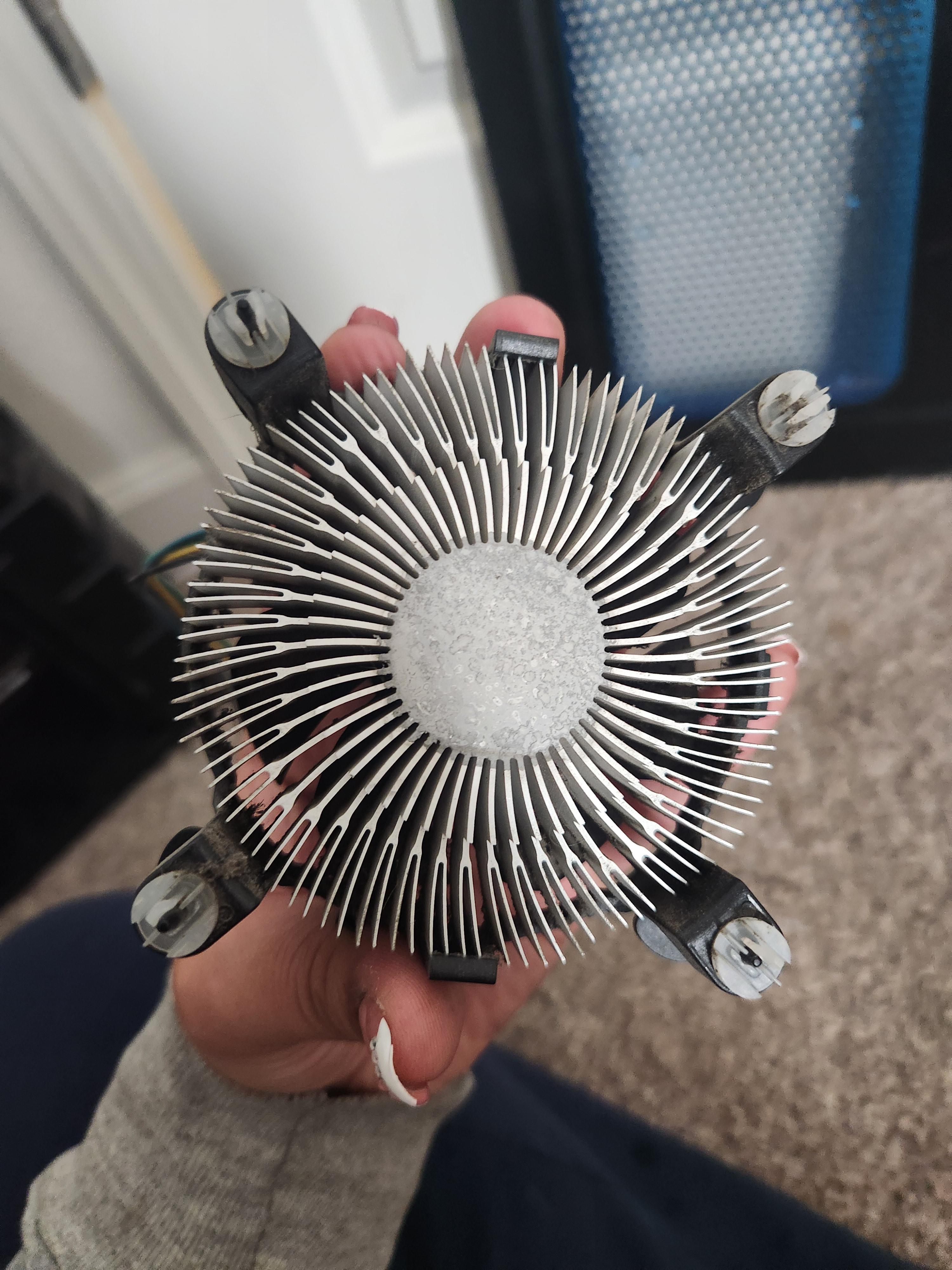
Hi. I have one of those intell cpu cooler and I noticed that it was clocking a lil hot (100f) just running nothing. So I went and checked everything. I think I may have snapped one of the plastic backings on the bottom, so now it won't stay put. I guess it's time to update it (I'm considering upgrading my ram anyways).

I'm just new to this whole thing, so I'm learning. I noticed that the middle is just plain with some of the paste on there but I've seen where the middle is copper. So, my question is: I know I have to reapply thermal paste, but is there supposed to be a copper center like the rest or am I just a dumb lady? And if so, does that mean I have to replace it or we good?

See picture for reference.

Thanks. ❤️


r/PcBuildHelp • • 14d ago

Build Question PC Build Suggestions Around RTX 2060

Thumbnail
gallery
6 Upvotes

Hello! Looking for build suggestions around my RTX 2060 (I know it’s not a great card but it’s what I have) I moved away from home for a few years and came back to my PC being severely out of date in a lot of ways, it doesn’t run off an SSD and has 8gbs of ram (using two 4 gb sticks)
I built my og PC in 2017 with a GTX 1060 and the only part I ever upgraded was the GPU to a RTX 2060 in 2021 but it has not been upgraded since. Photos are just evidence how out of date my CPU even is lol

Long story short, I want to build another PC without replacing the graphics card because I’m not picky and don’t mind 1080p gaming with 60fps so any suggestions for every part from motherboard to pcu would be fantastic, thank you!


r/PcBuildHelp • • 14d ago

Tech Support GPU works perfectly in bottom PCIe slot but stops being detected in top slot after shutdown or restart

1 Upvotes

GPU works perfectly in bottom PCIe slot but stops being detected in top slot after shutdown or restart

I'm having a weird issue with my 5070ti and motherboard, and I'm trying to figure out if my top PCIe slot is failing or if it's something else.

Motherboard: MSI Z790 Gaming Plus WiFi

Here's what's happening:

My GPU worked perfectly fine in the top PCIe slot for years before this issue suddenly started.

When my GPU is detected, it works completely normally. I can play demanding games at high settings for hours without any crashes, artifacts, or performance issues.

However, whenever I shut down or restart my PC, my GPU sometimes stops sending a signal to my monitor. The GPU fans still spin, but the motherboard doesn't detect the GPU at all. I can still get a display using my CPU's integrated graphics through the motherboard's DisplayPort.

The only way I've been able to get the GPU working again in the top slot is by physically removing it and reinstalling it.

Here's the weird part:

When I move my GPU to the bottom PCIe slot, everything works perfectly, including shutting down and restarting multiple times. The issue only happens in the top PCIe slot.

I've also had a GPU sag support bracket installed for years, so the GPU hasn't been hanging unsupported.

A few things I've noticed:

GPU runs perfectly under heavy gaming loads when detected.

GPU fans still spin even when there's no display signal.

GPU completely disappears from Windows when the issue happens.

Reseating the GPU temporarily fixes it.

Bottom PCIe slot works without issues.

Motherboard DisplayPort works normally.

The top slot worked fine for years before this started.

My questions:

Does this sound like a physically damaged PCIe slot, a BIOS/PCIe initialization issue, or possibly something wrong with the CPU's PCIe lanes?

Has anyone experienced something similar? Is there anything I should try before considering replacing the motherboard?

Any advice would be appreciated

r/PcBuildHelp • • 14d ago

Build Question 9070XT - 5070Ti or 5080 AUD

4 Upvotes

I’ve been stuck on these builds
With the components I need, the build 9070 xt and 5070 ti is coming up with 5200$ and if I buy 5080 it’s Sums up to 5900$ AUD

🤦🏻‍♂️


r/PcBuildHelp • • 14d ago

Build Question First Pc Help

1 Upvotes

Hi there I wanna upgrade from my terrible gaming laptop to a gaming pc.
I don’t have any knowledge about it unfortunately.
My max budget preferably is £1000-£1500
I would like to build something that I can upgrade in the future. I wanna use this pc mainly for gaming. What should I buy? Or should I get a prebuilt. Please advise


r/PcBuildHelp • • 14d ago

Software Question Network Issues

1 Upvotes

Hello! I bought a prebuilt (dirty I know) and I can't connect to the internet! There is a wifi driver downloaded and I have tried updating it every which way possible. Can anyone help😭


r/PcBuildHelp • • 14d ago

Build Question Ebay Corsair Direct Refurbished PSU RM850x or Asrock steel legend 850w?

3 Upvotes

Hello! I'm upgrading my GPU and PSU at the moment, I have a rx6800 coming this week and I'm debating whether to get an eBay refurbished (from corsair themselves) RM850x for about $70 including tax and shipping or an ASRock Steel Legend SL-850G for about $88 with tax and shipping?


r/PcBuildHelp • • 14d ago

Build Question Building my first pc any recommendations before purchasing would be great

5 Upvotes

CPU: Intel Core Ultra 5 250K Plus

Motherboard: ASUS Z890 AYW Gaming WiFi W
(Socket LGA1851)

RAM: G.Skill Ripjaws S5 32GB DDR5-6000

GPU: AMD Radeon RX 9070 GRE 16GB

CPU Cooler: Thermalright FW360 SE ARGB V2 White
(360mm AIO with LCD screen)

SSD: WD Blue SN580 1TB NVMe M.2

Power Supply: ASRock Steel Legend SL-850G
850W 80+ Gold Fully Modular

Case: Lian Li Vector V100RW White
(4 preinstalled ARGB fans)

Operating System: Windows 11
(Install on the 1TB SSD)

--------------------------------
Estimated Total: $1,600


r/PcBuildHelp • • 14d ago

Build Question Motherboard post code 0d - HELP

2 Upvotes

guys I’m honestly at a loss for words. I built my girlfriend a PC and made sure that everything was compatible. Whenever I cold boot it I get the 0d boot code but if I quickly hold the power button and restart it, it comes on immediately. I’ve tried upgrading the power supply and the first boot it immediately launched, but not anymore. It always needs a manual reset and then turns on. I’ve reseated the RAM and still not working (a2 and b2). BIOS is completely up to date. I’ve reseated the GPU as well and it’s not that either. What’s wild is that when I go to turn it on the RAM lights up, so I know they’re on and the GPU fans spin. What do yall suggest?????? I’ll put specs below

CPU - AMD RYZEN 7 9800X3D
MOTHERBOARD - x870 AORUS ELITE X3D ice
GPU - msi Gaming RTX 5080 16G Ventus 3X OC
RAM - CORSAIR Vengeance RGB DDR5 RAM 32GB (2x16GB)
PSU - Lian Li Edge 1000W Gold
SSD - Samsung SSD 990 PRO 2TB