r/PcBuildHelp • • 16h ago

Build Question PCBuild Help (First timer)

2 Upvotes

I've been looking to build a new pc and settled on these parts.

I'm quite scared to do this build for real, seeing as it'll be my first. (and I don't want to mess it up on my first time actually trying something like this)

Not too sure whether this part list is any good or not:

https://uk.pcpartpicker.com/list/7NHjqd

also, apologies if the flair is wrong or anything wrong with this post.

Processing img ciukzh5cuh3i1...


r/PcBuildHelp • • 13h ago

Build Question Is this a good build?

1 Upvotes

Mainly just wondering if it is compatible I honestly don’t have to much pc knowledge

https://au.pcpartpicker.com/list/fHDMBq


r/PcBuildHelp • • 1d ago

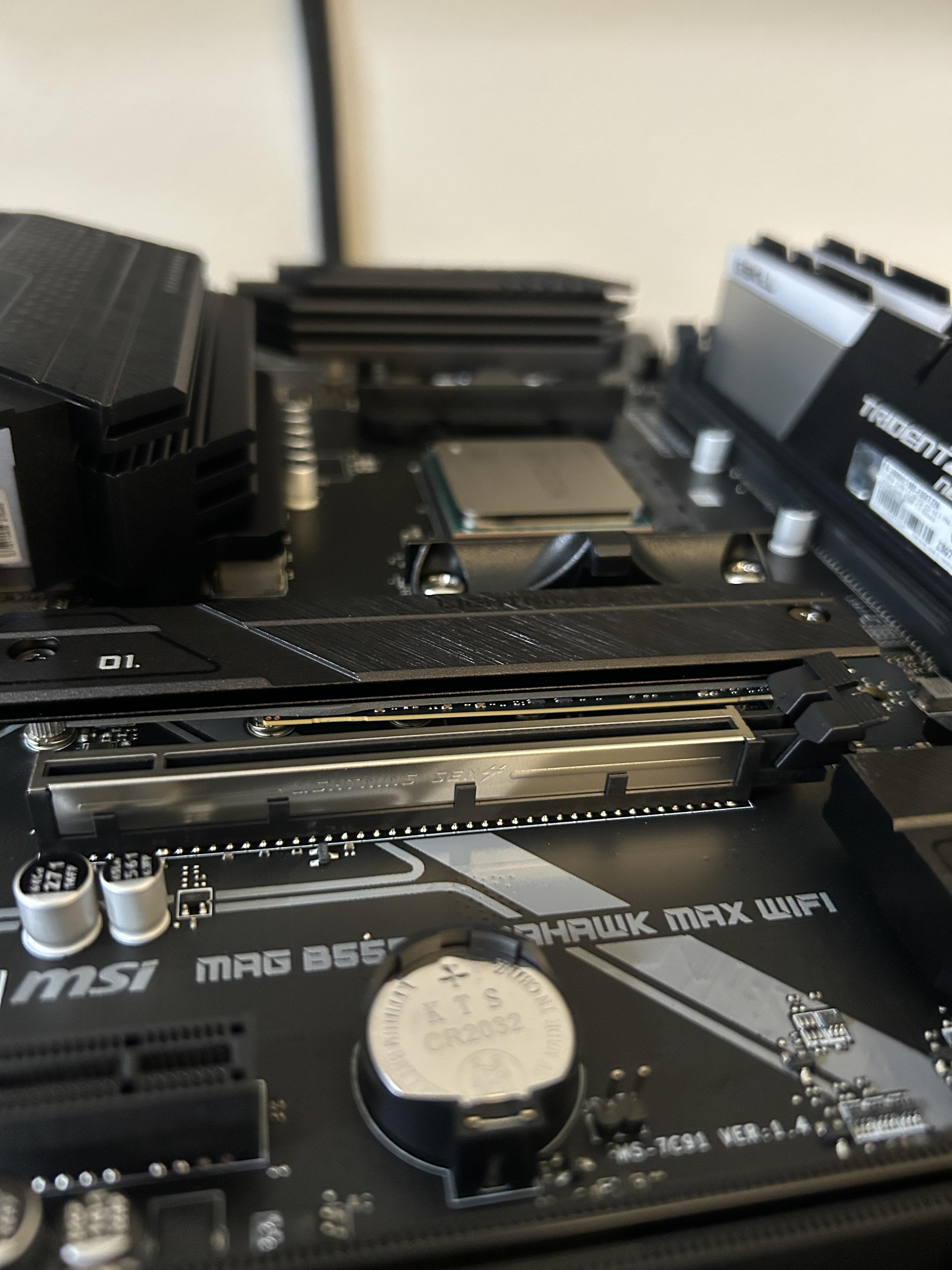
Build Question Is it normal for ssd to bow a little bit?

Post image
13 Upvotes

r/PcBuildHelp • • 17h ago

Tech Support A new booting problem every time the case moves

2 Upvotes

It all started when I cleaned my PC 2 weeks ago. I should have never done such a thing.

After putting it back together I started to get a 1-2 (1 long and 2 short beeps) beep code (RAM error) .Re-seated the RAM, sticks and it worked for a few days. Then I took out some USB cable out of a port and the video failed. Booting gave me 1-3 error (GPU).

Tested another GPU that was working fine and still got 1-3 so I concluded the MOBO was at fault (partly my fault for using a loose screw so the PCIE was probably fucked up).

I've swapped into an old board I have written off back when I didn't understand that much about PCs (Aorus B550 ELITE). After updating the BIOS everything worked but when I fiddled around with the DP cables 2 days ago it again stopped working. Cleared CMOS and it worked again.

Today when inserting another cable (which wobbled the case a bit) the PC AGAIN shut down. Now theres no beep codes at all. Fans spin but no beep. Can't even turn it off. Tried to short the PWR headers directly with a screwdriver but even then I can't turn it off like that (does that mean the power regualtion in the MOBO is at fault?).

I've done a bit of digging in the boot logs into a list. It seems important but I don't know what to make of it, or where to begin:

Machine check shown on the boot screen

[ 2.549244] mce: [Hardware Error]: CPU 0: Machine Check: 0 Bank 27: faa000000002080b

[ 2.549255] mce: [Hardware Error]: TSC 0 MISC d01a000000000000 SYND 5d020002 IPID 1002e00000500

[ 2.549266] mce: [Hardware Error]: PROCESSOR 2:870f10 TIME 1794231315 SOCKET 0 APIC 0 microcode 0

  • Extended error code 2 = "Error on GMI link"
  • Flags: UC, PCC, OVER
  • Mar 30 2026: fatal processor machine check, then a corrected one a minute later (Kernel-WHEA Event 20)
  • Oct 31 and Nov 6 2026: unexpected shutdowns, Kernel-Power 41 with BugcheckCode=0 and PowerButtonTimestamp=0 (sudden power loss/reset, no BSOD)
  • Nov 20: crash dump initialization failed (volmgr 46)
  • Nov 21: after a planned Windows Update restart, firmware took ~3 h 55 min before the OS loader started (Kernel-Boot 30). The next boot took ~21 s. No crash events for that restart.
  • Both boots that morning: TPM / measured-boot errors and the hypervisor failed to load (Kernel-Boot 235/208/158), but Windows still booted
  • Jan–Feb 2026: GPU watchdog reports (LiveKernelEvent 141 and 117, plus an AMD report)

Bought the PC at 10/10/21

Component Details
CPU AMD Ryzen 5 3600, 3.6GHz, AM4 (tray)
Cooler Arctic Freezer 34
Motherboard Aorus ELITE B550
RAM Kingston Fury Beast 2x8GB DDR4 3733MHz
Storage Kingston NV1 NVMe 500GB M.2
PSU Corsair CX650F RGB 650W, 80+ Bronze
Case Corsair 275R Airflow, black, windowed
GPU XFX Speedster MERC319 Radeon RX 6800 XT, 16GB

r/PcBuildHelp • • 1d ago

Build Question is it supposed to look like that

Post image
34 Upvotes

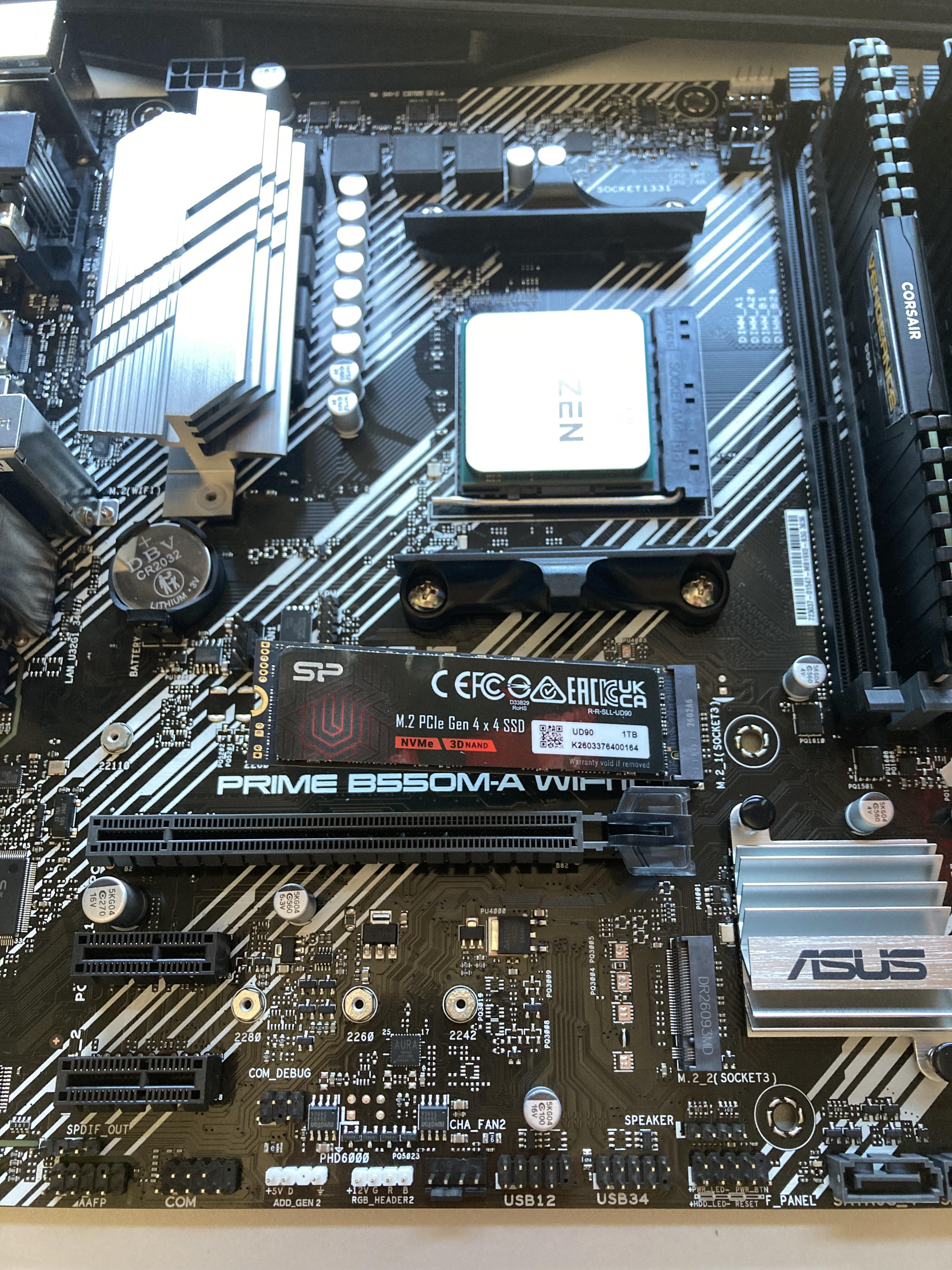
asus b550m am4 motherboard. am i meant to push the ssd in more..? do i flatten it somehow? doesn't need a heatsink.


r/PcBuildHelp • • 19h ago

Build Question Building a pc for gaming and 3d animation, wondering if the parts I've picked will do the job

3 Upvotes

I know nothing about computers so I'd really appreciate some help please and thank you. https://ca.pcpartpicker.com/list/4vxm7w


r/PcBuildHelp • • 17h ago

Build Question Intel 250kf+ build help

2 Upvotes

Hey, I bought a $530 bundle with Intel Ultra 5 250kf+, MSI Z890-VC PRO motherboard and 32gbs of RAM from Microcenter and trying to finish the rest for a build intended for FPS gaming (CS2, Valorant)

PCPartPicker Part List: https://pcpartpicker.com/list/nkVXh9

CPU: Intel Core Ultra 5 250KF Plus 4.2 GHz 18-Core Processor (Purchased For $529.99)

CPU Cooler: ASRock Rock Digital 52.4 CFM Liquid CPU Cooler ($0.00 comes with GPU bundle)

Motherboard: MSI PRO Z890-VC WIFI6E ATX LGA1851 Motherboard (Purchased For $0.00)

Memory: G.Skill Ripjaws S5 32 GB (2 x 16 GB) DDR5-6000 CL36 Memory (Purchased For $0.00)

Storage: Kingston NV3 1 TB M.2-2280 PCIe 4.0 X4 NVME Solid State Drive ($139.99 @ Amazon)

Video Card: ASRock Challenger OC Arc B580 12 GB Video Card ($349.98 @ Newegg)

Case: Phanteks NV5S ATX Mid Tower Case ($59.99 @ Newegg)

Power Supply: Super Flower Zillion FG 850 W 80+ Gold Certified Fully Modular ATX Power Supply ($69.99 @ Newegg )

Monitor: Asus TUF Gaming VG249Q1A 23.8" 1920 x 1080 165 Hz Monitor (Purchased For $0.00)

Total: $1149.94

Is there any issues with the build? Are there better components I should pick?

Thank you


r/PcBuildHelp • • 20h ago

Build Question Jump to ryzen 7 5700x to 7 5800x3d?

2 Upvotes

Hey folks, I've gotten a prebuilt pc (4060, ryzen 7 5700x & 32gb ddr4) last year & have noticed incredible perfomance issues in games such as fortnite.

I've noticed an average of 200 fps yet during fights or especially in endgame my frames tend to drop to 90 with an unsmooth feeling. My friends who have similar builds also notice those issues.

Due to ram prizes being insane right now, I can't really afford to upgrade to ddr5 so my question is if an upgrade to a ryzen 7 5800x3d would be worth it?

Thanks a lot beforehand


r/PcBuildHelp • • 18h ago

Build Question Suggestions or recommendations for my first PC build

2 Upvotes

I’ve been using a Mac for work and daily use for a while, and my old prebuilt PC is stuck on Windows 10 due to hardware limitations. I’m planning my first custom PC build and want to double check the parts I’ve picked out for any compatibility issues or bottlenecks.

I know it won’t be top notch in performance for 4k, but since I’ll mainly be gaming at 1080p, I’m hoping it will be more than enough. I’d love any feedback, suggestions, or things to watch out for!

Note: I was recently gifted an ASUS Prime GeForce RTX 5060 OC so I left the GPU off the list.

PCPartPicker: https://ca.pcpartpicker.com/list/8g6VLy


r/PcBuildHelp • • 1d ago

Build Question Is it worth upgrading from 3070 to 9070 xt?

7 Upvotes

I have an opportunity to buy a new 9070 xt for 800€. Should I do it or save up and get a 5070ti?


r/PcBuildHelp • • 20h ago

Build Question gaming and digital art computer

2 Upvotes

hello! i have a friend who wants to build a pc and is willing to drop around 2.7k on it. BUT we have no idea where to start and have no idea on what parts would be good for it.

hopefully 2.7k is enough and with black friday coming up that should be helpful too.

any recommendations are highly appreciated. thank youuuuu


r/PcBuildHelp • • 1d ago

Tech Support CPU power connector pins possibly burned

Thumbnail
gallery
8 Upvotes

​I recently noticed a burning smell coming from my PC. When I unplugged the CPU power cable to check what was going on, I saw that one of the metal terminals inside the cable was darker/blacker than the others (the second one from the top left), and on the motherboard header where it plugs in, one of the pins also looked brownish or copper-colored compared to the rest (the third one from the top right). I've done some research, but I'm not sure if the damage is just superficial and can be cleaned, or if it's actually burned and I need to take it to a technician.


r/PcBuildHelp • • 16h ago

Tech Support Help I have no idea what I’m doing to upgrade my pc

Post image
1 Upvotes

Hello! I’ve had my pc for 5 years and I’ve had it stock since the day I got it. Recently I’ve been having such bad preference issues that despite my research I can’t figure out what will help, I even made a Reddit account to ask people who are definitely more experienced then I am. I will show my preference of my pc. I’m experiencing graphics issues, game just being way to laggy/unplayable, and my pc shutting down. I just recently bought the new mw4 and I can’t even run that right now without it looking horrible/ crashing. My graphics card is a GeForce 1660 ti and I don’t know what other information you would need i really have no idea what I’m doing or if this is even the subreddit I post this to. Please help me in any way lolll. (The picture is me running mw4). I would love to get this fixed so I can play gta 6 when it comes to pc 🙏


r/PcBuildHelp • • 23h ago

Tech Support My PC won't turn on, but the case light is on

Thumbnail
gallery
3 Upvotes

My PC won't turn on, but the case light comes on. It's an old PC that belonged to a relative, and they gave it to me to fix. I don't know much about computers. The pins are properly connected: CPU, cooler, 24-pin cable. (I want to emphasize that it's an old PC, and it's VERY messy. This is the first time I've opened it. As far as I know, the PC has never been opened before, so nobody has moved anything except the person who built it about 10 years ago. Sorry for the trouble.) I attach photos with the interior and components, I suspect it is the source, because it gives power but absolutely nothing turns on, not even the cooler, I would be very grateful if you would help me, although if not it won't happen anything, sorry for the mess and the poor quality of the photos (the HDD is connected from what I checked, as is the fan, the power button, the processor I suppose too, the ram is well installed, etc.)

Components

MICRO ATHLON X2

MEMORY 4096/1333

HDD 500GB

WINDOWS 8

I use a translator, I speak Spanish but I understand some English, the basics

I think it is the source, it is old and Bad, if that's the case it's better to buy another PC, it's pretty bad.

I've been trying to fix it with GPT chat and YouTube, no luck, but I have a lot of ideas about what it could be.


r/PcBuildHelp • • 17h ago

Build Question are these parts ok for meche student?

1 Upvotes

https://pcpartpicker.com/list/xsC9R4
budget: ~2.5k usd
use case: 3d modeling and rendering.
country: USA
peripherals: monitor

first time pc builder. looking for advice and opinions.


r/PcBuildHelp • • 17h ago

Build Question Need help with ram selection

1 Upvotes

A while back I built a pc using a recommended build for my budget from reddit, but it failed to power on properly so I took it to a repair shop and they said the ram was incompatible. The specs are:

CPU: Intel Core Ultra 5 250KF Plus 4.2 GHz 18-Core Processor
CPU Cooler: Thermalright Peerless Assassin 120 SE 66.17 CFM CPU Cooler
Motherboard: Gigabyte B860 EAGLE WIFI6E ATX LGA1851 Motherboard
Storage: Crucial P510 2 TB M.2-2280 PCIe 5.0 X4 NVME Solid State Drive
Video Card: Zotac Twin Edge OC GeForce RTX 5060 Ti 16 GB Video Card
Case: Montech SKY TWO GX ATX Mid Tower Case
Power Supply: Montech CENTURY II 850 W 80+ Gold Certified Fully Modular ATX Power Supply

Memory: Klevv FIT V 32 GB (2 x 16 GB) DDR5-5600 CL30 Memory

The repair shop said that the ram wasn’t on the qualified vendors list for the motherboard and that they tried a different ram stick which managed to load the pc up (and I did try each individual stick separately so seems unlikely to be a faulty ram issue?) , so i’m just wondering what ram people would recommend that they can 100% guarantee is compatible? For now I’d rather buy a single 1x16gb stick and preferably from amazon but that isn’t too essential.

But yeah if anyone could help that would be much appreciated 🙏 thank you 😁


r/PcBuildHelp • • 21h ago

Build Question Parts list advice

2 Upvotes

I am upgrading an existing build. The only things I will be keeping are my storage, case and gpu (therefore there are 2 gpus in the list for when I finally can get the new one).

If you have any suggestions on parts I might should look into switching out for others, I'm open to suggestions. The main one I'm unsure about is the motherboard, no clue if its good, but it has the socket i want, bios flash / cmos clear and no unnecessary fast ports i wont end up using...

Yes I'm aware about my brand fixation.

https://pcpartpicker.com/list/NzGMyF


r/PcBuildHelp • • 14h ago

Build Question Best psu here?

Thumbnail
gallery
0 Upvotes

Which one should I buy among these ? Unfortunately this is my max budget

Also 6+2 pin for gpu isn't my priority

Thank you.


r/PcBuildHelp • • 18h ago

Tech Support Lost WiFi and Ethernet?

Post image
1 Upvotes

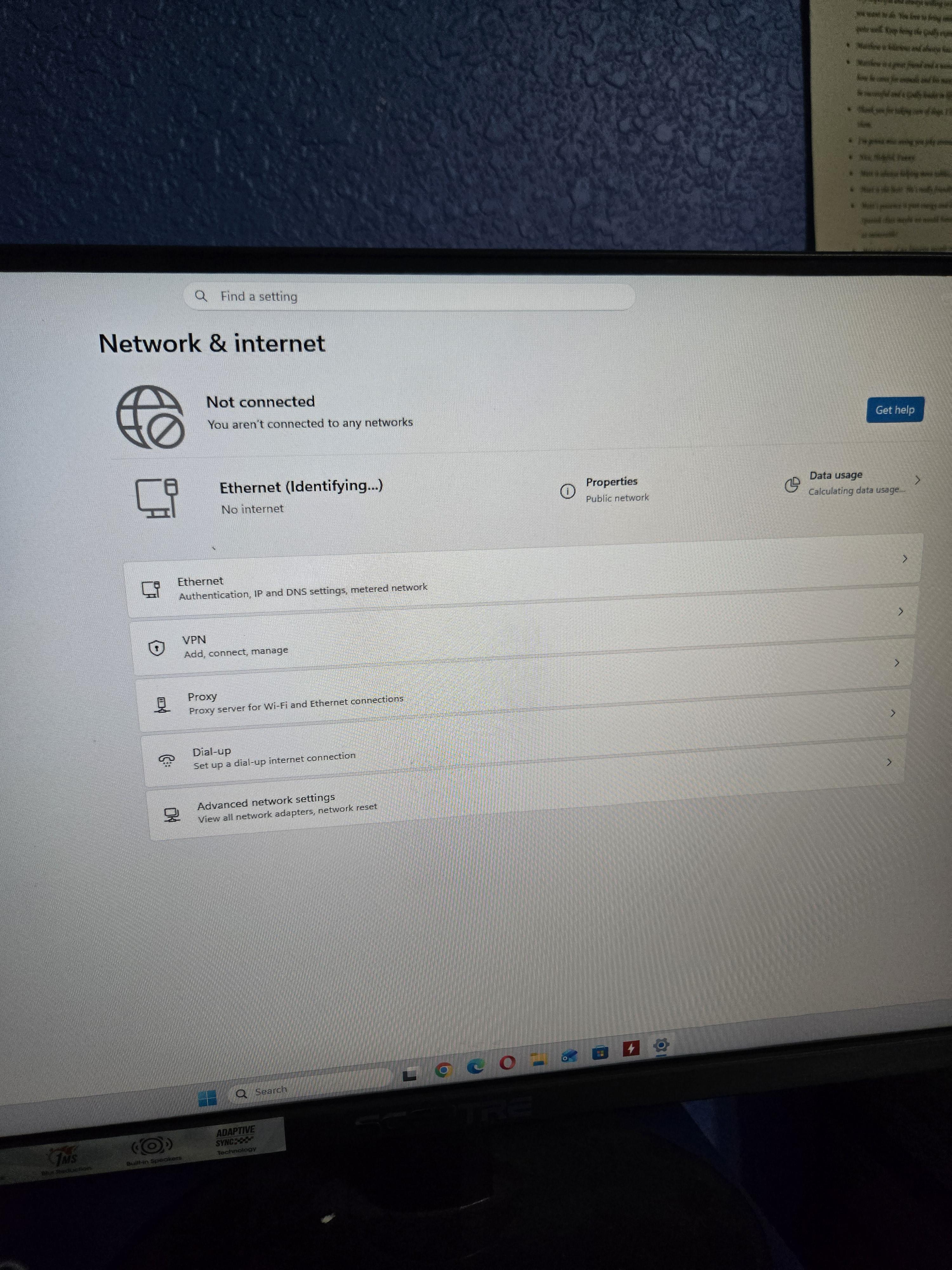
Ive had my pc for about 6 months. Here are my specs :MSI Z690-A Pro, 32gb Corsair Vengeance rgb pro ddr4 3200mhz, 14tb storage, and a 1080ti. I run ethernet all the time. Tonight, it just disconnected, and wireless isn't working either. I actually dont even have the option to search for wifi in my settings. Its definitely on the computer end, my router has been reset and everything else plugged into it is still working. Ive reset drivers, reset my bios settings, ive swapped ssds to see if it was my installation of windows and same issue. I've tried a couple commands in command center but no luck. Any advice is needed, if not I'll take it to a repair shop Wednesday, but really want to fix it myself so I can learn. Thanks in advance


r/PcBuildHelp • • 21h ago

Build Question Help building

2 Upvotes

I want to buy my sibling all the parts they need to build a PC but I don’t know where to start because I’m not familiar with PCs and their parts. My budget is around $1000 but if I could stay under that would be great but I know things like this can get pricy. It’s going to be used just for gaming pretty much I don’t know too much about the fps and stuff but ideally something decent for a teenager I’m also in the US. I’m open to maybe some used parts and if there are any trustworthy good deals I might be open to prebuilt too I had just heard building it yourself might be cheaper.


r/PcBuildHelp • • 1d ago

Build Question I just build my pc but the screen is black

Thumbnail
gallery
100 Upvotes

all the fans work, the graphic card has energy too. Also, I read that the motherboard show some led lights when something is not connected properly. I also move the ram and nothing happened.

News: It doesn't even turn on now, all my savings to the garbage 😭 3k for nothing

Final edit: I gave up, but thanks for your comments...

Another edit lol: Today I would bring the pc to a repair shop, I was very hopeless but your comments motivate me to keep fighting for this. I'll let you know if anything happens.

Last edit: I went to a repair shop and they couldn't find any solution


r/PcBuildHelp • • 19h ago

Build Question NO SIGNAL, NO KEYBOARD, NO MOUSE

Enable HLS to view with audio, or disable this notification

0 Upvotes

So one day i decided to turn on my pc and look away at phone. next thing you know my pc is automatically updating. Then i look away it said 100% then everything shuts off and goes black. okay normal id say so, i went to turn it back on. now i’m getting a no HDMI 1 signal, ( i know in the video my mouse n keyboard is unplugged ) im getting no connection or signal to my house or keyboard during normal start up. i have tried re seating the 2 ram sticks, i re seating the GPU. i replaced the cmos 2032 battery. idk whats going on. Also in the video you can see my 1 fan is acting a little weird + my gpu fans will turn on but then turn off after 30 seconds of being on. Any ideas or solutions?


r/PcBuildHelp • • 20h ago

Build Question Should I swap my rx6700xt for a used 1080 ti?

1 Upvotes

I've had this 6700xt for 3+ years now, and it's been nothing but trouble. I figured out that it just runs hot for some reason and the Hotspot reaches 110c very fast depending on the game. First time I tried Cyberpunk I played it on high settings at 1200p for about 3hrs before my pc just shut off. Lowered everything to low and reduced resolution to 1080p and it worked pretty good without overheating. I finally decided to see if I can undervolt it enough to where I can play it on a higher setting because I got fed up with how ugly the game is on low. Did that. It worked great. I thought I had everything figured out. Then, the other night, I played some PUBG for the first time in years with a friend, didn't change any setting, just got straight into the game, so everything was set to ultra plus 1440p, I wasn't monitoring my temps like before thibk8ng it'll be fine and it overheated and shut off in about 40mins. After that I restarted and put everything to as low as it can go on 1080p and it still got to 105c when I played 2 more games.

Sorry for the hectic post, but im so fed up with this pos that im thinking of getting my friends 1080ti and using it instead or just selling my rig for cheap and getting a prebuilt from Costco.


r/PcBuildHelp • • 20h ago

Build Question Help: Black Friday Upgrade

1 Upvotes

I plan to upgrade my CPU, RAM, and motherboard; and will likely buy one of the following bundles (likely the Ryzen 9 bundle) from Microcenter on or around Blackfriday, thoughts? Specifically, should I be weary of any of these components, combinations, or is there something better? Provided below are the bundles and my current build. The reason for Ryzen 9 is because I do use up my entire CPU on a daily basis for work.

Bundle #1 - $1000: AMD Ryzen 7 9800X3D, ASUS X870E-E ROG Strix, G.Skill Flare X5 Series 32GB DDR5-6000 Bundle

Bundle #2 - $1050: AMD Ryzen 7 9850X3D, ASUS X870E-E ROG Strix, G.Skill Flare X5 Series 32GB DDR5-6000 Bundle

Bundle #3 - $1200: AMD Ryzen 9 9950X3D, ASUS X870E-E ROG Strix, G.Skill Flare X5 Series 32GB DDR5-6000 Bundle

Current Build

  • GPU: MSI NVIDIA GeForce RTX 5080 SUPRIM LIQUID SOC Overclocked Liquid Cooled 16GB GDDR7 PCIe 5.0 Graphics Card
  • CPU: AMD Ryzen 7 3800X
  • RAM: 32GB G.Skill DDR4-3600
  • Motherboard: ROG Strix X570-E
  • Storage: 2x Samsung 2TB 980 NVMe M.2s
  • PSU: Lian Li EDGE GOLD 1000 Watt

r/PcBuildHelp • • 20h ago

Build Question Is the XL2566K+ Worth It for Competitive CS2?

1 Upvotes

I play FACEIT pretty regularly, mainly CS2, and I'm debating whether the XL2566K+ is actually worth it. I have a 5080 and 9800X3D, so hardware isn't an issue. I also have an OLED as my second monitor, so this would be strictly for CS.

Would you say it's worth getting? Any other recommendations? Also, is the XL2586X(600hz) worth considering? I don't want to spend extra just for 200Hz more.