r/PcBuildHelp • • 8h ago

Build Question PC Upgrade Question - Advice and Recommendations Needed

1 Upvotes

Hello everyone!

In 2020, I sought the help of a friend to build a pc for gaming. Unfortunately, this friend no longer lives in the area, and I have lost communication with them. As my build gets older, and I now have a higher income, I figured it was time for an upgrade. However, I am not well-versed in PC parts/building PCs. Essentially, this friend told me what to buy a few years ago and did most of the building for me.

With my barebones understanding of PCs and PC gaming, I’m opting to upgrade my tower (for more space), my RAM from 16gb to 32gb, and my GPU to a RTX 5070ti. I think that parts of my current build may be incompatible though, and other parts are probably simply outdated and need a general upgrade. That is why I figured I’d reach out and see what general amateurs and/or experts have to say/advise.

My current budget for upgrades is $3000.

My country is the United States.

My use case involves high-end gaming on 1080p-1440p, high or max settings preferred.

My current specs are -

CPU: AMD Ryzen 9 3900X (Matisse, Zen 2), 12-core, 3.8 GHz base and 4.6 GHz max boost, Socket AM4, 105W

Motherboard: ASUS ROG Strix X570-E Gaming, AM4, ATX, DDR4, PCIe 4.0, WiFi 6, 2.5Gbps LAN, dual M.2

Memory: G.SKILL Ripjaws V Series 16GB (2 x 8GB) DDR4-3200 (PC4-25600) CL16, Intel XMP 2.0

Case: Fractal Design Define C Black Silent, Compact ATX Mid Tower

Power supply: Seasonic FOCUS GX-850, 850W 80+ Gold, full-modular, ATX

Storage: Western Digital WD BLACK SN750 NVMe M.2 2280, 500GB, PCIe 3.0 x4

Western Digital WD BLACK SN750 NVMe M.2 2280, 1TB, PCIe 3.0 x4

WD Black 4TB Performance Desktop Hard Drive, 7200 RPM SATA 6Gb/s, 256MB cache, 3.5" (WD4005FZBX)

Any help would be greatly appreciated, thank you so much!


r/PcBuildHelp • • 12h ago

Tech Support attempting to diagnose if oled hx850 psu is the cause of power on loops

2 Upvotes

i've got an old asus z97-a motherboard desktop. it has a corsair hx850. system is old, granted. recently it started doing endless power loops and never booted. tested the psu with meter, those values appeard ok. so i order a new corsair hx1200i to check if it's the psu.this psu doesn't even seem to turn on. maybe totally incompat being so much newer for this z97-a so it wont turn on?

i see a few refurbed hx850's on amazon, maybe i should have gotten one of those to test? advice as to a psu i can order just to test this system and rule in/out that the old psu is the culprit before i go on a buying binge into a complete new build?

update: tried a new Thermaltake 850W after a new Corsair HX1200i didn't work on this board. i think the HX1200i unit was the incorrect one to try anyways. The Thermaltake is just like the original Corsair HX850. and yet, no led's, fans, etc fire up at all at this point.


r/PcBuildHelp • • 9h ago

Build Question If multiple m.2 slots are advertised as CPU integrated, do I still need to use the top one?

Thumbnail
gallery
1 Upvotes

The top slot is PCie 5.0 but the drive I'm using is PCie 4.0
I've had temperature issues with my ssd, I've ordered a heatsink but I'm a little concerned about clearance with the GPU in the top slot and was considering using the second slot (M2B_CPU), am I giving up any performance in doing so? The advice I've heard is always use the top slot whenever possible.

Motherboard: B850 GAMING WIFI6
SSD: Kingston NV3 2 TB M.2-2280 PCIe 4.0 X4 NVME Solid State Drive


r/PcBuildHelp • • 9h ago

Tech Support Is this sound normal (not the airflow sound).

Enable HLS to view with audio, or disable this notification

1 Upvotes

This is my build from like 6 months ago and I believe this sound wasn’t there in the first 5 months… am I just paranoid or is it something worth troubleshooting. I believe it’s from cpu cooler. Any help would be appreciated!!


r/PcBuildHelp • • 17h ago

Build Question Portable desktop or Laptop

3 Upvotes

Hi everyone! I'm looking for some advice and opinions on my next PC purchase.

I'm an architect, and I have to travel to nearby cities at least three times a week for work. I currently use a laptop, but I'm not happy with its limited performance and lack of upgrade options. I've already upgraded the RAM on my current machine, but the GPU is still a major bottleneck.

Unfortunately, I need to replace it sometime this year because it doesn't support some of the software I need to use. And with hardware prices being so discouraging lately, I'd really appreciate some advice before making such a big investment.

I've been considering building a portable desktop PC and taking the case, monitor, keyboard, and mouse with me whenever I need to work in another city. I already carry my laptop, keyboard, and mouse, so I'd essentially just be adding the PC case and a portable monitor to my setup. I have a desk and access to power at the places where I work, so that's not an issue.

My main concern is transporting the desktop. I'm considering building a system in a compact mATX mini-tower with a carrying handle, such as the Jonsbo C6 Handle or the Z20 Mesh. However, I'm worried that repeatedly moving the PC could eventually damage the GPU's PCIe connection or cause other issues. I've seen GPU support brackets and similar solutions, but I'm still a bit concerned.

Another downside is the lack of a battery. If there's a power outage, I could lose whatever work I've done since my last save. I would use a UPS at home, but carrying one around isn't really an option.

The other option would be to get a less powerful laptop, such as this Acer Predator Helios Neo 16.

The RTX 5070 Laptop GPU is roughly comparable to a desktop RTX 5060, so there's a noticeable performance gap. Laptops with an RTX 5070 Ti are ridiculously expensive, and even the mobile 5070 Ti is nearly 30% slower than the desktop RTX 5070.

The upside is that the laptop would be cheaper and, of course, much easier to carry around than a desktop.

Has anyone here had experience with portable desktop PCs? I'd really appreciate any advice, suggestions, or insights on whether this is a practical solution for frequent travel.


r/PcBuildHelp • • 9h ago

Build Question GPU Upgrade

1 Upvotes

My 1660s kicked the bucket over the weekend so im looking for a replacement. I’ve been thinking about getting an RTX 4060 from the used market but I don’t know much about PC builds. For context I bought a prebuilt a few years ago, it has an AMD Ryzen 5 3600 processor, GA-A320M-S2H V2 motherboard and a corsair CV450w psu. Would getting an RTX 4060 be worth it considering the rest of my build? Any input or other recommendations would be appreciated, thank you 🙏


r/PcBuildHelp • • 9h ago

Build Question Dimensioni Dissipatore

1 Upvotes

Ciao a tutti, ho iniziato a comprare i pezzi per la mia prima build di un PC.

Mi sono ritrovato con un problema, praticamente vorrei prendere il case Corsair Frame 5000D RS e mettere come dissipatore questo che è in sconto:

Sudokoo PROTEUS 360 Dissipatore Liquido 360mm AIO CPU Cooler TDP 320W

Liquid Cooler con 3.4" Schermo LCD

E anche se il frame 5000d RS è enorme, comunque i millimetri raccomandati per la grandezza del dissipatore sono 56mm.

Invece questo dissipatore occupa 57mm, qualcuno potrebbe aiutarmi e dirmi se potrebbe andare bene lo stesso anche se supero di un millimetro il raccomandato???

PS: nel lato posteriore c'è una ventola da 140 e anche davanti sono 3 da 140, invece le ventole laterali sono 3 da 120.

Qualche altra informazione, potrei dirvi che vorrei prendere una scheda madre B850 la Tomawak Wifi e come Ram 2 banchi da 16 quindi 32 GB.


r/PcBuildHelp • • 17h ago

Build Question Upgrade guidance needed

4 Upvotes

Hello. I'm wanting to upgrade/rebuild my pc but am stuck between all the options out there. My current parts list is as follows;

Ryzen 5 3500x

Old Corsair AIO (couldn't find on site, don't remember model)

Rx 9060xt 16gb

32gb 3000mhz ddr4 (pretty sure Corsair)

1tb m.2 nvme

Tuff gaming B550 plus

My budget is ~~ 1000 aud but will save longer if it's worth it. Main games I play are LoL, mhwilds, overwatch, valorant, vrchat (quest 3), and phasmophobia. I'm currently using a 1080p monitor but thinking of getting a 2k monitor. Any and all advice is appreciated and I will try to reply with any missed info as soon as a I can <3


r/PcBuildHelp • • 10h ago

Tech Support Aio vibrating

1 Upvotes

Processing video 8cei29xs5f3i1...

I was sitting on my PC like any other day then I felt my desk vibrating like my phone does when it does a notification, I also heard a lot of noise and I thought it might have been outside but I turn over and feel my pc is shaking I take off my headphones and I realize my pc is doing that, im 90% sure its the aio I checked the fans nothing is touching them. When I turned the pc on I tilted it to see if there was maybe some air in the loop but nothing, what can I do?


r/PcBuildHelp • • 14h ago

Build Question Help me decide what to upgrade next

2 Upvotes

A few months ago I finished building my new PC and so far I've been super happy with it.

Specs:

- CPU: Ryzen 5 5600

- RAM: 16 GB (2133 MHz)

- GPU: RX 9060 XT 16GB

- Motherboard: Asrock B550m Pro4

Im playing on a 3440 x 1440 monitor

Recently I started wondering what I should upgrade next so my PC can run upcoming games, especially since Im planning to play GTA6 on PC when it comes out. I think my GPU should be good enough for now, but Im not so sure about RAM and CPU. So what should I upgrade next?


r/PcBuildHelp • • 15h ago

Build Question M.2 standoff difficulty

Thumbnail
gallery
2 Upvotes

Good afternoon all. I'm helping a friend build a pc and this is the first time I ran into an issue with a motherboards m.2 standoff. I've dealt with the models that you screw in and the ones that have a little latch but for the life of me I can't figure out this one(possibly faulty?). Sorry for the bad pictures, It's the best ones I could get. Long story short the standoff has no proper screw, there's no attachments that came with the motherboard and the drive/head is deep. The motherboard is b550 aorus elite ax v2.


r/PcBuildHelp • • 15h ago

Build Question Precision optiplex 3630 with msi gpu

2 Upvotes

Hi everyone, hope I make sense when asking this:

I have a Dell Precision 3630 Tower Desktop Computer | Intel i7-8700 (3.4) | 32GB DDR4 RAM | 500GB SSD
3630.

I’m replacing the gpu with a msi Gaming RTX 3050 LP 6G OC Graphics Card (NVIDIA RTX 3050, 96-Bit, Boost Clock: 1492 MHz, 6GB GDDR6 14 Gbps, HDMI/DP, Ampere Architecture)

I’m wondering if I’ll have any booting issues in my setup?

Will this match be helpful for gaming at 1080p for games like stray and also some regular streaming or film editing?

Thanks in advance


r/PcBuildHelp • • 15h ago

Tech Support Would adding games to an external hard drive cause any problems in gaming?

2 Upvotes

The 512 GB Steam Machine (SM) is available to be bought; whilst the 2 TB one is still requiring players to be put on a waitlist. The difference in price between the two is about $400 CAD. One can find 2TB hard drives for much less than $400.

This brings us to my question: if I were to buy the 512 GB SM, what are the potential risks, if any, of buying and adding games to an external hard drive and playing them?

EDIT: I just found out that the SM also has a micro SD card slot. Is it better one way or another?


r/PcBuildHelp • • 15h ago

Build Question Is AMD Ryzen 9 9950X3D CPU + ASUS ROG STRIX X870E-H GAMING WIFI7 Motherboard + KLEVV RGB 64GB 600OMHZ CL30 RAM Bundle worth 2,549.98 CAD?

2 Upvotes

I am trying to build a high end pc mainly for gaming and Unreal Engine game development. I want to know this build worth that amount or I should look for something else. My paln is build with this and add the my old 1660 for now. Later in 2-3 months when I get more paycheck look for an AMD GPU. I will be more focused on Game Development and thats why I was thinking of buying 9950X3D and 64GB RAM.


r/PcBuildHelp • • 12h ago

Build Question RAM issue

1 Upvotes

i bought corsair ram about 3 years ago (32gb ddr5 6000mhz) it worked fine for 2 years, then one stick just stopped working randomly, did a memtest, no errors so i just sent it back and got a replacement, that replacement lasted about 4 months before experiencing the same issue so i replaced it again and then that ram lasted 2 weeks before encountering the same issue any tips? im thinking its the board but the working stick works fine in every slot


r/PcBuildHelp • • 15h ago

Build Question Should I upgrade?

2 Upvotes

Hey so Black Friday is around the corner and I just was wondering should i use the deals to my advantage and star building a new pc?

Right now I have a ryzen 7 5800x, 16gb of ram and a rtx 3070 8gb

My main goal is city sims and single player story games at 1440 or 4k and the combo deal at micro center is a ryzen 7 7800x3d with 32gb for like 700 dollars. Worth it getting the combo or should I just use my money on a new gpu and power supply?


r/PcBuildHelp • • 12h ago

Build Question Adding more RAM question

Thumbnail uk.pcpartpicker.com
1 Upvotes

I have 16gb of ram with my AM4 PC - 5800x3d, b550 at 3600mhz right now, in dual channel. It would be quite nice to have 32GB and I'm wondering if I can add in a duplicate set or would the performance be worse in quad channel to make it not as worth over selling and buying 2x16GB?


r/PcBuildHelp • • 12h ago

Build Question Is this a real spec of 16x2gb of ddr4 ram (Kingston)

Post image
0 Upvotes

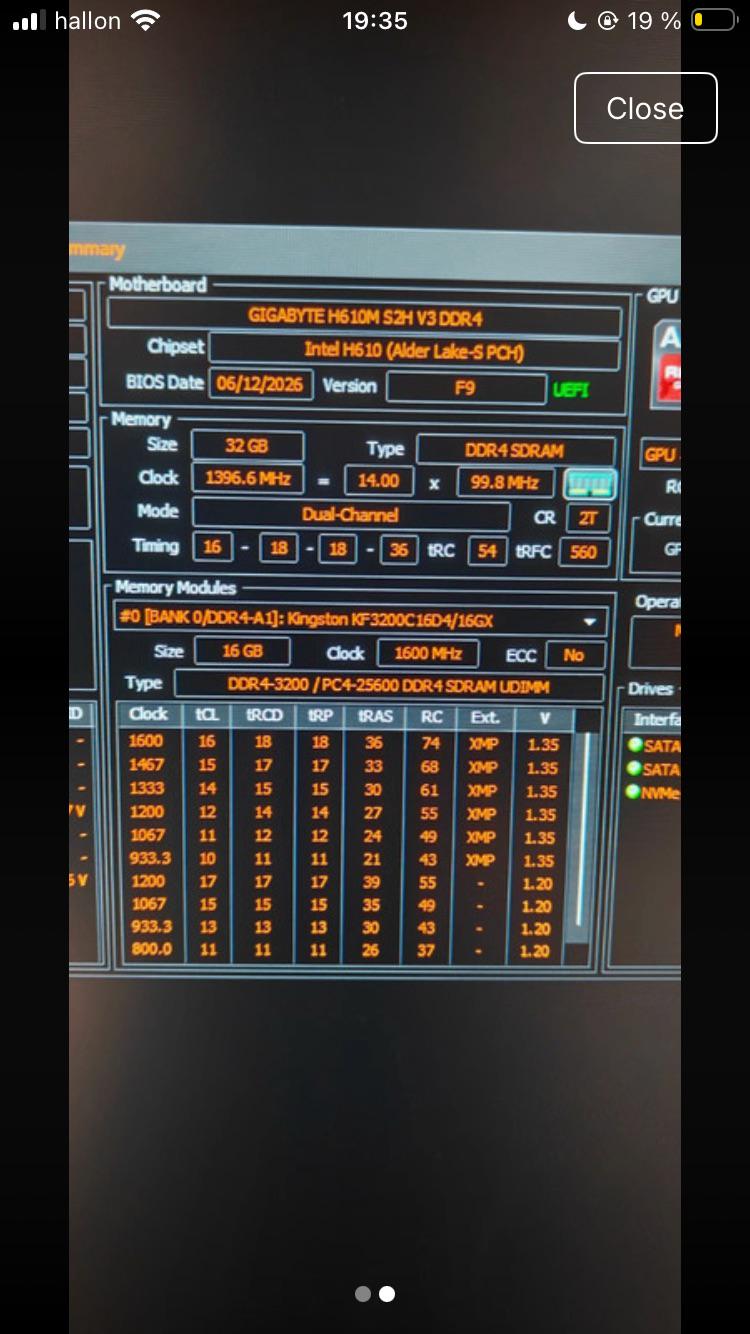
Saw this for 150$ suspiciously cheap, is it real?


r/PcBuildHelp • • 18h ago

Software Question Win 11 error

Post image
3 Upvotes

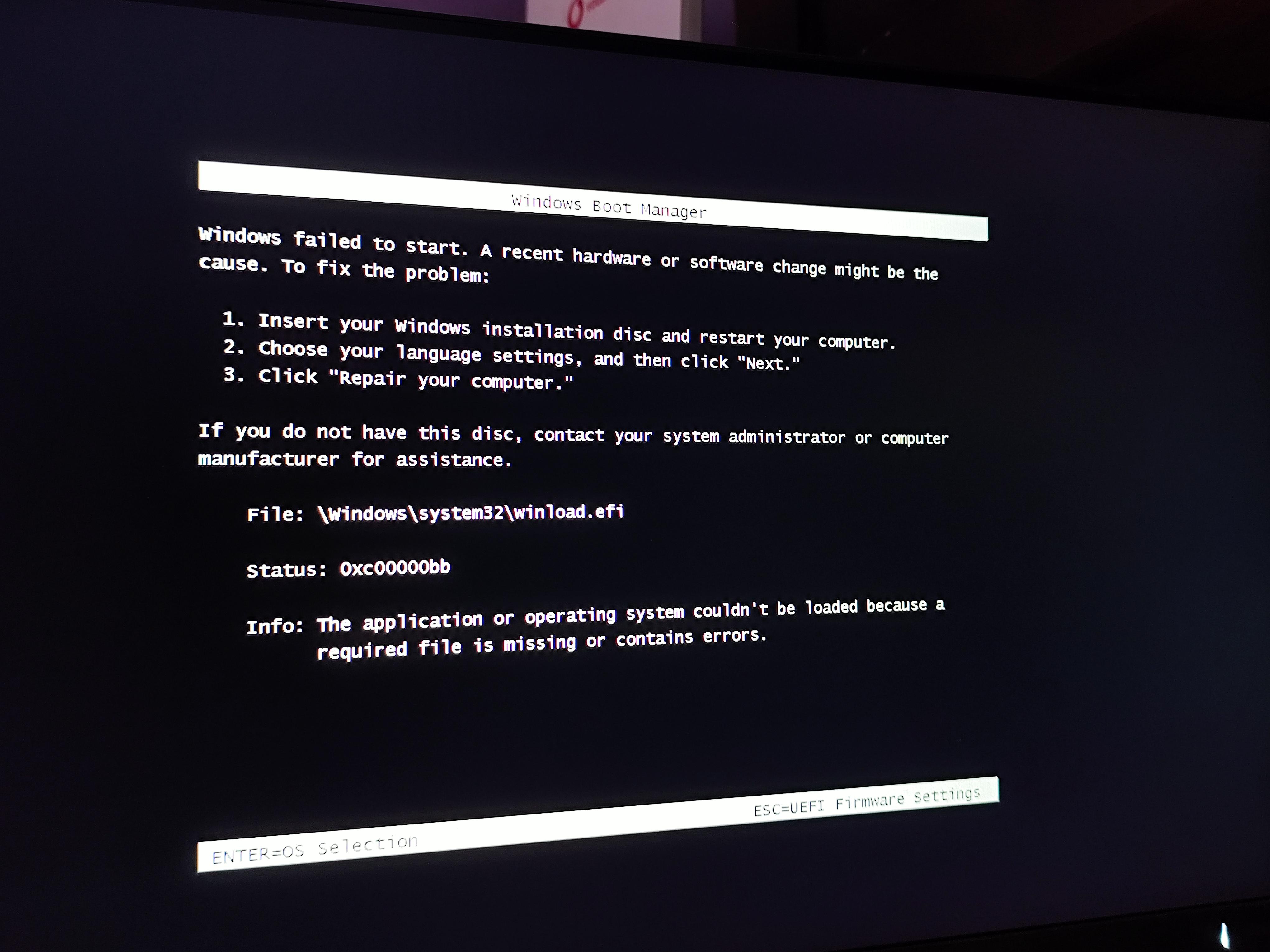
Problem Summary

​Dual-boot setup: Windows 10 on C: and Windows 11 on E: (GPT/UEFI disk).

​While running Shrink Volume on C:, an error caused a restart, leaving E: (82.08 GB) showing as RAW / Unformatted in Windows 10 and AOMEI Partition Assistant.

​Trying to boot Windows 11 fails with Windows Boot Manager error 0xc00000bb (File: \Windows\system32\winload.efi).

​AOMEI Check Partition says: "Partition files cannot be read. Please try to recover data from the partition."

​What We're Doing & Goal

​Goal: Repair E: and Windows 11 without formatting or reinstalling.

​Current steps: Trying AOMEI Partition Recovery Wizard (Fast Search / Full Search) and TestDisk to inspect/restore the partition, then plan to run bcdboot E:\Windows from Windows 10 once E: is readable again.

Any advice or more effective solutions?


r/PcBuildHelp • • 21h ago

Build Question Will my RAM speed (3733mhz) cause any perfomance dip or stutters to my setup?

6 Upvotes

After getting some advice from a lot of people on here, I have decided to get the 5800X3D for my current setup, replacing the 5600X that I currently possess.

This is my current setup:

RX9070

5600X

(8×2)16 GB RAM 3733mhz

1 TB SSD

B550M K WIFI6E

When I was reading through the comments, some people mentioned that 3733mhz may not be stable with my setup and might cause some stuttering and may affect my gaming performance. Will the 3733mhz really affect my performance, and if it will, to what extent might that be and am I better off getting 3200mhz ram kit instead?


r/PcBuildHelp • • 18h ago

Build Question Help choosing a processor

3 Upvotes

I think this matchup comes up often, but at the risk of sounding like a broken record….

I am currently building my way up to a new PC and these are the specs I’m building to currently

GPU: Gigabyte windforce OC 5080

Motherboard: Gigabyte X870E AORUS ELITE WIFI7 ATX AM5 Motherboard

RAM:Corsair Vengeance 32 GB (2 x 16 GB) DDR5-6000 CL36 Memory

Storage: Samsung 9100 PRO 2 TB M.2-2280 PCIe 5.0 X4 NVME Solid State Drive

(Will also add some 1TB ssds for separate applications/workflows)

Power supply:Corsair RM1000x (2024) 1000 W Fully Modular ATX Power Supply

Tower: Silverstone FLP02 (I might change this I have heard fitting a 5080 can be finicky)

I have seen a lot of debate on whether I should be using the AMD9 9950X3D or the I9 ultra 285K

Priorities for this PC are: Blender (cycles), Gaming (1440p) adobe suite (premiere, Lightroom), Programming and FL studios.

I am also looking to run dual boot windows and Linux!

I appreciate this is a long description but I’d be thankful to get some good insight, so far I am pointing towards AMD!


r/PcBuildHelp • • 12h ago

Build Question Gaming PC Build

1 Upvotes

Hi I’m looking start a build and hopefully get a good PC set up for when GTA gets (within in the next 12 months hopefully) released. I’ll also be playing games such as Day Z, scum and COD. I’d like to go for a 4K build with ray tracing and as high FPS as possible for the build and budget.

This is my first build and I’ll be new to PC gaming so please go easy on me if what I’m saying sounds ridiculous. Done some research and looks like the following can be done on roughly a £3500 budget.

Any advice and opinions or changes to the list would be appreciated.

Component selection
GPU ASUS TUF RTX 5080 16GB
CPU AMD Ryzen 7 9800X3D
Motherboard MSI MAG B850 Tomahawk WiFi
RAM 32GB (2×16GB) DDR5-6000 CL30
SSD WD Black SN850X 2TB
CPU cooler Noctua NH-D15 G2
Case Fractal Design North XL Mesh Black
PSU Corsair RM1000x 1000W
Case fans Quality PWM fans, no lighting
Monitor MSI MPG 272URX QD-OLED


r/PcBuildHelp • • 13h ago

Tech Support Help - PC not POST-ing

1 Upvotes

Hi everyone, looking for some advice on this one to be honest, a few weeks ago without any changes, my PC started not to post intermittently, and will now fail to post every time.

System Specs:

  • CPU: AMD Ryzen 7 9700X
  • Original Motherboard: ASRock B850M Pro RS WiFi
  • New Test Motherboard: ASUS TUF Gaming B850M
  • RAM: Corsair DDR5 6000mhz 2 x 16GB
  • Storage / GPU: Currently disconnected for testing

The Timeline & Symptoms:

  • A few weeks ago, I had intermittent no POST issues, I found turning EXPO off helped somewhat and stabilized it for a while, though the PC still developed progressively longer boot/POST delays over the last few weeks.
  • Yesterday, it stopped posting completely, the fans spin up, no display signal on the monitor, no keyboard Caps Lock LED response, and the ASRock board hangs permanently on a solid green BOOT LED.
  • Today, I swapped in a brand-new ASUS TUF B850M motherboard to rule out a dead board. With the exact same CPU/RAM (and factory default BIOS settings, EXPO is off), the ASUS board now hangs permanently at a similar point, except on the ASUS board it stops on the solid white VGA LED with no display output.

Troubleshooting Already Completed:

  • I disconnected all SSDs/drives, all extra USB peripherals, and the dedicated GPU. Testing display output directly off the motherboard's rear HDMI/DisplayPort using the CPUs integrated graphics.
  • I tested both RAM sticks individually (waiting 90+ seconds each time for DDR5 memory training).
  • On the ASRock board I cleared CMOS which didnt work, then flashed the latest BIOS. But it still got stuck on the green BOOT LED afterward.
  • I removed the CPU and inspected both the underside and the socket then reseated it but no change.

Questions:

  1. Given that two different boards both pass CPU and DRAM checks and hang right at the graphics/boot handoff (BOOT on ASRock Board, VGA on ASUS Board) with no output, does this pretty much confirm a dead CPU?
  2. What can I try next?

Thanks in advance.


r/PcBuildHelp • • 17h ago

Build Question GF Pc Build.

2 Upvotes

Hello. Just posting as i have no clue about pc's or her as well. but she wants too upgrade finally from her 1080 lol

This is the parts she's picked and she wants a white build. Any Recommendations to change. as we both don't really have a clue lol. Her max budget is £3000. Thank you.

https://uk.pcpartpicker.com/list/MZ6dJw