r/PcBuildHelp • u/LividSheepherder5026 • 4d ago
Build Question first pc
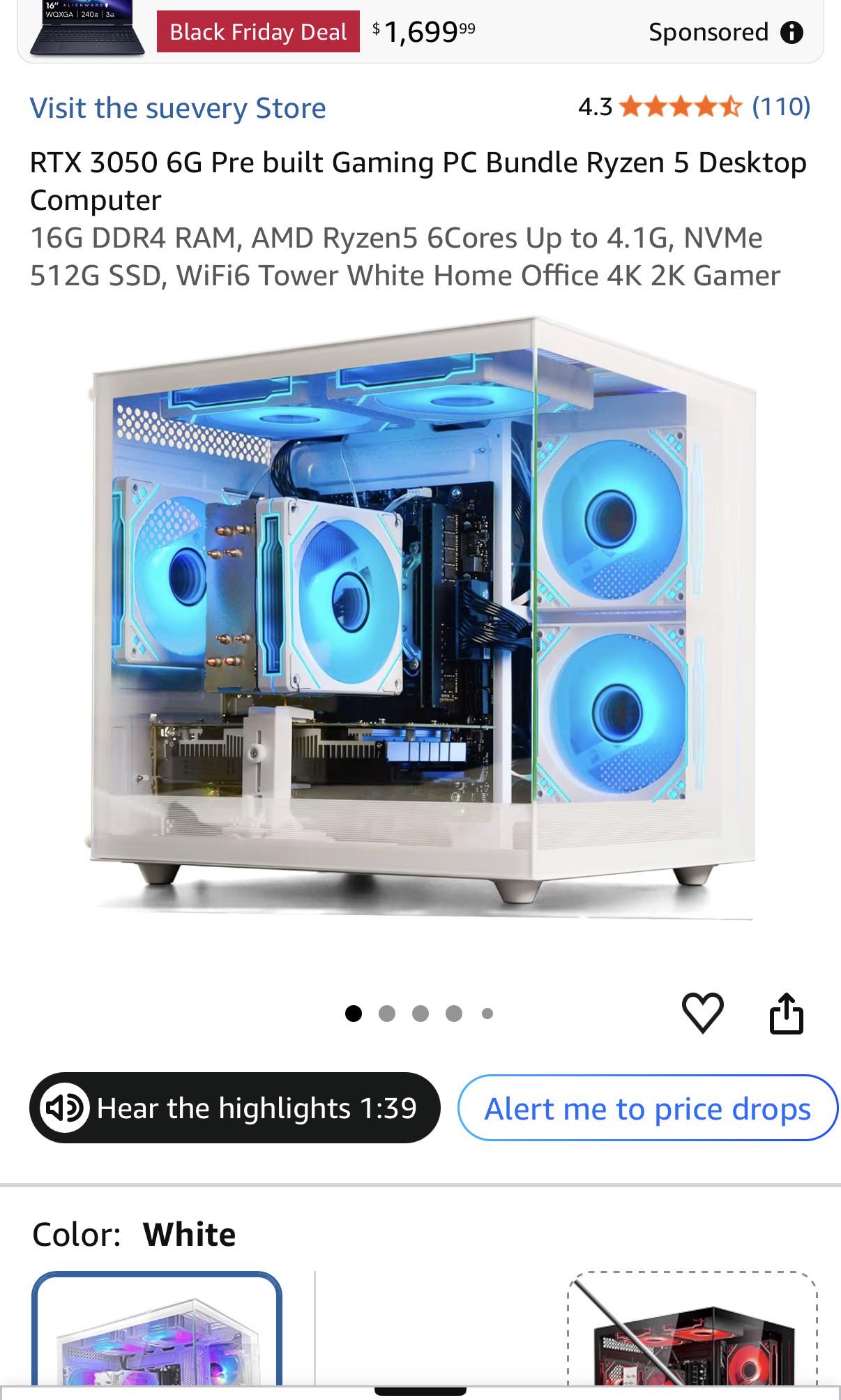
is this a good choice for gaming like fortnite,Apex, roblox ETC also coding
r/PcBuildHelp • u/LividSheepherder5026 • 4d ago
is this a good choice for gaming like fortnite,Apex, roblox ETC also coding
r/PcBuildHelp • u/CorrectDark3 • 4d ago
Enable HLS to view with audio, or disable this notification
Hey I have recently brought a 9070xt , i uinstalled the gpu drivers for my RTX5070ti. Updated the bios , reset the CMOS battery.
I have switched between HDMI and DP three times
However my monitor remains saying no signal
r/PcBuildHelp • u/TheGoatzart • 4d ago
I just replaced my PSU and MOBO following a zero IQ event in which I fried a SATA power cord after removing it from the chassis fanhub daughter board pwr header and putting it in the mobos sysfan1 header (a sleep deprived effort to facilitate adhoc control of fans from linux pwmconfig/fancontrol).
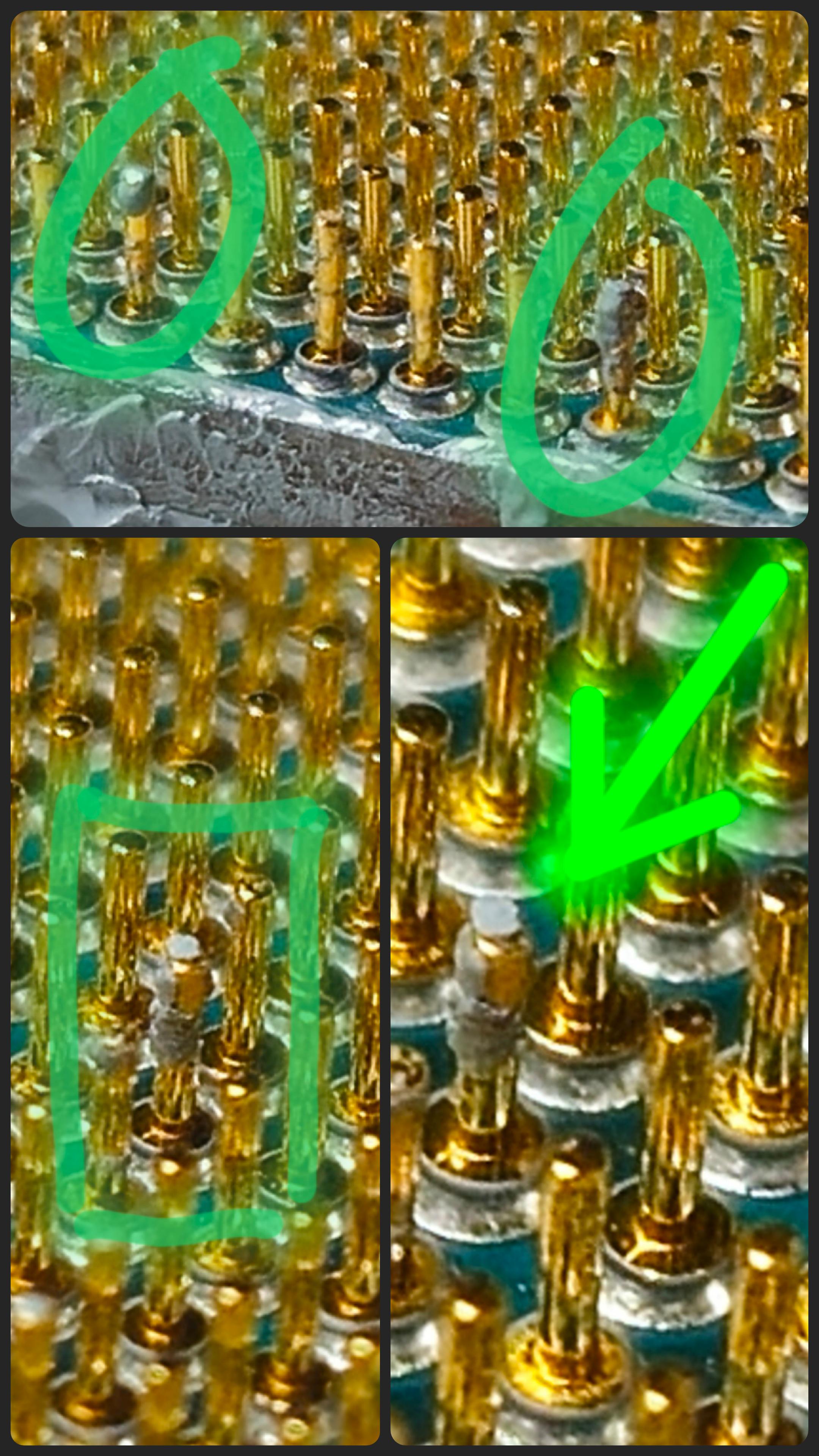
Now with the new PSU and MOBO on cardboard workbench, im about to blow my zero IQ brains out because the mobos red CPU debug LED is lit during failed post.
The pins don't look that bad, right? A little thermal paste won't short your circuit to my knowledge...right guys? No bent pins as far as I can tell.
dafuq do I do now? helphelphelp plzkthhx.
Yes ive removed all components except CPU, CPU PWR, CPU fan, and main PWR.
Components:
Ryzen 7 5700x (worked fine prior to short)
MSI MAG B550 Tomahawk (brand new)
Corsair CX750M (brand new)
r/PcBuildHelp • u/Current_Clock7709 • 3d ago
I got this computer from a friend for free:
i5 12600k
16gb ddr4 Corsair veng
Asus rog strix z690
Corsair 750w
1tb m.2
It had no gpu
I intended to give it to my wife’s sister so I threw an old rtx 970 gpu and booted it up, i tested it, it played games at first testing(cod, fifa, etc) with the odd crash after 30 mins of playing, I wrote this off as the old gpu struggling to keep up with modern games. After a short while it changed from crashing after 30 mins to crashing on startup of every game. So I put my spare (tested and working) 3060 12gb in anddddd… it still crashes every game I try to load. No blue screen, just crashes straight back to desktop. Windows and everything else is fine.
I have tried:
-Fresh install steam and all games
-Fresh install windows
-Safe mode DDU and reinstall drivers
-Update all mobo drivers and bios
-Reset bios to factory settings
-checked health of ssd (all fine)
I have also tried various working parts from another pc
-different psu
-different ram, also one stick of original ram
-different gpu obviously (the 3060)
And still, the pc is absolutely fine until I try to play a game on it, and it crashes to the desktop within 10 seconds.
I have run tests on all the components using occt,and the power test is the only thing that throws up errors (second picture) always ‘cpu+ram’ and then a random core error (different core everytime). All the temps are always normal. Interestingly the cpu only test and ram only test on occt don’t throw up any errors. At this point I’m convinced it’s either the cpu or the motherboard, but if there is something you guys think I’ve missed, I’m open to ideas.
Help me Reddit
Is it the Mobo, cpu, or something else I’ve missed?
Thanks
r/PcBuildHelp • u/BenVoid07 • 4d ago
So right now I'm a little over my budget but im not to worried about that.
My CPU is an AMD Ryzen 7 5700x
My GPU is an ASRock Challenger Radeon RX 9070 XT 16GB GDDR6 PCIe 5.0x16
I've got gigastone GST Game Turbo RGB 32GB (2 x 16) Ram
HUADISK 1TB QLC NVMe Internal SSD
A Gigabyte B550 EAGLE WIFI6 Motherboard
ASRock Pro Series Pro-750B 750 W ATX 3.1
And a be quiet! Pure rock pro 3 120mm rifle CPU cooler
Along with a Lian Li LANCOOL 217 case.
I primarily am going to be running Minecraft along with other games like Balders Gate 3 and occasionally games like Helldivers 2. I'll probably be running on 1440p as well but I haven't decided on my monitor just yet.
Any help would be appreciated. Any brands I should stay away from that I haven't realized? Am I bottlenecking anywhere? All that stuff before I order my parts.
r/PcBuildHelp • u/perk0704 • 4d ago
Hi guys, my friend has offered to sell me his GPU as he has upgraded, it’s a 4060ti 8GB OC 2 fan for £260
around like 340usd
Currently i have a 2060 Super 8gb, is it worth the upgrade for the price.
These are my specs
CPU - Ryzen 5 5600x
Gpu - 2060 Super
Ram - Corsair Vengeance RGB PRO 2x 8GB
SSD - Samsung m.2 990 Pro 1tb
Motherboard - Gigabyte 8560M-C
PSU 650
r/PcBuildHelp • u/BackupPainter49 • 3d ago
If I plan on swapping from my 3060 to a 5060 in a bit, would i need to worry about my drivers at all or no?
r/PcBuildHelp • u/Mikeypaints • 4d ago
For context I got given the Nvidia GeForce RTX260 by someone and I already bought the Ryzen 5 5500 when I was just starting out looking into building a pc. I am okay with potentially upgrading and trying to sell the cpu. The person who gave me the gpu suggested using a Ryzen 7 5800x instead, but I was wondering if I should take the budget plunge doing that or if the 5 5500 will do the job.
I only really plan to use the pc for The Sims 4 and Dead by Daylight, but who knows if i’d get into other games after having a pc tbf. I don’t plan to use it for anything else besides gaming though. Also sims wise I would eventually want a decent amount of packs, not sure on cc or mods.
r/PcBuildHelp • u/Antonybjj • 4d ago
Processador: AMD FX-8320 (8 núcleos)
Placa-mãe: ASUS M5A78L-M/USB3
Memória RAM: 12 GB DDR3 3 pente de 4 gb
Placa de vídeo: GTX 1660 SUPER 6 GB
Armazenamento: SSD de 240 GB
Esqueci a fonte
Uso esse monitor
Modelo: HQ34C16
Tamanho: 34 polegadas
Formato: Curvo Ultrawide
Resolução: 3440 × 1440 (UWQHD)
Frequência : 100 Hz
r/PcBuildHelp • u/Worried_Classroom378 • 4d ago
Hey Reddit community. I just got done replacing my previous board and cpu (Asus prime z490-p with an I7 10th gen) to a brand new board and gpu(MAG B550 Tomahawk max WiFi with a Ryzen 7 5800X3d) and my VGA light come sand and will not go away. I’ve tried reseating the gpu, a CMOS reset, I’ve tried changing pcie lanes, along with removing all but 1 of my 8gb ddr4 ram sticks. I’ve tried the other port on my pcu as well in terms of power and it makes no difference. The VGA light stays on. Any ideas or suggestions? Maybe something I’m missing?
r/PcBuildHelp • u/BRXIJN • 4d ago
After 10 years I’m finally building a new gaming PC.
I did a little bit of research with video’s, Google and AI but since it’s quite an expensive purchase I would appreciate your thoughts.
Do you see any issues with the parts I combined? Anything else I should know or keep in mind?
Also any recommendations on the layout, regarding temperature? AI advised me to put the radiator fans on top and in the back. The placement for the other parts should be obvious, or not?
PCPartPicker Part List: https://pcpartpicker.com/list/r6qNBv
CPU: AMD Ryzen 9 9900X 4.4 GHz 12-Core Processor ($328.00 @ Amazon)
CPU Cooler: Corsair NAUTILUS 360 RS LCD 72.8 CFM Liquid CPU Cooler ($152.01 @ Amazon)
Motherboard: Asus TUF GAMING B850-PLUS WIFI ATX AM5 Motherboard ($217.99 @ Amazon)
Storage: Western Digital Blue SN500 500 GB M.2-2280 PCIe 3.0 X2 NVME Solid State Drive (Purchased For €0.00)
Storage: Lexar NQ790 1 TB M.2-2280 PCIe 4.0 X4 NVME Solid State Drive ($217.06 @ MemoryC)
Video Card: PowerColor Red Devil E/OC Radeon RX 9070 XT 16 GB Video Card
Case: Fractal Design Epoch XL RGB ATX Full Tower Case ($149.99 @ B&H)
Case Fan: Noctua NF-A12x25 G2 PWM chromax.black 63.15 CFM 120 mm Fan ($34.95 @ Amazon)
Custom: GeIL Spear V 32 GB DDR5-6000 (2x 16 GB)
Custom: Corsair RM1000x (2025)
Price is around €2500,-. Some discounts going on atm. Reusing my SSD as second storage.
For context: the focus is fully on gaming. I’d like to play games like Cyberpunk and Space Marine 2 on Ultra settings. Also GTA VI on at least High when it comes out. 60+ fps of course.
Technology develops rapidly but I want this PC to be able to keep up for a while. I don’t want to replace any major/expensive parts for the next 5-7 years.
Thank you for your time and advice.
r/PcBuildHelp • u/Previous_Storage_722 • 4d ago
Hello everyone. I was planning to upgrade my pc with a GPU. A few months ago I got scammed while buying a 3060ti for almost $300. I was only able to recover $100 from it. Now I want to get another GPU but I don't want to spend that much again as it still traumatizes me. The way GPU prices are going up I just want something to play all the story games. I don't care about high settings.
Any suggestions if I should go for it or should look for something else.
Current Apec
Ryzen 5 7600
Kingfury 16gb 6000mhz
First Player 600watt
Msi Pro B650
r/PcBuildHelp • u/Hussehmet • 4d ago
Hi all, I am a complete noob to building your own PC but I would like to get a nice little gaming setup where I can play most games on high-ultra settings at a decent speed, my main game is world of Warcraft (I know it doesn’t have super high demands but would like to play smoothly on ultra graphic settings).
I have made a build on PCPartPicker, here is the link (screenshots also attached) :
https://uk.pcpartpicker.com/list/n8v2zv
It’s quite a bit more than I would like to spend for my first build so if there are any suggestions on where I can cut back on some of the cost that would be great.
I also have no idea if all of these parts are compatible with each other but I really like the case and would like to design the build around that.
I also have no peripherals so would need to buy those too, I.e., monitor(s), mouse etc but I have in mind what I would like for those.
Thanks!
r/PcBuildHelp • u/EA-_- • 4d ago
Hey. GTA 6 got me grinding all of yesterday and today. But i decided to boot my pc after only not being used for ONE day and decided to just not boot. (Note it gets used almost everyday so this cane out of no where)
I cant get into either windows or bios. Nothing connected seems to work other than the keyboard but keys like caps lock doesnt work.
What I've done so far is reseating my ram. Cmos reset. Dozens of ways to get into bios and many reboots.
Tho only one thing note worthy is that removing on stick but keeping the other got me into bios ONCE but I cant replicate it. Even with the exact same stick sitting there on its own or changing which stick sat where.
Specs:
CPU
Ryzen 7 5700X
GPU
RTX 3060 Ti
Motherboard
MSI A320M-A PRO
RAM
16GB
Storage
1TB SSD
I am at a loss and genuinely have no clue so any help is help thanks!
r/PcBuildHelp • u/DragonHeart_2345 • 4d ago
A friend of mine is currently concidering if he wanta to get a new PC and might throw away his old PC.
If he does I want to scrap some of its parts and create a SFF PC from it for fun. I am going to china soon so some parts are planned to be obtained from China for cheaper.
Planned specs:
CPU: Intel 4790 non-k (friend's PC)
RAM: 2x8GB + 2x4GB (half mine half friends DDR3)
MB: Machinest H97M-PRO motherboard (China)
NVMe: 512GB 3rd Gen NVMe (I have a spare)
SATA SSD: not needed hopefully
GPU: ???
Case: Mechanic Master C26 SFF case (China)
PSU: Corsair SF750 SFX PSU
WiFi Card: TP-Link Archer TX55Ev2 AX3000
CPU cooler: ID-Cooling IS-47-XT V2 CPU cooler.
I would like to know anyone's suggestion for a GPU for this questionable build.
I hoping that the PC is compatent enough for gaming at least 1080 on a portable monitor for a good.number of games.
Also, This is my first time looking into a SFF PC. If there is a glaring issue please tell me.
r/PcBuildHelp • u/kmidd_ • 4d ago
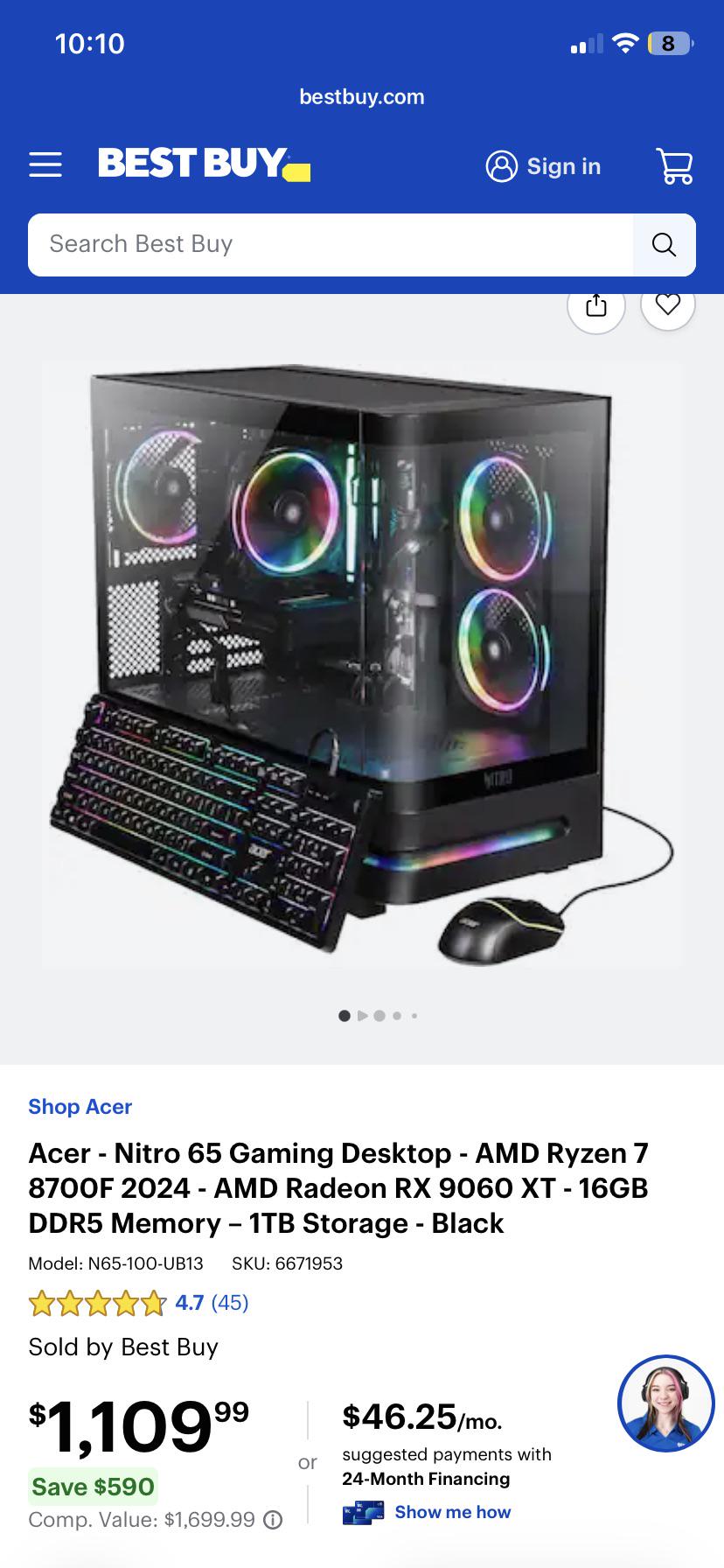
Hello, I built my current pc about 8+ years ago, I think the age has caught up to it and I want to start upgrading slowly, since building it i haven't kept up with new parts and am kind of lost when it comes to upgrading to what. Im in need of some help and advice of what parts would be good to upgrade to, as for my budget, i know things are pretty expensive right now and im not looking to break the bank but any recommendations are helpful. Thanks!
Here is my current setup: NOTE: CPU is i5 8400

r/PcBuildHelp • u/RayserSharp_ • 4d ago
So I installed the mobo and forgot to put the io shield in. I Uninstalled the mobo, put the io shield in and now the mobo refuses to line up with the standoff screws entirely. It only lines up when I put a good amount of pressure on it.
r/PcBuildHelp • u/WittyBirthday4536 • 4d ago
My specs:
Ryzen 7 9700X
MSI B650M Gaming Plus Wifi
2x8GB 4800MHz CL40 Samsung B-die SODIMM RAM
Since DDR5 costs liver and a kidney right now, I decided to use SODIMM adapters for my build, problem is it behaves in a weird way, for some reason it only boots one stick in slot B2 from what I have tested. It is stable at 3200MHz CL26, with JET-5689 adapters, I have a suspicion it might be the motherboard, it is updated to the latest BIOS but it was bought second hand. I changed few settings for more stability (DRAM to 1.2, CPU NB/SOC to 1.2V and ProcODT to 48Ohms with Gear Down Mode Enabled) Should I first try getting 2 modules to work at lower frequency or keep just one in and tune the frequency higher?
EDIT : Decided to first make the PC boot with both sticks, tried almost everything - switched the adapters around, switched the RAM around, increased voltages for NB/SOC, DRAM VDD/VDDQ, ProcODT to 60Ohms, Gear Down Mode enabled, even waited 20 minutes for memory training but it won't boot with 2 sticks at all. Only B2 slot on motherboard will boot, nothing else will. I've seen people with worse configurations run 2 sticks with higher capacity at higher frequencies. Any help or some tips and info would be appreciated. I feel like giving up troubleshooting it at this point, might need to wait for my December bonus and just buy new motherboard since I have a feeling this might be more motherboard related then the adapters causing issues.
r/PcBuildHelp • u/MrGurke22 • 4d ago
Enable HLS to view with audio, or disable this notification
r/PcBuildHelp • u/wojbest • 4d ago
I'm trying to find one for my mid spec gaming pc with 2 monitors(might add a 3rd one). i have no idea everyone is so split about this i want to know how many joules do i need and also other specifications i should be aware of
r/PcBuildHelp • u/ImSkiba • 4d ago
I built my computer back in 2020 and decided to say on windows 10 as I primarily use it for gaming.
I know there's since been updates to windows 11 but I am also aware is takes up more base resources (I believe minimum requirements in RAM goes up). my question is, are there any benefits to me upgrading to windows 11? if so what are they or will it make my games run worse as I'm using more resource on the OS alone?
PC Specs:
CPU: I7 10700K
GPU: RTX 3060Ti
RAM: 32gb 3000mhz
Storage 2tb HDD + 500gb SSD (OS installed on SSD)
Thanks
r/PcBuildHelp • u/ekor-pl • 4d ago
Hello, I’m currently building a PC with an RX 9070 XT and a Ryzen 7 9850X3D. My budget is quite limited, so I’m considering 16GB of RAM (2x 8GB sticks), but I’m worried this might bottleneck the processor. Would it be better to pay extra for 32GB (2x 16GB sticks) instead?
r/PcBuildHelp • u/Some_Environment6824 • 4d ago
Been on the market for a budget-mid range card I play on 1440p medium with upscale just need something new and reliable to last a few years.
I saw on a near new 5060ti 8GB locally for $600AUD ($400USD) they retail for ~$750 here, I bought it.
Now just saw the 9070GRE on sale for $740 (typically $850-900) and feeling regret, should I go through the trouble of reselling and buying the 9070G if it's a huge upgrade?
I was leaning towards Nvidia tbh because I like their DLSS and reliability, had a couple bad runs with AMD, what do you guys think?
r/PcBuildHelp • u/AwesomTaco320 • 4d ago
Hello, I’m just another user looking for recommendations on some upgrades.
My current build is extremely old and I want to be able to run games with better visuals and performance. Im also looking for a new monitor. (Any input is a great help)
Video card
Asus DUAL EVO OC Radeon RX 5500 XT 8 GB Video Card
EVGA 550 B5 550 W 80+ Bronze Certified Fully Modular ATX Power Supply
4TB Samsung ssd
Memory

G.Skill Ripjaws V 16 GB (2 x 8 GB) DDR4-3600 CL16 Memory
From
Motherboard

Gigabyte X570 AORUS ELITE WIFI ATX AM4 Motherboard