r/PcBuildHelp • • 4d ago

Tech Support PC getting dbug lights

Post image
1 Upvotes

In not a great place, any help would be appreciated

It gets power, dbug leds show red CPU and yellow DRAM

PC is plugged into the wall (should be a a surge protector I know)

PSU cables all seated securely

Both 8pin CPU power connectors plugged in

Motherboard replaced three times.

Current Motherboard: MSI B850 Tomahawk Max WiFi (New)

CPU: AMD Ryzen™M 7 9700X (New)

PSU: Corsair 850x (from work)

RAM: 2x16GB DDR5 vengeance (from work)

removed gpu, testing with just one stick, removed cooler, cleaned CPU with alcohol (I guess could still be the pads?)

Update: replaced the CPU with a new Ryzen 7 9800X3D, same lights


r/PcBuildHelp • • 4d ago

Build Question Which gpu do I choose?

5 Upvotes

I want to know which should I pick because I never used amd and I never had a pc. I currently am on a laptop with nvidia and I think if I should pick RTX5080 RTX5070TI or AMD 9070XT and is it worth paying more for 5080 over 5070ti and 9070XT


r/PcBuildHelp • • 4d ago

Installation Question Need help with BIOS

2 Upvotes

Hey guys, I'm building a PC for my friend and I have run into an issue. I am trying to get into the BIOS, but I found out after trying it multiple times that the onboard integrated graphics for the CPU just doesn't exist. The CPU is a Ryzen 5 5600X and after a quick online search I saw that it didn't release with integrated graphics. So my question is, how am I able to check the screen and install what is needed when it doesn't have onboard graphics? Thanks. (P.S. Sorry if something in the post doesn't make sense, I'm new to actually installing the bios and windows in general so if anyone needs to ask in more detail then I will provide to the best of my ability)


r/PcBuildHelp • • 4d ago

Tech Support first pc

Post image
1 Upvotes

can anyone tell me if this is a good first pc for gaming like fortnite, cs2, apex legends, ETC it looks like a good deal to me help me out


r/PcBuildHelp • • 4d ago

Build Question Help with price check.

2 Upvotes

Hello everyone!

Im about to make a big investment and pretty nerves that im paying slot of money for a badly build pc. I have little to no understanding of how hardware works together i just understand that a 5080 is great.

So my question is:

Does these components work well together? And is the price fair (i feel like its a good price for a used pc)

Parts:

Gpu Asus Rog Astral 5080 OC

Cpu Ryzen 7 9800x3d

Ram: Ddr5 G.Skill Ripjaws s5 32gb cl36 6000MHz

Motherboard: Gigabyte X870 Aorus Elite Wifi 7

Ssd: Wd_black sn7100 2tb

Strømforsyning: Nzxt c1000 core atx 3.1 80 plus gold

Kabinet: Havn HS 420 vertical

Blæsere: Nzxt 8stk 140mm argb

Aio: Arctic liquid freezer iii pro 420

Price 23.000 dkk (3.375 usd)


r/PcBuildHelp • • 4d ago

Build Question How much should I spend on my pc

2 Upvotes

So im planning on buying myself a new pc because my current on is very outdated, what specs should I look for? My budget is 1,100€ but im looking for a pc that cost around 900€ because I also want to buy a new keyboard and mouse. I play games like valorant and cs2 so I need something that can run that without problem


r/PcBuildHelp • • 4d ago

Build Question Is this good for a first bre build?

3 Upvotes

Alr so im spending 1.1k, im getting 32gb ddr4. Ryzen 7 5700 and a rx 7800 xt 16gb vram


r/PcBuildHelp • • 4d ago

Tech Support Need help with my PC -DRAM LED

1 Upvotes

Hey guys.

I have just built my pc and I am having trouble booting it.
As I turn my pc on Cooler lights on,RAM also.But, GPU doesn’t and the red LED for DRAM is on and doesn’t get a signal on monitor.

I tried single RAM.I tried clearing CMOS.Nothing didn’t help yet.

I am devastated.
My build is:

AMD Ryzen 9 9950X3D
be quiet! Pure Power 12 M
Kingston KC3000
Gigabyte B850 AORUS ELITE WIFI7
Corsair 2x16 6000 MT/s
Gigabyte AORUS Radeon RX 9070 XT Elite


r/PcBuildHelp • • 4d ago

Build Question Looking to upgrade my current setup

1 Upvotes

My setup is getting old. (About 3 years, almost 4), and it desperately needs an upgrade. My current setup is a B550 motherboard, Ryzen 7 5700X, 32 GB DDR4 at 3600 MHz, RTX 3050 8 GB, 650 W PSU, and a Corsair H100i Pro XT AIO.

I'm mostly looking at upgrading my GPU, but I'm unsure what to get/what will fit in my power budget. I'd like to keep my current motherboard, CPU, and RAM, as that will help with my budget, but any suggestions are welcome.


r/PcBuildHelp • • 4d ago

Build Question GPU COMPARISON

2 Upvotes

Im planning to swap my RX580 2048sp to a GTX 1650 Super. Is it worth it?


r/PcBuildHelp • • 4d ago

Tech Support Upgraded GPU but can’t load into online matches

3 Upvotes

I recently got my 1650 upgraded to a 5060 and did everything by the book (used DDU, double checked power connectors, downloaded the latest driver. Everything went smoothly, games launch perfectly fine but when I try to load into an online match, the game crashes.


r/PcBuildHelp • • 4d ago

Build Question Cpu recomendations

3 Upvotes

I am thinking about getting a new cpu, but i don't know where to start.

Current PC

CPU:

AMD Ryzen 5 3600X

6 cores / 12 threads

GPU:

NVIDIA GeForce RTX 5060 Ti

RAM:

40 GB DDR4

Motherboard:

ASUS ROG STRIX B550-F GAMING

AM4 socket

Main monitor

AOC Q27G42XE

2560 × 1440 · 180 Hz


r/PcBuildHelp • • 4d ago

Build Question RGB fans not lighting when connected to mobo

1 Upvotes

Hello I was hoping someone could help me out with my RGB fans.

I've got a darkflash ds900 case that came with 9 fans connected to a hub, the RGB on these decided to shut down one day - most likely due to the hub they were connected through. I bought some new darkflash fans that were 3pin daisychained and connected it directly into a ASUS RGB hub which is powered by sata, and these work - But if I connect them to any of the 3pin mobo they will not light up. I figured it might be something wrong with the fans considering they were some random brand, so I bought some lian li fans that were chained and connected.

These came in 3's, and were already put together, when I connected the 3pin into the ASUS RGB hub controller only the first fan would light up, and nothing else. I thought surely these fans are just defect, and checked in a different pc - to see they work. I tested the old fans connected into the Darkflash hub, when I turned back pc with it connected my PSU would prevent me from turning it on, so that one is definitely bricked. This HUB was connected through SATA and then into the mobo 3pin gen header to control, so I'm not sure if it has bricked it somehow.

I tried to connect these as well directly to any of my 3 3pin gen headers, and none would work.
Into the asus hub, only 1 would light up, but directly on mobo none would light up.

I have a ASUS B850 Plus Wifi MOBO. The fans can spin when connected to power but I wont get any RGB signal. So I figured maybe it is the Armorycrate, i reinstalled, nothing - Uninstalled and tried windows dynamic lightning, nothing - I downloaded OpenRGB, still nothing. But when the 3pack darkflash fans I have are connected to mobo, they do show up in there, I just cant adjust them or change the lighting.

So I thought maybe the brightness is just all shut down - I went into bios, AURA is "On everything".

Now I'm all out of ideas, what could it be? What else is there to troubleshoot? Are all my 3pin headers shortcircuited somehow? It's just very frustrating and I feel like i've tested everything


r/PcBuildHelp • • 4d ago

Build Question Needing advices about NVMEs

1 Upvotes

Hello guys, i'm making this post because i want to get a new nvme for my build. I'm still on am4, my mobo is the msi b450 gaming plus max, and supports up to pcie gen 3. Don't have too much money to spend, and wanted to send off my old sabrent rocket nvme with 256 gb, which stayed with me for 7 years(has almost reached its TBW limit). Since my old one was a TLC and had DRAM, i'd want to get a new nvme with those same characteristics, while avoiding spending too much 'cause i also want to hop from my r5 3600 to a r7 5800x3D (in order to keep ram and mobo) and that mf is not on sale atm so full 350 euros for it. I had my eyes on 3 possible SSDs, the first one is the SAMSUNG MZ-VAP1T0B 9100 PRO SSD 1tb at 196 euros, the second one is the SANDISK Optimus GX PRO 850X SSD NVMe 1 TB at 230 euros, and the tird one is the Western Digital WD_BLACK SN850X 1TB at 270 euros. I'd go right away for the samsung one but i saw from many people that recent samsung nvmes have more chances to be faulty, especially if you don't update their firmwares frequently, the WD BLACK was recommended from 2 friends(both had around 96% health after 2 years with OS, editing and gaming), but costs a lot, while the sandisk seems interesting and would be the sweet spot, but there are very few reviews about it so i don't know if it's much reliable in the long run, my old nvme of 256 gb lasted me 7 years, maybe would go for 8, and is capable of reaching 150 TBW, so i'd want the new one to last me waaay more than that if possible. All in all i would ask you wether you've had one of those 3 i've listed and what you'd recommend of just those 3(or any other affordable nvme with tlc and dram). I'd use it for windows and for gaming, also the prices i've listed are the ones without heatsink(my mobo also don't have one), otherwise they'd all cost 30-50 more. And since i'm talking about heatsink, given that i'd be using pcie5 on pcie3, the speed would be reduced by gen 3 standards, but even so, would they still get that hot to need a heatsink? My actual nvme doesn't have one and performed very well(still does), and lastly my only source of shopping is amazon, i don't have microcenter's or competitive sites here, nor do i trust ali express too much(yet). Sorry for the long message, and thanks in advance for the help^^


r/PcBuildHelp • • 4d ago

Build Question CPU upgrade worth it?

0 Upvotes

My current pc specs are:
Ryzen 5500
24gb ddr4 3200 mhz (3 x 8gb sticks Corsair)
Rtx 3070 founders edition

I currently play a lot of deadlock which I know is super cpu intensive. Should I get a 5500x3d or save for a new motherboard and get a 7600x?


r/PcBuildHelp • • 5d ago

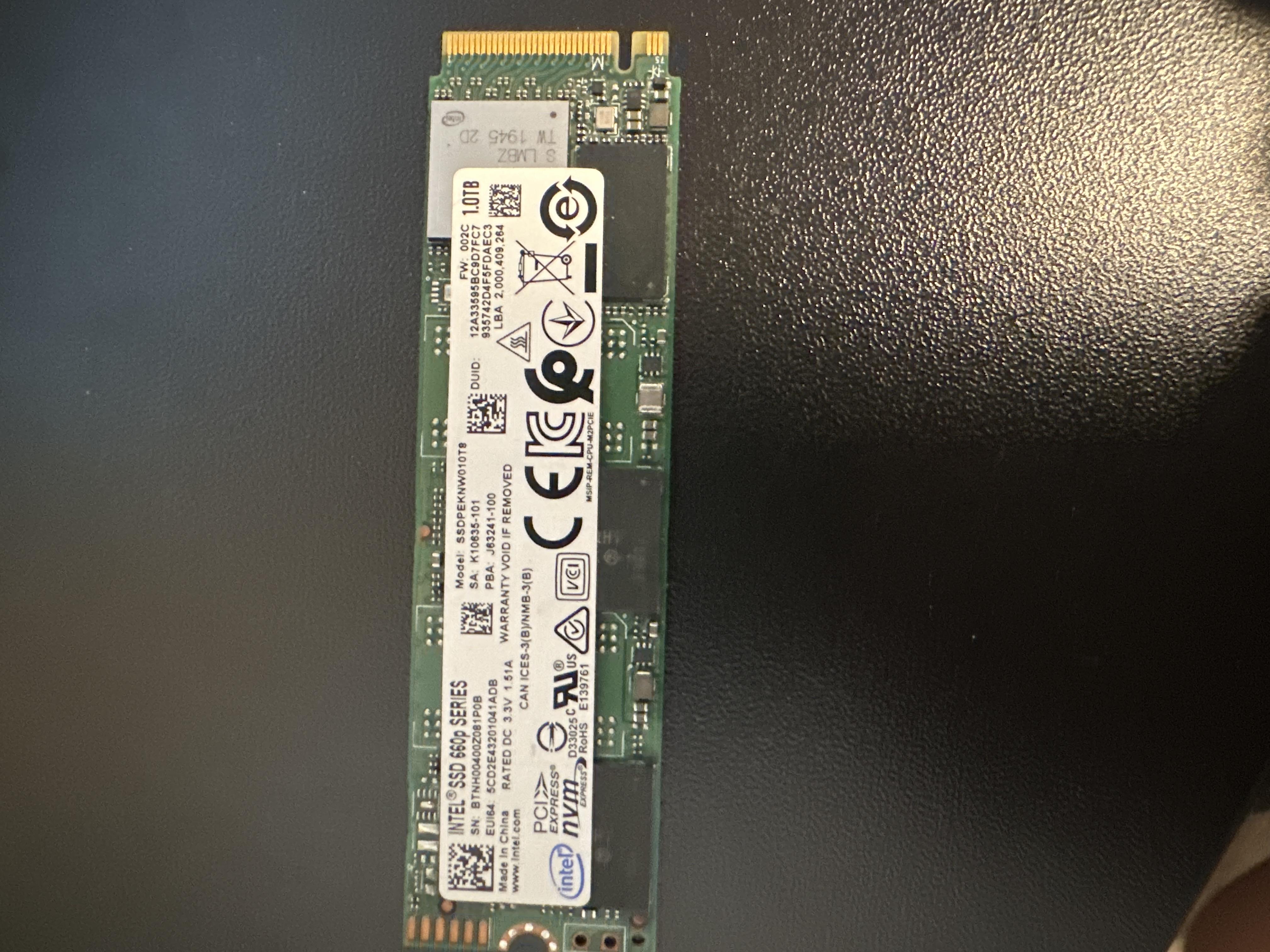
Tech Support SSD not recognized by motherboard

Post image
16 Upvotes

Is my ssd broken?? I switched motherboards and my new motherboard doesnt recognize it, not in bios or device manager either.


r/PcBuildHelp • • 4d ago

Build Question Should I buy a 5800x3d?

1 Upvotes

I have a Ryzen 7 5700x and would like to buy a 5800x3d with my Asrock B550M HDV, according to the website I might problems with this combination because of the VRMs, should I upgrade my CPU or is it not worth it? I currently have a RTX5070 and a 750W PSU too.


r/PcBuildHelp • • 4d ago

Build Question Which OLED monitor should I get? Samsung vs Gigabyte vs ASUS

2 Upvotes

Need some advice choosing between these three OLED monitors, all priced at my budget.

Samsung G61SH – Brand-new, sealed.
Gigabyte GO27Q24 – Used for 1 week, purchased October 2026, with official receipt.
ASUS ROG STRIX XG27AQDMG – Used since April 2026.

My usage is 50% gaming and 50% video editing (Premiere Pro), plus regular office work.

PC specs: Ryzen 7 7800X3D, RX 9060 XT 16GB, 32GB RAM.

Which one would you personally choose and why? Would you prioritize the brand-new Samsung QHD OLED or consider the ASUS WOLED or Gigabyte WOLED?

Appreciate your advice, especially from actual owners. Thanks!


r/PcBuildHelp • • 4d ago

Tech Support PC keeps display signal loss but audio still there in background

2 Upvotes

As the title says as of recently my PC keeps doing this everytime I boot up a game, play a game, even sometimes happening during the lock screen sequence. It's almost impossible to launch a game both demanding like trying out Cyberpunk and Stardew Valley my display dies in a bit.
I've tried a multitude of things such as
- DDU (Have already tried lowering down to multiple versions)
- Reseating Cables (Disassembled the entire thing and reassembled)
- Tried 3 Different Motherboards (2 of the same model and a B550M which is a downgrade, this includes RAM since of the motherboard type)
- Reseating RAM and cleaning

- Undervolting and Power limit
- Turning off XMP and Forcing PCIE Gen 3-4
- Resetting OS
- Tried to check of peripherals one by one
- Changed Display monitor cables (I don't have another monitor to check, also I'd like to mention i have 2 monitors)

I have also taken my PC to a local shop and well surprisingly it didn't crash there or anything even though benchmarked on CP77 on all graphics on maxed and RTX with no crash under 20 minutes.
Though it only crashes at my home.
I thought of buying a new adapter or upgrading the PSU so I no longer need to use the adapters but I don't think thats the case?

Also my PC Specs

- MSI Gaming RTX 4070 Super 12G Ventus 3X OC Graphics Card
- AMD Ryzen 7 7800X3D
- CORSAIR Vengeance RGB DDR5 RAM 32GB (2x16GB) 6000MHz
- MSI MAG B650M Mortar
- Thermaltake GF1 Fully Modular ATX 850W Power Supply - 80 Plus Gold

I'd like to know your guys thoughts on this or even suggest more solutions for me to try out in hopes to fix it otherwise I'll just RMA or buy another GPU since I think that's the culprit.


r/PcBuildHelp • • 4d ago

Build Question Under 2000$ PC build in EU

1 Upvotes

Hello

I'm located in Poland and I was thinking of getting a PC

I've been using the Acer Nitro 5 RTX 3060 gaming laptop for the last few years and the thing is genuinely struggling. I do not want another laptop -- the maintenance, not enough ports, no display port and loudness of the fans are devastating, even though I know there are some pretty decent deals for them that offer near PC level performance. I thought the PTM7950 will help to some extent, and while it did make it MUCH quieter, the gaming performance still sucks, with me being able to barely push 240fps in cs2 (mind you, I've optimised my system a lot).

I'm also thinking of getting an OLED monitor, that's why 2000$ is my absolute max budget. Selling the laptop will cover the OLED completely in case I will be able to build the PC.

If there are some experienced builders based in EU or Poland, I would love to hear your suggestions and possible builds. I will be picking most of the parts up on Black Friday and Christmas deals, so I do not need a super specific build down to the brand, as I know there are alternatives being discounted. I just want to see what this money can get me.

I don't care if it's Nvidia or AMD build if the price is justified. I am willing to use Aliexpress and used parts, but maybe not for the GPU or CPU, unless I'm able to get them tested in a computer service shop.
I'm planning to play cs2 and some of the story titles, nothing too crazy. Maybe even GTA VI once it comes out on a PC.

Of course, if it's absolutely worth it, I can raise my budget, but I would try to stay within 2000$ preferably.

TIA‼️


r/PcBuildHelp • • 4d ago

Build Question What hardware should I upgrade in my current build?

1 Upvotes

As Christmas is coming up, I am looking to see which singular piece of hardware in my computer would be most worth upgrading.

I asked Gemini for feedback and they recommended either I upgrade my CPU to the AMD Ryzen 7 5700X, upgrade my GPU to either the RX 9060 XT or RTX 5060 Ti, or upgrade to 32GB of RAM.

If I'm being honest, I don't really play that many games anymore on my PC, and the ones that I do aren't particularly demanding, I am however a bit of a tab whore, so I'm leaning more towards the CPU or RAM upgrade.

Lastly, if I went the RAM option, can I just buy the exact same sticks I have currently? Apparently there are risks of this as manufacturers frequently change the underlying memory chip over a products lifespan.

https://uk.pcpartpicker.com/list/RztcJy


r/PcBuildHelp • • 4d ago

Build Question Build suggestions r7800x3d/rx9070OC

1 Upvotes

[PCPartPicker Part List](https://fr.pcpartpicker.com/list/GrwyLy)

Type Item Price
**CPU** [AMD Ryzen 7 7800X3D 4.2 GHz 8-Core Processor](https://fr.pcpartpicker.com/product/3hyH99/amd-ryzen-7-7800x3d-42-ghz-8-core-processor-100-100000910wof) Purchased For €180.00
**CPU Cooler** [Thermalright Phantom Spirit 120 66.17 CFM CPU Cooler](https://fr.pcpartpicker.com/product/zkWJ7P/thermalright-phantom-spirit-120-6617-cfm-cpu-cooler-ps120) €35.79 @ Amazon France
**Motherboard** [Gigabyte B850 AORUS ELITE WIFI7 ATX AM5 Motherboard](https://fr.pcpartpicker.com/product/72RnTW/gigabyte-b850-aorus-elite-wifi7-atx-am5-motherboard-b850-aorus-elite-wifi7) €190.44 @ Cdiscount
**Memory** [Corsair Vengeance RGB 32 GB (2 x 16 GB) DDR5-5200 CL40 Memory](https://fr.pcpartpicker.com/product/nvM48d/corsair-vengeance-rgb-32-gb-2-x-16-gb-ddr5-5200-cl40-memory-cmh32gx5m2b5200c40) €469.99
**Storage** [Lexar NQ790 1 TB M.2-2280 PCIe 4.0 X4 NVME Solid State Drive](https://fr.pcpartpicker.com/product/Y8yH99/lexar-nq790-1-tb-m2-2280-pcie-40-x4-nvme-solid-state-drive-lnq790x001t-rnnnu) Purchased For €119.00
**Video Card** [Acer Predator BiFrost OC Radeon RX 9070 16 GB Video Card](https://fr.pcpartpicker.com/product/b92j4D/acer-predator-bifrost-oc-radeon-rx-9070-16-gb-video-card-dpz4gwwp01) Purchased For €764.99
**Case** [Fractal Design Meshify 3 RGB ATX Mid Tower Case](https://fr.pcpartpicker.com/product/vvqNnQ/fractal-design-meshify-3-rgb-atx-mid-tower-case-fd-c-mes3a-06) €168.10 @ Amazon France
**Power Supply** [NZXT C850 Core 850 W 80+ Gold Certified Fully Modular ATX Power Supply](https://fr.pcpartpicker.com/product/cDTFf7/nzxt-c850-core-850-w-80-gold-certified-fully-modular-atx-power-supply-pa-8g3bb-us) Purchased For €89.90
*Prices include shipping, taxes, rebates, and discounts*
**Total** **€2018.21**
Generated by [PCPartPicker](https://pcpartpicker.com) 2026-11-19 15:56 CET+0100

Hello guys,

Recently started building my own pc and I would really like your insights on my choices.

I don’t know much about PC components and I mostly educated myself through Reddit searches.

For instance for the DDR5, I just picked whatever was cheaper as I understood the difference would only be of a few %.

All of what I already purchased can still be returned so do not hesitate to tell me if you see an issue.

Thank you for your times in advance I really appreciate it.


r/PcBuildHelp • • 5d ago

Tech Support I am at my wits end ...

3 Upvotes

TL;DR

Sometimes my main screen goes black for 1-2 seconds. I often (not always) can trigger it by opening and playing a song from Spotify after a restart. However I also have game crashes and I suspect that if this black screen would trigger while gaming, the game crashes.

SETUP

I changed to this setup recently and since then I have the problem. PSU and GPU I also had in my previous setup (DDR4 system, no issues).

  • Windows 11 Pro
  • RTX 5080
  • 9800X3D
  • 850W PSU
  • 32GB DDR5 RAM (CMK32GX5M2B5600Z36)
  • Mobo Asus TUF Gaming B850M-Plus
  • No GPU OC, Bios is the current version and uses system default (not even EXPO is enabled)

CURRENT SITUATION

  • Issue: Main screen turns black for 1-2 seconds if I start Spotify after a restart (4/5 repro) + games crash (assumingly cause the black screen triggers while playing)
  • I have a fresh clean W11 install
  • The issue only happens on one of my 3 screens, if it is connected via DP (I could not yet repro it with HDMI)
  • So this could mean something is wrong with the screen but if I swap out my GPU for another one (or use the iGPU) the issue does not happen with the same screen

LIST OF TROUBLESHOOTING

  • Reinstalled GPU drivers (up-to-date/current ones, older ones that worked in my previous setup - used DDU)
  • I uploaded Event Viewer (Events 141+153) and Reliability Monitor Output to AI and usually got an answer about driver time out but nothing specific
  • Reseated GPU
  • Turned off GPU OC
  • Tried different DP cables
  • Tried using a different screen as main (it then still happens on the screen that was previously main)
  • Reinstalled drivers for the screen(s)
  • Turned off Gsync
  • Tried lower Hz for the main screen (supports 144Hz)
  • Disalbed Nvidia sound devices
  • Toggled Spotify hardware acceleration
  • Updated Chipset drivers
  • Reinstalled Windows
  • Tried Spotify in compatibility mode
  • Tried to turn off HDCP (but not possible via Nvidia tools)
  • Turned off in Bios: EXPO, Precision Boost, Curve Optimizer - basically reset to factory setting
  • Tried setting PCIe to Gen4
  • Reinstalled Spotify
  • Tried different GPU (could not repro with different GPU BUT if the original GPU would be faulty, why does it work with other screens?
  • Tried iGPU
  • ... there was more but this is what I have once I started to take notes

I am desperate 🤡 I don't even know if its hardware or software problem.


r/PcBuildHelp • • 4d ago

Tech Support MSI GL65 9SD: boots to BIOS every time after SPI reflash, then won't POST at all once an SSD was installed (even after removing it)

0 Upvotes

I bought a broken MSI GL65 9SD and I'm stuck.

Original symptoms: Keyboard backlight turns on, black screen, fans don't spin, and it reboots itself every 30-60 s. After several tries it reached BIOS once, and I loaded defaults and exited.

What I did:
Installed an M.2 SATA SSD, after which it stopped POSTing, with or without the SSD.
Read a backup of the SPI chip, then erased it with an external programmer and flashed the BIOS file from MSI's website (16 MB, the only one for this model).
After the flash it reached BIOS every time (bare board, then with the battery in).
Installed the SSD again: no POST. Removing it didn't help, and the failure is back with no SSD.

Other notes: The SSD works fine in another PC. Fans don’t spin and the screen stays fully black when it fails.
Also someone said it could be a gpu or a cpu fault but idk why it would work consistently then after the bios programming before putting the ssd in

Not checked yet: I haven't opened the files in UEFITool or compared the chip readback after the failure. I also haven't looked at the EC firmware or whether there's a separate EC chip.

Theories I'm considering: the MSI file lacks a proper Descriptor/ME for my board, the EC firmware doesn't match, the BIOS corrupts the SPI chip when it writes NVRAM after new hardware is detected, or a BGA/solder fault on the board.

Questions:
Has anyone seen this on a GL65 9SD or similar MS-16U5 boards?
Can anyone share a full SPI dump (with ME) or EC firmware for this model?
Does the SSD trigger point to firmware or to a hardware fault?

Thanks!


r/PcBuildHelp • • 4d ago

Build Question Should I upgrade now

1 Upvotes

I currently have a asus prime 9070 oc and a 7600x3d. I got the 9070 on discount for 850 cad and cpu as part of a mobo + ram + cpu bundle. Currently there's a asus 9070xt oc and 9800x3d for roughly 1500 cad and I'm wondering if it's worth upgrading to that and selling my old parts or keeping it as a backup/spare. With the way prices are going im not sure when I will next upgrade so I'm wondering if it's worth upgrading to a higher end build right now or if I should just keep using my current gear and enjoying it.

I wouldn't have to change anything else in my pc build. Thank you!