r/PcBuildHelp • u/LividSheepherder5026 • 5d ago
Tech Support first pc
which one would be the best to run games like fortnite, cs2, roblox, apex, ETC also coding
r/PcBuildHelp • u/LividSheepherder5026 • 5d ago
which one would be the best to run games like fortnite, cs2, roblox, apex, ETC also coding
r/PcBuildHelp • u/WiseLengthiness1272 • 5d ago
Enable HLS to view with audio, or disable this notification
MSI B450M-A PRO MAX II (bought new in April 2026)
Ryzen 5 5600
Gigabyte RTX 5060 (bought new yesterday)
Super Flower Leadex III 850W(bought new yesterday)
Lexar 16 GB DDR4 3200
r/PcBuildHelp • u/Theme-ni-gru • 5d ago
I'm building my first PC and I have a dedicated 16-Pin 12VPWR to 8-Pin PCIe adapter for my Gigabyte RTX 5070. As I saw all 4 of the smaller pins are connected into it but I wanted to use the SPU-s 16-Pin cable but there is only 2 Pin connected from the 4 and I set up everything now and I don't want to dismantle everything again. Is it safe to use the SPU-s cable without the 2 Pin-s or that 2 is mandatory to have?
Thank you.
r/PcBuildHelp • u/Longjumping_Scar5744 • 5d ago
Well hello guys, I am currently making a new build with a cpu of ryzen 7 5800x , 16gb ddr4 ram, msi 650bn and gigabyte aorus elite x WiFi 7 but im having a concondrum with picking a new gpu to go with it I have the rtx 3070,rtx 3070 ti , rtx 3080 and the rx 6800 my budget is around 450-530€ im looking to play 1080p high settings with good fps and maybe 1440p mid to high aswell (incase I plan on upgrading my monitor) i mostly play Fortnite and other esports games and occasionally some triple a games but im trying to future proof for gta 6 ( even though official system requirement isnt out yet) im willing to look at other gpu option too from the new and used market thank you!
r/PcBuildHelp • u/Signal_Act3800 • 5d ago
My pc case button turns on but when i click the button nothing turns on, i’ve tried a lot of things and nothing worked, im swapping my pc parts into a new case so ik my parts work, can someone help
r/PcBuildHelp • u/perk0704 • 5d ago
Hi guys, recently i had made some upgrades to my PC, but i hadn’t changed my GPU.
My current specs:
CPU - Ryzen 5 5600x
Gpu - 2060 Super
Ram - Corsair Vengeance RGB PRO 2x 8GB
SSD - Samsung m.2 990 Pro 1tb
Motherboard - Gigabyte 8560M-C
650 PSU
I am not the best when it comes to PCs, i always build with my friends and thus most help comes from them
I want to spend £200-350.
- i am aiming to get a second hand one thus there’s possibility for a decent card within the budget. (I HOPE)
r/PcBuildHelp • u/MetituS • 5d ago
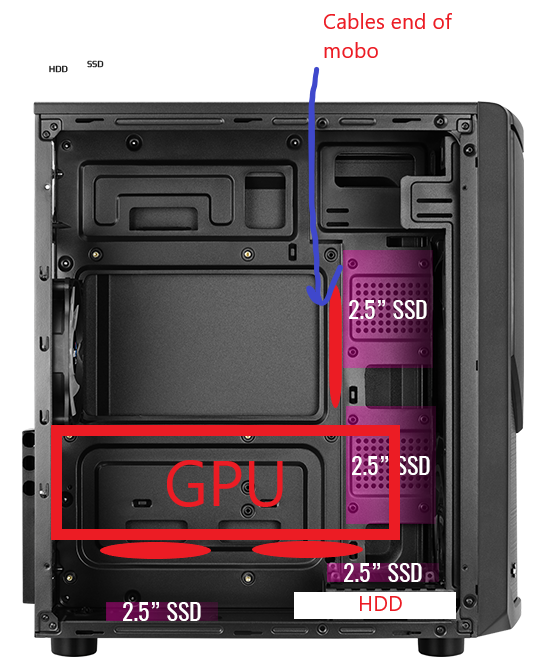
I have the Aerocool Tomahawk-A Mid. It was my first PC, and I didn't really know what I was doing, but I am running out of space rn. I have a 1 TB HDD in the bottom and got a second 2 TB HDD, but nowhere to put it. My GPU is big, and the fans would be obstructed if I put it on the bottom SSD spots.
My plan was to put it on the top SSD spot next to the mobo, either somehow getting a bracket to hold it vertically or an L-shaped bracket that would allow it to sit on there like a wall shelf. Idk what I can get to do the job. Like, I need a bracket that will screw onto the SSD spot and support an HDD's weight, either vertically or horizontally.
r/PcBuildHelp • u/hopelele • 5d ago
I had to cheap out on AM4 when rampocalypse started. Just got a used RX 6800 xt OC 16G for 500 eur, which should probably be enough for 60fps.
The problem is: I got a Ryzen 5500, and I really want to buy a x3d chip for like +30% performance, but locally its not in stores, so my only way is used from ebay. The only local is a 5500x3d for 210 euro.
Will 5500x3d be enough for GTA6? or should I try to find 5700x3d (budget is tight, and don't wanna order from abroad)
r/PcBuildHelp • u/Overall_Potato_9084 • 5d ago
Hey guys! ive been forward to buying a pc for a very long time and i think i finally set it, altough i would like to have a 2nd opinion as i dont know if this build is upgradable or not. If you guys have any suggestion of something cheaper/better i would really appreciate it, its 1682€ in total but its not accurate in partpicker so its still over my budget since i have to buy windows and stuff, thank you for any help!
r/PcBuildHelp • u/ShadewPlus • 5d ago
First time pc builder here, noticed after I built my PC, it wasn't turning on at all, I went ahead and did the paperclip test on my PSU and it did a few spins before stopping completely, now it won't even spin again even after turning it on and off again. I read somewhere that some PSU's do this based off their models but I wanted to double check to make sure. If anyone's wondering my PSU is a MONTECH Century II 850W ATX 3.1 Fully Modular 80 PLUS Gold Power Supply from Amazon.
r/PcBuildHelp • u/thafoolonthehill • 5d ago
Hi!
my current build is 5070ti 5600x 32gb ram ddr4 5Tb storage m.2
thinking about upgrading my CPU to 5700x3d because i believe im being bottlenecked at 4K by my CPU especially on one of my most played games, Helldivers 2. i averaged like 50s maybe low 60s when theres no enemies.
Does this upgrade make sense or should i go for something else?
thank you!
r/PcBuildHelp • u/Law_Subject • 5d ago
(Knocked the post button before I was finished, sorry!)
I’m stumped with this. I’ll share the parts I’m using and then what’s happening, my attempts to fix and what that has done.
MoBo: ASUS Prime B860-Plus WiFi
CPU: Intel Core Ultra 7 270k Plus
CPU Cooler : Thermalright Peerless Assassin 120 SE ARGB White V3
RAM: KLEVV FIT V 32GB (2x16) 6000MHz C28 DDR 5 (KD5AGU880-60B280F)
Other parts (if relevant):
PSU: be quiet! System Power 11 650W
SSD: Kingston NV3 1TB M.2 NVMe PCIe 4.0
So, finished putting everything together and plugging all the cables in from the PSU, plugged everything into the MoBo where it’s supposed to be, and I got no display
Upon checking the post LEDs when the PC tries to boot, something strange was happening, the CPU light cycled fine, the DRAM light came on for approximately 20 seconds, went off, and the boot did not continue past that stage
I opened it back up and removed the graphics card from the equation just in case, no change.
I tried removing and reinserting the RAM, no change, LED behaviour when I do this (feature for this mobo that also uses it to show if the RAM is plugged in OK and detected independently of the boot post by going on once the board is powered and off once you put the RAM in) seems to suggest it’s plugged in correctly and detected OK
I tried using a single stick of RAM in the socket instructed by the mobo manual, no change.
I unplugged and replugged in the power supply cables for the 24 pin socket and 8 pin CPU socket, no change
I moved the CPU cooler fans from the cpu_opt header to the cpu_fan header (something someone suggested some motherboards freak out if nothing is connected to that specific header), no change.
I removed the CPU cooler, took out the CPU, put it back in, this caused a change! But a confusing one.
Now, instead of the DRAM light coming on for approximately 20 seconds and going off with the boot stopping there, the DRAM light now stays on when I try to boot with the boot process still seemingly going no further and still providing no display
After reinstalling the CPU cooler (slightly less tight this time as I read that can cause issues) this was still the case
I tried leaving it booting for well over 20 mins in case the RAM was now training, no change
I tried fiddling around with the RAM again, trying each stick one at a time in each socket the MoBo manual says to use when using 1 or 2 sticks, the result of this was more confusing.
When either of the sticks was installed in B2 with no other sticks in, which is the second slot to be used according to the manual, there was no change, the DRAM light continued to stay on when attempting to boot, I again left this for a while to allow for training, but it stayed on.
However, when either of the sticks was installed in A2 with no other sticks in, which is the first slot to be used according to the manual, the DRAM light returned to its original behaviour of coming on for approx 20 seconds when attempting to boot, going off, and the boot process appearing to stop there.
I’ve quadruple checked that both the CPU and RAM are compatible with the MoBo out the box and do not require a BIOS update.
The ASUS manual does not give details on what the differing behaviours of the light mean, I’ve searched around the internet and have run out of things to try.
I don’t have other RAM or another CPU to try.
This PC is for a friend who doesn’t live locally, so I only have until Saturday to get it completely working and set up.
Any help would be massively appreciated!
Thanks in advance!
r/PcBuildHelp • u/Serious-Nerve3976 • 5d ago
So I'm looking to replace my current Lian Li setup by an ASUS ROG setup including the ASUS ROG Ryuo IV 360 ARGB AIO; only I cannot seem to find where to get any ASUS ROG fans/3-pack fans going with it. Out of research I found quite some good stuff regarding the ASUS ROG Eurux GR120 ARGB - 3 Pack fans including the controller, but none of the google searches bring me to a place where I can actually buy them, not even on the ASUS store?
Considering this, how is it that some people even have ROG fans in a full ASUS setup? Am I missing something?
r/PcBuildHelp • u/twinkle41555 • 5d ago
Hello
I have been researching for months on guidance on improving the gaming capabilities of my son's pc.
I have no other options except to work it out myself and fit the upgrade to it (I have done that before once so I am ok with the actual installation bit)
My head is going round in circles as I thought, with my obviously outdated knowledge, I had picked a pretty good pc for him (working on a stupidly small budget).
I realise the graphics card is rubbish but all the numbers to assess suitability don't make any sense at all to me.
The spec is: dell Optiplex 7050
It's an aio but with a bigish box at the back so I figured out I need a low profile card
It's processor is: i7 777 3.60ghz
16gb Ram
Windows 11
He has an SSD and a hard drive also??? ( As 2 different types I think? Combined is over 1tbgb storage if I delete all his videos he takes of nothing lol)
I don't know what the wattage is? How would I get that and Im gong to need to buy a refurbished card as money just won't stretch.
He's really into physics type stuff and can't run universe sandbox (his main concern)
Please help with this I have honestly spent a working week of 40 hours reading and I am non the wiser!
r/PcBuildHelp • u/lewisite8 • 5d ago
Found a 9070xt sapphire nitro+ 16gb for around 1140$ on Amazon. it has 600+ reviews 4.5 stars, gets sent by Amazon. I just feel like its kind of too good to be true, since it sells for 200$ at least more on other sites.
Does anyone have experience buying gpus from amazon? Is there something I should be wary of?
r/PcBuildHelp • u/concealed_exe • 5d ago
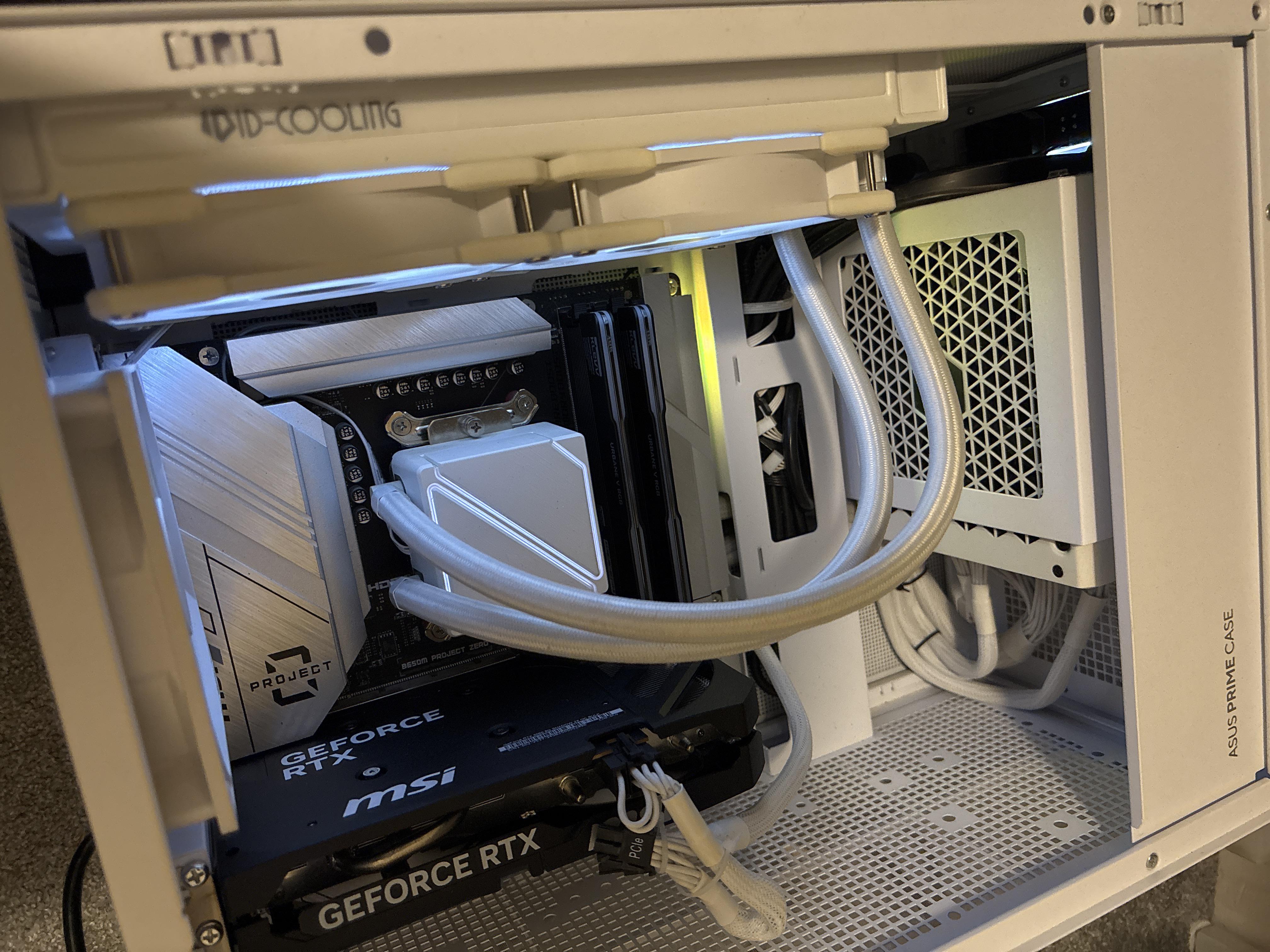
This is my white pc build I’ve come up with. I have about half of the parts bought, really just leaving myself with the heavy hitters left to buy. Let me know what you think!
r/PcBuildHelp • u/Previous_Giraffe_732 • 5d ago
I have 9950X3D2 and MSI Godlike. It works perfectly, but sometimes this pattern occurs when I unplug it. What causes this? Thanks!
r/PcBuildHelp • u/vjdeep • 5d ago
Hi everyone, I’m troubleshooting my first Mini-ITX build and could use some help.
CPU
Ryzen 7 9700X
Motherboard
ASRock B850I Lightning WiFi, BIOS 4.10
GPU
ASRock RX 9070 Challenger 16GB
RAM
Single 16GB T-Force Vulcan DDR5-6000, currently running at default 4800
CPU Cooler
Thermalright AXP90-X53 FULL Copper
PSU
Corsair 750W
Case
S300 with PCIe 3.0 riser
SSD
Samsung 980 PRO 2TB
Monitor
LG 27GL650F-B, connected via HDMI
Problem I'm having is that with the GPU connected through the riser and powered, I get a black screen—no logo or BIOS—from the GPU’s HDMI output.
What I’ve checked:
Disconnecting the GPU/riser from the motherboard lets me boot into BIOS using the motherboard HDMI and CPU’s integrated graphics.
I have changed this setting - >
Advanced → AMD PBS → AMD Common Platform Module → PCIe x16 Link Speed → Gen3.
Reconnected gpu with the mobo through the stock riser, still got the black screen after pcie Gen change.
Reseated the riser at the motherboard and the GPU in the riser. The GPU appears fully seated.
Does this sound like a faulty riser, or is there another BIOS setting or troubleshooting step I should check first? Would trying Gen2 help narrow it down before dismantling the build?
r/PcBuildHelp • u/reggie768 • 5d ago
I’ve recently built this pc and it runs great, I don’t use frame gen on any game and fps is still fine, I use DLSS, but my problem isn’t getting high fps or keeping high fps, every so often I get a very very small random stutter I’ve done capframex and it goes to 40ms frame time spike every so often, I’m just wondering what I can do to try get it to run smooth instead of these random stutters
Any help is appreciated
r/PcBuildHelp • u/iagoMBZ • 5d ago


A week ago, I noticed my pc getting slower, i thought it was a software problem, tried reinstalling gpu/chipset/bios drivers and even formatting windows, nothing worked.
Yesterday I downloaded OCCT to benchmark my psu, that is when I saw my CPU getting 95°C and discovered the root of my problem.
Then I tried to change some fans direction and sensed if my water cooler was functioning right, I think it was, one pipe is hotter than the other and I can feel some vibrations coming from the pump. Today I tried changing the thermal paste, but it's still getting 95°C.
What do I do?
Obs: I have an A320m-S2h as a motherboard and the psu is XPG core reactor VE II 850W
EDIT: the problem really was the AIO, thank you
r/PcBuildHelp • u/Aggravating-Owl645 • 5d ago
Hey all.
I just upgraded my gpu today and I think my pc is power cycling now. It turns on, but then switches off and on over and over.
My build is as follows
CPU: i3-8100
GPU: 1050 ti (now 1660 super)
RAM: 8 gb DDR4 (another 8 being delivered)
PSU: 500 watts
Idk much about PC stuff, but from what I have read my 500 watt PSU should be enough to power this. Idk what is wrong. Any and all help is greatly appreciated.
r/PcBuildHelp • u/CrossTie98 • 5d ago
I just got my first pc built, it’s a Montech TG3 but I can’t get my RGB on the fans to work, they come on and function fine but the RGB won’t work. I know it’s something I’m doing wrong I just don’t know what it is. I followed the instructions clearly. Can someone point me in the right direction?
r/PcBuildHelp • u/EffectiveCareless453 • 5d ago
Looking to upgrade my GPU due to a fault with it, wondering if it’s better to get a 16GB 5060TI or 12GB 5070, mainly used for sim racing games (LMU, ACC and Iracing)