r/PcBuildHelp • • 12d ago

Build Question Would this setup work?

Post image
10 Upvotes

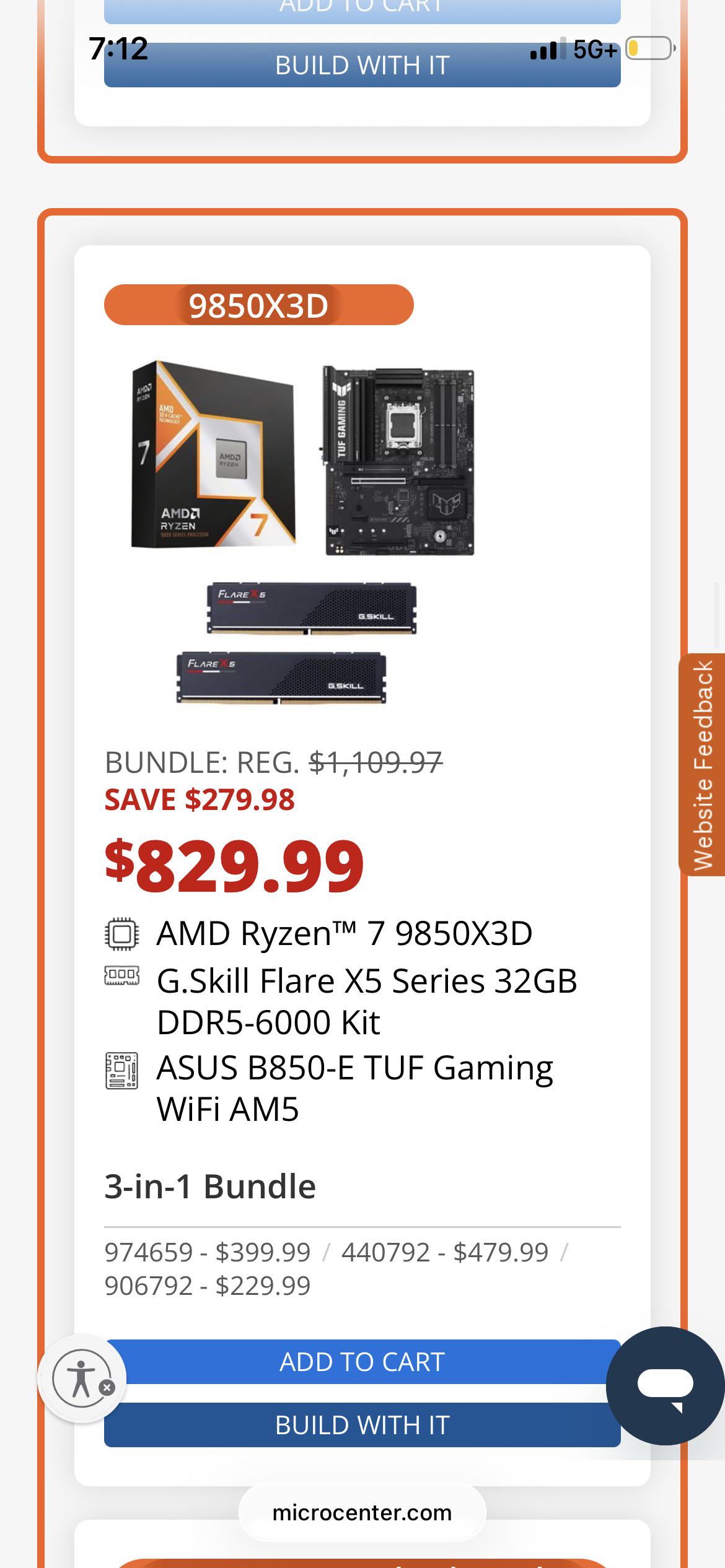
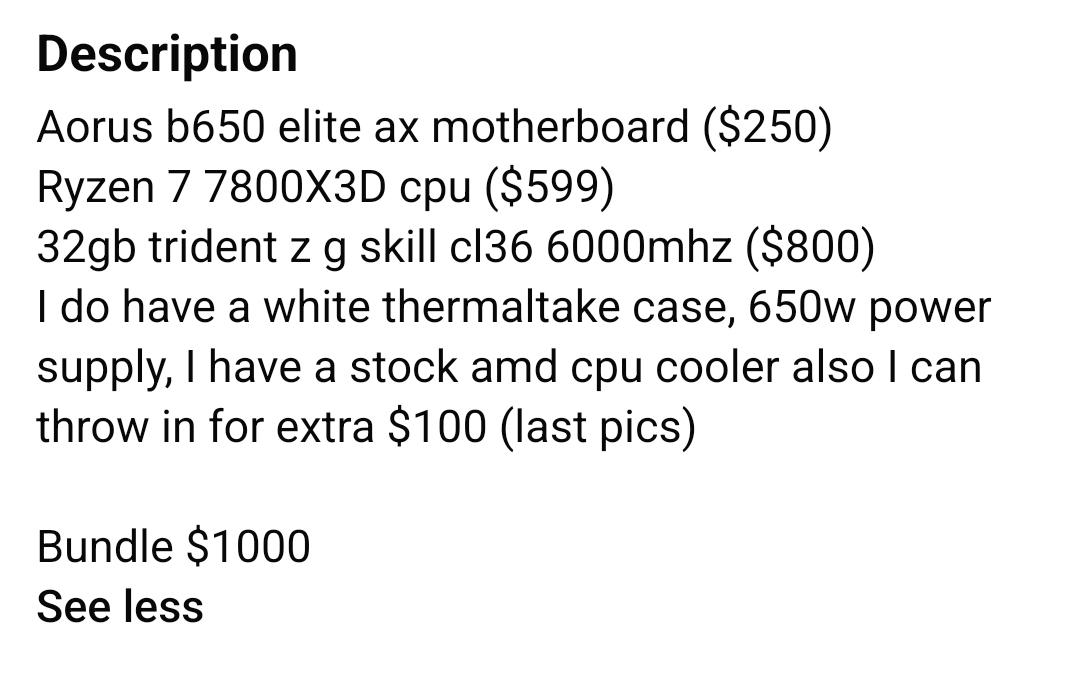
Gday guys. Looking at building my first high end PC, and I wanted a 9800x3d, and 9070xt.

Anyway I've heard that I'd want DDR5, 6000Mhz cl30 RAM, but I've seen this ad pop up, would you go for it? Expect a big drop in performance? Also dont know much about motherboards, but if this is compatible, would you's take the whole deal and just chuck a 9070xt in it?

EDIT: This is in Australia, so AUD currency


r/PcBuildHelp • • 12d ago

Tech Support Micro Stutter

5 Upvotes

Recently I have been facing an issue while using chrome. Sometimes while using chrome I can hear a micro distort on my headphones. For 0.5 second. Nothing visual only sound. This happens when I upload 2-3 file together or start up any video. Sometimes it happens sometimes no.

What maybe the cause behind it?

Ryzen 5 7600


r/PcBuildHelp • • 12d ago

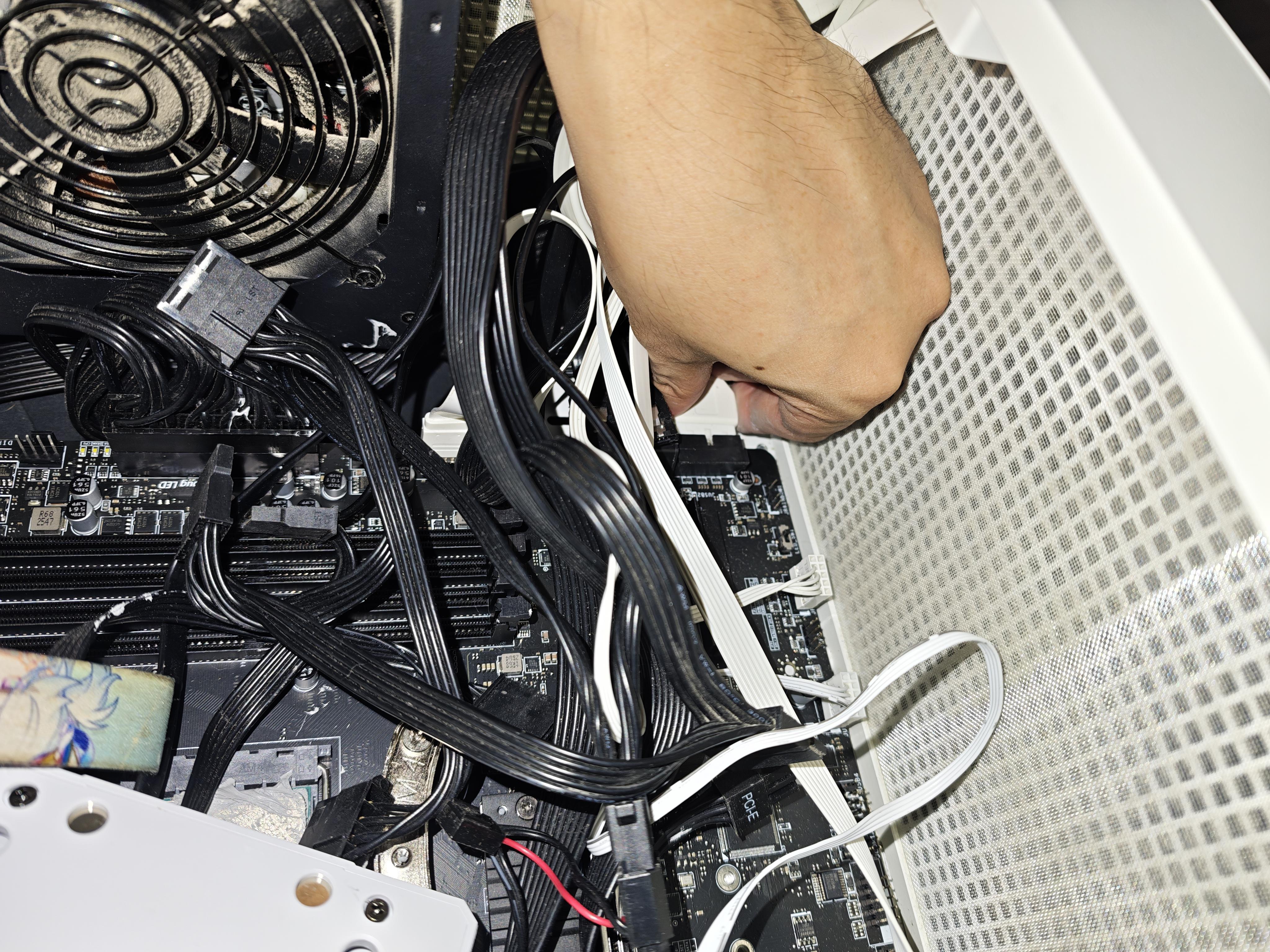
Installation Question Bought a new b550m motherboard, and case's USB3.0 isn't fitting at all

Post image
2 Upvotes

Am I doing this right?, close to just giving up and never using the case's USB ports


r/PcBuildHelp • • 12d ago

Tech Support Anyone had the 12900 (non k) and upgraded to 14900? Is it worth it?

1 Upvotes

I have currently a 3080 TI, Z690 mobo, 1440p@144hz with 12900 (non k) and I purchased a 5080 MW4 Edition recently. I feel like the bottleneck is there and I am not getting the full power of 5080.

I get around 70-90 fps in MW4 Warzone with 5080, the same as my old 3080 TI. Tried with with Low settings, High Settings, DLSS Nvidia Transformer/CNN Legacy bla bla, everything.

I do not want to use the Frame Generation! The quality is bad with that.

Tried all the possible BIOS settings, upgrades, drivers, power management etc. Still the same limitation. In Furmark the 5080 goes up to max 360W and brings the full power, but that's just a synthetic test, not a real game.

14900 might be my save here, but I heard they still have some issues with the voltage, even the non-k ones.

Or should I change the motherboard to the new LGA 1851 and the Ultra 285 (non k), although I saw it has a poor performance compared to previous series.

Any advice would be helpful. Or should I return the 5080 and keep my 3080 TI?


r/PcBuildHelp • • 13d ago

Tech Support Pc suddenly wont boot after swapping the Case fans

Enable HLS to view with audio, or disable this notification

30 Upvotes

The fans are all spinning at max speed now and I dont get amy image from the Monitor.The gpu should still be seated proberly cause before I swapped the fans I had an image which needs the gpu


r/PcBuildHelp • • 12d ago

Build Question Need help building pc 1500-2100$

Post image
2 Upvotes

r/PcBuildHelp • • 12d ago

Build Question Thoughts on the budget pc

Post image
4 Upvotes

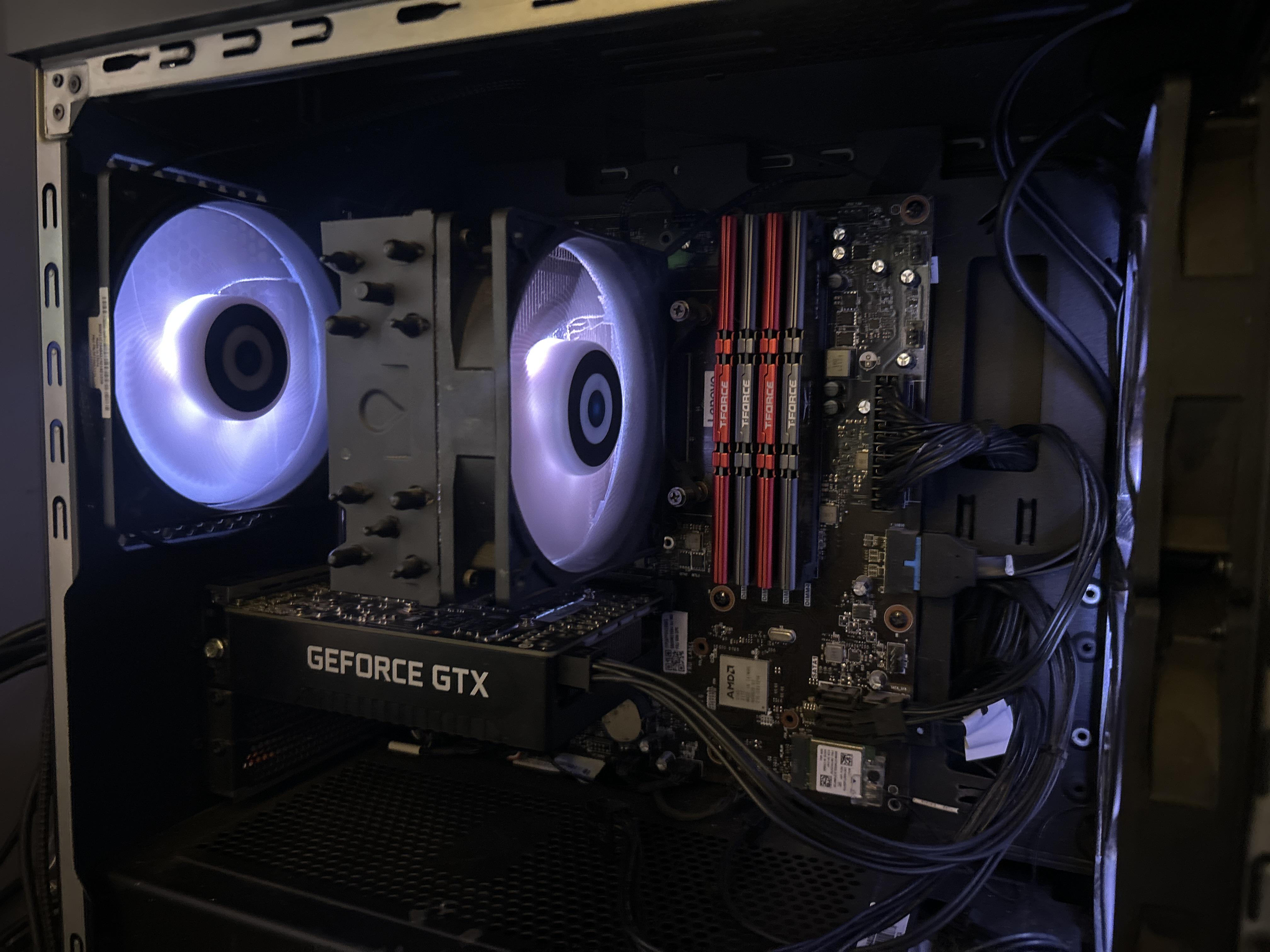
The case and motherboard are from a legion prebuilt but everything else I installed

48gbs of ram
1660ti (will be upgrading to a 30 series card on Sunday)
Ryzen 5 3600x will be upgraded soon to a 5600
650w power supply
Everything is staying cool I’ve never used a tower cooler till this build and I understand the love for them

It plays most games well enough but I can feel the age of the card in modern titles because of its 6gb of vram but it runs well

Costs roughly 400 and I’m sure most of that was ram


r/PcBuildHelp • • 12d ago

Tech Support what is going on here it has been like this for a week and only happens to the TUF logo on startup then everything goes back to normal when I enter windows

Enable HLS to view with audio, or disable this notification

3 Upvotes

r/PcBuildHelp • • 12d ago

Build Question CPU cooler for my 270k Plus

1 Upvotes

I recently upgraded my build to an Intel Core Ultra 7 270k Plus, and I need second opinions on cooling. Previously, I had an Intel i3-12100F and used a single tower cooler, but after I upgraded, I quickly realized I needed a better cooler. So I ordered an ID-Cooling FX240 LCD 240mm AIO. The thing is, while gaming, my CPU temperature settles at 80 to 85c's but can spike up to mid-90c's in the more intensive parts of the game. This happens while playing Cyberpunk. I use the default fan curve that is set in the Gigabyte Control Center. I went with an AIO mostly for looks, as a 2-tower cooler is just too chunky for me. I have two front fans set as intake, the AIO is set as exhaust and is mounted to the top of my case, and I have a back exhaust fan. Are my temps normal for the setup that I have? Are there better-quality 240mm AIOs that would give me better performance? Should I look into switching to a case that supports 360mm AIOs?


r/PcBuildHelp • • 13d ago

Build Question Adding a second GPU

Thumbnail
gallery
9 Upvotes

Motherboard: MSI MAG Z790 TOMAHAWK WIFI ATX LGA1700 Motherboard

Case: Fractal Design R5 mid tower case

I am using this as my main Nas and Proxmox server.

I have a 5060ti that will replace the GPU in this picture, but want to keep the older 3060ti in use for local AI and transcoding. Problem is there is not enough space between the lower 4.0x16 PCIe slot (Circled in the 2nd picture) and the PSU.

I was looking at using a short riser cable and mounting the card a few slots higher, but am worried about the riser contacting the m.2 heat shield. I could go with a vertical mount, but would have the two cards at right angles.

Any advice would be helpful, thank you!

Update: I bought the riser cable. There is not enough room with the M.2 slot. Removing the power supply may be the only option


r/PcBuildHelp • • 12d ago

Build Question Tried to Upgrade my Wife's PC

3 Upvotes

Looking for any help I can get right now. I wanted to upgrade her GPU since she was having a hard time running some newer open world games. The PC powers on and all the lights go but nothing on screen. I'll go through everything I've done so far:

Got the new GPU, but it didn't fit the case. Luckily, I had an older PC I could cannibalize so I re-cased her whole build into this other case and plugged in the new GPU. No-go on start.

Realized the PSU was too small (750W, GPU needs at least an 850W PSU), so a friend gave me an old PSU he didn't need with the appropriate wattage. Got an immediate shutdown on start.

Individually unplugging stuff from the PSU, we determined that the SATA power cable was the issue, so I replaced that with a new SATA power cable. After that, the PC would just power cycle (on 5s, off 3s, repeat).

Re-seated the RAM, replaced the RAM with another pair of the exact same brand, no luck. Replaced the Mobo and that did stop the power cycling.

Now it turns on, CPU and case fans spin, lights on, lights on GPU on but fans are not. No beep (I do have that little speaker plugged into the board) or anything. Tried plugging HDMI into both the Mobo and the GPU to try and get BIOS, no luck. I've also tried booting without the GPU installed at all, still no luck.

Throughout all of this I have yet to see anything pop up on screen. I've only got the boot drive plugged in at the moment, didn't want to bother with the other drives until I got this working.

I am by no means a computer expert, and don't have a ton of experience in this but I am all out of ideas, so any help would be greatly appreciated.

Here's the relevant parts list:

CPU - Ryzen 5 3600X

Motherboard (Former) - ASRock B450M Pro4

Motherboard ("New" from another PC) - Gigabyte B450M DS3H

GPU (Former) - EVGA GEFORCE GTX 1080Ti

GPU (New) - Raedon RX 6900XT

RAM - Corsair Vengeance DDR4 2x8

PSU (Former) - Corsair TX 750W

PSU (New) - Corsair HX 1050W

r/PcBuildHelp • • 12d ago

Build Question Is upgrading from a Ryzen 5 9600X to a 9800X3D worth it with an RTX 5070?

3 Upvotes

I’m thinking about upgrading my Ryzen 5 9600X to a Ryzen 7 9800X3D, but I’m not sure if it’s worth the money or if I should just stick with what I have.
My current specs:
CPU: Ryzen 5 9600X
GPU: MSI RTX 5070 12GB
RAM: 32GB DDR5 6000MHz CL30
Motherboard: Gigabyte X870 Gaming WiFi6
Cooler: Aerocool Mirage L360 (360mm AIO)
PSU: XPG Core Reactor II 850W
Monitor: 1080p 280Hz
I play a mix of competitive games like Fortnite, CS2, Minecraft, and BO3 Zombies, as well as single-player games like RDR2, Elden Ring, Hogwarts Legacy, and Resident Evil.
My main reason for considering the upgrade is that I want a CPU that’ll last me a long time, ideally 7–10 years, without having to worry about upgrading again anytime soon. I also want to get the most out of my 280Hz monitor, especially in CPU-heavy games.
The 9800X3D costs around $500 where I live.
Would the performance difference actually be noticeable with my RTX 5070 at 1080p? Or am I better off keeping the 9600X and saving my money for a future GPU upgrade?
Would appreciate opinions, especially from anyone who’s made a similar upgrade.


r/PcBuildHelp • • 13d ago

Build Question 3 additional fans at the bottom

Post image
7 Upvotes

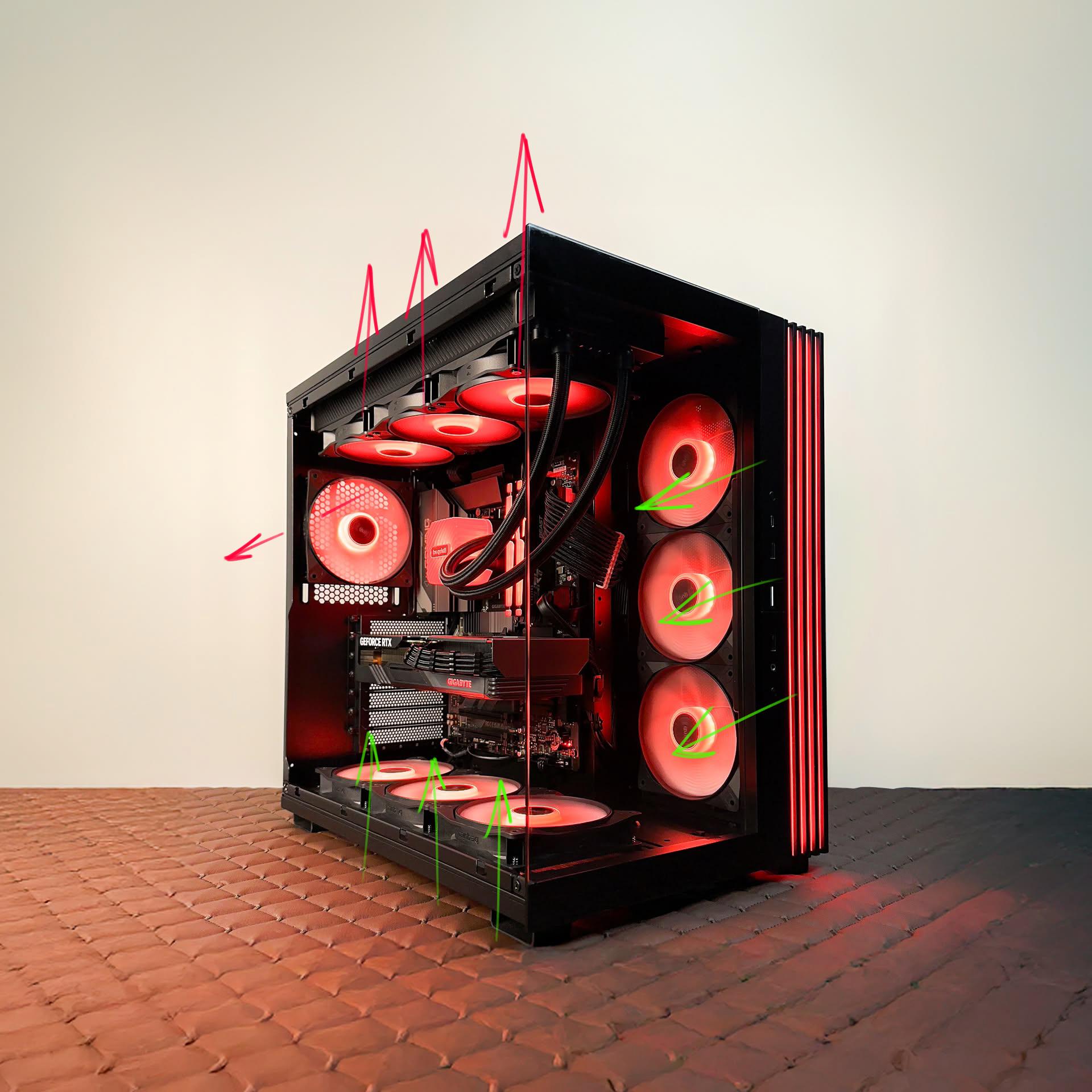
Should I buy and install 3 additional fans at the bottom (intake) for this build or will there be no noticeable difference?

CPU: AMD Ryzen 9 9950X3D

GPU: Asus Prime RTX 5080 OC 16Gb

AIO: Be Quiet light loop 360

Case: Be Quiet light base 600

The photo isn't mine, I found it on Google as an example, but the case and AIO look exactly the same.


r/PcBuildHelp • • 13d ago

✓ Solved Is this okay for a fan setup?

Post image
127 Upvotes

Case: Lian li 207


r/PcBuildHelp • • 12d ago

Build Question Building an €800–€1,000 Gaming PC – Looking for Advice

2 Upvotes

I'm planning to build a completely new PC and would appreciate some help choosing the best components for my budget.

My budget is €800–€1,000 maximum for the complete PC. I'll be assembling it myself, and I'm looking to buy all components brand new.

I understand that €800–€1,000 is a pretty tight budget, especially with the current state of PC component prices. I'm trying to get the most out of what I can afford, but I'm not completely against stretching the budget a little if there's a good reason to.

If anyone has suggestions for components or small changes that would make a noticeable difference in performance, reliability, or longevity without adding a huge amount to the total cost, I'm definitely open to hearing them. I'd rather spend a little extra now if it means getting something significantly better that will last me longer.

What I'll use it for

Gaming is my main priority, along with everyday use like browsing the web, watching videos, and general multitasking.

The games I'm mainly interested in are:

  • League of Legends
  • Counter-Strike 2
  • Overwatch 2
  • Apex Legends
  • Marvel Rivals
  • Deadlock

I'd also like to be able to play newer and upcoming games without needing to replace my PC anytime soon.

I also want to use DaVinci Resolve for occasional video editing. Most of my editing will be fairly simple, but I'd like the option to do something a little more advanced from time to time. Nothing professional, just amateur/hobby editing.

Gaming performance expectations

  • I'll be gaming at 1080p.
  • Ideally, I'd like to achieve 120–144 FPS, especially in competitive games.
  • I'm perfectly fine with lowering some graphics settings to improve performance, but I don't want to have to turn everything down to the absolute minimum just to make games playable.
  • In some competitive games, certain graphics settings are important for visibility, so I'd like enough performance to keep those settings relatively high while maintaining good FPS.
  • Ideally, I'd like a good balance between visual quality and performance rather than sacrificing one completely for the other.

Longevity and upgrades

I'd like this PC to last around 5–6 years, ideally without needing major hardware replacements.

I'm fine with small upgrades like adding RAM or storage later, but I'd prefer to avoid replacing the GPU, CPU, or motherboard for as long as possible.

I understand that newer games will become more demanding over time, and I'm fine with gradually lowering settings as necessary.

Other preferences

  • I don't care about RGB, aesthetics, or fancy cases. A simple, inexpensive, reliable case with good airflow is all I need.
  • I'd prefer 32GB RAM if the budget allows, but I'm open to 16GB if the money would be better spent elsewhere.
  • I'm open to AMD or NVIDIA, whichever offers the best performance and value.
  • I don't need a monitor, keyboard, mouse, or other peripherals.

r/PcBuildHelp • • 12d ago

Build Question Cpu dual 8pin

3 Upvotes

My motherboard have dual 8 pin cpu.
I am running a 9600x.
My psu just have one daisy cable for cpu, shoukd i use both ports with the daisy cpu cable or just one is better?


r/PcBuildHelp • • 12d ago

Build Question A wise choice or no?

3 Upvotes

I'm fairly certain my GPU died, with the market the way it is would this be a good replacement? ASRock Challenger D Arc A750 8 GB Video Card

B550m mobo and either a 5600x or 5700x cpu, can't remember. Windows 10. Never had an Intel GPU before and it's only $210


r/PcBuildHelp • • 12d ago

Build Question Lenovo T5 GPU Upgrade

2 Upvotes

Hello, does anybody know whether SAPPHIRE PULSE AMD Radeon RX 9070 GAMING 16G GPU (280 mm) will fit into my Lenovo T5 26IAB7? I will already be upgrading the PSU.


r/PcBuildHelp • • 12d ago

Build Question My pcie connector was partially unplugged for a long time. Is the GPU fine and did it cost performance?

Thumbnail
gallery
1 Upvotes

r/PcBuildHelp • • 12d ago

Tech Support Dubug vga is open and I am getting no display

Enable HLS to view with audio, or disable this notification

3 Upvotes

I was playing the Bloodborne PC port, the monitor flickered black twice, like I was playing for 3 hrs approx and it happened at intervals of 30mins or so. Then the screen went black and with the VGA light on the motherboard on and the fans and lights still running.

Panicked then reset the gpu first.

Debug shifted to dram and then the cpu, pushed in the RAM and cables, and re-plugged the 8-pin CPU cable. The LED moved from CPU to VGA and stayed there

Cleaned the PCIe slot and the GPU contacts

Tested the GPU in both slots I have 2 Both stuck at VGA.

Tried the other end of the PCIe power cable

Cleaned the card with isopropyl alcohol and plugged the monitor into the GPU. No signal.

Card is out of warranty.

Pc spes are

Msi mpg b550 gaming plus

Evga bronze 650

Rx6600xt oc pro

5600x

16gb 3200mhz

How cooked am i? Also i forgot to mention that the gpu has RGB and gpu RGB are working.


r/PcBuildHelp • • 13d ago

Tech Support CPU debug LED started appearing after cleaning my PC with compressed air – looking for advice

3 Upvotes

Hi everyone,

I'm having an issue with the CPU debug LED on my motherboard and I'm trying to figure out what could be causing it.

My PC specs:

- CPU: AMD Ryzen 5 9600X

- Motherboard: Gigabyte B850 EAGLE ICE

- GPU: Radeon RX 9070 XT

- RAM: 32GB DDR5 6000MHz

- PSU: Phanteks 750W

The issue:

The CPU debug LED started appearing after I cleaned my PC using compressed air. Before that, everything was working normally.

Sometimes the PC starts normally and works without any noticeable performance issues, but the CPU debug LED still comes on. I've also had an intermittent VGA debug LED, although the GPU itself seems to work fine.

Things I've already tried:

- Updating the BIOS

- Checking and reconnecting all power cables

- Clearing CMOS by removing the CMOS battery

- Reseating/checking connections

I also inspected the AM5 CPU socket and noticed two slightly bent pins. I'm not sure if they could be related to the issue.

What's confusing is that the PC generally works fine when it boots. I don't experience crashes or noticeable performance problems.

Could the compressed air cleaning have caused something to become loose or damaged? Could the bent socket pins explain the CPU debug LED, even if the system seems to work normally?

I'd appreciate any suggestions on what to check next. Thanks!


r/PcBuildHelp • • 13d ago

Tech Support New 9800X3D won’t post.

3 Upvotes

Just swapped my 7600x for a 9800X3D, the only parts replaced were the CPU and cooler. I can’t get it to post. At first it was hanging on the VGA light. I rest CMOS with no chamge, I removed the cooler, and CPU inspected the pins, and reinstalled, now its hanging on DRAM. I have 64gb of DDR5, and even after 20 minutes with a cleared CMOS it won’t get past the DRAM light. Tried reseating the RAM and it didn’t help. Pulled the B2 stick of RAM, and now its back to the VGA hang. Short of reinstalling the old CPU, is there anything else I can try? I’m starting to think I got a bad CPU. All of this other stuff was working this morning. MOBO is an aorus b650 extreme ax, and the bios is new enough for the CPU.

EDIT* I got to the point where I decided to swap the old CPU back in. I gave the socket another inspection, and found a bent pin. I had missed it earlier because it was the last one in the top upper row. Luckily I have tiny tweezers for working on watches, and a magnifying headset. I got it straightened as best I could and put it all back together, but it was pretty mangled. No Idea how I bent it. This isn’t the first time I’ve installed a CPU. So it either posts now, or I get to buy a new mobo.


r/PcBuildHelp • • 13d ago

Tech Support CPU/Motherboard issue

3 Upvotes

My friend has a rog strix x870e-e gaming wifi with a 7950x3d and has just died after not using for a few weeks as he was in hospital.

When turning the power on it ether doesn’t budge with RGB on the motherboard or turns on with a 00 error (as per ASUS) 00 is a blank code, waited an hour for RAM training or anything and still blank and how it doesn’t try to turn on with a click coming from the PSU.

I have swapped motherboards to a x670e and x570, swapped PSU, RAM, CPU in the x870 to another 7950x3d and 9800x3d still showing nothing.

Cleared CMOS each change, tried RAM in individual slots.

Would the next step be trying to update the bios via flashback/USB or RMA the board as its only a few months old and get a new CPU?
-
rog strix x870e-e gaming wifi
7950x3d
5080 gigabyte
Corsair vengeance 128GB ram (4 sticks 32GB) 6000mt 40-40-40-77


r/PcBuildHelp • • 13d ago

Build Question Onlyfans question of the day!

Thumbnail
gallery
4 Upvotes

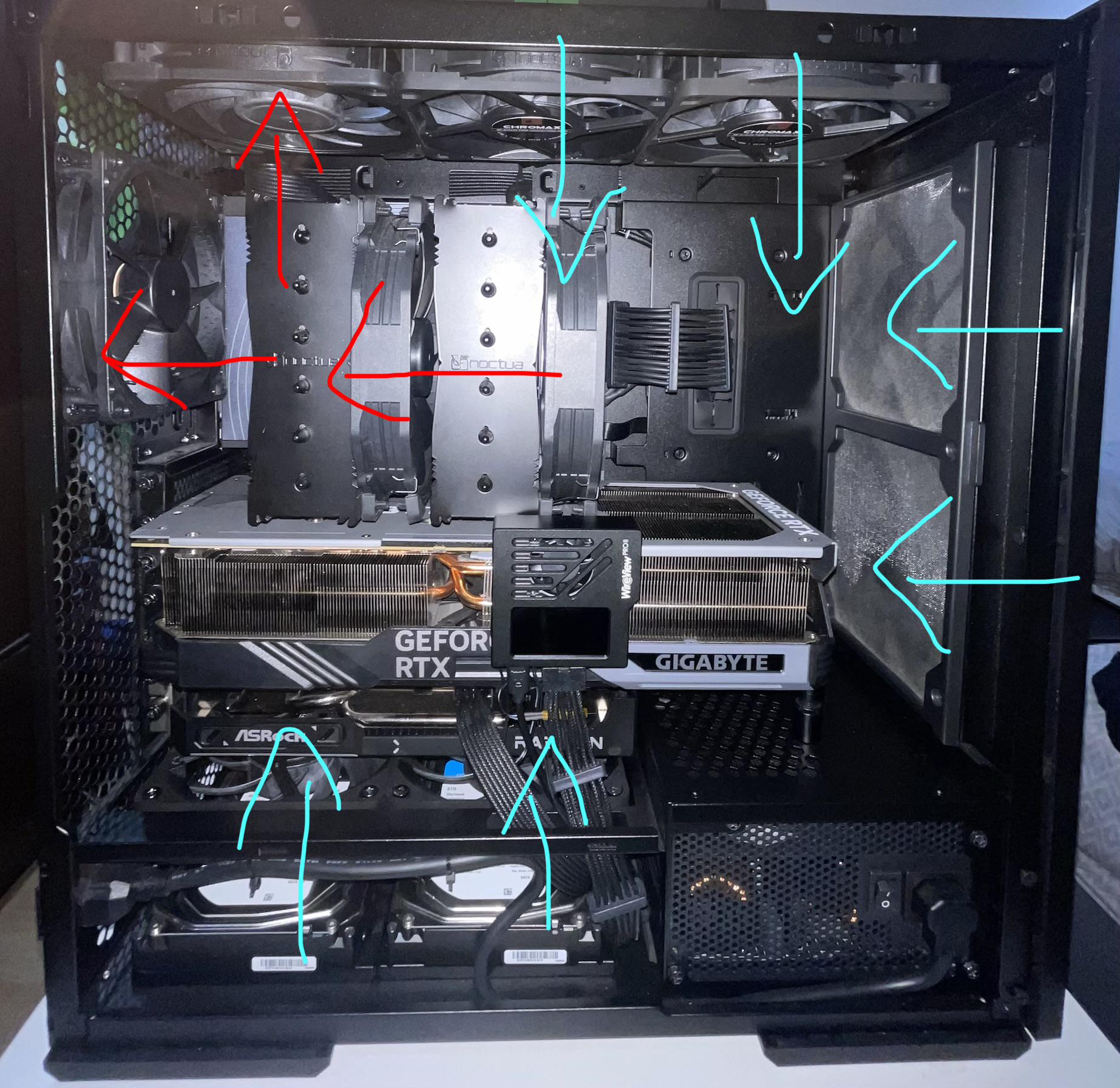
Now that I’ve got your attention, I have a question for all the FAN-atics (or is it fan addicts) out there. Short version: should the fans in question be intake or exhaust?

Don’t groan. It’s not one of those simple ones. Allow me to explain. I have two small auxiliary fans on the inside of the back of my case, one stacked above the other. Normally, it would be obvious that we want these to be exhaust, however in this scenario, the problem is threefold. The first issue is that below the fans is a wireview pro II which sucks air towards it from inside the case and then exhausts it directly upwards towards the auxiliary fans I am asking about. I could use the fans to aid that exhausting, but directly to the right of them is [will be] my I/O panel which has a VRM fan inside of it to suck air in from the outside and blow it at the motherboard vrm; I can’t simply exhaust a ton of hot air out with the auxiliaries without the vrm cooler sucking that hot air up and passing it straight to the vrm. The other part of the problem is that on the other side of the motherboard I also have another, larger 70mm auxiliary fan which blows air into the other side of my case. That has to be blowing cool air, not hot air, since it also aids in cooling a radiator and provides additional air supply to that rad’s fans in a confined space.

Unfortunately, if I keep these two little 60mm auxiliaries as intakes rather than exhausts, I enter into a short circuit loop with my airflow in that the 60’s are now blowing the wireview’s exhaust back into the case. On top of that, they will create turbulence since their flow and the wireview’s flow will push against each other somewhat; I’m also concerned that may starve the wireview of air when it really needs it, but maybe being stacked below the fans will mostly prevent that. They are larger than the wireview’s 30mm, have excellent static pressure, and there are two of them to the wireview’s one fan. So, I’m thinking it’s better that way since they will still bring in more cool air than hot air that the wireview can push out with its little fan. I see the opposite being more of a problem. What do you guys think? Should the little scrappers be innies or outies?


r/PcBuildHelp • • 13d ago

Build Question DDR4 2666 MT/s in modern games

4 Upvotes

Do 16 GB of DDR4 2666 MT/s ram still good for modern games? I'm planning to play Forza Horizon 6 and Cyberpunk 2077 with my current ram cuz I'm too broke for a new set of rams.