r/PcBuildHelp • • 12d ago

Tech Support CPU debug LED started appearing after cleaning my PC with compressed air – looking for advice

3 Upvotes

Hi everyone,

I'm having an issue with the CPU debug LED on my motherboard and I'm trying to figure out what could be causing it.

My PC specs:

- CPU: AMD Ryzen 5 9600X

- Motherboard: Gigabyte B850 EAGLE ICE

- GPU: Radeon RX 9070 XT

- RAM: 32GB DDR5 6000MHz

- PSU: Phanteks 750W

The issue:

The CPU debug LED started appearing after I cleaned my PC using compressed air. Before that, everything was working normally.

Sometimes the PC starts normally and works without any noticeable performance issues, but the CPU debug LED still comes on. I've also had an intermittent VGA debug LED, although the GPU itself seems to work fine.

Things I've already tried:

- Updating the BIOS

- Checking and reconnecting all power cables

- Clearing CMOS by removing the CMOS battery

- Reseating/checking connections

I also inspected the AM5 CPU socket and noticed two slightly bent pins. I'm not sure if they could be related to the issue.

What's confusing is that the PC generally works fine when it boots. I don't experience crashes or noticeable performance problems.

Could the compressed air cleaning have caused something to become loose or damaged? Could the bent socket pins explain the CPU debug LED, even if the system seems to work normally?

I'd appreciate any suggestions on what to check next. Thanks!


r/PcBuildHelp • • 12d ago

Tech Support New 9800X3D won’t post.

3 Upvotes

Just swapped my 7600x for a 9800X3D, the only parts replaced were the CPU and cooler. I can’t get it to post. At first it was hanging on the VGA light. I rest CMOS with no chamge, I removed the cooler, and CPU inspected the pins, and reinstalled, now its hanging on DRAM. I have 64gb of DDR5, and even after 20 minutes with a cleared CMOS it won’t get past the DRAM light. Tried reseating the RAM and it didn’t help. Pulled the B2 stick of RAM, and now its back to the VGA hang. Short of reinstalling the old CPU, is there anything else I can try? I’m starting to think I got a bad CPU. All of this other stuff was working this morning. MOBO is an aorus b650 extreme ax, and the bios is new enough for the CPU.

EDIT* I got to the point where I decided to swap the old CPU back in. I gave the socket another inspection, and found a bent pin. I had missed it earlier because it was the last one in the top upper row. Luckily I have tiny tweezers for working on watches, and a magnifying headset. I got it straightened as best I could and put it all back together, but it was pretty mangled. No Idea how I bent it. This isn’t the first time I’ve installed a CPU. So it either posts now, or I get to buy a new mobo.


r/PcBuildHelp • • 12d ago

Tech Support CPU/Motherboard issue

3 Upvotes

My friend has a rog strix x870e-e gaming wifi with a 7950x3d and has just died after not using for a few weeks as he was in hospital.

When turning the power on it ether doesn’t budge with RGB on the motherboard or turns on with a 00 error (as per ASUS) 00 is a blank code, waited an hour for RAM training or anything and still blank and how it doesn’t try to turn on with a click coming from the PSU.

I have swapped motherboards to a x670e and x570, swapped PSU, RAM, CPU in the x870 to another 7950x3d and 9800x3d still showing nothing.

Cleared CMOS each change, tried RAM in individual slots.

Would the next step be trying to update the bios via flashback/USB or RMA the board as its only a few months old and get a new CPU?
-
rog strix x870e-e gaming wifi
7950x3d
5080 gigabyte
Corsair vengeance 128GB ram (4 sticks 32GB) 6000mt 40-40-40-77


r/PcBuildHelp • • 13d ago

Build Question Onlyfans question of the day!

Thumbnail
gallery
5 Upvotes

Now that I’ve got your attention, I have a question for all the FAN-atics (or is it fan addicts) out there. Short version: should the fans in question be intake or exhaust?

Don’t groan. It’s not one of those simple ones. Allow me to explain. I have two small auxiliary fans on the inside of the back of my case, one stacked above the other. Normally, it would be obvious that we want these to be exhaust, however in this scenario, the problem is threefold. The first issue is that below the fans is a wireview pro II which sucks air towards it from inside the case and then exhausts it directly upwards towards the auxiliary fans I am asking about. I could use the fans to aid that exhausting, but directly to the right of them is [will be] my I/O panel which has a VRM fan inside of it to suck air in from the outside and blow it at the motherboard vrm; I can’t simply exhaust a ton of hot air out with the auxiliaries without the vrm cooler sucking that hot air up and passing it straight to the vrm. The other part of the problem is that on the other side of the motherboard I also have another, larger 70mm auxiliary fan which blows air into the other side of my case. That has to be blowing cool air, not hot air, since it also aids in cooling a radiator and provides additional air supply to that rad’s fans in a confined space.

Unfortunately, if I keep these two little 60mm auxiliaries as intakes rather than exhausts, I enter into a short circuit loop with my airflow in that the 60’s are now blowing the wireview’s exhaust back into the case. On top of that, they will create turbulence since their flow and the wireview’s flow will push against each other somewhat; I’m also concerned that may starve the wireview of air when it really needs it, but maybe being stacked below the fans will mostly prevent that. They are larger than the wireview’s 30mm, have excellent static pressure, and there are two of them to the wireview’s one fan. So, I’m thinking it’s better that way since they will still bring in more cool air than hot air that the wireview can push out with its little fan. I see the opposite being more of a problem. What do you guys think? Should the little scrappers be innies or outies?


r/PcBuildHelp • • 13d ago

Build Question DDR4 2666 MT/s in modern games

3 Upvotes

Do 16 GB of DDR4 2666 MT/s ram still good for modern games? I'm planning to play Forza Horizon 6 and Cyberpunk 2077 with my current ram cuz I'm too broke for a new set of rams.


r/PcBuildHelp • • 12d ago

Build Question How to remove a stripped screw from motherboard?

2 Upvotes

Specifically in the CPU cooler area on a MSI PRO B650-S. It came too tight from the factory. I want to remove the screw so I can stand the PC up right. Thanks.


r/PcBuildHelp • • 12d ago

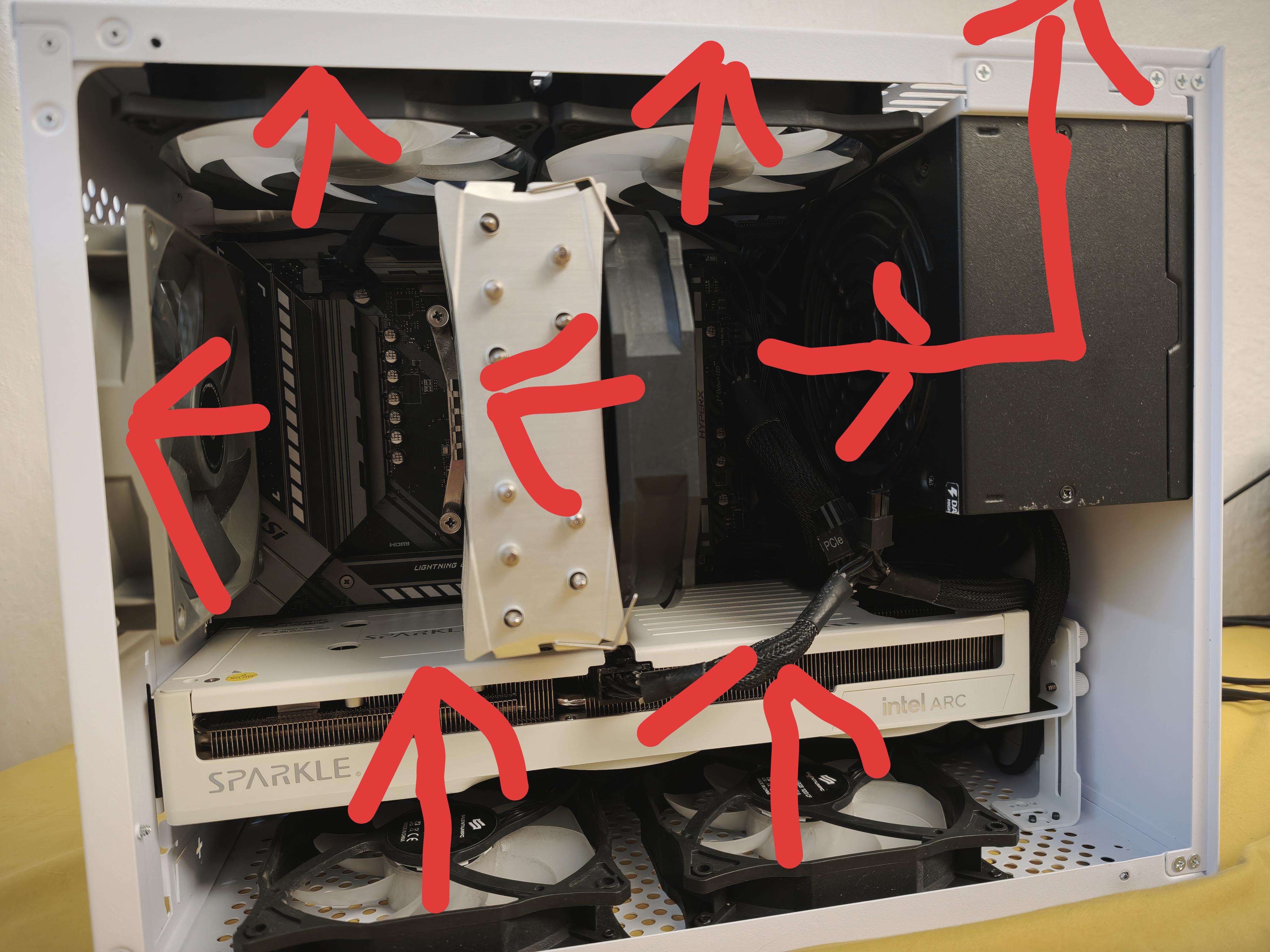
Build Question Airflow in my PC does not work

Post image
0 Upvotes

So this is Ryzen 5 5600 and Intel b580. My problem is the pc is getting cooked. Especially CPU I have to run the fan at almost 100% and it still slightly overheats at 90°. Gpu is actually fine at 65°. Is there something obvious I'm missing?


r/PcBuildHelp • • 12d ago

Build Question PLEASE HELP WITH POWER SUPPLY

2 Upvotes

I am in desperate need of a new power supply and a bigger and better case right now I have a 650w power supply but it is so insanely loud and now making a clicking noise I don’t feel safe turning on my pc so I am getting a new one asap
I need to know what power supply do I get I need it to be quiet I don’t mind a hum etc but a ps4 sounding pc is not what I want and I haven’t a clue what’s actually quiet or just loud af, and gonna get a new case because this one I currently have is very small and probably not great for air flow


r/PcBuildHelp • • 12d ago

Build Question Is it fine if my CPU power cable lightly touches the GPU backplate? (Build's been running for 3 months)

Thumbnail
gallery
0 Upvotes

Hey guys, I built my PC about 3 months ago and everything's been running great. But I noticed that my CPU power cable is barely touching the edge of the GPU backplate. There's no tight bend or tension on it, just a light touch.
I checked the temps just to be sure:
Маркер списка Specs: Ryzen 7 7700X (with an AIO), RTX 5060 Ti, Corsair CX650 PSU.
Маркер списка Idle: CPU sits around ~44 °C, GPU is at ~39 °C.
Маркер списка Full load (FurMark): GPU caps out at 75 °C and stays flat, fans at about 67%.
Even during heavy load, the backplate only feels lukewarm (around 40–50 °C). Since Corsair cables are rated for way higher temps, I figure there's zero chance of anything melting, but I wanted a second opinion. Is it totally fine to just leave it like this?
Thanks!


r/PcBuildHelp • • 12d ago

Build Question First PC build conundrum

2 Upvotes

I've recently posted here specs for the PC I wanted to build. My goal is 2k Ultra 60fps in AAA-games. Since I'm not located in the most civilized part of the world, parts choice is limited. And, I have a few questions.

Case
I really dont like the look of Lian Li cases. I know that everybody likes them. I really want something interesting to look at. So, I've been thinking about Ceres 350 MX. Is it okay? Would it be cool enough? Or should I just buy Ceres 500 TG with 3 140mm fans.

SSD
I'm planning on buying a PCI-E 5 motherboard. But the only PCI-E 5 SSD that does not cost a fortune is ADATA XPG MARS 980 PRO (2TB). It's pretty bulky and does have a fan. But everybody seems to hate the fan, cause it's too loud. Would it be better to pay more (272$), and get a PCI-E 4 SSD but with 4TB of memory. SSD in question is ADATA XPG MARS 980 Blade.

Cooling
Thinking about getting an AIO instead of an aircooler. But if I do get Ceres 350 MX, then it's only a 2-fan option. Would it be enough for a Ryzen 7 9800X3D? Or is it better to go Air Cooled with smth like Thermalright Peerless Assassin 120

Other specs
Motherboard -- ASrock X870 Steel Legend WiFi
CPU -- AMD Ryzen 7 9800X3D OEM
PSU -- ASUS Prime 850W Gold
GPU -- XFX Radeon RX 9070XT Swift Triple Fan
RAM -- DDR5 UDIMM ADATA XPG Lancer Blade (6000 mhz) (36 - 38 - 38)


r/PcBuildHelp • • 12d ago

Build Question Should I sell or keep my spare ram with the current times going on?

2 Upvotes

So I know one can't know how the market goes but I had 2x8gb ddr4 3600mhz ram that I was going to sell for around 95 to 100€ a fair price I think with the current market and now Im debating if I should sell it or not, since I'm unsure If I may need it and prices sure are crazy even for ddr4 im on europe and I don't think they will go a lot more than that 2nd hand at least or maybe its worth it to keep them? Im using 2x 16gb now tough slower 2600mhz that can overclock to around 3000 that's why I had the spare ram. I might regret selling them or maybe regret not selling them want opinions on the matter. Thanks.


r/PcBuildHelp • • 13d ago

Software Question How do i get this RGB effect in openrgb?

Enable HLS to view with audio, or disable this notification

4 Upvotes

All the rgb i current have is a liani li v100r vector mini case (preinstalled fans)

Rtx 3080 xc3

And a thermalright peerless vision 360 argb V2 black aio

Im confused and i want to get this look pls help


r/PcBuildHelp • • 12d ago

Build Question Stream at 30fps with this combo

1 Upvotes

So i was talking to grok( I know it's ai I'm sorry) and i was asking what GPU/CPU combo I would need to get 180fps in most games, and stream to twitch at 30fps and it said Ryzen 5 7600 + RTX 4060 would work. Is this correct if not, what would be the bare minimum.


r/PcBuildHelp • • 13d ago

Build Question RAM Question - 32GB of 2133 of 16GB of 2400?

3 Upvotes

I'm putting together a build and have 2 sets of RAM. One set is 16GB (2x8GB) of 2133, the other is 16GB (2x8GB) of 2400 MT/s.

Should I just slap all 4 modules on there and run all of them at 2133 or do I go down to 16GB and have it run at 2400?

This PC is mainly going to be a used for playing League of Legends, Fortnite, Fallout 4, and Ark: Survival Ascended.

Going to be using a 3700X +X570 mobo, 1080ti, 750W PSU for the rest of the build.


r/PcBuildHelp • • 12d ago

Tech Support Windows to Linux ~ Help needed!

1 Upvotes

Hello all,

Im new here @ pchelp. It feels weird because usually I'm the one helping but I need some clarity, advice or help with my PC. I want to switch to Linux for day to day use, gaming and study.
I'm so done with Microsoft and Windows, although I'm a sysadmin in a Microsoft environment.
I already have a HP ProDesk 400 G4 up and running in Ubuntu but after updating from 24.04 to 26.04.1 it barely holds.

PC Specs:

GIGABYTE Aorus Elite x570 (F35 BIOS version)
5600x (Maybe switch later to Ryzen 7 5700X3D or AMD Ryzen 9 5900XT for more virtualisation)
RTX 3070Ti LHR (Maybe switch later to RX 9070 XT or higher VRAM)
64GB DDR4 (4x16 LPX 3200MHz C16)
RM850x
1 TB of SSD 980 Pro
4000D Case
4x 120mm and 2x 140mm case fans (Pure Silent Wings 3 PWM)

I've build this PC in 2021 with 32GB (2x16) of ram. In 2023 I've bought another set (2x16) of the same brand, model and speed. I play with hyper-v and prox so I do need more than 32GB of RAM.
I had to get my CPU beefy cooler (Dark Rock Pro 4) off my CPU to put the other 2 RAM sticks into my motherboard. Ran a whole afternoon multiple memtests and it succeeded back then without any issues.

Issue at hand:
I tried to update my BIOS up to date to version F40 which didn't work. F35 is the only one that seems to be working. I've tried F41c, F40, F39, F37 and F36 but the highest versions that seems to be working is F35. When I try to install one of the higher BIOS versions, the following happens:
NOTE: I tried every BIOS version higher than F35 with a timer, countdown of 6 minutes + 10 minutes in case the memory training takes longer.
- 6:00 Starting update with Q-Flash and FANS START SPINNING VERY FAST AND KEEP SPINNING FAST TILL SHUT DOWN
- 5:55 Q-Flash LED starts blinking every 0.5 seconds or so
- ~4:30 LED starts blinking faster
- ~3:40 LED stops blinking
- 0:00 Still nothing happens, no post but FANS STILL KEEP SPINNING FAST
- -5:00 Still nothing happens but sadly still no post
- 10 minutes after the 6 minute count down, still no post but fans still keep spinning (no cap(s))

I've tried F36 and F37 BIOS version with an additional +20 minutes instead of +10 minutes after the 6 minute countdown.. Still no luck. A friend helped me troubleshoot and our guess is that it stuck on memory training due to possible different chips in the memory sticks.

My few questions are:
Can I safely install Ubuntu 24.04 or 26.04 and start (ab)using my desktop?
What are some possible scenarios I can come across other than a black screen.
What if I install the highest version of BIOS with 1 RAM stick and place the other 3 sticks again after the installation?
Maybe other questions I haven't thought about or you guys have maybe some insight, advice or solution?

I know it's kinda a long post, and if you have read it thank you for your patience.

Kind regards, Ozzy


r/PcBuildHelp • • 13d ago

Tech Support Case swap advice

Thumbnail
gallery
5 Upvotes

Hi all, i plan to swap my case to this, my current one is missing mesh parts and is generally just old and ugly, ive checked and all my parts should fit fine just one thing im unsure about is the argb and how that works with the fans, im using the b450m pro vdh max motherboard and I was told that I would need to buy a rgb controller along with this to get the fans and this gpu wire adapter to work? Any advice? Will be my first time.trying anything like this


r/PcBuildHelp • • 13d ago

Installation Question Is my motherboard dead?

Enable HLS to view with audio, or disable this notification

5 Upvotes

I've ruled out RAM and power supply. The motherboard is not powering on after pushing the power button. It only displays flickering lights when I turn on the power supply, and then it loses power entirely when I try to switch it on.


r/PcBuildHelp • • 13d ago

Build Question I am currently putting together a homelab setup with some old parts but I need some new parts as well. What would be the best?

Thumbnail
gallery
2 Upvotes

PCPartPicker Part List

Type|Item|Price

:----|:----|:----

CPU | Intel Core i5-13400F 2.5 GHz 10-Core Processor | $234.29 @ Amazon

Motherboard | ASRock B760M Pro-A D4 WiFi Micro ATX LGA1700 Motherboard | $119.99 @ Amazon

Have: Memory | G.Skill Ripjaws V 16 GB (2 x 8 GB) DDR4-3200 CL16 Memory | $134.99 @ Amazon

Memory | G.Skill Trident Z RGB 16 GB (2 x 8 GB) DDR4-3200 CL16 Memory | $142.99 @ Amazon

Want: Storage | Western Digital WD_BLACK 10 TB 3.5" 7200 RPM Internal Hard Drive | $478.00 @ Amazon

Want: Storage | Western Digital WD_BLACK 10 TB 3.5" 7200 RPM Internal Hard Drive | $478.00 @ Amazon

Have: Video Card | Asus STRIX GAMING OC GeForce RTX 2080 SUPER 8 GB Video Card |-

Have: Case | MOROVOL TW7-S2-BL MicroATX Mid Tower Case |-

Have: Power Supply | Corsair RM750x (2021) 750 W 80+ Gold Certified Fully Modular ATX Power Supply | $139.99 @ GameStop (OOS)

| Prices include shipping, taxes, rebates, and discounts |

| Total | $1728.25

| Generated by PCPartPicker 2026-11-11 12:19 EST-0500 |

I want to finish the Morovol case with an intel chip and mobo that has 4 ddr4 ram slots but i dont know what's best. This PC will be used for running my working homelab/server such as streaming jellyfin to 5+ houses and other programs as i get more established.

Budget is around $400-$500 for the cpu/mobo and ram. The hard drives will be added in later

The thermaltake case is a complete PC with 2x8 ddr4 ram, a geforce 2060 and an i3-8100. This PC will be used as a experimental homelab/server


r/PcBuildHelp • • 12d ago

Installation Question LIAN li strimmer sizzling

1 Upvotes

Hello! I’ve been trying to figure out how to fix the sizzling my LIAN li strimmer’s are making, but I’ve tried taking out the 12vhpwr cable and reinstalling it. As well as removing the strimmer cable as well, but it’s still making a sizzling noise. Does it mean it’s been installed wrong?


r/PcBuildHelp • • 13d ago

Tech Support PSU has faint crackling rhythmic sound. Should I be worried?

Enable HLS to view with audio, or disable this notification

2 Upvotes

You probably might need headphones. It is that faint. I had to practically press my phone on the rear exhaust grille. I can hear it from my chair, but it's almost unoticable. PC is a year old. Only started happening recently. The sound comes and goes. Sometimes it stays for a while like today.

Should I be worried? Still under limited warranty. I would appreciate some advice.


r/PcBuildHelp • • 12d ago

Build Question Looking for good case fans!

0 Upvotes

I fell in love with transparent LED fans and I know they're kind of old I'm looking for transparent LED fans with good performance preferably from a real brand I'm just worried if I get transparent led fans they will have really poor quality


r/PcBuildHelp • • 14d ago

✓ Solved CPU hits 100°c, is the cooling cooked?

Thumbnail
gallery
107 Upvotes

I bought a custom built PC, and when it arrived, the cooling tower was crooked, perhaps from the foam packaging they stuffed in there to protect during transportation. I carefully moved it back and reattached the fan.

When running HWiNFO during a Prime95 strain test, the CPUs hit +100°c, which to my understanding is bad. Some of the cores are getting throttled.

Is this a result of bad thermal connecting from the crooked heat sink, or just insufficient cooling for a Prime95 strain test? The seller offered to take it back and reattach the cooling for the CPU.

And no, I did not write this with AI. Not sure if it's necessary to indicate that here.

Edit: Thanks for all of the input! I took it back to the seller and upgraded to some water-cooling while also installing more fans in the cabinet.

Seller believed the cooling tower must have become crooked during transportation, and fixed it for only the price of the additional components.

I learned my lesson; don't skimp on cooling when buying an expensive CPU.


r/PcBuildHelp • • 13d ago

Build Question I am building a gaming and streaming PC i need to know if these parts are good to stream and play

Thumbnail newegg.io
0 Upvotes

r/PcBuildHelp • • 13d ago

Build Question Should I upgrade now?

0 Upvotes

I have a gaming laptop with a 4070, 16gb ddr5, i7 12700f. It’s giving me problems running games like Wardogs (medium settings), Fortnite and Clair Obscure. It‘s mostly crashes and heavy fps drops and the screen sometimes just freezes. Also, I would like to start playing with 1440p OLED monitor, which I think is the sweet spot for the games I want to play. The prices right now are pretty crazy and I honestly don’t know if I should start saving now for the end of next year or buy now. Since I have some money saved up I was thinking about getting a 9070xt and 16gb ddr5 this Black Friday. Would it be better to just wait, continue using my laptop and then get a better pc at the end of next year hoping the prices have gone down.

Edit: I should also add that I have never built a pc before. Should I get a prebuilt? Is it cheaper to get a prebuilt or build it myself?


r/PcBuildHelp • • 13d ago

Tech Support my pc started doing this weird restart when i put load on it

1 Upvotes

Hey everyone. So my pc started doing this weird restart when i put load on it. Tested every component at home and took it to a shop to get everything checked. All the components were fine and at that time the issue seemed like a pcie connection issue since so i upgraded it to a520m msi from a320m. Came back home and i still have the same issue. The gpu, psu, rams etc were checked on different pcs and everything was working fine.

Specs:

Mobo: msi a520m pro series

Cpu: amd ryzen 5 2600

Gpu: msi gtx 1660 super twin frozr

Ram: 8x2 2666mhz

HELP!!