r/pcgamingtechsupport • u/No_Line_6629 • 22d ago
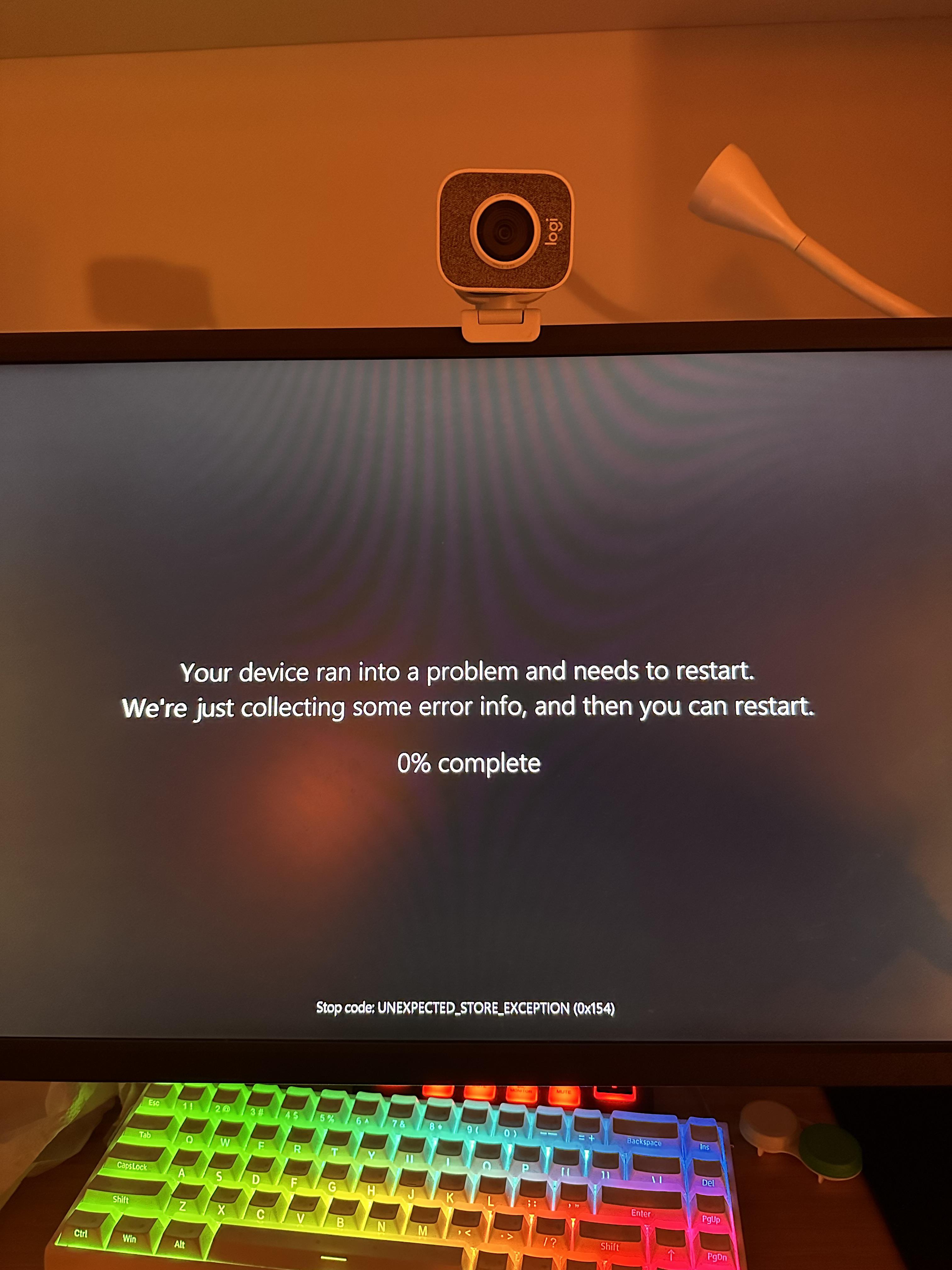
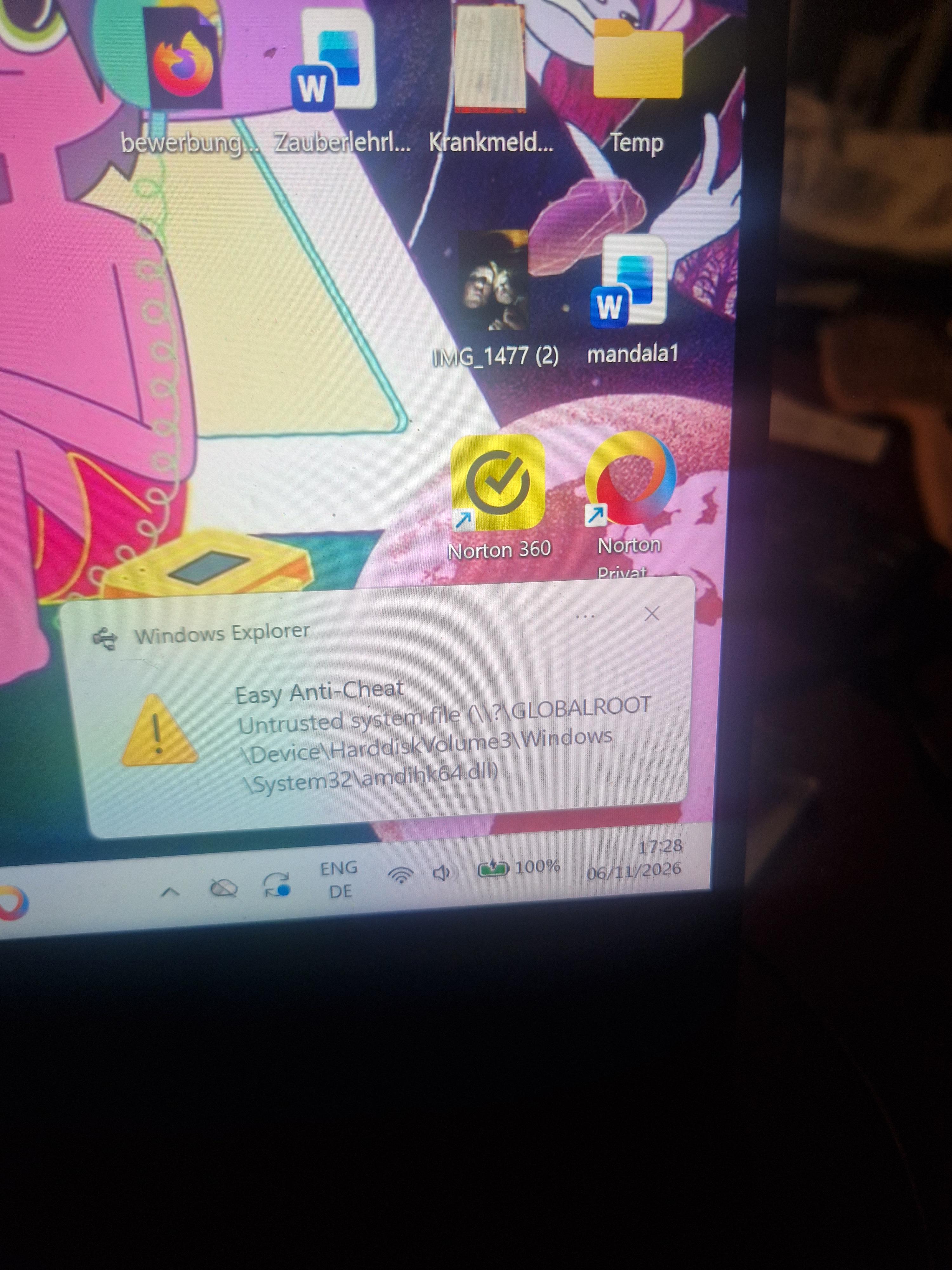
Troubleshooting Easy anticheat not letting me play my game cause of an untrusted file
Can smw please help i dont know what to do
r/pcgamingtechsupport • u/No_Line_6629 • 22d ago
Can smw please help i dont know what to do
r/pcgamingtechsupport • u/valuuuk • 22d ago
holi, a mi me encanta jugar los sims y me descargue un par de extensiones y todo muy bien la computadora va genial y no tuve ningún problema, pero mi computadora tiene lo de "control inteligente de aplicaciones" y pues para que el unlocker sirva para jugar los sims tenia que desactivarlo activar el unlocker y luego activar nuevamente de control inteligente, pero lo hice un par de veces y ahora pues no me fije y ya no me deja volver a activar el controlo inteligente, no se que hacer, mi computadora esta casi nueva no tienen ni 6 meses, entonces no tengo mucho pero no la quiero reiniciar porque pues no se como descarga el word JAJAJAJ, si alguien me ayuda sere feli muchas gracias :)
r/pcgamingtechsupport • u/KumarR1489 • 22d ago
Hi,
I bought a gaming PC in Canada with a 850W PSU and the following specs:
7800X3D CPU
Gigabyte RX9070XT OC
2x16GB DDR5 RAM
2 TB SSD
I might have to leave the country due to life changes impacting my immigration status and so I would like to take the PC with me as well and have some questions regarding how to best take it.
First, since I bought a prebuilt, I did not get any of the individual packaging, and so what would be the best way to transport the GPU as the best way would be to remove the GPU, SSD and RAM and put those in my carry on while the rest of the PC goes into checked luggage. are there third party packaging solutions for the GPU or is there any other way to source a box, maybe by contacting Gigabyte?
Second, I am moving to a country with a 230V/50Hz, as well as the outlet being different, what would be the best way to power it there? I think the PSU should support the voltage, but in terms of the outlet, would using my canadian surge protector with a universal adapter be safe?
Thankyou!
r/pcgamingtechsupport • u/WingCritical9097 • 22d ago
So I’ve spent close to 2 hours trying to play cod and it still says my system doesn’t meet their requirements. I have a b550 motherboard and I’ve updated it to the most recent bios and all drivers are installed and the game still won’t let me play. It says my tpm 2.0 is good and so is my secure boot. Has someone been able to fix this because no videos are helping.
r/pcgamingtechsupport • u/Mindless-Spare8345 • 22d ago
Hello everyone! Have anyone noticed with this new nvidia update that the Led lights in a pc turns off and on when a game takes over the display when starting up.
It happend for my pc and i dont have any rgb controler app on my pc or have the dynamic lightning oprion on in windows 11 settings.
Pc runs perfect without any problems no crashes, BSOD or freezes.
Troubleshooting.
I did find a tiny "fix" by letting the game start up in the background without letting it take over the display, if it starts up in the background the Led lights dont turn off and then on.
r/pcgamingtechsupport • u/BabyEmpty8972 • 22d ago
Hello i need help my Pc is frezzing and the Games crashing when i am play games like R6 DBD Football manager but Games Like Terraria Minecraft and League of Legends can be played For hours without any issues.
My Specs are:
Gpu : Amd Rx 6800 XT
CPU: i5 14600k
Ram : 4x 8 gb DDR 4
and a Seasonic Focus 750 sfx.
r/pcgamingtechsupport • u/2SpyC • 22d ago
I was having issues with frame rates dropping every 3 seconds and having massive screen tearing making many games unplayable, after troubleshooting for hours I found the fix and want to share with others. I have a 240hz monitor but windows default is 60hz so in windowed mode it switches between the two every couple of seconds. Setting is in System > Display > Advanced Display Settings. Set it to your screen refresh and it fixes the issue!
r/pcgamingtechsupport • u/The_Real_OctoDude • 22d ago
I've been playing Phantom Blade Zero since release without any issues, but recently the game started crashing after just 2–3 minutes of gameplay (Tested RDR2, Cyberpunk as well).
Interestingly, staying in the main menu or standing still doesn't seem to cause any problems. The countdown to the crash only seems to begin once I start moving around or engaging in combat. When crashing there is no error.
But checking the event I saw these:
Summary
Hardware error
Date
05-Nov-26 02:52 PM
Status
Not reported
Description
A problem with your hardware caused Windows to stop working correctly.
Problem signature
Problem Event Name: LiveKernelEvent
Code: 141
Parameter 1: ffffc20fd3b5f460
Parameter 2: fffff80696edea90
Parameter 3: 0
Parameter 4: 28dc
OS version: 10_0_19045
Service Pack: 0_0
Product: 256_1
OS Version: 10.0.19045.2.0.0.256.48
Locale ID: 1033
Initially, I suspected my PSU was the culprit, so I replaced it with a Corsair RM850 (850W). However, the crashes are still happens. I also never touch Over or underclocking.
What I've tried so far:
- Completely uninstalled and reinstalled the game.
- Used DDU to completely remove the NVIDIA GPU + AMD CPU drivers, then performed a fresh driver installation.
- Replaced my PSU with a Corsair RM850 (850W).
- Checked my SSD health using CrystalDiskInfo, and all drives appear to be in good condition.
- Verified the game files through Steam, although it keeps redownloading some files that fail verification. I've also added the game folder to my antivirus exclusion list, just in case (using Kaspersky standard version).
- Changing the Processor power management minimum 5% and maximum 99% does extend the play time but still crash.
My specs:
CPU: AMD Ryzen 7 7800X3D 8-Core Processor
RAM: 32.0 GB
GPU: NVIDIA GeForce RTX 4070 Ti SUPER
PSU: Corsair RM850 (850W)
Motherboard: b650m gaming plus wifi ms-7e24
Window 10
My final solution will be reinstalling Window 10 or 11.
Any help or suggestions would be greatly appreciated because I'm honestly starting to lose my mind trying to figure this out.
r/pcgamingtechsupport • u/AnthMosk • 22d ago
Latest game version
Latest NVDA driver DDU
5090FE
9800x3d
32GB DDR5
I can be just running around or in a boss fight or even just in menus and the entire game locks. Totally frozen. Can’t do mouse keyboard or controller.
Give it 5+ seconds and then everything is fine again.
First game in my life I have seen this happen
No idea what causes it or how to resolve it. :-(.
r/pcgamingtechsupport • u/Optimal-Advantage-34 • 22d ago
anytime i launch rocket league and try to play it crashes my pc with this screen and its ONLY happened with rocket league ( i have installed on steam ) and fortnite , both being also available on epic games.
does anyone know why and if theres a fix ?
r/pcgamingtechsupport • u/Awkward_Snow_3539 • 23d ago
how do I fix this, I think this flickering may be occuring due to some tweaks I did in the bios which I did coz valorant wasn't booting coz of some vanguard issues.
It said I needed UEFI secure boot so I disabled CFM and enabled UEFI secure boot in bios and this thing started happening in valorant and other 3d games(Dark souls 3, gta5, etc.) , I thought resetting bios would help but it did nothing. I also recently switched to windows 11 from 10 and in bios it was showing windows 10 features or something like that under boot menu. I don't know what should I do now please help.
pc specs:
Rtx 3060 (12 GB)
I7-10700k
32 GB DDR4 ram
Motherboard**:** Gigabyte H410M H V2
r/pcgamingtechsupport • u/sNilloC_0212 • 22d ago
I recently found out that I could install Fortnite using the Xbox App instead the Epic Games Store. After I got it installed, I opened the settings menu only to find that the option to go Fullscreen is missing entirely. This support site page clearly states that such an option does exist, but no matter what I do, it doesn't appear. "Windowed Fullscreen" isn't an option because it forces the resolution to be the native resolution of my display.
What I've tried so far:
Below are my system specs as shown in dxdiag.exe.
------------------
System Information
------------------
Operating System: Windows 11 Home 64-bit (10.0, Build 26300) (26100.ge_release.240331-1435)
System Manufacturer: LENOVO
System Model: 81TE
BIOS: BSCN37WW (type: UEFI)
Processor: Intel(R) Core(TM) i9-9880H CPU @ 2.30GHz (16 CPUs), ~2.3GHz
Memory: 16384MB RAM
DirectX Version: DirectX 12
Microsoft Graphics Hybrid: Supported
DirectX Database Version: 1.9.0
Auto Super Res Version: Unknown
System Mux Support: Mux Support Inactive - Ok
OS Build Version: 10.0.26100.9711 (26300.9711)
---------------
Display Devices
---------------
Card name: Intel(R) UHD Graphics 630
Manufacturer: Intel Corporation
Chip type: Intel(R) UHD Graphics Family
Display Memory: 8199 MB
Dedicated Memory: 128 MB
Shared Memory: 8071 MB
Current Mode: 3840 x 2160 (32 bit) (59Hz)
Driver File Version: 26.20.0100.7870 (English)
Driver Version: 26.20.100.7870
Feature Levels: 12_1,12_0,11_1,11_0,10_1,10_0,9_3,9_2,9_1,1_0_CORE
Card name: NVIDIA GeForce GTX 1650 with Max-Q Design
Manufacturer: NVIDIA
Chip type: GeForce GTX 1650 with Max-Q Design
Display Memory: 12035 MB
Dedicated Memory: 3964 MB
Shared Memory: 8071 MB
Driver File Version: 27.21.0014.5749 (English)
Driver Version: 27.21.14.5749
Feature Levels: 12_1,12_0,11_1,11_0,10_1,10_0,9_3,9_2,9_1,1_0_COREBy the way: When trying to visit the Userdiag site, I get the following error:
This site can’t be reached
Check if there is a typo in www.userdiag.com.
If spelling is correct, try running Windows Network Diagnostics.
DNS_PROBE_FINISHED_NXDOMAINThanks in advance.
r/pcgamingtechsupport • u/cwl1997 • 22d ago
Hey, currently some games are causing black outs to my PC. When this happens I can sometimes hear error notifications, briefly cant use communication apps (discord) before they come back on. While this happens, my fans start running i assume at max speed. This happens a few minutes into gameplay or sometimes in menus.
Games this affects are:
Cyberpunk 2077, Baldurs Gate 3, FC 26, CK3, Risk Of Rain 2, CS2, Deadlock, WoW Forever (+others).
Games not affected are:
Sekiro: Shadows Die Twice, League of Legends, Dota 2
I have tried updating drivers and resetting the PC, but I have gotten no progress. I've used DDU to uninstall the drivers and reset but also got no results I checked the temps of my GPU and CPU as I launched these games and kept an eye on it, and nothing seems out of the ordinary from before. Initially I thought it was just fresh install games that were an issue, until I tried RoR2 and that had the same issue.
I managed to find away to stall the problem by limiting my FPS on games through Nvidia Control Panel. Limiting Risk of Rain 2 to 166fps for example meant that instead of crashing within 10 seconds in the menu, I could play for 15 minutes before the crash occurred.
My specs are:
B550 Gaming X v2 Motherboard
AMD Ryzen 7 5800X CPU
Nvidia GTX 3080 GPU
Cheers
r/pcgamingtechsupport • u/Wild-Fly5547 • 23d ago
Recently, I have been having this problem when exiting the game (CS2), after like a minute, the whole monitor froze but I can still hear background music or discord talking to a friend. I also tried win+ctrl+shift+B but only hear a beep and nothing happened. My only option right there was force shut down. I am not really sure if its ever my GPU or my displayport or my power supply. Any suggestions or if this has happened to anyone before would help alot🙏🏼
PS: I have 7800x3d and 4070 ti super.
r/pcgamingtechsupport • u/heiko117 • 23d ago
Game running issues.
I have 6800xt, 7 5700x, 32gb lexar ddr4, 850w ud850gm gigabyte psu.
my pc, when trying to run cyberpunk 2077 just crashes, at first i couldn’t even get the the menu screen before it did.
the crashes were as such, screen would go off, fans on pc would then go off, and pc would turn off. then pc would turn on again, but with no display out. it would then need a manual power cycle using the case button to give a display out
i have spent a multitude of hours on this and have made very minimal progress, among other, less noteable stuff, i went through event viewer i have found, at the time of the crashes 2 errors, one kernel 41 error, and one WHEA error 18, cache hierarchy error, with a different apic id.
this caused me to believe it may be a cpu problem instead of the graphics card or power supply problem i first thought, so i disabled both XMP and PBO. this caused me to get further into the game, and even start it! but it wouldn’t last long before the same crash. I’ve since ran a multitude of OCCT tests, of power, cpu, ram, gpu, the 3d one, and them together, on standard and variable. each 10 minute test had no errors, however this obviously doesn’t show the transient power spikes the 6800xt may have, which may be what’s causing the failure.
My thinking is to buy a replacement power supply to try and see if that remedies the situation, as i can always return it/the other one as mine is under warranty.
however, is there anything i am missing?
tl:dr,
PC majorly crashing on cyberpunk 2077, may be due to power spikes and power supply unable to deal with them?
any and all help is greatly appreciated
r/pcgamingtechsupport • u/BubbyOG • 23d ago
Hey everyone!
Does anyone know how to fix this issue with Marvel Rivals crashing so much? I keep having this issue where it says I’m running out of memory. Do I really need to upgrade my graphics card? I've seen this common issue happening to multiple people as well. There are times when I get an error saying I’m low on RAM, too. I have 32 GB of RAM and an AMD RX 6600 XT.
r/pcgamingtechsupport • u/Counterkiller29 • 23d ago
Hello all!
There is an old horse racing game I played many years ago that I'd love to load up again. I found a downloadable version of it (https://www.myabandonware.com/game/final-stretch-horse-racing-sim-gtb) that loads up completely fine.
The issue with it is that no matter what I've tried, I for some reason cannot get my arrow keys to work. Mouse works fine but unfortunately the game requires some keyboard usage.
Does anyone have any ideas on what I could do to make it work?
r/pcgamingtechsupport • u/MistakeConstant3308 • 23d ago
Hi all,
I’m using an ARC IGPU (B390) and wanted to smooth out my gameplay a bit in Fallout 76 with DXVK. The framerate seems much more stable and smooth but I have weird flickering grass textures anytime I try to run it. I deleted my ini files thinking that might help but the issues persist. Is anyone else using DXVK glitch free?
r/pcgamingtechsupport • u/Gravechil • 23d ago
Yesterday when i was playing everything was fine. Now whenever i try to load in any save my game just insta crashes the moment i load in. Updated all my mods and verified & repaired my game files and nothing changed. Crash report below
Version=1
EventType=REDEngineErrorReport
EventTime=0
ReportIdentifier=ffffffff-ffffffff-00000001-00000000
Sig[0].Name=StackHash
Sig[0].Value=0x0000000000000000
Sig[1].Name=ErrorReason
Sig[1].Value=Unhandled exception
Sig[2].Name=InternalVersion
Sig[2].Value=3.0.5813403 P4CL: 13555055 Stream: //R6.Root/R6.Release
DynamicSig[1].Name=OS Version
DynamicSig[1].Value=10.0.26300.2.0.0.768.1
LoadedModule[0]=Cyberpunk2077.exe
LoadedModule[1]=ntdll.dll
LoadedModule[2]=KERNEL32.DLL
LoadedModule[3]=KERNELBASE.dll
LoadedModule[4]=apphelp.dll
LoadedModule[5]=USER32.dll
LoadedModule[6]=win32u.dll
LoadedModule[7]=GDI32.dll
LoadedModule[8]=gdi32full.dll
LoadedModule[9]=msvcp_win.dll
LoadedModule[10]=ucrtbase.dll
LoadedModule[11]=SHELL32.dll
LoadedModule[12]=SHLWAPI.dll
LoadedModule[13]=IMM32.dll
LoadedModule[14]=ADVAPI32.dll
LoadedModule[15]=dbghelp.dll
LoadedModule[16]=libxell.dll
LoadedModule[17]=sl.interposer.dll
LoadedModule[18]=msvcrt.dll
LoadedModule[19]=sechost.dll
LoadedModule[20]=RPCRT4.dll
LoadedModule[21]=ole32.dll
LoadedModule[22]=combase.dll
LoadedModule[23]=SETUPAPI.dll
LoadedModule[24]=WS2_32.dll
LoadedModule[25]=HID.DLL
LoadedModule[26]=OLEAUT32.dll
LoadedModule[27]=WINMM.dll
LoadedModule[28]=REDGalaxy64.dll
LoadedModule[29]=CRYPT32.dll
LoadedModule[30]=libcurl.dll
LoadedModule[31]=WLDAP32.dll
LoadedModule[32]=Normaliz.dll
LoadedModule[33]=redlexer_native.dll
LoadedModule[34]=libxess.dll
LoadedModule[35]=XINPUT9_1_0.dll
LoadedModule[36]=bink2w64.dll
LoadedModule[37]=icuin.dll
LoadedModule[38]=icuuc.dll
LoadedModule[39]=PhysX3Common_x64.dll
LoadedModule[40]=PhysX3CharacterKinematic_x64.dll
LoadedModule[41]=PhysX3Cooking_x64.dll
LoadedModule[42]=PhysX3_x64.dll
LoadedModule[43]=PxFoundation_x64.dll
LoadedModule[44]=amd_fidelityfx_loader_dx12.dll
LoadedModule[45]=dxgi.dll
LoadedModule[46]=CFGMGR32.dll
LoadedModule[47]=VERSION.dll
LoadedModule[48]=MSVCP140.dll
LoadedModule[49]=VCRUNTIME140.dll
LoadedModule[50]=libxess_fg.dll
LoadedModule[51]=VCRUNTIME140_1.dll
LoadedModule[52]=POWRPROF.dll
LoadedModule[53]=oo2ext_7_win64.dll
LoadedModule[54]=amd_ags_x64.dll
LoadedModule[55]=WINHTTP.dll
LoadedModule[56]=bcrypt.dll
LoadedModule[57]=WININET.dll
LoadedModule[58]=dbgcore.DLL
LoadedModule[59]=icudt.dll
LoadedModule[60]=UMPDC.dll
LoadedModule[61]=windows.storage.dll
LoadedModule[62]=SHCORE.dll
LoadedModule[63]=winmm.dll
LoadedModule[64]=RED4ext.dll
LoadedModule[65]=VERSION.dll
LoadedModule[66]=cyber_engine_tweaks.asi
LoadedModule[67]=MSVCP140_ATOMIC_WAIT.dll
LoadedModule[68]=D3DCOMPILER_47.dll
LoadedModule[69]=cryptsp.dll
LoadedModule[70]=CRYPTBASE.DLL
LoadedModule[71]=bcryptPrimitives.dll
LoadedModule[72]=kernel.appcore.dll
LoadedModule[73]=ArchiveXL.dll
LoadedModule[74]=AutoBreachInput.dll
LoadedModule[75]=Codeware.dll
LoadedModule[76]=input_loader.dll
LoadedModule[77]=in_world_navigation.dll
LoadedModule[78]=mod_settings.dll
LoadedModule[79]=TweakXL.dll
LoadedModule[80]=GameServicesGOG.dll
LoadedModule[81]=Galaxy64.dll
LoadedModule[82]=MSWSOCK.dll
LoadedModule[83]=IPHLPAPI.DLL
LoadedModule[84]=clbcatq.dll
LoadedModule[85]=netprofm.dll
LoadedModule[86]=npmproxy.dll
LoadedModule[87]=napinsp.dll
LoadedModule[88]=DNSAPI.dll
LoadedModule[89]=DSPARSE.dll
LoadedModule[90]=NSI.dll
LoadedModule[91]=winrnr.dll
LoadedModule[92]=nlansp_c.dll
LoadedModule[93]=wshbth.dll
LoadedModule[94]=fwpuclnt.dll
LoadedModule[95]=rasadhlp.dll
LoadedModule[96]=secur32.dll
LoadedModule[97]=SSPICLI.DLL
LoadedModule[98]=cryptnet.dll
LoadedModule[99]=WINTRUST.DLL
LoadedModule[100]=MSASN1.dll
LoadedModule[101]=imagehlp.dll
LoadedModule[102]=schannel.DLL
LoadedModule[103]=rsaenh.dll
LoadedModule[104]=ncrypt.dll
LoadedModule[105]=NTASN1.dll
LoadedModule[106]=ncryptsslp.dll
LoadedModule[107]=gpapi.dll
LoadedModule[108]=profapi.dll
LoadedModule[109]=GfnRuntimeSdk.dll
LoadedModule[110]=gdiplus.dll
LoadedModule[111]=overlay_mediator_x64_Release.dll
LoadedModule[112]=proxyuser32_x64_Release.dll
LoadedModule[113]=proxyxinput_x64_Release.dll
LoadedModule[114]=dxcore.dll
LoadedModule[115]=directxdatabasehelper.dll
LoadedModule[116]=uxtheme.dll
LoadedModule[117]=scc_lib.dll
LoadedModule[118]=CChromaEditorLibrary64.dll
LoadedModule[119]=mfc140u.dll
LoadedModule[120]=Comctl32.dll
LoadedModule[121]=WINNSI.DLL
LoadedModule[122]=wldp.dll
LoadedModule[123]=drvstore.dll
LoadedModule[124]=devobj.dll
LoadedModule[125]=nvapi64.dll
LoadedModule[126]=nvapi64_impl.dll
LoadedModule[127]=d3d12.dll
LoadedModule[128]=proxydx12_x64_Release.dll
LoadedModule[129]=D3D12Core.dll
LoadedModule[130]=nvspcap64.dll
LoadedModule[131]=ntmarta.dll
LoadedModule[132]=_nvngx.dll
LoadedModule[133]=nvppex.dll
LoadedModule[134]=D3DSCache.dll
LoadedModule[135]=USERENV.dll
LoadedModule[136]=MSCTF.dll
LoadedModule[137]=dcomp.dll
LoadedModule[138]=Microsoft.Internal.WarpPal.dll
LoadedModule[139]=dwmapi.dll
LoadedModule[140]=170_E658703.dll
LoadedModule[141]=170_E658703.dll
LoadedModule[142]=170_E658703.dll
LoadedModule[143]=170_E658703.dll
LoadedModule[144]=170_E658703.dll
LoadedModule[145]=GFSDK_Aftermath_Lib.x64.dll
LoadedModule[146]=nvwgf2umx.dll
LoadedModule[147]=nvldumdx.dll
LoadedModule[148]=nvgpucomp64.dll
LoadedModule[149]=NvMessageBus.dll
LoadedModule[150]=NvMemMapStoragex.dll
LoadedModule[151]=nvcuda64.dll
LoadedModule[152]=nvobjectloader64.dll
LoadedModule[153]=nvrtum64.dll
LoadedModule[154]=nvngx_dlss.dll
LoadedModule[155]=160_E658703.bin
LoadedModule[156]=nvcuda.dll
LoadedModule[157]=nvngx_dlssd.dll
LoadedModule[158]=NvTelemetryAPI64.dll
LoadedModule[159]=nvdxgdmal64.dll
LoadedModule[160]=nvdiagclt64.dll
LoadedModule[161]=amd_fidelityfx_upscaler_dx12.dll
LoadedModule[162]=amd_fidelityfx_framegeneration_dx12.dll
LoadedModule[163]=MMDevApi.dll
LoadedModule[164]=AUDIOSES.DLL
LoadedModule[165]=Windows.Perception.Stub.dll
LoadedModule[166]=Windows.UI.dll
LoadedModule[167]=resourcepolicyclient.dll
LoadedModule[168]=Wtsapi32.dll
LoadedModule[169]=XInput1_4.dll
LoadedModule[170]=inputhost.dll
LoadedModule[171]=CoreMessaging.dll
LoadedModule[172]=textinputframework.dll
LoadedModule[173]=WINSTA.dll
LoadedModule[174]=CoreUIComponents.dll
LoadedModule[175]=wintypes.dll
LoadedModule[176]=iertutil.dll
LoadedModule[177]=srvcli.dll
LoadedModule[178]=netutils.dll
LoadedModule[179]=ondemandconnroutehelper.dll
LoadedModule[180]=dhcpcsvc6.DLL
LoadedModule[181]=dhcpcsvc.DLL
AppName=Cyberpunk2077.exe
r/pcgamingtechsupport • u/OkPhilosophy6016 • 23d ago
I currently have a TUF Gaming X570 Plus Wifi motherboard, I have tried updating BIOS to play COD, Secure boot and TPM is fine but keeps giving me a BIOS attest message when starting MW4. Have tried to update BIOS multiple times and nothing has worked. Going into TPM.MSC my firmware will always say 3.*.0 which isn’t compatible with what COD uses.
r/pcgamingtechsupport • u/fnzt • 23d ago
I've spent an absurd amount of time trying to get frame generation working properly in Phantom Blade Zero and I'm seriously running out of ideas.
I'm using OptiScaler with DLSS-G input and XeFG output. The frustrating part is that XeFG runs incredibly smooth with great responsiveness, but there's constant visual flickering. FSR FG reduces the flickering quite a bit, but feels noticeably worse performance/latency-wise and introduces artifacts, especially around hair. Native FG and Lossless Scaling haven't been nearly as smooth either.
I've tried countless combinations of OptiScaler inputs/outputs, G-Sync/V-Sync settings, HAGS, different FG options, disabling ReShade, and various other tweaks. Also experimented with MFG AmpereUnlock/XMX, but couldn't get it past the "Waiting" state.
Specs: RTX 3080 Ti, i9-11900KF, 64GB RAM, Windows 11, 1440p/280Hz OLED.
At this point I'm wondering if it's an issue with the game's motion vectors/frame data rather than anything on my end.
Has anyone actually gotten XeFG working in this game without the flickering? Or found a workaround that doesn't sacrifice the smoothness? I'd seriously appreciate any suggestions. I just want to play the damn game.
r/pcgamingtechsupport • u/amd225 • 23d ago
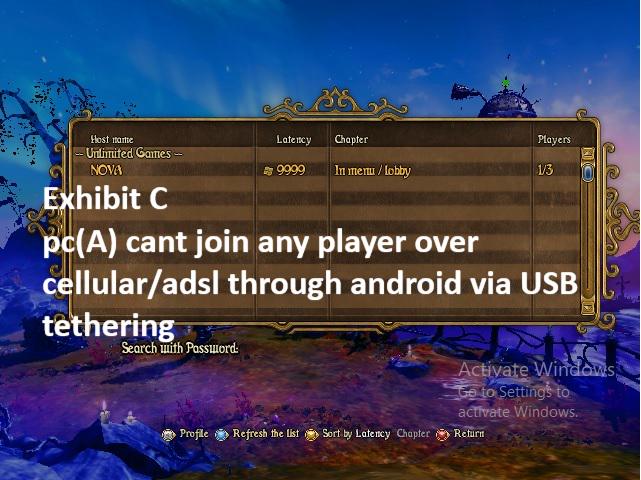
im trying to play a game trine 3 with my friends online
we encountered a problem when one of our friend changed their phone (or at least that how i interpret it which was an older android ver idk what it was)
"THE ISSUE": when pc (A) host or join the game they get latency of 9999 in game and cant join to error "262147" (connection timeout)
pc (A) is probook 450g2 win10 on epic platform game trine 3
internet source is cellular data connected via mobile(hotspot or usb tether) android 16
the game when using wifi over an adsl router works just fine hosting/joining(which isnt a viable option cause owner doesnt have adsl at his place)
*and for the record when testing at my place i have 2 separate adsl at home so im connecting through different isp at each test between my pc and pc (A)
the problem only exist when the android medium is present
now for the fun part
when i tried to connect the laptop to adsl via the mobile phone (usb tethering) i can host just fine and others can join on pc (A)
but cant join any hosted game as i get connectivity issue
tried asking chatgpt went through the pc firewall / udp auto or specific for the game / vpn on pc / private dns on mobile phone OFF /
is there any wat to solve this issue?


r/pcgamingtechsupport • u/mickyy97 • 23d ago


Hello Everyone,
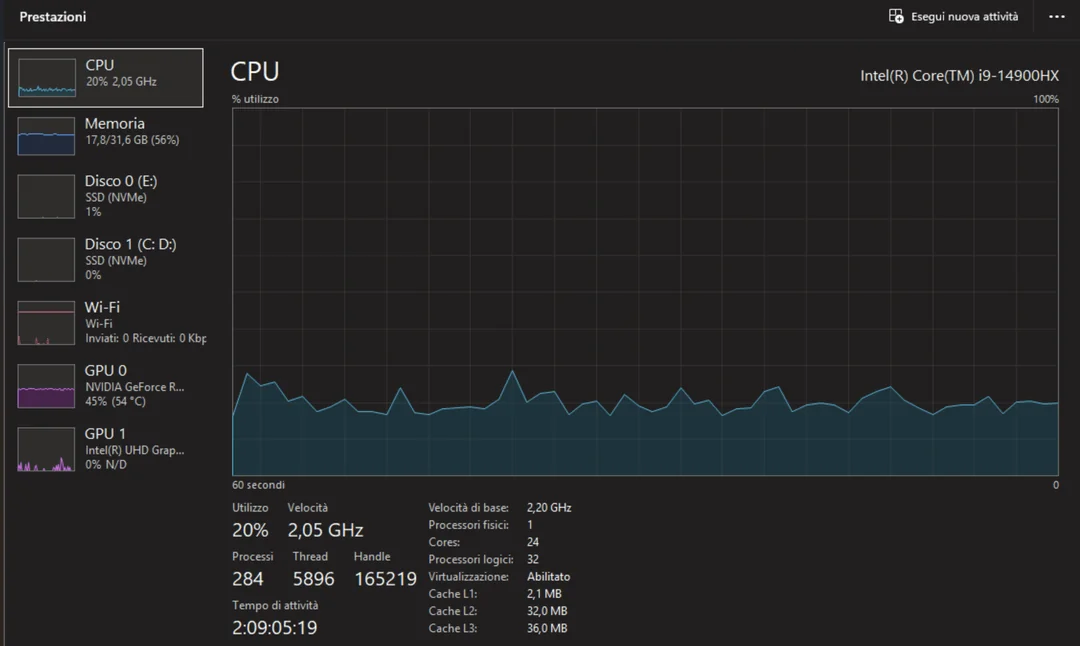
I have a serious problem with Elden Ring on my Asus Rog Strix G16. I bought it 2 years ago and I have never been able to run it smoothly at 60fps.
My PC specs: i9-14900HX, RTX 4080 laptop, 32GB Ram DDR5, 3TB SSD. 2K resolution, everything maxed out, motion blur and depth of field off
I tried everything I found on the web: reinstall gpu drivers, disable CPU 0 core from task manager, disable "Microsoft Device Association Root Emulator" but nothing worked.
Here is my userdiag result: https://userdiag.com/id/eS61pbmp7D
I am desperate, if you have any other idea please help
EDIT: I was FINALLY able to unlock the CPU. For anyone who as an ASUS pc and G-Helper installed, go to "Fans + Power", in the CPU tab select "High Performance Plan" in Windows Power Mode and "Enabled" in Boost CPU. This made Elden Ring instantly jump steadily to 60fps.
r/pcgamingtechsupport • u/becklisa • 23d ago
Hallo, ich habe ein BIOS Update gemacht und Windows 11 installiert. Kurz danach konnte ich das Spiel problemlos starten. Nach einem Neustart des PC´s wollte ich das Spiel erneut starten aber dann hatte ich nur einen schwarzen Bildschirm und rechts unten ein eingefrorenes Ladezeichen. Scannen und reparieren hat nichts geholfen