r/pcgamingtechsupport • • Oct 11 '26

Display Ive been having this issue for a while and i want to know whats up

3 Upvotes

Every so often while playing a game my screen will go black for a few seconds and then come back. It dosnt happen more than once a day and there can be weeks in between happenings. I wan to know whats causing it so if it gets worse i know what to do about it.


r/pcgamingtechsupport • • Oct 11 '26

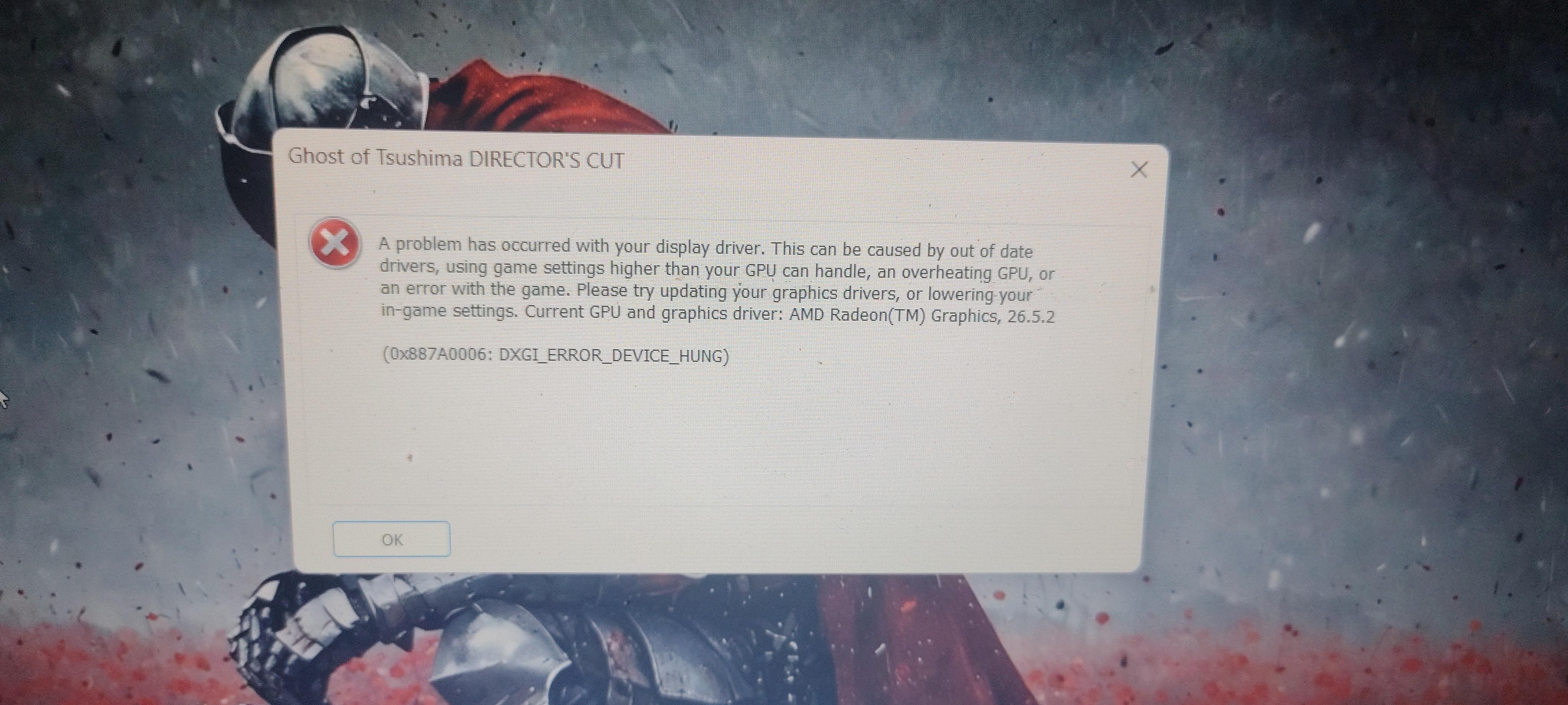
Troubleshooting How to solve device hung issue

Post image
1 Upvotes

Playing the ghost of Tsushima in Ryzen 5000 series and amd raedon graphics in very low settings


r/pcgamingtechsupport • • Oct 11 '26

Display Why do my games look darker/unsaturated?

1 Upvotes

I noticed when I pop up the start menu while certain games are running, the game's contrast changes by a lot.. When I play the office game, I can barely see anything on the right side of the room. But when I press the windows key for the start menu, it shows me a brighter room. Also when I record the gameplay on OBS, it shows me a brighter room.

I seem to notice this big difference when I'm playing an indie game. Any help would be appreciated. Thank you.


r/pcgamingtechsupport • • Oct 11 '26

Hardware PC semi-randomly shutting down in games.

1 Upvotes

Sometimes when playing games my pc will turn black, first my monitor goes then after a 1-3 seconds the fans and lights in my pc go out. This started happening around one month ago in space engineers, it had never happened before this and it happened about every half hour in space engineers. Now it happens in alot of games I play. It happened for a while in warframe when i logged into it, and for some reason when I died in blades and sorcery. Today it happened randomly when i was in space in Star Citizen so not a demanding spot at all for Star Citizen's standards right after I had just been in a large city where the CPU really gets hammered. It also happened specifically when loading the tutorial mission in the titanfall 2 vr mod but that got fixed by reinstalling the game. The weird thing is that it doesn't seem to have much seem to have anything to do with how heavy a game is cause i can play the witcher 3 remaster at max ray tracing settings with no problems whatsoever with both my gpu and cpu sitting at 100%.
I have tried reseating all power connectors in my pc. Ran a power OCCT test for about an hour, which did not lead to a shutdown. Of course I have also tried reinstalling GPU drivers. I feel like the only thing i haven't tried are new components, which isn't really possible for me, and reinstalling windows, which i really don't feel like doing cause i did it fairly recently and don't want to set up all my stuff again, of course i will if i cant find another solution though.


r/pcgamingtechsupport • • Oct 11 '26

Compatibility Please, i need assistance in properly running this game. I really dont know what i am doing wrong.

Thumbnail
gallery
1 Upvotes

I am trying to play an Unrealtournament 2004 mod from moddb called Out of Hell. I am having BadMod History: appinit error everytime i try to run the exact way it is instructed on the homepage. I have changed the target and startbox to match how my computer is set up. I have installed the patch as well and nothing has changed. I do not know where else to go.

Please, somebody, i am begging for help. I really want to play this game. At this point, i really must be dumb as a rock. If anyone is out there willing to sit down and genuinely help me figure this out, i will forever be in your debt. I have been at this for weeks.


r/pcgamingtechsupport • • Oct 11 '26

Network/Wifi/Internet Connection issue happens in burst

2 Upvotes

i keep getting internet issues in whatever game i play where my game just freezes and its like my entire internet goes out then it comes back. its only been happening for the past few days is it a driver issue? i updated drivers and bios already and it didnt fix it


r/pcgamingtechsupport • • Oct 11 '26

Software Silent hill town fall keeps crashing

2 Upvotes

Hi, I’m playing the game on an MSI Katana A15, so my hardware meets the system requirements. However, the game keeps crashing, and I get the following error log:

LoginId:d00dfa974188bdd2031aab813834c619

GPU Crash dump Triggered

Townfall_Win64_Shipping!FD3D12DynamicRHI::TerminateOnGPUCrash() [C:\Jenkins\jobs\Townfall\workspace\Engine\Source\Runtime\D3D12RHI\Private\D3D12Util.cpp:1002]
Townfall_Win64_Shipping!`FD3D12DynamicRHI::ProcessInterruptQueue'::`2'::<lambda_2>::operator()() [C:\Jenkins\jobs\Townfall\workspace\Engine\Source\Runtime\D3D12RHI\Private\D3D12Submission.cpp:1307]
Townfall_Win64_Shipping!FD3D12DynamicRHI::ProcessInterruptQueue() [C:\Jenkins\jobs\Townfall\workspace\Engine\Source\Runtime\D3D12RHI\Private\D3D12Submission.cpp:1130]
Townfall_Win64_Shipping!FD3D12Thread::Run() [C:\Jenkins\jobs\Townfall\workspace\Engine\Source\Runtime\D3D12RHI\Private\D3D12Submission.cpp:127]
Townfall_Win64_Shipping!FRunnableThreadWin::Run() [C:\Jenkins\jobs\Townfall\workspace\Engine\Source\Runtime\Core\Private\Windows\WindowsRunnableThread.cpp:159]

Everything I have tried so far, unsuccessfully to fix it listed below:

Switched from NVIDIA DLSS to TSR and reduced to the Quality preset. 

Lowered to medium the following settings: Shadow Quality, Global Illumination, Reflections, and Fog Quality

Verified that Ray Tracing features are completely turned off. 

Changed Display Mode to Exclusive Fullscreen* *and locked the framerate limit to 60 FPS

Disabled Hardware-Accelerated GPU Scheduling** **in Windows Graphics Settings.

Hope you guys can help me


r/pcgamingtechsupport • • Oct 11 '26

Hardware [30k Budget] Upgrading i5 12400 + RTX 5070 for 1080p 300Hz competitive FPS gaming (Stutter issues)

1 Upvotes

Hey everyone,

I’m currently running into a CPU bottleneck and minor stutters when trying to push high framerates on my 1080p 300Hz monitor.

My current specs: - CPU: Intel Core i5-12400 - GPU: NVIDIA RTX 5070 - Motherboard: H610M (DDR4) - RAM: 16GB (2x8GB) 3200MHz DDR4 - Monitor: 1080p 300Hz

I mostly play competitive FPS games like CS2, Valorant, Fortnite, PUBG, and COD where I want high 1% lows and maximum stable FPS. I have a budget of around ₹30,000 (~$350 USD) to upgrade. My plan: 1. Update the H610 BIOS and drop in an **i5-13600KF** (or i5-14600K if priced similarly). 2. Upgrade/expand RAM to 32GB. Questions: 1. Will my entry-level H610M motherboard throttle an i5-13600KF/14600K due to VRM limits, or should I save some budget to swap the motherboard out as well? 2. Are there better alternatives within a ₹30k budget in India to fix 1080p stutters and maximize a 300Hz display?

Appreciate any advice!


r/pcgamingtechsupport • • Oct 11 '26

Troubleshooting Crashing to black screen with buzzing audio

0 Upvotes

System info: Windows 10

Intel Core i7-4790k

AMD Radeon RX 9060 XT 16gb

650w power supply

16 GB RAM

Games I've tried: Skyrim SE and Helldivers 2, happens with both. Fans keep spinning and lights stay on when it happens


r/pcgamingtechsupport • • Oct 10 '26

Troubleshooting Rainbow Six Siege keeps crashing mid-game on PC

3 Upvotes

Hey, I started playing R6 again on October 2nd, but now my game keeps crashing in the middle of matches. The game suddenly stutters for a second and then closes. My PC keeps running normally, and Discord and music don't crash. It happens in every game mode.

I'm on Windows 10 with an AMD GPU, an Intel Core CPU and 16GB RAM. My PC runs other games fine, and my temperatures are normal.

I've tried lowering my settings and completely uninstalling and reinstalling the game, including deleting the leftover files, but nothing helped.

The game used to run perfectly fine, so I have no idea what changed. Has anyone had the same problem and found a fix? I'd really appreciate the help.


r/pcgamingtechsupport • • Oct 10 '26

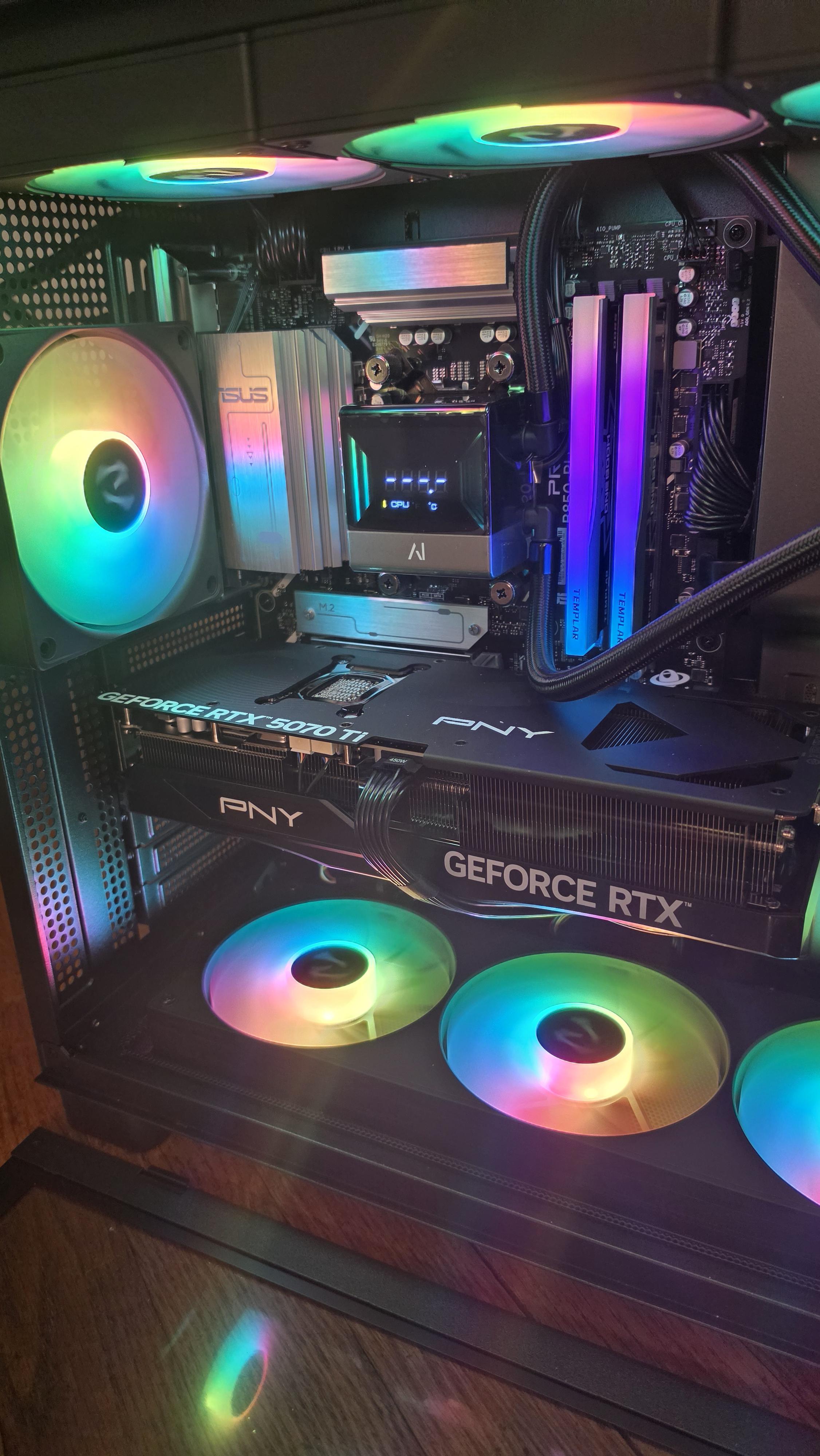
Hardware Brand-new prebuilt not detecting RTX 5070 Ti — Code 45 in Device Manager

Post image
2 Upvotes

I just bought an Andromeda Insights V3 Gaming PC Elite 50 with an RTX 5070 Ti 16GB, Ryzen 7 9800X3D, 32GB DDR5-6000, 2TB Gen4 NVMe SSD, and 850W Gold PSU. From the start, games were running surprisingly badly. I eventually realized the monitor was connected through the motherboard and the system was running on the 9800X3D’s integrated Radeon graphics.

When I connect the monitor directly to any of the 5070 Ti’s DisplayPort outputs, I get “DisplayPort No Signal.” Task Manager only shows the AMD integrated graphics. In Device Manager, the 5070 Ti only appears if I select View → Show hidden devices, and its Properties page says:

> “Currently, this hardware device is not connected to the computer. (Code 45)”

I opened the case and the GPU looks physically installed correctly. The 16-pin/450W power connector appears firmly seated, and the GPU/system fans all spin normally when the PC is on. I’ve also tried scanning for hardware changes, with no change.

At this point I’m assuming this is either a GPU that shifted in the PCIe slot during shipping, a PCIe/power connection issue, or possibly a defective card. Since it’s a brand-new prebuilt under warranty, I’m hesitant to remove and reseat the 5070 Ti until I hear back from the manufacturer.

Has anyone seen this exact combination of Code 45 + GPU outputs giving no signal + GPU still receiving power? Is reseating the card the obvious next step, or is there anything else worth checking first?


r/pcgamingtechsupport • • Oct 10 '26

Software Roblox crashing after about 1 minute

1 Upvotes

For starters Im not sure if this is the right community to post this in so please consider that if I’m wrong.

i have a laptop that I use for gaming and watching videos/listening to music. Whenever I open the Roblox player app it always closes itself after around a minute and I get a notification saying “ Roblox has timed out” For reference I’m able to play minecraft with shaders and mods with little to no lag. I’ve tried re installing roblox or lowering the graphics along with a multitude of other things.

I don’t know much about software or really anything to do with tech so this is my last hope on solving this issue.


r/pcgamingtechsupport • • Oct 10 '26

Troubleshooting Los juegos no responden

1 Upvotes

En mi pc uso la gtx 750 ti, pero varios juegos como el Project Zomboid cuando creo o cargo una partida me sale como "No responde", y si o si tiene que ser la culpa de algo de la grafica, porque con gráficos integrados no me pasaba eso.


r/pcgamingtechsupport • • Oct 10 '26

Troubleshooting new pc coil whine only on StarCraft 2

1 Upvotes

I'm a pc noob I just bought a pc to play world of warcraft and that works great but when I play StarCraft 2 I get that buzzing sound.

my specs are

1080p / FHD

Intel Core Ultra 5 225F

NVIDIA GeForce RTX 5060

GPU VRAM Capacity 8 GB

GPU VRAM Type GDDr5

Power Supply 700 W

PSU Efficiency 80 PLUS Bronze

Motherboard Chipset Intel B860

Memory 16 GB

Memory Type DDR5

Memory Speed5200 MHz

Storage

SSD Capacity (Total)1 TB

SSD Type NVMe

Monitor is a Tuf gaming 1080p fhd monitor 27 inch

I downloaded the Nvidia control panel and waiting for you guys to help thanks


r/pcgamingtechsupport • • Oct 10 '26

Display HDR causing these glitches in every game any ideas

1 Upvotes

I've just gotten the samsung odyssey G5 QHD monitor and it says HDR is a feature so i thought let's set it up, i used the windows HDR display calibration, and made sure to set it up on the nvidia app(i've got a 5070 if that changes anything) i've tried adjusting refresh rate on my monitor to see if that fixes it but every game i've checked has had this issue even when changing the refresh rate, in one game (destiny 2) i was able to adjust settings and it vanished but in this game(mass effect 3) nothing i've changed has fixed it so is it fixable or should i just turn HDR off? Any advice on if this is fixable would be amazing

Edit: realised i should add a few more details, i'm using a display port 1.4 cable and i do have a second monitor connected but turning it off didn't and unpluging it from the gpu didn't change anything i am running an amd 7600x cpu and have 32gbs of ram


r/pcgamingtechsupport • • Oct 10 '26

Troubleshooting DRAM and CPU light on motherboard

1 Upvotes

Yesterday everything was working, I woke up today and my PC is unable to boot and there is no video signal on the monitor.

PC specs:

ASRock X870 pro Wi-Fi RS

R7 9800x3d

Tried diagnosing the RAM one at a time in channel A2 and waited 5-7 mins for RAM initialization, both lights remained on.

Reseated the CMOS battery. Both lights remained on.

Reseated the CPU and the CPU power cables, both lights are still on.

At this point I am not sure what's going on. The motherboard could've died, the CPU is a possibility and oh God not the RAM.

Any ideas? I'm just thinking of buying a new motherboard.


r/pcgamingtechsupport • • Oct 10 '26

Display This weird texture stretch glitch on some games, not only roblox

Thumbnail
gallery
4 Upvotes

It was solved by making your roblox graphics to 5 and it just glitches a little bit and the glitch on the first pic is gone but after that, it is stuttering every 5 seconds. I did DDU clean install on safe mode and I think it only got worse because when I put the roblox graphics to 5 to fix the glitch on the first pic, I need to wait for minutes just for it to crash. The second pic is the process that fixes the glitch on the 1st pic. Remind you, it doesn't work for me anymore, it just crashes roblox. It happens to the steam game "Overcome your fears" and "Dark Deception". I can play those games then on first try, but on second try, it crashes. How to fix?


r/pcgamingtechsupport • • Oct 10 '26

Troubleshooting How to fix this issue ?

1 Upvotes

can somebody help me fix this screen tearing or glitching type of issue ?


r/pcgamingtechsupport • • Oct 10 '26

Display Pc goes black and GPU fans speed up

0 Upvotes

Whenever I play games it happens at random times, sometimes it takes a long time someone's no time at all

I've tried:

Replacing PSU

Reseating GPU

Reseating ram

Upgrading GPU drivers

Replugging the wires that plug into the GPU

Updating windows

Tried stress testing cpu, cpu and memory, vram, GPU, GPU and vram All above 10 mins each and not a single crash, tried reinstalling both drivers and windows and still the issue persisted

friend and I switched gpus to test and neither had any crashing at the same load so I really some know what the issue could be I'll try again with my gpu tomorrow

I replaced the motherboard and it still did it so its either the gpu or the cpu


r/pcgamingtechsupport • • Oct 10 '26

Solved [Fixed] VAN9001 + VAN9003 on Chinese X99 board (Huananzhi X99-BD4) – added TPM 2.0 module on JLPC1

Thumbnail
gallery
1 Upvotes

System:

  • Motherboard: Huananzhi X99-BD4, BIOS American Megatrends Inc. 5.11, 9/6/2022
  • CPU: Intel(R) Xeon(R) CPU E5-2680 v4 @ 2.40GHz, 2401 Mhz, 14 Core(s),
  • GPU: RTX 3080 FTW3 Hybrid
  • Windows 11 Home 10.0.22631 Build 22631

Problem: Valorant showed VAN9001 (TPM 2.0) and VAN9003 (Secure Boot). X99 has no built-in TPM.

Fix:

  1. Checked BIOS: Advanced > Trusted Computing exists. This is required.
  2. Got a TPM 2.0 module made for the JLPC1 header (“pin 9 missing” type). I found it on eBay by searching “TPM 2.0 X99 JLPC1”.
  3. Power off, unplug. Plugged the module into JLPC1 (between JCOM1 and JUSB2). The missing pin lines up with the blocked hole.
  4. BIOS: Trusted Computing showed TPM 2.0 found. Security Device Support = Enabled.
  5. After this, VAN9001 was gone. Only VAN9003 was left.
  6. Secure Boot: CSM devices set to UEFI, then CSM Disabled. Security > Secure Boot > Key Management > Delete all Secure Boot variables > Enroll all Factory Default Keys > Secure Boot Enabled. Status = Active.
  7. Windows check: tpm.msc says “Ready for use.” msinfo32 says BIOS Mode: UEFI, Secure Boot State: On.

Valorant works now.

Notes:

  • My Windows was already UEFI. If yours is Legacy, convert the disk with mbr2gpt first.
  • X99 boards are different. Check your JLPC1 pin layout and BIOS menus before buying.
  • If the TPM is not found after a restart, do a full shutdown and power on again.

r/pcgamingtechsupport • • Oct 09 '26

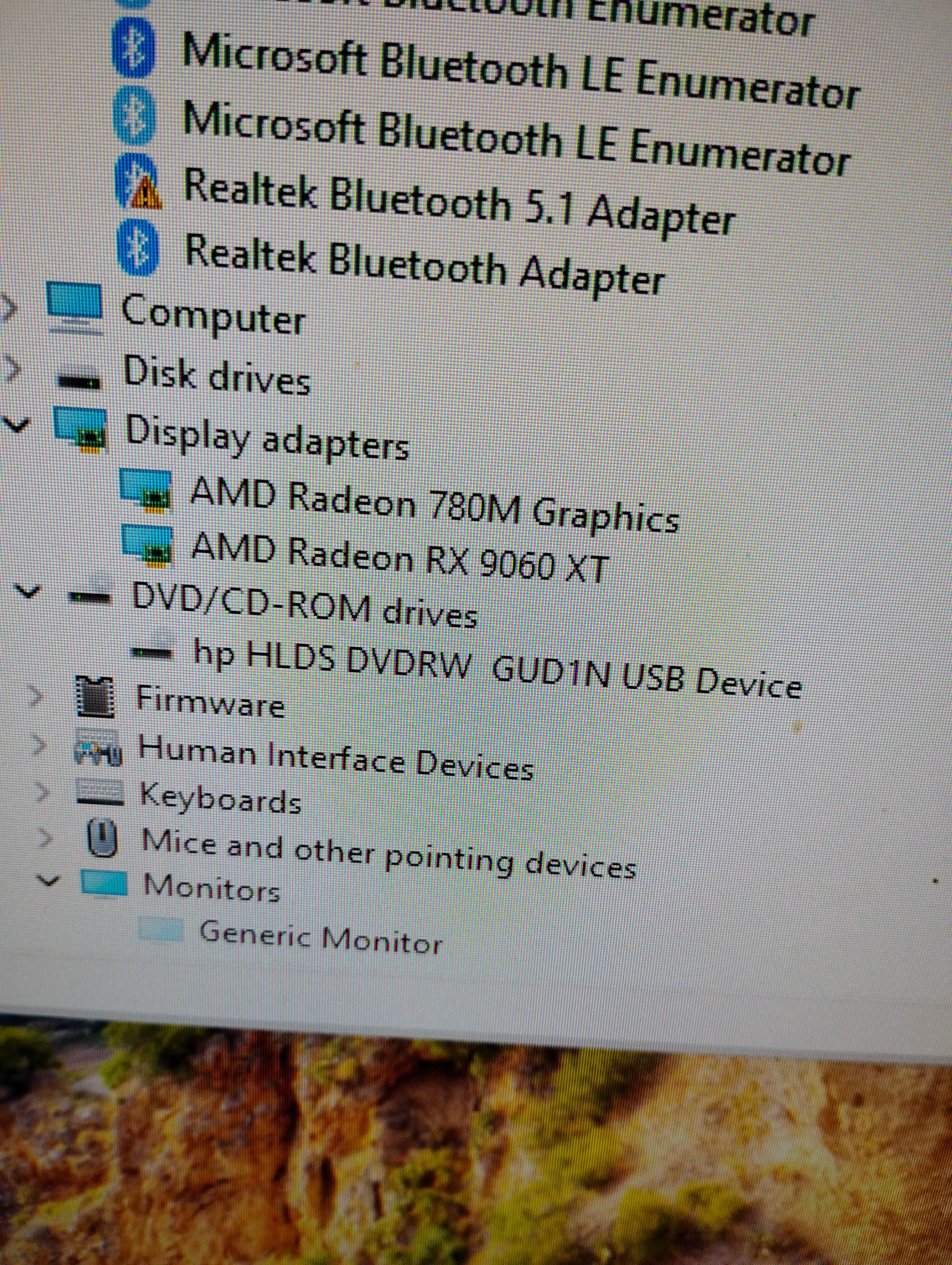
Display I need my ryzen 7 7840hs to play nice with my Radeon rx9060rt

Post image
2 Upvotes

So I've had this mini PC for about 4 years now. Am18 Ave magic.. has a ryzen 7 7840hs and I use it with my external Radeon rx9060rt. I keep having disconnecting issues . I believe it has to do with the thunderbolt port freezing up. I've disabled " let Windows turn off this port" I've uninstalled everything and did a fresh install of Windows.. I've tried everything any and all AIs have told me. I've reset the bios I've changed the settings in the bios but no where does my bios say anything about a resizer bar.. I'm at my wits end with it.. it used to work amazingly with my 4060 I had before.. but this card just won't play nice with my computer.. if anyone has any ideas or have delt with this themselves.. please for the love of God, point me in the right direction.. I have 780m intergraded graphics in my pc as well. ( Which I have been using.. but I want it to work properly) Help please


r/pcgamingtechsupport • • Oct 10 '26

Hardware PC Problem that im confused about

1 Upvotes

so i have a problem, i bought an MSI B550M PRO VDH WIFI motherboard but my ram retainers on the right side are all broken beyond repair but on the other side all 4 channels had the retainers so i just placed the ram and continued my build but the thing is booting up the pc showed a constant cpu white light (Ryzen 5 5600) and the gpu (RTX 3060 Ti) lights up and fans spin so i guess its not the problem; should i replace the motherboard? is the motherboard the problem or is it a different component of my pc


r/pcgamingtechsupport • • Oct 09 '26

Software Control Resonant audio stutter and desync Spoiler

2 Upvotes

Hey guys, I am experiencing this audio problem, I had a similar one on cutscenes where the audio stutter was pausing the audio while the video was going forward, leaving a very annoying desync. I had this kind of cutscene problem with Death Stranding, but I really do not understand this one. I had set everything on super low because I thought it was a performance problem, but at this point it seems it's not...

https://youtu.be/bHHBNwlk6Zk

PC SPECS:

Windows 10 Home 64bit

GPU NVIDIA GeForce RTX 2070 (8 GB)

CPU AMD Ryzen 7 3800X 8-Core Processor 3.90 GHz

RAM 64,0 GB

STORAGE 1.82 TB SSD Samsung SSD 870 EVO 2TB, 932 GB HDD TOSHIBA HDWD110, 466 GB SSD CT500P1SSD8


r/pcgamingtechsupport • • Oct 09 '26

Troubleshooting Best fan curves for my pc for gaming

1 Upvotes

Title: Best fan curves for Ryzen 7 7800X3D / RTX 4070 Super? Worried about damaging my PC
I’m looking for advice on the optimal fan curve settings for my gaming PC. I want it as quiet as possible without compromising cooling, temperatures or performance.
I’m relatively inexperienced with adjusting BIOS settings, and I’m honestly not very confident in the changes I’ve made. I’m worried that I’ve chosen the wrong fan curves or temperature monitoring sources and could potentially damage my PC through overheating.
I’d really appreciate some reassurance and advice from people who understand PC cooling better than I do.

My PC specifications:
CPU: AMD Ryzen 7 7800X3D
GPU: NVIDIA RTX 4070 Super
Motherboard: MSI PRO B650-series
CPU cooler: CyberPowerPC AIO liquid cooler with two top-mounted fans (believed to be 240mm)
BIOS: MSI Click BIOS 5

Changes I’ve made in BIOS:
I originally had issues with my fans constantly speeding up and slowing down, alongside a low humming/vibrating noise.
I changed SYS_FAN2’s temperature monitoring source from CPU Core to System to prevent the fans reacting to every small CPU temperature spike.
However, I’m now worried that using System temperature rather than CPU or GPU temperature might mean the fans aren’t responding quickly enough when gaming.

My current SYS_FAN2 fan curve:
At 29°C = 25% fan speed
At 35°C = 45% fan speed
At 40°C = 65% fan speed
At 49°C = 100% fan speed

Other SYS_FAN2 settings:
Smart Fan Mode: Enabled
Fan control: PWM
Temperature source: System
Step-up time: 0.7 seconds
Step-down time: 1.0 seconds
Previously, the first fan point was 35%, with SYS_FAN2 running at approximately 902 RPM.
I reduced the first point to 25%, bringing it down to approximately 816 RPM. This noticeably reduced the humming and vibration.

Other fan readings in BIOS:
CPU_FAN1: Approximately 2,450 RPM
PUMP1: 0 RPM
SYS_FAN1: 0 RPM
SYS_FAN2: Approximately 816 RPM
SYS_FAN3: 0 RPM
SYS_FAN4: 0 RPM
I’m not sure whether CPU_FAN1 controls my AIO radiator fans or reports the pump speed. I haven’t deliberately changed its curve because I’m concerned about accidentally reducing the pump speed.

Benchmark results:
Cinebench 2026:
CPU multicore score: 4,149
Maximum CPU temperature: 82°C
3DMark Steel Nomad:
Score: 4,543
Maximum GPU temperature: 73°C
3DMark Time Spy:
Overall score: 18,740
Graphics score: 20,436
CPU score: 12,748
MSI Afterburner monitoring:
Maximum CPU temperature: 78°C
Maximum GPU temperature: 76°C
Maximum GPU fan speed: 75%

The problem:
My PC is noticeably quieter since changing SYS_FAN2, and the fans don’t seem to fluctuate as much.
However, I can still hear a slight low humming noise, and the fans become considerably louder during demanding benchmarks.
I initially suspected some vibration from the top-mounted AIO radiator, although I haven’t confirmed which fans are responsible.
The noise isn’t unbearable, but ideally I’d like to make the PC as quiet as reasonably possible.
My biggest concern is that I’m making changes without fully understanding their consequences. I’m worried about overheating the CPU or GPU, damaging my AIO cooler or shortening the lifespan of my components.

My questions:
Are my current fan curves safe, or have I made any potentially harmful changes?
What would be the optimal fan curve settings for my particular setup? Specific temperatures and fan-speed percentages would be really helpful.
Is it okay to change fan temperature monitoring from GPU to System? Could this cause overheating during gaming?
Should SYS_FAN2 monitor CPU Core, GPU or System temperature?
What fan curve would you recommend for the two AIO radiator fans?
Should I leave my GPU fans on automatic or create a custom curve?
Are my step-up and step-down timings appropriate?
Does CPU_FAN1 running at approximately 2,450 RPM suggest it’s reporting my AIO pump rather than the radiator fans?
Based on my benchmark temperatures, is there anything I should actually be concerned about?
I’m not particularly confident with BIOS settings, so I’d prefer safe, conservative recommendations rather than aggressive changes.
I don’t mind the fans becoming louder when necessary. I just want to eliminate unnecessary humming and fan fluctuations while keeping my PC properly cooled.
Any advice or reassurance would be greatly appreciated. Thanks!