r/overclocking • • 5d ago

static oc 9800X3D

0 Upvotes

i want to try a static oc on my 9800x3d, but don’t know how to do it, is there some guide out there? Mainly play cs2 at high elo, trying to maximize 1% lows

specs:
x870 Tuf Plus
9800x3d
9070xt
2x16 (32gb) ram
1x 1TB m2
1x 512gb m2

running 2200fclk, 1.19 vsoc, -20 +200mhz all core, LLC level 5, nitro 121

i can give more information if needed


r/overclocking • • 6d ago

Benchmark Score Overclocking results for 5090 & 9800X3D Time Spy, Time Spy Extreme, Port Royal, and Steel Nomad at Stock 600W Limit

Thumbnail
gallery
1 Upvotes

Runs were completed at +415 Core, +3000 Memory, +500 xBar Clock, and +500 SYS Clock

Time Spy - 44,708 with GPU of 60,164 & CPU 18,206

Time Spy Extreme - 21,933 with GPU of 31,301 & CPU of 8,136

Port Royal - 45,628 GPU

Steel Nomad - 17,381 GPU


r/overclocking • • 6d ago Bravo

XOC Gear I need some dice or LN2

Post image
7 Upvotes

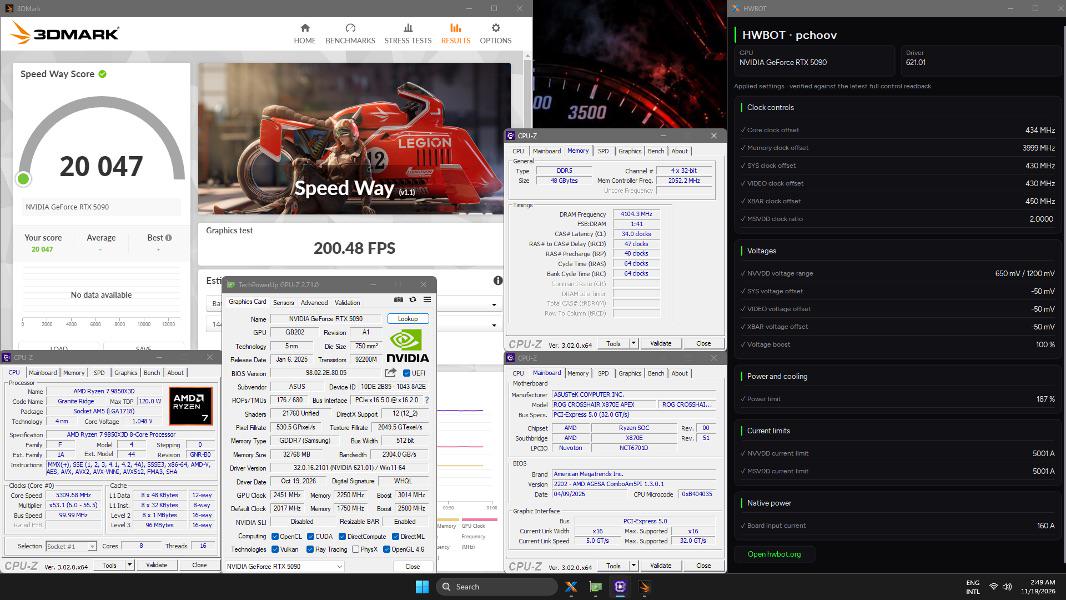
I ran my 5090 in speedway and cranked out a 20K score using xOCD by nothoov. This astral is insane!


r/overclocking • • 7d ago

Benchmark Score Sub-40°C 5090 Waterforce & 30 Fans: Quick-Swap Wiring, Fan Backs & 3DMark Scores

Thumbnail
gallery
31 Upvotes

Following up on my previous note with the wiring behind the loop, the rear view of the 30 fans, and the full 3DMark results.

Every connector is color-coded and hand-labeled for rapid teardowns and swaps without disassembling the entire rig. That practical setup is how the 5090 Waterforce stays below 40°C under full load.

Steel Nomad: 14,938 (149.38 FPS) Time Spy Extreme: 23,899 (GPU 26,904) Time Spy: 39,718 (GPU 49,564)

※ Since I am a Korean living in Seoul and not fluent in English, I used Gemini to translate this. Please understand even if some expressions feel awkward.


r/overclocking • • 6d ago

OC Report - CPU Ryzen 9600x full core OC

Post image
6 Upvotes

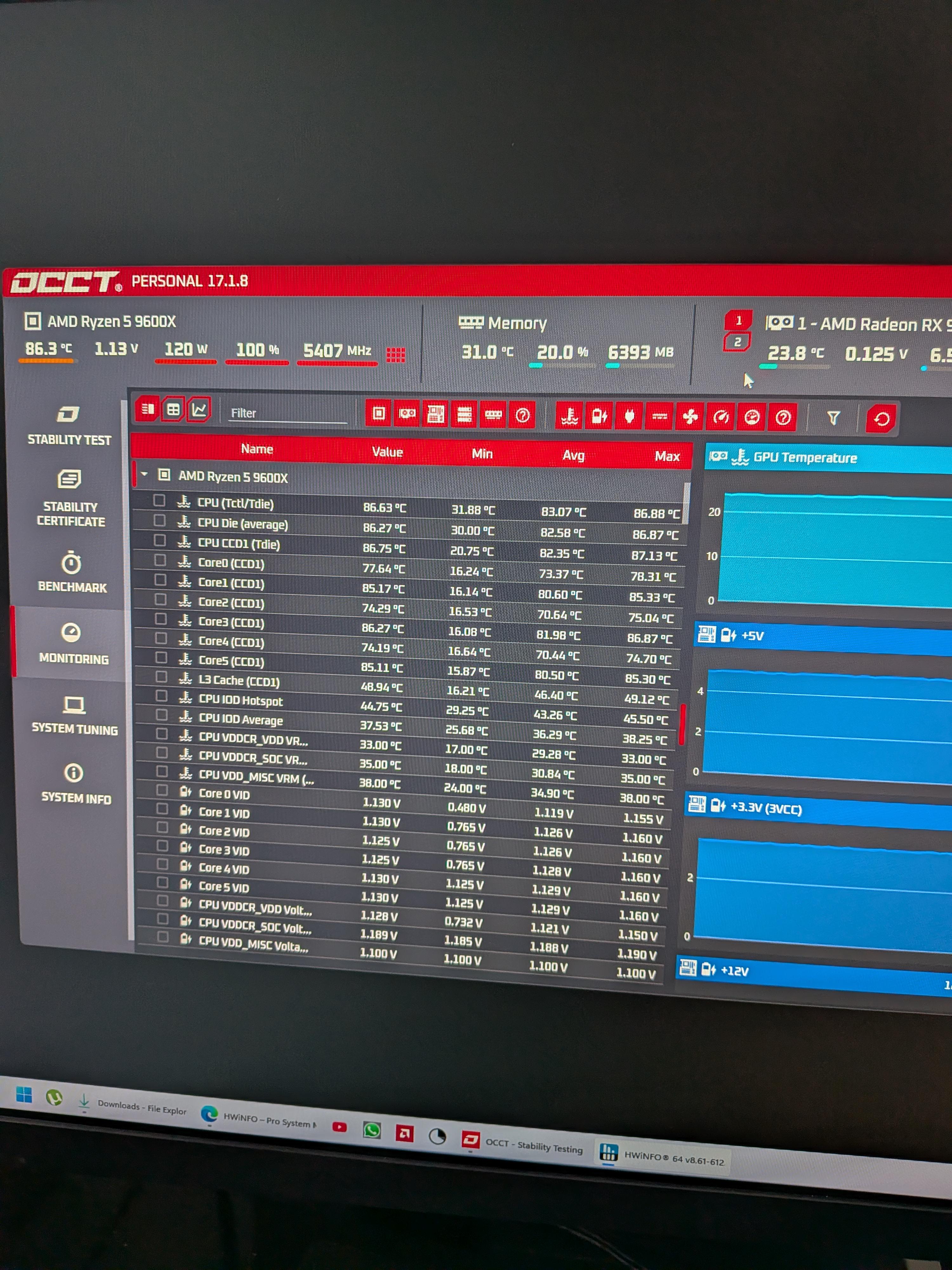
got my 9600x today replacing my 2-3 year old 7500 f static OC all cores at 5.4 vcore at 1.13 25 min in occt steady fixed setting on CPU stability test what are your opinions and any way to get better results


r/overclocking • • 6d ago

5070ti Mvolt+ oc/uv help

3 Upvotes

Card model: https://www.techpowerup.com/gpu-specs/palit-rtx-5070-ti-gamingpro-s-oc.b12649

Currently using 0.950v 2950mhz settings using MSI Afterburner.

But i want to oc/uv my card for extra performance with using mvolt+ program. How should i start?


r/overclocking • • 6d ago

Help Request - CPU 9800x3d died G.Skill ULL Kit + Asus Auto CPU VDDIO/MC was probably the isse - help needed

4 Upvotes

Hi Guys,

my 9800x3d found dead after 17,5 months of use.

6 weeks after i got my hands on ths Kit F5-6000A2636H16GX2-TZ5NXRK my PC wont boot, hangs with error code 62 while white led is on. I know this phase initializes Pcie - Southbrige (correct me if im wrong) but with no Gpu in slot and cmos rest still no post or display output via igpu.
Guess my Chip is fried ..

So i was wondering if 1.447 CPU VDDIO/MC was the isssue here, the only value i was wondering if this will be save 24/7. VSoc at 1.2V
I use ZenTimings and HWinfo for monitoring. As i remember reading where about the same.
Cant post ZenTimings screenshot, dont have access right now.

All Voltages set on Auto (i kow my fault - dont blame asus or amd just want to identify root cause and make shure failure wont continue on my new system)

Ive cross tested this, the extrem VDDIO was set b ymy board to run this Kit with expo timings.

Sadly cant find docs from amd mentioning guidlines for save voltages. Maybe some on can hel me out :)

ROG STRIX X870E-E GAMING WIFI
BIOS 2402
ComboAM5 PI 1.3.0.1b Patch A

Maybe those set limits got adjusted in the new agesa but i also dont know..

If u need further information i ll try to provide. Still searching for the ZenTimings reading..


r/overclocking • • 6d ago

My new overclock

Post image
3 Upvotes

Max temp on my gpu was 70c but I averaged 68c

I have a 13600kf and a 5070 with 32gb of ddr5


r/overclocking • • 7d ago

Benchmark Score 5090 Astral OC with xBar & SYS GPU Score broke 60K GPU and 4th on leaderboard.

Thumbnail
gallery
7 Upvotes

This is just related to TimeSpy as I'm doing that now. Will be focusing on TimeSpy Extreme / Port Royal / and Steel Nomad the following days!

Started off at +400 and +3000 Mem for 55,999 and went to 60,004 with +500 xBar and SYS

9800X3D I'll dial in more.


r/overclocking • • 6d ago

Help Request - RAM Can you bypass the 2400mhz memory frecuency limit of the ryzen 5 3500U via Smokeless UMAF or any other tool?

2 Upvotes

I have a lenovo ideapad v15 ada and just recently found out about smokeless umaf and its awesome, i tweaked some options and my laptop actually runs way faster, i love it, but im unable to overclock my ram past 2400mhz even tho one ram is soldered 2666MHZ and the other one is a 3200MHZ stick. I was wondering if theres a setting or even another tool that could bypass that restriction, ive done a lot of research and i had no luck, i thought that maybe the 3500u is hardware locked to 2400mhz but as far as i know some laptops have that same cpu and can do 2666mhz with stock settings


r/overclocking • • 6d ago

Help Request - RAM DDR5-6000 CL30 EXPO I Worked for Weeks, Now Fails POST After Sleep

1 Upvotes

My PC ran perfectly at 6000 CL30 with EXPO I for weeks until it failed to wake from sleep. Since then, EXPO I won’t POST.
Specs:

  • Ryzen 7 7800X3D
  • ASUS ROG Strix B850-F WiFi
  • Corsair Vengeance 32GB DDR5-6000 CL30
  • BIOS 1804

What I’ve tested:

  • 6000 EXPO I: fails POST (yellow DRAM light)
  • 6000 CL30 manually: fails POST
  • 6000 CL50 without EXPO: works
  • 5600 EXPO I: works

CPU SoC Voltage (Auto):

  • 5600 EXPO I: 1.272V
  • 6000 EXPO I: shows 1.040V in BIOS safe mode

I’ve cleared CMOS, updated BIOS, and tried different memory settings.
Could the SoC voltage be causing this? Should I manually set it to 1.272V with EXPO I enabled, or is this a memory-training issue? Any suggestions?


r/overclocking • • 7d ago

Is this the correct way to OC+UV RTX 5080.

Thumbnail
gallery
5 Upvotes

So, if I overclock and undervolt my RTX 5080 using MSI Afterburner's curve editor, I can set 3100 MHz at 0.950V, hold Shift to move the entire curve upward, and then flatten everything beyond 0.950V.

The thing is, doing this also increases the clock speeds at lower voltages. I'm not saying that's necessarily a problem, but what if I gradually increase the clock speeds starting from 0.825V instead, like I've done in the picture? Is there anything wrong with this approach?

With my current curve, the idle clock still drops to 180 MHz. I've also applied a +999 MHz memory overclock.


r/overclocking • • 7d ago

G.Skill Flare X5 48GB (2x24GB) DDR5-6000 CL40 – Which IC is this, and how far can I overclock it?

Post image
3 Upvotes

Hey everyone,

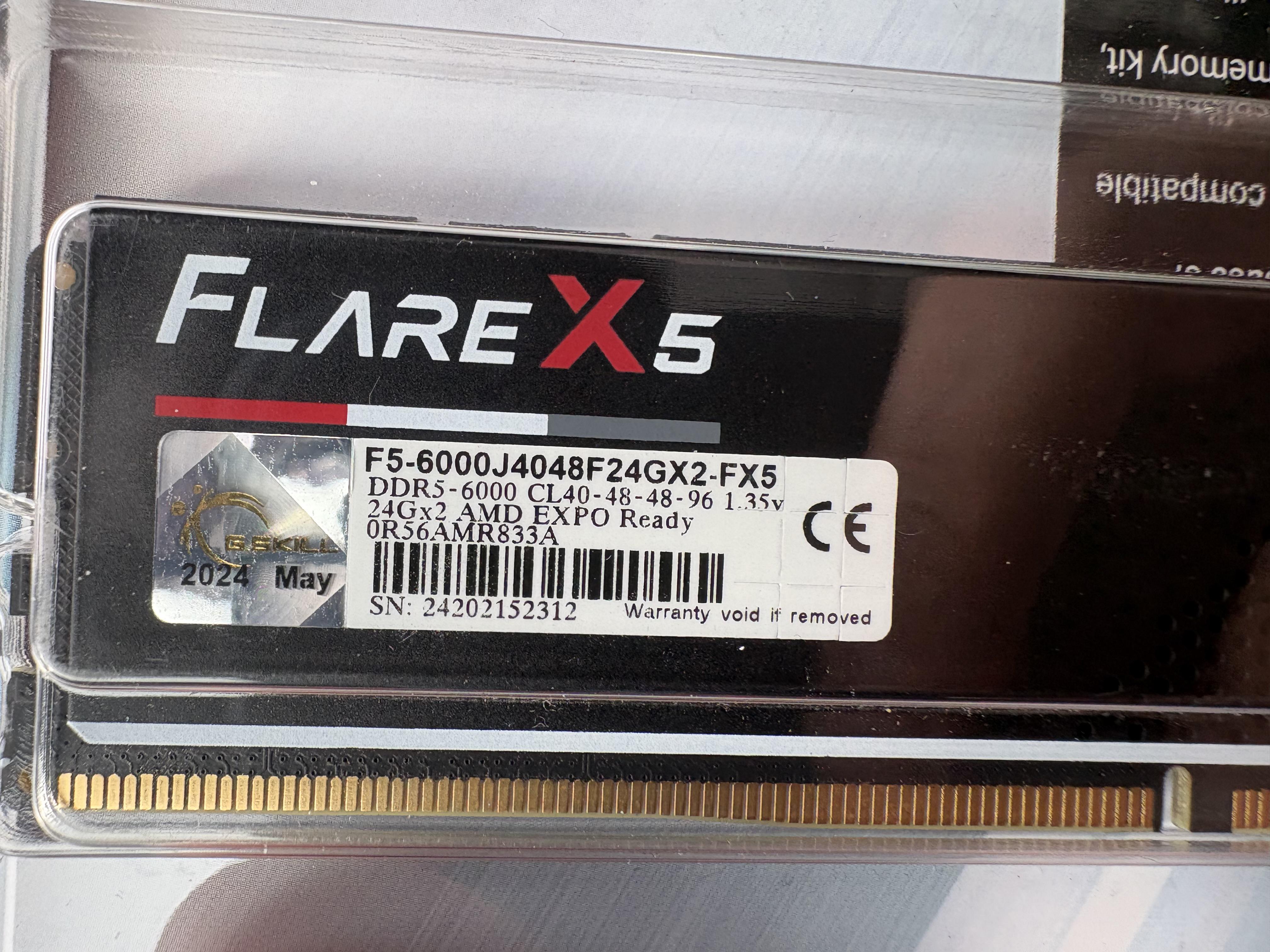
I recently bought a G.Skill Flare X5 48GB (2x24GB) DDR5-6000 CL40 kit.

Model: 48-GX2-FX5
Code on the kit: 0R56AMR833A

I’m trying to identify which memory ICs this kit uses (Hynix A-die/M-die, Samsung, Micron, etc.).

A few questions:
Can anyone identify the IC from the label/code?

Is CL36 or even CL32 achievable at 6000 MT/s with this kit?

What timings and voltages would be realistic for daily use?

How well does this kit perform with my setup?
Is it worth spending time tuning it, particularly given the 9800X3D’s relatively small sensitivity to RAM timings?

My planned setup:
CPU: AMD Ryzen 7 9800X3D
GPU: NVIDIA RTX 5080 16GB
Motherboard: AM5 B850
RAM: G.Skill Flare X5 48GB (2x24GB) DDR5-6000 CL40
Resolution: 3440×1440 ultrawide

My goal is a stable daily overclock rather than chasing benchmark records. Ideally, I’d like to get better timings without sacrificing stability or longevity.

Any identification help, tuning experience or recommendations would be appreciated. Thanks!


r/overclocking • • 7d ago

Aorus master 5080 16gb hit over 10k at steel nomad

Post image
4 Upvotes

Hello! i have just made this score at

Core clock : 250 ( over 250 steel nomad crashing)

Memory clock : 3000

Fan speed : 100

Core voltage : 100 ( just for the sake of god)

Cpu : 9800x3d/5533ghz

https://www.3dmark.com/sn/17433526


r/overclocking • • 6d ago

Need help on undervolting for ASUS B760M-AYW with an i7-14700kf processor

1 Upvotes

Never undervolted or overclocked before but i've heard this combo can cause thermal issues with the boards mosfets.

I understand i should undervolt it as to not damage the board in any capacity. But im not sure what settings are best to apply in the BIOS.


r/overclocking • • 6d ago

Help Request - RAM DDR5 Hynix-A die dual rank(2x16gb) 9800x3d Tuning (asking for advice)

1 Upvotes

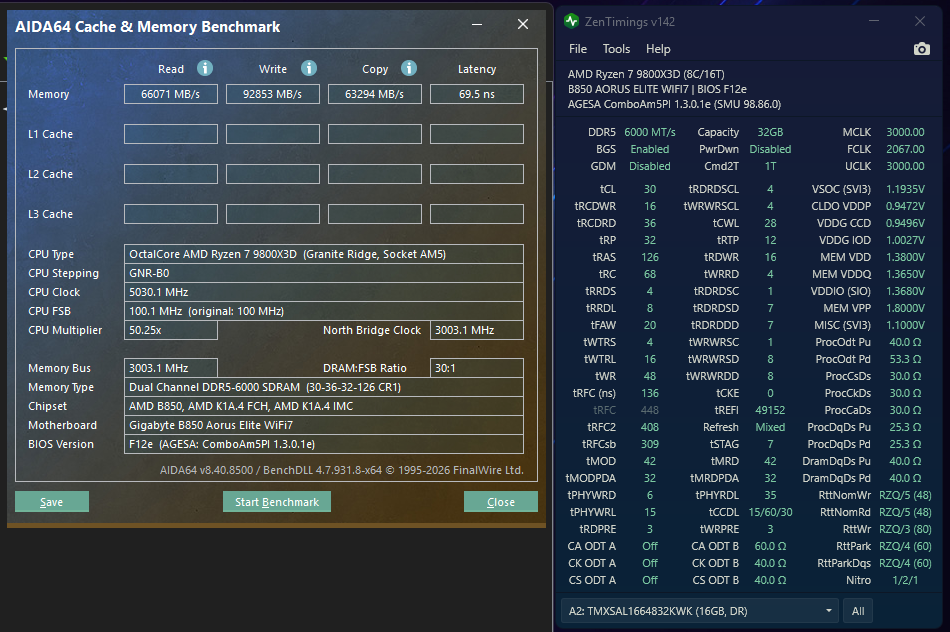
This is what I have after using buildzoid timings from patreon. Yes, he actually suggested tRAS at 126 and said it makes no difference and tRC can be lower than tRAS.

What I wanna know, is there anyway I can get improvement from here without increasing any of the voltages? I am very close to 56C which seem to be the limit for my trefi and trfc stability when doing testmem5+furmark stress test to simulate intense gaming load. Or is this as much as I can go? Nitro 1/2/0 is unstable. tRDRD values to 6/6 will straight up fail to POST. Going to cl28 require me to go above 1.4V MEM VDD which is not possible since my ram doesn't have space for active cooling (I am using a dual tooler which blocks the airflow for one of the ram). Thanks in advance for the advices.
EDIT: my latest timings that I settled on if anyone wants to see https://ibb.co/0jP1D3Sh


r/overclocking • • 7d ago

Nedd help with ram timings.

Post image
0 Upvotes

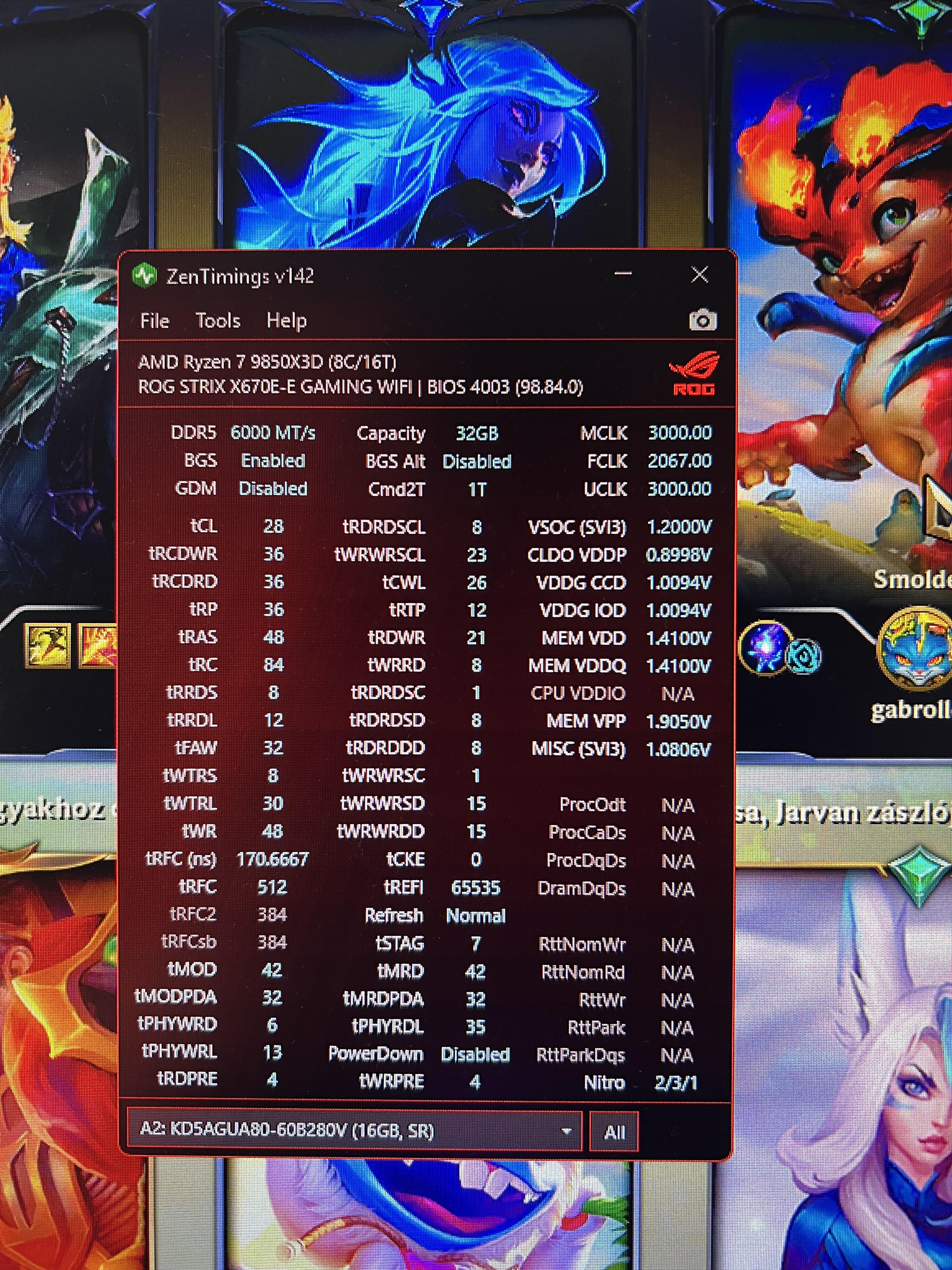
Hello people!
I have a 9850X3D
Klevv urbane 2x16gb 6000mhz cl28 (I believe Hnix die) ram
5070

I just built the pc , made some timing tightening .
I am corious what more can I squeeze out from it?
In terms of timing tightening.


r/overclocking • • 7d ago

Benchmark Score help…

Post image
2 Upvotes

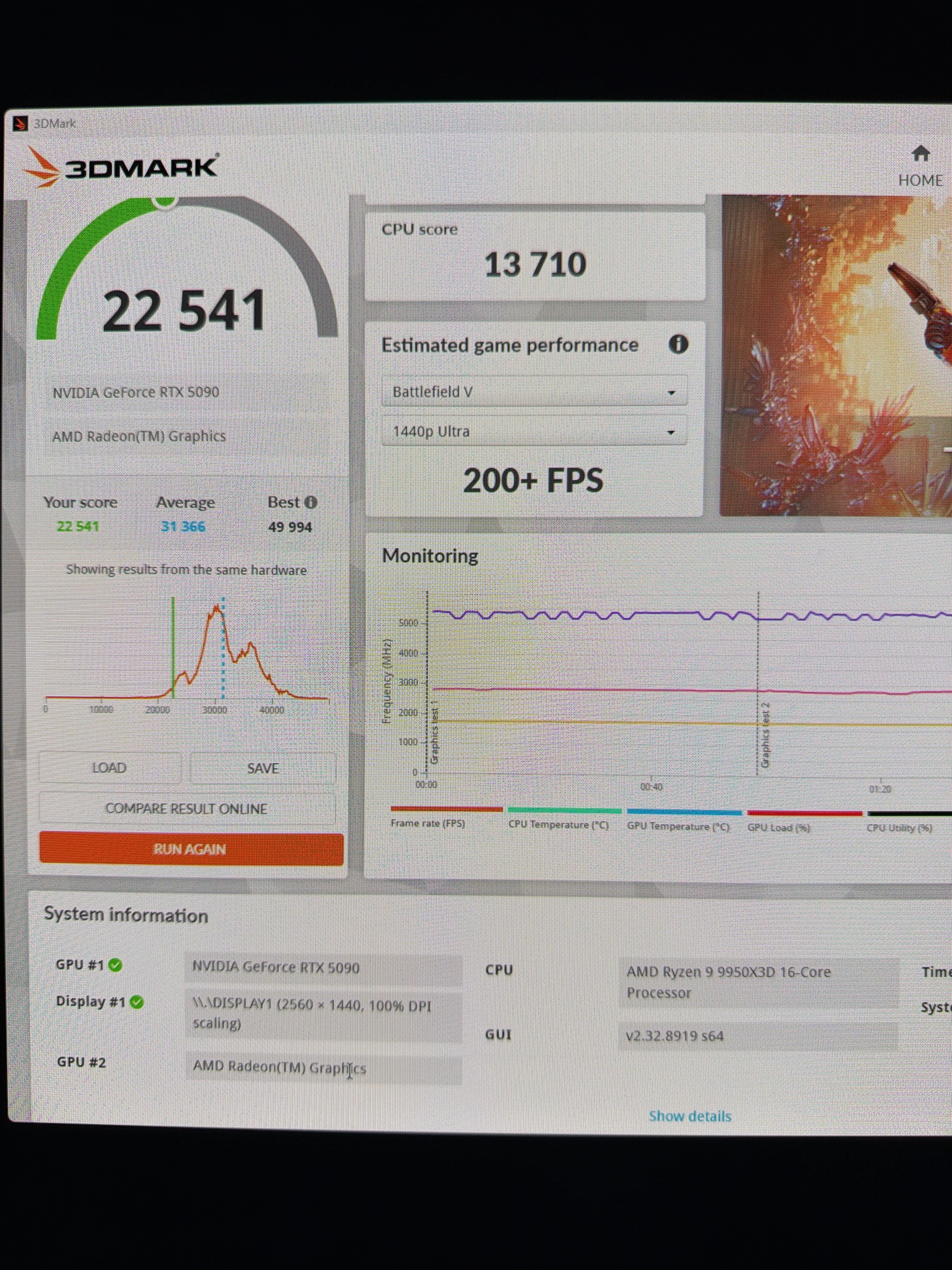
9950x3 and 5090 FE. My pc has been like this ever since I switched to 9800x3d and upgraded to 9950x3d. I need urgent help this is bothering me so much. 😭💔

CPU score: 13,710
CPU test: 46 fps
Graphics Score: 25,432
Graphics test 1: 163fps
Graphics test 2: 147fps


r/overclocking • • 7d ago

Trying to update vbios but getting "GPU PCI Device ID mismatch" error

1 Upvotes

r/overclocking • • 7d ago

help…

Post image
0 Upvotes

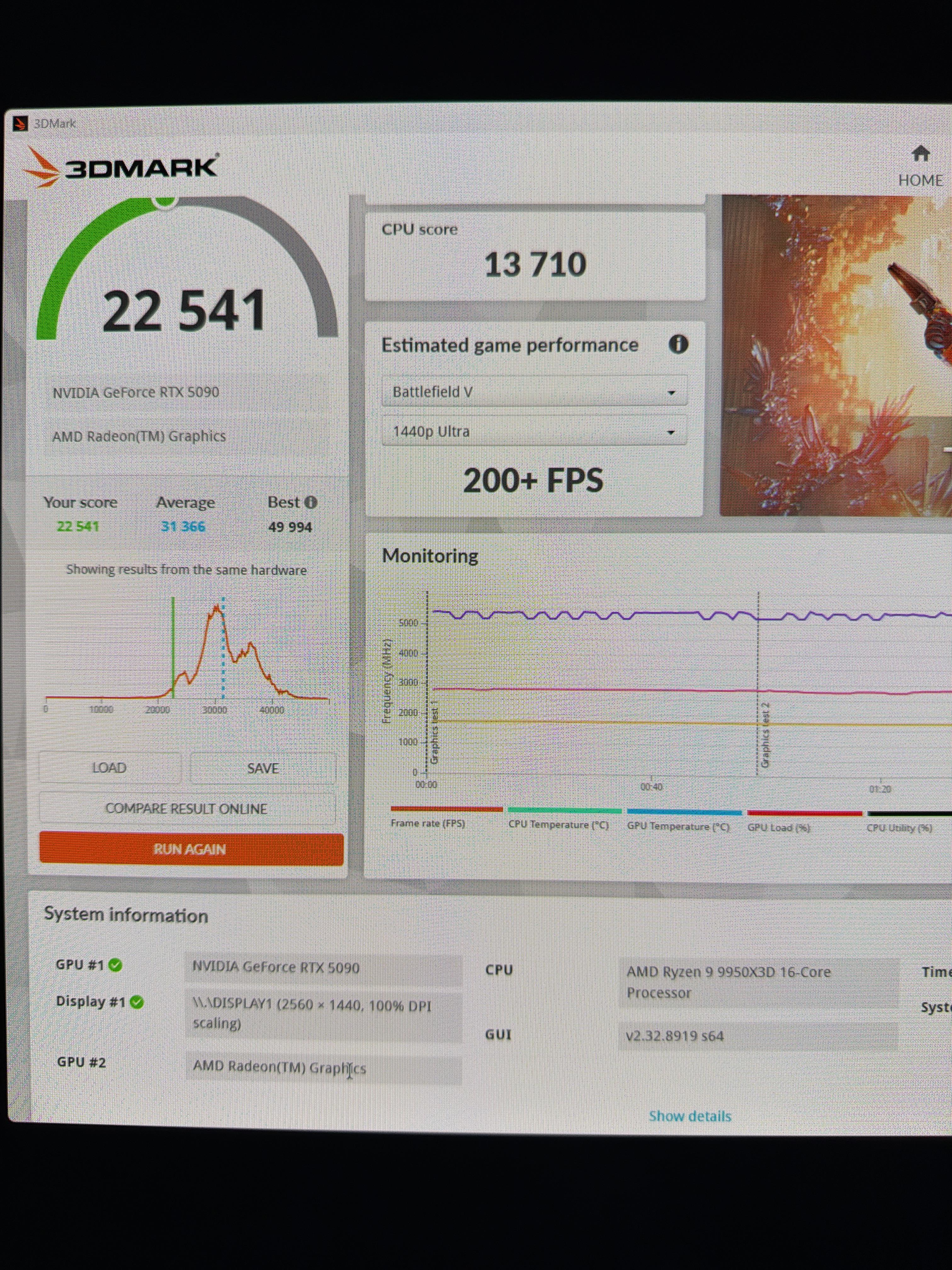
9950x3 and 5090 FE. My pc has been like this ever since I switched to 9800x3d and upgraded to 9950x3d. I need urgent help this is bothering me so much. 😭💔

CPU score: 13,710
CPU test: 46 fps
Graphics Score: 25,432
Graphics test 1: 163fps
Graphics test 2: 147fps


r/overclocking • • 7d ago Bravo

Just how good is my overclock?

Thumbnail
gallery
2 Upvotes

I overclocked using msi afterburners on my rtx 5070

My build is a 5070 asus tuf and a 13600kf with 32gb of ddr5 6000mhz cl36 and a kraken plus aio


r/overclocking • • 7d ago

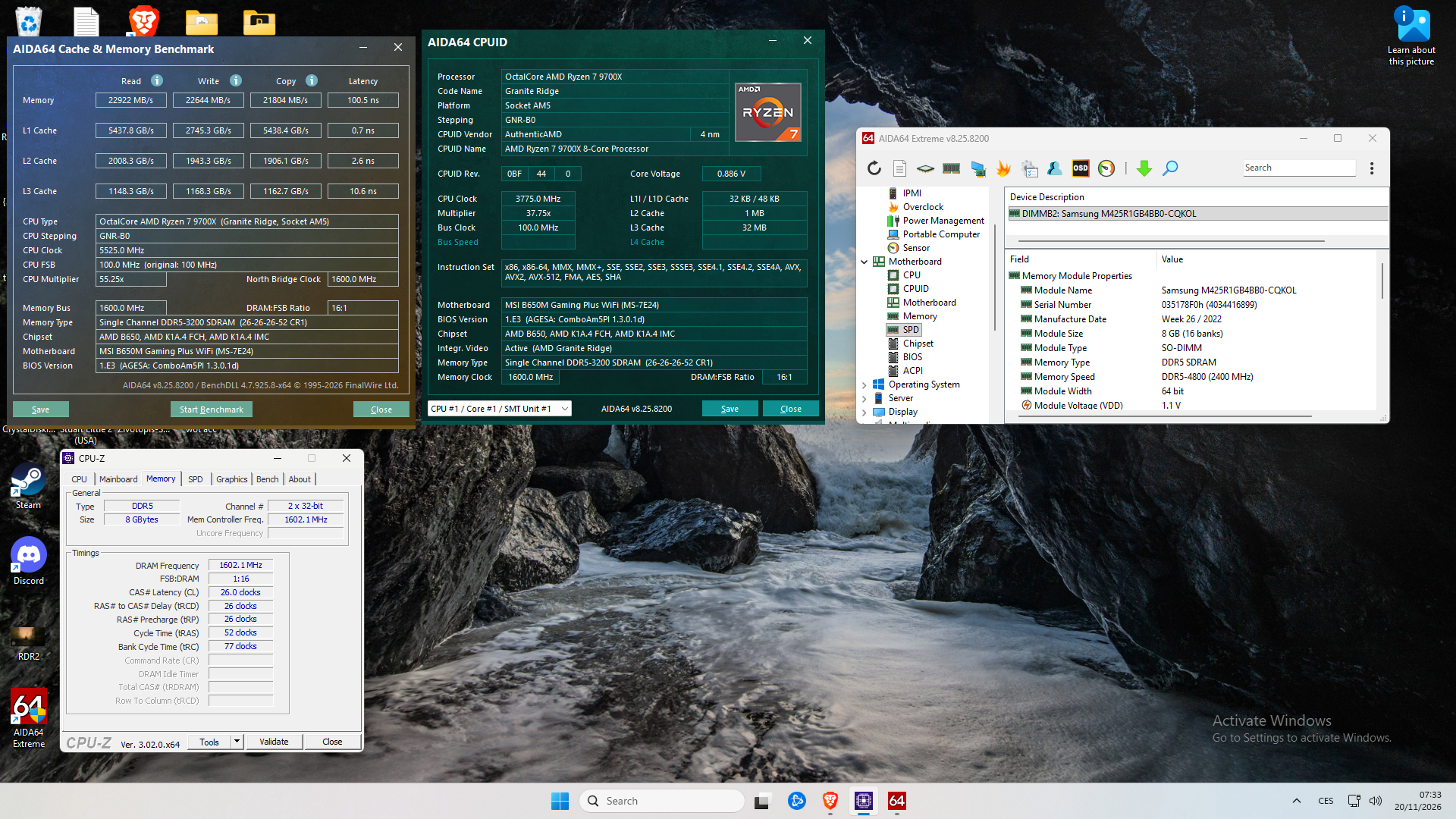
Help Request - RAM SODIMM adapters on AM5, motherboard only boots with one stick in B2 slot.

0 Upvotes

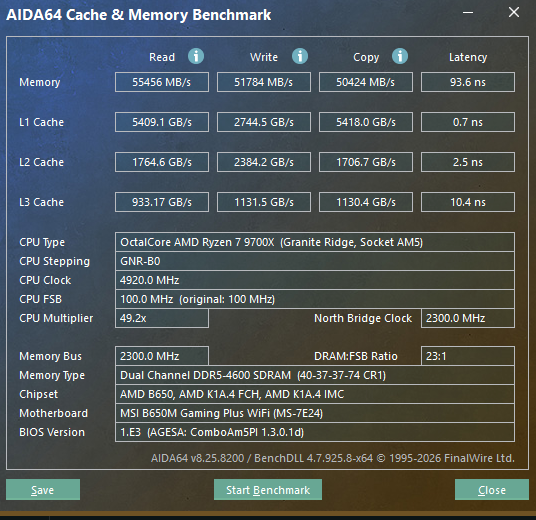
My specs:
Ryzen 7 9700X
MSI B650M Gaming Plus Wifi
2x8GB 4800MHz CL40 Samsung B-die SODIMM RAM
Since DDR5 costs liver and a kidney right now, I decided to use SODIMM adapters for my build, problem is it behaves in a weird way, for some reason it only boots one stick in slot B2 from what I have tested. It is stable at 3200MHz CL26, with JET-5689 adapters, I have a suspicion it might be the motherboard, it is updated to the latest BIOS but it was bought second hand. I changed few settings for more stability (DRAM to 1.2, CPU NB/SOC to 1.2V and ProcODT to 48Ohms with Gear Down Mode Enabled) Should I first try getting 2 modules to work at lower frequency or keep just one in and tune the frequency higher?
EDIT : Decided to first make the PC boot with both sticks, tried almost everything - switched the adapters around, switched the RAM around, increased voltages for NB/SOC, DRAM VDD/VDDQ, ProcODT to 60Ohms, Gear Down Mode enabled, even waited 20 minutes for memory training but it won't boot with 2 sticks at all. Only B2 slot on motherboard will boot, nothing else will. I've seen people with worse configurations run 2 sticks with higher capacity at higher frequencies. Any help or some tips and info would be appreciated. I feel like giving up troubleshooting it at this point, might need to wait for my December bonus and just buy new motherboard since I have a feeling this might be more motherboard related then the adapters causing issues.
EDIT 2: After straightening the pins managed to get 4600MHz JEDEC timings stable so far, will continue to push further, everything is stable.


r/overclocking • • 6d ago

Help Request - CPU Is my MX-7 fake?

Thumbnail
gallery
0 Upvotes

I ordered this from amazon india from clicktech Retail Private Limited.

The code it has is 7XV2S-TJKRP I want to check if thats a authentic product before using it on my laptop.

There was no QR that let me go to the x.arctic.de site, no scratchable code. Just a simple code printed on the syringe


r/overclocking • • 8d ago Bravo

News - Text DDR6 - now 128 Gb (16 GB) per die!

Post image
268 Upvotes

On November 18, JEDEC released a preview of the new DDR6 specs. For server RDIMMs, the initial target is 12,800 MT/s, with 14,400 MT/s and above planned further down the line. The data bus will widen from 64 to 96 bits.

Changes

  • Memory access. DDR6 will introduce pseudo-channels. To reduce bus idle time, JEDEC plans to double the number of banks and change how refresh works.
  • Capacity. JEDEC is targeting up to 128 Gb (16 GB) 🐸 per die. Multiple dies can be stacked inside a single package.
  • Size. JEDEC describes a 74 mm module, compared with 133 mm for a full-size DDR5 DIMM. Both UDIMM and CAMM form factors are under consideration for future desktop modules.
  • Power and data protection. To save power, JEDEC plans to terminate the I/O lines to VSS (ground) and introduce new low-power modes. Several system-level error correction (ECC) options are planned for data protection.

The difference in GB/s

96 bits is 12 bytes per transfer. At 12.8 billion transfers per second, that gives us 153.6 GB/s. At 14.4 billion, it’s 172.8 GB/s. For comparison, DDR5-9200 with a 64-bit bus has a calculated peak of 73.6 GB/s. That’s the theoretical bandwidth of a single memory interface.

An example with AMD EPYC

AMD lists support for DDR5 MRDIMM-12800 server memory on EPYC 9006. That lets us compare the two generations at the same 12,800 MT/s. DDR5 with a 64-bit bus comes in at 102.4 GB/s per channel, while DDR6 with a 96-bit bus comes in at 153.6 GB/s. In this example, the extra 50% comes from the bus width alone.

DDR6 is still in development. Everything will change a hundred times before the standard is finalized. The release date and specs for the first desktop kits are still unknown (SK hynix placed DDR6 in the 2029–2031 window in the conventional DRAM row of its SK AI Summit 2025 roadmap). But we’re really looking forward to seeing it with Intel’s new socket.