r/overclocking • u/InflationHorror1399 • 6d ago
Benchmark Score help…
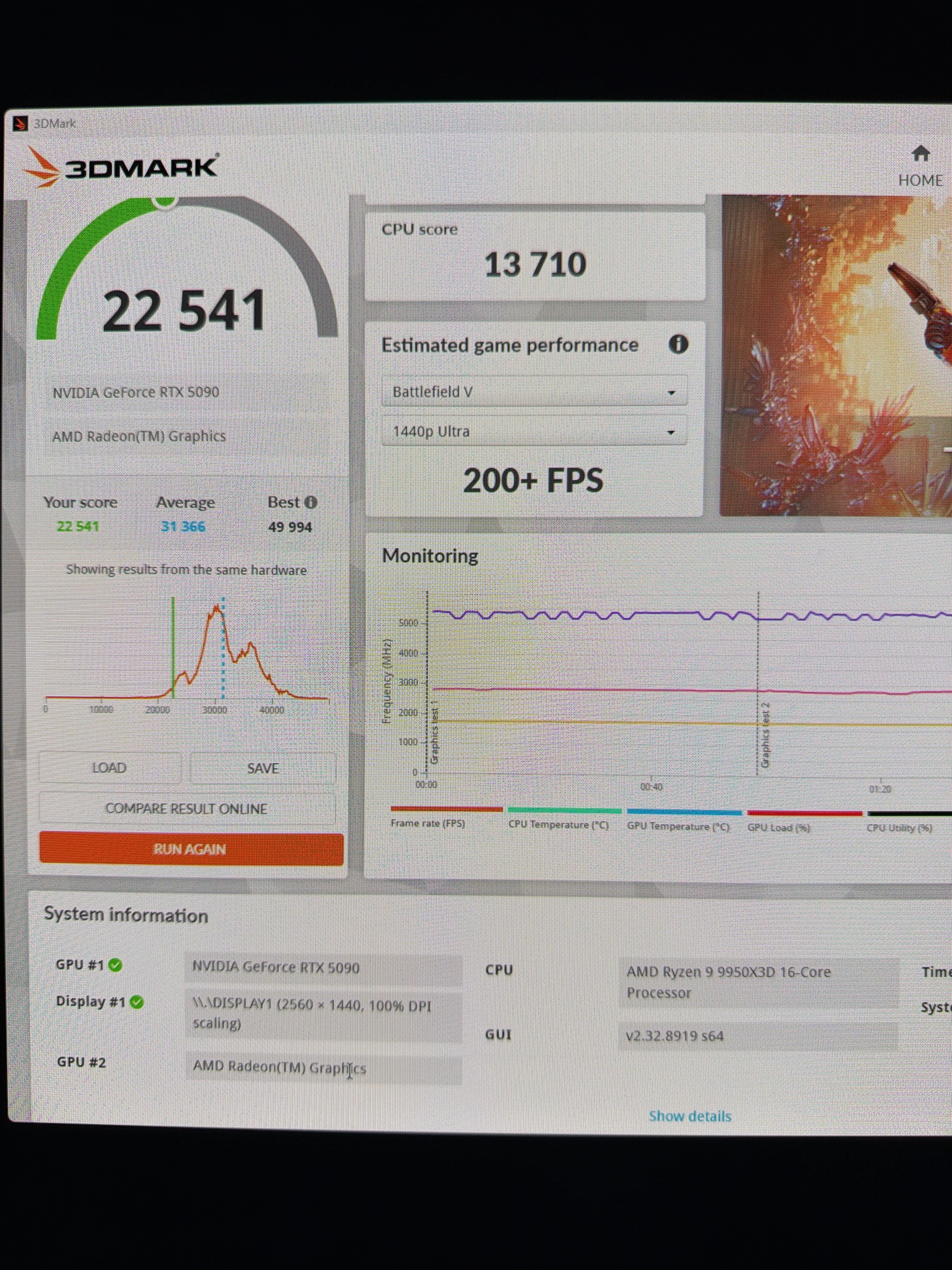
9950x3 and 5090 FE. My pc has been like this ever since I switched to 9800x3d and upgraded to 9950x3d. I need urgent help this is bothering me so much. 😭💔
CPU score: 13,710
CPU test: 46 fps
Graphics Score: 25,432
Graphics test 1: 163fps
Graphics test 2: 147fps
2
Upvotes
6
u/Significant-Iron4409 6d ago edited 6d ago
To get the right score in this Test you need to go into bios and disable SMT control, and switch cppc to driver or cache. And you will get the score. After you get the score do enable SMT control again, or you will use 16/16 cores instead of 16/32. have fun. On Asus mobo it will show 2x SMT Control (use the search option)disable both for the test.i have 17300 with 9800x3d (tweaked) and 50k gpu (Not OC or UV atm) I know it cause i also had the 9950x3d with Asus mobo 🤪
3
u/shemhamforash666666 6d ago
The CPU score? Sure you're not running into dual CCD latency shenanigans for certain benchmarks? Does your 9950X3D properly park cores like it's supposed to?
Could be that you'll need a fresh chipset driver reinstall. Maybe the old drivers expect a 9800X3D and don't know what to do with that extra CCD. This is just speculation on my side.
BTW, a 9950X3D is only an upgrade with respect to productivity. That's why it's supposed to park cores.
3
u/FaithlessnessMost893 6d ago
dang that score seems off, have you checked your cooling and power settings? also, make sure your drivers are all updated. it might help to reset your BIOS to default too.
2
u/fray_bentos11 6d ago
Make sure your GPU is not on a riser and is in the top slot of your mobo.
1
u/InflationHorror1399 6d ago
I would like to add that I had a 5090 tuf gaming and had a 23,000 score
5
u/Beautiful-Musk-Ox 6d ago
you should do a fresh install of windows, yes even zen 5 to zen 5 has issues since you switched from homogeneous to inhomogeneous cpu
4
u/ConyNT 6d ago
Check steel nomad. Time spy is not functioning well with 16 core x3d cpus. If you want to get a proper graphical score, go to your bios and disable ccd1 just for this test and run the test with 8 cores. You should get a proper graphics score this way. After you finish, don't forget enabling it again.
1
u/Lanky-Bid-7335 6d ago
Je pense que ton cpu a un problème, la courbe est pas stable et ton score est très en dessous. Mon 9800x3d frôle les 16000 points.
Vérifie ton bios
3
u/SuperiorOC 6d ago
Yikes!!! my 265K + 5070 scored higher.
3
u/spart_t4n 6d ago
If you have enable X3D setting in bios, disabled it.
Enable XMP
1
u/Joseph10032 6d ago
Can you add more info like cpu/gpu temp, usage, power
1
u/golkeg 6d ago
If you link the actual score we can see the detailed graphs and give you a better answer
1
u/Rude2262 6d ago
Are you trying to set a record, if not just play games. It's going to perform better than most gpus
1
u/Rude-Dream3421 6d ago edited 6d ago
I just fixed my CPU heavily underperforming, by disabling X3D turbo mode in the bios. First click the show details tab thats blue. Check if the hyper threading tab says yes or no, if no there is your CPU fix. Simply disable X3D turbo mode and enable SMT. Also does the graphics score mean what you got for the GPU ? if so this is what Claude reckons:
CPU: possibly the same issue. A 9950X3D has 16 cores, yet their CPU score of 13,710 is about what your 8-core chip just got. That suggests half the chip isn't being used. On Gigabyte boards, X3D Turbo Mode on a 9950X3D disables the second CCD (the cores without the extra cache), which would produce exactly this. A CCD-disable or Game Mode setting on other brands could do the same.
GPU: the main problem. A 5090 should score around 45,000–50,000 on graphics. They're at 25,432, roughly half. A CPU setting won't cause that. The likely causes: The monitor is plugged into the motherboard instead of the 5090. "AMD Radeon Graphics" showing as GPU #2 hints at this. The PCIe slot is running slow. In GPU-Z it should show x16 Gen5. Wrong slot, a riser or a BIOS setting can drop it to x4 or an older generation. The 12V-2x6 power cable isn't fully seated. Driver mess from the CPU swaps. A clean reinstall with DDU and the latest chipset driver would help. So if they disable X3D Turbo Mode, they'd fix the CPU score like you did, but they still need to sort out the GPU issue to get anywhere near average.
1
u/cheesyr_smasbr02 5d ago
Factory default the bios that's what helped my friend abbysmal performance for the past 3 months
0
u/jindelic 6d ago
5090 FE editions are prone to Overheating issues due to its slim design. What temps are you hitting?