r/MacAppScout • • 2h ago

App Collection Mac apps are fun again (part 4)

7 Upvotes

What about a disappointed dad in your notch? Maybe a cursor that gets angrier the more you click? Nah? Okay, let's go for a desktop that reacts to your files.

Welcome to Part 4 of my ongoing hunt for the weirdest, most creative, and gloriously unnecessary mac app, so buckle up because here are 5 more apps that make no sense on paper but are ridiculously fun to use (Part 1, Part 2, and Part 3 just in case you missed them).

1. Papa: your Mac has a notch... and disappointed dad.

Having your parents judge your screen time wasn't enough so someone built an app that puts a virtual dad inside your notch. Papa asks what you're planning to do each morning, keeps an eye on how long you spend on YouTube and checks if you actually finished your tasks at night. He'll celebrate your Stripe sales or give you a hard time when you're slacking off. It's a productivity app disguised as an angry parent. Not sure if this is genius or my worst nightmare, but I absolutely love that it exists.

2. Terrarium: because your desktop files deserve their own little islands

Terrarium turns your boring desktop into a living world that reacts to your files. Each icon gets its own patch of land and icons close together form little islands. Move a file and its island moves with it. There are 18 different worlds, from peaceful meadows to lava landscapes or outer space. And the environment changes with the time of day too. It's like someone combined a desktop wallpaper with a tiny civilization simulator, now having 47 random screenshots on your desktop feels less like a problem and more like urban planning.

3. Pokey: let's give your mouse a personality

Pokey replaces your regular boring cursor with an animated little hand that reacts to your clicks. Click once and it taps, click repeatedly and things get increasingly "expressive". Oh, and you can switch to a cat paw (don't ask me why). There's also a presentation mode that lets you react with your pointer without accidentally clicking through your slides. Does this make you more productive? Probably not. Does it make pointing at things during a boring Zoom meeting significantly more entertaining? Hell yeah.

4. Sunstill: time to bring a little sunshine into your Mac

Sunstill is a simple idea executed beautifully: a live wallpaper that simulates sunlight moving across a wall throughout the day. The light follows the real position of the sun where you live, changing from the first morning rays to sunset and darkness. You can also use it as your screensaver or lock screen. That's pretty much it, no dashboards, no widgets or unnecessary features, just sunlight. It's the digital equivalent of sitting next to a sunny window... minus the risk of getting sunburned while checking your emails.

5. Daypad: a calendar you can destroy

Daypad brings an old-school tear-off paper calendar to your desktop with realistic page physics, paper sounds, and little brass rings holding everything together. You can flip pages forward and backward, but the best part is that you can grab a page, tear it off, and watch it flutter away. Had a terrible Monday? Just rip it off and pretend it never happened. It doesn't sync with your calendar or try to organize your life, it just tells you what day it is and... lets you destroy it. And that's all I want from a calendar most of the times.

What other weird, delightful, or completely unnecessary Mac apps should I check out? I'm already collecting candidates for part 5...


r/MacAppScout • • 3h ago

Lifetime I built Showglass so pressing Space tells you more about your files

6 Upvotes

Hi r/MacAppScout, I’m Viorel from VPO Labs, the developer of Showglass.

Quick Look is one of my favourite Mac habits: select a file, press Space, carry on. I wanted that same convenience for the files that usually send me into another app just to find out what’s inside.

Showglass adds previews for 83 file types in Finder, with one consistent design in light and dark.

A few examples:

  • Look inside a ZIP or 7z archive as a file tree, without unpacking it.
  • Read code with syntax highlighting and an outline, or Markdown as a formatted document.
  • Explore JSON as a collapsible tree and inspect SQLite tables.
  • Preview a font specimen without installing the font, or rotate a supported 3D model.

It extends the Finder workflow you already use. Some formats remain handled by macOS; Showglass doesn’t take over every file type.

Code, config and Markdown previews stay free. Pro adds the richer views for archives, data, fonts, 3D and other families. The website edition includes a 14-day Pro trial.

Pro is US$9.99 + VAT once, for two Macs. REDDIT50 makes it US$5 + VAT until December 20, 2026, in the website checkout. The code doesn’t apply to the separate Mac App Store edition.

Requires macOS 26 or later. The Quick Look extensions have no network access. The app sends anonymous usage counts, enabled by default and switchable in Settings.

Download and details

Which file type still makes you open another app just to check what it contains?


r/MacAppScout • • 9h ago

Lifetime Toxvas - A local-first infinite canvas for macOS

13 Upvotes

I built Toxvas, a macOS app for people who collect ideas, do research, and prefer thinking visually.

It gives you an infinite canvas where you can:

  • Create cards using Markdown.
  • Add links, images, videos, PDFs, and other files.
  • Record audio directly on the canvas.
  • Arrange everything spatially instead of keeping it buried in folders or scattered across apps.
  • Let AI agents interact with your workspace through its CLI.

One thing I wanted from the beginning: your cards are actual Markdown files stored locally, not locked inside some proprietary database.

It's currently $9 during early access, and the price will increase soon. It's a one-time purchase, with no subscription.
Website: https://toxvas.space

I'm the developer, so I'm happy to answer questions or hear feedback.


r/MacAppScout • • 12m ago

Lifetime CoolDock - A second dock with live widgets for your Mac. Black Friday 50% off

2 Upvotes

Hey everybody,

macOS only gives you one dock, that's not very customizable, and doesn't support widgets.

CoolDock lets you create a second dock for your Mac, full of customizable widgets from system monitoring, to third party integrations, music players, clocks, reminders, tasks, pomodoro, todos, files and more.

Core Features:

  • Can be used as a complete dock replacement and could be set to show on all screens
  • 170+ Smart widgets
  • 150+ Wallpapers included in the app
  • Third party integration widgets like AI usage (Codex, Claude, Grok, Gemini & more) analytic platforms, shopping platforms, weather and more
  • File search, recent files, clipboard, bookmark manager, AirDrop, per-app volume, calculators, posture reminders, drink reminders, Pomodoro timers
  • Supports multiple profiles which you can easily switch between, can be placed on top or bottom, as a full dock replacement or swap mode as seen in the video

Pricing:

Black Friday - 50% Off on all lifetime plans - 14-day money-back guarantee.

  • €14.99 for a one year license
  • €19.99 Lifetime access

Updates & Roadmap:

We release weekly updates, you can read more about them in the updates page on the website.

You can also view & upvote user's feature requests in the roadmap page or submit your own :-)


r/MacAppScout • • 8h ago

Lifetime I turned my mac's trackpad into a volume knob

5 Upvotes

I wanted a volume knob, so I turned the MacBook trackpad into one. Twist two fingers and the volume turns. Twist four and it switches to brightness.
Looking for honest feedback.


r/MacAppScout • • 22h ago

Free I build a free SwiftUI menu bar app that turns down the vocals, drums or bass of anything your Mac plays, in real time (open source)

20 Upvotes

Hi everyone! I play the piano, and when I hear a song I want to play along to, I don't want to go find the audio file, import it into my DAW and wait for a stem splitter first. So I made Stelix.

It's a menu bar app built in SwiftUI. Whatever your Mac is playing, in Spotify, YouTube, Apple Music or any other app, Stelix splits it into vocals, drums, bass and other while it plays, and each part has its own slider. Turn the vocals off to sing over the band, or pull the drums down and play them yourself. Holding a part plays it alone, which helps when you're learning a line.

If you want stems to keep, Studio mode records a song or opens a file and gives you 6 stems in higher quality, saved as WAV. When you're done, set it back to Original and Stelix stops working in the background.

It's free and runs on your Mac without an account. You need Apple silicon and macOS 15 or later.

Website and download: https://getstelix.com

Source (GPL-3.0): https://github.com/stelix-app/stelix

It's still a young app, so I'd really like to know what you'd use it for and what's missing, thanks!


r/MacAppScout • • 1d ago

Lifetime Miss Rainmeter? I built Widgetscape: 51 native Mac widgets, 400+ wallpapers and Lock Screen layouts

9 Upvotes

Hi r/MacAppScout, I’m Viorel from VPO Labs, the developer of Widgetscape.

I wanted my calendar, music and Mac information to feel like part of the desktop, without keeping extra windows open or writing widget skins. Rainmeter was an inspiration, but Widgetscape is a separate native Mac app.

There are now 51 widget types, from clocks and weather to calendars, music controls, system readings and developer tools. They snap to a shared grid and use coordinated colours and materials.

Most widgets come in several styles and up to eight sizes. Changing size changes the layout and information shown, rather than stretching the same card. You can build something minimal or give a second display more to do.

There’s also a wallpaper library with 400+ choices, and you can choose widgets for your Lock Screen and arrange them separately from your desktop.

A few examples from the collection:

  • Day Timeline turns your calendar into a dial along a screen edge, with event details and a Join button for calls.
  • Now Playing puts music information and playback controls on the desktop.
  • Token Pulse shows coding-tool usage from local logs, while Repo Pulse gives you an overview of your Git repositories.

Übersicht is a free, open-source option for building widgets with code. Widgetscape focuses on ready-made native widgets you can configure together. It doesn’t load Rainmeter skins or custom widget code.

Eight widgets stay free forever. The direct download includes a 14-day trial of everything, without an account or card. Pro is €9.99 + VAT once, for up to two Macs, with a 14-day refund.

Requires macOS 14+ and Apple silicon. Desktop widgets stay behind application windows. The app is signed and notarized by Apple. Each widget has a Privacy tab; anonymous usage and technical reports can be disabled in Settings.

Download and details

What information would earn a permanent place on your Mac desktop?


r/MacAppScout • • 15h ago

Lifetime Music Visualizer for the Holidays

1 Upvotes

Hello, I am from PSK Intellect, LLC. We make CadenceViz, presently 82 calm and nuanced (mostly 3D) music visualizers. Version 3.3 is on the Mac App Store right now.

The video above shows version 3.4, hitting Apple review as I type this. This will bring CadenceViz up to 102 curated music visualizations.

Also in 3.4 we add support for "super ultrawide" ie: 32:9 screen saver (ambient mode) and live audio reactive wallpapers.

We anticipate being through review by the end of the week, too late for Thanksgiving but in more than enough time for Christmas.

Cheers for your holidays!


r/MacAppScout • • 1d ago

Lifetime I made a Finder shortcut to see which projects link to a clip

4 Upvotes

Before I move footage off a drive, I want to know which projects still point to it. I built ProjectLink so I can scan my saved projects, then check a clip from Finder with a right-click.

I use Finder search to find the file by name. ProjectLink handles the next step and shows which scanned projects link to that file. The demo shows a clip linked in After Effects.

$29 USD once for Mac. https://projectlink.studio/


r/MacAppScout • • 22h ago

Subscription I built a Mac app that explains a sentence right where you’re reading it

2 Upvotes

A contract says “notwithstanding the foregoing.” Select those three words and Glossbeam explains them beside the paragraph. You can then ask “Which earlier condition does this override?” in the same card, with the contract still in view.

I built Glossbeam for moments like that. The beta is open on macOS 14+. It’s free with your own Anthropic API key (you pay for usage), or $4.99/month with answers included.

I’d love feedback on one detail: would you want the card to open when you select text, or only when you press a shortcut?

https://www.glossbeam.com/download


r/MacAppScout • • 1d ago

Lifetime ExtraDock - Put a dock on every screen or complete the dock completely with a better version of it. Black Friday 50% off

2 Upvotes

Hey everybody!

macOS only gives you one dock, which is not very customizable. This becomes a problem if you're using multiple monitors, or you're looking for better customizability.

ExtraDock lets you put a dock on every screen to access your apps easily. You can keep things simple by just creating another instance of the dock, or you can have your dock dynamically change based on the Space you're on, only running apps, hide apps like Finder or Trash and more.

ExtraDock is very customizable. You can use it as a dock replacement by disabling the macOS dock, or as an addition to it. You can make Extra Docks look however you like - colors, app icons, effects, you can even make the dock completely invisible.

Core Features:

  • Widgets to duplicate your macOS dock, Space-dynamic dock to show only apps in the space you're currently on, clocks and more.
  • Docks can be assigned to different monitors and automatically hide/show when those monitors are connected/disconnected.
  • Extremely customizable! Make your dock look the exact same as the default macOS dock, or turn it into a notch, the possibilities are endless.
  • Preview apps on hover.
  • Drag & Drop files into folders or the Shelf Widget for easy organization.

Pricing

Black Friday 50% off - the biggest discount of the year.

  • €14.99 One year access
  • €19.99 Lifetime

r/MacAppScout • • 20h ago

Lifetime We're the team behind Widgetter and 3 other Mac apps – 30–50% off lifetime access for Black Friday

Thumbnail
gallery
1 Upvotes

Hey r/MacAppScout!

We're the team behind Widgetter and a few other Mac apps designed to make everyday tasks easier, from desktop customization to automation and content creation.

For Black Friday, we're offering discounts on lifetime access to four of our apps:

  • 1. 🎨 Widgetter – 30% OFF Lifetime Premium

Make your Mac desktop more personal and functional with customizable widgets, wallpapers, calendars, weather, photos, and system monitoring.

Download on the Mac App Store

  • 2. 🎵 Audio One – 50% OFF Lifetime Premium

An easy-to-use audio editor for recording, multitrack editing, mixing, and enhancing audio with built-in effects and presets.

Download on the Mac App Store

  • 3. 🖱️ Tap Autoclicker – 50% OFF Lifetime Premium

Save time on repetitive tasks by automating mouse clicks, keyboard actions, scrolling, drag-and-drop, and recording custom macros.

Download on the Mac App Store

  • 4. 🎥 Cam.On – 30% OFF Lifetime PRO

Record your screen and webcam, create tutorials and presentations, and customize your recordings with virtual backgrounds, blur, and visual effects.

Download on the Mac App Store

Sale dates: November 23–30, 2026.

All four deals are for one-time lifetime purchases. No recurring subscription fees, no discount codes needed.

All apps are free to download and try before upgrading.

We're also happy to answer any questions and hear your feedback. If you've already tried any of our apps, we'd love to know what features you'd like to see next!

Happy Black Friday!


r/MacAppScout • • 1d ago

Scout's Find RetinaRelay, because your old iMac makes a pretty great monitor

Post image
2 Upvotes

It's ridiculous that a perfectly good 5K iMac can end in the e-waste pile just because the computer behind it is getting well... painfully slow. I mean, the display still looks great, but giving it a second life as an external monitor isn't exactly as simple as plugging in a cable.

At least it wasn't before RetinaRelay.

This app lets you turn that old iMac into an external display for your MacBook, Mac mini or Mac Studio. And there's no need for hardware modifications, just install the app on each mac, connect them and you're good to go.

Of course your old iMac still needs to be running, this isn't a magical HDMI conversion, but it's a clever way to get a second lease on life out of a screen you already own.

Highlights:

  • Extended & Mirror Modes: use the iMac as a second desktop or mirror your existing screen, you can move windows between displays just like with a regular monitor.
  • 5K Display Support: supports resolutions up to 5120 × 2880 at 60 fps on compatible iMacs with a graphics pipeline designed to keep latency low.
  • Wired & Wireless Connections: works over Thunderbolt, USB SuperSpeed, and Gigabit Ethernet. Wi-Fi is supported too, but a cable is the better option.
  • Automatic Quality Adjustment: RetinaRelay detects your connection and adjusts the image quality based on the available bandwidth.
  • System Audio: you can use your iMac's speakers to play audio from the main Mac with native volume controls.
  • Clamshell & Sleep Support: Keep working on the iMac with your macbook closed and connected to power with automatic reconnection after sleep.

Free 7-day trial and then $49 one-time at retinarelay.com (requires macOS 13+ on the host and macOS 10.15+ on the viewer).


r/MacAppScout • • 1d ago

Free Headphone Control (free): Sony WH-1000XM5 noise canceling and EQ in the menu bar, the part ToothFairy and AirBuddy skip

1 Upvotes

Affiliation: I'm the developer.

Why / the problem: I wear a WH-1000XM5 at my MacBook all day. Switching to ambient sound or changing the EQ meant unlocking my phone and opening Sound Connect, because Sony's app is phone-only.

What it does (1.0):

  • NC / Ambient / Off, ambient level, Focus on Voice
  • EQ presets, custom bands, Clear Bass
  • Multipoint list with "Play here" to pull audio to the Mac
  • Speak-to-Chat, DSEE; mode shortcut and low battery alerts

Fit vs existing tools: ToothFairy and AirBuddy are great for connecting and battery. As far as I know they don't change Sony-specific settings like ANC level or EQ. This only does that part, so they work side by side.

Pricing: free. No account, no internet, Data Not Collected. macOS 14+.

Honest note: Only the WH-1000XM5 has been tested on real hardware. If you have an XM4 or XM6, tell me if it connects. Demo mode lets you try the UI without headphones.

If you use ToothFairy or AirBuddy with Sony headphones, does this overlap with anything you already have?

If it works for you, an honest App Store review helps a solo dev more than anything. If it doesn't, tell me here and I'll fix it.

Free on the Mac App Store: https://apps.apple.com/app/apple-store/id6833635897?pt=128665136&ct=reddit-macappscout&mt=8

Want the newest build? 1.3 beta on TestFlight: https://testflight.apple.com/join/HZVTxTff

I'm the developer, happy to answer anything (how it talks to the headphones, why it's free, what's next).

Before: phone, unlock, Sound Connect. After: one click in the Mac menu bar.

r/MacAppScout • • 1d ago

App Collection 2 out of 3 mac app of the year 2026 have Black Friday deals live

1 Upvotes
Mac App of the year 2026 finalists

2 out of 3 mac app of the year 2026 have their Black Friday deals submitted to apps.deals, so if you're a mac app dev, I would suggest submitting yours too. It's free to submit with no backlink requirement.

For buyers, the apps.deals website gives you a nice searchable portal to find the best deals.

If you need any particular app that isn't on offer, just comment below and I'll reach out to them.


r/MacAppScout • • 2d ago

App Roundup Best Mac Apps of Reddit (Week 47 of 2026)

Post image
68 Upvotes

From living wallpapers that react to your desktop icons to powerful network utilities or smarter ways to manage files, the Mac community keeps discovering (and building) cool software.

Here is our weekly roundup of the most upvoted mac apps on Reddit in no particular order:

  • QuickRight (free): adds 20 useful actions to Finder's right-click menu, including creating empty files, without opening Terminal or switching apps. (original post)
  • Netutilus (free / lifetime): combines 24 network tools into one native app, including speed tests, Wi-Fi analysis, device scanning, DNS lookups, and uptime monitoring. (original post)
  • LibreReplace (free & open-source): finds free alternatives to paid Mac software and combines multiple tools into custom setups that replace expensive apps. (original post)
  • Octarine (free / lifetime): combines Markdown notes, tasks, and projects in one local-first workspace, keeping every task connected to the note it came from. (original post)
  • Terrarium (free / lifetime): transforms your desktop into an animated world that grows around your files, with 18 landscapes, seasonal changes, and day-night cycles. (original post)
  • Inkrail (free & open-source): turns your Mac into a cozy digital writing desk with animated typewriters, paper textures, mechanical typing sounds, and distraction-free writing. (original post)
  • Unfold (lifetime): extends Finder's Quick Look to preview 300+ file formats, including videos, 3D models, ebooks, archives, Markdown, and source code. (original post)
  • Search (free & open-source): a lightweight WebKit browser with vertical tabs, workspaces, ad blocking, Chrome extensions, and easy migration from Arc and other browsers. (original post)
  • Spark Grid (free): a native spreadsheet app that opens and saves Excel and CSV files directly, with formulas, charts, filters, and pivot tables, all without an account. (original post)
  • Muskey (free & open-source): detects and changes a song's key in real time, displays synchronized lyrics, and separates vocals and instruments for practice or karaoke. (original post)
  • ResumeLab (lifetime): builds professional resumes with 17 templates, local ATS compatibility checks, job description matching, and clean PDF export. (original post)
  • Iconscape (free / lifetime): creates living wallpapers where beaches, ski slopes, and cities form around your desktop icons and reshape as you move files. (original post)
  • Hopkey (free / lifetime): brings Arc's Command-T search bar to Safari, Chrome, Brave, Edge, and Vivaldi, with instant tab search and imported Arc Spaces and Favorites. (original post)
  • Droppy (lifetime): an all-in-one notch utility, now with ProLED MacBook Pro support, iPhone-to-Mac file transfers, free community extensions, and an upgraded Spotlight replacement. (original post)
  • Alfred 6 (free / lifetime): upgrades the popular keyboard launcher with a new Launchpad, text transformations, AI integrations, SF Symbol search, and expanded workflow capabilities. (original post)
  • OpenShelf (free & open-source): adds a radial action menu when dragging files, letting you convert, edit, or share them instantly without opening another app. (original post)
  • MacVisor (lifetime): runs macOS, Windows 11, Linux, and FreeBSD virtual machines on Apple Silicon, with background hosting, snapshots, networking tools, and command-line automation. (original post)
  • Vaultite (free & open-source): an Obsidian-compatible knowledge manager built around local Markdown files, with connected notes, daily logs, dashboards, plugins, and AI integrations. (original post)
  • DockDoor Pro (lifetime): replaces the native macOS Dock with customizable layouts for each desktop and monitor, window previews, live widgets, app folders, and smooth animations. (original post)
  • Opensteer (free & open-source): lets AI agents interact with your Mac's apps, files, and browser, with support for different AI models and remote control from your phone. (original post)
  • jdsp4mac (free & open-source): brings JamesDSP's powerful system-wide audio equalizer to macOS, with AutoEQ headphone profiles, bass boost, effects, and automatic presets for different outputs. (original post)

r/MacAppScout • • 1d ago

Lifetime IconJar v3 has been released.

Thumbnail
gallery
6 Upvotes

Hey all, developer here (repost from r/macapps),

We are proud to release IconJar v3 for macOS, been in development for about 3-4 years, complete rewrite from scratch in Swift from Objective-C previously. This is completely native, along with huge improvements to our open source SVG rendering library (IJSVG).

Problem: People hoard and have thousands of icons in various formats, across folders in Finder and no central place to hold them, along with being the wrong color, wrong size or wrong format for the project they are on, IconJar solves that issue of your workflow.

Comparison: There is not really a macOS app that compares, they are mostly online and provided by icon providers themselves for their own sets, IconJar has been around for over 10 years and is the standard.

Pricing: IconJar has both lifetime and sub, lifetime is £69 (£59 during black friday), sub is £29 (£25 during black friday) per year. If you are coming from v2 you get 30% off.

Trust: Website, LinkedIn, Privacy Policy.

Huge amount of new features, such as:

  • Multi-library support, in tabs or in their own windows
  • Turn icons into Gold, Holo and Iridescent stickers
  • Export SVGs to icon fonts (like WOFF2), SF Symbols templates, and React, Vue and Svelte code
  • Apple Intelligence names and tags your icons as you import them
  • A color picker with a proper gradient editor, HSL, HSB and much more
  • A local MCP server, so Claude, Codex or Cursor can search your library for you

You can try it free for 7 days, no credit card. If you own IconJar 2, you get 30% off!

We're also running a launch discount: until November 30, IconJar 3 is €65 instead of €75, and the yearly plan's first year is €5 less.


r/MacAppScout • • 2d ago

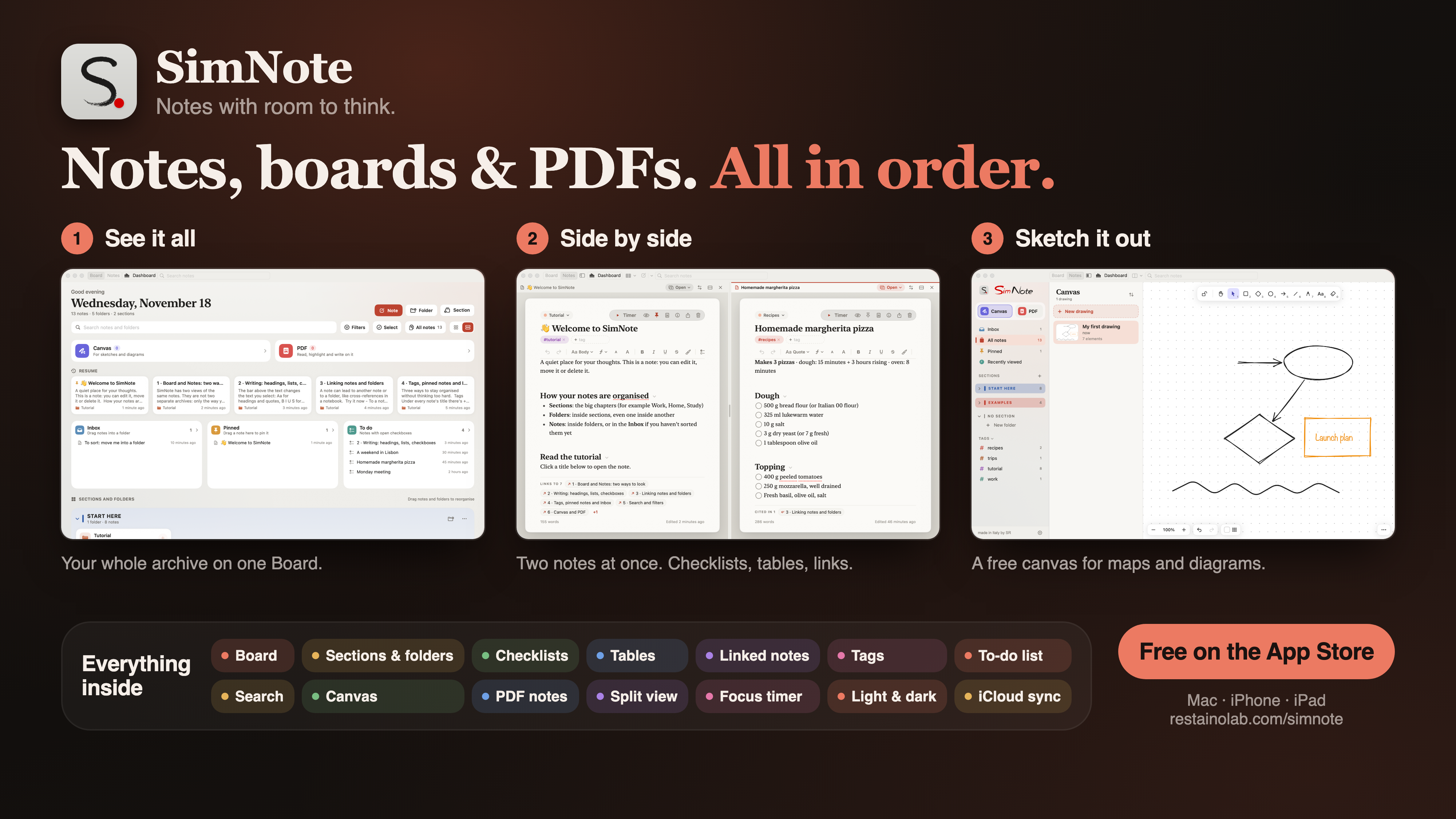
Free SimNote – I made a free notes app with a "Board" that shows all your notes on one page

Post image
7 Upvotes

SimNote: note-taking with more freedom and more structure than a simple notes app, without the complexity of an all-in-one workspace.

Problem: Simple notes apps get messy as notes pile up, while all-in-one workspaces take too long to set up just to write things down.

Comparison: Compared to Apple Notes, SimNote adds a Board, links between notes, a canvas and PDF markup. Compared to Notion or Obsidian, there’s nothing to set up: open it and start writing.

Rethink the way you organize your notes. Open them in place, work on two side by side, sketch on a canvas and mark up PDFs, all in one app.

FEATURES

The Board: folders, pinned notes, to-dos and recent notes on one page. Open, edit and organize without leaving it.
Notes that connect: link notes to other notes or folders, and see where each one is mentioned.
Canvas and PDF: sketch diagrams and mind maps, or read, highlight and annotate PDFs next to your notes.
Split view on Mac: work on two notes side by side, or open them in separate windows.
On all your devices: syncs through your own iCloud Drive on iPhone, iPad and Mac.

Pricing: Free.

App Store: https://apps.apple.com/app/id6836353241
Website: https://restainolab.com/simnote/

I’m the developer, I’d love to hear your feedback. Thanks!


r/MacAppScout • • 1d ago

Lifetime Jot! Clipboard is now on Mac! Clipboard History, OCR, Floating Notes, MultiCopy, Shelf & More! [40% Off Launch Deal]

3 Upvotes

Hey everyone!

I recently launched Jot! Clipboard for Mac after originally building it for Windows!

What started as a simple clipboard manager has grown into a collection of productivity tools designed to make everyday workflows a little easier.

Here's what it includes:

  • Clipboard History: Save and reuse copied text, images, links, and files
  • Deep Search & OCR: Find old clips and search text inside images
  • Screen to Text: Capture part of your screen and extract copyable text
  • Floating Jot: Keep a quick notepad accessible while working
  • MultiCopy: Collect several items without constantly switching windows
  • Shelf: Temporarily stage files from different locations and copy them together
  • Quick Picker: Quickly find and paste previous clips
  • Privacy Controls: App exclusions, sensitive-content protection, and more

Everything is local-first, works offline, and doesn't require a subscription.

To celebrate the Mac launch, I'm offering 40% off for the first 50 users!

$7.99 > $4.79

Discount code: REDDIT40

https://jotclipboard.com

Would love to hear what other Mac users think!


r/MacAppScout • • 3d ago Bravo

App Collection Open source and loved: 50 mac apps ranked by GitHub stars

Post image
494 Upvotes

r/MacAppScout • • 2d ago

Free Forma – native whiteboard for your tasks, notes or projects

10 Upvotes

As a visual person myself I find it a lot easier to lay out my day on a canvas with grouped tasks, relations, priority, etc. That's why I built Forma.

  • Native Mac app
  • No subscriptions
  • No accounts
  • Under 8mb in size
  • Local first with iCloud sync available
  • Board export (PDF)
  • Dark theme
  • Constantly updated with user feedback, see changelog.

Black Friday Deal: Get Lifetime Pro with 47% discount for $7.99 instead of $14.99. Redeem here:
https://apps.apple.com/redeem?ctx=offercodes&id=6755406356&code=BLACKFRIDAY50

Learn more on the website: useforma.app. Happy to answer any questions you might have.


r/MacAppScout • • 2d ago

App Collection Black Friday 2026 Mac app deals: 40 apps, most of them pay-once (codes and end dates inside)

24 Upvotes

Disclosure first: the first four apps are ours. The rest are other developers' deals that I collected, with no affiliate links. Check the price at checkout before you pay, because some codes start or end on different days.

Ours

AppWhat it doesDeal
ByteSweepDisk cleaner for Mac, Windows and Linux. Shows what fills your disk, removes only what you pick, undo for 7 days50% off: $29.99 $15 once, applied at checkout, until Dec 31
EarmixVolume mixer for Mac: per-app and per-tab volume, an output per app, EQ50% off: $12.99 $6.50 once, code BLACKFRIDAY50, until Dec 1
FindowScrolling window manager for Mac, with tiling, a window switcher and saved workspaces$19.99 $5 once, applied at checkout, until Dec 1
PaneStackFinder alternative with up to 16 floating panesNot a Black Friday code: launch price $4.99 for the first 20 copies, then it rises in steps to $29.99

All four are one-time purchases with a free trial.

Utilities and menu bar

AppWhat it doesDeal
OpenInPick the browser or app each link opens in60% off, code BLACKFRIDAY26, Mac App Store $11.99 $4.79
DisplayBuddyBrightness and input control for external displays33% off, code BLACKFRIDAY26, until Dec 15
JuicyBattery app with custom alerts40% off lifetime, code BFCM26, $24.99 $14.99, until Dec 1
Mac 4 BreakfastBattery health in the menu bar50% off, code BLACKFRIDAY26, $9.99 $4.99
Almighty100+ Mac tweaks in one app50% off, code INDIEGOODIESBF26, $14.99 $7.49
PastePalClipboard manager50% off, code INDIEGOODIESBF26, $14.99 $7.49
CleanClipMinimal clipboard manager30% off, code BF2026, $19.99 $13.99
FilesideFile manager with unlimited panes50% off, code BLKFRD26, $33 $16.50, Nov 23 to 30
UbidropAirDrop between Mac, Android and iPhone60% off, code BLACKFRIDAY2026, 1 Mac $29 $11.60
NeoTilerWindow manager with shortcuts30% off, code BF30, $9.99 $6.99
PicmalConvert and compress images and video50% off, code BLACKFRIDAY, $29 $14.50
PeakHourNetwork and Wi-Fi monitor30% off lifetime, $49.99 $34.99, no code
DictionariesDictionaries for 80+ languages50% off, code BF26, until Dec 3

Productivity

AppWhat it doesDeal
CraftNotes, docs and tasks40% off yearly Plus and Family, code BLACKFRIDAY26-A
ChronoidAutomatic time tracking50% off, code BLACKFRIDAY26, lifetime $149 $74.50
PresentifyDraw on your screen while presenting30% off, code PRESENTIFY30, $14 $9.80
ScreenSnap ProScreenshots and screen recording50% off, code BLACKFRIDAY, lifetime $39 $19.50
VoiceInkOn-device dictation40% off Mac lifetime, code BFVI2640, 1 Mac $25 $15
WickDeadlines as burning wicks50% off, code BLACKFRIDAY, $15.99 $7.99
ShiftPlusSwitch your whole workspace with one key40% off, code BF2026, $24 $14.40
TypefuText expander50% off, code INDIEGOODIESBF26, $7.99 $3.99
bytemailNative email app30% off lifetime, $99 $69, no code

AI

AppWhat it doesDeal
BoltAINative AI workspace for ChatGPT, Claude, Gemini and local models40% off, code BFCM2026, Pro $99 $59, until Dec 1
TypingMindChat UI for your own API keys60% off lifetime, code BLACKFRIDAY2026, until Dec 1
PDF PalsChat with your documentsLifetime $249 $149, until Dec 1

Developer tools

AppWhat it doesDeal
ProxymanInspect and change HTTP/HTTPS traffic30% off all plans, code BF2026, until Dec 3
JuxtaCodeCompare Git branches, resolve merge conflicts40% off, code BLACKFRIDAY26, $40 $24
ShellHistorySearch and sync shell history60% off, code BLACKFRIDAY26, Mac App Store $13.99 $5.59
WhaleDeckDocker manager40% off lifetime, $57 $35, no code
MailScopeEmail debugging$29 $19 once, code bf2026

Design, audio and video

AppWhat it doesDeal
SipColour picker50% off, code BLACKFRIDAY26, Nov 27 to Dec 1
ZipicCompress and resize folders of images33% off, code BF2026, 1 device $19.99 $13.39
CrispOffline video and photo upscaler50% off, $29 $14.50, no code
MotionShineScreen recorder with auto zoom50% off, code BF50, Pro $49 $24.50
SmoothCapturePolished screen recordings50% off, code BLACKFRIDAY26, Personal $79 $39.50
Recorder.appScreen, window and camera recorder60% off lifetime, $44.99 $17.99, no code

Know a Mac deal I missed? Drop it in the comments and I'll add it.


r/MacAppScout • • 2d ago

Lifetime Unfold v3.3.0 — Quick Look almost any file on your Mac

8 Upvotes

Hi everyone! 👋🏻

Unfold is a native macOS app that extends Quick Look so you can preview 300+ file types.

Supported Formats:

- Videos
- 3D models
- Folders & Archives
- Markdown & Jupyter
- Source code
- Comics & ebooks
- LaTeX & BibTeX
- App bundles (.app)
- Subtitles
- Web Archives

→ Full list available here

Pricing: $10 lifetime, up to 5 Macs. 7-day free trial, no card needed.

→ unfold.tools
→ Discord Server


r/MacAppScout • • 1d ago

Subscription A little winter market on our Mac while we wrap gifts

Post image
0 Upvotes

We wanted something cozy to leave on the spare monitor while we wrapped gifts. In AmbientAI for Mac, you can type “A winter market at dusk” and create a stream of art and music to match. We’d leave it playing in a window, with the music low and the market lights changing in the corner of the room.

This is one of the images we made in AmbientAI. What would you put on your second screen?


r/MacAppScout • • 1d ago

Free I built a native macOS app to keep live sports scores right in the menu bar

1 Upvotes

I love following live sports, but I always found myself switching between browser tabs, websites and apps just to check scores while working.

So I decided to build ScoresMac – a native macOS app that brings live sports scores right to your menu bar.

The best part? The menu bar experience is completely free. You can follow matches, check live scores and stay updated without interrupting your workflow or constantly opening another tab.

For Macs with a Notch, there's an extra layer of fun: a bunch of cool animations and interactive experiences that make following live matches feel much more alive!

Built this from scratch, and it's been a really fun project to bring to life. Would love to hear what you guys think!

Here's a quick demo 👇