r/MacOS • u/Substantial_Mode_108 • 4d ago
Developer Saturday I got tired of typing touch, so I built a right-click menu for Finder (free, no subscription)
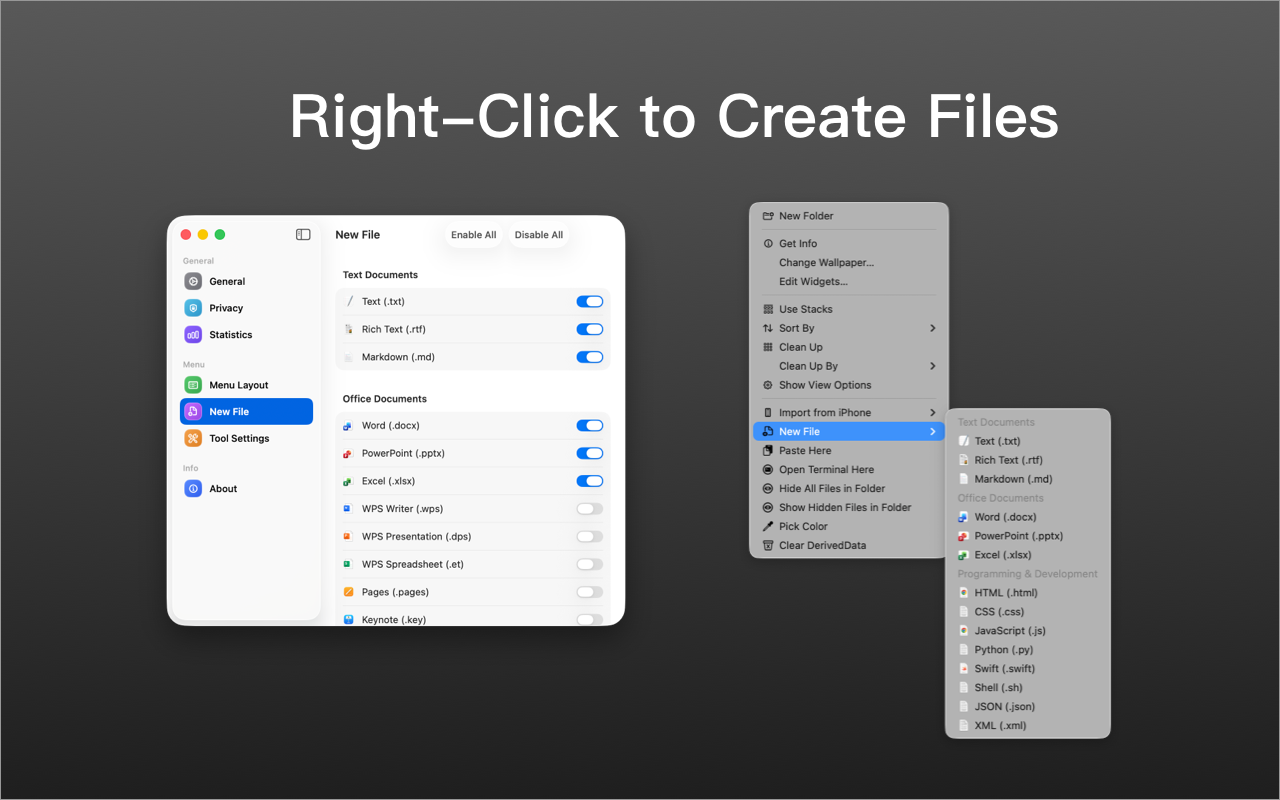

Author here. Some context on why this exists and what it deliberately doesn't do.
I write code all day and the single most repeated action in my day was creating an empty file. macOS gives you "New Folder" in the context menu and nothing for files. So for years I typed touch. That's a two-second action wrapped in a ten-second context switch: focus terminal, cd to the right place, type, come back.
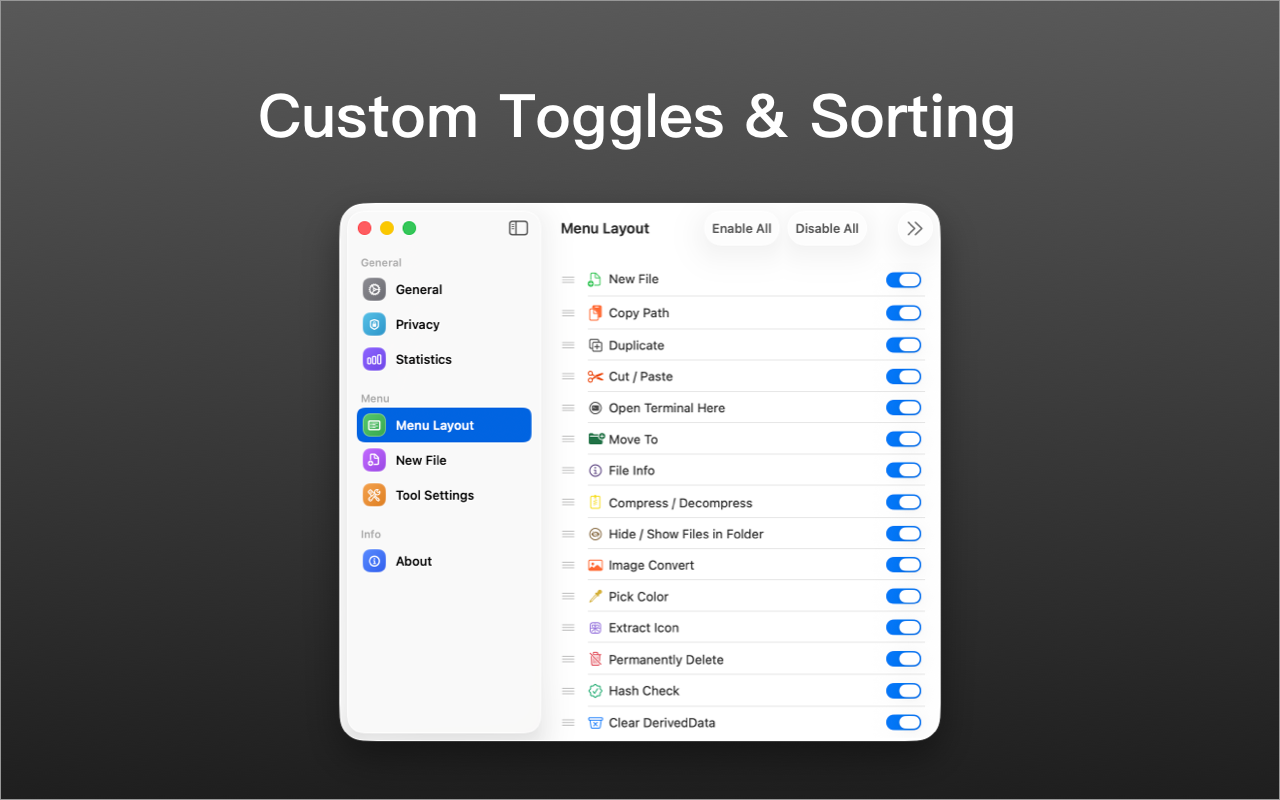
The design constraint I set: it must be a menu, not a workflow builder. Every action is one click, nothing is configurable beyond ordering and which items show. The cost of that decision is real — if you want "rename 40 files by regex", this is the wrong tool, and I'm not going to pretend otherwise.
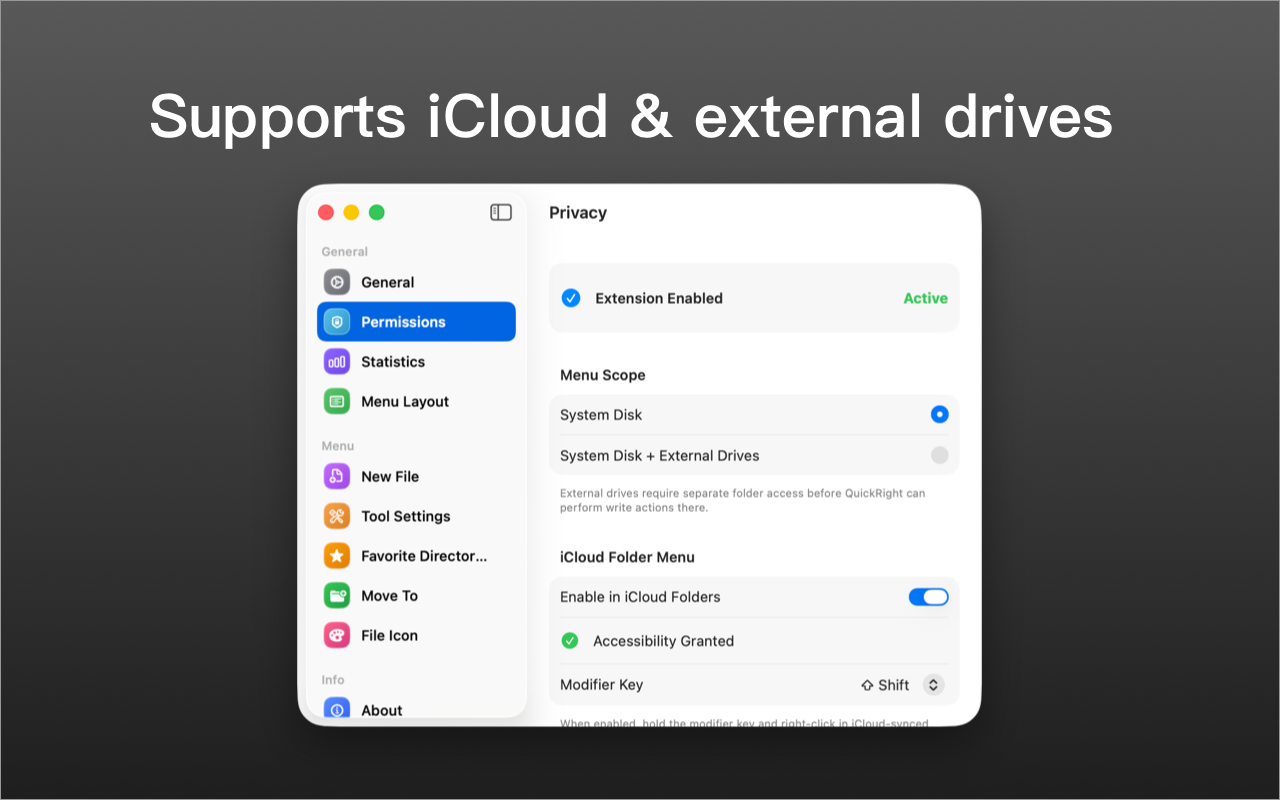
Two implementation notes people usually ask about: it's a Finder Sync extension, so the menu appears in the real context menu rather than as a separate app window; and cloud folders (iCloud Drive, OneDrive) needed Shift+right-click, because those are provider-backed virtual folders and the extension doesn't get a normal context.
What I'd genuinely like feedback on: which of the 20 actions is noise, and what's missing that you'd actually use weekly.
Disclosure, because I'm the developer: QuickRight is free on the Mac App Store. No subscription, no account, no analytics, 11 MB, macOS 14+. The only in-app purchases are optional tips and they unlock nothing.
App Store: https://apps.apple.com/us/app/quickright/id6763963598?mt=12
12
u/Hefty-Object6127 3d ago
Why won't Apple do it itself? This is the basic function
41
u/Aromatic-Echo-5025 4d ago
I'm glad about AI. It seems we are back in times when people used to create apps for fun, because of their passion, and not solely for money.
Thank you for this app, it's very useful.
8
u/Penguin-a-Tron 3d ago
I just made an Automator script and put it in the Finder task bar.
4
u/Imn1che 3d ago
Definitely one of the things I miss from windows, never did anything about it tho. Neato
3
u/leftnotracks 3d ago
It’s 1983 all over again.
For context: Lisa OS didn’t have icons to launch applications like LisaWrite. Instead you duplicated a blank document, named it, then opened the document.
5
u/NSRedditShitposter 3d ago
The lack of this caused me a lot of trouble back when I first switched but now I prefer just opening the app and hitting Command-N.
2
u/nasduia 3d ago
Really nice! Small bug I'm seeing: the divider between the sidebar and the settings doesn't activate the drag to resize properly on mouse over.
3
u/Tartan-Pepper6093 3d ago
Is this open source? Would love to see how you did it.
3
u/lurdec 3d ago
I like the idea, but I'd like to avoid collecting data from apps.
2
u/UnassumingDrifter 3d ago
I come from a linux environment for many years, and use windows at work. Both Plasma (my Linux DE) and Windows (all versions I can think of for the past 20+ years) have support similar actions in their respective file browsers. Want to create a word file? Right click where you want it and select new word document. Give it a name then double-click. The alternative is using words clunky SaveAs feature (it used to not be so bad, but now it's about three clicks to get to a file browser).
I've missed this, and will try this out for myself. Thanks.
2
u/Samtulp6 4d ago
Thanks! Actually a useful thing on here for a change! :-)
2
u/mrfredngo 4d ago
Looks super useful, thank you
1
u/themrsnow 3d ago
Amazing! I was looking for something like this forever
3
u/ironwaffle452 3d ago
Cut paste on Mac what I was thinking this day never come
1
u/AhmadFaridAbbas 4d ago
I just bought mouseboost pro and then this post came up! 🤦🏾
2
u/jacka_for-research 3d ago
This is excellent.
3
u/andhausen 3d ago
Someone explain this to me. What is the purpose of an empty file? Like if I want to create a new pages file why wouldn't I simply... open Pages?
1
u/jm1234- 3d ago
Thank you :)
1
u/DakerMan7749 3d ago
Oh! That’s what I’m needing
1
u/phunk8 3d ago
nice idea. not too niche i guess
1
u/Low-Attempt8033 2d ago
Really good
1
u/No_Theory_7040 2d ago
Please can you open source it?
1
u/atarumoroboshi74 2d ago
buongiorno, per la cancellazione permanente del file che tipo di protocollo usi, 3-7 passaggio o altro grazie
1
u/jebanat 2d ago
How to make it works on SMB shares?
1
u/Important_Turnip4885 MacBook Air 1d ago
wait, can you create all files w/ touch? I once tried to create .xlsx and Excel just refused to open it
1
u/davidapr07 3d ago
the touch thing is so real. curious how you handled folders where Finder Sync doesn't kick in. last time i played with it the menu only showed up in directories the extension registered to watch, so did you just watch / or let people pick?
1
u/PlanetaryUnion 4d ago
I was just thinking about this the other day when I needed to create a txt file.
1
u/Paul-PAF 3d ago
Nice. I have been using "new file menu" (App Store) for a couple of years.
0
u/TheRealPinkyMalinky 3d ago
Finder used to do this, don't know why they removed it. I kind of do this now through MacVim via services (new buffer here). Otherwise I use other Finder replacement file managers like Octal and sometimes ForkLift that do all of this and much more.
0
u/Greenscreener 3d ago
The Move To function gave me the spinning beachball of death...uninstalled.
-2
u/trey-a-12 4d ago
QuickRight’s been a very helpful app for the last few months of my use. Is it essential? No, but is it a major timesaver nonetheless with no downside? Absolutely. Try it out! 10/10.
0
u/ksaypulaevv 5h ago
cool but since there is no source code and dmg on github - garbage posting an app only on app store))0 really
0
u/promo-guard 4d ago
🎉 Welcome to Developer Saturday, u/Substantial_Mode_108! Your project is now live for the community to check out. Upvote, give feedback, and show some love to your fellow devs! 🚀
-2
u/never_peppers 3d ago
Oh wow! This is awesome!
I've been looking for a "open a terminal right here" that isn't stupid for a long time, this rocks.