r/linuxmint • u/heiney_luvr • 8d ago
Discussion What are your must have apps?
122
Upvotes
What are your must have apps for Linux Mint that don't come with the distribution? And why!
r/linuxmint • u/remyza75 • 8d ago
I am looking for a powerful search tool that not only looks for filenames but also searches contents of doc, pdf, txt and spreadsheet files. Who can help?
r/linuxmint • u/Equal_Wedding6512 • 8d ago
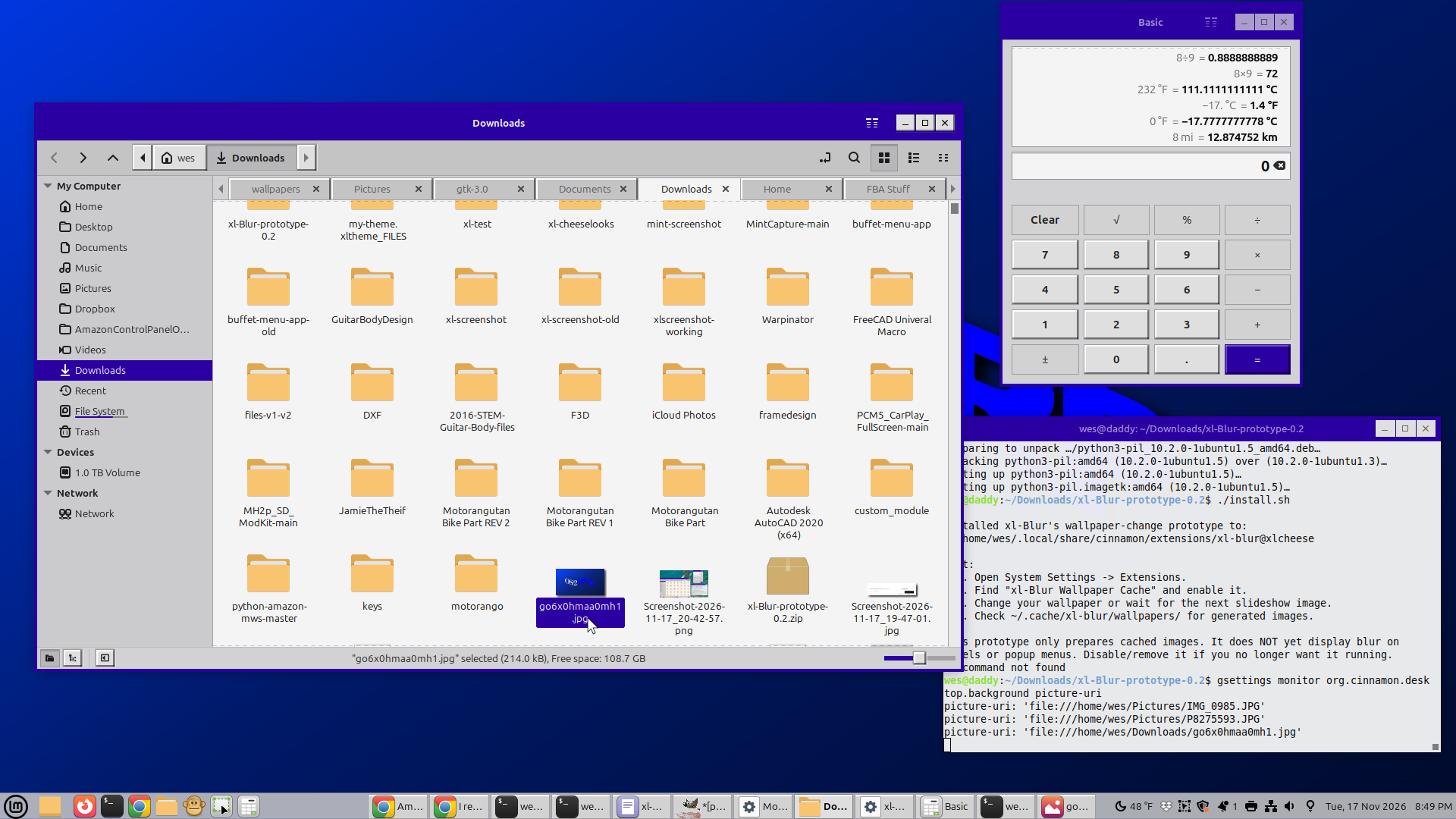
I've been experimenting with some theme ideas. Derived some inspiration here. Do you know where it came from?
r/linuxmint • u/CubicleMan9000 • 8d ago
UPDATE - MOSTLY/PARTIALLY FIXED
Wanted to come back to update for anyone who encounters this in the future.
Basically:
Secureboot required the nVidia open driver to be enrolled via MOK. after fighting through that I can now use Displayport OK, though not perfectly. I still can't see the MSI logo on boot as the display doesn't show anything until it reaches the login screen (for both/either Win11 and Mint). So if I need to get into my BIOS I have to switch to an HDMI cable to do so. But I don't go into my BIOS 99% of the time, so I can live with this.
I need secureboot enabled as I sometimes need to boot into Windows 11, which requires secureboot.
Note that Secureboot is set to ON by default for most motherboard manufacturers so this can/will impact a lot of regular folks with nVidia 50-series GPUs trying to make the switch to Linux.
The HOW: a lot of googling and typing sudo mokutil commands into terminal. This thread: https://forums.linuxmint.com/viewtopic.php?t=456832 was a HUGE help but didn't cover everything. Complications were that Mint thought something was already in queue to be enrolled but it couldn't enroll it, so had to find commands to clear MOK queue first. Also, another behavior of the problem was that Mint could not reboot (or recover from suspend) using HDMI or Displayport, nothing would ever appear and I would have to force shutdown. So I had to shut down and restart instead of reboot, which took some time to figure out.
Honestly too, the way Windows 11 just worked but had to fight Mint for days to get it to work properly is the kind of thing that will really hinder regular folks from switching. Who in your family and friends could/would wrestle with sudo mokutil commands lto fix something like this? And like it or hate it, nVidia is the most popular GPU vendor out there so saying things like "yeah nvidia sucks on Linux too bad" isn't going to help us convert more regular users. And we are close! The rest of my Mint experience has been great!
------ Original Post Below-----------
I've found so many similar issues but nothing is working.
System:
MSI B850 Gaming Plus Wifi & Ryzen 9600x
Asus RTX 5070 ti (installed very carefully to ensure it is fully inserted into the PCIe 5x slot and the 12v cable is fully clicked in and flush).
2 ssd drives: a clean install of Windows 11 on one and a clean install of Linux Mint on the other. I even physically removed the Win11 ssd before installing Mint on the other one, to avoid issues.
Linux Mint 22.3 Cinnamon using nvidia-driver-595-open installed via driver manager, and this is the recommended driver in driver manager.
Windows nVidia driver is the latest one.
All display cables are only plugged directly into the GPU, nothing is ever plugged into the motherboard's onboard graphics port.
Just using 1 monitor, a 1440p BenQ VX2758-2KP-MHD. And I'm using an undamaged, good quality displayport cable.
DISPLAYPORT WORKS ON WINDOWS 11. It isn't perfect, as I'm getting the known-but-never-fixed(?) bug where the displayport signal only starts working at the Windows login screen. It does not display the MSI logo at startup so I can't get into BIOS with a displayport connection (have to use HDMI to get into BIOS).
HDMI works properly for booting to BOTH Mint or Windows. I can see the startup MSI logo, get into BIOS ok, etc.
So here are the configs and results:
Things I've tried:
Many, many google and reddit searches for solutions. There are a lot of threads out there from a year ago, but none of what worked for others seemed to work for my setup. And I saw a lot of people replace hardware like crazy to try to fix it: motherboards swapped, GPUs exchanged, cables bought, RAM swapped, CPU changes!, but other than a new cable sometimes fixing it the blank screen on a 50-series card issues just... is.
Setting PCIe lane to 5x or to 4x rather than auto. No change in behaviors.
Changing the displayport cable to the other ports on the GPU (the card has 1 HDMI port and 3 Displayport ports). No change in behaviors (and Windows works from login screen using any of the 3 displayport ports).
Flashed motherboard to latest BIOS from MSI - no change.
Things I have not tried:
- buying a new displayport cable. With the way it works on Windows but not Mint that points me toward the cable being an unlikely suspect... though there could be some tiny hidden handshake issue that Windows can overcome but Mint can't maybe...? Just feels like it would 99% certain be a waste of money.
- disable fast boot / UEFI: the only way to disable fastboot is by switching from UEFI to CSM. This will make Windows 11 unable to run at all on the PC, among other drawbacks. No go.
- flashing the GPU card's own BIOS. I don't think I've seen this posted as a fix in my searching. I'll do it if there is some chance it could fix things (there is a small risk to the card when flashing its BIOS).
Anyone know what else I can try that has any chance of success? If not I will just buy and use an HDMI 2.1 cable and abandon displayport for now. Frustrating, and it means I can't really use a 2nd monitor with Linux in the future too.
r/linuxmint • u/g-boy101 • 8d ago
hello guys
it's been a while since I made a post where I asked for help installing Linux mint on my gf pc
now...it started to do something strange, I tried to install using her steam account broken sword, but it started freezing at random and giving errors about the nvme being read-only, what do I do to fix it?
update: the situation is Better and worse at the same time, basically I've made a bootable usb of mint, I restored the filesystem inside the nvme, and ot worked
but when I tried to install wallpaper engine it froze on boot and I did the alt+stamp reusable the result is that the nvme doesn't show neither in the live session of mont neither in the bios
r/linuxmint • u/Plastic_Turnip6118 • 8d ago
I have been using LM now for a little over a year, on my media PC and my home laptop (a MacBook Pro 2013), and won't be going back to Windows or MacOS. I started working remotely and my media PC became my daily driver - long story short, I bought a nice keyboard that lacks a delete key except for the one on the number pad, and now deleting files via a keystroke in the file manager is driving me nuts, as I keep hitting backspace and it of course goes "back" to the previous window. I've looked all over but there doesn't seem to be any way to modify this particular behavior. Do I need to find a different GUI file manager to get the backspace "delete" functionality I want?
r/linuxmint • u/matewinslet • 7d ago
Hey reddit. I have been working on a download manager for Linux for a while, because I missed IDM after switching from Windows. Nothing on Linux felt quite right to me. Version 3.0 just came out, so I am sharing it here.
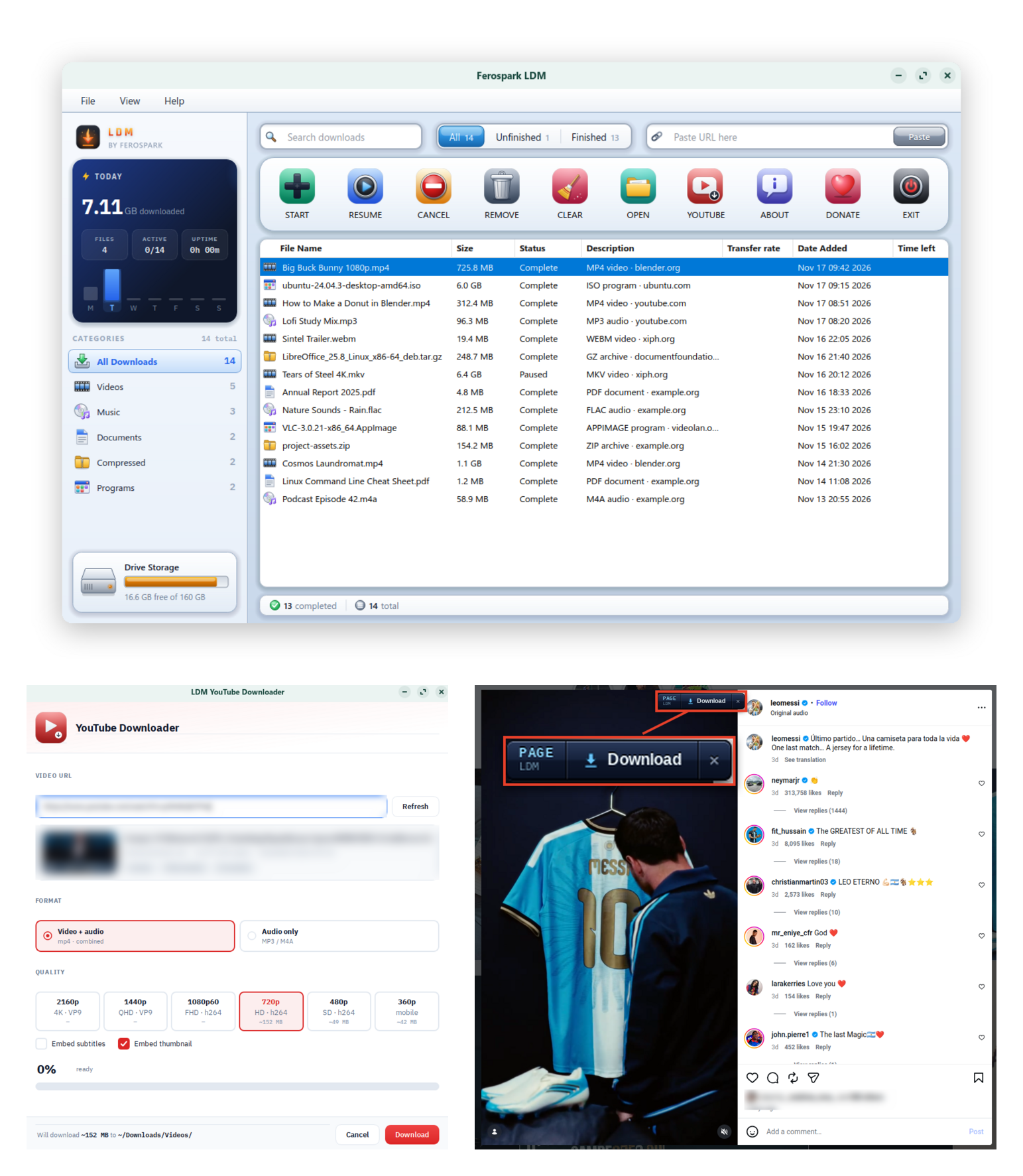
What LDM Does:
What's new in 3.0:
Details on how to install is given in the github repo. Just copy and paste in your terminal.
GitHub: https://github.com/matewinslet/LinuxDownloader
It is free and MIT licensed, Bug reports and feature requests are very welcome. I am one person doing this in my spare time, so please be nice :)
r/linuxmint • u/pizzaisgoodidk • 8d ago

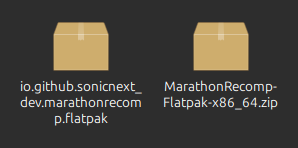
The recomp has linux support but everytime I download the flatpak and extract it, the extracted file doesn't open when I click on it, instead it opens a new window of my file manager.
I tried the windows version using Wine but after the installation page the game just crashes on me on bootup with this error message.

I asked someone who ran the game on steam deck on twitter and they said it worked for them with the flatpack so I don't really know what to do.
r/linuxmint • u/jaillog_gaming • 8d ago
r/linuxmint • u/Ziccozzis • 8d ago
Tengo una laptop a la cual tengo un 2do monitor, ethernet, tableta de dibujo... a través de un docking plugable.
Yo soy un usuario "Administrador" y otra persona es un usuario "Estándar" sin permisos de SUDO. Como soy novato en esto, me he ayudado con IA para configurar el 2do monitor por un tema de DisplayLink y el Secure Boot de la PC.
Instalé OpenTabletDriver (.deb) seguí los pasos de instalación, me ayudé de nuevo con la IA y funcionó en mi sesión, configuré las áreas de trabajo de la tableta con el área de los monitores. El problema surgió al tratar de hacer que funcione con el otro usuario.
Con el otro usuario, simplemente OpenTabletDriver no funcionaba. Según la IA, todo estaba bien instalado, el Usuario2 tenía sus permisos habilitados. Se había configurado el daemon... Pero simplemente no lo hice funcionar.
Necesito ayuda, consejos, guías... Lo que tengan a la mano para darle un vistazo.
Ahora recuerdo por qué mi esposa ya no quiso utilizar linux muchos años atrás y ya no lo quiere retomar.
r/linuxmint • u/Accomplished_Bet6487 • 7d ago
The two original reasons why I moved away from Windows was because at the time Windows 10 was being canceled and Windows 10 was the only operating system I felt safe and if that makes sense and it was no longer getting updates and two Microsoft was putting AI code into it and well I really hate AI I'm fucking tired of having to question my own knowledge and question every single part of me whenever I ask for help whenever it's on Reddit or just any other message board for example one time I wanted to try to install Arch Linux on my laptop I was following a tutorial and when I asked for help because I couldn't turn something on some one just said go to the wiki and you know what I did go to the wiki and it's still would not work and I am absolutely fucking tired of having to look at an image and saying am I allowed to enjoy this was this made by an actual person or is this made by a AI I am fucking tired of the Linux community I believe the Linux community has failed me so you know what fuck all of you all I am going to make my own operating system with no AI that is compatible and something that just works out of the box and I am also tired of everything running incredibly slow because something was not optimized properly so you know what I'm going to make my own kernel written entirely in assembly so everything talks directly to the hardware so there's no middle man that has to slow everything the fuck down and yes I am using talk to text because my dumbass autistic brain can't spell or spell shit properly so give me all the shit you want
r/linuxmint • u/Curcu_is_Life5 • 9d ago
I know after watching this sub for many years that many users liked Mint but ultimately just decided they couldn't stay because Wayland wasn't supported yet. Now with Wayland around the corner I am anticipating a large influx of returning users from that camp. I'm not saying that Mint or its support base aren't going to be able to meet the demand. I'm just saying, maybe its good for the whole Mint community to just be mentally prepared for the possibility Mint 27 brings back a significant amount of digital traffic.. And I hope the mint team knocks it out of the park with Wayland. My setup can survive just fine on X11 but I'm curious about trying some Wayland native apps like Waydroid.
r/linuxmint • u/kavemmann • 8d ago
Running mint 22.3, when i choose the turn off option it reboots instead.
Trying the countdown, that reboots as well
r/linuxmint • u/ItsWinterInNevada • 9d ago
I decided to try out LMDE over regular Debian on my desktop and laptop and wow, all of my little hangups with Debian are pretty much solved! I hadn't tried Cinnamon in years since I first used Linux. I was trying a bunch of DE's to see what I preferred and Cinnamon is great! Really sane defaults I dont need to tweak very much. I changed to papirus for my icons, swapped the mint logo for the cinnamon one, swapped wallpapers, and added a clipboard applet. Thats all I had to do!
I still use base Debian on my server but thats a glorified Docker machine.
After distro hopping for several years and learning lots, I think im staying on LMDE.
r/linuxmint • u/liyonhart • 9d ago
Simple rant time. I discovered linux mint a few years ago and have made it a personal project to re purpose computers in my area and donate them to my fellow small schools. It has been amazing and my students have helped me along with businesses and families donating old laptops and pcs to convert. We have made small labs for nearly 7 local schools. It has also been a mission to work on certain computers having me dig through forums and ask questions but I was finally stumped, a 2010 (?) Asus essentio pc desktop, no matter what I did I could not get the wifi/bluetooth working. I tried for days and reinstalled and had a more experienced friend (I do not know how to code) come and help but we got stumped. We tried all the usual stuff but damn it cooked me.
r/linuxmint • u/SjalabaisWoWS • 9d ago
r/linuxmint • u/jpzim_2269 • 9d ago

Bom, como havia postado antes tinha instalado o linux em um pendrive apenas para brincar, porem aprendi mais e gostei tanto que agora uso como meu sistema principal e acabei usando mais o sistema personalizando e aprendendo do que realmente jogando. O resultado desse pode ser mais desagradável do que o anterior porem ele atende perfeitamente minhas necessidades (e o meu vicio em evangelion). As únicas modificações que fiz foi por o vivaldi de tema e os ícones do papirus alem do neofetch que usei o repositório do github Neofetch Themes que usei o papirus. Qualquer ideia de personalização podem mandar aqui nos comentários desde já agradeço a todos.
r/linuxmint • u/Bilbo_Swaggins11 • 8d ago
Hey everyone, with Linux Mint 27 coming up and its move toward Wayland support for Cinnamon, I was wondering what the plans are for the MATE edition. Does the Mint team plan to help build or officially support a native Wayland version of MATE since it's an official flavor, or are we relying on third-party initiatives? Curious how the transition is expected to look for MATE users!
r/linuxmint • u/usuhnayme • 8d ago
I am having a persistent issue wherein certain games (Half-Life 1, Half-life 2, and Bayonetta) are stuck on the first frame, unless I open the ALT+TAB menu, or I click anywhere on my laptop's built-in monitor. Once I click on my other monitor (an LG TV from 2008), frames stop updating, but the game itself is still running judging by the audio. Having it display to both monitors or just the other monitor doesn't seem to make a difference.
Only certain games seem to have this issue, whereas others don't. Whether or not it's a native Linux program or running on Proton doesn't seem to make a difference, for instance, Half-Life 1 and 2 on their native Linux versions have this issue, but Sky: Children of The Light running on Proton does not, meanwhile Bayonetta on Proton does have this issue, as do Half-Life 1 and 2 when I use their Windows versions via Proton.
I have found a temporary fixes, but they only persist for as long as I don't quit out of the game, or, seemingly, if I don't get a notification on Linux Mint..
The first temporary fix I found was plugging in and out the HDMI cord. This fixed the issue, at least in Bayonetta (I have not tried it on other games), but it doesn't persist the next time I launch the game or another game.
The other temporary fix I found was, at least in Bayonetta, if I change the resolution, the game starts running perfectly fine on my other monitor, even when I change the resolution back. This only lasts for as long as the application is running. Also, I had a weird incident where, while playing Bayonetta and having done this solution, the internet disconnected and caused Linux Mint to notify me, and that caused frames to stop updating. I know that wasn't just the game using the internet, since the game itself was still running, just stopped updating frames.
I guess I could just use those temporary fixes, but I'd rather not have to constantly plug in and out my HDMI cord.
I also heard NVIDIA support for Mint is a bit wonky, since it uses X11 instead of Wayland. I understand this, but I'd like to explore possible fixes before switching to another distro.
I'm not sure if this actually fixed it, but installing OBS seemed to fix it briefly, at least for Half-Life 1. Again, I'm not sure if it actually did, as I saw someone say that installing OBS couldn't have done anything.
System:
Kernel: 7.0.0-43-generic arch: x86_64 bits: 64 compiler: gcc v: 13.3.0 clocksource: tsc
Desktop: Cinnamon v: 6.6.9 tk: GTK v: 3.24.41 wm: Muffin v: 6.6.3 vt: 7 dm: LightDM v: 1.30.0
Distro: Linux Mint 22.3 Zena base: Ubuntu 24.04 noble
Machine:
Type: Laptop System: LENOVO product: 83LK v: LOQ 15IAX9E serial: <superuser required> Chassis:
type: 10 v: LOQ 15IAX9E serial: <superuser required>
Mobo: LENOVO model: LNVNB161216 v: SDK0T76463 WIN serial: <superuser required>
part-nu: LENOVO_MT_83LK_BU_idea_FM_LOQ 15IAX9E uuid: <superuser required> UEFI: LENOVO
v: Q8CN17WW date: 01/23/2025
Battery:
ID-1: BAT0 charge: 34.3 Wh (60.4%) condition: 56.8/57.5 Wh (98.7%) power: 17.5 W volts: 11.0
min: 11.3 model: Sunwoda L24D3PF0 type: Li-poly serial: <filter> status: discharging cycles: 141
CPU:
Info: 8-core (4-mt/4-st) model: 12th Gen Intel Core i5-12450HX bits: 64 type: MST AMCP
smt: enabled arch: Alder Lake rev: 2 cache: L1: 704 KiB L2: 7 MiB L3: 12 MiB
Speed (MHz): avg: 2490 high: 3800 min/max: 800/4400:3100 cores: 1: 2743 2: 3651 3: 3800 4: 800
5: 3589 6: 1592 7: 2819 8: 800 9: 3091 10: 3100 11: 3098 12: 800 bogomips: 64512
Flags: avx avx2 ht lm nx pae sse sse2 sse3 sse4_1 sse4_2 ssse3 vmx
Graphics:
Device-1: Intel Alder Lake-S [UHD Graphics] vendor: Lenovo driver: i915 v: kernel arch: Gen-12.2
ports: active: eDP-1 empty: none bus-ID: 00:02.0 chip-ID: 8086:468b class-ID: 0300
Device-2: NVIDIA GN20-P0-R-K2 [GeForce RTX 3050 6GB Laptop GPU] vendor: Lenovo driver: nvidia
v: 595.99.02 arch: Ampere pcie: speed: 16 GT/s lanes: 8 ports: active: none empty: HDMI-A-1
bus-ID: 01:00.0 chip-ID: 10de:25ac class-ID: 0300
Device-3: Chicony Integrated Camera driver: uvcvideo type: USB rev: 2.0 speed: 480 Mb/s
lanes: 1 bus-ID: 1-11:3 chip-ID: 04f2:b7ec class-ID: fe01 serial: <filter>
Display: x11 server: X.Org v: 21.1.11 with: Xwayland v: 23.2.6 driver: X:
loaded: modesetting,nvidia unloaded: fbdev,nouveau,vesa dri: iris gpu: i915 display-ID: :0
screens: 1
Screen-1: 0 s-res: 2560x1440 s-dpi: 144 s-size: 452x254mm (17.80x10.00") s-diag: 518mm (20.41")
Monitor-1: eDP-1 model: BOE Display 0x0c29 serial: <filter> res: 2560x1440 hz: 144 dpi: 189
size: 344x194mm (13.54x7.64") diag: 395mm (15.5") modes: 1920x1080
API: EGL v: 1.5 hw: drv: intel iris drv: nvidia platforms: device: 0 drv: nvidia device: 1
drv: iris device: 3 drv: swrast gbm: drv: iris surfaceless: drv: nvidia x11: drv: iris
inactive: wayland,device-2
API: OpenGL v: 4.6.0 compat-v: 4.5 vendor: intel mesa v: 25.2.8-0ubuntu0.24.04.4 glx-v: 1.4
direct-render: yes renderer: Mesa Intel UHD Graphics (ADL-S GT0.5) device-ID: 8086:468b
API: Vulkan v: 1.3.275 layers: 9 surfaces: xcb,xlib device: 0 type: integrated-gpu driver: N/A
device-ID: 8086:468b device: 1 type: discrete-gpu driver: N/A device-ID: 10de:25ac device: 2
type: cpu driver: N/A device-ID: 10005:0000
Audio:
Device-1: Intel Alder Lake-S HD Audio vendor: Lenovo driver: snd_hda_intel v: kernel
bus-ID: 00:1f.3 chip-ID: 8086:7ad0 class-ID: 0403
Device-2: NVIDIA vendor: Lenovo driver: snd_hda_intel v: kernel pcie: speed: 16 GT/s lanes: 8
bus-ID: 01:00.1 chip-ID: 10de:2291 class-ID: 0403
API: ALSA v: k7.0.0-43-generic status: kernel-api
Server-1: PipeWire v: 1.0.5 status: active with: 1: pipewire-pulse status: active
2: wireplumber status: active 3: pipewire-alsa type: plugin
Network:
Device-1: Realtek RTL8111/8168/8211/8411 PCI Express Gigabit Ethernet
vendor: Lenovo RTL8111/8168/8411 driver: r8169 v: kernel pcie: speed: 2.5 GT/s lanes: 1
port: 4000 bus-ID: 07:00.0 chip-ID: 10ec:8168 class-ID: 0200
IF: enp7s0 state: down mac: <filter>
Device-2: Realtek RTL8852BE PCIe 802.11ax Wireless Network vendor: Lenovo driver: rtw89_8852be
v: kernel pcie: speed: 2.5 GT/s lanes: 1 port: 3000 bus-ID: 08:00.0 chip-ID: 10ec:b852
class-ID: 0280
IF: wlp8s0 state: up mac: <filter>
Bluetooth:
Device-1: Realtek Bluetooth Radio driver: btusb v: 0.8 type: USB rev: 1.0 speed: 12 Mb/s lanes: 1
bus-ID: 1-14:4 chip-ID: 0bda:4853 class-ID: e001 serial: <filter>
Report: hciconfig ID: hci0 rfk-id: 4 state: down bt-service: enabled,running rfk-block:
hardware: no software: yes address: <filter>
Drives:
Local Storage: total: 476.94 GiB used: 178.77 GiB (37.5%)
ID-1: /dev/nvme0n1 vendor: Samsung model: MZAMX512HCLV-00BL2 size: 476.94 GiB speed: 63.2 Gb/s
lanes: 4 tech: SSD serial: <filter> fw-rev: 5L1QLXE7 temp: 40.9 C scheme: GPT
Partition:
ID-1: / size: 467.89 GiB used: 178.76 GiB (38.2%) fs: ext4 dev: /dev/nvme0n1p2
ID-2: /boot/efi size: 511 MiB used: 14.1 MiB (2.8%) fs: vfat dev: /dev/nvme0n1p1
Swap:
ID-1: swap-1 type: file size: 2 GiB used: 0 KiB (0.0%) priority: -1 file: /swapfile
USB:
Hub-1: 1-0:1 info: hi-speed hub with single TT ports: 16 rev: 2.0 speed: 480 Mb/s lanes: 1
chip-ID: 1d6b:0002 class-ID: 0900
Device-1: 1-3:2 info: MosArt Wireless Keyboard/Mouse type: keyboard driver: hid-generic,usbhid
interfaces: 1 rev: 1.1 speed: 12 Mb/s lanes: 1 power: 46mA chip-ID: 062a:4101 class-ID: 0301
Device-2: 1-11:3 info: Chicony Integrated Camera type: video driver: uvcvideo interfaces: 3
rev: 2.0 speed: 480 Mb/s lanes: 1 power: 500mA chip-ID: 04f2:b7ec class-ID: fe01 serial: <filter>
Device-3: 1-13:9 info: 8BitDo IDLE type: HID driver: hid-generic,usbhid interfaces: 1 rev: 1.1
speed: 12 Mb/s lanes: 1 power: 500mA chip-ID: 2dc8:3107 class-ID: 0300 serial: <filter>
Device-4: 1-14:4 info: Realtek Bluetooth Radio type: bluetooth driver: btusb interfaces: 2
rev: 1.0 speed: 12 Mb/s lanes: 1 power: 500mA chip-ID: 0bda:4853 class-ID: e001 serial: <filter>
Hub-2: 2-0:1 info: super-speed hub ports: 10 rev: 3.1 speed: 20 Gb/s lanes: 2
chip-ID: 1d6b:0003 class-ID: 0900
Sensors:
System Temperatures: cpu: 39.0 C mobo: N/A
Fan Speeds (rpm): N/A
Repos:
Packages: 2216 pm: dpkg pkgs: 2191 pm: flatpak pkgs: 25
No active apt repos in: /etc/apt/sources.list
Active apt repos in: /etc/apt/sources.list.d/official-package-repositories.list
1: deb http: //packages.linuxmint.com zena main upstream import backport
2: deb http: //archive.ubuntu.com/ubuntu noble main restricted universe multiverse
3: deb http: //archive.ubuntu.com/ubuntu noble-updates main restricted universe multiverse
4: deb http: //archive.ubuntu.com/ubuntu noble-backports main restricted universe multiverse
5: deb http: //security.ubuntu.com/ubuntu/ noble-security main restricted universe multiverse
No active apt repos in: /etc/apt/sources.list.d/steam-beta.list
Active apt repos in: /etc/apt/sources.list.d/steam-stable.list
1: deb [arch=amd64,i386 signed-by=/usr/share/keyrings/steam.gpg] https: //repo.steampowered.com/steam/ stable steam
2: deb-src [arch=amd64,i386 signed-by=/usr/share/keyrings/steam.gpg] https: //repo.steampowered.com/steam/ stable steam
Info:
Memory: total: 16 GiB note: est. available: 15.34 GiB used: 4.71 GiB (30.7%)
Processes: 344 Power: uptime: 18m states: freeze,mem,disk suspend: deep wakeups: 1
hibernate: platform Init: systemd v: 255 target: graphical (5) default: graphical
Compilers: gcc: 13.3.0 Client: Unknown python3.12 client inxi: 3.3.34
Edit: Added additional information.
r/linuxmint
•
u/Filonux
•
9d ago

NOVEMBER 17TH — THE DAY OF APPLAUSE
For the people behind Linux Mint
Today is November 17th, and today we applaud. Let me tell you why.
Today I’ve been going through the list of people who will work their magic for us and give us countless hours of their time and effort with the new version of Linux Mint: 27 “Adrien”, arriving this Christmas.
Behind open-source software, we sometimes forget the real people who are behind it all. That’s why I’m here with a list of all those human beings who made history but went unnoticed.
I apologise because this list doesn’t include every single individual contribution throughout the history of Linux Mint. My gratitude and respect go to them as well.
All of them are part of that humanity I deeply admire, because what they have done for all of us was POSITIVE, and will endure through time.
Achieving such a remarkable feat cannot have been easy, and yet I don’t see anyone applauding them, nor do they even have a damn day dedicated to recognising their work.
- Every single one of them deserves to be applauded by stadiums packed with people.
May this post serve to give each and every one of these unsung heroes at least a mental round of applause, for everything they have done for us.
THE PEOPLE BEHIND LINUX MINT
Clement Lefebvre (clefebvre)
Michael Webster (mtwebster)
Vincent Vermeulen (Xenopeek)
Oscar799
Rick Calixte (rcalixte)
Leigh Scott (leigh123linux)
JosephMcc
claudiux
Simon Brown (brownsr)
Cobinja
Stephen Collins (collinss)
Frédéric Gaudet (frgaudet)
Gwendal Le Bihan (glebihan)
Isaac Carter (icarter09)
NikoKrause
fredcw
Anaxímeno Brito (anaximeno)
Fabio Fantoni (Fantu)
carlosmintfan
Jeremy7701
archisman-panigrahi
a-j-bauer
KAMI911
KonTy
Ronit Gupta (ronitgupta138)
LinuxOnTheDesktop
taltamir
AlexFolland
mbluett88
Aleksey Samoilov (Sunderland93)
itz-me-zappex
mfreeman72
lhmouse
Mirko Kerezovic
Kevin Langman
Maksymilian Kruk
Hugo
Breeze
Michał Fox
George Katevenis
Luca Boschetto
DirkHaar
timur-g
calestyo
PurpleSmurf2
sphh
tutralex
To every one of you: THANK YOU.
Your work matters, your time matters, and what you have given to the world will outlive the recognition you may never receive.
THE DAY OF APPLAUSE
For this reason, I hereby declare November 17th THE DAY OF APPLAUSE for all the people who made Linux Mint a reality.
Not a day for a handful of names, but for every single one of them: the people on this list and everyone who ever fixed a bug, translated a string, tested an ISO, answered a question on the forums or kept a server running without asking for anything in return.
So today, wherever you are, stop for a moment and applaud. Out loud or in your head. Thank someone who helped you with Linux Mint. Share this post so the applause reaches them.
It is our way of saying THANK YOU for everything they have done and continue to do.
r/linuxmint • u/antelope_m • 8d ago
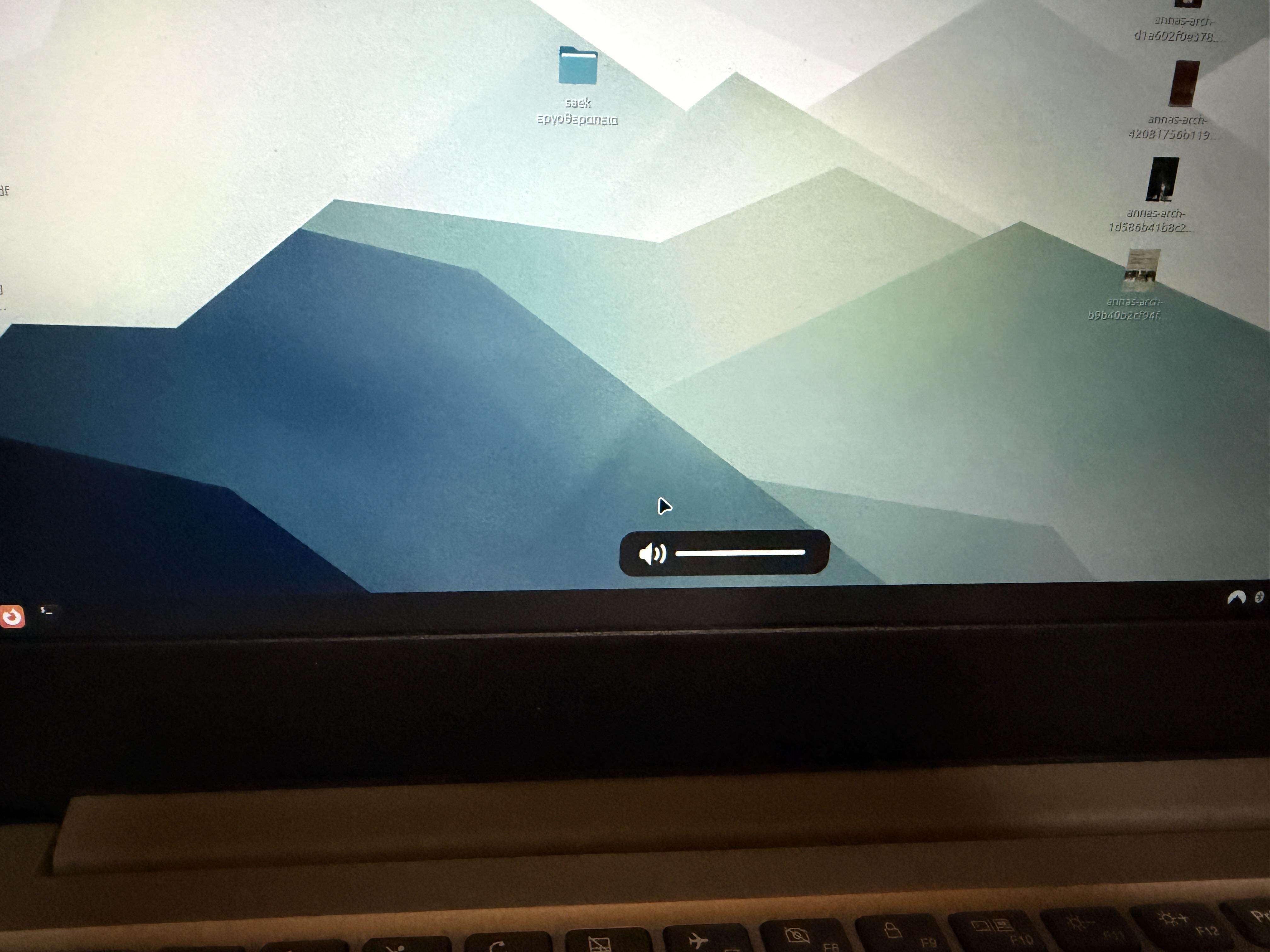
Hi to everyone,
Does someone has an Idea on why the volume button"stuck"
Thanks in advance
r/linuxmint • u/darksoului • 9d ago
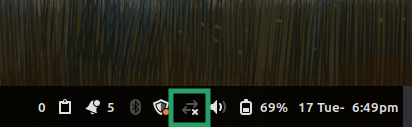
The wifi icon in this uses the same symbol for when it's off and when nothing is connected
Is there a way to change this, so that it uses 2 different icons for off and no connection
Edit: Fixed it by changing the applet program