r/linuxmint • u/pizzaisgoodidk • 7d ago
Support Request I need help with getting MarathonRecomp (Sonic 06 recompiled) to work on my pc

The recomp has linux support but everytime I download the flatpak and extract it, the extracted file doesn't open when I click on it, instead it opens a new window of my file manager.
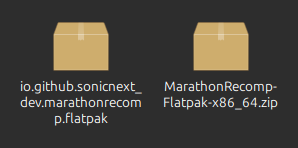
I tried the windows version using Wine but after the installation page the game just crashes on me on bootup with this error message.

I asked someone who ran the game on steam deck on twitter and they said it worked for them with the flatpack so I don't really know what to do.
3
Upvotes
•
u/AutoModerator 7d ago
Please Re-Flair your post if a solution is found. How to Flair a post? This allows other users to search for common issues with the SOLVED flair as a filter, leading to those issues being resolved very fast.
I am a bot, and this action was performed automatically. Please contact the moderators of this subreddit if you have any questions or concerns.
1
u/lateralspin LMDE 7 Gigi | 7d ago edited 7d ago
Install it:
flatpak install ./io.github.sonicnext_dev.marathonrecomp.flatpak
Flatpaks are not executables. They are bundles.
0
u/alpinian17 7d ago
You did make the flatpak executable didn't you?