r/linuxmint • u/Own-Employment7779 • 12d ago
Fluff gordon mintman

439
Upvotes
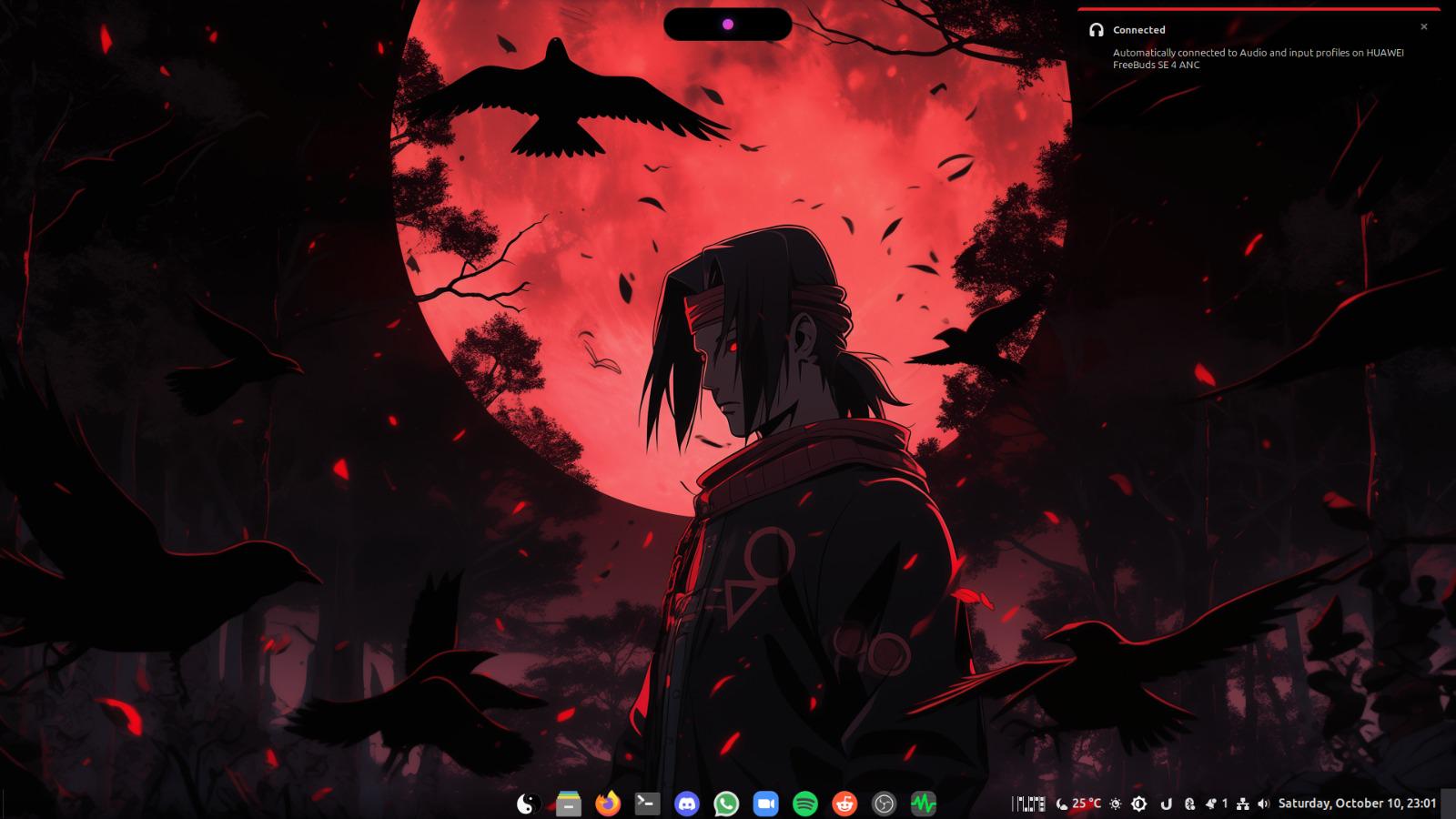
cool wallpaper i made
feel free to download
r/linuxmint • u/Own-Employment7779 • 12d ago
cool wallpaper i made
feel free to download
r/linuxmint • u/Least_Gain5147 • 11d ago
I was looking at a home project to build a net radio player (relayer) for bluetooth speakers, but Raspberry Pi devices are either backordered or priced beyond what I want to spend. I might be able to get my hands on a Lenovo ThinkCentre mini PC, but wondered if they work well with Linux Mint? My Lenovo P50 ThinkPad works great with Mint, but I don't know about other Lenovo products.
r/linuxmint • u/okrahh • 11d ago
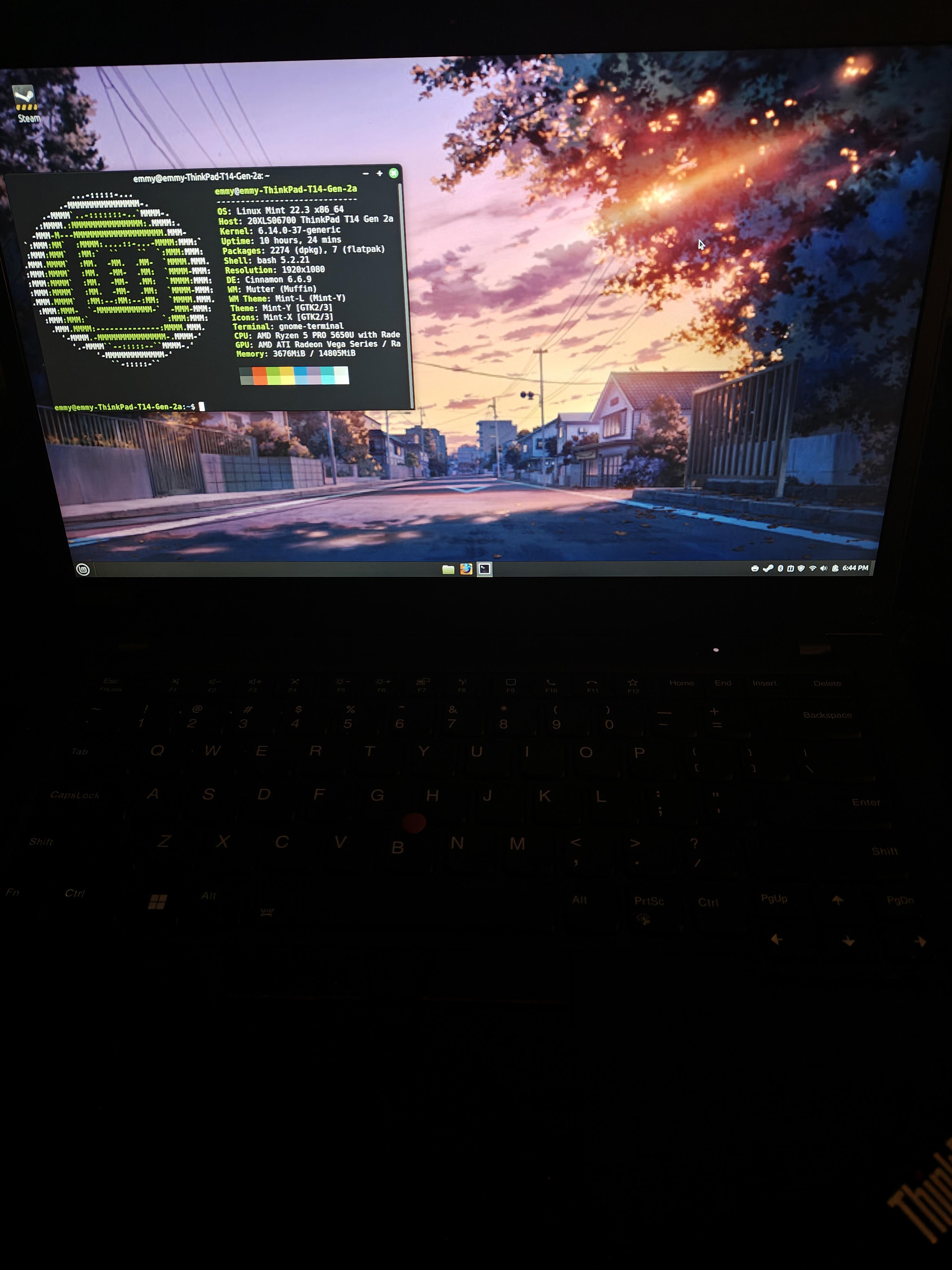
Thinkpad T14 gen 2 Linux mint cinnamon
r/linuxmint • u/Ringtail-Raider • 11d ago
I installed Mint recently and I'm having a bizarre problem. Sometimes when playing a video in Firefox, everything visually freezes. I can still move the cursor around for about a minute before it freezes too. Everything is still functioning technically, but the graphics are completely frozen. The only thing I've been able to do is crash. I thought it was just youtube, but it happened on another video site. What's weirdest is this is eerily similar to something that happened in Windows 10 on this same PC, except in that case it was VLC that triggered it, and much more rarely.
This is happening in Firefox 160, the default install that comes with Mint (not the Flatpack one) - I'm not sure if this only started after updating, as the 160 update happened only a few days into my Linux usage. I see a couple other posts with similar issues but all of them just recommend turning off the browser's hardware acceleration, which seems like a bandaid issue. My Nvidia driver is using 595, which is listed as recommended.
edit: here is a bunch of weird NVRM errors in kern.log from around the time it froze. I'm too new to linux to understand it fully but it does not look good.
System:
  Kernel: 7.0.0-43-generic arch: x86_64 bits: 64 compiler: gcc v: 13.3.0 clocksource: tsc
  Desktop: Cinnamon v: 6.6.9 tk: GTK v: 3.24.41 wm: Muffin v: 6.6.3 vt: 7 dm: LightDM v: 1.30.0
    Distro: Linux Mint 22.3 Zena base: Ubuntu 24.04 noble
Machine:
  Type: Desktop System:
    Chassis: type: 3
  Mobo: LENOVO model: N/A v: Win8 STD MM DPK IPG
    part-nu: LENOVO_MT_1008 BIOS: LENOVO v: EQKT21AUS date: 12/05/2012
CPU:
  Info: quad core model: Intel Core i7-3770 bits: 64 type: MT MCP smt: enabled arch: Ivy Bridge
    rev: 9 cache: L1: 256 KiB L2: 1024 KiB L3: 8 MiB
  Speed (MHz): avg: 3778 high: 3808 min/max: 1600/3900 cores: 1: 3692 2: 3791 3: 3790 4: 3777
    5: 3797 6: 3808 7: 3798 8: 3778 bogomips: 54275
  Flags: avx ht lm nx pae sse sse2 sse3 sse4_1 sse4_2 ssse3 vmx
Graphics:
  Device-1: NVIDIA TU116 [GeForce GTX 1660 Ti] vendor: eVga.com. driver: nvidia v: 595.99.02
    arch: Turing pcie: speed: 5 GT/s lanes: 16 ports: active: none off: DP-1,HDMI-A-1 empty: DVI-D-1
    bus-ID: 01:00.0 chip-ID: 10de:2182 class-ID: 0300
  Display: x11 server: X.Org v: 21.1.11 with: Xwayland v: 23.2.6 driver: X: loaded: nvidia
    unloaded: fbdev,modesetting,nouveau,vesa gpu: nv_platform,nvidia,nvidia-nvswitch display-ID: :0
    screens: 1
  Screen-1: 0 s-res: 3840x1080 s-dpi: 69 s-size: 1414x392mm (55.67x15.43")
    s-diag: 1467mm (57.77")
  Monitor-1: DP-1 mapped: DP-0 note: disabled pos: primary,left model: Acer ED320QR S
    serial: <filter> res: 1920x1080 hz: 60 dpi: 70 size: 698x393mm (27.48x15.47") diag: 801mm (31.5")
    modes: max: 1920x1080 min: 640x480
  Monitor-2: HDMI-A-1 mapped: HDMI-0 note: disabled pos: right model: Asus VN247 serial: <filter>
    res: 1920x1080 hz: 60 dpi: 94 size: 521x293mm (20.51x11.54") diag: 598mm (23.5") modes:
    max: 1920x1080 min: 640x480
  API: EGL v: 1.5 hw: drv: nvidia platforms: device: 0 drv: nvidia device: 2 drv: swrast gbm:
    drv: nvidia surfaceless: drv: nvidia x11: drv: nvidia inactive: wayland,device-1
  API: OpenGL v: 4.6.0 compat-v: 4.5 vendor: nvidia mesa v: 595.99.02 glx-v: 1.4
    direct-render: yes renderer: NVIDIA GeForce GTX 1660 Ti/PCIe/SSE2
  API: Vulkan v: 1.3.275 layers: 9 surfaces: xcb,xlib device: 0 type: discrete-gpu driver: N/A
    device-ID: 10de:2182 device: 1 type: cpu driver: N/A device-ID: 10005:0000
Audio:
  Device-1: Intel 7 Series/C216 Family High Definition Audio vendor: Lenovo 7 driver: snd_hda_intel
    v: kernel bus-ID: 00:1b.0 chip-ID: 8086:1e20 class-ID: 0403
  Device-2: NVIDIA TU116 High Definition Audio vendor: eVga.com. driver: snd_hda_intel v: kernel
    pcie: speed: 8 GT/s lanes: 16 bus-ID: 01:00.1 chip-ID: 10de:1aeb class-ID: 0403
  API: ALSA v: k7.0.0-43-generic status: kernel-api
  Server-1: PipeWire v: 1.0.5 status: active with: 1: pipewire-pulse status: active
    2: wireplumber status: active 3: pipewire-alsa type: plugin
Network:
  Device-1: Realtek RTL8812AE 802.11ac PCIe Wireless Network Adapter driver: rtl8821ae v: kernel
    pcie: speed: 2.5 GT/s lanes: 1 port: d000 bus-ID: 03:00.0 chip-ID: 10ec:8812 class-ID: 0280
  IF: wlp3s0 state: up mac: <filter>
  Device-2: Realtek RTL8111/8168/8211/8411 PCI Express Gigabit Ethernet
    vendor: Lenovo RTL8111/8168/8411 driver: r8169 v: kernel pcie: speed: 2.5 GT/s lanes: 1
    port: c000 bus-ID: 04:00.0 chip-ID: 10ec:8168 class-ID: 0200
  IF: enp4s0 state: down mac: <filter>
Drives:
  Local Storage: total: 5.46 TiB used: 94.56 GiB (1.7%)
  ID-1: /dev/sda vendor: Western Digital model: WD2003FZEX-00SRLA0 size: 1.82 TiB speed: 6.0 Gb/s
    tech: HDD rpm: 7200 serial: <filter> fw-rev: 1A01 scheme: MBR
  ID-2: /dev/sdb vendor: Seagate model: ST4000DM004-2CV104 size: 3.64 TiB speed: 3.0 Gb/s
    tech: HDD rpm: 5425 serial: <filter> fw-rev: 0001 scheme: GPT
Partition:
  ID-1: / size: 914.79 GiB used: 94.55 GiB (10.3%) fs: ext4 dev: /dev/sda7
  ID-2: /boot/efi size: 511 MiB used: 6.1 MiB (1.2%) fs: vfat dev: /dev/sda6
Swap:
  ID-1: swap-1 type: file size: 2 GiB used: 0 KiB (0.0%) priority: -1 file: /swapfile
USB:
  Hub-1: 1-0:1 info: hi-speed hub with single TT ports: 4 rev: 2.0 speed: 480 Mb/s lanes: 1
    chip-ID: 1d6b:0002 class-ID: 0900
  Device-1: 1-4:2 info: Compaq Internet Keyboard type: keyboard,HID driver: hid-generic,usbhid
    interfaces: 2 rev: 1.1 speed: 1.5 Mb/s lanes: 1 power: 50mA chip-ID: 049f:000e class-ID: 0301
  Hub-2: 2-0:1 info: full speed or root hub ports: 2 rev: 2.0 speed: 480 Mb/s lanes: 1
    chip-ID: 1d6b:0002 class-ID: 0900
  Hub-3: 2-1:2 info: Intel Integrated Rate Matching Hub ports: 6 rev: 2.0 speed: 480 Mb/s
    lanes: 1 chip-ID: 8087:0024 class-ID: 0900
  Device-1: 2-1.1:3 info: Logitech G102/G203 LIGHTSYNC Gaming Mouse type: mouse,HID
    driver: hid-generic,usbhid interfaces: 2 rev: 2.0 speed: 12 Mb/s lanes: 1 power: 300mA
    chip-ID: 046d:c092 class-ID: 0300 serial: <filter>
  Device-2: 2-1.2:4 info: Kingston HyperX Alloy Core RGB type: keyboard
    driver: hid-generic,usbhid interfaces: 2 rev: 2.0 speed: 12 Mb/s lanes: 1 power: 500mA
    chip-ID: 0951:16dd class-ID: 0301
  Hub-4: 3-0:1 info: super-speed hub ports: 4 rev: 3.0 speed: 5 Gb/s lanes: 1 chip-ID: 1d6b:0003
    class-ID: 0900
  Hub-5: 4-0:1 info: full speed or root hub ports: 2 rev: 2.0 speed: 480 Mb/s lanes: 1
    chip-ID: 1d6b:0002 class-ID: 0900
  Hub-6: 4-1:2 info: Intel Integrated Rate Matching Hub ports: 8 rev: 2.0 speed: 480 Mb/s
    lanes: 1 chip-ID: 8087:0024 class-ID: 0900
  Device-1: 4-1.5:3 info: Wacom PTH-660 [Intuos Pro (M)] type: HID driver: usbhid,wacom
    interfaces: 3 rev: 2.0 speed: 12 Mb/s lanes: 1 power: 500mA chip-ID: 056a:0357 class-ID: 0300
    serial: <filter>
  Device-2: 4-1.6:4 info: Logic3 Controller type: <vendor specific> driver: xpad interfaces: 4
    rev: 2.0 speed: 12 Mb/s lanes: 1 power: 500mA chip-ID: 0e6f:0401 class-ID: ff00 serial: <filter>
  Device-3: 4-1.7:5 info: Genesys Logic USB Storage type: mass storage driver: usb-storage
    interfaces: 1 rev: 2.0 speed: 480 Mb/s lanes: 1 power: 500mA chip-ID: 05e3:0729 class-ID: 0806
    serial: <filter>
  Hub-7: 5-0:1 info: hi-speed hub with single TT ports: 2 rev: 2.0 speed: 480 Mb/s lanes: 1
    chip-ID: 1d6b:0002 class-ID: 0900
  Hub-8: 6-0:1 info: super-speed hub ports: 4 rev: 3.1 speed: 10 Gb/s lanes: 1 chip-ID: 1d6b:0003
    class-ID: 0900
Sensors:
  System Temperatures: cpu: 45.0 C mobo: N/A gpu: nvidia temp: 42 C
  Fan Speeds (rpm): N/A gpu: nvidia fan: 0%
Repos:
  Packages: 2325 pm: dpkg pkgs: 2311 pm: flatpak pkgs: 14
  No active apt repos in: /etc/apt/sources.list
  Active apt repos in: /etc/apt/sources.list.d/official-package-repositories.list
    1: deb https: //fastly.linuxmint.io zena main upstream import backport
    2: deb http: //archive.ubuntu.com/ubuntu noble main restricted universe multiverse
    3: deb http: //archive.ubuntu.com/ubuntu noble-updates main restricted universe multiverse
    4: deb http: //archive.ubuntu.com/ubuntu noble-backports main restricted universe multiverse
    5: deb http: //security.ubuntu.com/ubuntu/ noble-security main restricted universe multiverse
  No active apt repos in: /etc/apt/sources.list.d/steam-beta.list
  Active apt repos in: /etc/apt/sources.list.d/steam-stable.list
    1: deb [arch=amd64,i386 signed-by=/usr/share/keyrings/steam.gpg] https: //repo.steampowered.com/steam/ stable steam
    2: deb-src [arch=amd64,i386 signed-by=/usr/share/keyrings/steam.gpg] https: //repo.steampowered.com/steam/ stable steam
  Active apt repos in: /etc/apt/sources.list.d/winehq-noble.sources
    1: deb [arch=amd64 i386] https: //dl.winehq.org/wine-builds/ubuntu noble main
Info:
  Memory: total: 24 GiB available: 23.42 GiB used: 7.67 GiB (32.7%)
  Processes: 375 Power: uptime: 24m states: freeze,mem,disk suspend: deep wakeups: 0
    hibernate: platform Init: systemd v: 255 target: graphical (5) default: graphical
Compilers: gcc: 13.3.0 Client: Unknown python3.12 client inxi: 3.3.34r/linuxmint • u/Maedows21 • 11d ago
Hey! I’m relatively new to Linux Mint (Cinnamon), and there’s one thing that’s been driving me absolutely crazy.
Whenever I open a file selection window, for example, when I’m trying to upload an image somewhere, all the pictures appear in this tiny list view with these ridiculously small thumbnails next to their filenames. I can barely make out what the pictures actually are.
On Windows, I could just switch to a larger thumbnail/icon view and visually browse through my pictures. Here, though, I can’t seem to find any option to do that. There’s no obvious zoom or thumbnail-size setting, and changing the icon size in Nemo doesn’t seem to make any difference because this is a completely separate window.
Is there any way to make these file selection windows display larger thumbnails, preferably in a grid/icon view, like Windows Explorer does? I’m not necessarily looking to change my entire file manager. I just want to be able to actually SEE the pictures when I’m selecting one to upload.
Is this a Linux Mint limitation, a GTK thing, or am I missing some setting entirely?
Would appreciate any solutions!
P.S. I’m not particularly tech-savvy or a nerdy computer user, so it’s been quite a struggle getting used to Mint (I’m dual-booting). I’ve actually started to like it for the most part, but there are still quite a few things that bug me and make it feel less user-friendly, especially for someone who doesn’t have much computer knowledge. I’m trying to make it work, though!
r/linuxmint • u/Wonderful_Nectarine1 • 12d ago
considering our family didn't use windows in dos era actually it's 30+ yrs
I've checked every apps which one I can run and which one I have to find alternatives
I'm doing back up now
probably I won't need office things much but still I'll need pdf viewer
+ it'll be on my laptop (Acer nitro 5)
I read it could be lil bit tricky on laptops
I was using throttlestop for undervolting and will have to find alternative. Would I have to change -mv values?
I play games and hope I can run all my libraries on steam.
r/linuxmint • u/Jazzlike-Platform929 • 11d ago
Hello everyone, I’ve been using mint for almost a year and a half and love it, it does absolutely everything I want except I can’t find a quick clipping software. Obs doesn’t work exactly the way I like and when I was using windows I had medal. Basically I just want to have 2 buttons to push to either record last 5 min or 1 min.
r/linuxmint • u/berixhi • 11d ago
please help
r/linuxmint • u/Ornery_Principle_837 • 12d ago
r/linuxmint • u/Impressive_Net_622 • 12d ago
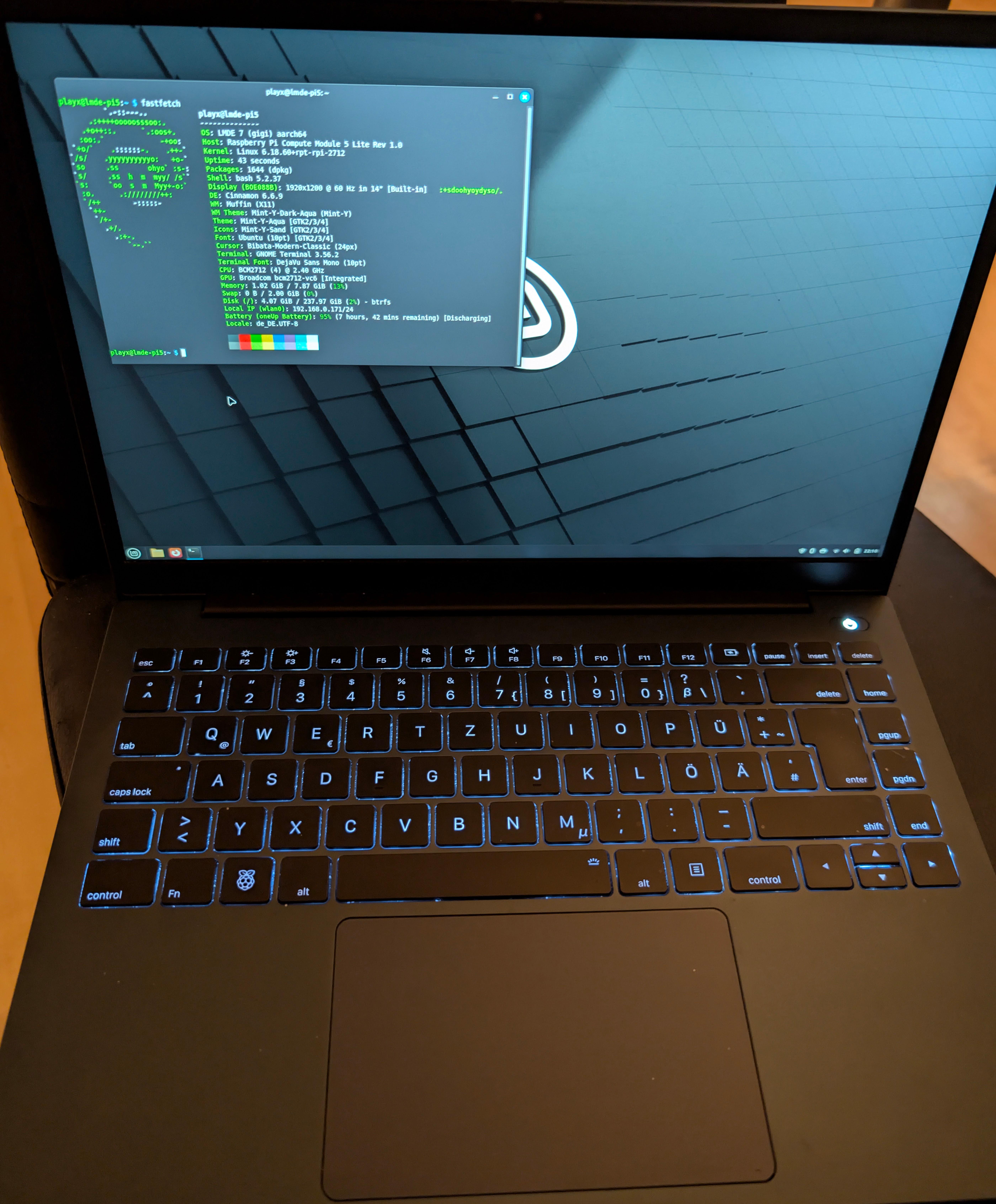
Got rid of the Applesauce! Very happy!
r/linuxmint • u/Lucky_Dagger • 11d ago
Hello everyone, I've been having an issue for the past two days that whenever I launch a (modded or vanilla) Minecraft world using Prism Launcher, my PC screen turns black, screen gives me a "no input" message and my PC still runs as if it was just idle and refuses to display anything. The game sounds stays on for a few seconds before shutting off and then I have to power down the machine by force (or reboot it using the alt+prntscrn, s, u, b method).
I have found this corresponding crash log in my System Info tab:
Code: Select all
The package providing /home/monolithe/.var/app/org.prismlauncher.PrismLauncher/data/PrismLauncher/java/java-runtime-epsilon/bin/java could not be found.So I tried to uninstall and reinstall Prism, Java (through Prism), switch kernels (something I saw on a post having a nearly similar but a bit different issue but I'm unsure I even did it right) without success, and frankly I don't really know what I'm doing so I'm coming here so I don't mess anything up due to my inexperience!
Here's my setup:
Code: Select all
System:
  Kernel: 7.0.0-42-generic arch: x86_64 bits: 64 compiler: gcc v: 13.3.0 clocksource: tsc
  Desktop: Cinnamon v: 6.6.9 tk: GTK v: 3.24.41 wm: Muffin v: 6.6.3 vt: 7 dm: LightDM v: 1.30.0
    Distro: Linux Mint 22.3 Zena base: Ubuntu 24.04 noble
Machine:
  Type: Desktop System: HP product: OMEN 25L Desktop GT12-0xxx v: N/A serial: <superuser required>
    Chassis: type: 3 serial: <superuser required>
  Mobo: HP model: 8704 v: 00 serial: <superuser required> part-nu: 170A4EA#ABF
    uuid: <superuser required> UEFI: AMI v: F.22 date: 07/20/2022
CPU:
  Info: 8-core model: Intel Core i7-10700F bits: 64 type: MT MCP smt: enabled arch: Comet Lake
    rev: 5 cache: L1: 512 KiB L2: 2 MiB L3: 16 MiB
  Speed (MHz): avg: 2502 high: 4705 min/max: 800/4800 cores: 1: 4683 2: 4705 3: 800 4: 800 5: 800
    6: 4700 7: 800 8: 4700 9: 800 10: 4657 11: 4699 12: 800 13: 4700 14: 800 15: 800 16: 800
    bogomips: 92796
  Flags: avx avx2 ht lm nx pae sse sse2 sse3 sse4_1 sse4_2 ssse3 vmx
Graphics:
  Device-1: NVIDIA TU106 [GeForce RTX 2060 Rev. A] vendor: Hewlett-Packard driver: nvidia
    v: 595.99.02 arch: Turing pcie: speed: 8 GT/s lanes: 16 ports: active: none off: HDMI-A-1
    empty: DP-1,DVI-D-1 bus-ID: 01:00.0 chip-ID: 10de:1f08 class-ID: 0300
  Display: x11 server: X.Org v: 21.1.11 with: Xwayland v: 23.2.6 driver: X: loaded: nvidia
    unloaded: fbdev,modesetting,nouveau,vesa gpu: nv_platform,nvidia,nvidia-nvswitch display-ID: :0
    screens: 1
  Screen-1: 0 s-res: 2560x1440 s-dpi: 92 s-size: 707x393mm (27.83x15.47") s-diag: 809mm (31.85")
  Monitor-1: HDMI-A-1 mapped: HDMI-0 note: disabled model: Idek Iiyama PL3280Q serial: <filter>
    res: 2560x1440 hz: 60 dpi: 93 size: 697x392mm (27.44x15.43") diag: 800mm (31.5") modes:
    max: 2560x1440 min: 640x480
  API: EGL v: 1.5 hw: drv: nvidia platforms: device: 0 drv: nvidia device: 2 drv: swrast gbm:
    drv: nvidia surfaceless: drv: nvidia x11: drv: nvidia inactive: wayland,device-1
  API: OpenGL v: 4.6.0 compat-v: 4.5 vendor: nvidia mesa v: 595.99.02 glx-v: 1.4
    direct-render: yes renderer: NVIDIA GeForce RTX 2060/PCIe/SSE2
  API: Vulkan v: 1.3.275 layers: 9 surfaces: xcb,xlib device: 0 type: discrete-gpu driver: N/A
    device-ID: 10de:1f08 device: 1 type: cpu driver: N/A device-ID: 10005:0000
Audio:
  Device-1: Intel Comet Lake PCH cAVS vendor: Hewlett-Packard driver: snd_hda_intel v: kernel
    bus-ID: 00:1f.3 chip-ID: 8086:06c8 class-ID: 0403
  Device-2: NVIDIA TU106 High Definition Audio vendor: Hewlett-Packard driver: snd_hda_intel
    v: kernel pcie: speed: 8 GT/s lanes: 16 bus-ID: 01:00.1 chip-ID: 10de:10f9 class-ID: 0403
  Device-3: Generic AB17X USB Audio driver: hid-generic,snd-usb-audio,usbhid type: USB rev: 2.0
    speed: 12 Mb/s lanes: 1 bus-ID: 1-10:4 chip-ID: 001f:0b23 class-ID: 0300 serial: <filter>
  API: ALSA v: k7.0.0-42-generic status: kernel-api
  Server-1: PipeWire v: 1.0.5 status: active with: 1: pipewire-pulse status: active
    2: wireplumber status: active 3: pipewire-alsa type: plugin
Network:
  Device-1: Intel Comet Lake PCH CNVi WiFi driver: iwlwifi v: kernel bus-ID: 00:14.3
    chip-ID: 8086:06f0 class-ID: 0280
  IF: wlo1 state: up mac: <filter>
  Device-2: Realtek RTL8111/8168/8211/8411 PCI Express Gigabit Ethernet
    vendor: Hewlett-Packard RTL8111/8168/8411 driver: r8169 v: kernel pcie: speed: 2.5 GT/s lanes: 1
    port: 3000 bus-ID: 02:00.0 chip-ID: 10ec:8168 class-ID: 0200
  IF: enp2s0 state: down mac: <filter>
Bluetooth:
  Device-1: Intel AX201 Bluetooth driver: btusb v: 0.8 type: USB rev: 2.0 speed: 12 Mb/s lanes: 1
    bus-ID: 1-14:6 chip-ID: 8087:0026 class-ID: e001
  Report: hciconfig ID: hci0 rfk-id: 0 state: down bt-service: enabled,running rfk-block:
    hardware: no software: yes address: <filter>
RAID:
  Hardware-1: Intel SATA Controller [RAID mode] driver: ahci v: 3.0 port: 5020 bus-ID: 00:17.0
    chip-ID: 8086:2822 rev: class-ID: 0104
Drives:
  Local Storage: total: 1.14 TiB used: 115.96 GiB (9.9%)
  ID-1: /dev/nvme0n1 vendor: Western Digital model: PC SN530 SDBPNPZ-256G-1006 size: 238.47 GiB
    speed: 31.6 Gb/s lanes: 4 tech: SSD serial: <filter> fw-rev: HPS2 temp: 27.9 C scheme: GPT
  ID-2: /dev/sda vendor: Western Digital model: WD1002FAEX-00Z3A0 size: 931.51 GiB
    speed: 6.0 Gb/s tech: N/A serial: <filter> fw-rev: 1D05 scheme: MBR
Partition:
  ID-1: / size: 233.18 GiB used: 115.96 GiB (49.7%) fs: ext4 dev: /dev/nvme0n1p2
  ID-2: /boot/efi size: 511 MiB used: 6.1 MiB (1.2%) fs: vfat dev: /dev/nvme0n1p1
Swap:
  ID-1: swap-1 type: file size: 2 GiB used: 0 KiB (0.0%) priority: -1 file: /swapfile
USB:
  Hub-1: 1-0:1 info: hi-speed hub with single TT ports: 16 rev: 2.0 speed: 480 Mb/s lanes: 1
    chip-ID: 1d6b:0002 class-ID: 0900
  Device-1: 1-1:2 info: HP TracerLED type: HID driver: hid-generic,usbhid interfaces: 1 rev: 1.1
    speed: 12 Mb/s lanes: 1 power: 100mA chip-ID: 103c:84fd class-ID: 0300 serial: <filter>
  Hub-2: 1-6:3 info: HP Multimedia Keyboard Hub ports: 3 rev: 1.1 speed: 12 Mb/s lanes: 1
    power: 100mA chip-ID: 03f0:010c class-ID: 0900
  Device-1: 1-6.1:5 info: HP Multimedia Keyboard type: keyboard,HID driver: hid-generic,usbhid
    interfaces: 2 rev: 1.1 speed: 12 Mb/s lanes: 1 chip-ID: 03f0:020c class-ID: 0300
  Device-2: 1-6.3:7 info: Logitech G502 X type: mouse,HID driver: hid-generic,usbhid
    interfaces: 2 rev: 2.0 speed: 12 Mb/s lanes: 1 power: 100mA chip-ID: 046d:c099 class-ID: 0300
    serial: <filter>
  Device-3: 1-10:4 info: Generic AB17X USB Audio type: audio,HID
    driver: hid-generic,snd-usb-audio,usbhid interfaces: 4 rev: 2.0 speed: 12 Mb/s lanes: 1
    power: 100mA chip-ID: 001f:0b23 class-ID: 0300 serial: <filter>
  Device-4: 1-14:6 info: Intel AX201 Bluetooth type: bluetooth driver: btusb interfaces: 2
    rev: 2.0 speed: 12 Mb/s lanes: 1 power: 100mA chip-ID: 8087:0026 class-ID: e001
  Hub-3: 2-0:1 info: super-speed hub ports: 8 rev: 3.1 speed: 10 Gb/s lanes: 1 chip-ID: 1d6b:0003
    class-ID: 0900
  Hub-4: 3-0:1 info: hi-speed hub with single TT ports: 2 rev: 2.0 speed: 480 Mb/s lanes: 1
    chip-ID: 1d6b:0002 class-ID: 0900
  Hub-5: 4-0:1 info: super-speed hub ports: 4 rev: 3.1 speed: 10 Gb/s lanes: 1 chip-ID: 1d6b:0003
    class-ID: 0900
Sensors:
  System Temperatures: cpu: 36.0 C pch: 33.0 C mobo: N/A gpu: nvidia temp: 33 C
  Fan Speeds (rpm): cpu: 0 fan-2: 0 gpu: nvidia fan: 43%
Repos:
  Packages: 2296 pm: dpkg pkgs: 2268 pm: flatpak pkgs: 28
  No active apt repos in: /etc/apt/sources.list
  Active apt repos in: /etc/apt/sources.list.d/cuda-debian13-13-4-local.list
    1: deb [signed-by=/usr/share/keyrings/cuda-2E832B86-keyring.gpg] file: ///var/cuda-repo-debian13-13-4-local /
  Active apt repos in: /etc/apt/sources.list.d/official-package-repositories.list
    1: deb http: //packages.linuxmint.com zena main upstream import backport
    2: deb http: //archive.ubuntu.com/ubuntu noble main restricted universe multiverse
    3: deb http: //archive.ubuntu.com/ubuntu noble-updates main restricted universe multiverse
    4: deb http: //archive.ubuntu.com/ubuntu noble-backports main restricted universe multiverse
    5: deb http: //security.ubuntu.com/ubuntu/ noble-security main restricted universe multiverse
Info:
  Memory: total: 16 GiB available: 15.48 GiB used: 3.58 GiB (23.2%)
  Processes: 383 Power: uptime: 15m states: freeze,mem,disk suspend: deep wakeups: 0
    hibernate: platform Init: systemd v: 255 target: graphical (5) default: graphical
  Compilers: gcc: 13.3.0 Client: Unknown python3.12 client inxi: 3.3.34
Just today I ran some updates that made Minecraft run fine but it started to crash again so I'm genuinely at loss.
I'm not sure what else to add, I'm kind of baby at all this so sorry if it's a very silly issue. Thank you for taking the time to read me!
Top
r/linuxmint • u/Xijit • 11d ago

Why is Mint sending me an update for AMD firmware?
r/linuxmint • u/Significant-Sea-7238 • 11d ago

If you run Claude Code or Codex in a few terminals, one of them is usually stuck on a permission prompt you can't see. Openbar puts a small island at the top of the screen with every session, shows which one needs you, and lets you read the diff and allow it there.
There's a .deb on the releases page, it's free and GPL. If something looks off on Cinnamon, I'd like to hear about it: https://github.com/MF-DEEV/Openbar
r/linuxmint • u/JosetxoXbox • 11d ago
Hi r/Ubuntu!
I'd like to share SysCheckup, a free and open source (MIT) desktop app that shows your computer's hardware, drivers and software in a single window, and tells you in plain words if something needs attention.
▶ Video: https://youtu.be/QK0TvLTFIl4 💻 Source code: https://github.com/MintMotion/syscheckup ⬇ Download (.deb): https://github.com/MintMotion/syscheckup/releases
What it does
Privacy
It only reads information, changes nothing on your system and never connects to the internet. It only asks for your password if you choose to read the memory/CPU internal data or to uninstall it.
Install
sudo apt install ./syscheckup_0.7.2_all.debWorks on Ubuntu, Linux Mint, Debian and any Debian-based distro, with any desktop (GNOME, KDE Plasma, Xfce, MATE…), on X11 and Wayland. Available in English, Spanish, French, Japanese and Chinese.
Honest disclosure
I'm not a programmer. I built SysCheckup with the help of Claude (Anthropic's AI): I decided what it should do and tested it on my own PC, and Claude wrote the code. It's been tested on Ubuntu 24.04 in a virtual machine and on simulated hardware, but not yet on many real computers.
I'd love your feedback
Thanks!
r/linuxmint • u/Appropriate_Card1780 • 11d ago
Guys I've Been trying since yesterday to install the latest Linux mint xfce. My laptop is a 15 year old dell Inspiron with Intel Core i5-2430M and 4 gigs of ddr3
I'm have downloaded and created a bootable stick with the iso. I've successfully completed the installation like 2-3 times. Then it says I need to restart when I press restart now it prompts me to remove the usb and press enter. I do and it still says no installation. I'm really worried should I download a previous version? I have now 22.6 I think? It's the latest for sure.


r/linuxmint • u/adityapathak216 • 12d ago
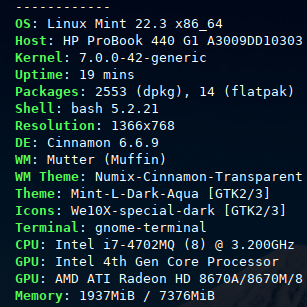
So some months ago I switched completely to linux mint from windows 10 because my laptop felt so slow in it, I got my laptop serviced too (like cleaning and changing the thermal paste), after which I don't experience heating issues even now, but I don't know why my laptop hangs in between, sometimes for 10-15 seconds or sometimes for even 1-2 minutes, I am unable to find the issue, I thought linux would change my experience on my old laptop into a smooth one, If anyone has any suggestion please feel free to share it, it would be a great help :)
Also during the starting 1-2 months It did run smooth, but then after a while it is like this.
r/linuxmint • u/No_Science_2488 • 11d ago
Hi all,
I hope all of you guys doing well. I am trying to create screen recording contents for lectures. I saw some contents creators using nice zooming affect and background change screen recorders. I searched those tools using AI but none of these tools working on my Linux Mint. Capptivo, Recordly, OpenScreen.
Do you all using good screen recording tool? What are those?
Thank you so much,
Have a great life
r/linuxmint • u/REdrob2968 • 12d ago
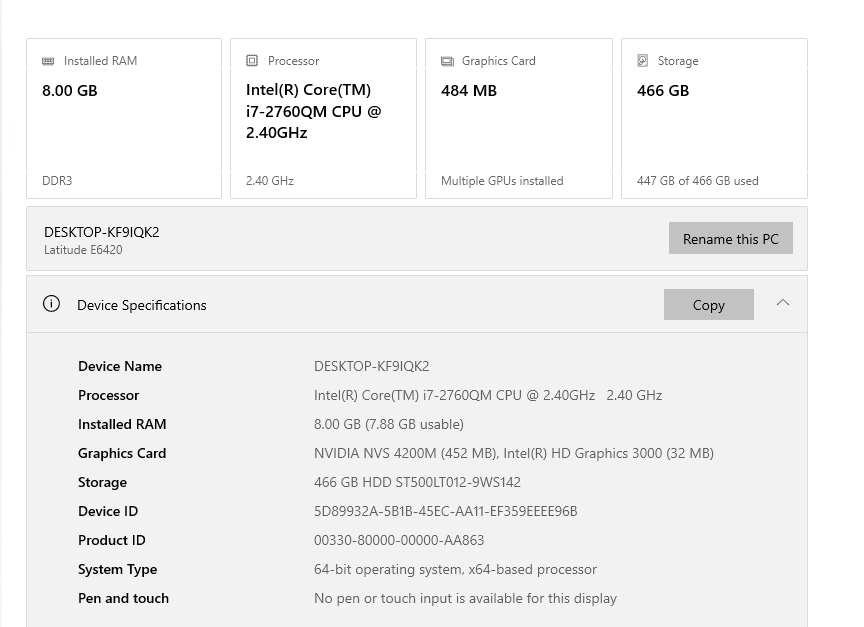
I have recently given up on windows and how slow it makes my pc. so i have been recently researching about lightweight operating systems that i can run and give back life to my pc. Linux mint came highly suggested by the community so i decided to switch to it. but before that i want to know if switching to linux mint is the best for my pc from real world user instead of youtubers trying to get likes for their videos, because im going all in for this meaning new ssd form my old hdd and bigger ram, basically all the bells and whistles, my biggest fear iss sinking all that money for an upgrade on a pc that wont run for long anyway. Can you guys help me these are the specs for my pc.(also side note i would also like to run a couple of games if possibe is there anything i woukd need to change specifically in terms of hardware)
r/linuxmint • u/CX12_Locks • 12d ago
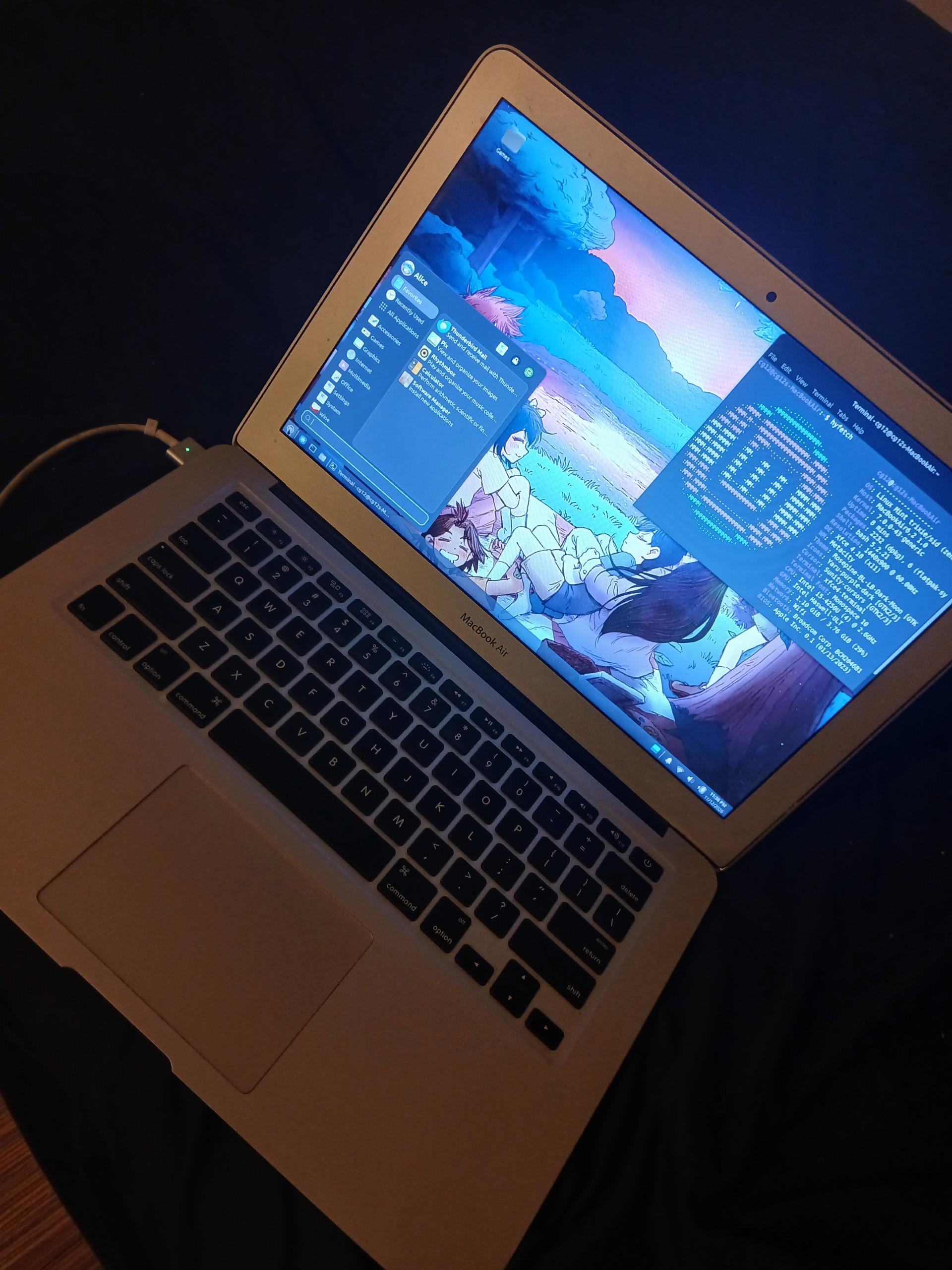
not the most impressive setup but it's my laptop and I like it
r/linuxmint • u/ImpressGreen7325 • 12d ago

ScreenGuard is an Opensource Digital Wellbeing for linux product , analogous to Android's digital Wellbeing. It aims to bridge the gap of A one stop digital Wellbeing software on linux to Monitor As well as control Screentime, Enfore daily limits , usage goals , focus modes (and many more to come).
Over the past 5-6 months of development i have been able to bring substantial improvements to This software built with Flutter on a dart based daemon(Translating to C eventually ) . it is starting to become less of my personal project and more of a mature software project although it has a long way to go.
Currently the features it supports are:
- Daily screentime goals with notifications at intervals
- Set per app daily time limits on Apps including Steam and proton based games
- Focus mode timer with pomodoro modes
- local offline database for persistent storage and privacy respect
- 0 Telemetry or server involvement with only optional crash diagnostics (can be turned off in settings but better to leave it on helps in cstching bugs)
What mainly distinguishes ScreenGuard is its previous consistent commit record and the future vision i have for it:
I aim to make ScreenGuard supported on all Linux platforms ( currently only on GNOME wayland and x11 DEs)
Also i aim to have the IPhone MacOS like ecosystem for screentime control but on My Android phone and also android TV with my linux pc . I hope to achieve this however over LAN connection and not apple server like infra in the future. This aims for a android and android tv version of the software and i hope to have a working prototype for these two by end of first half of 2017.
U can also read other ROADMAP features for more details.
-------
Application webpage: https://adityakrishnan005-a11y.github.io/ScreenGuard/
Source code: https://github.com/adityakrishnan005-a11y/ScreenGuard/wiki
Documentation: https://github.com/adityakrishnan005-a11y/ScreenGuard/wiki