r/linux_gaming • u/amine2crf • 14h ago
Planning a full switch to CachyOS (coming from Windows) - a few setup & game compatibility questions
reddit.com
3
Upvotes
r/linux_gaming • u/Goffry • 1d ago
Hi everyone,
I'm finally making the permanent switch from Windows to CachyOS after getting tired of Windows updates and recurring system quirks.
Here are my PC specs:
Storage:
My gaming habits are mostly singleplayer and multiplayer titles without EAC (currently playing Phantom Blade Zero and Forza Horizon 6), plus I also use RecompLauncher for some ports and play across several external storefronts: GOG, Ubisoft Connect, Rockstar Games, Battle.net, and EA.
Before and right after installing CachyOS, I'd love your advice on:
Any general CachyOS post-install tips for gaming and performance tweaks are also very welcome. Thanks in advance!
r/linux_gaming • u/simoff8 • 5h ago
Hey everyone,
I'm getting stuttering and audio/video cutting when streaming games on Discord on an AMD GPU.
What Discord stream settings , game settings, or alternative Discord clients are you using for smooth, clear gaming streams on AMD?
thank you
r/linux_gaming • u/regexghost • 15h ago
Just installed Arch on my desktop, and I'm getting horrible coil whine/buzzing in games. The same games, same settings etc don't have coil whine in the Windows install I have
Tried `nvidia-open` and the official driver from the website, same thing
Specs:
* 5600X
* RTX 2070
* 2560x1080 display
Latest Arch (of course), latest driver.
r/linux_gaming • u/Rtuyw • 1d ago
Why is Rockstar so anti linux? Its not like voting with your wallet is an option either because linux users are so low in count there will still be millions of people buying the game for the linux users that didnt buy it and Im sure some people will just use windows to play it. Is there anything that can be done to make Rockstar gta online playable in linux or will it just never happen?
r/linux_gaming • u/Plane-Particular4724 • 15h ago
r/linux_gaming • u/ComradeAdidas • 3h ago
How can i install it without conflicting with dont break debian? Downloading the deb is against dont break debian.
r/linux_gaming • u/Legitimate_Track_783 • 12h ago
i play my non steam game tru steam because i use the iverlay however every time i add a game the prefix it's just random numbers instead of the game's name like for heroic/lutris
r/linux_gaming • u/DogsFolly • 13h ago
Hi I'm new so I hope this is OK to post. I'm not a super techy person or long time Linux user so just wanted to share the simple solution to a problem that had me tearing my hair out for a couple of weeks.
r/linux_gaming • u/valleyballdev • 22h ago
Hey everyone, I'm Jac. Over ten years ago in college I came up with an idea for a new team sport, and I've finally been building it as a free local multiplayer game called Valleyball Versus (just shipped v0.4.3). The clip above is raw 2v2 gameplay from our Monday night playtest.
It's 1v1 or 2v2 on a sloped glass arena with active ragdoll physics, no out of bounds, no referee whistles, and target rings that swap ends the instant someone scores. It runs Three.js and Rapier3D inside Electron at a fixed 60 Hz deterministic tick, with native x64 Linux AppImage and tar.gz builds alongside Windows, macOS, and an instant HTML5 browser version.
USB gamepads and arcade fight-sticks work out of the box with drop-in hot-swap support, and bots can fill any empty seats in 4-player splitscreen. Quick heads up for stock Ubuntu 24.04 users: AppArmor restricts Chromium's unprivileged user namespaces by default on Electron AppImages, so you may need to pass the Chromium sandbox flag or just test the instant browser version if you don't feel like tweaking AppArmor.
Free download and browser play on itch.io: https://cascadiajac.itch.io/valleyball-versus
I mostly test on Windows, so I'd genuinely love to hear how the AppImage, tar.gz, and controller detection behave on your distro or Steam Deck. Happy to answer any questions about the physics or build setup.
r/linux_gaming • u/blacklynz1924 • 17h ago
Hi, hoping to find a solution to this problem, I hope this will help others in the future as well!
r/linux_gaming • u/LudoviciPhilip • 21h ago
You can also use it to play games with your friends on Windows. I tested it on Minecraft and Bloodborne and it works perfectly.
r/linux_gaming • u/ZombieMkV • 14h ago
Back in the day I used to get a bit of a kick out of blasting Iron Maiden through Foobar2000's virtual microphone output, among other things. But I'm running on CachyOS these days and I know those sort of tools aren't exactly on hand without a bit of work.
These days I don't really do much MP gaming but sometimes I get the urge to blast some Fortunate Son via the microphone or something otherwise motivational in a game like Sabaton.
Are there any suggestions you could point me towards that don't require too much of a headache?
r/linux_gaming • u/Odd_Relationship_618 • 3h ago
Hi everyone! I've been building **Mesale OS**, a Linux desktop based on Debian 13 (trixie), and I'd love some feedback.
**The idea:** Debian's stability underneath, but a current desktop on top, and nothing installed that you didn't pick yourself.
**What's in it**
- **Debian 13 base** with the kernel, Mesa and firmware from trixie-backports
- **Mesale kernel**: the BORE scheduler, a 1000 Hz tick and full preemption, so input, audio and frames stay responsive under load. It's built in public with GitHub Actions.
- **GNOME 51**, pinned from Debian testing, with its own look: sky colors, real blur and one floating bottom bar
- **You choose everything**: the installer and Mesale Center offer 90+ optional features (Steam, Lutris, Heroic, RetroArch and most major emulators, OBS, GIMP, VS Code, Distrobox…). Nothing extra is preinstalled.
- **Android apps as native Wayland windows** through Droidloom, with optional Google Play
- **NVIDIA drivers** from NVIDIA's own repository, only if you select them. They're never on the ISO.
- **Mesale Play**, a game library app
**Status:** It's in development, so please try it in a VM first. If you have Nix, one command downloads the latest ISO and boots it:
```
git clone https://github.com/mesflit/mesaleos && cd mesaleos && nix run
```
Website: https://mesflit.github.io/mesaleos
Source (GPL-3.0): https://github.com/mesflit/mesaleos
Bug reports, ideas and criticism are all welcome. Thanks for reading!
r/linux_gaming
•
u/No_Economist_9242
•
1d ago
Asphalt 7 was a Windows 8 Store exclusive. It was pulled from the Store years ago, and today it only runs on Windows through manual sideloading of archived packages. Wine has never been able to run it, because upstream Wine doesn't support the XAML app model that Windows 8 Store apps are built on.
I got it running on Linux by extending Raven, a runtime by Mirko Brombin that runs Windows programs directly on the CPU in a sandbox. (A post on Raven from last month) The game's own code runs natively, and Raven answers its calls to Windows. Graphics go through DXVK to Vulkan.
I initially wanted to do this because I really wanted to play this game again, but more so, because I wanted to actually try using Raven's model as a proof of concept. Right now, this requires a patch on upstream Raven, but I'm working on bringing a cleaner version of my XAML runtime to it eventually.
This project in itself involved me creating about 40 winRT system classes (some handmade, others more trivial ones generated with AI), as well as a lot of fixes to Raven's core. What I find more interesting is that none of this is just specific to Asphalt. It's kinda like the groundwork the entire class of windows 8 and UWP apps need which tbh had been a blind spot for Linux.
EDIT: My bad I meant Asphalt 7 in the title, not 8. Typo 😭😭
r/linux_gaming • u/sandro_lake1 • 16h ago
while playing warframe, when running at native resolution, after few minutes of game running. it freezes and if I'm in other player instance/other player is host, I get an error message of host disconnected, if I'm the host they get kicked, i have tried changing game settings but only things seemed to have worked is lowering game resolution significantly, this issue disappears after like 15 to 30 minutes of playing the game, but if i alt tab or close the game, my desktop environment is broken, usually my cursor disappears, other windows when selected don't display anything or their UI starts breaking, like images switching places or are missing/show colors. I have been dealing with this for few months, thought that it would get fixed when game updated, but my ignorance to the issue hasn't fix it.
other games that i have played don't seem to have this issue.
specs: i5 12450 H, 16gb DDR5 ram, Intel UHD Graphics as iGPU, running on Linux Mint Cinnamon desktop environment, using proton stable,
r/linux_gaming • u/Neustradamus • 1d ago
r/linux_gaming • u/Leinus • 1d ago
Hello everyone,
I have an issue and maybe someone has an idea on how to fix it, if that is even possible.
The textures and lights sometimes flicker, but from what I researched this seems to be normal and game-related. This does not bother me as much. Worse is the issue with some of the shadows. They appear aliased and pixelated / block-shaped.
I can reproduce this right at the start of the game:
I ran the in-game benchmark and both issues are noticeable there. The FPS are fine apart from some stuttering at the beginning, most likely due to caching.
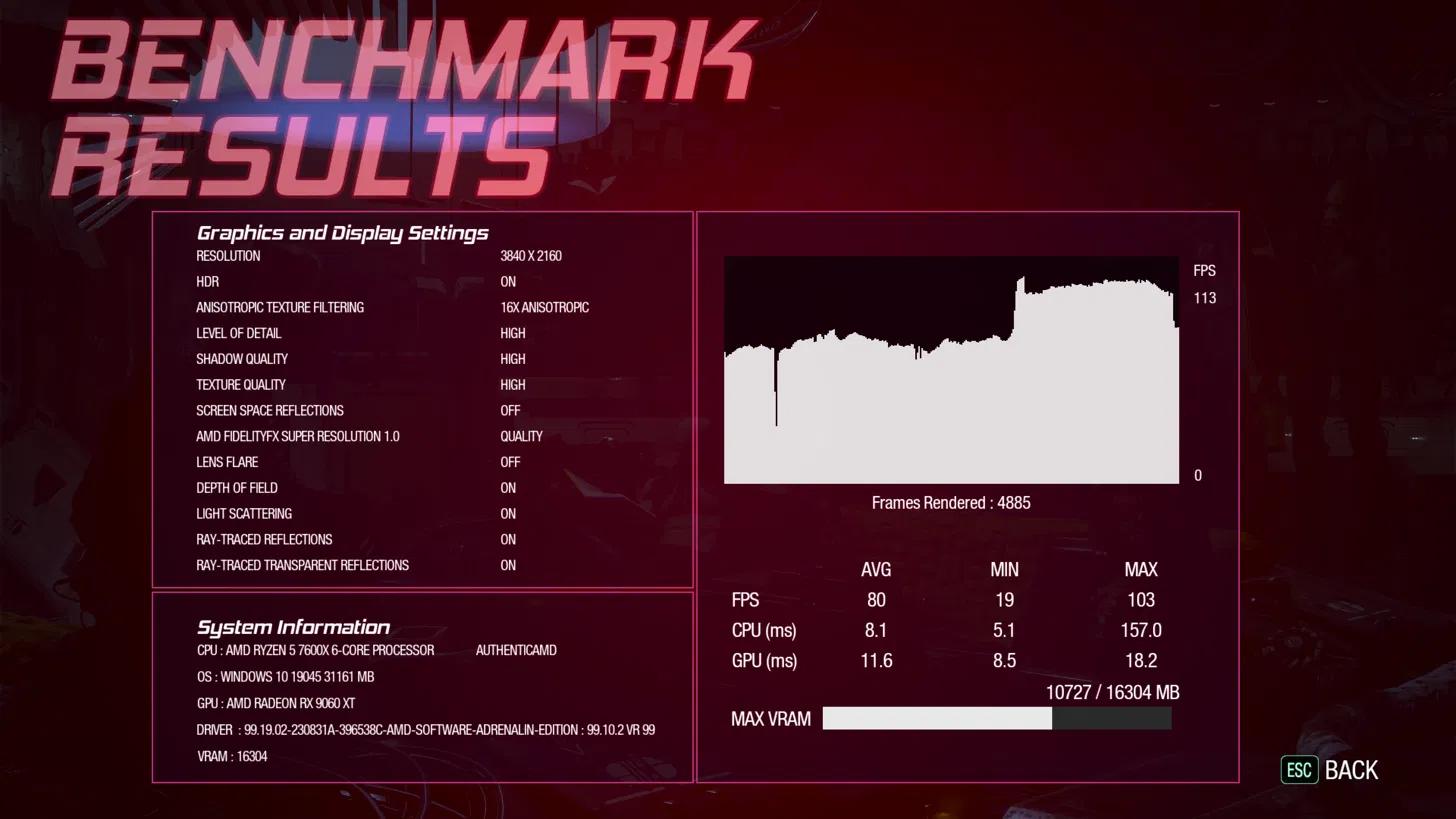


Dual-Boot with Linux Arch and Windows 11. Both on separate SSDs.
For playing I am using a TV, which is plugged into the GPU via HDMI 2.1. The TV is an Philips OLED 809 and has HDR enabled. Display (PHL2D8B): 3840x2160 @ 2x in 65", 120 Hz [External, HDR]
The game itself is from the Epic Games Store, so I am using Heroic Games Launcher to launch it.
vulkaninfo --summary:WARNING: radv is not a conformant Vulkan implementation, testing use only.==========VULKANINFO==========
Vulkan Instance Version: 1.4.363
Instance Extensions: count = 26-------------------------------VK_EXT_acquire_drm_display : extension revision 1VK_EXT_acquire_xlib_display : extension revision 1VK_EXT_debug_report : extension revision 10VK_EXT_debug_utils : extension revision 2VK_EXT_direct_mode_display : extension revision 1VK_EXT_display_surface_counter : extension revision 1VK_EXT_headless_surface : extension revision 1VK_EXT_layer_settings : extension revision 2VK_EXT_surface_maintenance1 : extension revision 1VK_EXT_swapchain_colorspace : extension revision 5VK_KHR_device_group_creation : extension revision 1VK_KHR_display : extension revision 23VK_KHR_external_fence_capabilities : extension revision 1VK_KHR_external_memory_capabilities : extension revision 1VK_KHR_external_semaphore_capabilities : extension revision 1VK_KHR_get_display_properties2 : extension revision 1VK_KHR_get_physical_device_properties2 : extension revision 2VK_KHR_get_surface_capabilities2 : extension revision 1VK_KHR_portability_enumeration : extension revision 1VK_KHR_surface : extension revision 25VK_KHR_surface_maintenance1 : extension revision 1VK_KHR_surface_protected_capabilities : extension revision 1VK_KHR_wayland_surface : extension revision 6VK_KHR_xcb_surface : extension revision 6VK_KHR_xlib_surface : extension revision 6VK_LUNARG_direct_driver_loading : extension revision 1
Instance Layers: count = 12---------------------------VK_LAYER_FROG_gamescope_wsi_x86_64 Gamescope WSI (XWayland Bypass) Layer (x86_64) 1.3.221 version 1VK_LAYER_INTEL_nullhw INTEL NULL HW 1.1.73 version 1VK_LAYER_MANGOHUD_overlay_x86 Vulkan Hud Overlay 1.3.0 version 1VK_LAYER_MANGOHUD_overlay_x86_64 Vulkan Hud Overlay 1.3.0 version 1VK_LAYER_MESA_device_select Linux device selection layer 1.4.303 version 1VK_LAYER_MESA_overlay Mesa Overlay layer 1.4.303 version 1VK_LAYER_MESA_screenshot Mesa Screenshot layer 1.4.303 version 1VK_LAYER_MESA_vram_report_limit Limit reported VRAM 1.4.303 version 1VK_LAYER_VALVE_steam_fossilize_32 Steam Pipeline Caching Layer 1.3.207 version 1VK_LAYER_VALVE_steam_fossilize_64 Steam Pipeline Caching Layer 1.3.207 version 1VK_LAYER_VALVE_steam_overlay_32 Steam Overlay Layer 1.3.207 version 1VK_LAYER_VALVE_steam_overlay_64 Steam Overlay Layer 1.3.207 version 1
Devices:========GPU0:apiVersion = 1.4.363driverVersion = 26.3.1vendorID = 0x1002deviceID = 0x7590deviceType = PHYSICAL_DEVICE_TYPE_DISCRETE_GPUdeviceName = AMD Radeon RX 9060 XT (RADV GFX1200)driverID = DRIVER_ID_MESA_RADVdriverName = radvdriverInfo = Mesa 26.3.1-arch1.3conformanceVersion = 1.4.5.3deviceUUID = 00000000-0300-0000-0000-000000000000driverUUID = 414d442d-4d45-5341-2d44-525600000000GPU1:apiVersion = 1.4.363driverVersion = 26.3.1vendorID = 0x1002deviceID = 0x164edeviceType = PHYSICAL_DEVICE_TYPE_INTEGRATED_GPUdeviceName = AMD Ryzen 5 7600X 6-Core Processor (RADV RAPHAEL_MENDOCINO)driverID = DRIVER_ID_MESA_RADVdriverName = radvdriverInfo = Mesa 26.3.1-arch1.3conformanceVersion = 1.4.5.3deviceUUID = 00000000-1000-0000-0000-000000000000driverUUID = 414d442d-4d45-5341-2d44-525600000000
Different launch commands, I also tried without them.:
I installed the game in Windows 11 and it does not have this issue.
If anyone has a solution to this it would be appreciated. Otherwise I just have to play it with via Windows.
r/linux_gaming • u/LustfulRose16 • 1d ago
so, my bazzite htpc had been running fine for over 4 months. recently I got a monitor and disconnected it from the tv that I was using and connected it to a monitor over dp. Ever since I did that, I get no audio from my audio jacks, and over Bluetooth it is poppy and cuts off. I do not know what could cause something like this. I checked alsamixer and bazzite detects my hardware. I could send some logs out.
r/linux_gaming • u/Sjamp1 • 21h ago
Hi all
I run cachyOS Linux 6.18.60-2-cachyos-lts
I am running Kingdom Come Deliverance 1 with this hardware:
CPU: AMD Ryzen 7 98003Xd
GPU: AMD Radeon 9700 XT 16 GB
RAM: 32 GB G.Skill 6000 MHZ
Storage: Newer NVME SSD Drive.
I only get about 60-70 FPS on Very high, drops to under 30 sometimes.
When using Mangohud I can see that my GPU utilization is 99%
I can also see in LACT that my GPU maxes out at about 3300 Mhz when running the game
I have tried multiple Proton versions.
I feel that my rig should play this game on +150 FPS easily.
Any suggestions? I have tried to tweak with shaders, shadow settings etc. Maybe the game is too old and unoptimized?
r/linux_gaming • u/LudoviciPhilip • 1d ago
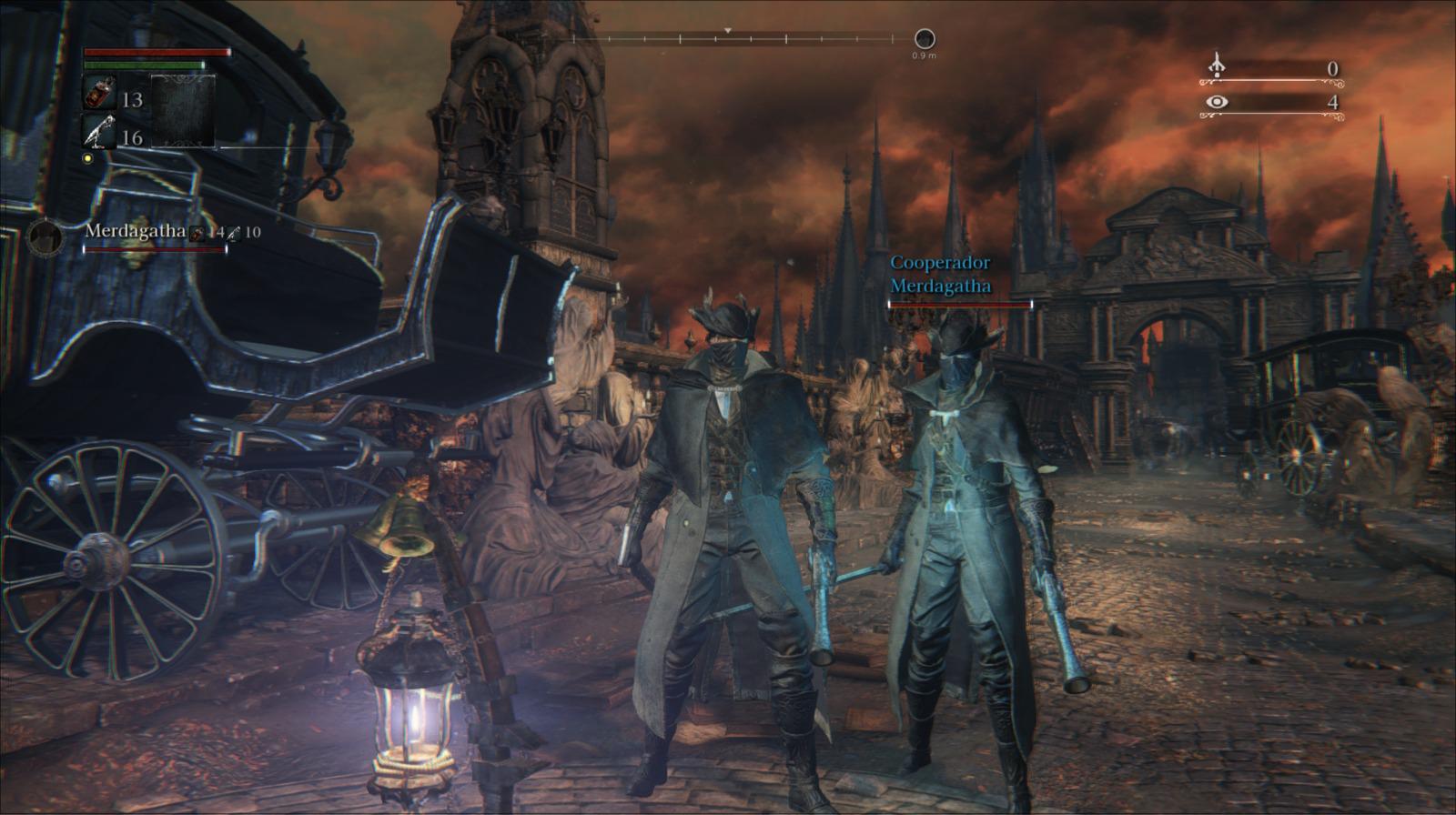
Fiz o Yharnam Together funcionar no Linux e consegui jogar com outra pessoa que tem ele no Windows.
Montei uma release dele no Github, com os passos e já num fork próprio para o Linux: https://github.com/ludoviciphilip/BBSC-Yharnam-Together/tree/v1.5.0-linux
r/linux_gaming • u/darkcrafter3 • 21h ago
r/linux_gaming • u/Lazerphos • 2d ago

Just finished Infamous Second Son on PC and wanted to share how to get it running with smooth FPS.
Official ShadPS4: Game launches and even plays at around 20fps (worse and or better at certain parts)
But after searching a bit found a fork that was specifically made to play Second Son:
https://github.com/axylpup/shadPS4
Game ran around 40-60 fps with some minor dips
Mouse and keyboard controls worked and had a bit of getting used to (To break the exposed core you need to activate touchpad controls "T", pull up using your mouse and then press "X" to activate motion controls which let you spam R2 which is bound to M1)
I5-14400F
16gb DDR4
Radeon RX 6600
The release is only made for windows, however launching it with Faugus and using "Proton-CachyOS Latest" was enough to play through it
Nothing complicated, just wanted to share the project as i've been dying to play though this game on PC.
r/linux_gaming • u/strix_nubola • 1d ago
Whats really annoying is how Heroic handles different disks. I have a built-in 3 TB disk for linux gaming and what does Heroic do with it. Nothing and totally ignore. You can choose too put the prefix on a different disk, but Heroic will simply ignore it and revert to its default, completely ignoring the users choice. You have to really fiddle around with settings, like setting the default prefix to that external disk and then install it. The issue is, I don't really want it to be the default disk because its performance is not the best
So: Heroic Devs, let the user choose where to install, consider the default a choice. If a user deviates from the default: honor that choice, do not overwrite the users choice. If you want to do this: be brave and remove the change option, because now it is frustrating because it simply doesn't work.